

Microsoft documented CVE-2026-12459 in its Security Update Guide because the flaw is in Chromium open-source code used by Microsoft Edge, and the guide is Microsoft’s way of telling Edge customers that patched Edge builds are no longer vulnerable. The short answer is procedural; the more interesting answer is architectural. In the Chromium era, a Chrome CVE is often also an Edge supply-chain event, and Microsoft’s security catalog has become the downstream ledger where that inheritance is made visible.
The wording on Microsoft’s CVE page is doing more work than it first appears to do. “Inappropriate implementation in Serial” points to a Chromium component, not to a Microsoft-only Edge feature. The note explaining that the vulnerability is in Chromium Open Source Software is Microsoft’s way of drawing a boundary between discovery, upstream ownership, and downstream responsibility.
That boundary matters because modern Edge is not an independent browser engine in the old Internet Explorer sense. It is a Microsoft browser product built on the Chromium project, with Microsoft’s own services, enterprise controls, UI decisions, identity plumbing, and Windows integration layered around a very large shared codebase. When the shared codebase has a security bug, Edge inherits the risk unless Microsoft ships a build that incorporates the upstream fix.
That is why the Security Update Guide includes CVEs that may look, at first glance, like “Chrome vulnerabilities.” They are Chrome vulnerabilities only in the colloquial sense that Google Chrome is the most visible Chromium-based browser. Technically, they are often Chromium vulnerabilities, and Chromium is consumed by multiple products: Chrome, Edge, Brave, Opera, Vivaldi, embedded WebView surfaces, Electron apps, and other Chromium-derived software.
For administrators, the practical meaning is simple: do not dismiss the entry because the description says Chrome or Chromium. If Edge is built from affected Chromium code, Edge belongs in the patch conversation.
That creates a documentation problem. Microsoft cannot simply point every enterprise administrator to Google’s Chrome release notes and call the job done. Edge has its own release channels, version numbers, rollout timing, policies, Extended Stable cadence, WebView2 runtime exposure, and management surface. Enterprises need to know whether Microsoft’s browser has consumed the fix, not merely whether Google’s browser has.
The Security Update Guide is therefore less about brand attribution and more about customer impact. Microsoft is saying: this CVE affects code we ship, the Edge version now available contains the relevant fix, and administrators should treat the browser update as part of Microsoft patch hygiene.
That is especially important in organizations that track vulnerabilities by vendor feeds. A security team using Microsoft’s guide as its authoritative patch intake source would be poorly served if Chromium-originated Edge flaws were omitted merely because Google or the Chromium project did the upstream work. The guide is not a museum of Microsoft-written bugs. It is a risk register for Microsoft-supported products.
The public summary describes the issue as an inappropriate implementation that, in Chrome before a fixed version, could allow a remote attacker to inject arbitrary scripts or HTML through a crafted page. The shorthand for that kind of outcome is often UXSS, or universal cross-site scripting, a class of problem where browser behavior breaks the normal isolation assumptions that keep one origin from acting like another.
The danger is not that every Edge user suddenly has a serial device exposed to the open web. Browser APIs like this are normally guarded by permissions, user gestures, origin checks, and implementation constraints. The danger is that a flaw in those constraints can turn a narrow web platform feature into a broader browser security problem.
This is the recurring tension of the modern browser. Users expect the browser to be a document viewer, application runtime, identity surface, password vault, video platform, file handler, PDF reader, hardware bridge, and enterprise policy endpoint. Every new capability makes the browser more useful. Every new capability also creates another place where a misimplementation can punch through the security model.
Chromium broke that mental model, or at least complicated it. Chromium is a shared upstream codebase, and downstream browsers move at different speeds to ingest fixes, test builds, and ship updates. A CVE may be disclosed in the context of Chrome because Chrome is the reference implementation and the release vehicle most closely tied to Google’s security advisories, but the vulnerability can still be relevant to other Chromium-based browsers.
Microsoft’s inclusion of the CVE is therefore not bureaucratic clutter. It is a warning against false negatives. If a vulnerability scanner, patch dashboard, or human analyst filters too aggressively on the word “Chrome,” it may miss Edge exposure entirely.
The reverse is also true. Not every Chrome vulnerability maps to Edge in the same way, at the same severity, or on the same schedule. Some Chrome-specific features do not exist in Edge; some Edge-specific mitigations or configurations may alter practical exploitability; some fixes arrive through channel-specific timelines. But the burden is on the downstream vendor to say what applies. In this case, Microsoft’s message is that the Chromium flaw is relevant enough to document for Edge customers.
For an individual user, the normal path is straightforward. Open Microsoft Edge, select the three-dot menu in the upper-right corner, go to Settings, and then open About Microsoft Edge. The same destination can usually be reached by typing
For administrators, that same version string is the start rather than the end of the investigation. Managed environments may use Stable, Extended Stable, Beta, Dev, or Canary channels. Edge may be updated by Microsoft Edge Update, Windows Update mechanisms, Configuration Manager, Intune, Autopatch, offline MSI deployments, virtual desktop images, or tightly controlled gold images. A user seeing “up to date” on one endpoint does not prove fleet-wide compliance.
The other trap is assuming that Edge the browser and the Edge WebView2 Runtime are always the same operational problem. WebView2 is a Chromium-based runtime used by applications to render web content inside app windows. Many Windows environments have WebView2 deployed broadly, sometimes without users ever thinking of it as a browser. When Chromium security bugs are serious enough, WebView2 deserves its own inventory and update check.
Microsoft’s own Edge documentation has long emphasized automatic updating, channel cadence, and the distinction between Stable and Extended Stable. Security fixes can arrive outside the ordinary feature rhythm, but they still need to traverse the organization’s actual management fabric. That fabric is where theoretical protection becomes applied protection.
This is why the Security Update Guide matters to IT teams even when Edge release notes also exist. Release notes tell the story of a build. The guide lets vulnerability management programs associate a CVE with Microsoft’s product ecosystem, remediation status, severity metadata, affected products, and update availability.
For home users, the advice is boring but effective: open the About page and let Edge update. For enterprises, the advice is less glamorous and more important: confirm the patched version across inventory, including servers, VDI images, kiosks, shared workstations, developer machines, and WebView2-dependent app stacks.
That does not mean every Chromium-based browser is equally exposed at the same moment. Release timing, feature flags, sandboxing, platform differences, disabled APIs, and enterprise policies all matter. But attackers read CVE feeds too, and public summaries can narrow their search space. Once a bug class and affected component are known, lag becomes a security variable.
This is especially uncomfortable for organizations that standardize on Edge because it is the Windows default and integrates neatly with Microsoft identity and management tools. Standardization reduces complexity, but it also concentrates exposure. If Edge is everywhere, an Edge patch delay is everywhere.
The same logic applies to Chrome-heavy shops, Brave users, and app developers who ship Chromium inside desktop products. Chromium’s security model is impressive partly because it is battle-tested at enormous scale. But that scale also means a single upstream flaw can ripple through a very large software population.
Vendors often restrict technical detail until patches have propagated. Browser bugs can be highly actionable, and a precise explanation may help defenders but also accelerate exploit development. In the early period after disclosure, the best public guidance is frequently version-based rather than mechanism-based: update to a fixed build, verify the installed version, and monitor for vendor revisions.
That caution creates frustration for administrators who need to prioritize. A phrase like “arbitrary scripts or HTML” sounds serious, but it does not by itself tell you whether exploitation requires user interaction, a permission prompt, a specific platform, an enabled feature, or a rare device configuration. The severity score and vendor status help, but they do not replace local risk judgment.
The right way to read Microsoft’s page is not as a full forensic dossier. It is a remediation notice. The absence of exploit code or deep technical detail should not be interpreted as a reason to wait.
That means inventory comes first. Which devices have Edge installed? Which have WebView2 Runtime? Which are on Stable, Extended Stable, or preview channels? Which are pinned to target versions? Which update policies allow silent automatic updates, and which devices depend on manual action?
Then comes validation. Browser version reporting should be checked through management tooling rather than spot checks alone. If a subset of machines is stuck, the reason may be policy, connectivity, update service health, packaging workflow, or a user context issue. The CVE page can tell you that Microsoft has documented the fix; it cannot tell you that your fleet accepted it.
Finally comes communication. Users do not need a lecture on Chromium governance. They need a short instruction: restart Edge when prompted, do not ignore update badges, and report systems that fail to update. Administrators, meanwhile, need a deadline and a dashboard.
That is good for developers in many ways. It gives applications a current web platform without each vendor having to ship and maintain its own browser engine. It can also reduce fragmentation if the Evergreen runtime is kept updated. But the security consequence is obvious: Chromium flaws can become application-platform flaws even when the end user never launches Edge.
This is why enterprise remediation should include WebView2 runtime checks. A locked-down workstation with Edge hidden from the Start menu may still have line-of-business apps relying on WebView2. A server used for management consoles or reporting tools may have embedded browser surfaces. A VDI image may carry a stale runtime into hundreds of sessions.
The fix may still be routine, but routine does not mean optional. If the vulnerable component is in the runtime, the user’s browser habits are not the only measure of risk.
That vagueness is irritating, but it also reflects how browsers fail. Many browser vulnerabilities are not simple buffer overflows in the old textbook sense. They live in the complicated interaction between specs, APIs, user prompts, origins, frames, process isolation, device access, and legacy compatibility.
The Serial component is a perfect example of where these interactions matter. Web APIs that mediate access to local capabilities must maintain a hard distinction between what a page can request, what a user has granted, what an origin is allowed to do, and what the browser exposes internally. A small implementation mistake can make a carefully designed permission model behave in a way the designers did not intend.
That does not mean every “inappropriate implementation” bug is catastrophic. It means the label alone is not enough to judge urgency. The fact that Microsoft documented the CVE for Edge users is the stronger signal.
Edge participates in the Microsoft ecosystem, but it also lives in the Chromium cadence. That means security fixes can appear as out-of-band browser updates, quiet Stable channel bumps, Extended Stable security updates, or WebView2 runtime updates. The operational rhythm is closer to “continuous patch verification” than monthly patch batching.
This creates tension in conservative environments. A monthly patch cycle is easier to test, document, and communicate. Browser updates, however, are too exposed to the public web to be treated like ordinary feature updates. A web browser is an attack surface that users voluntarily point at untrusted content all day.
The better enterprise posture is to separate browser security servicing from slower OS and application servicing where possible. Test quickly, stage intelligently, but do not let a Chromium CVE sit unresolved because it arrived on the wrong week of the calendar.
At scale, the better answer involves telemetry. Endpoint management tools should report Edge versions and WebView2 versions. Vulnerability scanners should map CVEs correctly to Chromium-based Edge and not rely on product names alone. Update compliance dashboards should distinguish devices that have not checked in from devices that checked in and failed to update.
Organizations should also be careful with rollback and target-version policies. Microsoft supports rollback for cases where a browser update breaks business-critical workflows, but rolling back a browser is inherently a security tradeoff. A target version that made sense during last month’s compatibility incident can become this month’s exposure if nobody removes it.
The larger lesson is that browser version management is now core security operations. It is not a help desk footnote.
But the same decision also tied Microsoft’s browser security story to the health, speed, and disclosure practices of the Chromium ecosystem. That is not a scandal. It is the price of joining a dominant open-source platform. Microsoft gains the benefits of shared engineering and shared hardening, while inheriting the obligation to move quickly when the shared code breaks.
CVE-2026-12459 is a small example of that trade. It is not a grand Microsoft security failure. It is not “really only Chrome.” It is a reminder that Edge’s security perimeter includes upstream code that Microsoft did not originate but does ship.
That distinction is subtle, and it is exactly why the Security Update Guide entry exists.
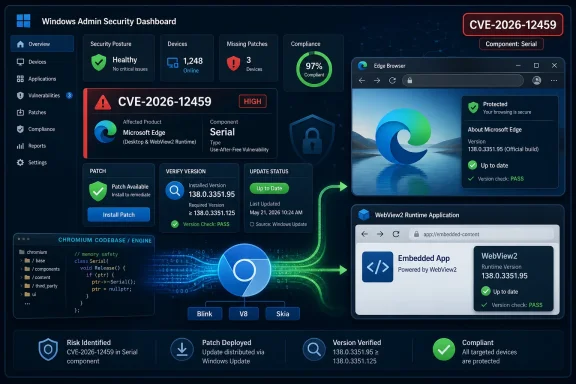 Microsoft Is Not Claiming Ownership of the Bug
The wording on Microsoft’s CVE page is doing more work than it first appears to do. “Inappropriate implementation in Serial” points to a Chromium component, not to a Microsoft-only Edge feature. The note explaining that the vulnerability is in Chromium Open Source Software is Microsoft’s way of drawing a boundary between discovery, upstream ownership, and downstream responsibility.That boundary matters because modern Edge is not an independent browser engine in the old Internet Explorer sense. It is a Microsoft browser product built on the Chromium project, with Microsoft’s own services, enterprise controls, UI decisions, identity plumbing, and Windows integration layered around a very large shared codebase. When the shared codebase has a security bug, Edge inherits the risk unless Microsoft ships a build that incorporates the upstream fix.
That is why the Security Update Guide includes CVEs that may look, at first glance, like “Chrome vulnerabilities.” They are Chrome vulnerabilities only in the colloquial sense that Google Chrome is the most visible Chromium-based browser. Technically, they are often Chromium vulnerabilities, and Chromium is consumed by multiple products: Chrome, Edge, Brave, Opera, Vivaldi, embedded WebView surfaces, Electron apps, and other Chromium-derived software.
For administrators, the practical meaning is simple: do not dismiss the entry because the description says Chrome or Chromium. If Edge is built from affected Chromium code, Edge belongs in the patch conversation.
The Security Update Guide Has Become Microsoft’s Browser Accountability Ledger
Microsoft’s Security Update Guide used to feel more naturally aligned with Windows, Office, Exchange, SQL Server, and the rest of the classic Microsoft estate. Edge changed that. Once Microsoft adopted Chromium, the company also accepted a steady stream of upstream browser vulnerabilities whose disclosure rhythm is heavily influenced by Google’s Chrome release process.That creates a documentation problem. Microsoft cannot simply point every enterprise administrator to Google’s Chrome release notes and call the job done. Edge has its own release channels, version numbers, rollout timing, policies, Extended Stable cadence, WebView2 runtime exposure, and management surface. Enterprises need to know whether Microsoft’s browser has consumed the fix, not merely whether Google’s browser has.
The Security Update Guide is therefore less about brand attribution and more about customer impact. Microsoft is saying: this CVE affects code we ship, the Edge version now available contains the relevant fix, and administrators should treat the browser update as part of Microsoft patch hygiene.
That is especially important in organizations that track vulnerabilities by vendor feeds. A security team using Microsoft’s guide as its authoritative patch intake source would be poorly served if Chromium-originated Edge flaws were omitted merely because Google or the Chromium project did the upstream work. The guide is not a museum of Microsoft-written bugs. It is a risk register for Microsoft-supported products.
“Serial” Is a Small Word Sitting on a Large Browser Permission Model
The component name in CVE-2026-12459 is easy to glide past. “Serial” refers to browser functionality connected to serial device access, a class of capability exposed through modern web platform APIs under controlled conditions. That is exactly the sort of browser feature that makes security engineers nervous: it brings web content closer to local hardware, and every boundary crossing needs to be carefully designed.The public summary describes the issue as an inappropriate implementation that, in Chrome before a fixed version, could allow a remote attacker to inject arbitrary scripts or HTML through a crafted page. The shorthand for that kind of outcome is often UXSS, or universal cross-site scripting, a class of problem where browser behavior breaks the normal isolation assumptions that keep one origin from acting like another.
The danger is not that every Edge user suddenly has a serial device exposed to the open web. Browser APIs like this are normally guarded by permissions, user gestures, origin checks, and implementation constraints. The danger is that a flaw in those constraints can turn a narrow web platform feature into a broader browser security problem.
This is the recurring tension of the modern browser. Users expect the browser to be a document viewer, application runtime, identity surface, password vault, video platform, file handler, PDF reader, hardware bridge, and enterprise policy endpoint. Every new capability makes the browser more useful. Every new capability also creates another place where a misimplementation can punch through the security model.
The Chrome Name Is a Distraction, Not a Reassurance
The most common mistake with entries like CVE-2026-12459 is to read “Google Chrome” and stop there. That instinct comes from an older software world where product boundaries were cleaner. A vulnerability in Product A was patched by Vendor A; Product B might have a similar issue, but it was a separate matter.Chromium broke that mental model, or at least complicated it. Chromium is a shared upstream codebase, and downstream browsers move at different speeds to ingest fixes, test builds, and ship updates. A CVE may be disclosed in the context of Chrome because Chrome is the reference implementation and the release vehicle most closely tied to Google’s security advisories, but the vulnerability can still be relevant to other Chromium-based browsers.
Microsoft’s inclusion of the CVE is therefore not bureaucratic clutter. It is a warning against false negatives. If a vulnerability scanner, patch dashboard, or human analyst filters too aggressively on the word “Chrome,” it may miss Edge exposure entirely.
The reverse is also true. Not every Chrome vulnerability maps to Edge in the same way, at the same severity, or on the same schedule. Some Chrome-specific features do not exist in Edge; some Edge-specific mitigations or configurations may alter practical exploitability; some fixes arrive through channel-specific timelines. But the burden is on the downstream vendor to say what applies. In this case, Microsoft’s message is that the Chromium flaw is relevant enough to document for Edge customers.
Edge’s Version Number Is the Only Answer That Really Counts
The user-facing question attached to Microsoft’s page is almost comically plain: how can I see the version of the browser? That question is the hinge between advisory language and real-world security. A CVE entry can tell you a product is fixed in the abstract, but only the installed version can tell you whether a given device has actually crossed the line from vulnerable to patched.For an individual user, the normal path is straightforward. Open Microsoft Edge, select the three-dot menu in the upper-right corner, go to Settings, and then open About Microsoft Edge. The same destination can usually be reached by typing
edge://settings/help in the address bar. That page shows the installed version and typically triggers an update check.For administrators, that same version string is the start rather than the end of the investigation. Managed environments may use Stable, Extended Stable, Beta, Dev, or Canary channels. Edge may be updated by Microsoft Edge Update, Windows Update mechanisms, Configuration Manager, Intune, Autopatch, offline MSI deployments, virtual desktop images, or tightly controlled gold images. A user seeing “up to date” on one endpoint does not prove fleet-wide compliance.
The other trap is assuming that Edge the browser and the Edge WebView2 Runtime are always the same operational problem. WebView2 is a Chromium-based runtime used by applications to render web content inside app windows. Many Windows environments have WebView2 deployed broadly, sometimes without users ever thinking of it as a browser. When Chromium security bugs are serious enough, WebView2 deserves its own inventory and update check.
The Patch Story Is Also a Rollout Story
Browser vendors like to describe updates as automatic, and for consumer machines that is usually a fair shorthand. But enterprise administrators know that “automatic” is not the same thing as “already deployed.” Update checks have intervals, rollouts can be progressive, maintenance windows exist, policies can suppress updates, proxies can interfere, devices can be offline, and golden images can remain stale.Microsoft’s own Edge documentation has long emphasized automatic updating, channel cadence, and the distinction between Stable and Extended Stable. Security fixes can arrive outside the ordinary feature rhythm, but they still need to traverse the organization’s actual management fabric. That fabric is where theoretical protection becomes applied protection.
This is why the Security Update Guide matters to IT teams even when Edge release notes also exist. Release notes tell the story of a build. The guide lets vulnerability management programs associate a CVE with Microsoft’s product ecosystem, remediation status, severity metadata, affected products, and update availability.
For home users, the advice is boring but effective: open the About page and let Edge update. For enterprises, the advice is less glamorous and more important: confirm the patched version across inventory, including servers, VDI images, kiosks, shared workstations, developer machines, and WebView2-dependent app stacks.
A Shared Engine Makes Patch Lag a Cross-Browser Risk
One of the hidden consequences of Chromium’s dominance is synchronized vulnerability pressure. When a Chromium bug becomes public, the race is not just between attackers and Google Chrome users. It is between attackers and every downstream product that needs to absorb the fix.That does not mean every Chromium-based browser is equally exposed at the same moment. Release timing, feature flags, sandboxing, platform differences, disabled APIs, and enterprise policies all matter. But attackers read CVE feeds too, and public summaries can narrow their search space. Once a bug class and affected component are known, lag becomes a security variable.
This is especially uncomfortable for organizations that standardize on Edge because it is the Windows default and integrates neatly with Microsoft identity and management tools. Standardization reduces complexity, but it also concentrates exposure. If Edge is everywhere, an Edge patch delay is everywhere.
The same logic applies to Chrome-heavy shops, Brave users, and app developers who ship Chromium inside desktop products. Chromium’s security model is impressive partly because it is battle-tested at enormous scale. But that scale also means a single upstream flaw can ripple through a very large software population.
Microsoft’s Language Is Cautious Because Browser CVEs Are Often Incomplete by Design
Public browser advisories frequently feel unsatisfying. They often use brief phrases such as “inappropriate implementation,” “use after free,” “type confusion,” or “out-of-bounds write” without walking readers through exploit mechanics. That is not just corporate evasiveness. It is partly an intentional security practice.Vendors often restrict technical detail until patches have propagated. Browser bugs can be highly actionable, and a precise explanation may help defenders but also accelerate exploit development. In the early period after disclosure, the best public guidance is frequently version-based rather than mechanism-based: update to a fixed build, verify the installed version, and monitor for vendor revisions.
That caution creates frustration for administrators who need to prioritize. A phrase like “arbitrary scripts or HTML” sounds serious, but it does not by itself tell you whether exploitation requires user interaction, a permission prompt, a specific platform, an enabled feature, or a rare device configuration. The severity score and vendor status help, but they do not replace local risk judgment.
The right way to read Microsoft’s page is not as a full forensic dossier. It is a remediation notice. The absence of exploit code or deep technical detail should not be interpreted as a reason to wait.
The Real Operational Question Is Exposure, Not Branding
For WindowsForum readers, the interesting part of CVE-2026-12459 is not whether the bug “belongs” to Google or Microsoft. That question is emotionally satisfying and operationally useless. The real question is whether code running on your Windows endpoints contains the vulnerable Chromium implementation.That means inventory comes first. Which devices have Edge installed? Which have WebView2 Runtime? Which are on Stable, Extended Stable, or preview channels? Which are pinned to target versions? Which update policies allow silent automatic updates, and which devices depend on manual action?
Then comes validation. Browser version reporting should be checked through management tooling rather than spot checks alone. If a subset of machines is stuck, the reason may be policy, connectivity, update service health, packaging workflow, or a user context issue. The CVE page can tell you that Microsoft has documented the fix; it cannot tell you that your fleet accepted it.
Finally comes communication. Users do not need a lecture on Chromium governance. They need a short instruction: restart Edge when prompted, do not ignore update badges, and report systems that fail to update. Administrators, meanwhile, need a deadline and a dashboard.
WebView2 Keeps the Browser Patch Story From Staying in the Browser
The Chromium-based Edge era blurred another boundary: the browser engine is no longer confined to the browser window. WebView2 lets Windows applications embed web content using the Edge Chromium runtime, and that has become a major part of modern Windows app architecture.That is good for developers in many ways. It gives applications a current web platform without each vendor having to ship and maintain its own browser engine. It can also reduce fragmentation if the Evergreen runtime is kept updated. But the security consequence is obvious: Chromium flaws can become application-platform flaws even when the end user never launches Edge.
This is why enterprise remediation should include WebView2 runtime checks. A locked-down workstation with Edge hidden from the Start menu may still have line-of-business apps relying on WebView2. A server used for management consoles or reporting tools may have embedded browser surfaces. A VDI image may carry a stale runtime into hundreds of sessions.
The fix may still be routine, but routine does not mean optional. If the vulnerable component is in the runtime, the user’s browser habits are not the only measure of risk.
“Inappropriate Implementation” Is the Browser World’s Most Annoyingly Useful Phrase
Security advisories are full of bland labels, and “inappropriate implementation” is among the blandest. It can cover a wide territory: a logic mistake, a permission check in the wrong place, a state transition handled incorrectly, a mismatch between specification and code, or an edge case that only becomes dangerous when chained with other behavior.That vagueness is irritating, but it also reflects how browsers fail. Many browser vulnerabilities are not simple buffer overflows in the old textbook sense. They live in the complicated interaction between specs, APIs, user prompts, origins, frames, process isolation, device access, and legacy compatibility.
The Serial component is a perfect example of where these interactions matter. Web APIs that mediate access to local capabilities must maintain a hard distinction between what a page can request, what a user has granted, what an origin is allowed to do, and what the browser exposes internally. A small implementation mistake can make a carefully designed permission model behave in a way the designers did not intend.
That does not mean every “inappropriate implementation” bug is catastrophic. It means the label alone is not enough to judge urgency. The fact that Microsoft documented the CVE for Edge users is the stronger signal.
The Old Patch Tuesday Reflex Does Not Fit Browser Security
Windows administrators are trained by decades of Patch Tuesday. Browsers punish that muscle memory. Chromium security updates do not wait politely for the second Tuesday of the month, and neither do browser exploits.Edge participates in the Microsoft ecosystem, but it also lives in the Chromium cadence. That means security fixes can appear as out-of-band browser updates, quiet Stable channel bumps, Extended Stable security updates, or WebView2 runtime updates. The operational rhythm is closer to “continuous patch verification” than monthly patch batching.
This creates tension in conservative environments. A monthly patch cycle is easier to test, document, and communicate. Browser updates, however, are too exposed to the public web to be treated like ordinary feature updates. A web browser is an attack surface that users voluntarily point at untrusted content all day.
The better enterprise posture is to separate browser security servicing from slower OS and application servicing where possible. Test quickly, stage intelligently, but do not let a Chromium CVE sit unresolved because it arrived on the wrong week of the calendar.
The Version Check Is Simple; The Assurance Program Is Not
There is a difference between checking a version and proving remediation. Microsoft’s answer to the user question is simple because the consumer action is simple: use the menu or the About page to see the installed Edge version. That is the right answer for one machine.At scale, the better answer involves telemetry. Endpoint management tools should report Edge versions and WebView2 versions. Vulnerability scanners should map CVEs correctly to Chromium-based Edge and not rely on product names alone. Update compliance dashboards should distinguish devices that have not checked in from devices that checked in and failed to update.
Organizations should also be careful with rollback and target-version policies. Microsoft supports rollback for cases where a browser update breaks business-critical workflows, but rolling back a browser is inherently a security tradeoff. A target version that made sense during last month’s compatibility incident can become this month’s exposure if nobody removes it.
The larger lesson is that browser version management is now core security operations. It is not a help desk footnote.
Edge’s Chromium Bet Keeps Paying Dividends and Sending Invoices
Microsoft’s move to Chromium solved real problems. It improved web compatibility, reduced the burden on developers who once had to account for multiple divergent engines, and gave Edge access to a fast-moving browser platform. For users, it made Edge feel less like a Windows obligation and more like a competitive browser.But the same decision also tied Microsoft’s browser security story to the health, speed, and disclosure practices of the Chromium ecosystem. That is not a scandal. It is the price of joining a dominant open-source platform. Microsoft gains the benefits of shared engineering and shared hardening, while inheriting the obligation to move quickly when the shared code breaks.
CVE-2026-12459 is a small example of that trade. It is not a grand Microsoft security failure. It is not “really only Chrome.” It is a reminder that Edge’s security perimeter includes upstream code that Microsoft did not originate but does ship.
That distinction is subtle, and it is exactly why the Security Update Guide entry exists.
The Patch Signal Hidden Inside This CVE
The practical reading of CVE-2026-12459 is narrower than the anxiety it may generate, but it is still important. Treat it as a browser update event for Chromium-based Edge, not as a mysterious new Windows vulnerability. Confirm the version, make sure the update has landed, and remember that embedded Chromium surfaces may matter too.- Microsoft included the CVE because Edge consumes Chromium open-source code, and the vulnerable implementation was in that shared upstream codebase.
- The presence of the CVE in Microsoft’s guide means Edge administrators should verify remediation through Edge versions, not assume the issue applies only to Google Chrome.
- Users can check the installed browser version from Edge’s About page or by entering
edge://settings/helpin the address bar. - Enterprise teams should validate Edge and WebView2 Runtime versions across managed devices rather than relying on individual users to self-report.
- Browser security updates should be handled on a faster cadence than traditional monthly patch routines when a Chromium fix is available.
- Product branding is less important than code provenance: if the vulnerable Chromium component ships inside a Microsoft product, Microsoft customers need Microsoft-facing documentation.
References
- Primary source: MSRC
Published: 2026-06-19T13:52:39-07:00
Security Update Guide - Microsoft Security Response Center
 msrc.microsoft.com
- Official source: learn.microsoft.com
Microsoft Edge release notes for Stable Channel | Microsoft Learn
Microsoft Edge release note for the Stable Channellearn.microsoft.com - Related coverage: vulnerability.circl.lu
Vulnerability-Lookup
Vulnerability-Lookup - Fast vulnerability lookup correlation from different sources.vulnerability.circl.lu - Official source: developer.microsoft.com

Microsoft Edge WebDriver | Microsoft Edge Developer
developer.microsoft.com
- Related coverage: sentinelone.com
CVE-2026-8008: Google Chrome DevTools UI Spoofing Flaw
CVE-2026-8008 is a UI spoofing vulnerability in Google Chrome DevTools. Learn about its impact, affected versions, and mitigation methods.www.sentinelone.com
- Related coverage: windowsforum.com
CVE-2026-0902 Explained: How Edge Ingests Chromium Fixes via the Security Update Guide | Windows Forum
Chromium’s CVE-2026-0902 is appearing in Microsoft’s Security Update Guide because the flaw lives in Chromium’s V8 JavaScript engine, and Microsoft Edge...windowsforum.com
- Related coverage: www2.gov.bc.ca
- Related coverage: mphasis.com
