

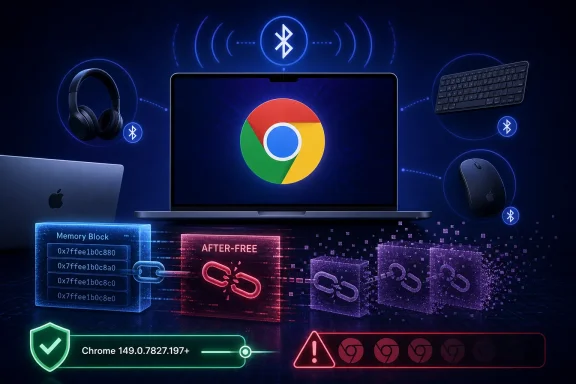
CVE-2026-13035 is a high-severity use-after-free vulnerability in Google Chrome’s Bluetooth code on macOS, disclosed June 24, 2026, and fixed for Mac users in Chrome 149.0.7827.197 after Google’s Stable Channel desktop update. The short version is simple: if Chrome on a Mac is older than that build, it belongs in the emergency-patch lane, not the “next maintenance window” lane. The longer version is more interesting, because this bug lives at the awkward intersection of browser security, local radio hardware, and enterprise asset management. It is also a reminder that the web browser is no longer just a web browser.
Most Chrome security advisories follow a familiar pattern. A crafted web page triggers a renderer bug, a JavaScript engine trips over memory corruption, or a graphics stack turns a canvas operation into something more dangerous than intended. CVE-2026-13035 is different enough to deserve attention because the attacker path described in the vulnerability record is not merely “visit a malicious site.” It is “via a malicious peripheral.”
That phrase should make Mac administrators pause. Bluetooth is usually treated as a convenience layer for keyboards, mice, headsets, and the occasional stubborn conference-room speaker. But when browser code talks to Bluetooth-capable devices, the boundary between web-facing application logic and local hardware begins to blur.
The vulnerability is classified as a use-after-free issue, or UAF, in Chrome’s Bluetooth component. In practical terms, that means Chrome could continue using a memory object after it had already been released, creating the possibility that an attacker could manipulate memory layout and gain code execution. This family of bugs is not exotic in browser security; it is one of the recurring reasons memory safety keeps showing up in every serious discussion about hardening large C++ codebases.
What is less routine is the macOS-only framing. The CVE description specifically names Google Chrome on Mac prior to 149.0.7827.197. The NVD configuration also ties vulnerable Chrome versions to Apple macOS, which is exactly the sort of detail vulnerability scanners, procurement dashboards, and harried patch teams need to get right.
That is not the same as saying macOS itself is the vulnerable product. The operating system CPE appears as part of the platform condition. The vulnerable component is Chrome’s Bluetooth handling, and the affected product is Google Chrome. For scanners that understand CPE configuration logic properly, that distinction matters: vulnerable Chrome on macOS should light up; Chrome on Linux should not light up for this CVE merely because it is Chrome; macOS without the affected Chrome version should not be treated as inherently vulnerable.
The catch is that CPE logic is only as useful as the tools consuming it. Some scanners flatten CPE configurations into misleading rows. Some dashboards show the operating system CPE as if it were the primary vulnerable software. Others overmatch application CPEs and under-handle platform constraints, producing noisy reports that send administrators chasing ghosts.
There is also a small but familiar wrinkle in the CVE record’s affected-version language. The affected entry says version 149.0.7827.197 with a less-than boundary of 149.0.7827.197, which reads awkwardly because the version field and the fixed threshold look identical. The meaningful interpretation is still clear: versions prior to 149.0.7827.197 are affected, and 149.0.7827.197 is the fixed Mac build.
So, no, the obvious missing CPE is not absent. The more likely problem is interpretation. If an asset tool is not flagging vulnerable Chrome-on-macOS installations, the issue may be ingestion lag, version normalization, or mishandling of the AND configuration rather than a missing NVD CPE.
But that does not make the bug academic. Bluetooth is a local proximity technology, and proximity attacks have a long history of being underestimated until someone demonstrates them in an office, airport lounge, conference hall, classroom, or shared lab. A browser bug triggered through peripheral interaction is the kind of scenario that sounds contrived until it lines up with high-value targets and unmanaged hardware habits.
The CISA-ADP vector gives the vulnerability a CVSS 3.1 score of 8.8, with network attack vector, low complexity, no privileges required, and user interaction required. That combination is worth parsing carefully. The “network” part in CVSS does not necessarily mean “the public Internet in the normal web sense”; it can describe attack paths over network-adjacent communications. The “user interaction” requirement suggests the target may need to do something, such as interact with or connect to the malicious peripheral path.
The SSVC enrichment is also revealing. It records no known exploitation at the time of enrichment, says the issue is not automatable, and marks the technical impact as total. That is a sensible description of a high-impact bug whose real-world exploitability depends on circumstances. It is not a wormable catastrophe; it is not harmless either.
For WindowsForum readers, the macOS specificity may sound like somebody else’s problem. In mixed fleets, it is not. Many Windows-first organizations still have Mac users in development, design, executive, security, sales engineering, and bring-your-own-device corners of the business. Those machines often run Chrome because it keeps enterprise identity, extensions, password managers, and browser policies consistent across platforms.
Administrators have had years to internalize the idea that operating systems must be patched quickly. Browsers now deserve the same treatment, if not more. They render untrusted content constantly, expose sprawling APIs, integrate with identity providers, sync state across devices, talk to hardware, process media, run WebAssembly, and host extensions that may have deep access to user activity.
The operational consequence is that “Chrome is installed” is not a sufficient inventory fact. Security teams need to know the channel, version, platform, update policy, relaunch state, extension posture, and whether the browser is actually restarting after updates land. A patched binary sitting behind a week-old user session is a less comforting sight than management consoles sometimes imply.
Google’s update model is designed to move fast, but enterprises often introduce friction. Deferral policies, golden images, virtual desktop pools, blocked update services, proxy quirks, and users who never restart all conspire to make “available” very different from “deployed.” CVE-2026-13035 is exactly the sort of issue where that distinction matters.
The lesson is not that every Chrome advisory should trigger panic. It is that Chrome’s security posture is now an always-on operational discipline. If an organization can patch endpoint agents faster than it can patch the browser its users keep open all day, its risk model is backwards.
In Chrome, the stakes are higher because many components run at the junction of untrusted input and privileged local behavior. Web content can influence browser state. Devices can influence browser state. Extensions can influence browser state. Graphics, media, file handling, printing, networking, and hardware APIs all add their own complexity.
Bluetooth is a particularly interesting component because it pulls physical-world state into application logic. Device discovery, pairing, permissions, service enumeration, and data exchange all involve asynchronous events. Asynchronous programming is fertile ground for lifetime bugs because the thing that was true when a callback was registered may no longer be true when it runs.
Memory-safe languages reduce this class of failure, but browser engines cannot be rewritten overnight. Chromium has made steady investments in exploit mitigations, sandboxing, MiraclePtr-style protections, fuzzing, and safer coding patterns, yet advisories keep arriving because the codebase is huge and old enough to contain many generations of design decisions.
That is why a high-severity UAF in Bluetooth is more than a single defect. It is another data point in the long campaign to make browser internals less dependent on humans perfectly managing object lifetimes across millions of lines of code.
CVE-2026-13035 is explicitly framed around Chrome on Mac. That means Mac users do not get to treat Chrome as a generic app that will quietly behave like every other platform’s build. The fixed version matters. The platform matters. The local hardware stack matters.
For enterprise Mac fleets, the practical work is straightforward but not optional. Confirm Chrome is at 149.0.7827.197 or later. Confirm the browser has restarted. Confirm management profiles and update policies are not pinning machines to older builds. Confirm security tooling is not silently reporting “Chrome 149” as compliant without checking the full four-part version.
Consumer Mac users have the simpler version of the same job. Open Chrome’s About page, let it check for updates, and restart the browser. If Bluetooth is unnecessary, turning it off reduces exposure to an entire class of proximity interactions, though it should not be treated as a substitute for patching.
The uncomfortable truth is that browser security has become platform security. If Chrome can expose a local hardware path to memory corruption, then Chrome’s version belongs in the same conversation as macOS updates, endpoint protection, and device control policy.
That is by design. Chromium issue links for security bugs are frequently restricted until most users have received the fix. This frustrates researchers and defenders who want technical detail immediately, but it also reduces the chance that a patch diff becomes a turnkey exploit guide before the update has reached the field.
The important public facts are still concrete. The bug is in Bluetooth. It affects Google Chrome on Mac before 149.0.7827.197. It is a use-after-free issue. It can allow arbitrary code execution through a malicious peripheral. Chromium rates it High. CISA-ADP gives it an 8.8 CVSS 3.1 score and says there was no observed exploitation in its SSVC entry at the time.
That is enough to justify expedited patching without overstating the case. There is no public indication in the provided record that CVE-2026-13035 is being exploited in the wild. There is also no basis for treating it as low priority merely because exploitation requires a peripheral interaction.
Good vulnerability management lives in that middle ground. It avoids both alarmism and complacency. A high-impact, low-complexity browser bug with no privileges required is serious even when the attacker path is unusual.
Microsoft Edge, Brave, Vivaldi, Opera, and many embedded browser runtimes inherit large portions of Chromium’s attack surface. Not every Chromium bug affects every downstream browser in the same way, and platform-specific issues do not automatically cross over. Still, Chrome advisories often serve as early warning signals for the broader browser stack.
The better enterprise habit is to treat Chrome security updates as a prompt to review Chromium-based browser versions generally. Edge has its own release pipeline and advisories. Electron applications may lag behind the Chromium version they embed. Third-party browsers may update quickly or slowly depending on their maintainers. Managed application inventories often miss those embedded copies entirely.
CVE-2026-13035 should not be falsely assigned to Windows Chrome if the vulnerable condition is Mac-specific. But it should remind Windows administrators that browser monoculture has consequences. A large share of desktop applications now contains a browser engine, depends on a browser engine, or interacts with one in ways users never see.
That is the broader security story. The browser engine has become infrastructure, and infrastructure bugs rarely stay politely inside the category where they first appear.
CVE-2026-13035 shows this clearly. The CVE was received from Chrome on June 24, modified by CISA-ADP the same day, and enriched by NIST on June 25 with CPE configuration and reference typing. An organization that scanned during that window could have seen incomplete metadata, no NVD score, or different enrichment depending on its vendor feed.
That timing matters. Security teams sometimes treat vulnerability database entries as static truth, but they are living records. Early records may lack CPEs. Later records may add platform constraints. CVSS may come from an ADP participant before NVD completes its own assessment. References may change type as analysts review them.
For administrators, the implication is practical. If a critical or high-severity browser CVE appears but the scanner is quiet, do not assume there is no exposure. Check the vendor advisory, inspect real installed versions, and revisit the scanner after NVD enrichment has propagated.
The opposite problem also occurs. If a scanner flags every Chrome installation in the estate, including Windows and Linux builds, for a macOS-specific CVE, challenge the finding. The goal is not to maximize ticket count. The goal is to identify the machines where the vulnerable condition actually exists.
“Chrome 149” is not enough. Earlier Chrome 149 builds may be vulnerable while later builds are fixed. The distinction between 149.0.7827.196 and 149.0.7827.197 may matter on one platform and not another. Update channels can differ between stable and extended stable. Reporting tools that round or truncate versions create false confidence.
The same applies to platform detection. A Chrome binary on macOS should be evaluated differently from Chrome on Windows or Linux for this CVE. If the asset database does not reliably distinguish OS platform, architecture, and application build, CPE configuration logic cannot save it.
This is where vulnerability management becomes less glamorous but more important. The real work is not reading the CVE. The real work is maintaining the plumbing that turns a CVE into a correct list of affected machines, owners, and remediation status.
Browser bugs expose weak inventory faster than almost anything else because the update cadence is relentless. If your tooling cannot answer “Which Macs are running Chrome below 149.0.7827.197?” within minutes, the issue is not this CVE. The issue is the operating model.
That does not mean every organization should disable Bluetooth everywhere. The modern workplace depends on wireless peripherals, accessibility devices, headsets, mobile workflows, and conference-room hardware. A blanket ban can be counterproductive if it drives users toward unmanaged workarounds.
But Bluetooth should be a deliberate policy choice. High-risk environments may restrict pairing, limit discoverability, monitor device classes, or disable Bluetooth where it is unnecessary. Shared workspaces, executive travel, public events, and development machines handling sensitive material deserve extra attention.
The browser connection adds another layer. Web Bluetooth and adjacent APIs have long raised questions about how much hardware access the browser should mediate. Even when permissions exist, the implementation must safely handle untrusted or malformed device behavior. A malicious peripheral is, by definition, not going to behave like the friendly device model in a developer demo.
For administrators, the right response is layered. Patch Chrome first. Then review Bluetooth exposure where risk justifies it. Then make sure browser permissions, device-control policies, and endpoint monitoring tell a coherent story rather than living in separate administrative silos.
Both positions are rational. The window after a security update ships is dangerous because attackers can diff patched and unpatched code, infer the bug, and build exploits for users who have not restarted their browsers. Publishing rich technical detail immediately can accelerate that process.
The result is the sparse advisory style we see here. The public gets severity, component, vulnerability class, affected versions, researcher credit when available, and a fixed build. The deeper Chromium issue may remain restricted. NVD and CISA then add structured enrichment for scoring, prioritization, and machine-readable workflows.
That ecosystem is imperfect but functional. It gives defenders enough to patch and enough to prioritize without handing attackers an instruction manual on day one. The tradeoff is that journalists, researchers, and IT teams must resist filling the gaps with speculation.
For CVE-2026-13035, the disciplined reading is straightforward. Treat it as a serious Chrome-on-Mac remote code execution risk involving Bluetooth peripheral interaction. Do not claim active exploitation unless evidence appears. Do not broaden it to all platforms without data. Do not wait for a proof of concept before patching.
The impact is high because arbitrary code execution is the kind of outcome browser sandboxes and OS protections are designed to contain, not ignore. The exposure is meaningful because Chrome is widely deployed on Macs in both consumer and enterprise settings. The remediation is simple because the fix is already in a Chrome Stable Channel build.
The user-interaction requirement should not be misread as a comfort blanket. Many real attacks require user interaction: opening a document, visiting a page, accepting a prompt, pairing a device, plugging in hardware, joining a call. Attackers build workflows around human behavior because human behavior is available.
The “not automatable” SSVC signal is useful, but it is not a reason to defer indefinitely. It suggests mass exploitation may be less straightforward than a drive-by web exploit. It does not eliminate targeted risk, especially in environments where physical proximity to users is plausible.
The sensible enterprise SLA is therefore accelerated but measured. Patch managed Macs promptly, verify restarts, and use Bluetooth restrictions where risk warrants. Save the all-hands incident bridge for evidence of exploitation or failed deployment, not for the existence of the CVE itself.
Administrators should also remember that Chrome’s in-app updater and enterprise management tooling may report different states at different times. One view may show the update available. Another may show the installed version. A third may show the running process. For security purposes, the running version after relaunch is what matters.
This is especially relevant for Mac users who keep browser sessions open for weeks. Chrome can be very good at downloading updates quietly, but it still needs a relaunch to replace the active binary. The little update indicator is not decoration; it is the gap between “patched in theory” and “patched in use.”
In managed environments, Chrome Browser Cloud Management, MDM inventory, endpoint detection tooling, and software update reports should converge on the same answer. If they do not, trust the most direct local version check and fix the reporting pipeline afterward.
There is no credible compensating control that is easier than updating the browser. Disabling Bluetooth may reduce a specific exposure path, but it does not correct the vulnerable code. Network filtering is beside the point if the attack path involves peripheral interaction. User awareness helps only at the margins.
 A Browser Bug Steps Outside the Browser
Most Chrome security advisories follow a familiar pattern. A crafted web page triggers a renderer bug, a JavaScript engine trips over memory corruption, or a graphics stack turns a canvas operation into something more dangerous than intended. CVE-2026-13035 is different enough to deserve attention because the attacker path described in the vulnerability record is not merely “visit a malicious site.” It is “via a malicious peripheral.”That phrase should make Mac administrators pause. Bluetooth is usually treated as a convenience layer for keyboards, mice, headsets, and the occasional stubborn conference-room speaker. But when browser code talks to Bluetooth-capable devices, the boundary between web-facing application logic and local hardware begins to blur.
The vulnerability is classified as a use-after-free issue, or UAF, in Chrome’s Bluetooth component. In practical terms, that means Chrome could continue using a memory object after it had already been released, creating the possibility that an attacker could manipulate memory layout and gain code execution. This family of bugs is not exotic in browser security; it is one of the recurring reasons memory safety keeps showing up in every serious discussion about hardening large C++ codebases.
What is less routine is the macOS-only framing. The CVE description specifically names Google Chrome on Mac prior to 149.0.7827.197. The NVD configuration also ties vulnerable Chrome versions to Apple macOS, which is exactly the sort of detail vulnerability scanners, procurement dashboards, and harried patch teams need to get right.
The CPE Is There, but the Shape Matters
The user-facing question — “Are we missing a CPE here?” — is the right one, because CPE data often determines whether a vulnerability shows up in the correct bucket for a given organization. In this case, NIST’s initial analysis added a configuration that combines Google Chrome versions earlier than 149.0.7827.197 with Apple macOS. In plain English, the NVD entry is trying to describe Chrome as the vulnerable application, but only in the context of macOS.That is not the same as saying macOS itself is the vulnerable product. The operating system CPE appears as part of the platform condition. The vulnerable component is Chrome’s Bluetooth handling, and the affected product is Google Chrome. For scanners that understand CPE configuration logic properly, that distinction matters: vulnerable Chrome on macOS should light up; Chrome on Linux should not light up for this CVE merely because it is Chrome; macOS without the affected Chrome version should not be treated as inherently vulnerable.
The catch is that CPE logic is only as useful as the tools consuming it. Some scanners flatten CPE configurations into misleading rows. Some dashboards show the operating system CPE as if it were the primary vulnerable software. Others overmatch application CPEs and under-handle platform constraints, producing noisy reports that send administrators chasing ghosts.
There is also a small but familiar wrinkle in the CVE record’s affected-version language. The affected entry says version 149.0.7827.197 with a less-than boundary of 149.0.7827.197, which reads awkwardly because the version field and the fixed threshold look identical. The meaningful interpretation is still clear: versions prior to 149.0.7827.197 are affected, and 149.0.7827.197 is the fixed Mac build.
So, no, the obvious missing CPE is not absent. The more likely problem is interpretation. If an asset tool is not flagging vulnerable Chrome-on-macOS installations, the issue may be ingestion lag, version normalization, or mishandling of the AND configuration rather than a missing NVD CPE.
The Bluetooth Angle Changes the Threat Model
A malicious Bluetooth peripheral is not the same threat model as a malicious website. It narrows the attack surface in one sense and complicates it in another. The attacker needs a device or radio presence that can interact with the target system’s Bluetooth path, which is a different operational burden than hosting a booby-trapped page and waiting for clicks.But that does not make the bug academic. Bluetooth is a local proximity technology, and proximity attacks have a long history of being underestimated until someone demonstrates them in an office, airport lounge, conference hall, classroom, or shared lab. A browser bug triggered through peripheral interaction is the kind of scenario that sounds contrived until it lines up with high-value targets and unmanaged hardware habits.
The CISA-ADP vector gives the vulnerability a CVSS 3.1 score of 8.8, with network attack vector, low complexity, no privileges required, and user interaction required. That combination is worth parsing carefully. The “network” part in CVSS does not necessarily mean “the public Internet in the normal web sense”; it can describe attack paths over network-adjacent communications. The “user interaction” requirement suggests the target may need to do something, such as interact with or connect to the malicious peripheral path.
The SSVC enrichment is also revealing. It records no known exploitation at the time of enrichment, says the issue is not automatable, and marks the technical impact as total. That is a sensible description of a high-impact bug whose real-world exploitability depends on circumstances. It is not a wormable catastrophe; it is not harmless either.
For WindowsForum readers, the macOS specificity may sound like somebody else’s problem. In mixed fleets, it is not. Many Windows-first organizations still have Mac users in development, design, executive, security, sales engineering, and bring-your-own-device corners of the business. Those machines often run Chrome because it keeps enterprise identity, extensions, password managers, and browser policies consistent across platforms.
Chrome’s Security Patch Cadence Is Becoming Its Own Operational Load
Chrome 149 has been a noisy release line for security teams. The late-June desktop update that included CVE-2026-13035 arrived as part of a broader set of fixes, not as a single-issue emergency bulletin. That is normal for Chrome, but it is also what makes browser patching feel less like a monthly chore and more like background radiation.Administrators have had years to internalize the idea that operating systems must be patched quickly. Browsers now deserve the same treatment, if not more. They render untrusted content constantly, expose sprawling APIs, integrate with identity providers, sync state across devices, talk to hardware, process media, run WebAssembly, and host extensions that may have deep access to user activity.
The operational consequence is that “Chrome is installed” is not a sufficient inventory fact. Security teams need to know the channel, version, platform, update policy, relaunch state, extension posture, and whether the browser is actually restarting after updates land. A patched binary sitting behind a week-old user session is a less comforting sight than management consoles sometimes imply.
Google’s update model is designed to move fast, but enterprises often introduce friction. Deferral policies, golden images, virtual desktop pools, blocked update services, proxy quirks, and users who never restart all conspire to make “available” very different from “deployed.” CVE-2026-13035 is exactly the sort of issue where that distinction matters.
The lesson is not that every Chrome advisory should trigger panic. It is that Chrome’s security posture is now an always-on operational discipline. If an organization can patch endpoint agents faster than it can patch the browser its users keep open all day, its risk model is backwards.
Use-After-Free Bugs Keep Winning Because They Fit the Browser
Use-after-free vulnerabilities persist because browsers are large, concurrent, performance-sensitive systems that juggle lifetimes constantly. Objects are created, referenced, passed between components, exposed through APIs, destroyed, and sometimes touched again after the program believes they are gone. That gap between “logically dead” and “still reachable in memory” is where attackers look.In Chrome, the stakes are higher because many components run at the junction of untrusted input and privileged local behavior. Web content can influence browser state. Devices can influence browser state. Extensions can influence browser state. Graphics, media, file handling, printing, networking, and hardware APIs all add their own complexity.
Bluetooth is a particularly interesting component because it pulls physical-world state into application logic. Device discovery, pairing, permissions, service enumeration, and data exchange all involve asynchronous events. Asynchronous programming is fertile ground for lifetime bugs because the thing that was true when a callback was registered may no longer be true when it runs.
Memory-safe languages reduce this class of failure, but browser engines cannot be rewritten overnight. Chromium has made steady investments in exploit mitigations, sandboxing, MiraclePtr-style protections, fuzzing, and safer coding patterns, yet advisories keep arriving because the codebase is huge and old enough to contain many generations of design decisions.
That is why a high-severity UAF in Bluetooth is more than a single defect. It is another data point in the long campaign to make browser internals less dependent on humans perfectly managing object lifetimes across millions of lines of code.
Mac Users Are Not Outside the Browser Blast Radius
There is a persistent folk belief that Mac users are safer because attackers focus elsewhere. That belief was always too simple, and browser vulnerabilities have made it even less useful. Chrome is a cross-platform application with a massive shared codebase, but platform-specific integrations can produce platform-specific bugs, fixes, and exposure.CVE-2026-13035 is explicitly framed around Chrome on Mac. That means Mac users do not get to treat Chrome as a generic app that will quietly behave like every other platform’s build. The fixed version matters. The platform matters. The local hardware stack matters.
For enterprise Mac fleets, the practical work is straightforward but not optional. Confirm Chrome is at 149.0.7827.197 or later. Confirm the browser has restarted. Confirm management profiles and update policies are not pinning machines to older builds. Confirm security tooling is not silently reporting “Chrome 149” as compliant without checking the full four-part version.
Consumer Mac users have the simpler version of the same job. Open Chrome’s About page, let it check for updates, and restart the browser. If Bluetooth is unnecessary, turning it off reduces exposure to an entire class of proximity interactions, though it should not be treated as a substitute for patching.
The uncomfortable truth is that browser security has become platform security. If Chrome can expose a local hardware path to memory corruption, then Chrome’s version belongs in the same conversation as macOS updates, endpoint protection, and device control policy.
The Vulnerability Record Tells Administrators What to Do, Not Everything They Want to Know
NVD entries are often mistaken for complete technical analysis. They are not. They are structured records designed to identify, classify, and enrich vulnerabilities so the ecosystem can act. CVE-2026-13035 gives administrators enough to prioritize the patch, but not enough to reconstruct the exploit.That is by design. Chromium issue links for security bugs are frequently restricted until most users have received the fix. This frustrates researchers and defenders who want technical detail immediately, but it also reduces the chance that a patch diff becomes a turnkey exploit guide before the update has reached the field.
The important public facts are still concrete. The bug is in Bluetooth. It affects Google Chrome on Mac before 149.0.7827.197. It is a use-after-free issue. It can allow arbitrary code execution through a malicious peripheral. Chromium rates it High. CISA-ADP gives it an 8.8 CVSS 3.1 score and says there was no observed exploitation in its SSVC entry at the time.
That is enough to justify expedited patching without overstating the case. There is no public indication in the provided record that CVE-2026-13035 is being exploited in the wild. There is also no basis for treating it as low priority merely because exploitation requires a peripheral interaction.
Good vulnerability management lives in that middle ground. It avoids both alarmism and complacency. A high-impact, low-complexity browser bug with no privileges required is serious even when the attacker path is unusual.
The Windows Connection Is Chromium, Not macOS
Windows administrators may be tempted to skip this one because the CVE says Mac. For the specific vulnerability, that is fair: the known affected configuration is Chrome on macOS prior to 149.0.7827.197. But Windows shops should still pay attention because the underlying ecosystem is Chromium, and Chromium is everywhere.Microsoft Edge, Brave, Vivaldi, Opera, and many embedded browser runtimes inherit large portions of Chromium’s attack surface. Not every Chromium bug affects every downstream browser in the same way, and platform-specific issues do not automatically cross over. Still, Chrome advisories often serve as early warning signals for the broader browser stack.
The better enterprise habit is to treat Chrome security updates as a prompt to review Chromium-based browser versions generally. Edge has its own release pipeline and advisories. Electron applications may lag behind the Chromium version they embed. Third-party browsers may update quickly or slowly depending on their maintainers. Managed application inventories often miss those embedded copies entirely.
CVE-2026-13035 should not be falsely assigned to Windows Chrome if the vulnerable condition is Mac-specific. But it should remind Windows administrators that browser monoculture has consequences. A large share of desktop applications now contains a browser engine, depends on a browser engine, or interacts with one in ways users never see.
That is the broader security story. The browser engine has become infrastructure, and infrastructure bugs rarely stay politely inside the category where they first appear.
The Scanner Output Is Only the Beginning of the Argument
CPE-driven vulnerability management is powerful because it turns software identity into action. It is also brittle because software identity is messy. Product names change, vendors ship platform-specific builds, version strings differ by channel, and vulnerability records evolve after initial publication.CVE-2026-13035 shows this clearly. The CVE was received from Chrome on June 24, modified by CISA-ADP the same day, and enriched by NIST on June 25 with CPE configuration and reference typing. An organization that scanned during that window could have seen incomplete metadata, no NVD score, or different enrichment depending on its vendor feed.
That timing matters. Security teams sometimes treat vulnerability database entries as static truth, but they are living records. Early records may lack CPEs. Later records may add platform constraints. CVSS may come from an ADP participant before NVD completes its own assessment. References may change type as analysts review them.
For administrators, the implication is practical. If a critical or high-severity browser CVE appears but the scanner is quiet, do not assume there is no exposure. Check the vendor advisory, inspect real installed versions, and revisit the scanner after NVD enrichment has propagated.
The opposite problem also occurs. If a scanner flags every Chrome installation in the estate, including Windows and Linux builds, for a macOS-specific CVE, challenge the finding. The goal is not to maximize ticket count. The goal is to identify the machines where the vulnerable condition actually exists.
Asset Management Fails Where Version Management Gets Lazy
The version threshold for this issue is precise: Chrome on Mac before 149.0.7827.197. That precision is useful only if asset systems collect full versions. Too many inventories collapse application versions into major releases, marketing names, or stale registry-like fields that do not reflect what is running.“Chrome 149” is not enough. Earlier Chrome 149 builds may be vulnerable while later builds are fixed. The distinction between 149.0.7827.196 and 149.0.7827.197 may matter on one platform and not another. Update channels can differ between stable and extended stable. Reporting tools that round or truncate versions create false confidence.
The same applies to platform detection. A Chrome binary on macOS should be evaluated differently from Chrome on Windows or Linux for this CVE. If the asset database does not reliably distinguish OS platform, architecture, and application build, CPE configuration logic cannot save it.
This is where vulnerability management becomes less glamorous but more important. The real work is not reading the CVE. The real work is maintaining the plumbing that turns a CVE into a correct list of affected machines, owners, and remediation status.
Browser bugs expose weak inventory faster than almost anything else because the update cadence is relentless. If your tooling cannot answer “Which Macs are running Chrome below 149.0.7827.197?” within minutes, the issue is not this CVE. The issue is the operating model.
Bluetooth Policy Is Now Part of Browser Policy
Device control policies often focus on USB storage, printers, cameras, and removable media. Bluetooth is sometimes treated as a user-experience setting rather than a security boundary. CVE-2026-13035 argues for a more mature view.That does not mean every organization should disable Bluetooth everywhere. The modern workplace depends on wireless peripherals, accessibility devices, headsets, mobile workflows, and conference-room hardware. A blanket ban can be counterproductive if it drives users toward unmanaged workarounds.
But Bluetooth should be a deliberate policy choice. High-risk environments may restrict pairing, limit discoverability, monitor device classes, or disable Bluetooth where it is unnecessary. Shared workspaces, executive travel, public events, and development machines handling sensitive material deserve extra attention.
The browser connection adds another layer. Web Bluetooth and adjacent APIs have long raised questions about how much hardware access the browser should mediate. Even when permissions exist, the implementation must safely handle untrusted or malformed device behavior. A malicious peripheral is, by definition, not going to behave like the friendly device model in a developer demo.
For administrators, the right response is layered. Patch Chrome first. Then review Bluetooth exposure where risk justifies it. Then make sure browser permissions, device-control policies, and endpoint monitoring tell a coherent story rather than living in separate administrative silos.
Google’s Advisory Language Is Sparse Because the Patch Race Is Real
Chrome advisories often withhold exploit details, and that can feel unsatisfying. Security professionals want root cause, proof-of-concept boundaries, affected code paths, and mitigation nuance. Vendors want users patched before attackers reverse-engineer the fix.Both positions are rational. The window after a security update ships is dangerous because attackers can diff patched and unpatched code, infer the bug, and build exploits for users who have not restarted their browsers. Publishing rich technical detail immediately can accelerate that process.
The result is the sparse advisory style we see here. The public gets severity, component, vulnerability class, affected versions, researcher credit when available, and a fixed build. The deeper Chromium issue may remain restricted. NVD and CISA then add structured enrichment for scoring, prioritization, and machine-readable workflows.
That ecosystem is imperfect but functional. It gives defenders enough to patch and enough to prioritize without handing attackers an instruction manual on day one. The tradeoff is that journalists, researchers, and IT teams must resist filling the gaps with speculation.
For CVE-2026-13035, the disciplined reading is straightforward. Treat it as a serious Chrome-on-Mac remote code execution risk involving Bluetooth peripheral interaction. Do not claim active exploitation unless evidence appears. Do not broaden it to all platforms without data. Do not wait for a proof of concept before patching.
Patch Triage Should Follow the Exploit Path, Not the Novelty
Because the bug involves Bluetooth, it is easy to over-index on novelty. A malicious peripheral sounds cinematic. But practical patch triage should weigh impact, exposure, and ease of remediation. On those factors, the case for quick action is strong.The impact is high because arbitrary code execution is the kind of outcome browser sandboxes and OS protections are designed to contain, not ignore. The exposure is meaningful because Chrome is widely deployed on Macs in both consumer and enterprise settings. The remediation is simple because the fix is already in a Chrome Stable Channel build.
The user-interaction requirement should not be misread as a comfort blanket. Many real attacks require user interaction: opening a document, visiting a page, accepting a prompt, pairing a device, plugging in hardware, joining a call. Attackers build workflows around human behavior because human behavior is available.
The “not automatable” SSVC signal is useful, but it is not a reason to defer indefinitely. It suggests mass exploitation may be less straightforward than a drive-by web exploit. It does not eliminate targeted risk, especially in environments where physical proximity to users is plausible.
The sensible enterprise SLA is therefore accelerated but measured. Patch managed Macs promptly, verify restarts, and use Bluetooth restrictions where risk warrants. Save the all-hands incident bridge for evidence of exploitation or failed deployment, not for the existence of the CVE itself.
The Fixed Build Is the Only Safe Line in the Sand
For Mac users, the fixed line is Chrome 149.0.7827.197. Anything earlier is on the wrong side of the advisory. That includes machines that have downloaded an update but not restarted, machines pinned by management policy, and machines running alternate channels whose versioning does not meet or exceed the fixed build.Administrators should also remember that Chrome’s in-app updater and enterprise management tooling may report different states at different times. One view may show the update available. Another may show the installed version. A third may show the running process. For security purposes, the running version after relaunch is what matters.
This is especially relevant for Mac users who keep browser sessions open for weeks. Chrome can be very good at downloading updates quietly, but it still needs a relaunch to replace the active binary. The little update indicator is not decoration; it is the gap between “patched in theory” and “patched in use.”
In managed environments, Chrome Browser Cloud Management, MDM inventory, endpoint detection tooling, and software update reports should converge on the same answer. If they do not, trust the most direct local version check and fix the reporting pipeline afterward.
There is no credible compensating control that is easier than updating the browser. Disabling Bluetooth may reduce a specific exposure path, but it does not correct the vulnerable code. Network filtering is beside the point if the attack path involves peripheral interaction. User awareness helps only at the margins.
The Small Print That Should Drive the Ticket Queue
CVE-2026-13035 is not the loudest Chrome vulnerability of the year, and that is exactly why it is a useful test of security maturity. It requires administrators to read beyond the headline, understand platform-scoped CPE logic, and act on a precise version boundary without waiting for exploit drama.- Chrome on macOS should be updated to 149.0.7827.197 or later to address CVE-2026-13035.
- The vulnerable product is Google Chrome, while macOS appears as the platform condition in the NVD CPE configuration.
- The bug is a use-after-free issue in Chrome’s Bluetooth component and is classified by Chromium as High severity.
- The public record describes arbitrary code execution through a malicious peripheral, with user interaction required and no known exploitation recorded in the CISA-ADP SSVC enrichment at the time.
- Vulnerability scanners that miss or over-broaden the finding should be checked for feed lag, version normalization problems, and mishandling of platform-specific CPE logic.
- Bluetooth policy should be reviewed for high-risk Mac users, but patching Chrome remains the primary remediation.
References
- Primary source: NVD / Chromium
Published: 2026-06-26T17:46:43-07:00
NVD - CVE-2026-13035
 nvd.nist.gov
- Security advisory: MSRC
Published: 2026-06-26T17:46:43-07:00
Original feed URL
Security Update Guide - Microsoft Security Response Center
 msrc.microsoft.com
- Related coverage: govcert.gov.hk
GovCERT.HK - Security Alert (A26-06-27): Multiple Vulnerabilities in Google Chrome
Security Alert (A26-06-27): Multiple Vulnerabilities in Google Chromewww.govcert.gov.hk
