

Google has fixed CVE-2026-13825 in Chrome 150.0.7871.47, closing a high-severity uninitialized-use vulnerability in Dawn that affected earlier Google Chrome desktop versions on Windows, Linux, and macOS. The published description says a remote attacker could potentially exploit heap corruption through crafted HTML. CISA-ADP contributed a CVSS 3.1 score of 8.8 High, while its timestamped SSVC assessment records exploitation as “none.” The immediate response is straightforward: update Chrome, relaunch it, and verify the complete running version.
CVE-2026-13825 is formally described as an “Uninitialized Use in Dawn” and categorized under CWE-457, Use of Uninitialized Variable. Chromium rated it High severity. The affected-version information identifies Google Chrome versions prior to 150.0.7871.47, while NIST’s platform configuration associates that vulnerable application range with Windows, Linux, and macOS.
That distinction matters. This is not a vulnerability in Windows itself, and the operating-system listing does not mean that a Windows component must be serviced through Windows Update. It means that vulnerable Google Chrome installations running on Windows fall within the affected configuration, just as Chrome installations on the other listed desktop platforms do.
For Windows administrators, the remediation boundary is the browser version: 150.0.7871.47 is the published security threshold. A fully patched Windows installation can still contain an affected Chrome version. Conversely, correcting Chrome for this CVE does not require waiting for a Microsoft cumulative update, firmware package, or OEM driver.
The version test is more useful than general statements about whether automatic updates are enabled. If Chrome reports a complete version below 150.0.7871.47, the installation remains within the documented affected range. If Chrome reports 150.0.7871.47 or a numerically later version after the update-and-relaunch procedure, it has crossed the published threshold for this CVE.
This is also why administrators should avoid relying on the major release number alone. “Chrome 150” does not reveal whether the browser is running a build before or after 150.0.7871.47. All four version components matter.
“Uninitialized use” generally refers to software consuming a value or memory location before it has been placed into a known, valid state. For this specific vulnerability, however, the public record does not disclose the relevant object, allocation, structure, variable, error path, or sequence of operations. It identifies the weakness category and potential heap-corruption result, not a complete root-cause analysis.
The description is also conditional. It says an attacker could potentially exploit heap corruption; it does not say that every crafted page produces the same result or that a reliable public exploit has been demonstrated. The supplied material does not establish a complete exploit chain, a browser sandbox escape, operating-system-level code execution, persistence, administrator access, credential theft, or control of Windows.
The documented input is crafted HTML. As a general operational inference, hostile web content could hypothetically be delivered through several web-navigation or social-engineering routes, but the CVE record does not identify a malicious site, compromised page, email link, redirect chain, campaign, or exploit kit associated with CVE-2026-13825.
That distinction supports urgency without inventing an attack narrative. Administrators have enough information to identify the affected product and enforce the corrected-version threshold. They do not have enough public detail to describe the exact vulnerable code path or claim a specific method of compromise beyond the crafted-HTML condition in the record.
The individual values are recorded facts:
Similarly, low attack complexity is a standardized scoring selection. It does not prove that a working exploit is easy to develop, reliable across every configuration, publicly available, or guaranteed to succeed.
User interaction is required in the vector, and the CVE description identifies crafted HTML. It is therefore reasonable to interpret the modeled scenario as involving a user loading relevant content, but the record does not provide detailed social-engineering mechanics or establish how much additional interaction may be necessary.
“No privileges required” means the scoring does not assume that the attacker already possesses privileges within the vulnerable environment before beginning the attack. It should not be expanded into claims about the privileges or operating-system access that successful exploitation would ultimately provide.
The high confidentiality, integrity, and availability values explain the 8.8 result. They represent CISA-ADP’s modeled impacts if exploitation succeeds. They are not confirmation that all three consequences have been observed in an actual attack.
CISA-ADP’s separate SSVC assessment adds point-in-time context by recording:
“Automatable: no” should also be reported without overinterpretation. It does not guarantee that malicious content cannot be distributed broadly or that exploitation could never be packaged into tooling. It is the SSVC decision value contributed for this vulnerability.
Together, the CVSS and SSVC information support a measured response: the modeled technical impact is severe, but the supplied assessment does not establish an active attack campaign. That is a reason to patch promptly, not a reason to describe every affected endpoint as compromised.
That provenance matters because vulnerability tools may process the same record differently. One dashboard may ingest the CISA-ADP contribution and show 8.8 High. Another may look specifically for an NVD-authored score and label the CVE unscored. A third may display Chromium’s High severity without importing the contributed numerical value.
An unavailable NVD-authored score is a metadata condition, not evidence that the vulnerability is low risk. Chromium supplied a High severity rating, CISA-ADP contributed a complete 8.8 CVSS 3.1 calculation, and the record supplies a specific affected-version boundary.
Security teams should preserve those distinctions in tickets and dashboards:
The accurate wording is therefore that CISA-ADP contributed an 8.8 High score displayed by NVD, not that NVD independently scored the vulnerability 8.8.
Organizations using numerical thresholds should also ensure that recently published CVEs do not disappear into an “unscored” queue merely because an NVD-authored value is absent. Vendor severity, contributed government scoring, product scope, and the fixed-version boundary all provide usable prioritization evidence.
Administrators should compare all four components numerically and in order: 150, then 0, then 7871, then 47. The version should not be treated as a decimal number, and a major-version-only result should not be accepted as compliance evidence.
The same security boundary applies to the Google Chrome application across the three desktop platform configurations identified in the record. The deployment mechanics may differ, but the version question remains the same.
The published facts establish the threshold. They should not be stretched into an unsupported claim about present distribution status, rollout completion, or universal availability on every device and management channel.
The final post-relaunch check is essential. Opening the About page is not proof of remediation. Seeing that an update is being checked or downloaded is not proof of remediation. The useful result is that Chrome has reopened and displays a full version at or above 150.0.7871.47.
If Chrome continues to display an earlier version, the installation remains within the documented affected range. On a managed device, users should then follow the organization’s normal support or browser-remediation process.
This browser check is independent of Windows Update. A Windows computer can be current on Microsoft patches while still running an outdated third-party browser. Likewise, a current Chrome version does not establish that Windows or other applications are fully patched.
The compliance rule is direct:
Claims about updated files coexisting with an old active process, inventory discovering those files, or persistent virtual desktops continuing to use pre-update code are reasonable general operational concerns, but they are not findings established by this CVE record. Where an organization’s tooling can directly observe running-process versions, that data may strengthen validation. Where it cannot, administrators should state the visibility limitation and collect the freshest practical post-remediation version evidence.
A defensible workflow is:
Shared upstream technology may justify checking other vendors’ advisories, but it does not justify copying Chrome’s version number into another product’s compliance rule. Other vendors may integrate different revisions, apply separate patches, expose components differently, or use unrelated version numbering.
Administrators should therefore avoid two unsupported conclusions:
The default-browser setting is also not a scope test. If Chrome is installed on a Windows system, its version should be checked even when Edge or another browser is the organization’s standard. An installed non-default browser remains a software asset that must be inventoried and maintained.
At the same time, reporting should not invent installation patterns or delivery scenarios. The supported finding is simply that the affected product is Google Chrome and that installations below the published threshold require remediation.
The restriction does not establish why access is limited, whether disclosure was delayed for update propagation, or when additional information might become public. Those explanations should not be asserted without a separate source.
The missing internals should narrow technical claims. The supplied record does not support publishing a proof of concept, precise trigger sequence, exploit-reliability assessment, sandbox-escape claim, or complete remote-code-execution narrative.
Defenders nevertheless have enough information to act:
Administrators should also be cautious when third-party vulnerability databases expand sparse language into stronger claims. The authoritative description remains an uninitialized use in Dawn with potential heap corruption through crafted HTML. Any assertion about a broader compromise, specific exposed data, hardware interaction, or complete exploit outcome requires additional evidence.
The operational sequence can be stated without unsupported dates:
CISA-ADP enrichment: CISA-ADP contributed the CVSS 3.1 vector and 8.8 High score.
SSVC assessment: The contributed SSVC fields recorded exploitation as none, automatable as no, and technical impact as total.
NIST analysis: NIST added affected-product configuration information for Google Chrome on Windows, Linux, and macOS and classified the available references.
NVD presentation: NVD displayed the Chrome-originated vulnerability information, CISA-ADP assessment data, and NIST analysis together without supplying a separate NVD-authored CVSS score in the provided record.
This sequence matters mainly for attribution. A value displayed on an NVD page is not necessarily a value calculated by NVD or NIST. Security teams should preserve the originating organization when copying fields into internal systems.
The “exploitation: none” value is reassuring only within its limits. It means the supplied assessment did not identify exploitation at that point. It does not establish that future exploitation is impossible or remove the need to update.
There is also no basis in the supplied material for threat-hunting claims tied to a named campaign, specific indicators of compromise, or a known exploit kit. The available defensive action is version-based remediation and continued monitoring for changes in authoritative assessments.
Fleet-wide percentages can hide unresolved devices. A report showing that most systems have updated does not identify whether the remainder is low risk, high value, offline, unmanaged, stale, or simply missing current inventory data. Those endpoints should remain exceptions until they can be verified.
Organizations may prioritize remediation using asset context, but the basic pass-or-fail test should remain consistent. A privileged workstation and a low-value test system may receive different operational priority, yet both fail the CVE control if Chrome reports a version below 150.0.7871.47.
The same principle applies to virtual, shared, remote, development, and special-purpose systems. These device categories are worth including in inventory because they are commonly managed through different workflows, not because the supplied CVE record establishes a particular update failure mode for them.
A practical remediation record should contain:
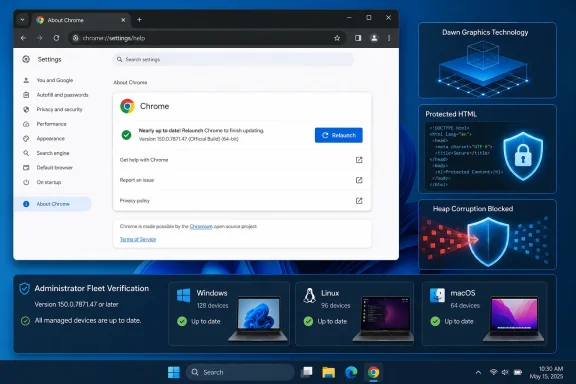
Windows users should open Chrome’s three-dot menu (⋮) > Help > About Google Chrome, let Chrome check for and download the update, click Relaunch, and then confirm that the displayed version is 150.0.7871.47 or later.
Windows administrators should use the same threshold as an auditable enterprise test. Find every in-scope Google Chrome installation, remediate versions below 150.0.7871.47, obtain fresh post-relaunch version evidence, and keep missing or stale results open.
The broader lesson is operational rather than speculative. Browser-security programs work best when they can quickly convert a published version boundary into verified fleet state while preserving accurate scoring provenance and product scope. For CVE-2026-13825, the answer is measurable: Google Chrome below 150.0.7871.47 remains within the documented affected range; Chrome reporting 150.0.7871.47 or later after the update and relaunch workflow meets the published security threshold.
What to do
- Published security threshold: Google Chrome 150.0.7871.47.
- Exact user procedure: Open Chrome and select the three-dot menu (⋮) > Help > About Google Chrome. Let Chrome check for and download the update. Click Relaunch when offered. After Chrome reopens, return to ⋮ > Help > About Google Chrome and confirm that the displayed version is 150.0.7871.47 or later.
- Enterprise compliance test: An in-scope device passes only when the running Google Chrome version is 150.0.7871.47 or later. A deployment assignment, update notification, or incomplete “Chrome 150” result is not sufficient evidence.
 A Browser Patch With a Windows-Sized Blast Radius
CVE-2026-13825 is formally described as an “Uninitialized Use in Dawn” and categorized under CWE-457, Use of Uninitialized Variable. Chromium rated it High severity. The affected-version information identifies Google Chrome versions prior to 150.0.7871.47, while NIST’s platform configuration associates that vulnerable application range with Windows, Linux, and macOS.That distinction matters. This is not a vulnerability in Windows itself, and the operating-system listing does not mean that a Windows component must be serviced through Windows Update. It means that vulnerable Google Chrome installations running on Windows fall within the affected configuration, just as Chrome installations on the other listed desktop platforms do.
For Windows administrators, the remediation boundary is the browser version: 150.0.7871.47 is the published security threshold. A fully patched Windows installation can still contain an affected Chrome version. Conversely, correcting Chrome for this CVE does not require waiting for a Microsoft cumulative update, firmware package, or OEM driver.
The version test is more useful than general statements about whether automatic updates are enabled. If Chrome reports a complete version below 150.0.7871.47, the installation remains within the documented affected range. If Chrome reports 150.0.7871.47 or a numerically later version after the update-and-relaunch procedure, it has crossed the published threshold for this CVE.
This is also why administrators should avoid relying on the major release number alone. “Chrome 150” does not reveal whether the browser is running a build before or after 150.0.7871.47. All four version components matter.
The Published Dawn Finding Is Narrow but Serious
The vendor description is concise: an uninitialized use in Dawn could allow a remote attacker to potentially exploit heap corruption through a crafted HTML page. Reporting should retain those boundaries rather than filling the missing technical detail with assumptions about Dawn’s broader role, the browser subsystem involved, or the precise trigger sequence.“Uninitialized use” generally refers to software consuming a value or memory location before it has been placed into a known, valid state. For this specific vulnerability, however, the public record does not disclose the relevant object, allocation, structure, variable, error path, or sequence of operations. It identifies the weakness category and potential heap-corruption result, not a complete root-cause analysis.
The description is also conditional. It says an attacker could potentially exploit heap corruption; it does not say that every crafted page produces the same result or that a reliable public exploit has been demonstrated. The supplied material does not establish a complete exploit chain, a browser sandbox escape, operating-system-level code execution, persistence, administrator access, credential theft, or control of Windows.
The documented input is crafted HTML. As a general operational inference, hostile web content could hypothetically be delivered through several web-navigation or social-engineering routes, but the CVE record does not identify a malicious site, compromised page, email link, redirect chain, campaign, or exploit kit associated with CVE-2026-13825.
That distinction supports urgency without inventing an attack narrative. Administrators have enough information to identify the affected product and enforce the corrected-version threshold. They do not have enough public detail to describe the exact vulnerable code path or claim a specific method of compromise beyond the crafted-HTML condition in the record.
The 8.8 Score Describes Modeled Characteristics, Not a Published Exploit
CISA-ADP contributed a CVSS 3.1 base score of 8.8 High with the vector:CVSS:3.1/AV:N/AC:L/PR:N/UI:R/S:U/C:H/I:H/A:HThe individual values are recorded facts:
- AV:N — Network attack vector.
- AC:L — Low attack complexity.
- PR:N — No privileges required.
- UI:R — User interaction required.
- S:U — Unchanged scope.
- C:H/I:H/A:H — High modeled impacts to confidentiality, integrity, and availability.
Similarly, low attack complexity is a standardized scoring selection. It does not prove that a working exploit is easy to develop, reliable across every configuration, publicly available, or guaranteed to succeed.
User interaction is required in the vector, and the CVE description identifies crafted HTML. It is therefore reasonable to interpret the modeled scenario as involving a user loading relevant content, but the record does not provide detailed social-engineering mechanics or establish how much additional interaction may be necessary.
“No privileges required” means the scoring does not assume that the attacker already possesses privileges within the vulnerable environment before beginning the attack. It should not be expanded into claims about the privileges or operating-system access that successful exploitation would ultimately provide.
The high confidentiality, integrity, and availability values explain the 8.8 result. They represent CISA-ADP’s modeled impacts if exploitation succeeds. They are not confirmation that all three consequences have been observed in an actual attack.
CISA-ADP’s separate SSVC assessment adds point-in-time context by recording:
- Exploitation: none
- Automatable: no
- Technical impact: total
“Automatable: no” should also be reported without overinterpretation. It does not guarantee that malicious content cannot be distributed broadly or that exploitation could never be packaged into tooling. It is the SSVC decision value contributed for this vulnerability.
Together, the CVSS and SSVC information support a measured response: the modeled technical impact is severe, but the supplied assessment does not establish an active attack campaign. That is a reason to patch promptly, not a reason to describe every affected endpoint as compromised.
The Missing NVD Score Is Not a Reason to Downgrade the Risk
The NVD record displays the CISA-ADP 8.8 High score, but the supplied material does not contain a separate NVD-authored CVSS 4.0, CVSS 3.x, or CVSS 2.0 assessment. Those NVD scoring sections remain unavailable in the documented record.That provenance matters because vulnerability tools may process the same record differently. One dashboard may ingest the CISA-ADP contribution and show 8.8 High. Another may look specifically for an NVD-authored score and label the CVE unscored. A third may display Chromium’s High severity without importing the contributed numerical value.
An unavailable NVD-authored score is a metadata condition, not evidence that the vulnerability is low risk. Chromium supplied a High severity rating, CISA-ADP contributed a complete 8.8 CVSS 3.1 calculation, and the record supplies a specific affected-version boundary.
Security teams should preserve those distinctions in tickets and dashboards:
| Assessment source | Published value | Correct interpretation |
|---|---|---|
| Chromium | High severity | The vendor-side severity associated with the Chrome issue |
| CISA-ADP CVSS 3.1 | 8.8 High | A contributed standardized score displayed by NVD |
| CISA-ADP SSVC | Exploitation: none; automatable: no; technical impact: total | Point-in-time decision-support information |
| NVD/NIST CVSS | No separate assessment in the supplied record | NVD displays contributed data but did not author the 8.8 score |
Organizations using numerical thresholds should also ensure that recently published CVEs do not disappear into an “unscored” queue merely because an NVD-authored value is absent. Vendor severity, contributed government scoring, product scope, and the fixed-version boundary all provide usable prioritization evidence.
The Fixed-Version Boundary Is the Strongest Control
Google’s affected-version data uses a custom version structure that may be confusing when viewed without the narrative description and platform configuration. The practical boundary is nevertheless clear: versions prior to 150.0.7871.47 are affected, while 150.0.7871.47 is excluded from that vulnerable range.Administrators should compare all four components numerically and in order: 150, then 0, then 7871, then 47. The version should not be treated as a decimal number, and a major-version-only result should not be accepted as compliance evidence.
| Reported Google Chrome state | CVE-2026-13825 status | Required response |
|---|---|---|
| Earlier than 150.0.7871.47 | Within the documented affected range | Update, relaunch, and verify |
| Exactly 150.0.7871.47 | Meets the published security threshold | Confirm after relaunch |
| Later than 150.0.7871.47 | Outside the documented affected range | Record the verified version |
| “Chrome 150” with no full build | Insufficient evidence | Collect the complete version |
| Missing, stale, or conflicting version | Unknown | Keep the finding open until verified |
| Desktop platform | Affected product | Vulnerable range | Published security threshold | Primary admin task |
|---|---|---|---|---|
| Windows | Google Chrome | Versions prior to 150.0.7871.47 | 150.0.7871.47 | Verify Chrome’s complete version |
| Linux | Google Chrome | Versions prior to 150.0.7871.47 | 150.0.7871.47 | Confirm the deployed package crosses the threshold |
| macOS | Google Chrome | Versions prior to 150.0.7871.47 | 150.0.7871.47 | Complete the update, relaunch, and version check |
Exact Chrome Procedure: Update, Relaunch, Verify
Windows users can check and update Chrome directly:- Open Google Chrome.
- Select the three-dot menu (⋮) in the upper-right corner.
- Select Help.
- Select About Google Chrome.
- Let Chrome check for and download the update.
- Save any necessary work and click Relaunch when Chrome offers that option.
- After Chrome reopens, return to ⋮ > Help > About Google Chrome.
- Read the complete displayed version.
- Confirm that the version is 150.0.7871.47 or later.
chrome://settings/help in the address bar to reach the same page, but the menu path should be included in user instructions so that the procedure does not depend on knowing an internal Chrome address.The final post-relaunch check is essential. Opening the About page is not proof of remediation. Seeing that an update is being checked or downloaded is not proof of remediation. The useful result is that Chrome has reopened and displays a full version at or above 150.0.7871.47.
If Chrome continues to display an earlier version, the installation remains within the documented affected range. On a managed device, users should then follow the organization’s normal support or browser-remediation process.
This browser check is independent of Windows Update. A Windows computer can be current on Microsoft patches while still running an outdated third-party browser. Likewise, a current Chrome version does not establish that Windows or other applications are fully patched.
Enterprise Verification Must End With Version Evidence
Enterprise environments should turn the published boundary into a concrete detection and exception workflow. The supplied vulnerability record does not prescribe a particular browser-management console, endpoint product, policy, inventory field, or deployment method, so organizations should use their existing controls while enforcing a product-neutral outcome.The compliance rule is direct:
Management terms such as “assigned,” “offered,” “downloaded,” “installed,” “successful,” and “compliant” can mean different things across platforms. Administrators should not assume that a deployment status automatically establishes the browser version that a user sees after completing the relaunch workflow.An in-scope installation is compliant only when current evidence shows Google Chrome 150.0.7871.47 or later.
Claims about updated files coexisting with an old active process, inventory discovering those files, or persistent virtual desktops continuing to use pre-update code are reasonable general operational concerns, but they are not findings established by this CVE record. Where an organization’s tooling can directly observe running-process versions, that data may strengthen validation. Where it cannot, administrators should state the visibility limitation and collect the freshest practical post-remediation version evidence.
A defensible workflow is:
- Identify managed endpoints on which Google Chrome is installed.
- Collect the complete four-part Chrome version.
- Flag every version below 150.0.7871.47.
- Separate missing, stale, incomplete, and conflicting records from verified results.
- Deploy or accelerate an approved Chrome update through the established management process.
- Tell users to use ⋮ > Help > About Google Chrome and click Relaunch when offered.
- Run a fresh inventory or browser-version collection after the remediation window.
- Spot-check representative endpoints through Chrome’s About page.
- Keep unresolved endpoints open until current evidence establishes the complete version.
- Record an owner and follow-up action for every exception.
Action checklist for admins
- Inventory Google Chrome across in-scope Windows, Linux, and macOS endpoints.
- Compare the complete version with 150.0.7871.47.
- Treat every earlier version as affected.
- Treat “Chrome 150” as incomplete evidence.
- Treat missing, stale, or conflicting data as unknown rather than compliant.
- Deploy an appropriate Chrome update through the organization’s approved process.
- Require users to click Relaunch when Chrome offers it.
- Collect fresh version evidence after remediation.
- Verify a representative sample through ⋮ > Help > About Google Chrome.
- Record post-remediation results showing 150.0.7871.47 or later.
- Assign owners to offline, unmanaged, failed, or otherwise unresolved endpoints.
- Monitor authoritative vulnerability information for any change in exploitation status.
Browser Diversity Does Not Automatically Expand the Product Scope
The affected-product record names Google Chrome. It does not establish that Microsoft Edge, every Chromium-derived browser, Windows WebView components, Electron applications, embedded runtimes, or unrelated products are affected under the same version boundary.Shared upstream technology may justify checking other vendors’ advisories, but it does not justify copying Chrome’s version number into another product’s compliance rule. Other vendors may integrate different revisions, apply separate patches, expose components differently, or use unrelated version numbering.
Administrators should therefore avoid two unsupported conclusions:
- Do not label every Chromium-derived product vulnerable solely because the Chrome record names Dawn.
- Do not declare another product unaffected solely because it is absent from this Chrome-specific record.
The default-browser setting is also not a scope test. If Chrome is installed on a Windows system, its version should be checked even when Edge or another browser is the organization’s standard. An installed non-default browser remains a software asset that must be inventoried and maintained.
At the same time, reporting should not invent installation patterns or delivery scenarios. The supported finding is simply that the affected product is Google Chrome and that installations below the published threshold require remediation.
Restricted Issue Details Require Restraint, Not Delay
NIST lists the Chrome release announcement as the vendor advisory and includes a Chromium issue-tracking reference that requires permission. That establishes only that the linked issue is not publicly accessible without the required permissions.The restriction does not establish why access is limited, whether disclosure was delayed for update propagation, or when additional information might become public. Those explanations should not be asserted without a separate source.
The missing internals should narrow technical claims. The supplied record does not support publishing a proof of concept, precise trigger sequence, exploit-reliability assessment, sandbox-escape claim, or complete remote-code-execution narrative.
Defenders nevertheless have enough information to act:
- The affected product is Google Chrome.
- The issue is an uninitialized use in Dawn.
- The weakness is categorized as CWE-457.
- The documented input is crafted HTML.
- The potential result is heap corruption.
- Chromium rates the issue High.
- CISA-ADP contributes an 8.8 High score.
- The supplied CISA SSVC assessment records exploitation as none.
- Versions before 150.0.7871.47 are affected.
- Version 150.0.7871.47 is the published security threshold.
Administrators should also be cautious when third-party vulnerability databases expand sparse language into stronger claims. The authoritative description remains an uninitialized use in Dawn with potential heap corruption through crafted HTML. Any assertion about a broader compromise, specific exposed data, hardware interaction, or complete exploit outcome requires additional evidence.
“Exploitation: None” Is a Timestamped Assessment
CISA-ADP’s SSVC contribution records exploitation as “none,” automatable as “no,” and technical impact as “total.” Exact calendar dates previously associated with submission, publication, enrichment, and modification events are omitted because the supplied evidence does not adequately confirm them.The operational sequence can be stated without unsupported dates:
Record timeline
Initial Chrome-originated information: The vulnerability record identified CVE-2026-13825, the uninitialized-use weakness in Dawn, the CWE-457 classification, the crafted-HTML condition, and the affected-version boundary.CISA-ADP enrichment: CISA-ADP contributed the CVSS 3.1 vector and 8.8 High score.
SSVC assessment: The contributed SSVC fields recorded exploitation as none, automatable as no, and technical impact as total.
NIST analysis: NIST added affected-product configuration information for Google Chrome on Windows, Linux, and macOS and classified the available references.
NVD presentation: NVD displayed the Chrome-originated vulnerability information, CISA-ADP assessment data, and NIST analysis together without supplying a separate NVD-authored CVSS score in the provided record.
This sequence matters mainly for attribution. A value displayed on an NVD page is not necessarily a value calculated by NVD or NIST. Security teams should preserve the originating organization when copying fields into internal systems.
The “exploitation: none” value is reassuring only within its limits. It means the supplied assessment did not identify exploitation at that point. It does not establish that future exploitation is impossible or remove the need to update.
There is also no basis in the supplied material for threat-hunting claims tied to a named campaign, specific indicators of compromise, or a known exploit kit. The available defensive action is version-based remediation and continued monitoring for changes in authoritative assessments.
The Enterprise Risk Is Unverified Chrome Below the Threshold
The central management problem is not estimating a hypothetical exploit path. It is determining whether every in-scope Chrome installation has crossed the published security threshold.Fleet-wide percentages can hide unresolved devices. A report showing that most systems have updated does not identify whether the remainder is low risk, high value, offline, unmanaged, stale, or simply missing current inventory data. Those endpoints should remain exceptions until they can be verified.
Organizations may prioritize remediation using asset context, but the basic pass-or-fail test should remain consistent. A privileged workstation and a low-value test system may receive different operational priority, yet both fail the CVE control if Chrome reports a version below 150.0.7871.47.
The same principle applies to virtual, shared, remote, development, and special-purpose systems. These device categories are worth including in inventory because they are commonly managed through different workflows, not because the supplied CVE record establishes a particular update failure mode for them.
A practical remediation record should contain:
- The device or asset identity.
- The complete Chrome version observed before remediation.
- The collection time or reporting period.
- The update action taken.
- Confirmation that the user completed the applicable relaunch step.
- The complete Chrome version observed afterward.
- The owner and next action for any unresolved result.
What Windows Teams Should Carry Forward
CVE-2026-13825 is a Google Chrome vulnerability, not a Windows vulnerability, but the Windows takeaway is direct: operating-system patch status does not substitute for third-party browser version control.Windows users should open Chrome’s three-dot menu (⋮) > Help > About Google Chrome, let Chrome check for and download the update, click Relaunch, and then confirm that the displayed version is 150.0.7871.47 or later.
Windows administrators should use the same threshold as an auditable enterprise test. Find every in-scope Google Chrome installation, remediate versions below 150.0.7871.47, obtain fresh post-relaunch version evidence, and keep missing or stale results open.
The broader lesson is operational rather than speculative. Browser-security programs work best when they can quickly convert a published version boundary into verified fleet state while preserving accurate scoring provenance and product scope. For CVE-2026-13825, the answer is measurable: Google Chrome below 150.0.7871.47 remains within the documented affected range; Chrome reporting 150.0.7871.47 or later after the update and relaunch workflow meets the published security threshold.
References
- Primary source: NVD / Chromium
Published: 2026-07-11T15:40:53-07:00
NVD - CVE-2026-13825
 nvd.nist.gov
- Security advisory: MSRC
Published: 2026-07-11T15:40:53-07:00
Original feed URL
Security Update Guide - Microsoft Security Response Center
 msrc.microsoft.com
- Related coverage: security.snyk.io
Use of Uninitialized Variable in chromium | CVE-2026-13825 | Snyk
Use of Uninitialized Variable in chromium | CVE-2026-13825security.snyk.io - Related coverage: vulnerability.circl.lu
Vulnerability-Lookup
Vulnerability-Lookup - Fast vulnerability lookup correlation from different sources.vulnerability.circl.lu
