

Google fixed CVE-2026-13831, a high-severity Chromium GPU memory-safety flaw affecting Chrome before version 150.0.7871.47, in the June 30, 2026 Stable Channel update for desktop Chrome on Windows, macOS, and Linux. The vulnerability matters less because of its label than because of where it sits: inside the browser’s graphics plumbing, behind a renderer compromise, in the part of Chromium that has repeatedly turned “just a web page” into a serious containment problem. As documented by Google’s Chrome Releases blog and later enriched by NVD and CISA, this is not currently described as an exploited-in-the-wild emergency, but it is exactly the kind of bug enterprise patch programs should not let age. The confusing part is that the public metadata around it is already messy — and that mess is the real story for Windows administrators trying to turn CVE feeds into action.
CVE-2026-13831 is listed by Google as a high-severity “use after free in GPU,” reported internally by Google on May 16, 2026 and disclosed publicly with Chrome’s June 30 Stable Channel update. NVD’s description, however, says “out of bounds read and write in GPU,” while the weakness entry names CWE-416, the standard category for use-after-free flaws. That mismatch is not just pedantry; it is a reminder that vulnerability records are living documents, often assembled from vendor advisories, CNA submissions, automated enrichment, and later analyst interpretation.
The exploit condition is also narrower than the phrase “remote code execution” can imply. According to the CVE text, an attacker would first need to compromise the renderer process, then use a crafted HTML page to execute arbitrary code inside the sandbox. That is not the same as a one-click, instant host takeover, but it is also not comforting. Browser exploit chains are built from precisely this kind of staging: one flaw gets code running in a constrained process, another pushes execution into a more privileged compartment.
For Windows users, the practical takeaway is simple. If Chrome is older than 150.0.7871.47 on Windows or macOS, it is behind the fixed build identified in the public advisory. Linux users appear to have received 150.0.7871.46 in the same desktop update train, while the NVD record’s version language points to Chrome prior to 150.0.7871.47. That discrepancy should make administrators verify vendor release notes for their platform instead of blindly keying policy to a single version number.
Google’s release notes also place CVE-2026-13831 among a large cluster of Chrome 150 security fixes. That context matters because defenders rarely patch one CVE at a time in Chrome. They patch a moving browser platform whose GPU, rendering, media, JavaScript, extension, updater, and enterprise surfaces all change together.
That is the kind of off-by-one-looking metadata that creates false positives, false negatives, and arguments between vulnerability management teams and desktop engineering teams. If your scanner treats 150.0.7871.46 as fixed because of one record, but your policy treats only 150.0.7871.47 or later as acceptable because of another, the dashboard will tell two different stories about the same machine.
The better answer is to treat the Chrome Releases blog as the authority for the build train and use CVE metadata as a routing signal, not as a final compliance oracle. On Windows and macOS, the conservative threshold is 150.0.7871.47 or newer. On Linux, administrators should confirm the distro-packaged Chromium or Google Chrome build against the vendor’s own release notes, because Linux packaging often lags or rebases differently than Google’s direct Chrome packages.
The CPE question in the NVD record — “Are we missing a CPE here?” — is not cosmetic. Chromium-based browsers downstream of Google Chrome may share code affected by the same underlying bug, but they do not automatically share the same CVE applicability, version numbers, patch timing, or CPE coverage. Microsoft Edge, Brave, Vivaldi, Opera, and Electron-based applications all live in the Chromium ecosystem, but each needs its own vendor confirmation before a Chrome CPE can be treated as a complete asset map.
That is why a GPU bug with a renderer prerequisite still deserves attention. The renderer sandbox is supposed to make web content survivable. Once an attacker has renderer code execution, the next question is whether another flaw lets them break into a process with different privileges, different broker relationships, or different access to system resources.
Use-after-free bugs are especially familiar in this terrain. They occur when software continues to use memory after the object that owned it has been released. In a browser, where objects are constantly created, destroyed, passed across threads, and exposed through scriptable APIs, that class of bug can become a primitive for memory corruption. Not every use-after-free is exploitable, but the category has a long record of producing real browser exploits.
The NVD description’s “out of bounds read and write” wording points to a related but different memory-corruption failure: reading or writing beyond the intended bounds of an object or buffer. Whether the root cause is best classified as use-after-free or out-of-bounds access, the operational conclusion is the same. This is a memory-safety flaw in a high-risk Chrome component, patched in a stable desktop release, with potential for code execution after another browser compromise.
That still leaves plenty of room for risk. Browser exploitation is often delivered through watering-hole pages, malvertising, compromised sites, phishing links, or embedded content. The fact that the crafted page requires user interaction is not a high bar when the interaction is visiting a web page, clicking a link, or being redirected through an ad stack.
For home users, Chrome’s automatic updater will likely handle the fix after a relaunch. The weak point is the browser that has downloaded the update but has not restarted, the portable install that never checks in, the managed profile with update policies misconfigured, or the old VM image that comes back online after months of dormancy. In enterprise fleets, those edge cases are not edge cases; they are the long tail that keeps CVEs alive.
Administrators should also resist the temptation to rank this below server CVEs simply because it is “only Chrome.” The browser is the most exposed application on most Windows endpoints, and it is commonly authenticated into email, SSO, password managers, SaaS consoles, developer portals, cloud dashboards, and internal apps. A browser compromise does not need kernel execution to become expensive.
The initial NVD configuration reportedly modeled Google Chrome as the vulnerable application and included operating system CPEs for Windows, Linux, and macOS. That is a normal way to represent a desktop application vulnerability across platforms, but it can also confuse readers who interpret OS CPEs as meaning the operating system itself is vulnerable. In this case, the affected product is Chrome; the OS entries describe supported environments, not a Windows kernel flaw.
The record also contains an odd affected-version structure in the submitted data: a version value of 150.0.7871.47, a less-than value of 150.0.7871.47, and an affected status. Humans can infer that “before 150.0.7871.47” is the intended meaning, but automation is less forgiving. A poorly written parser can turn that into nonsense.
This is why mature security teams separate “detect,” “decide,” and “enforce.” Detection can begin with NVD, CISA ADP, vendor advisories, and scanner plugins. Decision-making should compare those feeds with the vendor’s release channel and local asset reality. Enforcement should happen through update rings, browser management policies, and endpoint telemetry that proves the fixed binary is actually running.
The same caveat applies to Electron applications. Teams often forget that Chromium is embedded in desktop apps that do not look like browsers: chat clients, code editors, collaboration tools, password utilities, internal enterprise shells, and vendor consoles. If the vulnerable code path is present and reachable in a given Electron build, the fix may depend on an application update rather than the system Chrome update.
That does not mean every Chromium-derived product is immediately vulnerable in the same way. Build flags, feature exposure, sandbox configuration, platform differences, and disabled APIs can change exploitability. But from an asset-management point of view, the right posture is suspicion followed by verification, not dismissal.
For Windows admins, the best operational move is to ask three separate questions. Is Google Chrome patched? Is Microsoft Edge patched according to Microsoft’s own channel? Are any high-risk Electron or Chromium-embedded applications pinned to older runtimes? The third question is where many environments remain weakest.
Chromium tries to contain that complexity through process isolation and layered components such as ANGLE, Dawn, Skia, GFX, and the GPU service. But the June 30 release notes show how frequently those same layers appear in security fixes. CVE-2026-13831 is one item in a broader pattern, not a freak accident.
For Microsoft’s Windows ecosystem, this pattern has special significance. Windows graphics drivers vary widely across OEMs, GPUs, enterprise images, and update cadences. A browser bug in GPU code can intersect with driver behavior, feature flags, hardware acceleration, virtualization, remote desktop, and endpoint security hooks. The exploitability of a Chrome GPU issue may be shaped by Chromium code, but the blast radius is lived on real Windows machines with real driver stacks.
Disabling hardware acceleration is sometimes floated as a mitigation, but it is not a clean substitute for patching. It can reduce exposure to some GPU code paths, but it can also break performance, video playback, WebGL workloads, conferencing quality, and enterprise web apps. For CVE-2026-13831, the rational mitigation is updating Chrome, not trying to outguess Chromium’s graphics architecture from a policy toggle.
The worst patch strategy is the one that treats Chrome like a quarterly desktop application. The browser is closer to an operating environment than an app. It has an update channel, policy surface, extension ecosystem, storage model, identity state, sandbox, network stack, certificate logic, and hardware interfaces. If it is vulnerable, the user’s day-to-day work is vulnerable.
Enterprises should already know their Chrome channel distribution, update policy state, relaunch enforcement window, and extension inventory. If they do not, CVE-2026-13831 is a useful forcing function. The issue may not be known to be exploited, but it is serious enough to expose whether the organization can verify a browser fix in hours or only argue about it for days.
The relaunch problem deserves special attention. Chrome can download updates silently, but the running process remains old until restarted. On shared workstations, kiosk systems, call-center desktops, developer machines, and executive laptops, uptime habits can quietly defeat the auto-updater. A dashboard that reports “update available” is not the same as one that reports “fixed build running.”
That is the quiet discipline vulnerability management requires. Not every CVE is a fire drill, but every browser memory-safety CVE is a test of whether the basics work. Do assets report accurately? Do browser policies enforce updates? Do users restart? Do scanners understand application CPEs? Do teams distinguish Chrome from Edge, Chromium from Electron, and vendor advisory from enrichment metadata?
If the answer to those questions is no, the organization’s risk is not CVE-2026-13831 by itself. The risk is that the next Chrome bug with active exploitation will enter the same brittle pipeline.
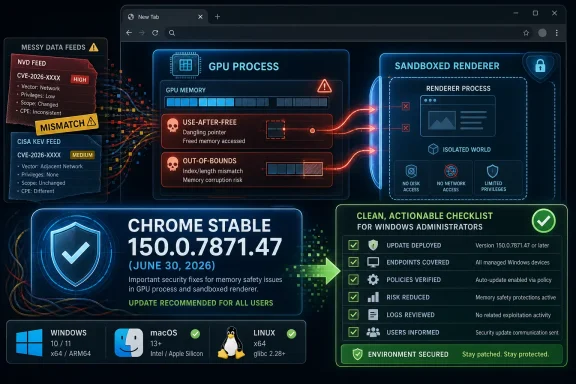 Chrome’s GPU Bug Is a Sandbox Story, Not Just a Browser Bug
CVE-2026-13831 is listed by Google as a high-severity “use after free in GPU,” reported internally by Google on May 16, 2026 and disclosed publicly with Chrome’s June 30 Stable Channel update. NVD’s description, however, says “out of bounds read and write in GPU,” while the weakness entry names CWE-416, the standard category for use-after-free flaws. That mismatch is not just pedantry; it is a reminder that vulnerability records are living documents, often assembled from vendor advisories, CNA submissions, automated enrichment, and later analyst interpretation.The exploit condition is also narrower than the phrase “remote code execution” can imply. According to the CVE text, an attacker would first need to compromise the renderer process, then use a crafted HTML page to execute arbitrary code inside the sandbox. That is not the same as a one-click, instant host takeover, but it is also not comforting. Browser exploit chains are built from precisely this kind of staging: one flaw gets code running in a constrained process, another pushes execution into a more privileged compartment.
For Windows users, the practical takeaway is simple. If Chrome is older than 150.0.7871.47 on Windows or macOS, it is behind the fixed build identified in the public advisory. Linux users appear to have received 150.0.7871.46 in the same desktop update train, while the NVD record’s version language points to Chrome prior to 150.0.7871.47. That discrepancy should make administrators verify vendor release notes for their platform instead of blindly keying policy to a single version number.
Google’s release notes also place CVE-2026-13831 among a large cluster of Chrome 150 security fixes. That context matters because defenders rarely patch one CVE at a time in Chrome. They patch a moving browser platform whose GPU, rendering, media, JavaScript, extension, updater, and enterprise surfaces all change together.
The Version Number Is Doing Too Much Work
The user-facing fix line looks clean: update Chrome. The inventory-facing version story is less clean. Google’s June 30 desktop advisory identifies Windows and Mac builds as 150.0.7871.46/.47 and Linux as 150.0.7871.46, while the CVE language says Chrome prior to 150.0.7871.47 is affected. NVD’s initial CPE enrichment reportedly added a configuration for Google Chrome versions up to, but excluding, 150.0.7871.46, alongside Windows, Linux kernel, and macOS operating system CPEs.That is the kind of off-by-one-looking metadata that creates false positives, false negatives, and arguments between vulnerability management teams and desktop engineering teams. If your scanner treats 150.0.7871.46 as fixed because of one record, but your policy treats only 150.0.7871.47 or later as acceptable because of another, the dashboard will tell two different stories about the same machine.
The better answer is to treat the Chrome Releases blog as the authority for the build train and use CVE metadata as a routing signal, not as a final compliance oracle. On Windows and macOS, the conservative threshold is 150.0.7871.47 or newer. On Linux, administrators should confirm the distro-packaged Chromium or Google Chrome build against the vendor’s own release notes, because Linux packaging often lags or rebases differently than Google’s direct Chrome packages.
The CPE question in the NVD record — “Are we missing a CPE here?” — is not cosmetic. Chromium-based browsers downstream of Google Chrome may share code affected by the same underlying bug, but they do not automatically share the same CVE applicability, version numbers, patch timing, or CPE coverage. Microsoft Edge, Brave, Vivaldi, Opera, and Electron-based applications all live in the Chromium ecosystem, but each needs its own vendor confirmation before a Chrome CPE can be treated as a complete asset map.
Memory Safety Keeps Reappearing in the Browser’s Most Privileged Corners
The GPU process is one of Chromium’s most security-sensitive design compromises. Modern browsers use hardware acceleration for compositing, WebGL, video decode, Canvas, WebGPU, and other workloads that users experience simply as “the web.” Under the hood, that means untrusted web content can influence complex driver-adjacent code paths, shader compilers, command buffers, graphics abstractions, and cross-process IPC.That is why a GPU bug with a renderer prerequisite still deserves attention. The renderer sandbox is supposed to make web content survivable. Once an attacker has renderer code execution, the next question is whether another flaw lets them break into a process with different privileges, different broker relationships, or different access to system resources.
Use-after-free bugs are especially familiar in this terrain. They occur when software continues to use memory after the object that owned it has been released. In a browser, where objects are constantly created, destroyed, passed across threads, and exposed through scriptable APIs, that class of bug can become a primitive for memory corruption. Not every use-after-free is exploitable, but the category has a long record of producing real browser exploits.
The NVD description’s “out of bounds read and write” wording points to a related but different memory-corruption failure: reading or writing beyond the intended bounds of an object or buffer. Whether the root cause is best classified as use-after-free or out-of-bounds access, the operational conclusion is the same. This is a memory-safety flaw in a high-risk Chrome component, patched in a stable desktop release, with potential for code execution after another browser compromise.
The Absence of Known Exploitation Is Not a Permission Slip
CISA’s ADP enrichment reportedly marks exploitation as “none,” automatable as “no,” and technical impact as “total.” That combination is useful but easy to misread. “No known exploitation” does not mean “not exploitable,” and “not automatable” does not mean “not useful.” It means public evidence did not show exploitation at the time of enrichment, and the attack path described requires user interaction and a prior renderer compromise.That still leaves plenty of room for risk. Browser exploitation is often delivered through watering-hole pages, malvertising, compromised sites, phishing links, or embedded content. The fact that the crafted page requires user interaction is not a high bar when the interaction is visiting a web page, clicking a link, or being redirected through an ad stack.
For home users, Chrome’s automatic updater will likely handle the fix after a relaunch. The weak point is the browser that has downloaded the update but has not restarted, the portable install that never checks in, the managed profile with update policies misconfigured, or the old VM image that comes back online after months of dormancy. In enterprise fleets, those edge cases are not edge cases; they are the long tail that keeps CVEs alive.
Administrators should also resist the temptation to rank this below server CVEs simply because it is “only Chrome.” The browser is the most exposed application on most Windows endpoints, and it is commonly authenticated into email, SSO, password managers, SaaS consoles, developer portals, cloud dashboards, and internal apps. A browser compromise does not need kernel execution to become expensive.
NVD Metadata Is Helpful Until It Becomes the Product
The CPE oddities around CVE-2026-13831 are a small example of a larger problem: vulnerability management has become dependent on metadata that arrives after the vendor fix and may not fully capture platform reality. NVD published the CVE on June 30, 2026, and modified it on July 2 after additional enrichment. During that window, scanners, dashboards, ticketing rules, and service-level agreements may already have been making decisions.The initial NVD configuration reportedly modeled Google Chrome as the vulnerable application and included operating system CPEs for Windows, Linux, and macOS. That is a normal way to represent a desktop application vulnerability across platforms, but it can also confuse readers who interpret OS CPEs as meaning the operating system itself is vulnerable. In this case, the affected product is Chrome; the OS entries describe supported environments, not a Windows kernel flaw.
The record also contains an odd affected-version structure in the submitted data: a version value of 150.0.7871.47, a less-than value of 150.0.7871.47, and an affected status. Humans can infer that “before 150.0.7871.47” is the intended meaning, but automation is less forgiving. A poorly written parser can turn that into nonsense.
This is why mature security teams separate “detect,” “decide,” and “enforce.” Detection can begin with NVD, CISA ADP, vendor advisories, and scanner plugins. Decision-making should compare those feeds with the vendor’s release channel and local asset reality. Enforcement should happen through update rings, browser management policies, and endpoint telemetry that proves the fixed binary is actually running.
Edge, Electron, and the Chromium Shadow
The obvious WindowsForum question is whether this affects Microsoft Edge. The careful answer is: not automatically from the Chrome CVE record alone, but the Chromium codebase relationship makes it a question worth asking every time a high-severity Chromium component bug lands. Microsoft Edge is Chromium-based, but Microsoft ships its own builds, advisories, and version numbers. A Chrome-specific CVE entry is not a substitute for Microsoft’s Edge release notes.The same caveat applies to Electron applications. Teams often forget that Chromium is embedded in desktop apps that do not look like browsers: chat clients, code editors, collaboration tools, password utilities, internal enterprise shells, and vendor consoles. If the vulnerable code path is present and reachable in a given Electron build, the fix may depend on an application update rather than the system Chrome update.
That does not mean every Chromium-derived product is immediately vulnerable in the same way. Build flags, feature exposure, sandbox configuration, platform differences, and disabled APIs can change exploitability. But from an asset-management point of view, the right posture is suspicion followed by verification, not dismissal.
For Windows admins, the best operational move is to ask three separate questions. Is Google Chrome patched? Is Microsoft Edge patched according to Microsoft’s own channel? Are any high-risk Electron or Chromium-embedded applications pinned to older runtimes? The third question is where many environments remain weakest.
The GPU Stack Is Where Web Ambition Meets Driver Reality
Chrome’s GPU process exists because the modern web is no longer a document viewer. It is a gaming platform, video terminal, 3D canvas, conferencing layer, design workstation, and increasingly an AI front end. That ambition pushes browsers into deeper relationships with graphics APIs, drivers, sandbox brokers, and hardware abstraction layers.Chromium tries to contain that complexity through process isolation and layered components such as ANGLE, Dawn, Skia, GFX, and the GPU service. But the June 30 release notes show how frequently those same layers appear in security fixes. CVE-2026-13831 is one item in a broader pattern, not a freak accident.
For Microsoft’s Windows ecosystem, this pattern has special significance. Windows graphics drivers vary widely across OEMs, GPUs, enterprise images, and update cadences. A browser bug in GPU code can intersect with driver behavior, feature flags, hardware acceleration, virtualization, remote desktop, and endpoint security hooks. The exploitability of a Chrome GPU issue may be shaped by Chromium code, but the blast radius is lived on real Windows machines with real driver stacks.
Disabling hardware acceleration is sometimes floated as a mitigation, but it is not a clean substitute for patching. It can reduce exposure to some GPU code paths, but it can also break performance, video playback, WebGL workloads, conferencing quality, and enterprise web apps. For CVE-2026-13831, the rational mitigation is updating Chrome, not trying to outguess Chromium’s graphics architecture from a policy toggle.
Patch Management Has to Beat Browser Velocity, Not Perfect It
Chrome’s update rhythm is both a blessing and a management problem. Google can move fixes to stable users quickly, but enterprises often slow the browser down with validation rings, change freezes, compatibility testing, and help-desk concerns. That friction is understandable; Chrome updates can break extensions, line-of-business apps, media behavior, or legacy workflows. But security fixes like CVE-2026-13831 are why browser update deferral needs a short leash.The worst patch strategy is the one that treats Chrome like a quarterly desktop application. The browser is closer to an operating environment than an app. It has an update channel, policy surface, extension ecosystem, storage model, identity state, sandbox, network stack, certificate logic, and hardware interfaces. If it is vulnerable, the user’s day-to-day work is vulnerable.
Enterprises should already know their Chrome channel distribution, update policy state, relaunch enforcement window, and extension inventory. If they do not, CVE-2026-13831 is a useful forcing function. The issue may not be known to be exploited, but it is serious enough to expose whether the organization can verify a browser fix in hours or only argue about it for days.
The relaunch problem deserves special attention. Chrome can download updates silently, but the running process remains old until restarted. On shared workstations, kiosk systems, call-center desktops, developer machines, and executive laptops, uptime habits can quietly defeat the auto-updater. A dashboard that reports “update available” is not the same as one that reports “fixed build running.”
The Bug Record Is Messy, but the Operational Signal Is Clear
CVE-2026-13831 arrives with three pieces of noise: the “use after free” versus “out of bounds read and write” wording mismatch, the version-threshold ambiguity between 150.0.7871.46 and 150.0.7871.47, and the still-evolving CPE enrichment. None of those uncertainties change the response for most Windows users. Chrome should be moved to the fixed June 30 Stable Channel build or later, and managed environments should prove the relaunch happened.That is the quiet discipline vulnerability management requires. Not every CVE is a fire drill, but every browser memory-safety CVE is a test of whether the basics work. Do assets report accurately? Do browser policies enforce updates? Do users restart? Do scanners understand application CPEs? Do teams distinguish Chrome from Edge, Chromium from Electron, and vendor advisory from enrichment metadata?
If the answer to those questions is no, the organization’s risk is not CVE-2026-13831 by itself. The risk is that the next Chrome bug with active exploitation will enter the same brittle pipeline.
The Chrome 150 GPU Fix Leaves Administrators With a Short Checklist
The sensible response to CVE-2026-13831 is neither panic nor complacency. Treat it as a high-severity browser containment bug with no public exploitation signal so far, but with enough technical impact to justify fast desktop patching.- Verify that Chrome on Windows and macOS is running 150.0.7871.47 or later, rather than merely showing that an update has been downloaded.
- Confirm Linux Chrome or Chromium builds against the relevant vendor package channel, because the desktop advisory and CVE metadata do not present the Linux version threshold identically.
- Check Microsoft Edge separately through Microsoft’s own release information instead of assuming Chrome’s CVE record fully describes Edge exposure.
- Review Electron and other Chromium-embedded applications where the browser engine may be pinned to an older runtime outside normal Chrome update controls.
- Treat NVD and scanner CPE data as detection inputs, but resolve version disputes against vendor advisories and observed endpoint telemetry.
- Keep relaunch enforcement tight, because a patched browser that has not restarted is still an old browser in practice.
References
- Primary source: NVD / Chromium
Published: 2026-07-03T07:00:24-07:00
NVD - CVE-2026-13831
 nvd.nist.gov
- Security advisory: MSRC
Published: 2026-07-03T07:00:24-07:00
Original feed URL
Security Update Guide - Microsoft Security Response Center
 msrc.microsoft.com
- Related coverage: cvefeed.io
CVE-2026-13831 - Google Chrome GPU Out-of-Bounds Read/Write
Out of bounds read and write in GPU in Google Chrome prior to 150.0.7871.47 allowed a remote attacker who had compromised the renderer process to execute arbitrary code inside a sandbox via a crafted HTML page. (Chromium security severity: High)cvefeed.io
