

Google fixed CVE-2026-13832 in Chrome 150.0.7871.47 for Windows and Mac, and 150.0.7871.46 for Linux, after documenting a high-severity use-after-free flaw in Headless Chrome that could let an attacker escape the browser sandbox after first compromising the renderer process. The bug landed in a massive June 30, 2026 Stable Channel update that Google says contains 433 security fixes. NVD published the CVE the same day and CISA’s enrichment rated it high, while noting no known exploitation at the time of its assessment. The uncomfortable lesson is that “headless” no longer means “low-risk background plumbing”; it is now part of the browser attack surface that enterprise automation depends on.
For years, Headless Chrome sounded like something that belonged in test labs, CI pipelines, crawler farms, and web-scraping stacks rather than on the front line of enterprise security. That mental model is out of date. The browser without a visible window now renders invoices, screenshots dashboards, validates single-page applications, executes authentication flows, generates PDFs, and runs synthetic monitoring across countless Windows and Linux estates.
CVE-2026-13832 matters because it sits precisely in that gray zone between “browser bug” and “server-side automation risk.” According to Google’s Chrome Releases post, the flaw is a use-after-free in Headless, reported internally by Google on May 16, 2026, and fixed in the Chrome 150 Stable Channel release on June 30. NVD’s entry describes the attack path more sharply: a remote attacker who had already compromised the renderer process could potentially perform a sandbox escape through a crafted HTML page.
That phrasing is easy to misread. This is not a simple one-click remote-code-execution bug from a clean browser state, at least based on the public wording. But it is also not harmless. A sandbox escape is the second half of many serious browser exploit chains, and Headless Chrome is often pointed at untrusted or semi-trusted web content by automation systems that were never designed with browser exploit chains in mind.
The result is a vulnerability that looks narrower than a headline zero-day but is more operationally interesting than a routine memory-safety fix. It asks a practical question: who is responsible for patching the invisible browsers running inside test runners, containers, render services, and third-party tools?
But that is exactly why sandbox escapes matter. A renderer bug can give an attacker code execution inside the constrained browser process; a sandbox escape is what can turn that foothold into access beyond the renderer boundary. CVE-2026-13832 is therefore not the whole burglary. It is potentially the lock pick for the inner door.
CISA’s CVSS 3.1 vector, as shown in the NVD record, captures this awkward middle ground. The attack vector is network-accessible, privileges are not required, and user interaction is required. Attack complexity is high, scope is changed, and the confidentiality, integrity, and availability impact are all high. That produces an 8.3 high score, which is a sober rating for a bug that probably needs chaining but could be severe when chained successfully.
The Headless angle changes the meaning of “user interaction.” In a normal browser, that usually means a person clicks or visits something. In a headless workflow, the “user” may be a job queue, test script, monitoring probe, PDF renderer, crawler, helpdesk ingestion tool, or URL preview service. The interaction may be entirely automated, and that makes the security boundary more subtle.
If your automation fetches attacker-supplied pages, customer-submitted URLs, emails rendered as HTML, support-ticket attachments, or arbitrary documents converted through browser machinery, the absence of a human at the keyboard is not a defense. It can be the opposite: automation runs tirelessly, predictably, and often with service credentials nearby.
Chrome has spent years moving pieces of the platform toward safer patterns, tighter sandboxing, site isolation, MiraclePtr-style mitigations, fuzzing, and exploit hardening. Yet the Chrome 150 release note reads like a tour of the remaining sharp edges: use-after-free in Extensions, GPU, ANGLE, Dawn, Views, Bluetooth, Ozone, V8, Canvas, Updater, Chromoting, USB, DOM, Forms, and now Headless. The list is so long that the individual CVE risks becoming visually lost in the flood.
That flood is the story. Google’s June 30 Stable Channel post says the update includes 433 security fixes, a number large enough to make even seasoned administrators blink. Some were critical. Many were high. Several were reported by Google itself, suggesting internal auditing and automated discovery continue to uncover flaws at industrial scale.
For IT pros, the lesson is not that Chrome is uniquely broken. It is that the modern browser is effectively an operating system for hostile input. It includes graphics stacks, parsers, JavaScript engines, device APIs, networking, authentication, storage, sync, extensions, UI frameworks, media codecs, accessibility hooks, and automation interfaces. A headless browser removes the visible window, not the complexity.
The familiar enterprise patching line — “it is only a browser update” — has become one of the most dangerous phrases in endpoint management. Chrome and Chromium-derived runtimes sit in the path of identity, SaaS access, endpoint compromise, and now server-side automation.
That staggered rollout is convenient for consumers and risky for administrators who assume auto-update has already done the work. In managed Windows environments, Chrome update status can be shaped by Group Policy, registry settings, enterprise controls, VDI images, packaging systems, or frozen golden images. On servers and build agents, the installed browser may be pinned by Dockerfiles, base images, package repositories, or test-tool dependencies.
The specific NVD affected configuration is Chrome versions before 150.0.7871.47. That creates a simple remediation target for Windows and Mac administrators: anything below that build should be treated as vulnerable for this CVE. Linux’s Stable Channel versioning in Google’s post lists 150.0.7871.46, so defenders should verify through the vendor channel and distribution packaging rather than blindly applying a Windows build number to every platform.
This is where Chromium security becomes messy for WindowsForum readers. Google Chrome is only one distribution of the Chromium engine. Microsoft Edge, Brave, Vivaldi, Opera, Electron apps, embedded Chromium frameworks, and automation tooling all inherit from the same broad ecosystem, but they do not always ship the same build at the same moment. A Chrome CVE does not automatically prove a given downstream product is exploitable in the same way, but it does provide a patch-management signal administrators should not ignore.
The safest operating model is to track the engine, not just the brand. If your fleet includes Chromium-based browsers or apps that expose browser rendering to untrusted content, version drift becomes security debt.
It may be installed through npm as part of Puppeteer, bundled with Playwright, baked into a container image, pulled into a CI runner, deployed on a Linux VM, shipped inside a vendor product, or hidden in a screenshot microservice someone built three years ago and forgot. Windows shops are not immune simply because many headless workloads run on Linux. Mixed estates routinely have Windows administrators responsible for developer workstations, build pipelines, Azure-hosted runners, and line-of-business services that use Chromium under the hood.
That creates a discovery problem before it creates a patching problem. Asset inventories that know every interactive Chrome install may still miss browser binaries living in build caches or application directories. Vulnerability scanners may detect package versions but miss embedded browser bundles. Software bills of materials may include an automation library while obscuring the actual Chromium revision it downloads at runtime.
CVE-2026-13832 should push administrators to ask where Chrome is being used as a service component. Any workflow that renders hostile HTML deserves scrutiny. That includes website thumbnailers, document converters, invoice previewers, customer-support URL expanders, marketing email renderers, crawler infrastructure, and test environments that exercise production authentication with privileged accounts.
The uncomfortable truth is that many headless browser deployments were built for functional correctness, not containment. They may run with broad filesystem access, network reachability to internal services, long-lived tokens, mounted secrets, or privileged containers. In that world, the browser sandbox is not merely a belt-and-suspenders protection. It may be the last meaningful boundary before an attacker reaches the host.
For CVE-2026-13832, the linked Chromium issue is visible as an identifier, but public technical detail is limited. That means defenders should avoid overclaiming. There is no public evidence in the NVD or Google advisory, as of the July 2 NVD modification noted in the record, that this vulnerability is being exploited in the wild. CISA’s SSVC enrichment lists exploitation as “none,” automation as “no,” and technical impact as “total.”
That “total” impact is not an exploitation claim. It is a consequence assessment if exploitation succeeds. The distinction matters because patch prioritization should be urgent without becoming theatrical. A high-severity sandbox escape in a browser component that processes untrusted content deserves fast remediation even when there is no known active exploitation.
Administrators have learned to triage Chrome bugs by zero-day status because Google sometimes explicitly says when exploitation exists in the wild. That habit can mislead here. A non-zero-day browser sandbox escape can still become valuable after patch release, when attackers diff code changes, infer the bug, and target slow-moving fleets.
The post-patch window is especially relevant for headless systems. Desktop Chrome often updates itself. A container image does not. A CI runner pinned to an old image does not. A third-party appliance may not. A forgotten screenshot service may keep serving vulnerable Chromium long after every employee laptop has moved on.
The deeper answer is that Windows environments increasingly depend on browser engines outside the traditional browser boundary. Microsoft Edge has its own Chromium update channel. WebView2 powers desktop apps. Electron applications carry Chromium into collaboration tools, developer utilities, productivity apps, and internal software. Automated testing stacks may invoke Chrome or Chromium on Windows build agents even when end users never touch those machines.
CVE-2026-13832 is specifically described for Google Chrome, and defenders should not mechanically assign that CVE to every Chromium-derived product without vendor confirmation. But the pattern is familiar: a Chromium security fix lands in Chrome, downstream products assess exposure, and administrators wait for corresponding updates or advisories. That lag is where fleet hygiene matters.
Windows endpoint teams should use this moment to check three categories. First, confirm Chrome Stable is at or above the patched build wherever Chrome is installed interactively. Second, identify developer and QA systems running automation frameworks that download browser binaries outside normal software management. Third, ask application owners whether any internal services use headless browser rendering against untrusted or customer-provided content.
Those questions are boring, but they are the work. Browser security in 2026 is less about heroic manual analysis of every CVE and more about making sure there is no unmanaged browser engine quietly becoming part of your attack surface.
CPE works best when software is a discrete, installed product with a clear vendor and version. Chromium complicates that model. Google Chrome has a clean product identity. Chromium as an open-source project has many downstream consumers. Headless Chrome may be installed as Chrome, Chromium, a browser bundle inside an automation framework, or a dependency downloaded on demand by a test runner.
That means CPE coverage can be technically correct and operationally incomplete at the same time. NVD can list Google Chrome, while your real exposure sits in a container running a Playwright-managed browser binary. A vulnerability scanner can flag the installed desktop browser but miss an archived Chromium executable inside a build workspace. A software inventory can show Chrome absent from a server while a service account launches a bundled browser every few minutes.
The right question is not only “is the CPE present?” It is “does my inventory know where the vulnerable code runs?” For headless browser vulnerabilities, that second question is harder and more important.
Security teams should treat NVD as a starting point, not the full map. Vendor advisories, package manifests, container scans, runtime telemetry, process execution logs, and developer tooling inventories all matter. If a headless browser touches untrusted input, its update path should be as deliberate as a public-facing web server’s.
The security bargain was often implicit: because Chrome is hardened, teams assumed it was safe enough to point at arbitrary pages. That assumption is partly justified; Chrome’s sandbox, site isolation, process model, and update cadence are formidable. But “safe enough” depends on deployment context. A hardened browser running as a low-privilege desktop app is one thing. A headless browser running in a privileged container with access to internal networks is another.
CVE-2026-13832 lands in the seam between those worlds. It does not tell us that every headless deployment is doomed. It tells us that the headless layer should be treated as hostile-input processing infrastructure. That means least privilege, network segmentation, frequent rebuilding, fast browser updates, ephemeral execution, restricted filesystem access, and careful handling of credentials.
The problem is cultural as much as technical. Developers see a browser automation tool as part of the test stack. Security teams see a browser as endpoint software. Platform teams see a container image. Each group owns a slice, and nobody owns the full risk. A high-severity Headless Chrome sandbox escape is the kind of bug that exposes those seams.
Enterprises that already maintain hardened browser automation environments will patch and move on. Enterprises that do not know where Headless Chrome runs have a different task: discovery first, remediation second, architecture third.
It is reassuring because bugs are being found and fixed. Internal discovery appears heavily represented in this release, and the Chrome security ecosystem continues to generate fixes before attackers necessarily weaponize every issue. It is exhausting because administrators cannot manually reason through 433 security fixes every time a major release lands.
The operational answer is automation, but not blind automation. Consumer Chrome auto-update is excellent, yet enterprise controls often slow it down for compatibility reasons. That tension is legitimate. Browser updates can break web apps, extensions, automation scripts, video controls, and enterprise workflows. But the risk calculation changes when a release contains critical and high-severity memory corruption bugs across core browser components.
Chrome 150 may also create friction simply because it is a major version jump. Some organizations pin browser versions for extension compatibility, app validation, or kiosk stability. That is understandable in tightly controlled environments, but pinning without a rapid security exception process turns compatibility management into vulnerability preservation.
For Windows administrators, the practical policy should be clear: browser updates deserve a fast lane. Test rings are useful, but the ring must move. If production Chrome remains below 150.0.7871.47 weeks after this release because no one wants to disturb an internal portal, the organization has chosen portal stability over a known sandbox-escape fix, whether it admits that or not.
For enterprise environments, the version check is only the visible tip. Managed Chrome deployments should confirm update policy health, Omaha update reachability, endpoint management reporting, and any devices excluded from normal update flows. VDI images, kiosk devices, lab machines, offline systems, and developer workstations deserve special attention because they are exactly where browser versions tend to fossilize.
Headless deployments need a different playbook. Rebuild container images that contain Chrome or Chromium. Refresh Playwright or Puppeteer browser caches. Check CI runners and base images. Review services that install Chrome through package managers at build time but do not rebuild frequently. Make sure production automation is not depending on a stale browser binary checked into an artifact repository.
There is also a permissions question. If a headless rendering service must fetch untrusted pages, it should run as though those pages are malicious. That means no broad host mounts, no access to cloud metadata endpoints unless strictly required, no long-lived secrets in the environment, no unnecessary internal network reachability, and no privileged container mode. A browser sandbox is not a substitute for platform sandboxing.
CVE-2026-13832 is fixed in Chrome, but a similar bug will appear again. The organizations that come out ahead will be those that use this CVE to improve the system around the browser, not merely bump a version number.
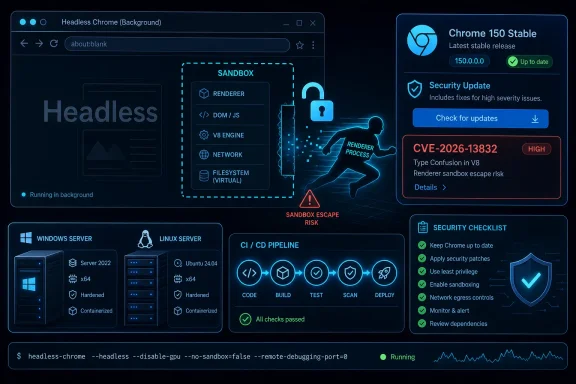 Headless Chrome Has Become Production Infrastructure, Not Developer Convenience
For years, Headless Chrome sounded like something that belonged in test labs, CI pipelines, crawler farms, and web-scraping stacks rather than on the front line of enterprise security. That mental model is out of date. The browser without a visible window now renders invoices, screenshots dashboards, validates single-page applications, executes authentication flows, generates PDFs, and runs synthetic monitoring across countless Windows and Linux estates.CVE-2026-13832 matters because it sits precisely in that gray zone between “browser bug” and “server-side automation risk.” According to Google’s Chrome Releases post, the flaw is a use-after-free in Headless, reported internally by Google on May 16, 2026, and fixed in the Chrome 150 Stable Channel release on June 30. NVD’s entry describes the attack path more sharply: a remote attacker who had already compromised the renderer process could potentially perform a sandbox escape through a crafted HTML page.
That phrasing is easy to misread. This is not a simple one-click remote-code-execution bug from a clean browser state, at least based on the public wording. But it is also not harmless. A sandbox escape is the second half of many serious browser exploit chains, and Headless Chrome is often pointed at untrusted or semi-trusted web content by automation systems that were never designed with browser exploit chains in mind.
The result is a vulnerability that looks narrower than a headline zero-day but is more operationally interesting than a routine memory-safety fix. It asks a practical question: who is responsible for patching the invisible browsers running inside test runners, containers, render services, and third-party tools?
The Renderer Compromise Requirement Is a Caveat, Not a Comfort Blanket
The public description says the attacker must have compromised the renderer process first. That is an important limitation, and defenders should not erase it in the name of drama. Chrome’s multi-process architecture is built around the assumption that rendering untrusted web content is dangerous, so the renderer is locked inside a sandbox that limits what a successful renderer exploit can do.But that is exactly why sandbox escapes matter. A renderer bug can give an attacker code execution inside the constrained browser process; a sandbox escape is what can turn that foothold into access beyond the renderer boundary. CVE-2026-13832 is therefore not the whole burglary. It is potentially the lock pick for the inner door.
CISA’s CVSS 3.1 vector, as shown in the NVD record, captures this awkward middle ground. The attack vector is network-accessible, privileges are not required, and user interaction is required. Attack complexity is high, scope is changed, and the confidentiality, integrity, and availability impact are all high. That produces an 8.3 high score, which is a sober rating for a bug that probably needs chaining but could be severe when chained successfully.
The Headless angle changes the meaning of “user interaction.” In a normal browser, that usually means a person clicks or visits something. In a headless workflow, the “user” may be a job queue, test script, monitoring probe, PDF renderer, crawler, helpdesk ingestion tool, or URL preview service. The interaction may be entirely automated, and that makes the security boundary more subtle.
If your automation fetches attacker-supplied pages, customer-submitted URLs, emails rendered as HTML, support-ticket attachments, or arbitrary documents converted through browser machinery, the absence of a human at the keyboard is not a defense. It can be the opposite: automation runs tirelessly, predictably, and often with service credentials nearby.
Use-After-Free Bugs Keep Surviving Because Browsers Are Still C++ Machines
A use-after-free flaw is one of the oldest forms of memory corruption: software frees a chunk of memory and later continues using a stale reference to it. In a large C++ codebase, that stale reference can become a crash, a controlled object confusion, or, under the right circumstances, a path to code execution. Modern browser exploit mitigations make that path harder, but not impossible.Chrome has spent years moving pieces of the platform toward safer patterns, tighter sandboxing, site isolation, MiraclePtr-style mitigations, fuzzing, and exploit hardening. Yet the Chrome 150 release note reads like a tour of the remaining sharp edges: use-after-free in Extensions, GPU, ANGLE, Dawn, Views, Bluetooth, Ozone, V8, Canvas, Updater, Chromoting, USB, DOM, Forms, and now Headless. The list is so long that the individual CVE risks becoming visually lost in the flood.
That flood is the story. Google’s June 30 Stable Channel post says the update includes 433 security fixes, a number large enough to make even seasoned administrators blink. Some were critical. Many were high. Several were reported by Google itself, suggesting internal auditing and automated discovery continue to uncover flaws at industrial scale.
For IT pros, the lesson is not that Chrome is uniquely broken. It is that the modern browser is effectively an operating system for hostile input. It includes graphics stacks, parsers, JavaScript engines, device APIs, networking, authentication, storage, sync, extensions, UI frameworks, media codecs, accessibility hooks, and automation interfaces. A headless browser removes the visible window, not the complexity.
The familiar enterprise patching line — “it is only a browser update” — has become one of the most dangerous phrases in endpoint management. Chrome and Chromium-derived runtimes sit in the path of identity, SaaS access, endpoint compromise, and now server-side automation.
The Chrome 150 Patch Is Bigger Than One CVE
CVE-2026-13832 is worth singling out because Headless Chrome occupies a special place in enterprise automation, but it is one item in a much larger release. Google’s Stable Channel announcement promoted Chrome 150 to stable for Windows, Mac, and Linux on June 30, 2026, with Windows and Mac receiving 150.0.7871.46 or .47 and Linux receiving 150.0.7871.46. The advisory says rollout will occur over the coming days and weeks, the usual Chrome cadence that helps Google scale updates without detonating every deployment at once.That staggered rollout is convenient for consumers and risky for administrators who assume auto-update has already done the work. In managed Windows environments, Chrome update status can be shaped by Group Policy, registry settings, enterprise controls, VDI images, packaging systems, or frozen golden images. On servers and build agents, the installed browser may be pinned by Dockerfiles, base images, package repositories, or test-tool dependencies.
The specific NVD affected configuration is Chrome versions before 150.0.7871.47. That creates a simple remediation target for Windows and Mac administrators: anything below that build should be treated as vulnerable for this CVE. Linux’s Stable Channel versioning in Google’s post lists 150.0.7871.46, so defenders should verify through the vendor channel and distribution packaging rather than blindly applying a Windows build number to every platform.
This is where Chromium security becomes messy for WindowsForum readers. Google Chrome is only one distribution of the Chromium engine. Microsoft Edge, Brave, Vivaldi, Opera, Electron apps, embedded Chromium frameworks, and automation tooling all inherit from the same broad ecosystem, but they do not always ship the same build at the same moment. A Chrome CVE does not automatically prove a given downstream product is exploitable in the same way, but it does provide a patch-management signal administrators should not ignore.
The safest operating model is to track the engine, not just the brand. If your fleet includes Chromium-based browsers or apps that expose browser rendering to untrusted content, version drift becomes security debt.
Headless Workloads Often Run Where Endpoint Tools See Least
A conventional browser exploit target is visible. It runs on a user’s endpoint, launches from the Start menu or taskbar, appears in software inventory, and is usually covered by endpoint detection, browser management, and update telemetry. Headless Chrome often lives in a less governed world.It may be installed through npm as part of Puppeteer, bundled with Playwright, baked into a container image, pulled into a CI runner, deployed on a Linux VM, shipped inside a vendor product, or hidden in a screenshot microservice someone built three years ago and forgot. Windows shops are not immune simply because many headless workloads run on Linux. Mixed estates routinely have Windows administrators responsible for developer workstations, build pipelines, Azure-hosted runners, and line-of-business services that use Chromium under the hood.
That creates a discovery problem before it creates a patching problem. Asset inventories that know every interactive Chrome install may still miss browser binaries living in build caches or application directories. Vulnerability scanners may detect package versions but miss embedded browser bundles. Software bills of materials may include an automation library while obscuring the actual Chromium revision it downloads at runtime.
CVE-2026-13832 should push administrators to ask where Chrome is being used as a service component. Any workflow that renders hostile HTML deserves scrutiny. That includes website thumbnailers, document converters, invoice previewers, customer-support URL expanders, marketing email renderers, crawler infrastructure, and test environments that exercise production authentication with privileged accounts.
The uncomfortable truth is that many headless browser deployments were built for functional correctness, not containment. They may run with broad filesystem access, network reachability to internal services, long-lived tokens, mounted secrets, or privileged containers. In that world, the browser sandbox is not merely a belt-and-suspenders protection. It may be the last meaningful boundary before an attacker reaches the host.
The Bug Detail Is Restricted, and That Is a Feature
Google’s advisory repeats the standard Chrome security language: access to bug details and links may remain restricted until most users have received the fix, and restrictions may remain longer if the issue affects a third-party library used elsewhere. That frustrates researchers, journalists, and administrators who want the full technical write-up immediately. It is also the reason opportunistic exploit development is harder in the first days after release.For CVE-2026-13832, the linked Chromium issue is visible as an identifier, but public technical detail is limited. That means defenders should avoid overclaiming. There is no public evidence in the NVD or Google advisory, as of the July 2 NVD modification noted in the record, that this vulnerability is being exploited in the wild. CISA’s SSVC enrichment lists exploitation as “none,” automation as “no,” and technical impact as “total.”
That “total” impact is not an exploitation claim. It is a consequence assessment if exploitation succeeds. The distinction matters because patch prioritization should be urgent without becoming theatrical. A high-severity sandbox escape in a browser component that processes untrusted content deserves fast remediation even when there is no known active exploitation.
Administrators have learned to triage Chrome bugs by zero-day status because Google sometimes explicitly says when exploitation exists in the wild. That habit can mislead here. A non-zero-day browser sandbox escape can still become valuable after patch release, when attackers diff code changes, infer the bug, and target slow-moving fleets.
The post-patch window is especially relevant for headless systems. Desktop Chrome often updates itself. A container image does not. A CI runner pinned to an old image does not. A third-party appliance may not. A forgotten screenshot service may keep serving vulnerable Chromium long after every employee laptop has moved on.
Windows Administrators Should Care Even When the Word Is Chromium
This is WindowsForum, so the natural instinct is to ask what this means for Windows users and Windows administrators. The immediate answer is straightforward: Chrome for Windows before 150.0.7871.47 is in scope, and Google’s Stable Channel update is the fix. Users can verify through Chrome’s About page, while enterprise admins should confirm version telemetry through their management stack rather than assuming auto-update completed everywhere.The deeper answer is that Windows environments increasingly depend on browser engines outside the traditional browser boundary. Microsoft Edge has its own Chromium update channel. WebView2 powers desktop apps. Electron applications carry Chromium into collaboration tools, developer utilities, productivity apps, and internal software. Automated testing stacks may invoke Chrome or Chromium on Windows build agents even when end users never touch those machines.
CVE-2026-13832 is specifically described for Google Chrome, and defenders should not mechanically assign that CVE to every Chromium-derived product without vendor confirmation. But the pattern is familiar: a Chromium security fix lands in Chrome, downstream products assess exposure, and administrators wait for corresponding updates or advisories. That lag is where fleet hygiene matters.
Windows endpoint teams should use this moment to check three categories. First, confirm Chrome Stable is at or above the patched build wherever Chrome is installed interactively. Second, identify developer and QA systems running automation frameworks that download browser binaries outside normal software management. Third, ask application owners whether any internal services use headless browser rendering against untrusted or customer-provided content.
Those questions are boring, but they are the work. Browser security in 2026 is less about heroic manual analysis of every CVE and more about making sure there is no unmanaged browser engine quietly becoming part of your attack surface.
The CPE Confusion Is a Symptom of a Larger Inventory Problem
The user-supplied NVD excerpt asks whether a CPE is missing. In the change history, NIST added a configuration for Google Chrome with versions up to but excluding 150.0.7871.47. The visible “Are we missing a CPE?” prompt is standard NVD page furniture, not proof that NVD has failed to model the vulnerability. Still, the concern is understandable because browser CVEs routinely strain CPE-based inventory.CPE works best when software is a discrete, installed product with a clear vendor and version. Chromium complicates that model. Google Chrome has a clean product identity. Chromium as an open-source project has many downstream consumers. Headless Chrome may be installed as Chrome, Chromium, a browser bundle inside an automation framework, or a dependency downloaded on demand by a test runner.
That means CPE coverage can be technically correct and operationally incomplete at the same time. NVD can list Google Chrome, while your real exposure sits in a container running a Playwright-managed browser binary. A vulnerability scanner can flag the installed desktop browser but miss an archived Chromium executable inside a build workspace. A software inventory can show Chrome absent from a server while a service account launches a bundled browser every few minutes.
The right question is not only “is the CPE present?” It is “does my inventory know where the vulnerable code runs?” For headless browser vulnerabilities, that second question is harder and more important.
Security teams should treat NVD as a starting point, not the full map. Vendor advisories, package manifests, container scans, runtime telemetry, process execution logs, and developer tooling inventories all matter. If a headless browser touches untrusted input, its update path should be as deliberate as a public-facing web server’s.
The Automation Boom Has Outpaced the Security Model
Headless browsers spread because they solved real problems. Web apps became dynamic enough that simple HTTP fetchers could no longer see what users saw. Teams needed to test modern interfaces, generate faithful PDFs, capture screenshots, render charts, and validate flows involving JavaScript-heavy identity providers. Headless Chrome became the universal adapter for the modern web.The security bargain was often implicit: because Chrome is hardened, teams assumed it was safe enough to point at arbitrary pages. That assumption is partly justified; Chrome’s sandbox, site isolation, process model, and update cadence are formidable. But “safe enough” depends on deployment context. A hardened browser running as a low-privilege desktop app is one thing. A headless browser running in a privileged container with access to internal networks is another.
CVE-2026-13832 lands in the seam between those worlds. It does not tell us that every headless deployment is doomed. It tells us that the headless layer should be treated as hostile-input processing infrastructure. That means least privilege, network segmentation, frequent rebuilding, fast browser updates, ephemeral execution, restricted filesystem access, and careful handling of credentials.
The problem is cultural as much as technical. Developers see a browser automation tool as part of the test stack. Security teams see a browser as endpoint software. Platform teams see a container image. Each group owns a slice, and nobody owns the full risk. A high-severity Headless Chrome sandbox escape is the kind of bug that exposes those seams.
Enterprises that already maintain hardened browser automation environments will patch and move on. Enterprises that do not know where Headless Chrome runs have a different task: discovery first, remediation second, architecture third.
Chrome’s Security Firehose Rewards Fast Movers
The Chrome 150 release is a reminder that Google’s browser security machine operates at a scale few vendors can match. Hundreds of fixes flow through a single Stable Channel update, with public CVEs, internal bug IDs, severity ratings, reward amounts, and delayed disclosure for sensitive details. That cadence is both reassuring and exhausting.It is reassuring because bugs are being found and fixed. Internal discovery appears heavily represented in this release, and the Chrome security ecosystem continues to generate fixes before attackers necessarily weaponize every issue. It is exhausting because administrators cannot manually reason through 433 security fixes every time a major release lands.
The operational answer is automation, but not blind automation. Consumer Chrome auto-update is excellent, yet enterprise controls often slow it down for compatibility reasons. That tension is legitimate. Browser updates can break web apps, extensions, automation scripts, video controls, and enterprise workflows. But the risk calculation changes when a release contains critical and high-severity memory corruption bugs across core browser components.
Chrome 150 may also create friction simply because it is a major version jump. Some organizations pin browser versions for extension compatibility, app validation, or kiosk stability. That is understandable in tightly controlled environments, but pinning without a rapid security exception process turns compatibility management into vulnerability preservation.
For Windows administrators, the practical policy should be clear: browser updates deserve a fast lane. Test rings are useful, but the ring must move. If production Chrome remains below 150.0.7871.47 weeks after this release because no one wants to disturb an internal portal, the organization has chosen portal stability over a known sandbox-escape fix, whether it admits that or not.
The Patch Is Simple; The Estate Is Not
At the individual-machine level, remediation is mundane. Update Chrome. Restart the browser. Verify the version. For home users and small offices, that is almost the whole story.For enterprise environments, the version check is only the visible tip. Managed Chrome deployments should confirm update policy health, Omaha update reachability, endpoint management reporting, and any devices excluded from normal update flows. VDI images, kiosk devices, lab machines, offline systems, and developer workstations deserve special attention because they are exactly where browser versions tend to fossilize.
Headless deployments need a different playbook. Rebuild container images that contain Chrome or Chromium. Refresh Playwright or Puppeteer browser caches. Check CI runners and base images. Review services that install Chrome through package managers at build time but do not rebuild frequently. Make sure production automation is not depending on a stale browser binary checked into an artifact repository.
There is also a permissions question. If a headless rendering service must fetch untrusted pages, it should run as though those pages are malicious. That means no broad host mounts, no access to cloud metadata endpoints unless strictly required, no long-lived secrets in the environment, no unnecessary internal network reachability, and no privileged container mode. A browser sandbox is not a substitute for platform sandboxing.
CVE-2026-13832 is fixed in Chrome, but a similar bug will appear again. The organizations that come out ahead will be those that use this CVE to improve the system around the browser, not merely bump a version number.
The Headless Patch Leaves a Very Practical Checklist
The most useful response to CVE-2026-13832 is neither panic nor indifference. Treat it as a high-priority browser security update with special relevance to automation and rendering workflows. The public record does not show known exploitation, but the impact of a successful chain is serious enough that slow patching is hard to justify.- Chrome for Windows and Mac should be updated to 150.0.7871.47 or later wherever the Google build is installed.
- Linux administrators should verify the patched Chrome 150 package through Google’s Stable Channel or their distribution source, since Google’s release lists 150.0.7871.46 for Linux.
- Security teams should search for Headless Chrome in CI systems, containers, screenshot services, PDF generators, monitoring probes, and web-testing frameworks.
- Any service that renders attacker-controlled HTML should run with least privilege, restricted network access, and no unnecessary secrets exposed to the browser process.
- Chromium-based downstream products should be monitored for their own advisories rather than assumed safe or vulnerable solely from the Chrome CVE.
- NVD’s CPE entry is useful for Google Chrome tracking, but it is not a complete inventory strategy for embedded or bundled Chromium runtimes.
References
- Primary source: NVD / Chromium
Published: 2026-07-03T07:00:31-07:00
NVD - CVE-2026-13832
 nvd.nist.gov
- Security advisory: MSRC
Published: 2026-07-03T07:00:31-07:00
Original feed URL
Security Update Guide - Microsoft Security Response Center
 msrc.microsoft.com
- Related coverage: cvefeed.io
CVE-2026-13832 - Google Chrome Headless Use-After-Free Sandbox Escape
Use after free in Headless in Google Chrome prior to 150.0.7871.47 allowed a remote attacker who had compromised the renderer process to potentially perform a sandbox escape via a crafted HTML page. (Chromium security severity: High)cvefeed.io
