

On June 30, 2026, Google disclosed CVE-2026-14037, a Chrome GPU-process policy-enforcement flaw fixed in desktop Chrome 150.0.7871.47 that could let an attacker escape the browser sandbox after first compromising the renderer process with a crafted HTML page. The awkward part is not merely the bug; it is the gap between Chromium’s “Low” severity label and CISA’s ADP enrichment scoring it as a critical 9.6 under CVSS 3.1. For Windows users and IT administrators, that mismatch is the story: a vulnerability can look minor in Chrome’s internal taxonomy while still representing a serious step in a modern exploit chain.
The National Vulnerability Database entry, sourced from Chrome and modified by CISA-ADP on July 1, describes the weakness as “insufficient policy enforcement in GPU.” Google’s Chrome Releases blog tied the fix to the late-June Stable Channel update for desktop, moving Windows and macOS builds to the 150.0.7871.46/.47 line. The result is a familiar browser-security lesson with a very 2026 flavor: GPU isolation is no longer an implementation detail for graphics people; it is part of the security perimeter every enterprise depends on.
Chrome’s security model is built around the idea that the browser should survive a partial compromise. A malicious page may trigger a memory corruption bug in a renderer, but the renderer is supposed to be confined, stripped of broad system access, and forced to communicate with more privileged processes through narrow, policy-controlled interfaces. That is the bargain behind modern web browsing: untrusted code runs constantly, but it runs in compartments.
CVE-2026-14037 matters because it sits at one of those compartment boundaries. The NVD description says an attacker must already have compromised the renderer process before the GPU issue becomes useful. That precondition explains why Chromium can rate the vulnerability “Low” in its own security severity language: by itself, it is not the first domino.
But attackers do not buy vulnerabilities one at a time. They assemble them. A renderer exploit gives a foothold; a sandbox escape turns that foothold into access that can matter on the host. In that chain-based view, a weak policy check in the GPU process is not a footnote but a bridge.
That is why CISA’s ADP enrichment looks so much harsher than the Chromium severity label. CISA assigned a CVSS 3.1 vector of AV:N/AC:L/PR:N/UI:R/S:C/C:H/I:H/A:H, producing a 9.6 critical score. The important translation is this: the attack is network-deliverable, needs user interaction, crosses a security boundary, and can have high confidentiality, integrity, and availability impact if chained successfully.
That proximity is the problem. GPU drivers are historically large, vendor-specific, performance-tuned, and difficult to sandbox perfectly. Browser vendors therefore try to put policy gates between web content and dangerous GPU capabilities. CVE-2026-14037 is exactly the kind of bug that emerges when those gates are incomplete, inconsistent, or too trusting of a compromised renderer.
On Windows, this is especially consequential because Chrome’s GPU process interacts with a platform that has spent years hardening graphics memory handling, driver isolation, and process mitigation. Microsoft has improved the kernel and driver model over successive Windows releases, but the browser still carries much of the burden of deciding which requests should be allowed to cross from web content into acceleration machinery. The web page may be “just HTML,” but the path from a canvas draw call to a driver-facing interface is long and security-sensitive.
The phrase insufficient policy enforcement sounds bureaucratic. In browser security, it is often more dangerous than it sounds. It means the system may already know that a boundary exists, but one path through the machinery fails to enforce it strongly enough.
That distinction matters. A vulnerability can be strategically important without being a known zero-day. CVSS measures potential technical impact under a defined set of assumptions; it does not tell you whether a criminal crew has working exploit code today. CISA’s rating reflects what the bug could do as part of an attack chain, not a confirmed campaign.
Still, administrators should not dismiss the score as alarmism. Browser exploits routinely rely on chaining a renderer compromise with a sandbox escape. Chrome’s architecture assumes renderer compromise is survivable only if the next boundary holds. If the GPU boundary can be weakened after the renderer falls, the defender has lost one of the browser’s most important layers.
This is the heart of the severity mismatch. Chromium’s “Low” is scoped to the bug’s place inside Google’s internal triage system. CISA’s critical score is scoped to the outcome if the bug is used in a realistic exploit sequence. Both can be internally consistent, and both can mislead if read without context.
Chrome’s staged rollout model complicates that simplicity. Google often pushes Stable Channel updates gradually, and enterprise-managed Chrome fleets may sit behind update policies, testing rings, or maintenance windows. The practical result is that two machines in the same organization can report different fixed states for several days unless update enforcement is explicit.
On unmanaged Windows PCs, the usual check remains Chrome’s About page, which triggers an update check and prompts a relaunch if needed. On managed systems, the better answer is policy-backed verification: confirm the installed version through your endpoint management platform, browser management console, software inventory agent, or vulnerability scanner. “Chrome updates automatically” is not a control; it is an assumption until measured.
The same lesson applies to Chromium-based browsers. Microsoft Edge, Brave, Vivaldi, Opera, and others inherit large amounts of Chromium code, but each vendor ships fixes on its own schedule and with its own versioning. CVE-2026-14037 is a Chrome CVE in the NVD entry, but the underlying Chromium area should prompt administrators to check downstream browser advisories rather than assuming Chrome’s version number maps cleanly to every fork.
Modern browser exploitation often begins with social engineering that barely looks like social engineering. A user clicks a link in chat, opens a shared document portal, follows a search result, or lands on a compromised legitimate site. If the attacker can pair a renderer bug with a sandbox escape, the browser’s containment promise is under pressure.
CVE-2026-14037 requires the renderer to be compromised first, and that requirement is meaningful. It means the GPU flaw is not a stand-alone “visit and instantly own the machine” issue based on the public description. But it also means the flaw belongs to the part of exploit development where attackers invest heavily: turning one browser bug into a more useful foothold.
This is why security teams should resist ranking browser vulnerabilities only by whether they are the first exploit stage. A second-stage sandbox escape may be the part that determines whether an intrusion fizzles inside a constrained process or becomes capable of stealing secrets, manipulating local data, or pivoting into other parts of the endpoint.
That sequencing is normal, but it can be confusing. Security teams often consume CVE data through scanners that update at different times, parse CPEs differently, and display vendor severity, NVD severity, and enrichment severity side by side. For a period of time, the same CVE may appear unscored in one dashboard, critical in another, and low in the vendor’s release note.
CVE-2026-14037 is therefore a case study in why vulnerability management cannot be fully automated around a single severity field. The CPE tells you whether an asset is in scope. The vendor advisory tells you which update contains the fix. CVSS tells you one model of technical impact. SSVC-style enrichment tells you something about exploitation status and decision priority. None of those fields is the whole truth.
For Windows administrators, the healthy practice is to treat browser sandbox escapes and sandbox-escape enablers as expedited patch candidates even when the vendor’s label looks modest. Browsers are high-exposure applications, and Chrome is often present on endpoints that handle email, identity portals, internal dashboards, cloud admin consoles, password managers, and privileged SaaS sessions. That exposure changes the risk calculus.
That does not mean every Chromium-derived product is automatically vulnerable to CVE-2026-14037 in the same way. Build configuration, branch level, patch backports, disabled features, and platform-specific code all matter. But it does mean that administrators should avoid stopping at the literal Chrome CPE if their risk model includes Chromium as a platform dependency.
Windows shops have learned this lesson through WebView2 and Electron. A patched system browser does not necessarily patch every Chromium runtime bundled with a desktop application. Some apps update their embedded runtime promptly; others lag. In high-sensitivity environments, the inventory question is not “Do we have Chrome?” but “Where do we run Chromium-derived code that renders untrusted content?”
That is the uncomfortable expansion of the browser patching problem. The browser is no longer a single application icon on the taskbar. It is a rendering platform distributed across productivity tools, chat clients, helpdesk agents, admin portals, and line-of-business apps.
Attackers like browsers because browsers sit at the intersection of users, identity, documents, and cloud control planes. A compromised browser context can expose session tokens, password-manager interactions, local files offered through upload dialogs, and internal web applications reachable only from the victim’s network. A sandbox escape raises the stakes because it can move the attack closer to the operating system.
On Windows, endpoint detection and response tools may catch post-exploitation behavior, but they cannot make browser patching optional. The exploit chain that never runs because Chrome updated yesterday is still the cheapest win in endpoint security. The exploit chain that runs and then gets caught is a much more expensive day.
CVE-2026-14037 is not the kind of bug that should send every helpdesk into emergency mode by itself. It is, however, exactly the kind of bug that should validate aggressive browser update policy. If an organization’s Chrome fleet cannot reliably move past a fixed version within days, the risk is not this CVE alone; it is the accumulated exposure to every browser chain that follows the same pattern.
The relaunch problem deserves special attention. Chrome can download an update and still run old code until the browser restarts. In organizations where users keep dozens of tabs open for weeks, “installed” and “active” can diverge. A fleet may look mostly patched on paper while a meaningful subset continues running the vulnerable build until a forced restart or maintenance event.
Chrome Browser Cloud Management, Group Policy, Intune, Configuration Manager, and third-party endpoint tools can all play a role, depending on the environment. The exact tooling matters less than the discipline: set update policies, monitor version drift, enforce relaunch deadlines, and keep exception lists short. Browser updates should be treated more like endpoint security updates than ordinary application refreshes.
There is also a communications angle. Users often interpret browser relaunch prompts as optional annoyances. Security teams can reduce friction by setting predictable restart windows and explaining that browser patches close the very path attackers use when email filtering and web filtering fail. The goal is not to scare users; it is to make the relaunch feel like part of the security routine.
The disagreement becomes useful when it forces a better conversation. If a bug is low severity because it requires a prior renderer compromise, defenders should ask how often renderer bugs appear and how quickly they patch them. If a bug is critical because it enables a sandbox escape, defenders should ask whether their fleet can close that escape path before exploit chains incorporate it.
Security maturity lies in reconciling these views rather than choosing one. A home user needs the simple instruction to update. A sysadmin needs affected versions, rollout status, relaunch enforcement, and downstream Chromium exposure. A vulnerability manager needs to know why a “Low” vendor label may still deserve accelerated remediation.
CVE-2026-14037 is a small object lesson in the limits of labels. The word “Low” can describe exploit preconditions. The word “Critical” can describe chained impact. The patching decision must account for both.
That inventory problem is getting harder, not easier. Developers build desktop apps with web technologies because it is efficient. Vendors ship embedded browsers because it makes interfaces portable. Admins manage multiple browsers because users, SaaS platforms, and compatibility requirements demand it. The attack surface expands while the patching responsibility fragments.
For smaller organizations, the practical answer is to keep Chrome and Edge on automatic updates, verify versions weekly or through endpoint tooling, and avoid long-lived browser sessions where updates sit pending. For larger enterprises, the answer is ring-based rollout with fast security lanes, relaunch enforcement, and asset queries that distinguish installed version from running version. For high-risk teams, browser isolation, site isolation policy review, exploit protection, and hardened browsing profiles still have a place.
None of this is glamorous. It is the uncelebrated operational work that determines whether a CVE remains a line item or becomes an incident.
The National Vulnerability Database entry, sourced from Chrome and modified by CISA-ADP on July 1, describes the weakness as “insufficient policy enforcement in GPU.” Google’s Chrome Releases blog tied the fix to the late-June Stable Channel update for desktop, moving Windows and macOS builds to the 150.0.7871.46/.47 line. The result is a familiar browser-security lesson with a very 2026 flavor: GPU isolation is no longer an implementation detail for graphics people; it is part of the security perimeter every enterprise depends on.
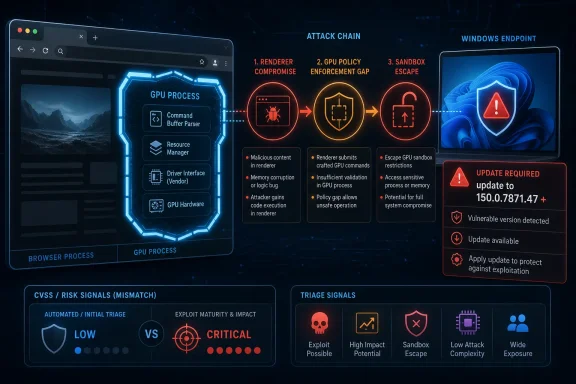 A “Low” Chromium Bug Can Still Be a Sandbox-Escape Problem
Chrome’s security model is built around the idea that the browser should survive a partial compromise. A malicious page may trigger a memory corruption bug in a renderer, but the renderer is supposed to be confined, stripped of broad system access, and forced to communicate with more privileged processes through narrow, policy-controlled interfaces. That is the bargain behind modern web browsing: untrusted code runs constantly, but it runs in compartments.CVE-2026-14037 matters because it sits at one of those compartment boundaries. The NVD description says an attacker must already have compromised the renderer process before the GPU issue becomes useful. That precondition explains why Chromium can rate the vulnerability “Low” in its own security severity language: by itself, it is not the first domino.
But attackers do not buy vulnerabilities one at a time. They assemble them. A renderer exploit gives a foothold; a sandbox escape turns that foothold into access that can matter on the host. In that chain-based view, a weak policy check in the GPU process is not a footnote but a bridge.
That is why CISA’s ADP enrichment looks so much harsher than the Chromium severity label. CISA assigned a CVSS 3.1 vector of AV:N/AC:L/PR:N/UI:R/S:C/C:H/I:H/A:H, producing a 9.6 critical score. The important translation is this: the attack is network-deliverable, needs user interaction, crosses a security boundary, and can have high confidentiality, integrity, and availability impact if chained successfully.
The GPU Process Became a Security Boundary by Accident and Necessity
The browser GPU process began life as a performance and compatibility answer. WebGL, accelerated canvas, video decode, compositing, hardware overlays, and increasingly complex graphics pipelines all demanded a way to talk to drivers and hardware without dragging the whole browser down. Over time, that performance subsystem became a security subsystem because it handled risky inputs, mediated access to privileged APIs, and sat close to operating-system graphics stacks.That proximity is the problem. GPU drivers are historically large, vendor-specific, performance-tuned, and difficult to sandbox perfectly. Browser vendors therefore try to put policy gates between web content and dangerous GPU capabilities. CVE-2026-14037 is exactly the kind of bug that emerges when those gates are incomplete, inconsistent, or too trusting of a compromised renderer.
On Windows, this is especially consequential because Chrome’s GPU process interacts with a platform that has spent years hardening graphics memory handling, driver isolation, and process mitigation. Microsoft has improved the kernel and driver model over successive Windows releases, but the browser still carries much of the burden of deciding which requests should be allowed to cross from web content into acceleration machinery. The web page may be “just HTML,” but the path from a canvas draw call to a driver-facing interface is long and security-sensitive.
The phrase insufficient policy enforcement sounds bureaucratic. In browser security, it is often more dangerous than it sounds. It means the system may already know that a boundary exists, but one path through the machinery fails to enforce it strongly enough.
CISA’s Critical Score Is a Warning About Chains, Not Proof of Active Exploitation
There is a temptation to read a 9.6 score as evidence that the internet is already on fire. That would overstate the public record. The NVD change history includes CISA’s SSVC-style information showing “exploitation: none” and “automatable: no” as of the July 1 modification. In plain English, there was no public indication in that enrichment that CVE-2026-14037 was being exploited in the wild at the time of that update.That distinction matters. A vulnerability can be strategically important without being a known zero-day. CVSS measures potential technical impact under a defined set of assumptions; it does not tell you whether a criminal crew has working exploit code today. CISA’s rating reflects what the bug could do as part of an attack chain, not a confirmed campaign.
Still, administrators should not dismiss the score as alarmism. Browser exploits routinely rely on chaining a renderer compromise with a sandbox escape. Chrome’s architecture assumes renderer compromise is survivable only if the next boundary holds. If the GPU boundary can be weakened after the renderer falls, the defender has lost one of the browser’s most important layers.
This is the heart of the severity mismatch. Chromium’s “Low” is scoped to the bug’s place inside Google’s internal triage system. CISA’s critical score is scoped to the outcome if the bug is used in a realistic exploit sequence. Both can be internally consistent, and both can mislead if read without context.
The Version Number Is the Operational Detail That Matters
For most WindowsForum readers, the actionable line is simple: Chrome before 150.0.7871.47 is the affected range identified for this CVE, and desktop users should be on the fixed 150.0.7871.47 line or later. NIST’s change log added the CPE configuration for Google Chrome versions up to but excluding 150.0.7871.47. That is the inventory fact administrators need for vulnerability scanners, endpoint reports, and compliance dashboards.Chrome’s staged rollout model complicates that simplicity. Google often pushes Stable Channel updates gradually, and enterprise-managed Chrome fleets may sit behind update policies, testing rings, or maintenance windows. The practical result is that two machines in the same organization can report different fixed states for several days unless update enforcement is explicit.
On unmanaged Windows PCs, the usual check remains Chrome’s About page, which triggers an update check and prompts a relaunch if needed. On managed systems, the better answer is policy-backed verification: confirm the installed version through your endpoint management platform, browser management console, software inventory agent, or vulnerability scanner. “Chrome updates automatically” is not a control; it is an assumption until measured.
The same lesson applies to Chromium-based browsers. Microsoft Edge, Brave, Vivaldi, Opera, and others inherit large amounts of Chromium code, but each vendor ships fixes on its own schedule and with its own versioning. CVE-2026-14037 is a Chrome CVE in the NVD entry, but the underlying Chromium area should prompt administrators to check downstream browser advisories rather than assuming Chrome’s version number maps cleanly to every fork.
The Crafted HTML Page Is the Old Attack Surface Wearing New Clothes
The NVD description’s attack vehicle is a crafted HTML page. That sounds mundane because it is. The web’s most dangerous attack surface is not a suspicious executable attachment; it is the ordinary act of rendering content from an untrusted site, ad frame, compromised SaaS page, phishing landing page, or malicious redirect.Modern browser exploitation often begins with social engineering that barely looks like social engineering. A user clicks a link in chat, opens a shared document portal, follows a search result, or lands on a compromised legitimate site. If the attacker can pair a renderer bug with a sandbox escape, the browser’s containment promise is under pressure.
CVE-2026-14037 requires the renderer to be compromised first, and that requirement is meaningful. It means the GPU flaw is not a stand-alone “visit and instantly own the machine” issue based on the public description. But it also means the flaw belongs to the part of exploit development where attackers invest heavily: turning one browser bug into a more useful foothold.
This is why security teams should resist ranking browser vulnerabilities only by whether they are the first exploit stage. A second-stage sandbox escape may be the part that determines whether an intrusion fizzles inside a constrained process or becomes capable of stealing secrets, manipulating local data, or pivoting into other parts of the endpoint.
The NVD Entry Shows the Messiness of Modern Vulnerability Metadata
The user-facing NVD page for CVE-2026-14037 is also a useful snapshot of the vulnerability-data pipeline. Chrome issued the CVE on June 30. CISA-ADP added scoring, weakness classification, and SSVC data on July 1. NIST’s own CVSS assessment was not yet provided in the visible record, while the CPE configuration was added during initial analysis.That sequencing is normal, but it can be confusing. Security teams often consume CVE data through scanners that update at different times, parse CPEs differently, and display vendor severity, NVD severity, and enrichment severity side by side. For a period of time, the same CVE may appear unscored in one dashboard, critical in another, and low in the vendor’s release note.
CVE-2026-14037 is therefore a case study in why vulnerability management cannot be fully automated around a single severity field. The CPE tells you whether an asset is in scope. The vendor advisory tells you which update contains the fix. CVSS tells you one model of technical impact. SSVC-style enrichment tells you something about exploitation status and decision priority. None of those fields is the whole truth.
For Windows administrators, the healthy practice is to treat browser sandbox escapes and sandbox-escape enablers as expedited patch candidates even when the vendor’s label looks modest. Browsers are high-exposure applications, and Chrome is often present on endpoints that handle email, identity portals, internal dashboards, cloud admin consoles, password managers, and privileged SaaS sessions. That exposure changes the risk calculus.
“Are We Missing a CPE?” Is More Than a Database Prompt
The NVD page’s “Are we missing a CPE?” prompt is boilerplate, but in this case it points to a real operational issue. Chrome has a clean CPE entry. The broader Chromium ecosystem does not always present the same neat mapping. Organizations rarely run only one browser, and browser components can show up embedded in applications, WebView runtimes, Electron apps, and vendor-packaged Chromium builds.That does not mean every Chromium-derived product is automatically vulnerable to CVE-2026-14037 in the same way. Build configuration, branch level, patch backports, disabled features, and platform-specific code all matter. But it does mean that administrators should avoid stopping at the literal Chrome CPE if their risk model includes Chromium as a platform dependency.
Windows shops have learned this lesson through WebView2 and Electron. A patched system browser does not necessarily patch every Chromium runtime bundled with a desktop application. Some apps update their embedded runtime promptly; others lag. In high-sensitivity environments, the inventory question is not “Do we have Chrome?” but “Where do we run Chromium-derived code that renders untrusted content?”
That is the uncomfortable expansion of the browser patching problem. The browser is no longer a single application icon on the taskbar. It is a rendering platform distributed across productivity tools, chat clients, helpdesk agents, admin portals, and line-of-business apps.
Why Windows Defenders Should Care Even Without a Known Exploit
The strongest argument for urgency is not panic over this one CVE. It is the broader pattern of browser exploitation. Chrome’s June 2026 release cadence included large security drops, with multiple reports noting unusually high vulnerability counts in recent stable updates. Even without leaning on inflated totals or social-media summaries, the official Chrome Releases blog made clear that the Stable Channel has been carrying a steady load of security fixes.Attackers like browsers because browsers sit at the intersection of users, identity, documents, and cloud control planes. A compromised browser context can expose session tokens, password-manager interactions, local files offered through upload dialogs, and internal web applications reachable only from the victim’s network. A sandbox escape raises the stakes because it can move the attack closer to the operating system.
On Windows, endpoint detection and response tools may catch post-exploitation behavior, but they cannot make browser patching optional. The exploit chain that never runs because Chrome updated yesterday is still the cheapest win in endpoint security. The exploit chain that runs and then gets caught is a much more expensive day.
CVE-2026-14037 is not the kind of bug that should send every helpdesk into emergency mode by itself. It is, however, exactly the kind of bug that should validate aggressive browser update policy. If an organization’s Chrome fleet cannot reliably move past a fixed version within days, the risk is not this CVE alone; it is the accumulated exposure to every browser chain that follows the same pattern.
Enterprise Policy Can Turn Chrome’s Auto-Update Promise Into a Measurable Control
Chrome’s consumer update story is designed to be quiet. That is good for home users and bad for administrators who need proof. Enterprise IT needs a measurable answer: which endpoints have updated, which are pending relaunch, which are pinned by policy, and which are failing update checks?The relaunch problem deserves special attention. Chrome can download an update and still run old code until the browser restarts. In organizations where users keep dozens of tabs open for weeks, “installed” and “active” can diverge. A fleet may look mostly patched on paper while a meaningful subset continues running the vulnerable build until a forced restart or maintenance event.
Chrome Browser Cloud Management, Group Policy, Intune, Configuration Manager, and third-party endpoint tools can all play a role, depending on the environment. The exact tooling matters less than the discipline: set update policies, monitor version drift, enforce relaunch deadlines, and keep exception lists short. Browser updates should be treated more like endpoint security updates than ordinary application refreshes.
There is also a communications angle. Users often interpret browser relaunch prompts as optional annoyances. Security teams can reduce friction by setting predictable restart windows and explaining that browser patches close the very path attackers use when email filtering and web filtering fail. The goal is not to scare users; it is to make the relaunch feel like part of the security routine.
The Severity Disagreement Is a Feature, Not a Bug, of Vulnerability Triage
It is tempting to ask whether Chromium or CISA is “right.” That is the wrong framing. They are measuring different things for different audiences. Google’s internal severity labels help prioritize engineering response and reward structures inside a massive browser project. CISA’s enrichment helps defenders understand potential operational impact across the public vulnerability ecosystem.The disagreement becomes useful when it forces a better conversation. If a bug is low severity because it requires a prior renderer compromise, defenders should ask how often renderer bugs appear and how quickly they patch them. If a bug is critical because it enables a sandbox escape, defenders should ask whether their fleet can close that escape path before exploit chains incorporate it.
Security maturity lies in reconciling these views rather than choosing one. A home user needs the simple instruction to update. A sysadmin needs affected versions, rollout status, relaunch enforcement, and downstream Chromium exposure. A vulnerability manager needs to know why a “Low” vendor label may still deserve accelerated remediation.
CVE-2026-14037 is a small object lesson in the limits of labels. The word “Low” can describe exploit preconditions. The word “Critical” can describe chained impact. The patching decision must account for both.
The Patch Is Simple; The Inventory Is Not
The immediate fix for Chrome users is straightforward: run 150.0.7871.47 or later on affected desktop systems. The messy work is proving that this is true across all Windows endpoints, all user profiles, all installed browser channels, and all Chromium-derived applications that may matter to the organization’s threat model.That inventory problem is getting harder, not easier. Developers build desktop apps with web technologies because it is efficient. Vendors ship embedded browsers because it makes interfaces portable. Admins manage multiple browsers because users, SaaS platforms, and compatibility requirements demand it. The attack surface expands while the patching responsibility fragments.
For smaller organizations, the practical answer is to keep Chrome and Edge on automatic updates, verify versions weekly or through endpoint tooling, and avoid long-lived browser sessions where updates sit pending. For larger enterprises, the answer is ring-based rollout with fast security lanes, relaunch enforcement, and asset queries that distinguish installed version from running version. For high-risk teams, browser isolation, site isolation policy review, exploit protection, and hardened browsing profiles still have a place.
None of this is glamorous. It is the uncelebrated operational work that determines whether a CVE remains a line item or becomes an incident.
The Lesson Hidden in Chrome 150.0.7871.47
The practical conclusions from CVE-2026-14037 are narrow enough to act on and broad enough to shape policy. Treat this as a Chrome patching issue first, a Chromium ecosystem prompt second, and a reminder about sandbox-chain risk always.- Chrome desktop installations older than 150.0.7871.47 should be treated as exposed to CVE-2026-14037 and updated promptly.
- The public record described no known exploitation in CISA’s July 1 enrichment, but the bug’s sandbox-escape role makes delay hard to justify.
- Chromium’s “Low” severity label reflects the need for a prior renderer compromise, while CISA’s critical score reflects the potential impact once that precondition is met.
- Windows administrators should verify not only that Chrome downloaded the update, but that users relaunched into the fixed build.
- Organizations that run Chromium-based browsers, Electron applications, or embedded web runtimes should check vendor-specific update status rather than assuming Chrome’s fix covers everything.
References
- Primary source: NVD / Chromium
Published: 2026-07-03T07:00:17-07:00
NVD - CVE-2026-14037
 nvd.nist.gov
- Security advisory: MSRC
Published: 2026-07-03T07:00:17-07:00
Original feed URL
Security Update Guide - Microsoft Security Response Center
 msrc.microsoft.com
- Related coverage: radar.offseq.com
CVE-2026-14037: Insufficient policy enforcement in Google Chrome - Live Threat Intelligence - Threat Radar | OffSeq.com
Detailed information about CVE-2026-14037: Insufficient policy enforcement in Google Chrome affecting Google Chrome. Get real-time updates, technical details, aradar.offseq.com
