

Google has fixed CVE-2026-14404, a medium-severity PDFium flaw affecting Chrome versions earlier than 150.0.7871.46. According to the supplied CVE description, a remote attacker can use a crafted PDF to spoof browser interface information, potentially causing a user to trust a presentation that Chrome has not represented accurately. The supplied CVSS assessment lists no direct confidentiality or availability impact; the CVE description identifies UI spoofing, not code execution. The available assessment also lists no known exploitation.
The confirmed product boundary is important: the vulnerability record identifies Google Chrome. It does not, by itself, establish affected or corrected versions for Microsoft Edge or other Chromium-derived products. Those applications must be checked against their own vendors’ guidance rather than against Chrome’s version number.
CVE-2026-14404 is described by Chrome and the National Vulnerability Database as an “inappropriate implementation” in PDFium, the PDF technology used by Google Chrome. In vulnerable versions, a remote attacker can deliver a crafted PDF that causes UI spoofing. Chrome assigned the issue Medium security severity, while the supplied CISA-ADP CVSS 3.1 assessment gives it a base score of 6.5.
UI spoofing concerns the integrity of information presented to the user. The weakness is classified as CWE-451, User Interface Misrepresentation of Critical Information, reflecting a failure to maintain a reliable distinction between untrusted content and security-relevant interface information.
The practical risk depends on what the user does in response. Hypothetically, misleading interface information could contribute to a broader social-engineering attempt by making document content appear more authoritative than it is. The public CVE description does not specify particular prompts, controls, workflows, or follow-on actions, so defenders should not treat any one scenario as a confirmed exploitation method for this flaw.
The operational conclusion is narrower and more defensible: a PDF rendered in an affected version of Chrome may be able to misrepresent browser UI information, and updating Chrome removes the installation from the documented vulnerable range.
PDFium must interpret a complex document format that supports detailed layouts, fonts, annotations, forms, embedded elements, and numerous compatibility cases. A document that appears static to the user may still require substantial parsing and rendering work.
CVE-2026-14404 does not establish that all PDFs are broadly unsafe, nor does it mean organizations must disable Chrome’s PDF viewer in every environment. It does show that the viewer is an active attack surface and that the boundary between document-controlled content and browser-controlled interface information matters.
A successful spoofing flaw can undermine the reliability of what the user believes the application is presenting. That is different from a documented claim of native-code execution, data theft, sandbox escape, or operating-system compromise. The supplied CVSS assessment lists confidentiality and availability impacts as none, while integrity impact is rated high.
That combination explains why the issue warrants prompt remediation without sensational claims. The technical record supports concern about deceptive presentation, but it does not support describing CVE-2026-14404 as a complete browser or Windows takeover.
The network attack vector indicates that malicious input can be delivered remotely rather than requiring physical or local access to the target. Low attack complexity means the assessment does not depend on unusually difficult preconditions, and privileges required are none, so the attacker does not first need an authorized account on the target.
The user-interaction requirement is central. A person must encounter or open the crafted PDF, and the attack’s practical effect depends on interaction with the resulting presentation. The record does not characterize this as a vulnerability that silently compromises every reachable Chrome installation without user involvement.
The supplied assessment lists confidentiality impact as none and availability impact as none. It therefore does not directly claim that the vulnerability exposes protected data or makes Chrome or Windows unavailable. Integrity impact is rated high, consistent with the CVE’s description of UI spoofing and the CWE-451 classification.
Scope is unchanged, indicating that the scored impact remains within the same security authority. That does not make the issue irrelevant, but it constrains how it should be described. The available evidence supports a browser UI-integrity problem rather than claims of cross-boundary system compromise.
The supplied Stakeholder-Specific Vulnerability Categorization data lists exploitation as none, automatable as no, and technical impact as partial. Those values argue against calling this an actively exploited zero-day, a mass automated compromise, or a route to complete machine takeover.
They do not argue for leaving affected installations unpatched. The fixed-version boundary is explicit, user interaction with external PDFs is common in many organizations, and remediation is available.
End users can verify the version in the running browser by selecting ⋮ > Help > About Google Chrome or entering
For managed devices, remote verification is necessarily environment-specific. Administrators should use whichever authoritative inventory source their organization has configured, such as a Chrome browser-management console, endpoint-management platform, software-distribution service, or endpoint inventory agent. The relevant field is the Chrome application version reported for each device, which must be compared with the 150.0.7871.46 threshold.
Where remote reporting is incomplete or disputed, a direct check on the endpoint through
Microsoft Edge uses its own product versioning, release process, packaging, and vendor advisories. The same is true of other Chromium-derived browsers and applications. Chrome version 150.0.7871.46 is therefore not a valid compliance threshold for Edge unless Microsoft independently provides guidance that establishes an equivalent affected and corrected range.
The correct administrative approach is product-specific:
A CVE identifier alone is not a deployment instruction. Security teams also need a product name, vulnerable range, corrected boundary, attack conditions, impact description, and prioritization context. In this case, those elements combine to support a concrete action: identify Chrome installations earlier than 150.0.7871.46, update them, and verify the resulting version.
CISA-ADP enrichment: The record received a CVSS 3.1 vector and 6.5 Medium score, the CWE-451 classification, and SSVC data listing exploitation as none, automatable as no, and technical impact as partial.
NIST analysis: The Chrome CPE configuration was added, documenting versions earlier than 150.0.7871.46 as vulnerable and classifying the vendor material associated with the release.
The supplied material does not provide public reproduction steps for the PDFium behavior. That limits detailed exploit analysis and prevents responsible reporting from asserting a specific visual technique, PDF structure, prompt design, or detection signature.
Defenders should work from the confirmed facts rather than fill those gaps with speculation:
CVE-2026-14404 requires user interaction and has no direct confidentiality or availability impact in the supplied CVSS assessment. Those factors limit its score. At the same time, the issue is network-reachable, requires no prior privileges, has low assessed attack complexity, and carries high integrity impact.
Organizational exposure will vary by workflow. Employees in finance, legal, recruitment, procurement, insurance, customer support, healthcare administration, and government services may routinely open PDFs received from outside the organization. Systems that never process external PDFs present a different risk profile.
This makes workflow-aware prioritization useful. Administrators can first update devices used by teams that regularly process externally supplied documents, then complete deployment across the remaining Chrome population. That is a prioritization strategy, not a reason to leave lower-exposure devices indefinitely vulnerable.
No supplied fact establishes that organizations must shut down Chrome, disable all PDF handling, or conduct an emergency operating-system rebuild. A proportionate response is rapid browser remediation:
A Windows device can be current on Microsoft operating-system updates while still running an affected Chrome release. Conversely, updating Chrome does not prove that Edge, another browser, a standalone PDF reader, or a line-of-business application has received an equivalent fix.
Browser and renderer inventory is essential. A single Windows device may include:
Organizations that intentionally hold Chrome at a fixed version should compare the security cost of that decision with the compatibility requirement behind it. If immediate remediation is genuinely impossible, temporary controls should focus on reducing exposure to untrusted PDFs in the affected browser.
Such temporary measures may include directing high-exposure users not to open unsolicited PDFs in the affected Chrome version, using the organization’s existing email and web filtering, and routing suspicious documents through an established isolated-review process. These measures are bridges to the update, not replacements for it.
The most reliable defensive check is version-based: locate Chrome releases earlier than 150.0.7871.46 and update them.
Incident monitoring can still look for broader social-engineering activity, but any examples must be treated as hypothetical rather than CVE-specific indicators. For example, an organization might investigate when an externally delivered document is followed by an unusual login, download, or business request. Such a sequence could have many causes and would not, by itself, demonstrate use of this vulnerability.
User reports may also provide useful context. An employee might report that document content appeared to overlap with or imitate browser-controlled information. Security teams should capture that report without declaring exploitation before technical review.
Useful evidence can include:
The confirmed facts establish a network-reachable, low-complexity, no-privilege vulnerability that requires user interaction and can produce high integrity impact. Chrome assigned Medium severity, and the supplied CISA-ADP assessment scores it 6.5. Google Chrome versions earlier than 150.0.7871.46 are within the documented affected range.
The same record establishes important limits. The SSVC entry lists exploitation as none, the attack as not automatable, and technical impact as partial. The supplied CVSS assessment lists no direct confidentiality or availability impact. The CVE description identifies UI spoofing, not code execution, and it does not claim sandbox escape, persistence, credential theft, Windows compromise, or complete machine takeover.
Responsible reporting must preserve both sides. Overstatement creates unnecessary alarm and weakens credibility. Understatement ignores the importance of interface integrity in document-heavy workflows.
For Windows users, the practical resolution is simple: open ⋮ > Help > About Google Chrome, or go directly to
The broader lesson is that security boundaries include what software communicates to people, not only what code can access. A browser must reliably distinguish trusted interface information from untrusted document content because users make consequential decisions based on that distinction. CVE-2026-14404 is a focused reminder to treat browser updates, PDF rendering, and interface integrity as connected parts of Windows endpoint security.
The confirmed product boundary is important: the vulnerability record identifies Google Chrome. It does not, by itself, establish affected or corrected versions for Microsoft Edge or other Chromium-derived products. Those applications must be checked against their own vendors’ guidance rather than against Chrome’s version number.
What to do now
Windows users: In Chrome, select ⋮ > Help > About Google Chrome, or enterchrome://settings/helpdirectly in the address bar. Confirm that the displayed version is 150.0.7871.46 or later, then click Relaunch if prompted.
Administrators: Identify managed devices running Chrome earlier than 150.0.7871.46, deploy the corrected release, and verify the resulting version. The exact remote verification method is environment-specific: use the browser-management console, endpoint-management inventory, or software-distribution reporting available in your organization. For a direct endpoint check, openchrome://settings/helpin the running browser and confirm the version displayed there.
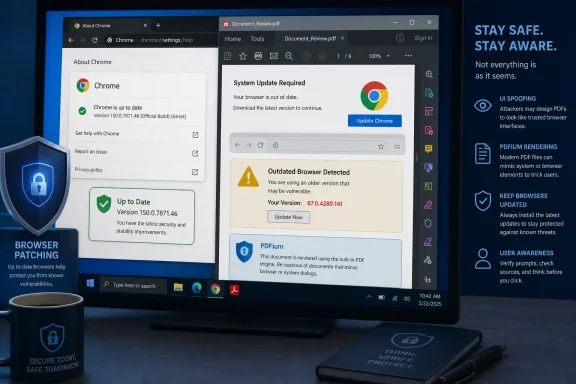 A Crafted PDF Can Misrepresent Trusted Interface Information
CVE-2026-14404 is described by Chrome and the National Vulnerability Database as an “inappropriate implementation” in PDFium, the PDF technology used by Google Chrome. In vulnerable versions, a remote attacker can deliver a crafted PDF that causes UI spoofing. Chrome assigned the issue Medium security severity, while the supplied CISA-ADP CVSS 3.1 assessment gives it a base score of 6.5.UI spoofing concerns the integrity of information presented to the user. The weakness is classified as CWE-451, User Interface Misrepresentation of Critical Information, reflecting a failure to maintain a reliable distinction between untrusted content and security-relevant interface information.
The practical risk depends on what the user does in response. Hypothetically, misleading interface information could contribute to a broader social-engineering attempt by making document content appear more authoritative than it is. The public CVE description does not specify particular prompts, controls, workflows, or follow-on actions, so defenders should not treat any one scenario as a confirmed exploitation method for this flaw.
The operational conclusion is narrower and more defensible: a PDF rendered in an affected version of Chrome may be able to misrepresent browser UI information, and updating Chrome removes the installation from the documented vulnerable range.
PDFium Is Part of Chrome’s Document Attack Surface
PDFs are commonly used for invoices, contracts, shipping records, tax documents, resumes, legal correspondence, benefit forms, and internal approvals. Chrome can display these files inside a browser tab, placing PDF parsing and rendering within the browser’s security boundary.PDFium must interpret a complex document format that supports detailed layouts, fonts, annotations, forms, embedded elements, and numerous compatibility cases. A document that appears static to the user may still require substantial parsing and rendering work.
CVE-2026-14404 does not establish that all PDFs are broadly unsafe, nor does it mean organizations must disable Chrome’s PDF viewer in every environment. It does show that the viewer is an active attack surface and that the boundary between document-controlled content and browser-controlled interface information matters.
A successful spoofing flaw can undermine the reliability of what the user believes the application is presenting. That is different from a documented claim of native-code execution, data theft, sandbox escape, or operating-system compromise. The supplied CVSS assessment lists confidentiality and availability impacts as none, while integrity impact is rated high.
That combination explains why the issue warrants prompt remediation without sensational claims. The technical record supports concern about deceptive presentation, but it does not support describing CVE-2026-14404 as a complete browser or Windows takeover.
The 6.5 Score Describes a User-Interaction Attack
The supplied CISA-ADP assessment assigns CVE-2026-14404 a CVSS 3.1 score of 6.5, with the vectorAV:N/AC:L/PR:N/UI:R/S:U/C:N/I:H/A:N. That vector summarizes both the vulnerability’s reach and its documented limits.The network attack vector indicates that malicious input can be delivered remotely rather than requiring physical or local access to the target. Low attack complexity means the assessment does not depend on unusually difficult preconditions, and privileges required are none, so the attacker does not first need an authorized account on the target.
The user-interaction requirement is central. A person must encounter or open the crafted PDF, and the attack’s practical effect depends on interaction with the resulting presentation. The record does not characterize this as a vulnerability that silently compromises every reachable Chrome installation without user involvement.
The supplied assessment lists confidentiality impact as none and availability impact as none. It therefore does not directly claim that the vulnerability exposes protected data or makes Chrome or Windows unavailable. Integrity impact is rated high, consistent with the CVE’s description of UI spoofing and the CWE-451 classification.
Scope is unchanged, indicating that the scored impact remains within the same security authority. That does not make the issue irrelevant, but it constrains how it should be described. The available evidence supports a browser UI-integrity problem rather than claims of cross-boundary system compromise.
The supplied Stakeholder-Specific Vulnerability Categorization data lists exploitation as none, automatable as no, and technical impact as partial. Those values argue against calling this an actively exploited zero-day, a mass automated compromise, or a route to complete machine takeover.
They do not argue for leaving affected installations unpatched. The fixed-version boundary is explicit, user interaction with external PDFs is common in many organizations, and remediation is available.
Chrome’s Confirmed Version Boundary Is Clear
The affected-product record names Google Chrome, and the supplied NIST CPE configuration marks Chrome versions earlier than 150.0.7871.46 as vulnerable. Administrators therefore have a direct minimum-version test.| Installed Chrome version | CVE-2026-14404 status | Practical interpretation |
|---|---|---|
| Earlier than 150.0.7871.46 | Affected | Within the documented vulnerable Chrome range |
| 150.0.7871.46 or later | Outside the documented affected range | Meets or exceeds the minimum corrected Chrome baseline |
chrome://settings/help in the address bar. The page should display 150.0.7871.46 or later. If Chrome presents a Relaunch button, the user should select it and then return to the same page to confirm the version after Chrome reopens.For managed devices, remote verification is necessarily environment-specific. Administrators should use whichever authoritative inventory source their organization has configured, such as a Chrome browser-management console, endpoint-management platform, software-distribution service, or endpoint inventory agent. The relevant field is the Chrome application version reported for each device, which must be compared with the 150.0.7871.46 threshold.
Where remote reporting is incomplete or disputed, a direct check on the endpoint through
chrome://settings/help provides an actionable confirmation of what the running browser reports. Administrators should document which inventory source is authoritative and avoid treating a successful deployment job as proof that every endpoint has reached the required version.Chrome does not establish the status of Edge
The product scope must not be generalized merely because multiple browsers use Chromium-derived technology. The supplied record identifies Google Chrome and gives a Chrome-specific version boundary.Microsoft Edge uses its own product versioning, release process, packaging, and vendor advisories. The same is true of other Chromium-derived browsers and applications. Chrome version 150.0.7871.46 is therefore not a valid compliance threshold for Edge unless Microsoft independently provides guidance that establishes an equivalent affected and corrected range.
The correct administrative approach is product-specific:
- Check Google Chrome against the Chrome threshold in the CVE record.
- Check Microsoft Edge against Microsoft’s security and release guidance.
- Check other Chromium-derived browsers against their respective vendors’ advisories.
- Check standalone or embedded PDF-rendering applications separately when they are part of the organization’s document workflow.
The Disclosure Record Became Operationally Useful in Stages
The supplied change history shows the vulnerability record gaining the information defenders need for remediation. Chrome provided the initial vulnerability description and affected-version boundary. CISA-ADP added severity, weakness classification, and prioritization data. NIST added the Chrome CPE configuration and reference classifications.A CVE identifier alone is not a deployment instruction. Security teams also need a product name, vulnerable range, corrected boundary, attack conditions, impact description, and prioritization context. In this case, those elements combine to support a concrete action: identify Chrome installations earlier than 150.0.7871.46, update them, and verify the resulting version.
Timeline
Initial vendor-originated record: The vulnerability was described as an inappropriate implementation in PDFium that could allow a remote attacker to perform UI spoofing through a crafted PDF. Google Chrome versions earlier than 150.0.7871.46 were identified as affected, and Chrome assigned Medium severity.CISA-ADP enrichment: The record received a CVSS 3.1 vector and 6.5 Medium score, the CWE-451 classification, and SSVC data listing exploitation as none, automatable as no, and technical impact as partial.
NIST analysis: The Chrome CPE configuration was added, documenting versions earlier than 150.0.7871.46 as vulnerable and classifying the vendor material associated with the release.
The supplied material does not provide public reproduction steps for the PDFium behavior. That limits detailed exploit analysis and prevents responsible reporting from asserting a specific visual technique, PDF structure, prompt design, or detection signature.
Defenders should work from the confirmed facts rather than fill those gaps with speculation:
- The affected component is identified as PDFium in Google Chrome.
- The delivery vehicle is a crafted PDF.
- The documented effect is UI spoofing.
- User interaction is required.
- Chrome versions earlier than 150.0.7871.46 are within the affected range.
- The supplied assessment lists no known exploitation.
- The supplied CVSS assessment lists no direct confidentiality or availability impact.
- The confirmed remediation is to run Chrome 150.0.7871.46 or later.
Medium Severity Still Supports Prompt Patching
Severity labels are prioritization inputs, not complete deployment schedules. Medium vulnerabilities may be deferred when exposure is low or remediation is unusually disruptive, but neither conclusion should be assumed from the label alone.CVE-2026-14404 requires user interaction and has no direct confidentiality or availability impact in the supplied CVSS assessment. Those factors limit its score. At the same time, the issue is network-reachable, requires no prior privileges, has low assessed attack complexity, and carries high integrity impact.
Organizational exposure will vary by workflow. Employees in finance, legal, recruitment, procurement, insurance, customer support, healthcare administration, and government services may routinely open PDFs received from outside the organization. Systems that never process external PDFs present a different risk profile.
This makes workflow-aware prioritization useful. Administrators can first update devices used by teams that regularly process externally supplied documents, then complete deployment across the remaining Chrome population. That is a prioritization strategy, not a reason to leave lower-exposure devices indefinitely vulnerable.
No supplied fact establishes that organizations must shut down Chrome, disable all PDF handling, or conduct an emergency operating-system rebuild. A proportionate response is rapid browser remediation:
- Find Chrome installations earlier than 150.0.7871.46.
- Deploy a corrected version.
- Have users select Relaunch when prompted.
- Verify that Chrome reports 150.0.7871.46 or later.
- Investigate reported interface anomalies involving PDFs without assuming they prove exploitation.
- Evaluate other browsers through their own vendors’ guidance.
Windows Security Requires Product-Specific Browser Hygiene
CVE-2026-14404 is a Chrome vulnerability, not a Windows vulnerability. On Windows endpoints, however, browsers routinely process links, downloads, attachments, and externally supplied documents. Browser-version compliance is therefore part of endpoint security even when the operating system itself is fully patched.A Windows device can be current on Microsoft operating-system updates while still running an affected Chrome release. Conversely, updating Chrome does not prove that Edge, another browser, a standalone PDF reader, or a line-of-business application has received an equivalent fix.
Browser and renderer inventory is essential. A single Windows device may include:
- Google Chrome;
- Microsoft Edge;
- another Chromium-derived browser;
- one or more standalone PDF readers;
- embedded web or document components;
- business applications that preview PDF content.
Organizations that intentionally hold Chrome at a fixed version should compare the security cost of that decision with the compatibility requirement behind it. If immediate remediation is genuinely impossible, temporary controls should focus on reducing exposure to untrusted PDFs in the affected browser.
Such temporary measures may include directing high-exposure users not to open unsolicited PDFs in the affected Chrome version, using the organization’s existing email and web filtering, and routing suspicious documents through an established isolated-review process. These measures are bridges to the update, not replacements for it.
Action checklist for administrators
- Inventory all managed Google Chrome installations.
- Identify every device reporting a version earlier than 150.0.7871.46.
- Deploy Chrome 150.0.7871.46 or later through the organization’s approved management system.
- Tell users to select Relaunch if Chrome prompts them after checking for the update.
- Verify the version through the configured browser-management, endpoint-management, software-distribution, or inventory platform.
- For direct endpoint validation, open
chrome://settings/helpand confirm that the running browser reports 150.0.7871.46 or later. - Define which inventory source is authoritative when management systems report conflicting versions.
- Prioritize devices used by employees who routinely process externally supplied PDFs.
- Preserve the original PDF, source message, source location, screenshot, Chrome version, and relevant timestamps when investigating suspicious behavior.
- Evaluate Microsoft Edge and other Chromium-derived products separately through their own vendors’ guidance.
- Do not use Chrome’s version threshold as proof that another browser or PDF renderer is affected or remediated.
Detection Should Avoid Unsupported Indicators
The public record supplied for this article does not expose the detailed rendering behavior, and the SSVC assessment lists exploitation as none. There is no supported basis for claiming that a particular filename, PDF layout, embedded object, domain, URL pattern, or process sequence identifies exploitation of CVE-2026-14404.The most reliable defensive check is version-based: locate Chrome releases earlier than 150.0.7871.46 and update them.
Incident monitoring can still look for broader social-engineering activity, but any examples must be treated as hypothetical rather than CVE-specific indicators. For example, an organization might investigate when an externally delivered document is followed by an unusual login, download, or business request. Such a sequence could have many causes and would not, by itself, demonstrate use of this vulnerability.
User reports may also provide useful context. An employee might report that document content appeared to overlap with or imitate browser-controlled information. Security teams should capture that report without declaring exploitation before technical review.
Useful evidence can include:
- The original PDF rather than a converted or forwarded copy.
- The email, website, chat, or business system through which it arrived.
- A screenshot or screen recording, if one can be collected safely.
- The exact Chrome version shown at
chrome://settings/help. - The date and time of the event.
- The actions taken before and after the unusual presentation appeared.
- Relevant browser, email, endpoint, identity, or business-process records already retained by the organization.
The Public Record Supports Urgency, Not Alarmism
CVE-2026-14404 should not be flattened into either an emergency-machine-takeover narrative or a harmless visual glitch.The confirmed facts establish a network-reachable, low-complexity, no-privilege vulnerability that requires user interaction and can produce high integrity impact. Chrome assigned Medium severity, and the supplied CISA-ADP assessment scores it 6.5. Google Chrome versions earlier than 150.0.7871.46 are within the documented affected range.
The same record establishes important limits. The SSVC entry lists exploitation as none, the attack as not automatable, and technical impact as partial. The supplied CVSS assessment lists no direct confidentiality or availability impact. The CVE description identifies UI spoofing, not code execution, and it does not claim sandbox escape, persistence, credential theft, Windows compromise, or complete machine takeover.
Responsible reporting must preserve both sides. Overstatement creates unnecessary alarm and weakens credibility. Understatement ignores the importance of interface integrity in document-heavy workflows.
For Windows users, the practical resolution is simple: open ⋮ > Help > About Google Chrome, or go directly to
chrome://settings/help, confirm version 150.0.7871.46 or later, and click Relaunch if prompted. For administrators, the job is to deploy the corrected Chrome release, verify it through an environment-appropriate inventory source, and check other browsers separately rather than assuming Chrome’s affected range applies to them.The broader lesson is that security boundaries include what software communicates to people, not only what code can access. A browser must reliably distinguish trusted interface information from untrusted document content because users make consequential decisions based on that distinction. CVE-2026-14404 is a focused reminder to treat browser updates, PDF rendering, and interface integrity as connected parts of Windows endpoint security.
References
- Primary source: NVD / Chromium
Published: 2026-07-11T15:37:48-07:00
NVD - CVE-2026-14404
 nvd.nist.gov
- Security advisory: MSRC
Published: 2026-07-11T15:37:48-07:00
Original feed URL
Security Update Guide - Microsoft Security Response Center
 msrc.microsoft.com
- Related coverage: security-tracker.debian.org
- Related coverage: vuln.cs.berkeley.edu

Berkeley Vulnerability Initiative · Agentic Vulnerability Coverage Map
A coverage map of vulnerabilities discovered by agentic systems, rebuilt daily from public CVE feeds.
vuln.cs.berkeley.edu
