

An attacker could exploit CVE-2026-35429 over the network by hosting a maliciously crafted website and persuading a Microsoft Edge for Android user to open it, where the browser’s interface could misrepresent critical information and enable spoofing without requiring authentication or local access. That wording matters because this is not a wormable Edge bug, nor is it a classic remote-code-execution emergency. It is a browser trust bug, and browser trust bugs sit in the awkward space between “medium severity” scoring and very real abuse. The attacker still needs the user to tap, but modern phishing campaigns are built around exactly that moment.
CVE-2026-35429 is listed as a spoofing vulnerability in Microsoft Edge, Chromium-based, for Android. The affected product is Microsoft Edge for Android before version 148.0.3967.55, and the flaw is categorized as a user-interface misrepresentation issue. In plain English, the concern is that Edge may show the user something about a page, origin, prompt, or interaction that is not as trustworthy as it appears.
That distinction is important because spoofing vulnerabilities are often underestimated. They do not usually give an attacker instant control of a device. They do, however, attack the decision layer: the small visual cues users rely on when deciding whether a page is legitimate, whether a prompt is safe, or whether a displayed identity can be trusted.
Microsoft’s own exploitation scenario is familiar. An attacker hosts a specially crafted website, then convinces the victim to visit it through an email, instant message, social post, QR code, or attachment-driven lure. The attacker cannot force the user to browse to the page, but the attacker does not need to if the lure is convincing enough.
That is why the “Network” attack vector in the CVSS string should not be read as “automatic compromise from across the internet.” It means the exploit can be delivered remotely over a network once the victim interacts with attacker-controlled content. The missing piece is not connectivity; it is user action.
Once the user opens the page in Edge for Android, the crafted content is designed to trigger the browser’s spoofing weakness. Because the public advisory describes the issue at a high level, we should not pretend to know the exact UI element involved. The safe inference is narrower: the browser may misrepresent critical information in a way that helps an attacker make hostile content look more legitimate than it is.
That could matter in several common mobile scenarios. A spoofed or misleading browser interface can make it harder for a user to tell which site they are on, whether a sign-in prompt belongs to a trusted service, or whether the browser is showing a genuine security signal. The result is not necessarily device takeover; it is a more convincing lie.
This is why user interaction is marked as required. The attacker’s site alone is not enough. The victim must visit it, and the final harm may depend on what the victim does next: entering credentials, approving a prompt, downloading something, or trusting a fake workflow.
The network component means the attacker’s content can be reached remotely. The exploit does not require physical access to the phone, a malicious app already installed on the device, or credentials on the target system. A website is enough as a delivery surface, provided the user opens it in the vulnerable browser.
That still deserves attention. Mobile browsers are exposed to untrusted content all day, and the boundary between “a user chose to open a link” and “a user was manipulated into opening a link” has never been especially clean. Phishing kits, malvertising chains, fake package-tracking messages, and corporate SSO lookalikes all exist to manufacture that click.
But the CVSS details also keep the risk in proportion. The vulnerability is rated medium with a 4.3 base score, attack complexity is low, privileges are not required, and user interaction is required. The listed impact is limited to confidentiality, not integrity or availability, which suggests the concern is exposure or deception rather than arbitrary modification or crashing of the target.
That is the uncomfortable part of this class of vulnerability. A spoofed UI element does not need to defeat cryptography if it can defeat attention. If a page can make the user believe they are interacting with a trusted site or browser-provided surface, the attacker has moved the battlefield from software correctness to human judgment.
Edge for Android also sits in a distinctive position. It is a Chromium-based browser, but it is not simply Chrome with a different icon. Microsoft adds account integration, sync, enterprise policy hooks, Copilot-era interface changes, and its own release pipeline. A vulnerability in the Android version of Edge may therefore matter to organizations that standardize on Microsoft identity and browsing tools across desktop and mobile fleets.
For consumers, the danger is simpler. If Edge is installed and used for banking, Microsoft account access, work email, password-manager flows, or corporate portals, a spoofing bug can become part of a credential-theft chain. The vulnerability may be medium on paper, but the account exposed through it may be high value.
On Android, however, “update the browser” is rarely as clean as it sounds. Some users rely on automatic Play Store updates, others disable them, and managed devices may receive updates through enterprise mobility controls. Work-profile separation can also create situations where personal and managed browser instances are treated differently.
For IT teams, the practical question is not merely whether Microsoft shipped a fix. It is whether every device that can touch company resources has actually received it. Mobile device management platforms, conditional access rules, and app protection policies exist for exactly this reason: the patch only matters once it reaches the endpoints that handle real credentials and data.
The version threshold also helps security teams avoid overreaction. This is not a reason to block all Edge for Android usage indefinitely. It is a reason to inventory versions, enforce updates, and treat stale mobile browsers as part of the same risk surface as stale desktop browsers.
The attacker’s job is to make the required action seem ordinary. A message says a delivery failed. A fake Teams notification claims a file is waiting. A bank-themed SMS warns of account activity. A QR code at a conference points to a “Wi-Fi login” page. In each case, the user action is not an obstacle so much as the attack’s design center.
A browser spoofing vulnerability can make that second stage more persuasive. The lure gets the victim to the page; the UI misrepresentation helps the page survive the user’s moment of doubt. That is the point at which a medium-severity browser bug starts to feel less academic.
This is also why security training alone is insufficient. Telling users to “check the address bar” is less useful when the browser’s handling of critical UI information is itself part of the advisory. Training still matters, but patching removes the condition that makes the deception stronger.
The most immediate control is version enforcement. Managed Android fleets should require an Edge build at or above the fixed version before allowing access to sensitive resources. If an organization cannot reliably query Edge versions, that gap is the bigger lesson.
Conditional access can help by requiring compliant devices, approved client apps, and current app versions for corporate resources. App protection policies can reduce data leakage if a phishing chain succeeds. DNS filtering, safe-link rewriting, and web reputation controls can reduce exposure to known malicious domains, though none of those defenses should be treated as a substitute for the browser update.
Security teams should also review telemetry for mobile-originated sign-in anomalies around the disclosure window. A spoofing vulnerability does not produce a tidy exploit signature in the way a malware dropper might. The observable effect may be suspicious sign-ins, impossible travel, MFA fatigue, or users reporting pages that looked legitimate but behaved oddly.
Users should also be cautious with links received through email, SMS, messaging apps, social media, and QR codes. That warning is old, but the mobile context keeps making it newly relevant. The device in your hand is often where password resets, banking alerts, and work approvals converge.
If a page asks for credentials after arriving through a message, it is safer to close it and navigate manually through a known app or bookmarked site. That habit defeats many phishing chains, including ones that rely on browser presentation tricks. It is especially important on small screens, where visual inspection is harder and UI chrome is easier to miss.
The vulnerability does not mean every Edge for Android session before the fixed version was compromised. It means users were exposed to a class of deception that Microsoft has now patched. The rational response is to update, not to abandon the browser or assume account compromise without evidence.
That is why spoofing vulnerabilities deserve more respect than their scores sometimes receive. They do not always break the machine; they bend the user’s perception of the machine. In a world where credentials and session tokens are often more valuable than local files, that can be enough.
The most useful takeaways are practical rather than dramatic:
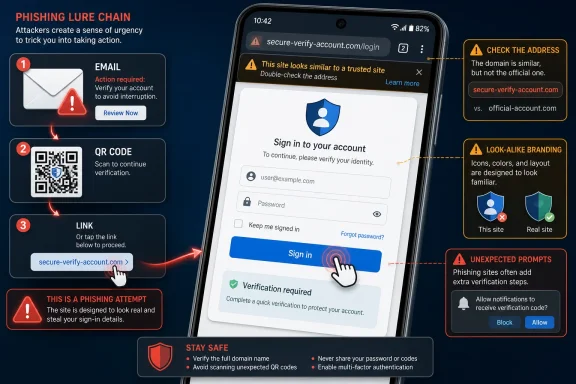 Microsoft’s Android Browser Has a Trust Problem, Not a Code-Execution Crisis
CVE-2026-35429 is listed as a spoofing vulnerability in Microsoft Edge, Chromium-based, for Android. The affected product is Microsoft Edge for Android before version 148.0.3967.55, and the flaw is categorized as a user-interface misrepresentation issue. In plain English, the concern is that Edge may show the user something about a page, origin, prompt, or interaction that is not as trustworthy as it appears.That distinction is important because spoofing vulnerabilities are often underestimated. They do not usually give an attacker instant control of a device. They do, however, attack the decision layer: the small visual cues users rely on when deciding whether a page is legitimate, whether a prompt is safe, or whether a displayed identity can be trusted.
Microsoft’s own exploitation scenario is familiar. An attacker hosts a specially crafted website, then convinces the victim to visit it through an email, instant message, social post, QR code, or attachment-driven lure. The attacker cannot force the user to browse to the page, but the attacker does not need to if the lure is convincing enough.
That is why the “Network” attack vector in the CVSS string should not be read as “automatic compromise from across the internet.” It means the exploit can be delivered remotely over a network once the victim interacts with attacker-controlled content. The missing piece is not connectivity; it is user action.
The Tap Is the Exploit Chain’s Weakest and Strongest Link
The exploit path for CVE-2026-35429 begins outside the browser. The attacker needs a delivery mechanism: a message, a link, an embedded redirect, a fake login notice, a support scam, a malicious ad placement, or a document that nudges the user toward a URL. That social layer is not incidental to the vulnerability; it is the condition that turns the bug into an attack.Once the user opens the page in Edge for Android, the crafted content is designed to trigger the browser’s spoofing weakness. Because the public advisory describes the issue at a high level, we should not pretend to know the exact UI element involved. The safe inference is narrower: the browser may misrepresent critical information in a way that helps an attacker make hostile content look more legitimate than it is.
That could matter in several common mobile scenarios. A spoofed or misleading browser interface can make it harder for a user to tell which site they are on, whether a sign-in prompt belongs to a trusted service, or whether the browser is showing a genuine security signal. The result is not necessarily device takeover; it is a more convincing lie.
This is why user interaction is marked as required. The attacker’s site alone is not enough. The victim must visit it, and the final harm may depend on what the victim does next: entering credentials, approving a prompt, downloading something, or trusting a fake workflow.
“Network” Does Not Mean What Many Patch Dashboards Imply
Security dashboards love simple words, and “Network” is one of the most misleading. To a busy administrator, it can sound like a service listening on a port and accepting unauthenticated exploitation from anywhere. For CVE-2026-35429, that is not the model.The network component means the attacker’s content can be reached remotely. The exploit does not require physical access to the phone, a malicious app already installed on the device, or credentials on the target system. A website is enough as a delivery surface, provided the user opens it in the vulnerable browser.
That still deserves attention. Mobile browsers are exposed to untrusted content all day, and the boundary between “a user chose to open a link” and “a user was manipulated into opening a link” has never been especially clean. Phishing kits, malvertising chains, fake package-tracking messages, and corporate SSO lookalikes all exist to manufacture that click.
But the CVSS details also keep the risk in proportion. The vulnerability is rated medium with a 4.3 base score, attack complexity is low, privileges are not required, and user interaction is required. The listed impact is limited to confidentiality, not integrity or availability, which suggests the concern is exposure or deception rather than arbitrary modification or crashing of the target.
Mobile Browsers Turn Small UI Lies Into Big Security Decisions
Desktop users have spent decades being trained to inspect URLs, padlocks, tabs, windows, and certificate warnings. Mobile users get a much thinner interface. Address bars collapse, app-to-browser transitions are visually compressed, and screen space is scarce. A browser UI spoofing bug on Android therefore lands in an environment where users already have fewer cues to work with.That is the uncomfortable part of this class of vulnerability. A spoofed UI element does not need to defeat cryptography if it can defeat attention. If a page can make the user believe they are interacting with a trusted site or browser-provided surface, the attacker has moved the battlefield from software correctness to human judgment.
Edge for Android also sits in a distinctive position. It is a Chromium-based browser, but it is not simply Chrome with a different icon. Microsoft adds account integration, sync, enterprise policy hooks, Copilot-era interface changes, and its own release pipeline. A vulnerability in the Android version of Edge may therefore matter to organizations that standardize on Microsoft identity and browsing tools across desktop and mobile fleets.
For consumers, the danger is simpler. If Edge is installed and used for banking, Microsoft account access, work email, password-manager flows, or corporate portals, a spoofing bug can become part of a credential-theft chain. The vulnerability may be medium on paper, but the account exposed through it may be high value.
The Patch Boundary Is Clear, but the Fleet Boundary Is Messier
The fixed boundary publicly associated with CVE-2026-35429 is Edge for Android version 148.0.3967.55. Systems running earlier versions fall on the wrong side of the advisory. That gives administrators and users a concrete check: update the browser and verify the installed version.On Android, however, “update the browser” is rarely as clean as it sounds. Some users rely on automatic Play Store updates, others disable them, and managed devices may receive updates through enterprise mobility controls. Work-profile separation can also create situations where personal and managed browser instances are treated differently.
For IT teams, the practical question is not merely whether Microsoft shipped a fix. It is whether every device that can touch company resources has actually received it. Mobile device management platforms, conditional access rules, and app protection policies exist for exactly this reason: the patch only matters once it reaches the endpoints that handle real credentials and data.
The version threshold also helps security teams avoid overreaction. This is not a reason to block all Edge for Android usage indefinitely. It is a reason to inventory versions, enforce updates, and treat stale mobile browsers as part of the same risk surface as stale desktop browsers.
Social Engineering Is Not a Mitigating Detail
Vendor advisories often phrase user-assisted exploitation in a way that sounds reassuring: the attacker cannot force the user to open the content. That is technically true and operationally incomplete. Most successful phishing attacks also require the user to do something, yet nobody serious treats phishing as a solved problem.The attacker’s job is to make the required action seem ordinary. A message says a delivery failed. A fake Teams notification claims a file is waiting. A bank-themed SMS warns of account activity. A QR code at a conference points to a “Wi-Fi login” page. In each case, the user action is not an obstacle so much as the attack’s design center.
A browser spoofing vulnerability can make that second stage more persuasive. The lure gets the victim to the page; the UI misrepresentation helps the page survive the user’s moment of doubt. That is the point at which a medium-severity browser bug starts to feel less academic.
This is also why security training alone is insufficient. Telling users to “check the address bar” is less useful when the browser’s handling of critical UI information is itself part of the advisory. Training still matters, but patching removes the condition that makes the deception stronger.
Enterprise Defenders Should Treat This as a Mobile Phishing Multiplier
For administrators, CVE-2026-35429 belongs in the mobile phishing and browser-hardening bucket. It is not a domain-controller fire drill, but it is also not noise. Any organization that permits Android devices to access Microsoft 365, SaaS dashboards, VPN portals, admin consoles, or internal web apps should care about the browser version used on those devices.The most immediate control is version enforcement. Managed Android fleets should require an Edge build at or above the fixed version before allowing access to sensitive resources. If an organization cannot reliably query Edge versions, that gap is the bigger lesson.
Conditional access can help by requiring compliant devices, approved client apps, and current app versions for corporate resources. App protection policies can reduce data leakage if a phishing chain succeeds. DNS filtering, safe-link rewriting, and web reputation controls can reduce exposure to known malicious domains, though none of those defenses should be treated as a substitute for the browser update.
Security teams should also review telemetry for mobile-originated sign-in anomalies around the disclosure window. A spoofing vulnerability does not produce a tidy exploit signature in the way a malware dropper might. The observable effect may be suspicious sign-ins, impossible travel, MFA fatigue, or users reporting pages that looked legitimate but behaved oddly.
Users Do Not Need Panic; They Need the Boring Fix
For individual Edge users on Android, the advice is refreshingly mundane: update Microsoft Edge from the Play Store, open the browser’s version information, and confirm it is at least 148.0.3967.55. If automatic updates are off, turn them back on unless there is a specific reason not to. Browser updates are security updates.Users should also be cautious with links received through email, SMS, messaging apps, social media, and QR codes. That warning is old, but the mobile context keeps making it newly relevant. The device in your hand is often where password resets, banking alerts, and work approvals converge.
If a page asks for credentials after arriving through a message, it is safer to close it and navigate manually through a known app or bookmarked site. That habit defeats many phishing chains, including ones that rely on browser presentation tricks. It is especially important on small screens, where visual inspection is harder and UI chrome is easier to miss.
The vulnerability does not mean every Edge for Android session before the fixed version was compromised. It means users were exposed to a class of deception that Microsoft has now patched. The rational response is to update, not to abandon the browser or assume account compromise without evidence.
The Real Fix Is Closing the Gap Between Browser Patches and Human Trust
The concrete lesson from CVE-2026-35429 is that the browser’s interface remains part of the security boundary. A padlock, origin display, permission prompt, account sign-in surface, or browser-controlled message is not decoration. It is the user-facing part of the trust model.That is why spoofing vulnerabilities deserve more respect than their scores sometimes receive. They do not always break the machine; they bend the user’s perception of the machine. In a world where credentials and session tokens are often more valuable than local files, that can be enough.
The most useful takeaways are practical rather than dramatic:
- An attacker would exploit CVE-2026-35429 by luring an Edge for Android user to a specially crafted website under the attacker’s control.
- The vulnerability is remotely reachable over a network, but it still requires user interaction and is not described as a forced, wormable compromise.
- Microsoft Edge for Android versions before 148.0.3967.55 are the relevant concern, so version verification matters more than product-name panic.
- The most plausible abuse path is phishing or credential deception strengthened by browser UI misrepresentation.
- Enterprise teams should treat the issue as part of mobile browser compliance, conditional access, and anti-phishing defense rather than as an isolated Android footnote.
- Users should update Edge, distrust message-driven sign-in links, and navigate manually to sensitive sites when a prompt arrives unexpectedly.
References
- Primary source: MSRC
Published: 2026-06-08T07:00:00-07:00
Security Update Guide - Microsoft Security Response Center
 msrc.microsoft.com
- Related coverage: sentinelone.com
CVE-2026-35429: Microsoft Edge Android Spoofing Vulnerability
CVE-2026-35429 is a UI spoofing vulnerability in Microsoft Edge for Android. Learn about its impact, affected versions, and mitigation methods.www.sentinelone.com
- Related coverage: datacomm.com
- Related coverage: netservicesgroup.com
CVE-2026-0391 Microsoft Edge (Chromium-based) for Android Spoofing Vulnerability - Network Services Group
User interface (ui) misrepresentation of critical information in Microsoft Edge for Android allows an unauthorized attacker to perform spoofing over a network.www.netservicesgroup.com - Official source: microsoft.com
MSRC - Microsoft Security Response Center
The Microsoft Security Response Center is part of the defender community and on the front line of security response evolution. For over twenty years, we have been engaged with security researchers working to protect customers and the broader ecosystem.www.microsoft.com
- Related coverage: winbuzzer.com
New Microsoft Edge Android Flaw Enables Spoofing Attacks
Microsoft has disclosed CVE-2026-0391, a UI spoofing vulnerability in Edge for Android that enables network attacks and phishing campaigns targeting mobile users. winbuzzer.com
- Related coverage: www2.gov.bc.ca
