

Microsoft’s guidance for CVE-2026-44819 says Office customers must install every security update offered for the affected Office software on their systems, even when the Security Updates table lists multiple packages for what appears to be the same product. That small sentence matters because it turns this from a routine Office remote-code-execution fix into an inventory problem. The patch is not simply “install the Office update and move on”; it is “know exactly which Office components, channels, language packs, runtimes, and legacy products are present, then let every applicable update land.”
The most important line in Microsoft’s advisory is not the vulnerability title. It is the answer to the deceptively mundane deployment question: if multiple update packages are listed for affected software, do customers need all of them? Microsoft’s answer is yes, and it adds that applicable updates can be installed in any order.
That sounds like standard patch-management boilerplate until you remember how Office actually exists in the wild. Office is not one thing. It is Click-to-Run Microsoft 365 Apps on one fleet, volume-licensed Office 2019 on another, a stubborn Access Runtime on a line-of-business workstation, Visio on the project team’s machines, Project on a handful of finance laptops, and language accessories scattered across global offices.
CVE-2026-44819 therefore lands in the awkward middle ground of modern Windows administration. The vulnerability is described as a Microsoft Office remote code execution flaw, but the remediation path is less about a single patch than about coverage. If your endpoint management tool sees only the headline application and misses an installed Office component, you may walk away with a green dashboard and a still-exposed machine.
That is why the advisory’s “install all applicable updates” language deserves more attention than it usually gets. It is Microsoft saying, in effect, that partial Office patching is not a supported interpretation of this fix.
Office vulnerabilities are dangerous precisely because users are trained to open Office content. A spreadsheet from a vendor, a Word document from legal, a PowerPoint from a partner, an Access database in an old workflow — these are not suspicious edge cases in most businesses. They are the daily grammar of work.
Microsoft has spent years reducing the blast radius of Office-borne attacks. Protected View, Mark of the Web enforcement, macro hardening, Attack Surface Reduction rules, and cloud detonation have all made commodity document malware less straightforward than it used to be. But none of those controls changes the core fact that Office remains one of the richest file-parsing environments installed on Windows endpoints.
That is the larger significance of CVE-2026-44819. Even without public exploitation details, a remote-code-execution label on Office should be treated as a reminder that the endpoint perimeter is not only a browser, a VPN client, and RDP. It is also the application suite that employees use to open files from people they only half trust.
The modern Microsoft 365 Apps model is designed to be evergreen, but enterprise environments are rarely clean. Some machines receive current channel updates quickly. Others sit on monthly enterprise channels. Some are governed by Configuration Manager or Intune. Others are updated through internal shares, WSUS-adjacent processes, or third-party patch tools that treat Office components unevenly.
Then there are the durable oddities: standalone Visio, standalone Project, Office LTSC, Access Database Engine redistributables, proofing tools, language packs, and older MSI-based installations that never quite disappeared. A vulnerability that crosses Office product boundaries can require more than the obvious Word or Excel patch.
Microsoft’s answer makes the policy unambiguous. If the Security Updates table offers multiple applicable packages for the software installed, the safe reading is not to choose among them. The safe reading is to apply them all.
But “any order” should not be confused with “any subset.” The order is flexible because the remediation model expects all relevant pieces to arrive. Skipping one update because another appears broader may leave a component untouched.
For administrators, the better mental model is dependency closure. You are not hunting for the one package that represents the vulnerability. You are ensuring that every installed Office component with an applicable fix has been advanced past the vulnerable build.
That distinction matters most on shared machines and legacy endpoints. A device may look compliant from the perspective of Microsoft 365 Apps while still carrying a separate Office runtime or component that an attacker can invoke through a crafted file or workflow. The messier the endpoint, the more dangerous it is to rely on product names alone.
A laptop may have Microsoft 365 Apps for enterprise, but also an old Visio viewer. A finance workstation may have a supported Office suite and an Access runtime required by a niche database application. A developer machine may carry database connectivity components installed years earlier by a setup wizard. A multilingual desktop may have proofing and language tools that never show up in a casual software inventory review.
This is where CVE-2026-44819 becomes a test of asset intelligence. The vulnerability itself is the spark, but the bigger question is whether the organization can determine which machines need which Office updates. Many can deploy a monthly Windows cumulative update with confidence; fewer can prove that every Office-adjacent package on every endpoint has been patched.
That gap is not theoretical. Attackers do not need your standard image to be vulnerable if they can find the exception. The forgotten endpoint in the lab, the kiosk with a legacy runtime, the executive laptop with standalone Project, or the terminal server with mixed Office components can become the path of least resistance.
For Office, boring discipline means trusting the servicing channel where possible and auditing it where necessary. It means confirming update status at the build level, not merely checking that “Office is installed.” It means treating optional-looking Office components as security-relevant software rather than harmless productivity debris.
It also means avoiding the false comfort of partial compliance. A report that says 95 percent of machines received “the Office update” may hide the 5 percent that matter most. In many environments, those outliers are not random; they are specialized systems with higher business importance and weaker change tolerance.
The advisory’s language pushes admins toward a stricter posture. If a machine has affected software and multiple updates apply, the job is not complete until every applicable update is installed.
The risk for consumers is not that they will thoughtfully choose the wrong package. It is that they will postpone updates because Office appears to be working fine. Office security fixes often arrive with little fanfare, and the applications themselves may remain open for days on laptops that sleep rather than shut down.
That matters because some Office updates do not fully take effect until the application is closed and relaunched. A machine can download an update and still be running the old process. The most ordinary security advice — save your work, close the apps, restart if needed — remains irritatingly relevant.
Consumers should also remember that Microsoft Office is not limited to Word and Excel icons on the desktop. If you have Visio, Project, Access components, or older Office products installed, the update story may be broader than expected. The safest path is to accept every update offered for installed Microsoft Office software.
For managed environments, that starts with endpoint inventory. Administrators should be able to answer which machines have Microsoft 365 Apps, Office LTSC, Visio, Project, Access Runtime, Office language packs, and related redistributables. If that answer requires three tools, a spreadsheet, and a hunch, CVE-2026-44819 is not the real problem. It is merely revealing the real problem.
The second step is deployment policy. Microsoft 365 Apps can be serviced through cloud-driven update channels, Configuration Manager, Intune, or other enterprise tooling. MSI-era Office products and standalone packages may need different handling. A single patching dashboard that does not represent both worlds is a liability.
The third step is validation. Security teams should not ask only whether the update was approved or deployed. They should ask whether the vulnerable build is gone. That is a different question, and it is the one that matters.
But compensating controls are not a substitute for installing the fix. They are layers that buy time, reduce exploitability, or limit common delivery paths. They do not necessarily remove the vulnerable code from the machine.
That distinction is especially important in environments where patching is delayed for compatibility testing. A security team may reasonably stage Office updates before broad deployment, particularly when mission-critical macros or add-ins are involved. During that window, hardening controls matter. But the endpoint remains in a temporary risk state, not a remediated one.
Microsoft’s instruction to install all applicable updates narrows the room for creative interpretation. If the affected software is present, and updates apply, the durable fix is to install them.
Those concerns are real, but they are not a reason to defer security updates indefinitely. They are a reason to maintain a test ring, document critical workflows, and move faster when remote-code-execution bugs appear. The longer an organization postpones Office security updates, the more it bets that attackers will not care about exactly the same file formats its employees use every day.
This is where modern servicing models have changed the bargain. Microsoft 365 Apps has made continuous update adoption more normal. Enterprises can choose channels that balance stability and speed. The old culture of treating Office as a once-a-year upgrade event no longer matches the threat model.
CVE-2026-44819 does not, by itself, prove that any given organization is at imminent risk. But it does reinforce the point that Office is not static infrastructure. It is an actively serviced application platform, and patch latency is part of the attack surface.
The subtler failure is the half-patched endpoint. The main Office suite updates successfully, the security team reports progress, and one affected component remains behind. Everyone believes the risk is closed because the most recognizable product name has moved forward.
That is the scenario Microsoft’s FAQ language is designed to prevent. It tells customers not to infer that one listed package supersedes the need for another unless the update mechanism itself determines applicability. It also tells them not to treat multiple rows in the Security Updates table as alternatives.
For attackers, ambiguity is useful. For defenders, ambiguity is expensive. The clearer the patch rule, the less room there is for wishful thinking.
The result is often terse language that is technically precise but operationally dense. “Install all updates that apply” is correct, but it assumes the reader understands how to determine applicability across Office deployment models. Many do not.
This is not only Microsoft’s problem. The industry has built patch workflows around machine-readable advisories, scanner plugins, update catalogs, and endpoint management platforms. Human-readable clarity sometimes arrives as a short FAQ entry attached to a much larger data table.
CVE-2026-44819 is a case where the short entry may be the most actionable part of the page. It tells administrators what not to do: do not pick one update from a set of applicable Office fixes and call the job finished.
That does not make scanners untrustworthy. It means their output needs to be reconciled against the actual software estate. A scanner result showing CVE-2026-44819 on a machine should trigger investigation into which Office component remains vulnerable, not a reflexive dismissal because “we already patched Office.”
The reverse is also true. A clean scanner result should not be the only evidence of compliance if the organization knows it has complex Office installations. Build-level reporting from the update channel, endpoint inventory, and software deployment logs all matter.
In mature environments, vulnerability management is less about believing a single tool and more about making several imperfect tools disagree loudly enough that humans notice.
The next Office vulnerability will arrive with a different CVE number, a different affected-products table, and perhaps a different exploit story, but the administrative lesson will look familiar: the organizations that know what is installed will move cleanly, and the organizations that only know what they meant to install will spend the next maintenance window discovering their own past.
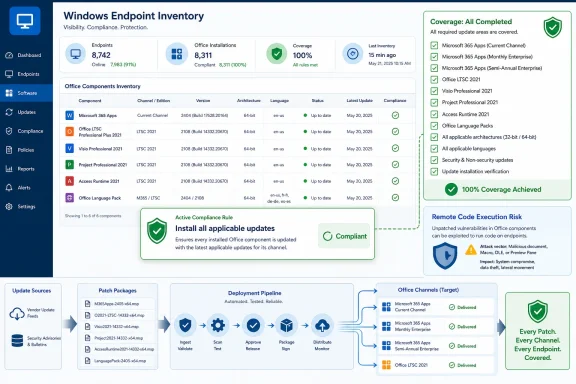 Microsoft’s Short Answer Carries a Long Administrative Tail
The most important line in Microsoft’s advisory is not the vulnerability title. It is the answer to the deceptively mundane deployment question: if multiple update packages are listed for affected software, do customers need all of them? Microsoft’s answer is yes, and it adds that applicable updates can be installed in any order.That sounds like standard patch-management boilerplate until you remember how Office actually exists in the wild. Office is not one thing. It is Click-to-Run Microsoft 365 Apps on one fleet, volume-licensed Office 2019 on another, a stubborn Access Runtime on a line-of-business workstation, Visio on the project team’s machines, Project on a handful of finance laptops, and language accessories scattered across global offices.
CVE-2026-44819 therefore lands in the awkward middle ground of modern Windows administration. The vulnerability is described as a Microsoft Office remote code execution flaw, but the remediation path is less about a single patch than about coverage. If your endpoint management tool sees only the headline application and misses an installed Office component, you may walk away with a green dashboard and a still-exposed machine.
That is why the advisory’s “install all applicable updates” language deserves more attention than it usually gets. It is Microsoft saying, in effect, that partial Office patching is not a supported interpretation of this fix.
Office Remains the Attack Surface Users Voluntarily Open
The phrase remote code execution still has a special gravity in security advisories. It implies that malicious code may run without the attacker already possessing an account on the target system. In the Office world, that risk is often mediated through documents, previews, embedded content, or parsing paths rather than an exposed network listener, but the practical result can still be serious.Office vulnerabilities are dangerous precisely because users are trained to open Office content. A spreadsheet from a vendor, a Word document from legal, a PowerPoint from a partner, an Access database in an old workflow — these are not suspicious edge cases in most businesses. They are the daily grammar of work.
Microsoft has spent years reducing the blast radius of Office-borne attacks. Protected View, Mark of the Web enforcement, macro hardening, Attack Surface Reduction rules, and cloud detonation have all made commodity document malware less straightforward than it used to be. But none of those controls changes the core fact that Office remains one of the richest file-parsing environments installed on Windows endpoints.
That is the larger significance of CVE-2026-44819. Even without public exploitation details, a remote-code-execution label on Office should be treated as a reminder that the endpoint perimeter is not only a browser, a VPN client, and RDP. It is also the application suite that employees use to open files from people they only half trust.
The Advisory Is Really About Patch Completeness
Microsoft’s note about multiple update packages cuts against a common administrator instinct: identify the newest-looking update, deploy it, and assume supersedence has done the rest. That logic works well enough for many Windows cumulative updates. It is shakier around Office because Office servicing has accumulated eras, channels, and product boundaries.The modern Microsoft 365 Apps model is designed to be evergreen, but enterprise environments are rarely clean. Some machines receive current channel updates quickly. Others sit on monthly enterprise channels. Some are governed by Configuration Manager or Intune. Others are updated through internal shares, WSUS-adjacent processes, or third-party patch tools that treat Office components unevenly.
Then there are the durable oddities: standalone Visio, standalone Project, Office LTSC, Access Database Engine redistributables, proofing tools, language packs, and older MSI-based installations that never quite disappeared. A vulnerability that crosses Office product boundaries can require more than the obvious Word or Excel patch.
Microsoft’s answer makes the policy unambiguous. If the Security Updates table offers multiple applicable packages for the software installed, the safe reading is not to choose among them. The safe reading is to apply them all.
“Any Order” Is Helpful, but It Is Not a Strategy
The advisory’s reassurance that multiple updates can be installed in any order is operationally useful. It means admins do not need to build fragile sequencing logic simply to satisfy CVE-2026-44819. In environments with maintenance windows, slow VPN links, or geographically distributed endpoints, that flexibility matters.But “any order” should not be confused with “any subset.” The order is flexible because the remediation model expects all relevant pieces to arrive. Skipping one update because another appears broader may leave a component untouched.
For administrators, the better mental model is dependency closure. You are not hunting for the one package that represents the vulnerability. You are ensuring that every installed Office component with an applicable fix has been advanced past the vulnerable build.
That distinction matters most on shared machines and legacy endpoints. A device may look compliant from the perspective of Microsoft 365 Apps while still carrying a separate Office runtime or component that an attacker can invoke through a crafted file or workflow. The messier the endpoint, the more dangerous it is to rely on product names alone.
The Office Estate You Think You Have Is Not the Office Estate You Have
Most organizations underestimate the diversity of their Office installations. This is not because admins are careless; it is because Office has been deployed, upgraded, repaired, partially removed, bundled, licensed, and reinstalled across decades of Windows lifecycle churn.A laptop may have Microsoft 365 Apps for enterprise, but also an old Visio viewer. A finance workstation may have a supported Office suite and an Access runtime required by a niche database application. A developer machine may carry database connectivity components installed years earlier by a setup wizard. A multilingual desktop may have proofing and language tools that never show up in a casual software inventory review.
This is where CVE-2026-44819 becomes a test of asset intelligence. The vulnerability itself is the spark, but the bigger question is whether the organization can determine which machines need which Office updates. Many can deploy a monthly Windows cumulative update with confidence; fewer can prove that every Office-adjacent package on every endpoint has been patched.
That gap is not theoretical. Attackers do not need your standard image to be vulnerable if they can find the exception. The forgotten endpoint in the lab, the kiosk with a legacy runtime, the executive laptop with standalone Project, or the terminal server with mixed Office components can become the path of least resistance.
Patch Tuesday Rewards Boring Discipline
The security industry loves novelty: zero-days, exploit chains, nation-state tradecraft, and clever bypasses. Most defensive work is less cinematic. CVE-2026-44819 is a reminder that a mature patch process often beats a dramatic incident response plan.For Office, boring discipline means trusting the servicing channel where possible and auditing it where necessary. It means confirming update status at the build level, not merely checking that “Office is installed.” It means treating optional-looking Office components as security-relevant software rather than harmless productivity debris.
It also means avoiding the false comfort of partial compliance. A report that says 95 percent of machines received “the Office update” may hide the 5 percent that matter most. In many environments, those outliers are not random; they are specialized systems with higher business importance and weaker change tolerance.
The advisory’s language pushes admins toward a stricter posture. If a machine has affected software and multiple updates apply, the job is not complete until every applicable update is installed.
Home Users Should Let Office Update, Not Curate the Patch List
For home users and small businesses, the practical advice is simpler. Do not try to manually interpret a Security Updates table unless you have a specific reason to do so. Open Office, let Microsoft’s update mechanism run, and restart Office applications when prompted.The risk for consumers is not that they will thoughtfully choose the wrong package. It is that they will postpone updates because Office appears to be working fine. Office security fixes often arrive with little fanfare, and the applications themselves may remain open for days on laptops that sleep rather than shut down.
That matters because some Office updates do not fully take effect until the application is closed and relaunched. A machine can download an update and still be running the old process. The most ordinary security advice — save your work, close the apps, restart if needed — remains irritatingly relevant.
Consumers should also remember that Microsoft Office is not limited to Word and Excel icons on the desktop. If you have Visio, Project, Access components, or older Office products installed, the update story may be broader than expected. The safest path is to accept every update offered for installed Microsoft Office software.
Enterprise IT Should Treat This as a Coverage Audit
The immediate action is patching. The more valuable action is verifying whether your Office update process can handle this kind of advisory without heroic manual work.For managed environments, that starts with endpoint inventory. Administrators should be able to answer which machines have Microsoft 365 Apps, Office LTSC, Visio, Project, Access Runtime, Office language packs, and related redistributables. If that answer requires three tools, a spreadsheet, and a hunch, CVE-2026-44819 is not the real problem. It is merely revealing the real problem.
The second step is deployment policy. Microsoft 365 Apps can be serviced through cloud-driven update channels, Configuration Manager, Intune, or other enterprise tooling. MSI-era Office products and standalone packages may need different handling. A single patching dashboard that does not represent both worlds is a liability.
The third step is validation. Security teams should not ask only whether the update was approved or deployed. They should ask whether the vulnerable build is gone. That is a different question, and it is the one that matters.
Security Controls Reduce Risk, but They Do Not Replace the Patch
Office hardening is still worth doing. Protected View should not be casually disabled. Macros from the internet should remain blocked. Attack Surface Reduction rules can blunt common document-based tradecraft. Email filtering, attachment sandboxing, and web isolation all reduce the odds that a malicious file reaches a user in the first place.But compensating controls are not a substitute for installing the fix. They are layers that buy time, reduce exploitability, or limit common delivery paths. They do not necessarily remove the vulnerable code from the machine.
That distinction is especially important in environments where patching is delayed for compatibility testing. A security team may reasonably stage Office updates before broad deployment, particularly when mission-critical macros or add-ins are involved. During that window, hardening controls matter. But the endpoint remains in a temporary risk state, not a remediated one.
Microsoft’s instruction to install all applicable updates narrows the room for creative interpretation. If the affected software is present, and updates apply, the durable fix is to install them.
The Compatibility Excuse Is Getting Weaker
Office patching has always lived under the shadow of compatibility. Finance departments worry about Excel models. Legal teams worry about document management add-ins. Engineering teams worry about Project files and Visio diagrams. Old Access applications can be the load-bearing beams of business processes nobody wants to admit still exist.Those concerns are real, but they are not a reason to defer security updates indefinitely. They are a reason to maintain a test ring, document critical workflows, and move faster when remote-code-execution bugs appear. The longer an organization postpones Office security updates, the more it bets that attackers will not care about exactly the same file formats its employees use every day.
This is where modern servicing models have changed the bargain. Microsoft 365 Apps has made continuous update adoption more normal. Enterprises can choose channels that balance stability and speed. The old culture of treating Office as a once-a-year upgrade event no longer matches the threat model.
CVE-2026-44819 does not, by itself, prove that any given organization is at imminent risk. But it does reinforce the point that Office is not static infrastructure. It is an actively serviced application platform, and patch latency is part of the attack surface.
The Real Failure Mode Is the Half-Patched Endpoint
The most dangerous outcome after an advisory like this is not total inaction. Total inaction is visible. It creates obvious alerts, angry dashboards, and uncomfortable meetings.The subtler failure is the half-patched endpoint. The main Office suite updates successfully, the security team reports progress, and one affected component remains behind. Everyone believes the risk is closed because the most recognizable product name has moved forward.
That is the scenario Microsoft’s FAQ language is designed to prevent. It tells customers not to infer that one listed package supersedes the need for another unless the update mechanism itself determines applicability. It also tells them not to treat multiple rows in the Security Updates table as alternatives.
For attackers, ambiguity is useful. For defenders, ambiguity is expensive. The clearer the patch rule, the less room there is for wishful thinking.
The Advisory Also Exposes Microsoft’s Documentation Burden
Microsoft’s Security Update Guide has become the central map for vulnerability response across the company’s sprawling product estate. That centralization is valuable, but it also creates a readability problem. A single CVE page may need to serve home users, enterprise admins, vulnerability scanners, managed service providers, and security researchers at the same time.The result is often terse language that is technically precise but operationally dense. “Install all updates that apply” is correct, but it assumes the reader understands how to determine applicability across Office deployment models. Many do not.
This is not only Microsoft’s problem. The industry has built patch workflows around machine-readable advisories, scanner plugins, update catalogs, and endpoint management platforms. Human-readable clarity sometimes arrives as a short FAQ entry attached to a much larger data table.
CVE-2026-44819 is a case where the short entry may be the most actionable part of the page. It tells administrators what not to do: do not pick one update from a set of applicable Office fixes and call the job finished.
Scanner Results Need Human Skepticism
Vulnerability scanners are essential here, but they are not magic. They can misread Office build states, miss components outside their detection logic, or produce duplicate-looking findings that administrators are tempted to suppress. They can also lag behind vendor advisories on the day patches ship.That does not make scanners untrustworthy. It means their output needs to be reconciled against the actual software estate. A scanner result showing CVE-2026-44819 on a machine should trigger investigation into which Office component remains vulnerable, not a reflexive dismissal because “we already patched Office.”
The reverse is also true. A clean scanner result should not be the only evidence of compliance if the organization knows it has complex Office installations. Build-level reporting from the update channel, endpoint inventory, and software deployment logs all matter.
In mature environments, vulnerability management is less about believing a single tool and more about making several imperfect tools disagree loudly enough that humans notice.
The Small FAQ Line That Should Drive the Change Window
The practical reading of CVE-2026-44819 is straightforward: patch Office completely, not cosmetically. The advisory’s most operationally important detail is Microsoft’s insistence that all applicable updates be installed when multiple packages are offered for installed software.- Organizations should inventory Office products and components beyond the main Microsoft 365 Apps installation.
- Administrators should deploy every applicable update listed for affected installed software rather than choosing one package from the table.
- Update order is not the central issue, because Microsoft says applicable packages may be installed in any order.
- Compliance should be validated by build or component state, not merely by deployment approval.
- Home users and small offices should allow Office updates to complete and restart Office applications so fixes actually take effect.
- Security controls such as Protected View and macro blocking reduce exposure, but they do not replace patch installation.
The next Office vulnerability will arrive with a different CVE number, a different affected-products table, and perhaps a different exploit story, but the administrative lesson will look familiar: the organizations that know what is installed will move cleanly, and the organizations that only know what they meant to install will spend the next maintenance window discovering their own past.
References
- Primary source: MSRC
Published: 2026-06-09T07:00:00-07:00
Security Update Guide - Microsoft Security Response Center
 msrc.microsoft.com
- Related coverage: threats.kaspersky.com
Kaspersky Threats — KLA90842
threats.kaspersky.com
- Related coverage: windowscentral.com
Microsoft Office Critical Security Flaws: How to Fix Them | Windows Central
Microsoft\u2019s March Patch Tuesday addresses two critical Office vulnerabilities, but don't let the "local access" label fool you into skipping these updates.www.windowscentral.com - Related coverage: techradar.com
Microsoft quietly patches LNK vulnerability that's been weaponized for years | TechRadar
The November Patch Tuesday fixed an age-old bugwww.techradar.com - Related coverage: itpro.com
Microsoft patches six zero-days targeting Windows, Word, and more – here’s what you need to know | IT Pro
Patch Tuesday update targets large number of vulnerabilities already being used by attackerswww.itpro.com - Official source: microsoft.com
MSRC - Microsoft Security Response Center
The Microsoft Security Response Center is part of the defender community and on the front line of security response evolution. For over twenty years, we have been engaged with security researchers working to protect customers and the broader ecosystem.www.microsoft.com
- Official source: msrc-ppe.microsoft.com
- Official source: learn.microsoft.com
Security Advisories and Bulletins | Microsoft Learn
learn.microsoft.com - Official source: techcommunity.microsoft.com
Protect against React RSC CVE-2025-55182 with Azure Web Application Firewall (WAF) | Microsoft Community Hub
Please subscribe to this blog as we will be updating the suggested rules as new attack permutations are found. On December 3, 2025, the React team... techcommunity.microsoft.com
- Related coverage: api.urlscan.io

api.msrc.microsoft.com - urlscan.io
urlscan.io - Website scanner for suspicious and malicious URLs
api.urlscan.io
