

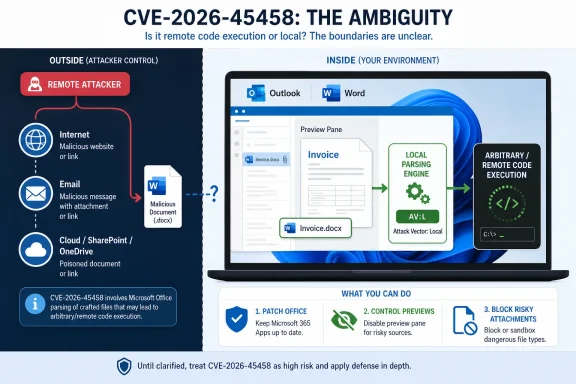
Microsoft labels CVE-2026-45458 as a Microsoft Outlook and Word remote code execution vulnerability because the attacker can be remote, even though CVSS scores the exploit path as local because malicious content must be opened, previewed, or otherwise processed on the victim’s machine. That distinction is not semantic trivia; it is the hinge on which many Office security advisories turn. The phrase “remote code execution” describes the consequence and attacker position, while “AV:L” describes the mechanical point of exploitation. In plain English: the danger may arrive from the internet, but the bug is triggered when local Office code handles the weaponized content.
The confusion around CVE-2026-45458 is reasonable. To most Windows users, “remote code execution” means an attacker can reach across the network and run code on a machine without anyone touching a file. To CVSS, however, Attack Vector: Local can still apply when the attacker sends a malicious document, email, or attachment that only becomes dangerous after the victim’s local software processes it.
Microsoft’s answer follows a pattern the company has used for years in Office advisories. “Remote” refers to the attacker’s position, not necessarily to a packet hitting a listening service. The attacker does not need to be sitting at the keyboard, logged into the machine, or physically present; they may deliver the exploit through email, web download, messaging, file share, or another channel.
CVSS is measuring something narrower. It asks where exploitation is carried out from the vulnerable component’s point of view. If Outlook or Word must parse a crafted file on the local endpoint, the scoring can land at AV:L even if the document came from a server halfway around the world.
That is why the CVE title and vector can both be true. The title says what class of outcome the vulnerability enables: code execution by an attacker who is not local to the victim. The metric says how the exploit crosses the final line: through local processing on the victim system.
That does not make the risk small. It makes the delivery chain more dependent on user workflow, application defaults, and enterprise document handling. In modern Windows environments, “local processing” does not always mean a user consciously double-clicked a file and ignored ten warnings. It can include preview panes, search indexers, cloud-synced folders, collaboration tools, or mail clients doing exactly what users expect them to do.
This is the old Office paradox: the file is local by the time the vulnerable code touches it, but the attacker’s reach can be global. Email remains a remote delivery system for local parsers. SharePoint and OneDrive remain remote delivery systems for local clients. A download folder remains a landing zone for code paths that did not ask whether the file’s author was trustworthy.
The result is a class of bugs that do not fit the popular shorthand. They are not “remote” in the same way as a wormable SMB flaw. They are not “local” in the same way as a privilege escalation that requires an attacker already operating on the box. They are remote-delivered local execution bugs, and Office has been full of them for decades.
That distinction matters because a vulnerability can have a local attack vector and still be operationally remote. If a victim must open a crafted document, the exploit depends on local action or local file processing. CVSS sees that as local because the vulnerable parser runs on the endpoint. The attacker’s campaign, however, may be entirely remote: send the document, lure the user, wait for preview or opening, and gain execution in the user’s context.
This is why relying on the title alone is dangerous, but relying on the vector alone is also incomplete. “Remote code execution” tells defenders the possible impact is severe. “AV:L” tells exploitability is not the same as a directly reachable network service. The useful interpretation comes from reading them together.
For CVE-2026-45458, Microsoft’s own explanation cuts through the apparent contradiction: the attacker may be remote, while the exploit is carried out locally. That is not Microsoft redefining “local” on a whim; it is the collision between advisory language and CVSS mechanics.
Those details change the response plan. A network RCE in a public-facing service may demand emergency exposure reduction and immediate patching of internet-facing assets. An Office RCE with AV:L still demands urgency, but the mitigations may emphasize patch deployment, attachment filtering, disabling risky preview behavior, hardening Office file handling, and training users not to treat unexpected documents as harmless.
There is also a policy lesson here. Security teams often classify “local” as lower priority because local bugs frequently require existing access. That habit can be misleading for document-based vulnerabilities. In Office land, “local” may simply mean “the payload must be processed on the target,” which is exactly what business users do all day.
Attackers know this. They do not need a pristine network exploit if they can persuade a payroll clerk, recruiter, paralegal, or project manager to preview a file that appears routine. Office remains valuable to attackers because it sits at the boundary between human trust and machine parsing.
But the industry has standardized around RCE as the more alarming, more recognizable label. It appears in dashboards, Patch Tuesday summaries, vulnerability feeds, compliance reports, and executive briefings. Vendors use it because it signals severity quickly, even when the exploit path is not a pure network attack.
The downside is that RCE has become overloaded. It can describe everything from a pre-authentication server bug reachable from the internet to a malicious document that requires local rendering. Those are not the same operational risk, even if the impact after exploitation may be similarly ugly.
This is where defenders need discipline. The phrase “remote code execution” should trigger attention, not end analysis. The next step is to examine the attack vector, privileges required, user interaction, exploit maturity, affected products, and available mitigations.
That does not mean every preview feature is equally dangerous or that CVE-2026-45458 is automatically exploitable through every preview path. It means defenders should treat preview handling as part of the attack surface, not a cosmetic convenience. Outlook and Word are not just productivity apps; they are parsers for untrusted content arriving from strangers.
Enterprises have spent years reducing macro risk, and that work matters. But macro hardening does not eliminate parser bugs. If exploitation happens before macros enter the picture, then “we block macros from the internet” is not a complete defense. It is one layer, not a force field.
This is also why Office updates matter even for users who believe they never open suspicious attachments. Many users do not have a precise mental model of what “opening” means in the era of preview panes, cloud sync, embedded objects, and collaboration previews. The safest assumption is that untrusted document handling is routine, not exceptional.
The reason is exposure. Word and Outlook are installed broadly, used constantly, and connected to high-volume external content streams. If a vulnerability sits in the path of document parsing, then the vulnerable component may be exercised by ordinary business activity. That gives attackers a social engineering route that scales.
The likely impact also matters. Code execution in the context of the current user can be enough to steal documents, harvest tokens, access mail, stage persistence, or move laterally if the user has valuable access. On a locked-down workstation, the attacker may need a second bug to elevate privileges. On a poorly segmented network or an overprivileged account, the first foothold may be plenty.
Security teams should therefore avoid a simplistic “AV:L equals low urgency” rule. CVSS is useful, but it is not a substitute for environment-aware risk. A vulnerability in a rarely used local utility and a vulnerability in Outlook’s handling of untrusted content can share a metric while living in very different threat models.
It is also unfriendly to normal readers. Even many IT professionals read “local” as “the attacker already has access” and “remote” as “network exploitable.” When those words appear together, the advisory looks self-contradictory unless the reader understands CVSS conventions and Microsoft’s title taxonomy.
The better editorial formulation would be something like: “remote attacker, local document processing, arbitrary code execution.” That phrase is clunkier, but it captures the chain. Unfortunately, vulnerability titles are not written for prose clarity. They are written for classification systems, dashboards, and long-running vendor conventions.
This leaves Windows administrators with the job of translating vendor language into operational meaning. For CVE-2026-45458, the translation is straightforward: do not treat the vulnerability as wormable merely because the title says RCE, and do not treat it as harmless merely because the vector says local.
The second move is to reduce risky document handling while patches propagate. That may include reviewing Outlook preview settings, attachment filtering, web download controls, and policies for files originating from the internet. In higher-risk environments, temporary restrictions on previewing or opening externally sourced Office documents may be justified until patch compliance is high.
The third move is detection. Office child processes spawning shells, script engines, unusual LOLBins, or network connections remain strong signals. The precise indicators vary by exploit, but the behavioral pattern is familiar: a document-handling application becomes the parent of activity it should not be launching.
Finally, organizations should communicate the nuance without drowning users in CVSS jargon. Telling staff “this is local, don’t worry” is wrong. Telling them “this is remotely exploitable like a network worm” may also be wrong. The useful message is that malicious documents and previews can be enough to trigger serious bugs, so updates and caution around unexpected files matter.
For home users, the answer is simpler. Keep Office updated, avoid unexpected attachments, and be skeptical of documents that arrive with urgency, payment pressure, hiring language, legal threats, or password-protected wrappers. Most users do not need to parse the finer points of CVSS; they need patched software and fewer opportunities for hostile files to reach Office.
For IT pros, the lesson is more specific. Document-based RCEs are phishing-adjacent vulnerabilities, and they should be handled as part of both vulnerability management and mail security. The endpoint patch closes the bug, but filtering and user protections reduce the chance that a weaponized file reaches the parser before the fix lands.
The more mature response is to use CVSS as one input among several. Attack vector, user interaction, exploitability, asset exposure, user privilege, and business workflow all shape priority. In the Office ecosystem, “local” often means “local parser,” not “local attacker.”
 Microsoft’s Wording Sounds Contradictory Because Two Taxonomies Collide
The confusion around CVE-2026-45458 is reasonable. To most Windows users, “remote code execution” means an attacker can reach across the network and run code on a machine without anyone touching a file. To CVSS, however, Attack Vector: Local can still apply when the attacker sends a malicious document, email, or attachment that only becomes dangerous after the victim’s local software processes it.Microsoft’s answer follows a pattern the company has used for years in Office advisories. “Remote” refers to the attacker’s position, not necessarily to a packet hitting a listening service. The attacker does not need to be sitting at the keyboard, logged into the machine, or physically present; they may deliver the exploit through email, web download, messaging, file share, or another channel.
CVSS is measuring something narrower. It asks where exploitation is carried out from the vulnerable component’s point of view. If Outlook or Word must parse a crafted file on the local endpoint, the scoring can land at AV:L even if the document came from a server halfway around the world.
That is why the CVE title and vector can both be true. The title says what class of outcome the vulnerability enables: code execution by an attacker who is not local to the victim. The metric says how the exploit crosses the final line: through local processing on the victim system.
Office Has Always Lived in the Gray Zone Between Remote and Local
Office vulnerabilities are uniquely good at making security vocabulary look broken. A network daemon listening on TCP port 445 is easy to reason about: an attacker sends traffic to the service, the service mishandles it, and the exploit is scored as network reachable. A Word document is messier. It is inert until an application renders, previews, indexes, opens, converts, or otherwise interprets it.That does not make the risk small. It makes the delivery chain more dependent on user workflow, application defaults, and enterprise document handling. In modern Windows environments, “local processing” does not always mean a user consciously double-clicked a file and ignored ten warnings. It can include preview panes, search indexers, cloud-synced folders, collaboration tools, or mail clients doing exactly what users expect them to do.
This is the old Office paradox: the file is local by the time the vulnerable code touches it, but the attacker’s reach can be global. Email remains a remote delivery system for local parsers. SharePoint and OneDrive remain remote delivery systems for local clients. A download folder remains a landing zone for code paths that did not ask whether the file’s author was trustworthy.
The result is a class of bugs that do not fit the popular shorthand. They are not “remote” in the same way as a wormable SMB flaw. They are not “local” in the same way as a privilege escalation that requires an attacker already operating on the box. They are remote-delivered local execution bugs, and Office has been full of them for decades.
CVSS Is a Map, Not a Headline Writer
CVSS was built to make vulnerabilities comparable, not to write human-friendly product advisories. Its Attack Vector metric is one coordinate in a larger scoring system. It does not try to summarize the entire intrusion story; it tries to describe the proximity required to exploit the vulnerable component.That distinction matters because a vulnerability can have a local attack vector and still be operationally remote. If a victim must open a crafted document, the exploit depends on local action or local file processing. CVSS sees that as local because the vulnerable parser runs on the endpoint. The attacker’s campaign, however, may be entirely remote: send the document, lure the user, wait for preview or opening, and gain execution in the user’s context.
This is why relying on the title alone is dangerous, but relying on the vector alone is also incomplete. “Remote code execution” tells defenders the possible impact is severe. “AV:L” tells exploitability is not the same as a directly reachable network service. The useful interpretation comes from reading them together.
For CVE-2026-45458, Microsoft’s own explanation cuts through the apparent contradiction: the attacker may be remote, while the exploit is carried out locally. That is not Microsoft redefining “local” on a whim; it is the collision between advisory language and CVSS mechanics.
The Real Question Is Not Remote Versus Local, but Who Has to Do What
For administrators, the practical question is not whether the title or the vector “wins.” The practical question is what chain of events must occur before code executes. Does the attacker need credentials? Does the victim need to open a file? Is preview enough? Is Protected View involved? Does the exploit run in the context of the current user? Are macros relevant, or is this a parser-level flaw where macros do not matter?Those details change the response plan. A network RCE in a public-facing service may demand emergency exposure reduction and immediate patching of internet-facing assets. An Office RCE with AV:L still demands urgency, but the mitigations may emphasize patch deployment, attachment filtering, disabling risky preview behavior, hardening Office file handling, and training users not to treat unexpected documents as harmless.
There is also a policy lesson here. Security teams often classify “local” as lower priority because local bugs frequently require existing access. That habit can be misleading for document-based vulnerabilities. In Office land, “local” may simply mean “the payload must be processed on the target,” which is exactly what business users do all day.
Attackers know this. They do not need a pristine network exploit if they can persuade a payroll clerk, recruiter, paralegal, or project manager to preview a file that appears routine. Office remains valuable to attackers because it sits at the boundary between human trust and machine parsing.
“Arbitrary Code Execution” Would Be Clearer, but the Industry Likes RCE
Microsoft’s note that this class of exploit is sometimes called arbitrary code execution is helpful because ACE describes the outcome without implying a specific delivery path. The attacker can cause code of their choosing to run. That is the heart of the risk.But the industry has standardized around RCE as the more alarming, more recognizable label. It appears in dashboards, Patch Tuesday summaries, vulnerability feeds, compliance reports, and executive briefings. Vendors use it because it signals severity quickly, even when the exploit path is not a pure network attack.
The downside is that RCE has become overloaded. It can describe everything from a pre-authentication server bug reachable from the internet to a malicious document that requires local rendering. Those are not the same operational risk, even if the impact after exploitation may be similarly ugly.
This is where defenders need discipline. The phrase “remote code execution” should trigger attention, not end analysis. The next step is to examine the attack vector, privileges required, user interaction, exploit maturity, affected products, and available mitigations.
Outlook and Word Make Preview a Security Boundary Whether We Like It or Not
The most uncomfortable part of Office security is that preview features blur the old line between “received” and “opened.” Users think previewing is safer than opening. Technically, previewing may still invoke complex parsing logic in the same family of components that process full documents.That does not mean every preview feature is equally dangerous or that CVE-2026-45458 is automatically exploitable through every preview path. It means defenders should treat preview handling as part of the attack surface, not a cosmetic convenience. Outlook and Word are not just productivity apps; they are parsers for untrusted content arriving from strangers.
Enterprises have spent years reducing macro risk, and that work matters. But macro hardening does not eliminate parser bugs. If exploitation happens before macros enter the picture, then “we block macros from the internet” is not a complete defense. It is one layer, not a force field.
This is also why Office updates matter even for users who believe they never open suspicious attachments. Many users do not have a precise mental model of what “opening” means in the era of preview panes, cloud sync, embedded objects, and collaboration previews. The safest assumption is that untrusted document handling is routine, not exceptional.
The Patch Priority Is Higher Than the Word “Local” Suggests
A local attack vector can lull patch managers into triage complacency. That is understandable in a month with dozens or hundreds of advisories, especially when some vulnerabilities are network reachable and unauthenticated. But Office RCEs deserve a different mental bucket from classic local-only flaws.The reason is exposure. Word and Outlook are installed broadly, used constantly, and connected to high-volume external content streams. If a vulnerability sits in the path of document parsing, then the vulnerable component may be exercised by ordinary business activity. That gives attackers a social engineering route that scales.
The likely impact also matters. Code execution in the context of the current user can be enough to steal documents, harvest tokens, access mail, stage persistence, or move laterally if the user has valuable access. On a locked-down workstation, the attacker may need a second bug to elevate privileges. On a poorly segmented network or an overprivileged account, the first foothold may be plenty.
Security teams should therefore avoid a simplistic “AV:L equals low urgency” rule. CVSS is useful, but it is not a substitute for environment-aware risk. A vulnerability in a rarely used local utility and a vulnerability in Outlook’s handling of untrusted content can share a metric while living in very different threat models.
Microsoft’s Terminology Is Defensible, but Still User-Hostile
Microsoft is technically justified in calling CVE-2026-45458 a remote code execution vulnerability while scoring the attack vector as local. The company is using “remote” in the advisory title to describe the attacker’s location and “local” in the CVSS vector to describe the exploitation mechanism. The explanation is coherent.It is also unfriendly to normal readers. Even many IT professionals read “local” as “the attacker already has access” and “remote” as “network exploitable.” When those words appear together, the advisory looks self-contradictory unless the reader understands CVSS conventions and Microsoft’s title taxonomy.
The better editorial formulation would be something like: “remote attacker, local document processing, arbitrary code execution.” That phrase is clunkier, but it captures the chain. Unfortunately, vulnerability titles are not written for prose clarity. They are written for classification systems, dashboards, and long-running vendor conventions.
This leaves Windows administrators with the job of translating vendor language into operational meaning. For CVE-2026-45458, the translation is straightforward: do not treat the vulnerability as wormable merely because the title says RCE, and do not treat it as harmless merely because the vector says local.
The Defensive Playbook Starts With Patching, Not Semantics
The immediate response should be boring: apply the relevant Microsoft Office security updates for affected Outlook and Word installations. If Office is Click-to-Run, verify update channels and build deployment rather than assuming Windows Update alone tells the whole story. If Microsoft 365 Apps are managed through enterprise tooling, confirm that the patched build has actually reached endpoints.The second move is to reduce risky document handling while patches propagate. That may include reviewing Outlook preview settings, attachment filtering, web download controls, and policies for files originating from the internet. In higher-risk environments, temporary restrictions on previewing or opening externally sourced Office documents may be justified until patch compliance is high.
The third move is detection. Office child processes spawning shells, script engines, unusual LOLBins, or network connections remain strong signals. The precise indicators vary by exploit, but the behavioral pattern is familiar: a document-handling application becomes the parent of activity it should not be launching.
Finally, organizations should communicate the nuance without drowning users in CVSS jargon. Telling staff “this is local, don’t worry” is wrong. Telling them “this is remotely exploitable like a network worm” may also be wrong. The useful message is that malicious documents and previews can be enough to trigger serious bugs, so updates and caution around unexpected files matter.
The CVE Teaches a Bigger Lesson About Patch Tuesday Literacy
CVE-2026-45458 is not just a single advisory; it is a reminder that Patch Tuesday literacy now requires reading past the headline. The old habit of sorting by severity and scanning for “remote code execution” is no longer enough. The shape of the exploit chain matters as much as the category.For home users, the answer is simpler. Keep Office updated, avoid unexpected attachments, and be skeptical of documents that arrive with urgency, payment pressure, hiring language, legal threats, or password-protected wrappers. Most users do not need to parse the finer points of CVSS; they need patched software and fewer opportunities for hostile files to reach Office.
For IT pros, the lesson is more specific. Document-based RCEs are phishing-adjacent vulnerabilities, and they should be handled as part of both vulnerability management and mail security. The endpoint patch closes the bug, but filtering and user protections reduce the chance that a weaponized file reaches the parser before the fix lands.
The more mature response is to use CVSS as one input among several. Attack vector, user interaction, exploitability, asset exposure, user privilege, and business workflow all shape priority. In the Office ecosystem, “local” often means “local parser,” not “local attacker.”
The Practical Reading of CVE-2026-45458 Fits in One Sentence
The cleanest interpretation is that CVE-2026-45458 can be exploited by a remote attacker who induces local Outlook or Word processing of malicious content, making the impact remote code execution while the CVSS attack vector remains local.- The word “remote” in the CVE title describes where the attacker may be located, not necessarily a direct network exploit against a listening service.
- The CVSS AV:L value means the vulnerable code is exploited through local processing on the victim’s machine.
- A malicious document, email attachment, or previewed file can still be part of a remote attack chain even when the final exploit step is local.
- The vulnerability should not be dismissed as low-risk simply because the attack vector is local.
- The right response is to patch Office promptly, verify deployment, and reduce exposure to untrusted document handling while updates roll out.
References
- Primary source: MSRC
Published: 2026-06-09T07:00:00-07:00
Security Update Guide - Microsoft Security Response Center
 msrc.microsoft.com
- Related coverage: threats.kaspersky.com
Kaspersky База Угроз — KLA91035
threats.kaspersky.com
- Related coverage: bleepingcomputer.com
- Related coverage: first.org
CVSS v3.1 User Guide
 www.first.org
- Official source: support.microsoft.com
Windows remote code execution vulnerability: June 13, 2017 - Microsoft Support
Resolves a vulnerability in Windows that could allow remote code execution.support.microsoft.com - Official source: learn.microsoft.com
Microsoft Security Bulletin MS12-020 - Critical | Microsoft Learn
learn.microsoft.com
- Official source: microsoft.com
More information about the DLL Preloading remote attack vector
www.microsoft.com
