

Microsoft’s Azure Bug Is Really a Linux Kernel Chore
The awkward part of CVE-2026-45476 is that it sounds like a Microsoft vulnerability but behaves like a Linux kernel vulnerability. Microsoft’s Security Update Guide identifies it as an Azure Network Adapter elevation-of-privilege issue, but the remediation path points administrators toward the Linux kernel, not a standalone Microsoft package, portal toggle, or Azure-side mitigation.
That distinction matters because many users will instinctively look in the wrong place. If you are thinking in terms of Patch Tuesday, Windows Update, Defender signatures, or Azure portal recommendations, you may miss the systems that actually need attention. The relevant asset is a Linux machine whose kernel includes the affected Azure Network Adapter code path.
The Azure Network Adapter in this context refers to Microsoft’s high-performance cloud networking driver stack for Linux guests, commonly associated with Azure virtual machines and cloud-optimized kernels. In practical terms, the concern is not every laptop or every Windows PC. It is Linux running in an environment where the vulnerable kernel driver is present, enabled, or reachable through the system’s hardware and virtualization configuration.
That gives home users and enterprise administrators very different action items. A Windows 11 desktop user with no Linux virtual machines, no WSL kernel exposure to this driver, and no Azure-hosted Linux workloads probably has little to do beyond normal updating. A cloud team running Linux VMs in Azure should treat this as a kernel patching event.
Elevation of Privilege Is Not Harmless Just Because It Is Not Remote Code Execution
Security teams often triage vulnerabilities by asking whether an attacker can exploit them remotely without credentials. That instinct is reasonable, but it can also understate elevation-of-privilege bugs. An elevation-of-privilege vulnerability is rarely the first move in an intrusion; it is often the move that turns a foothold into control.
In cloud Linux environments, the difference between an unprivileged process and kernel-level or elevated access can be the difference between a contained compromise and a host that can tamper with workloads, credentials, network flows, or persistence mechanisms. Even when a bug requires local access or some prior execution path, attackers routinely chain those conditions together. Phishing, exposed web apps, compromised containers, weak SSH keys, and vulnerable services all create the first step.
That is why administrators should avoid the comforting phrase “only elevation of privilege.” In modern attack chains, only local privilege escalation is often the bridge between an application bug and full system compromise. A kernel-level flaw in a cloud network driver deserves particular attention because the driver lives close to traffic handling, device state, and privileged kernel operations.
The measured response is not panic. It is prioritization. Internet-exposed Linux systems, multi-tenant workloads, CI/CD runners, container hosts, and Azure VMs handling sensitive data should move higher in the patch queue than a dormant test VM in an isolated subscription.
The Patch Is Upstream, but Your Risk Lives Downstream
Microsoft’s guidance says the fix has been accepted upstream and will be included in newer kernel releases. That is good news, but it is not the same thing as saying your systems are already protected. Linux kernel fixes move through several layers before they land on a production server: upstream maintainers, stable kernel branches, distribution maintainers, cloud image builders, package repositories, and finally your own patching process.
This is where many organizations get caught. They read that a fix exists and assume the problem is solved. In reality, the important question is whether the exact kernel package installed on a given machine contains the backported fix.
Distribution vendors do not all ship the same kernel version, and they do not all express fixes the same way. Ubuntu, Debian, Red Hat, SUSE, Oracle Linux, Azure Linux, AlmaLinux, Rocky Linux, and other distributions may backport a security fix into an older-looking kernel version while keeping the package name aligned with their supported branch. A system may appear to run an older kernel and still be fixed, or appear close to current and still lack the relevant vendor patch.
That is why version-string comparison can mislead. The right source of truth is the distribution’s security advisory and the changelog for the installed kernel package. For custom kernels, the source of truth is your own tree: either the upstream commit has been applied, an equivalent backport exists, or the kernel remains exposed.
The First Job Is Finding the Machines That Actually Use the Driver
The practical protection plan starts with inventory. You need to know which Linux systems are running in Azure or using a kernel build that includes Microsoft’s Azure Network Adapter driver. In many environments, that is not a neat list.
Cloud teams should start with Azure subscriptions and enumerate Linux VMs, scale sets, Kubernetes nodes, appliances, golden images, and marketplace images. Security teams should include ephemeral systems, build agents, disaster recovery nodes, and old test environments that quietly escaped normal lifecycle management. The most annoying machines are often the most interesting ones from a risk perspective.
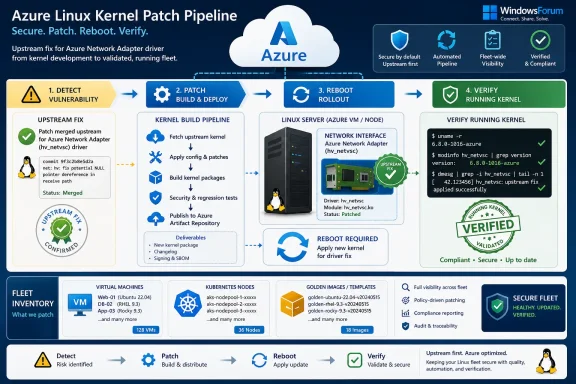
On the host itself, administrators can check the running kernel version and whether the relevant driver modules are loaded or built into the kernel. The familiar commands still matter: uname -r tells you what kernel is running, package-manager tools tell you what kernel is installed, and lsmod, modinfo, kernel config files, or distribution-specific tooling can help determine whether the MANA driver is present.
But inventory should not stop at live machines. If your organization bakes custom images, maintains private VM templates, or uses infrastructure-as-code to deploy fleets, those artifacts need to be updated too. Otherwise, today’s patch becomes tomorrow’s regression when an autoscaling group or disaster recovery drill redeploys an image with the vulnerable kernel.
Reboot Avoidance Is the Enemy This Time
Kernel vulnerabilities force the uncomfortable part of Linux operations: installing the package is not always the same as running the fixed code. Unless your environment uses live patching and the vendor has explicitly shipped a live patch for this issue, you should assume affected systems need a reboot into the fixed kernel.
That is where the advisory’s plain wording hides real operational cost. Updating a kernel package can be fast; coordinating the reboot of production nodes is where maintenance windows, service owners, load balancers, clustered applications, and uptime promises collide. For single VMs, the answer is straightforward. For Kubernetes clusters, database nodes, network appliances, and stateful services, patching becomes choreography.
Administrators should confirm the active kernel after reboot, not merely the installed kernel package before reboot. It is common to find systems with a fixed kernel installed but an older vulnerable kernel still running because a reboot was deferred. It is also common to find bootloader configuration issues where a machine restarts into the wrong kernel.
Cloud environments add another wrinkle. VM scale sets, Kubernetes node pools, and automated image pipelines may replace nodes rather than patch them in place. That can be safer, but only if the replacement image includes the fixed kernel. Rolling a fleet from vulnerable pets into vulnerable cattle is not a remediation plan.
Distribution Advisories Matter More Than Generic CVE Pages
For most administrators, the best answer is not to hunt for an upstream commit and manually apply it. The best answer is to follow the security channel for the Linux distribution you actually run. That is the package you can install, the kernel ABI your vendor supports, and the update path your compliance evidence will recognize.
This is especially important for enterprise distributions that backport fixes. A Red Hat-family kernel, for example, may not jump to a shiny new upstream release number when it receives a security correction. Debian and Ubuntu likewise carry vendor patches in distribution-specific packages. Azure Linux has its own package cadence. Looking only at the mainline kernel version can produce false confidence or false alarm.
The correct workflow is mundane but defensible. Identify the distribution and release. Check whether the vendor has published an advisory for CVE-2026-45476 or for the relevant kernel package. Install the fixed kernel from the supported repository. Reboot if required. Verify that the running kernel matches the fixed package. Record the result.
Where the vendor has not yet published a fixed package, the answer becomes risk management rather than magic. Monitor the advisory, reduce exposure where possible, prioritize compensating controls, and prepare an expedited maintenance window. If the vulnerable driver is not needed on a given system and can be disabled without breaking the workload, that may reduce risk, but administrators should test carefully; cloud network drivers are not ornamental.
Custom Kernels Turn a Vendor Patch Into Your Problem
Organizations that maintain custom kernels inherit a harder version of the same task. If you compile your own kernel for performance, appliance packaging, compliance, embedded deployment, or specialized cloud images, the distribution vendor may not be able to save you. You need to confirm that your source tree includes the upstream fix or an equivalent backport.
That is not just a build step. It is a validation step. Kernel networking changes can have side effects, and the Azure Network Adapter driver is performance-sensitive infrastructure. A rushed backport that fixes the CVE but destabilizes networking under load is not a win for production.
The right process is the one kernel teams already know: apply or cherry-pick the relevant fix, resolve branch conflicts, build, run regression tests, validate Azure networking behavior, stage the kernel in nonproduction, and roll it forward with rollback plans. The difference here is urgency. A CVE turns what might otherwise be a routine maintenance update into a security-controlled change.
If your organization cannot confidently answer whether its custom kernel contains the patch, that is itself a finding. Kernel customization carries an ongoing tax, and CVE-2026-45476 is a reminder that the bill comes due whenever upstream code changes under a cloud driver you depend on.
Azure Customers Should Check More Than Their Servers
Azure users should think in layers. The vulnerable code may live in the guest kernel, but the operational exposure can span images, extensions, managed services, node pools, and third-party appliances. The VM you log into is only one manifestation of the kernel estate.
Start with directly managed Linux VMs. Then look at Azure Kubernetes Service node pools, self-managed Kubernetes clusters, virtual network appliances, security appliances, developer jump boxes, GitHub or Azure DevOps self-hosted runners, and any marketplace images that run Linux in your subscriptions. If a vendor appliance ships its own kernel, you may need that vendor’s advisory rather than your usual distribution feed.
Managed services complicate the picture because customers do not always control the underlying kernel. In those cases, the responsibility boundary matters. If Microsoft or a third-party vendor operates the guest or host layer, customers should monitor service health advisories and vendor notices. If you administer the guest OS, the patch is your responsibility.
This is also a good time to review how your organization proves kernel patch status. Cloud asset inventory often knows that a VM exists, but not whether it has rebooted into a fixed kernel. Endpoint management often knows package state, but not cloud context. Vulnerability scanners often flag by version and miss backports. The truth usually emerges only when these sources are correlated.
Home Lab Users Should Patch, but Not Overread the Microsoft Label
For WindowsForum readers running home labs, the practical advice is less dramatic but still useful. If you run Linux VMs in Azure, keep them updated and reboot after kernel updates. If you run Linux locally under Hyper-V, VMware, VirtualBox, Proxmox, or WSL, the risk depends on whether the affected Azure Network Adapter driver is present and used in your kernel environment.
Most ordinary Windows users do not need to take special action for CVE-2026-45476 beyond normal system maintenance. This is not a browser zero-day, not a Windows shell bug, and not a reason to reinstall Windows. The Microsoft name appears because Microsoft is associated with the Azure networking component and the advisory, not because every Windows endpoint is automatically exposed.
WSL deserves careful wording. WSL uses a Microsoft-provided Linux kernel, but that does not automatically mean this specific Azure Network Adapter path is relevant to a given Windows machine. Users should keep Windows and WSL updated, but they should not assume they are vulnerable merely because the words “Microsoft,” “Linux,” and “kernel” appear in the same advisory.
The same logic applies to home lab distributions. If your Linux distro ships a kernel update referencing this CVE, install it. If it does not, keep watching the vendor’s security notices rather than downloading random kernel patches from the internet. For most users, the distribution maintainer is the security boundary.
The Cloud Has Made Kernel Hygiene a Shared Responsibility
CVE-2026-45476 is a small example of a larger shift. The old mental model separated Microsoft vulnerabilities from Linux vulnerabilities and cloud infrastructure from guest operating systems. That model no longer matches the way systems are built.
Microsoft contributes drivers to Linux so Azure guests perform well. Linux distributions package those drivers in kernels that run in Microsoft’s cloud. Customers deploy those kernels through images, automation, and managed platforms. When a flaw appears, responsibility is spread across upstream maintainers, Microsoft, distribution vendors, cloud operators, and customers.
That shared model is efficient when everyone moves quickly. It is fragile when any layer assumes another layer has already solved the problem. Microsoft can publish guidance, upstream can accept a fix, and a distribution can ship a package, but none of that protects a VM still running last month’s kernel after 180 days of deferred reboots.
For administrators, the lesson is familiar: kernel patch management must be measurable. A spreadsheet of intended updates is not enough. You need to know which systems are affected, which package contains the fix, which machines have installed it, which machines have rebooted into it, and which images will be used for future deployments.
The Sensible Runbook Is Boring by Design
The best mitigation plan for CVE-2026-45476 is not exotic. It is the disciplined version of what administrators already do for kernel security updates. The difference is that Azure networking may sit in a blind spot between Windows-oriented Microsoft patching and Linux-oriented server maintenance.
Patch managers should create a specific tracking item for the CVE rather than bury it in generic kernel maintenance. Cloud teams should tag affected Azure Linux assets, check vendor advisories, schedule reboots, and verify active kernels. Security teams should make sure scanners do not mark systems clean solely because a package is installed while the old kernel is still running.
Compensating controls are useful but secondary. Least privilege, workload isolation, hardened SSH access, endpoint detection, container boundaries, and network segmentation all reduce the odds that an attacker can exploit a local privilege-escalation bug. None of them should become an excuse to skip the kernel fix.
The priority order should be clear: patch exposed and high-value systems first, then broad production fleets, then lower-risk development and lab assets, while making sure base images and automation are updated before the next redeployment cycle.
The Real Protection Is Knowing Where the Kernel Ends and Azure Begins
CVE-2026-45476 is easy to summarize and surprisingly easy to mishandle. The remediation sentence is short: update the Linux kernel to a fixed build. The operational interpretation is longer: find the affected Linux systems, use the distribution’s security update, reboot into the fixed kernel, update images, and verify the result.
That distinction is the difference between compliance theater and protection. A team that closes the ticket after reading “upstream fix accepted” has not protected anything. A team that waits for its distribution, rolls the kernel update, confirms the active version, and prevents vulnerable images from returning has done the real work.
For organizations with Azure-heavy Linux estates, this should also become a test of patch visibility. If you cannot rapidly answer which kernels are running across your subscriptions, CVE-2026-45476 is not just a vulnerability notice. It is an asset-management audit arriving in CVE form.
The Work That Actually Reduces Risk
The safest response is practical rather than dramatic: treat CVE-2026-45476 as a Linux kernel patching event for Azure-connected or Azure-optimized systems, and prove that the fixed kernel is actually running. The administrative burden is real, but the task is well understood.
- Identify Linux systems running in Azure or using kernels that include the Microsoft Azure Network Adapter driver.
- Check your Linux distribution’s security advisory or kernel changelog for a fixed package that addresses CVE-2026-45476.
- Install the vendor-provided kernel update rather than relying on generic upstream version numbers alone.
- Reboot affected systems unless your vendor explicitly provides and confirms an applicable live patch.
- Verify the running kernel after reboot and update golden images, VM templates, scale sets, and node pools so the vulnerable kernel does not return.
- For custom kernels, apply or backport the upstream fix through your normal build, test, and rollout process.
The forward-looking lesson is that cloud security increasingly depends on components that do not fit cleanly into one vendor’s patch bucket. CVE-2026-45476 carries Microsoft branding, lives in Linux kernel maintenance, and lands on administrators as a fleet hygiene problem. The organizations that handle it well will be the ones that already know their kernels, their images, and their reboot debt; the ones that struggle will not be failing at this single CVE so much as discovering that their cloud operating model has been trusting an inventory it cannot actually see.