

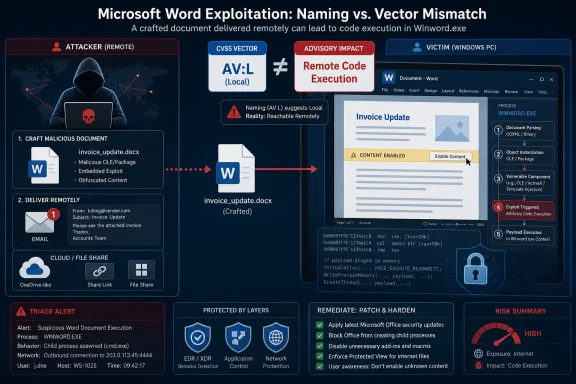
Microsoft classifies CVE-2026-45486 as a Microsoft Word Remote Code Execution vulnerability even though its CVSS attack vector is Local because the exploit code runs on the victim’s machine after a malicious document or content path reaches the user, while the attacker may be remote from that machine. The apparent contradiction is not a typo so much as a collision between two security dialects: Microsoft’s impact-oriented advisory language and CVSS’s stricter scoring grammar. For defenders, the distinction matters because “local” does not mean “low risk,” and “remote code execution” does not always mean “network worm.”
The confusion starts with a reasonable expectation. In everyday security shorthand, remote code execution often means an attacker sends packets across a network and code runs without anyone touching the target. That is the mental model behind the scariest Windows bugs: exposed services, pre-authentication flaws, and server-side parsing errors that turn listening machines into targets.
But Microsoft’s security advisories have long used “Remote Code Execution” as an impact category, not always as a precise description of the CVSS attack vector. In that vocabulary, the word “remote” can describe the attacker’s position relative to the victim, while the mechanics of exploitation still require the vulnerable application to process something on the local endpoint.
That is why a Microsoft Word flaw can be titled Remote Code Execution while carrying
CVSS, by contrast, asks a narrower question for Attack Vector: where must the attacker be, or what path must the exploit take, at the moment the vulnerable component is attacked? If the vulnerable code is triggered by local document handling inside Word, CVSS can score that as Local even if email, chat, SharePoint, Teams, OneDrive, or a browser delivered the bait.
That makes Office vulnerabilities a recurring source of semantic friction. A malicious Word document can be created on another continent, delivered through a cloud service, and opened by a user in a corporate environment. The attacker is remote in every practical sense. Yet the exploit fires when Word, running locally in the user’s session, processes the crafted content.
This is not just pedantry. CVSS is designed to produce comparable scores across vulnerability classes. It distinguishes a network-reachable service flaw from a client-side file parsing flaw because the operational exposure is different. A vulnerable server listening on TCP port 443 is not the same risk shape as a vulnerable document parser that needs a file open event.
The outcome, however, may be similarly bad once exploitation succeeds. If the bug allows code execution in the context of the current user, the attacker may get a foothold, run commands, drop malware, steal data available to that user, or chain the compromise with privilege escalation. The local vector says something about the path in; it does not make the payload harmless.
That is why Word vulnerabilities are rarely just “user opened a file” stories. They are parser stories. They are memory safety stories. They are trust boundary stories hidden in a familiar icon. The application is expected to ingest material from outside the organization while preserving the illusion that a document is inert.
For attackers, this is a gift. A Word document is socially acceptable malware packaging. It moves through email gateways, cloud storage, ticketing systems, legal workflows, HR processes, procurement chains, and executive inboxes. Even hardened users who would never run an unknown
This is why the RCE label survives despite the Local vector. The attacker’s goal is not to “be local” in the human sense. The attacker’s goal is to make a local application execute attacker-chosen behavior. In client-side exploitation, the victim’s machine becomes the execution environment precisely because the user or application brings the hostile content inside.
Preview is a productivity feature with security consequences. If a document can be parsed for display before a user fully opens it, the boundary between “received” and “executed” gets thinner. Many enterprise workflows encourage exactly this behavior because previewing attachments and shared files is faster than launching the full application.
That does not automatically mean CVE-2026-45486 is a zero-click bug. The advisory language supplied here says the attack is carried out locally and that an attacker or victim needs to execute code from the local machine to exploit the vulnerability. But the broader lesson remains: Office’s local attack surface is often reachable through remote delivery.
Security teams should therefore treat the Local vector as a constraint on exploitation mechanics, not as a dismissal. A document-handling vulnerability can be local in CVSS and still be remotely exploitable in the campaign sense. Phishing exists precisely to bridge that gap.
RCE is often used as the public-facing umbrella because it communicates impact quickly. It tells administrators that successful exploitation may cross the line from crash or disclosure into active execution. But in client applications, RCE can blur two separate ideas: where the attacker is and where the vulnerable code is triggered.
ACE avoids that problem. It focuses on the result. If Word mishandles crafted content and the attacker can gain execution in the context of the user, that is arbitrary code execution even when the CVSS vector is Local. The exploit is local; the adversary does not have to be.
The industry is not likely to abandon RCE as a term because it is too deeply embedded in advisories, patch dashboards, SIEM rules, vulnerability scanners, and executive reporting. But administrators reading Microsoft bulletins need to translate it correctly. RCE in an Office advisory often means “malicious content can lead to code execution on the endpoint,” not necessarily “an unauthenticated attacker can hit this machine over the network.”
But CVSS is not a complete threat model. It does not fully capture how reliably a phishing campaign lands in a given organization, how many users routinely handle external Word files, whether Protected View is enforced, whether macros are blocked, whether EDR catches post-exploitation behavior, or whether the affected endpoints hold sensitive data. A score is a compressed representation, not a substitute for operational judgment.
The Local vector is especially easy to misread in desktop software. In server vulnerabilities, the difference between Network and Local often maps cleanly onto perimeter exposure. In client software, remote delivery and local execution are part of the same attack chain. The exploit may require a local trigger, but the campaign is still conducted remotely.
That is why a Word RCE with
But “requires user interaction” should not be confused with “requires user stupidity.” Modern phishing campaigns are not just typo-ridden emails with obvious attachments. They exploit real business processes, compromised accounts, trusted vendor relationships, shared document platforms, and time pressure. If an accounts payable clerk opens an invoice attached to an ongoing thread from a supplier’s compromised mailbox, that is not a failure of common sense; it is the threat model.
Word’s role in business makes this worse. Users are paid to open documents. Legal teams review contracts from strangers. Recruiters open résumés. Finance teams receive forms. Executives receive briefings. A vulnerability that depends on document interaction is still aimed directly at normal work.
This is where the title “Remote Code Execution” does useful work despite its imprecision. It warns that the consequence is execution, not merely corruption or denial of service. The CVSS vector then refines that warning by explaining that the execution path runs through local handling of malicious content.
If Word is broadly deployed, receives content from outside the organization, or is used by high-value targets, the answer leans toward urgency. Client-side RCEs are particularly attractive for initial access because they turn ordinary business communication into an exploit delivery channel. Even if exploitation requires interaction, attackers have decades of experience manufacturing that interaction.
Administrators should also consider the identity context. Code execution in Word typically starts with the rights of the current user. In a least-privilege environment with strong application control, the attacker’s first step may be constrained. In a flat environment where users have local admin rights, broad file share access, cached credentials, or weak EDR coverage, the same vulnerability becomes far more dangerous.
The right response is therefore layered. Patch the affected Office builds. Reduce the likelihood that untrusted documents reach vulnerable endpoints. Harden Office’s handling of files from the internet. Watch for suspicious child processes spawned by Office applications. Treat attachment detonation and endpoint telemetry as part of the same defensive story.
That ambiguity matters because Patch Tuesday triage is often done under time pressure. Security teams scan dozens or hundreds of advisories, sort by severity, look for exploitation signals, and match affected products to their estate. A title that appears to conflict with
Microsoft tries to solve this in the FAQ text, and the explanation is technically sound. The attacker can be remote; the vulnerable execution occurs locally. But the title still compresses too much. “Word Arbitrary Code Execution via Local Document Processing” would be less dramatic and more precise, though probably less compatible with Microsoft’s long-running classification scheme.
The broader industry has the same problem. RCE has become a severity scent more than a literal sentence. It tells readers to care, but not enough about how to care. CVSS supplies the missing mechanics, provided people know how to read it.
Put together, that kind of vector often describes a familiar Office scenario. An attacker prepares malicious content, gets it to a user, and relies on the local application to mishandle it. The attacker’s infrastructure may be remote, the delivery may be remote, and the victim may be unaware. The vulnerable operation still happens on the endpoint.
This is the distinction vulnerability managers need to preserve in their reports. Calling it “local only” can understate the risk. Calling it “remote network exploitable” can overstate the mechanism. The accurate phrasing is less catchy but more useful: remote attacker, local trigger, code execution impact.
That phrasing also helps explain why email security and endpoint security both matter. A mail gateway may block the attachment; a cloud sandbox may detonate it; Protected View may limit it; EDR may catch the spawned process; application control may prevent payload execution; patching may remove the vulnerable condition entirely. The attack chain crosses several controls because the remote/local distinction is not a wall.
That is why administrators should not let
The strongest mitigations are boring in exactly the way security teams need them to be. Keep Microsoft 365 Apps and supported Office versions current. Enforce Protected View and Mark-of-the-Web-aware policies where possible. Block or detonate risky attachments. Limit Office child processes that should almost never appear in normal use. Remove local administrator rights from standard users.
None of those controls depends on resolving the vocabulary dispute. They assume the attacker will try to turn a document into execution and then make every step after delivery harder. That is the right mental model for a Word RCE with a Local attack vector.
 Microsoft’s Wording Sounds Broader Than CVSS Allows
The confusion starts with a reasonable expectation. In everyday security shorthand, remote code execution often means an attacker sends packets across a network and code runs without anyone touching the target. That is the mental model behind the scariest Windows bugs: exposed services, pre-authentication flaws, and server-side parsing errors that turn listening machines into targets.But Microsoft’s security advisories have long used “Remote Code Execution” as an impact category, not always as a precise description of the CVSS attack vector. In that vocabulary, the word “remote” can describe the attacker’s position relative to the victim, while the mechanics of exploitation still require the vulnerable application to process something on the local endpoint.
That is why a Microsoft Word flaw can be titled Remote Code Execution while carrying
AV:L. The attacker is not necessarily sitting at the keyboard. The attacker may send a crafted file, host a malicious document, embed content in a workflow, or otherwise persuade a target to open something. The vulnerable parsing, rendering, or execution path then happens inside Word on the victim’s computer.CVSS, by contrast, asks a narrower question for Attack Vector: where must the attacker be, or what path must the exploit take, at the moment the vulnerable component is attacked? If the vulnerable code is triggered by local document handling inside Word, CVSS can score that as Local even if email, chat, SharePoint, Teams, OneDrive, or a browser delivered the bait.
The “Local” Label Describes the Exploit Boundary, Not the Attacker’s Desk
The most important thing to strip away is the ordinary meaning of “local.” In CVSS, Local does not only mean a malicious insider has logged on to the machine. It can also mean the vulnerable component is exploited by getting the victim or a local process to open, load, preview, parse, or execute something on the endpoint.That makes Office vulnerabilities a recurring source of semantic friction. A malicious Word document can be created on another continent, delivered through a cloud service, and opened by a user in a corporate environment. The attacker is remote in every practical sense. Yet the exploit fires when Word, running locally in the user’s session, processes the crafted content.
This is not just pedantry. CVSS is designed to produce comparable scores across vulnerability classes. It distinguishes a network-reachable service flaw from a client-side file parsing flaw because the operational exposure is different. A vulnerable server listening on TCP port 443 is not the same risk shape as a vulnerable document parser that needs a file open event.
The outcome, however, may be similarly bad once exploitation succeeds. If the bug allows code execution in the context of the current user, the attacker may get a foothold, run commands, drop malware, steal data available to that user, or chain the compromise with privilege escalation. The local vector says something about the path in; it does not make the payload harmless.
Word Is a Client-Side Attack Surface Wearing an Enterprise Badge
Microsoft Word occupies a strange place in enterprise security. It is a productivity application, but it is also a high-volume interpreter of untrusted content. Every document is a bundle of structures, formatting instructions, embedded objects, links, metadata, compatibility behaviors, and legacy features accumulated over decades.That is why Word vulnerabilities are rarely just “user opened a file” stories. They are parser stories. They are memory safety stories. They are trust boundary stories hidden in a familiar icon. The application is expected to ingest material from outside the organization while preserving the illusion that a document is inert.
For attackers, this is a gift. A Word document is socially acceptable malware packaging. It moves through email gateways, cloud storage, ticketing systems, legal workflows, HR processes, procurement chains, and executive inboxes. Even hardened users who would never run an unknown
.exe may open a .docx attached to a plausible business conversation.This is why the RCE label survives despite the Local vector. The attacker’s goal is not to “be local” in the human sense. The attacker’s goal is to make a local application execute attacker-chosen behavior. In client-side exploitation, the victim’s machine becomes the execution environment precisely because the user or application brings the hostile content inside.
The Preview Pane Keeps Blurring the Line
Office vulnerabilities become even murkier when preview handlers are involved. In some Microsoft advisories, the Preview Pane is explicitly called out as an attack vector; in others, exploitation may still depend on a user opening or interacting with a file. Either way, defenders should resist the comforting assumption that “user interaction required” always means a deliberate double-click followed by a reckless decision.Preview is a productivity feature with security consequences. If a document can be parsed for display before a user fully opens it, the boundary between “received” and “executed” gets thinner. Many enterprise workflows encourage exactly this behavior because previewing attachments and shared files is faster than launching the full application.
That does not automatically mean CVE-2026-45486 is a zero-click bug. The advisory language supplied here says the attack is carried out locally and that an attacker or victim needs to execute code from the local machine to exploit the vulnerability. But the broader lesson remains: Office’s local attack surface is often reachable through remote delivery.
Security teams should therefore treat the Local vector as a constraint on exploitation mechanics, not as a dismissal. A document-handling vulnerability can be local in CVSS and still be remotely exploitable in the campaign sense. Phishing exists precisely to bridge that gap.
Arbitrary Code Execution Is the More Exact Phrase
Microsoft’s own explanation points toward a cleaner term: arbitrary code execution. ACE says what the vulnerability permits without overloading the word remote. It means an attacker may be able to cause code of their choosing to run, subject to the vulnerable process, user context, mitigations, and exploit reliability.RCE is often used as the public-facing umbrella because it communicates impact quickly. It tells administrators that successful exploitation may cross the line from crash or disclosure into active execution. But in client applications, RCE can blur two separate ideas: where the attacker is and where the vulnerable code is triggered.
ACE avoids that problem. It focuses on the result. If Word mishandles crafted content and the attacker can gain execution in the context of the user, that is arbitrary code execution even when the CVSS vector is Local. The exploit is local; the adversary does not have to be.
The industry is not likely to abandon RCE as a term because it is too deeply embedded in advisories, patch dashboards, SIEM rules, vulnerability scanners, and executive reporting. But administrators reading Microsoft bulletins need to translate it correctly. RCE in an Office advisory often means “malicious content can lead to code execution on the endpoint,” not necessarily “an unauthenticated attacker can hit this machine over the network.”
CVSS Is a Scoring System, Not a Threat Model
CVSS is useful because it imposes discipline. It forces vendors and analysts to describe characteristics such as attack vector, complexity, privileges required, user interaction, scope, and impact. Those fields prevent every serious bug from collapsing into the same marketing-grade word cloud.But CVSS is not a complete threat model. It does not fully capture how reliably a phishing campaign lands in a given organization, how many users routinely handle external Word files, whether Protected View is enforced, whether macros are blocked, whether EDR catches post-exploitation behavior, or whether the affected endpoints hold sensitive data. A score is a compressed representation, not a substitute for operational judgment.
The Local vector is especially easy to misread in desktop software. In server vulnerabilities, the difference between Network and Local often maps cleanly onto perimeter exposure. In client software, remote delivery and local execution are part of the same attack chain. The exploit may require a local trigger, but the campaign is still conducted remotely.
That is why a Word RCE with
AV:L can deserve urgent attention even if it is not a wormable network bug. Its blast radius depends on document flows, user targeting, endpoint controls, and patch coverage. In many organizations, Word is exposed to the internet not through an open port, but through the inbox.The User Interaction Field Carries the Human Cost
For many Office vulnerabilities, the User Interaction metric is just as important as Attack Vector. If exploitation requires a user to open or preview a crafted file, that fact changes how defenders prioritize mitigations. It also shifts the first line of defense from firewall exposure to content handling and user workflow.But “requires user interaction” should not be confused with “requires user stupidity.” Modern phishing campaigns are not just typo-ridden emails with obvious attachments. They exploit real business processes, compromised accounts, trusted vendor relationships, shared document platforms, and time pressure. If an accounts payable clerk opens an invoice attached to an ongoing thread from a supplier’s compromised mailbox, that is not a failure of common sense; it is the threat model.
Word’s role in business makes this worse. Users are paid to open documents. Legal teams review contracts from strangers. Recruiters open résumés. Finance teams receive forms. Executives receive briefings. A vulnerability that depends on document interaction is still aimed directly at normal work.
This is where the title “Remote Code Execution” does useful work despite its imprecision. It warns that the consequence is execution, not merely corruption or denial of service. The CVSS vector then refines that warning by explaining that the execution path runs through local handling of malicious content.
Patch Priority Should Follow Exposure, Not Semantics
The practical question for IT is not whether the title and vector can be reconciled. They can. The practical question is whether the organization’s exposure makes this a routine Office patch or an accelerated deployment item.If Word is broadly deployed, receives content from outside the organization, or is used by high-value targets, the answer leans toward urgency. Client-side RCEs are particularly attractive for initial access because they turn ordinary business communication into an exploit delivery channel. Even if exploitation requires interaction, attackers have decades of experience manufacturing that interaction.
Administrators should also consider the identity context. Code execution in Word typically starts with the rights of the current user. In a least-privilege environment with strong application control, the attacker’s first step may be constrained. In a flat environment where users have local admin rights, broad file share access, cached credentials, or weak EDR coverage, the same vulnerability becomes far more dangerous.
The right response is therefore layered. Patch the affected Office builds. Reduce the likelihood that untrusted documents reach vulnerable endpoints. Harden Office’s handling of files from the internet. Watch for suspicious child processes spawned by Office applications. Treat attachment detonation and endpoint telemetry as part of the same defensive story.
Microsoft’s Naming Convention Still Needs a Better Warning Label
There is a fair criticism here: Microsoft’s title format is efficient for dashboards but confusing for humans. “Microsoft Word Remote Code Execution Vulnerability” communicates product and impact, but it does not communicate exploit path. A reader who sees RCE may reasonably assume network attackability unless they inspect the CVSS vector and FAQ.That ambiguity matters because Patch Tuesday triage is often done under time pressure. Security teams scan dozens or hundreds of advisories, sort by severity, look for exploitation signals, and match affected products to their estate. A title that appears to conflict with
AV:L creates friction exactly where clarity is most valuable.Microsoft tries to solve this in the FAQ text, and the explanation is technically sound. The attacker can be remote; the vulnerable execution occurs locally. But the title still compresses too much. “Word Arbitrary Code Execution via Local Document Processing” would be less dramatic and more precise, though probably less compatible with Microsoft’s long-running classification scheme.
The broader industry has the same problem. RCE has become a severity scent more than a literal sentence. It tells readers to care, but not enough about how to care. CVSS supplies the missing mechanics, provided people know how to read it.
Defenders Should Read the Vector as an Attack Story
The vector string for vulnerabilities like this is not decorative metadata. It is a miniature attack story.AV:L says exploitation occurs through local access or local processing. If User Interaction is required, the story includes a victim action. If Privileges Required is none, the attacker does not need an account on the target before the interaction. High confidentiality, integrity, and availability impacts mean successful exploitation can be serious.Put together, that kind of vector often describes a familiar Office scenario. An attacker prepares malicious content, gets it to a user, and relies on the local application to mishandle it. The attacker’s infrastructure may be remote, the delivery may be remote, and the victim may be unaware. The vulnerable operation still happens on the endpoint.
This is the distinction vulnerability managers need to preserve in their reports. Calling it “local only” can understate the risk. Calling it “remote network exploitable” can overstate the mechanism. The accurate phrasing is less catchy but more useful: remote attacker, local trigger, code execution impact.
That phrasing also helps explain why email security and endpoint security both matter. A mail gateway may block the attachment; a cloud sandbox may detonate it; Protected View may limit it; EDR may catch the spawned process; application control may prevent payload execution; patching may remove the vulnerable condition entirely. The attack chain crosses several controls because the remote/local distinction is not a wall.
The Real Risk Lives Between the Inbox and Winword.exe
CVE-2026-45486 is best understood as a reminder that endpoint applications are part of the remote attack surface. Word may not listen on a port, but it listens to documents. In an enterprise, those documents arrive constantly from people and systems the organization does not fully control.That is why administrators should not let
AV:L push the issue too far down the queue. The metric is accurate, but the surrounding workflow may still be hostile. If a vulnerability can be triggered by content a remote attacker can plausibly cause a user to process, it belongs in the same operational conversation as phishing, attachment filtering, and endpoint hardening.The strongest mitigations are boring in exactly the way security teams need them to be. Keep Microsoft 365 Apps and supported Office versions current. Enforce Protected View and Mark-of-the-Web-aware policies where possible. Block or detonate risky attachments. Limit Office child processes that should almost never appear in normal use. Remove local administrator rights from standard users.
None of those controls depends on resolving the vocabulary dispute. They assume the attacker will try to turn a document into execution and then make every step after delivery harder. That is the right mental model for a Word RCE with a Local attack vector.
The Patch-Triage Translation for CVE-2026-45486
The useful reading of Microsoft’s wording is not “remote equals network” or “local equals physical access.” It is that a remote adversary may be able to cause code execution through something that must be processed locally by Word. That puts the vulnerability squarely in the client-side exploitation bucket.- The title describes the potential impact: attacker-controlled code execution in Microsoft Word’s context.
- The CVSS Local attack vector describes where the vulnerable operation is triggered: on the victim’s machine.
- The attacker can still be remote if they deliver or induce the opening of malicious content.
- The risk depends heavily on document workflows, user exposure, Office hardening, and endpoint controls.
- The safest operational response is to patch promptly and treat untrusted Office documents as active content, not passive files.
References
- Primary source: MSRC
Published: 2026-06-09T07:00:00-07:00
Security Update Guide - Microsoft Security Response Center
 msrc.microsoft.com
- Related coverage: bleepingcomputer.com
- Related coverage: leakycreds.com
- Related coverage: sra.io
- Related coverage: first.org
CVSS v3.1 User Guide
 www.first.org
- Official source: support.microsoft.com
Windows remote code execution vulnerability: June 13, 2017 - Microsoft Support
Resolves a vulnerability in Windows that could allow remote code execution.support.microsoft.com
- Official source: learn.microsoft.com
Microsoft Security Advisory 4022344 | Microsoft Learn
learn.microsoft.com - Related coverage: windowsforum.com
Remote Code Execution vs CVSS Attack Vector: When “Remote” Is Still Local
Microsoft’s use of “Remote Code Execution” in a CVE title does not always mean the exploit is launched over the network from a distant attacker. In Microsoft’s terminology, the label describes the impact of the bug: if exploited successfully, it can let an attacker run code on the target system... windowsforum.com
- Related coverage: techradar.com
Microsoft quietly patches LNK vulnerability that's been weaponized for years | TechRadar
The November Patch Tuesday fixed an age-old bugwww.techradar.com - Related coverage: itpro.com
Microsoft patches six zero-days targeting Windows, Word, and more – here’s what you need to know | IT Pro
Patch Tuesday update targets large number of vulnerabilities already being used by attackerswww.itpro.com - Related coverage: fbiic.gov
- Related coverage: prostep.org
