

Microsoft’s June 9, 2026 security update identifies CVE-2026-45597 as a Windows UI Automation Manager elevation-of-privilege vulnerability in uiamanager.dll, a local Windows component tied to accessibility and cross-process interface automation. The immediate story is not a remote worm or a headline-grabbing browser escape. It is a quieter Windows privilege boundary flaw in the machinery that lets software inspect, drive, and assist other software. That makes it exactly the kind of bug administrators should patch promptly and interpret carefully.
UI Automation is one of those Windows subsystems most users never knowingly touch, yet many depend on it every day. Screen readers, testing frameworks, accessibility tools, enterprise automation suites, and some assistive workflows rely on Windows being able to expose interface elements across application boundaries. That design is powerful because it makes Windows more usable and more scriptable.
It is also security-sensitive by nature. A subsystem that can observe windows, enumerate controls, send inputs, or broker interactions between processes must constantly prove that convenience has not become authority. CVE-2026-45597 lands in that uneasy space: the line between helping a user operate the desktop and helping an attacker climb out of a low-privilege context.
Microsoft classifies the issue as an elevation-of-privilege vulnerability, which means exploitation would not normally be the first step in an intrusion. The attacker already needs some foothold: a local account, malware running as a standard user, a compromised app sandbox, or access through another vulnerability. The payoff is what matters. Local privilege escalation is how nuisance access becomes durable control.
That detail deserves attention because administrators often fixate on the base score and miss the smaller flags that shape real-world triage. A vulnerability with vague public details can be urgent if exploitation is observed, but it is a different operational problem from a vulnerability whose existence, affected component, and remediation path have been confirmed. Confidence is not severity, but it changes how much trust defenders can place in the advisory.
For CVE-2026-45597, the important practical reading is that Microsoft’s advisory anchors the issue in a named Windows binary and a named impact category. That does not reveal exploit mechanics, and it should not be mistaken for a proof-of-concept. But it does move the issue out of the realm of rumor. The vulnerability is not a forum whisper; it is a Microsoft-tracked Windows flaw with a remediation path.
Windows’ defensive model assumes that not every process is equally trusted. Standard users should not become administrators simply because they can talk to a desktop service. Low-integrity processes should not be able to manipulate higher-integrity ones. Accessibility and automation features complicate this model because they are designed to cross some of the same boundaries that security controls try to enforce.
That is why bugs in UI-adjacent components have an outsized operational feel. They sit close to the user session, close to UAC behavior, and close to the practical reality of how malware survives after initial execution. A remote-code-execution flaw may get the attacker in. A local privilege-escalation flaw helps the attacker stay, hide, dump secrets, disable tools, and move laterally.
The problem is that accessibility tooling often requires privileged kinds of visibility. It may need to read interface elements from another application, identify controls, invoke actions, or help a user interact with a window that would otherwise be opaque. Windows uses mechanisms such as integrity levels, User Interface Privilege Isolation, secure desktop behavior, and UIAccess signing rules to decide which cross-boundary interactions are legitimate.
When a vulnerability appears in this zone, the question is rarely “why does Windows allow UI automation at all?” The better question is whether a narrow exception has widened into a privilege path. CVE-2026-45597 appears to be one of those cases where the remediation is less about turning off a feature and more about tightening the broker that decides who may do what.
That would be a mistake in environments where endpoint compromise is the expected path rather than the nightmare edge case. Workstations, jump boxes, developer laptops, VDI pools, kiosk systems, and shared administrative machines are all places where local privilege boundaries matter. The right mental model is not “can this be exploited from the internet?” but “what happens after a user-level process lands?”
The answer is uncomfortable. If an attacker can turn ordinary code execution into higher privileges, security controls that depend on least privilege start to erode. Endpoint detection can be weakened, credential material becomes easier to reach, persistence becomes easier to install, and incident responders inherit a much messier machine state.
But lack of public detail is not the same as lack of attacker interest. Once Microsoft ships a patch, attackers can compare old and new binaries, especially for Windows components with a clear filename and impact category. Patch diffing is not magic, but it is a mature discipline. The more precisely an advisory identifies a component, the more efficiently skilled researchers can look for what changed.
That does not mean every local privilege bug becomes weaponized. Many do not. Some require awkward preconditions, race timing, unusual configuration, or a user context that is less common than it first appears. Still, defenders should assume that the window between patch release and exploit understanding is measured in days or weeks, not quarters.
That includes managed laptops, help-desk machines, shared workstations, and systems used by staff with access to sensitive internal tools. It also includes developer endpoints, which routinely hold credentials, source code, signing materials, package tokens, cloud sessions, and privileged management utilities. On those machines, local privilege escalation is not a theoretical upgrade; it is often the shortest route from “user compromised” to “environment compromised.”
Servers are a different story, but not an irrelevant one. Windows Server systems with interactive logon exposure, Remote Desktop use, jump-host roles, or administrative tooling installed should not be casually deferred. A local elevation bug is less interesting on a headless server that almost nobody logs into. It is much more interesting on the server administrators actually use.
The more useful lesson is that accessibility pathways deserve the same threat modeling as RPC services, kernel drivers, browser sandboxes, and identity brokers. If a feature can mediate interactions between processes at different integrity levels, it is part of the privilege architecture. If it can influence elevated windows, observe sensitive UI state, or participate in UAC-adjacent behavior, it belongs in security reviews.
CVE-2026-45597 should therefore be read as another reminder that Windows’ desktop is not a flat surface. It is a layered environment full of brokers, handles, tokens, windows, messages, and policy exceptions. Bugs emerge when those layers disagree about who is allowed to act.
This is especially true because disabling accessibility infrastructure broadly is rarely acceptable. It can break legitimate assistive technology, automated testing tools, remote support workflows, and compliance expectations. Security programs that respond to accessibility-related CVEs by bluntly disabling accessibility features tend to create operational damage without necessarily closing the specific exploit path.
The better approach is boring and effective: update, reboot, verify build levels, and watch for post-patch failures in accessibility-dependent workflows. If a business-critical assistive or automation tool breaks after the update, treat that as a compatibility incident to solve quickly, not as a reason to leave privilege-escalation exposure open indefinitely.
That lag matters. A vulnerability-management console can tell you that a CVE applies to a product family, but Windows servicing is ultimately build-specific. The question administrators need answered is whether the relevant cumulative update is installed and whether the system has completed any required reboot. A machine that has downloaded an update but not restarted is not the same as a remediated machine.
This is where disciplined Windows operations beat generic CVE panic. Track KB deployment, OS build numbers, reboot status, and exception groups. If your scanner and Microsoft’s servicing state disagree, trust the actual update inventory and investigate the scanner logic rather than assuming either side is automatically right.
The first priority should be endpoints that face untrusted content. User workstations that handle email attachments, browser sessions, collaboration tools, downloads, and external documents are natural candidates. If an attacker can get code running as the user, a local privilege escalation becomes immediately useful.
The second priority should be systems used by administrators and developers. These machines are prize targets because their users already sit near valuable secrets. A local EoP flaw can collapse the distance between a compromised user token and broader operational control.
The third priority should be shared or semi-trusted Windows environments. Lab machines, classroom systems, call-center desktops, kiosk variants, and multi-user RDS-style deployments all create scenarios where local privilege boundaries carry extra weight. In those environments, “local attacker” may mean “anyone who can log in,” which is not much comfort.
But sparse does not mean useless. The component name, impact category, and confidence signal already tell defenders a great deal. This is a Windows local privilege issue, not a remote service bug. It is tied to UI Automation Manager, not Exchange, SQL Server, or Edge. It affects the post-compromise phase more than initial access. It is confirmed enough to warrant a Microsoft security update.
The judgment call is therefore straightforward: do not overstate it as a catastrophic internet-facing emergency, and do not dismiss it because it is local. Treat it as a privilege-escalation patch that belongs in the first wave for user-facing Windows systems and privileged workstations.
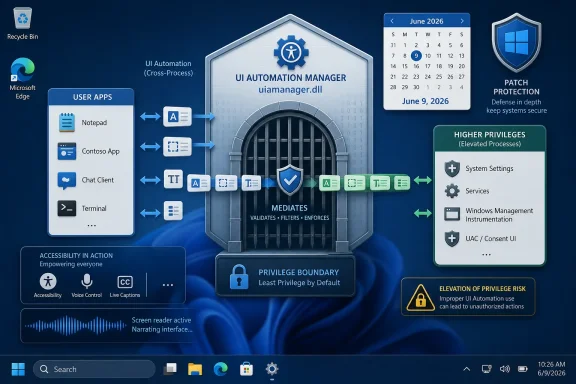 Microsoft’s Accessibility Plumbing Becomes a Privilege Boundary Again
UI Automation is one of those Windows subsystems most users never knowingly touch, yet many depend on it every day. Screen readers, testing frameworks, accessibility tools, enterprise automation suites, and some assistive workflows rely on Windows being able to expose interface elements across application boundaries. That design is powerful because it makes Windows more usable and more scriptable.It is also security-sensitive by nature. A subsystem that can observe windows, enumerate controls, send inputs, or broker interactions between processes must constantly prove that convenience has not become authority. CVE-2026-45597 lands in that uneasy space: the line between helping a user operate the desktop and helping an attacker climb out of a low-privilege context.
Microsoft classifies the issue as an elevation-of-privilege vulnerability, which means exploitation would not normally be the first step in an intrusion. The attacker already needs some foothold: a local account, malware running as a standard user, a compromised app sandbox, or access through another vulnerability. The payoff is what matters. Local privilege escalation is how nuisance access becomes durable control.
The CVSS Confidence Signal Is Doing More Work Than Usual
The user-supplied MSRC context points to the CVSS metric that measures confidence in the existence and technical understanding of a vulnerability. In CVSS v3.x terminology, this is the Report Confidence metric: a way of saying whether the vulnerability is merely rumored, reasonably corroborated, or confirmed by the vendor or author.That detail deserves attention because administrators often fixate on the base score and miss the smaller flags that shape real-world triage. A vulnerability with vague public details can be urgent if exploitation is observed, but it is a different operational problem from a vulnerability whose existence, affected component, and remediation path have been confirmed. Confidence is not severity, but it changes how much trust defenders can place in the advisory.
For CVE-2026-45597, the important practical reading is that Microsoft’s advisory anchors the issue in a named Windows binary and a named impact category. That does not reveal exploit mechanics, and it should not be mistaken for a proof-of-concept. But it does move the issue out of the realm of rumor. The vulnerability is not a forum whisper; it is a Microsoft-tracked Windows flaw with a remediation path.
Local Bugs Still Decide Remote Compromises
It is tempting to down-rank every local elevation-of-privilege bug because “the attacker already has to be on the box.” That is tidy spreadsheet logic and poor incident logic. Modern compromises are chained, and privilege escalation is often the link that turns a phished user session, a malicious document, or a browser escape into a machine-level incident.Windows’ defensive model assumes that not every process is equally trusted. Standard users should not become administrators simply because they can talk to a desktop service. Low-integrity processes should not be able to manipulate higher-integrity ones. Accessibility and automation features complicate this model because they are designed to cross some of the same boundaries that security controls try to enforce.
That is why bugs in UI-adjacent components have an outsized operational feel. They sit close to the user session, close to UAC behavior, and close to the practical reality of how malware survives after initial execution. A remote-code-execution flaw may get the attacker in. A local privilege-escalation flaw helps the attacker stay, hide, dump secrets, disable tools, and move laterally.
Uiamanager.dll Sits Where Usability and Isolation Collide
The filename uiamanager.dll is not a household name, but the territory is familiar to anyone who has administered locked-down Windows desktops. Windows has long had to balance accessibility with isolation. Microsoft UI Automation exists because accessibility is not optional; a secure system that cannot be used by people who need assistive technologies is not a successful system.The problem is that accessibility tooling often requires privileged kinds of visibility. It may need to read interface elements from another application, identify controls, invoke actions, or help a user interact with a window that would otherwise be opaque. Windows uses mechanisms such as integrity levels, User Interface Privilege Isolation, secure desktop behavior, and UIAccess signing rules to decide which cross-boundary interactions are legitimate.
When a vulnerability appears in this zone, the question is rarely “why does Windows allow UI automation at all?” The better question is whether a narrow exception has widened into a privilege path. CVE-2026-45597 appears to be one of those cases where the remediation is less about turning off a feature and more about tightening the broker that decides who may do what.
Patch Tuesday’s Volume Makes the Small Print Matter
June 2026’s Patch Tuesday is a busy one by any reasonable measure, and busy patch cycles create triage fatigue. Administrators scan for exploited-in-the-wild labels, public proof-of-concept indicators, critical remote bugs, and products exposed to the internet. A Windows UI Automation Manager local privilege escalation can easily fall into the second tier.That would be a mistake in environments where endpoint compromise is the expected path rather than the nightmare edge case. Workstations, jump boxes, developer laptops, VDI pools, kiosk systems, and shared administrative machines are all places where local privilege boundaries matter. The right mental model is not “can this be exploited from the internet?” but “what happens after a user-level process lands?”
The answer is uncomfortable. If an attacker can turn ordinary code execution into higher privileges, security controls that depend on least privilege start to erode. Endpoint detection can be weakened, credential material becomes easier to reach, persistence becomes easier to install, and incident responders inherit a much messier machine state.
The Absence of Public Exploit Detail Is Not a Reprieve
At publication time, the publicly available material around CVE-2026-45597 does not provide a detailed exploit recipe. That is good for defenders and frustrating for researchers. It also means this article should not pretend to know the vulnerable code path, the exact object lifetime issue, the access check failure, or the exploit primitive.But lack of public detail is not the same as lack of attacker interest. Once Microsoft ships a patch, attackers can compare old and new binaries, especially for Windows components with a clear filename and impact category. Patch diffing is not magic, but it is a mature discipline. The more precisely an advisory identifies a component, the more efficiently skilled researchers can look for what changed.
That does not mean every local privilege bug becomes weaponized. Many do not. Some require awkward preconditions, race timing, unusual configuration, or a user context that is less common than it first appears. Still, defenders should assume that the window between patch release and exploit understanding is measured in days or weeks, not quarters.
Enterprise Risk Is Concentrated on the Endpoint
For home users, the advice is simple: install the cumulative Windows update when it is offered, reboot, and do not treat this CVE as a reason to panic. For enterprise IT, the risk calculation is more nuanced. The vulnerability matters most where standard user execution is common and privileged separation is a meaningful defense.That includes managed laptops, help-desk machines, shared workstations, and systems used by staff with access to sensitive internal tools. It also includes developer endpoints, which routinely hold credentials, source code, signing materials, package tokens, cloud sessions, and privileged management utilities. On those machines, local privilege escalation is not a theoretical upgrade; it is often the shortest route from “user compromised” to “environment compromised.”
Servers are a different story, but not an irrelevant one. Windows Server systems with interactive logon exposure, Remote Desktop use, jump-host roles, or administrative tooling installed should not be casually deferred. A local elevation bug is less interesting on a headless server that almost nobody logs into. It is much more interesting on the server administrators actually use.
Accessibility Exceptions Are Not Security Debt by Default
There is a lazy version of the argument that treats accessibility as an attack surface Windows would be better off without. That argument is both technically and ethically wrong. Accessibility is a core operating-system requirement, and the security challenge is to make it robust rather than to wish it away.The more useful lesson is that accessibility pathways deserve the same threat modeling as RPC services, kernel drivers, browser sandboxes, and identity brokers. If a feature can mediate interactions between processes at different integrity levels, it is part of the privilege architecture. If it can influence elevated windows, observe sensitive UI state, or participate in UAC-adjacent behavior, it belongs in security reviews.
CVE-2026-45597 should therefore be read as another reminder that Windows’ desktop is not a flat surface. It is a layered environment full of brokers, handles, tokens, windows, messages, and policy exceptions. Bugs emerge when those layers disagree about who is allowed to act.
Mitigation Is Mostly Patch Discipline, Not Registry Theater
For most organizations, the correct mitigation is to deploy Microsoft’s update rather than hunting for a clever workaround. There may be hardening value in reviewing UIAccess policy, UAC behavior, application allow lists, and endpoint privilege management, but those are supporting controls. They are not substitutes for patching the vulnerable Windows component.This is especially true because disabling accessibility infrastructure broadly is rarely acceptable. It can break legitimate assistive technology, automated testing tools, remote support workflows, and compliance expectations. Security programs that respond to accessibility-related CVEs by bluntly disabling accessibility features tend to create operational damage without necessarily closing the specific exploit path.
The better approach is boring and effective: update, reboot, verify build levels, and watch for post-patch failures in accessibility-dependent workflows. If a business-critical assistive or automation tool breaks after the update, treat that as a compatibility incident to solve quickly, not as a reason to leave privilege-escalation exposure open indefinitely.
Scanner Output Will Lag Behind Real Risk
One of the recurring frustrations with Microsoft CVEs is the gap between advisory publication, NVD enrichment, scanner plugin coverage, asset inventory precision, and actual patch state. CVE-2026-45597 is likely to travel through that pipeline like many Windows vulnerabilities before it: first as an MSRC record, then as vendor and scanner metadata, then as dashboard findings that may or may not map cleanly to your deployed builds.That lag matters. A vulnerability-management console can tell you that a CVE applies to a product family, but Windows servicing is ultimately build-specific. The question administrators need answered is whether the relevant cumulative update is installed and whether the system has completed any required reboot. A machine that has downloaded an update but not restarted is not the same as a remediated machine.
This is where disciplined Windows operations beat generic CVE panic. Track KB deployment, OS build numbers, reboot status, and exception groups. If your scanner and Microsoft’s servicing state disagree, trust the actual update inventory and investigate the scanner logic rather than assuming either side is automatically right.
The Patch Should Be Prioritized Where Attack Chains Already Exist
Not every environment can patch everything on day one. That is reality, not negligence. The challenge is ranking CVE-2026-45597 correctly among louder vulnerabilities in the same cycle.The first priority should be endpoints that face untrusted content. User workstations that handle email attachments, browser sessions, collaboration tools, downloads, and external documents are natural candidates. If an attacker can get code running as the user, a local privilege escalation becomes immediately useful.
The second priority should be systems used by administrators and developers. These machines are prize targets because their users already sit near valuable secrets. A local EoP flaw can collapse the distance between a compromised user token and broader operational control.
The third priority should be shared or semi-trusted Windows environments. Lab machines, classroom systems, call-center desktops, kiosk variants, and multi-user RDS-style deployments all create scenarios where local privilege boundaries carry extra weight. In those environments, “local attacker” may mean “anyone who can log in,” which is not much comfort.
Microsoft’s Sparse Advisories Force Better Defender Judgment
Microsoft’s Security Update Guide is designed to move patch information at scale, not to satisfy every reverse engineer’s curiosity. That means many CVEs arrive with a title, severity, CVSS vector, affected products, exploitability flags, and little else. Security teams often complain about that sparseness, and they are not wrong to want more context.But sparse does not mean useless. The component name, impact category, and confidence signal already tell defenders a great deal. This is a Windows local privilege issue, not a remote service bug. It is tied to UI Automation Manager, not Exchange, SQL Server, or Edge. It affects the post-compromise phase more than initial access. It is confirmed enough to warrant a Microsoft security update.
The judgment call is therefore straightforward: do not overstate it as a catastrophic internet-facing emergency, and do not dismiss it because it is local. Treat it as a privilege-escalation patch that belongs in the first wave for user-facing Windows systems and privileged workstations.
The Practical Read for WindowsForum Readers
CVE-2026-45597 is the kind of vulnerability that rewards calm urgency. It is not the patch-cycle item most likely to dominate executive briefings, but it is exactly the kind of issue that shows up in real intrusions as a force multiplier.- Install the relevant June 9, 2026 Windows cumulative updates on affected Windows clients and servers, then verify that the systems have rebooted into the patched build.
- Prioritize machines that process untrusted content, including everyday user workstations, developer laptops, help-desk systems, and administrative jump boxes.
- Do not disable accessibility or UI Automation features broadly unless Microsoft or your own testing identifies a specific, supportable reason to do so.
- Treat scanner findings as leads, not verdicts, and confirm remediation through installed KBs, OS build numbers, and reboot status.
- Watch for compatibility issues in screen readers, assistive tools, UI testing frameworks, and remote support utilities after patching.
- Assume that public exploit understanding may improve after the patch ships, even if no proof-of-concept is currently circulating.
References
- Primary source: MSRC
Published: 2026-06-09T07:00:00-07:00
Security Update Guide - Microsoft Security Response Center
 msrc.microsoft.com
- Official source: learn.microsoft.com
User Account Control Allow UIAccess applications to prompt for elevation without using the secure desktop - Windows 10 | Microsoft Learn
Best practices and more for the policy setting, User Account Control Allow UIAccess applications to prompt for elevation without using the secure desktop.learn.microsoft.com - Related coverage: action1.com
CVE-2026-21519 – Desktop Window Manager Elevation of Privilege Vulnerability | Action1
CVE-2026-21519 is an important-severity elevation of privilege vulnerability in the Windows Desktop Window Manager (DWM). The issue is caused by a type confusion error that allows an authorized local attacker with low privileges to exploit improper resource handling and escalate access to SYSTEM...www.action1.com - Related coverage: rapid7.com
Rapid7 Vulnerability Database
Rapid7's VulnDB is curated repository of vetted computer software exploits and exploitable vulnerabilities.www.rapid7.com - Related coverage: safe.security
Windows Win32k Elevation of Privilege Vulnerability [CVE-2021-1732]
In this research paper, you can learn about Windows Win32k elevation of privilege vulnerability (CVE-2021-1732) and how it works. Download it here.safe.security
- Official source: microsoft.com
MSRC - Microsoft Security Response Center
The Microsoft Security Response Center is part of the defender community and on the front line of security response evolution. For over twenty years, we have been engaged with security researchers working to protect customers and the broader ecosystem.www.microsoft.com
- Related coverage: publicapi.dev
Microsoft Security Response Center (MSRC) API - PublicAPI
Microsoft Security Response Center (MSRC) API provides Programmatic interfaces to engage with the Microsoft Security Response Center (MSRC) publicapi.dev
- Related coverage: deepwiki.com
MSRC API Reference | microsoft/MSRC-Microsoft-Security-Updates-API | DeepWiki
This document provides technical reference information for the Microsoft Security Response Center (MSRC) CVRF API that underlies the MsrcSecurityUpdates PowerShell module. This covers the REST API enddeepwiki.com - Related coverage: thehackerwire.com
CVE-2026-45497 - High Vulnerability
CVE-2026-45497 is a High severity vulnerability (CVSS 7.7). Improper neutralization of special elements used in a command ('command injection') in Microsoft Copilot allows an authorized attacker to execute...www.thehackerwire.com
- Related coverage: vulnerability.circl.lu
Vulnerability-Lookup
Vulnerability-Lookup - Fast vulnerability lookup correlation from different sources.vulnerability.circl.lu - Related coverage: sentinelone.com
CVE-2026-33597: PRSD Detection DOS Vulnerability
CVE-2026-33597 is a denial of service vulnerability in PRSD detection. Learn about its impact, affected versions, and mitigation methods.www.sentinelone.com
