

Microsoft’s AI Browser Surface Is Now a Security Boundary
For years, Edge security meant the usual browser concerns: sandbox escapes, memory corruption, malicious extensions, credential theft, and cross-site data leakage. Copilot Chat changes the shape of that boundary. It is not just rendering web content; it is interpreting user intent, brokering cloud services, and sitting close to work data that may come from Microsoft 365, the browser session, enterprise identity, or organizational policy.
That is why an information disclosure flaw in Copilot Chat deserves more attention than the same label might receive in a smaller feature. “Information disclosure” can sound comparatively mild beside remote code execution or privilege escalation. In AI-assisted software, however, disclosure is often the core risk: the system’s job is to gather context, reason over it, and produce text for the user.
The uncomfortable part is that Copilot’s value proposition and its attack surface are almost the same thing. It becomes useful by being near the material users care about. It becomes risky when the rules governing that nearness are incomplete, bypassed, or misunderstood.
The Advisory Says Less Than Administrators Want, but More Than They Should Ignore
The user-facing fragment in Microsoft’s advisory language points to the CVSS concept of Report Confidence: how certain the vulnerability is, how credible the known technical details are, and whether the vendor or author has acknowledged the issue. In plain English, this is the industry’s way of separating rumor from reproducible weakness.
That matters because security teams often treat sparse advisories as low-priority noise. When Microsoft publishes a CVE for a product surface it owns, especially one tied to a cloud-backed feature like Copilot Chat, the absence of technical detail does not mean the absence of risk. It usually means the vendor is limiting disclosure while customers update, the service-side fix is being rolled out, or the exploit path depends on context Microsoft does not want to hand to attackers.
The practical reading is simple: the bug is real enough to be tracked, named, and scored. If Microsoft’s advisory assigns confidence to the report, administrators should not wait for a polished exploit blog before reviewing exposure. By the time the write-up arrives, the operational window for calm mitigation may already have closed.
Copilot Makes Old Disclosure Bugs Feel New Again
Security professionals already know how data leaks happen. Input is mishandled, output is over-trusted, permissions are overbroad, and components talk to each other in ways designers did not fully model. Copilot does not repeal those old rules. It compresses them into a conversational interface that users are encouraged to trust.
That is the new wrinkle. A traditional browser disclosure flaw might leak a token, a page fragment, or metadata under specific conditions. An AI assistant may transform the leaked material into a useful summary, connect it to other context, or present it in a way that looks authoritative. The harm is not only that data crosses a boundary; it is that the assistant can make crossed-boundary data more legible.
This is why information disclosure in AI systems should not be dismissed as “just confidentiality.” In many organizations, confidentiality is the crown jewel. Customer records, executive mail, legal strategy, source code, incident response notes, and unreleased financial data are all information. A system that can helpfully summarize them can also helpfully expose them if the guardrails fail.
Edge Is No Longer Just the Place Users Go to the Web
Microsoft has spent years turning Edge into more than a Chromium distribution with a Windows logo. It is a policy-managed enterprise browser, a Microsoft 365 access point, a PDF reader, a password and profile container, a search front end, and now a Copilot host. That strategy makes sense commercially and technically, but it also concentrates risk.
For administrators, the relevant question is not whether Edge is “safe.” The relevant question is which Edge features are enabled, which identities they run under, what tenant data they can reach, and how quickly Microsoft can patch or remotely alter the feature when something goes wrong. Copilot Chat is part of that management problem.
The cloud-backed nature of the feature cuts both ways. Microsoft can often mitigate server-side issues faster than customers can patch every desktop. But customers may also have less visibility into what changed, when it changed, and whether a particular exposure ever applied to their tenant. That is a recurring tension in modern Microsoft security: faster remediation, but more opacity.
The CVSS Confidence Language Is a Clue About Operational Reality
The quoted metric language is dry, but it tells administrators something useful. Vulnerability handling is not binary. A bug can move from suspected to corroborated to confirmed, and each step changes how urgently defenders should act.
In a Copilot Chat case, the confidence metric is especially relevant because public technical detail may lag behind remediation. Microsoft may confirm the vulnerability while withholding the exact trigger, affected request pattern, or data path. That is frustrating for defenders who want to validate exposure independently, but it is also normal for vulnerabilities in widely deployed consumer and enterprise software.
The danger is that teams confuse “not enough detail to reproduce” with “not enough detail to prioritize.” Those are different states. A confirmed vendor advisory gives you enough to put the issue into the patch and policy queue, even if it does not give you enough to build a lab exploit.
Where the Enterprise Risk Actually Lives
The obvious risk is that an attacker extracts information through Copilot Chat in Edge. The less obvious risk is that organizations do not know what information Copilot Chat could access in the first place. AI features often arrive through licensing, browser updates, Microsoft 365 admin defaults, or user-facing toggles that move faster than governance processes.
This is where security and compliance teams should focus. If a user can ask Copilot to reason over work data, then the organization needs to understand the identity, permission, logging, retention, and data-loss-prevention model around that interaction. Otherwise, every Copilot vulnerability becomes a scramble to reconstruct a map that should already exist.
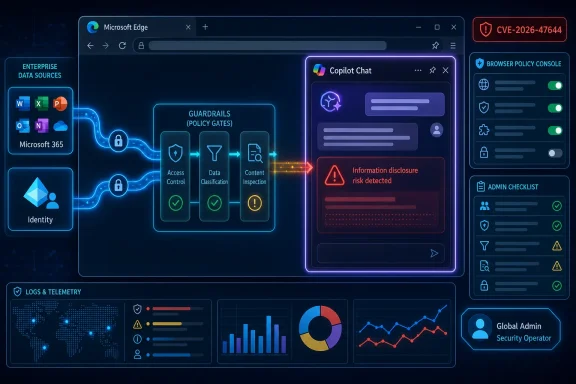
The issue is not that Copilot is uniquely reckless. The issue is that AI assistants make implicit access feel invisible. A user sees a chat box. An administrator has to see the chain behind it: browser profile, account state, tenant policy, Microsoft Graph access, service-side prompts, content filters, logging, and output controls.
Patch Management Alone Is Not a Strategy
For many WindowsForum readers, the instinctive response to a Microsoft CVE is straightforward: patch, verify, move on. That remains necessary. Edge should be updated, managed devices should be checked for compliance, and administrators should confirm that browser update channels are not lagging behind policy.
But Copilot vulnerabilities are a reminder that patch management is only the maintenance layer. The governance layer sits above it. If Copilot Chat is enabled broadly, with weak understanding of what it can reach, then patching this CVE merely returns the organization to its previous risk posture. It does not answer whether that posture was acceptable.
A mature response would pair remediation with configuration review. Which users have Copilot Chat in Edge? Is it enabled in personal profiles, work profiles, or both? Are Edge for Business policies aligned with Microsoft 365 Copilot policies? Are high-risk groups treated differently from general users? Those are boring questions until they are not.
The Browser Policy Console Becomes an AI Control Plane
Edge management used to feel like a convenience layer for favorites, homepage defaults, extension allow lists, and update channels. In the Copilot era, it becomes part of the AI control plane. The same tooling that decides whether a button appears in the toolbar may now influence whether users can put enterprise context into a Microsoft-hosted assistant from inside the browser.
That changes the audience for browser policy. It is no longer just desktop engineering. Security architecture, compliance, legal, and data protection teams all have a stake in the defaults. If Edge is the place where AI assistance meets authenticated work data, then Edge policy is a data boundary.
This does not mean every organization should disable Copilot Chat. It means enabling it should be a decision rather than an accident. The difference between those two states is documentation, ownership, and telemetry.
Users Will Not Read a CVE Before They Ask the Chat Box
The human side of this is brutally simple. Users adopt tools that save time. If Copilot Chat can summarize a page, draft a message, or explain a policy document, many users will try it long before the security team has finished its risk register.
That is not user failure. It is product design working as intended. Microsoft has put Copilot where users already work because friction kills adoption. Security teams therefore cannot rely on obscurity, training fatigue, or the hope that users will avoid AI features until governance catches up.
The answer is not another annual awareness module. It is clear policy enforced through configuration. Users should not be asked to decide whether a particular prompt crosses a compliance boundary if the organization can technically prevent the risky workflow in the first place.
Information Disclosure Is the AI Era’s Quiet Severity Class
Security culture still tends to rank vulnerabilities by drama. Remote code execution gets headlines. Kernel privilege escalation gets emergency meetings. Information disclosure often gets a slower path unless it involves passwords, keys, or public embarrassment.
AI should change that mental model. Disclosure is no longer passive. A leak into or through an AI assistant can be reformatted, summarized, correlated, and made actionable. The assistant may not be “exploiting” data in the traditional sense, but it can lower the effort required for a human attacker to understand what was obtained.
That makes impact harder to judge from a CVSS label alone. A low-complexity disclosure in a low-value context may be routine. A disclosure touching executive mail, security tickets, customer data, or privileged operational notes may be existential. The same vulnerability class can have wildly different business consequences depending on the data around it.
Microsoft’s Advantage Is Also Microsoft’s Burden
Microsoft is in a better position than most vendors to fix these issues quickly because it controls Edge, Copilot services, Microsoft 365 integration, identity, and much of the management stack. That vertical integration is the reason Copilot can feel seamless. It is also why Microsoft owns the blast radius when seams split.
Customers should expect more of these advisories, not fewer. As Copilot surfaces multiply across Windows, Edge, Office, Teams, Outlook, SharePoint, and developer tools, the number of places where input handling, identity scoping, and output control can go wrong increases. This is not an argument against Copilot. It is an argument against pretending AI integration is merely a feature rollout.
The security bargain Microsoft is offering enterprise customers is clear: trust us to embed AI deeply, and we will provide the controls, telemetry, and remediation pipeline to make that safe enough. CVE-2026-47644 is another test of whether that bargain is visible and manageable from the customer side.
The Admin’s Job Is to Turn a Sparse Advisory Into Concrete Checks
A sparse advisory can still produce a concrete response. Administrators do not need to know the exploit string to reduce exposure. They need to know whether affected components are current, whether Copilot Chat is governed, and whether logs can answer basic questions after the fact.
The first check is update hygiene. Edge’s rapid release model only works if devices are actually receiving updates and users are not pinned to stale builds. Managed environments should verify both stable-channel deployment and any exception groups that delay browser updates for compatibility testing.
The second check is feature scope. If Copilot Chat is not approved for a population, it should not be casually available because a browser update exposed a toolbar entry. If it is approved, the organization should document the data classes users may process through it and the groups for which stricter controls apply.
The third check is incident readiness. If a Copilot-related disclosure concern arises, can the team determine who used the feature, from which device class, under which identity, and around what time? If the answer is no, then the organization is running a high-context assistant with low-context auditability.
The Edge-Copilot Boundary Needs Its Own Risk Register
Many enterprises already maintain risk registers for Microsoft 365 Copilot. Fewer treat Copilot Chat in Edge as a distinct browser-mediated surface. That distinction matters because browser behavior often involves web content, mixed personal and work profiles, extensions, downloads, and user sessions that do not map cleanly onto Office app assumptions.
Edge for Business helps by separating work and personal browsing contexts, but separation is only as strong as the policy design behind it. If users can move sensitive work context into unmanaged prompts or personal profiles, the administrative boundary becomes more aspirational than real. CVEs in Copilot Chat should push teams to test those assumptions rather than merely recite them.
The governance model should also account for different user populations. A frontline worker asking Copilot to summarize a public web page presents a different risk than a finance executive using it near confidential forecasts. A developer pasting stack traces from internal systems presents a different risk than a marketer drafting public copy. The policy should be granular because the data is granular.
Security Teams Should Resist Both Theater and Complacency
There are two bad reactions to this kind of advisory. The first is security theater: disable every AI feature overnight, declare victory, and ignore the business demand that caused users to adopt the tools in the first place. The second is complacency: assume Microsoft has handled everything server-side and leave defaults untouched.
Neither is a strategy. AI assistance is becoming part of the Windows and Microsoft 365 baseline, and organizations that ban it without alternatives will often drive users toward less governable tools. But organizations that enable it without boundaries are outsourcing too much judgment to vendor defaults.
The better path is boring and durable. Define approved AI use cases. Segment user populations. Manage Edge policies. Monitor adoption. Patch quickly. Review incidents and advisories as signals about where the control model is thin.
The Practical Read for Windows Shops Is Narrow but Urgent
CVE-2026-47644 should not be treated as proof that Copilot Chat is unsafe by design. It should be treated as proof that Copilot Chat is now important enough to sit in the normal vulnerability-management stream. That is a milestone, and not an entirely comfortable one.
The organizations best positioned to handle this advisory are not necessarily the ones with the most restrictive AI posture. They are the ones that can answer basic operational questions quickly. Where is Copilot enabled? Who can use it? What data can it touch? How are Edge updates enforced? Who owns the policy?
Those answers matter more than rhetoric about AI risk. A named CVE gives security teams a lever to demand clarity. They should use it.
The Edge Copilot CVE Turns Governance From Slideware Into Work
This advisory’s most useful lesson is that AI risk has moved from conference decks into the patch queue. The immediate actions are not exotic, but they are concrete.
- Administrators should verify that Microsoft Edge is updating normally across managed Windows devices and that exception rings are not leaving high-risk users behind.
- Security teams should confirm whether Copilot Chat in Edge is enabled, disabled, or conditionally available under enterprise policy.
- Organizations should separate work and personal browser contexts wherever Edge is used to access sensitive Microsoft 365 data.
- Compliance teams should review whether current logging can reconstruct Copilot Chat usage during a suspected disclosure event.
- High-sensitivity groups should receive stricter Copilot and browser controls until the organization can prove that data boundaries match policy.
- Vulnerability managers should treat Copilot advisories as part of the standard Microsoft remediation cycle, not as experimental AI edge cases.
The broader lesson is that Microsoft’s AI features are no longer optional curiosities orbiting the Windows estate; they are becoming part of the estate itself. CVE-2026-47644 may ultimately be remembered as a small advisory with limited public detail, but it points toward a larger operational truth: the next phase of Windows security will be fought as much over context, policy, and data flow as over code execution.
References
- CVE-2026-47644 Copilot Chat (Microsoft Edge) Information Disclosure Vulnerability MSRC · 2026-06-04T07:00:00-07:00