

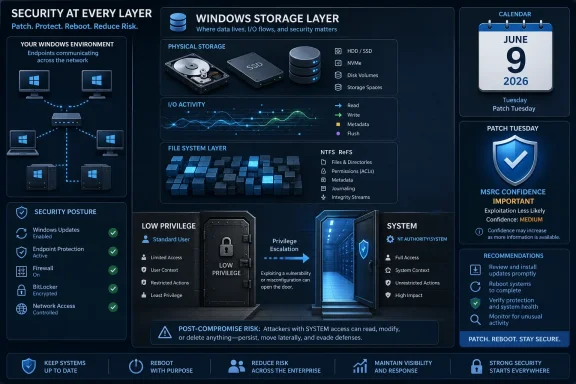
Microsoft published CVE-2026-47648, a Windows Storage elevation-of-privilege vulnerability, in its Security Update Guide on June 9, 2026, identifying the issue as a Windows flaw that can allow privilege escalation while assigning high confidence to the existence of the vulnerability and its technical basis. That last phrase matters more than it sounds. Microsoft is not merely saying “something may be wrong”; it is saying the bug is real enough to patch and credible enough to score. For Windows admins, the story is less about dramatic exploit details than about a familiar operational truth: local privilege-escalation bugs are the second stage attackers count on after the first foothold succeeds.
The phrase “Windows Storage Elevation of Privilege Vulnerability” is not the kind of advisory wording that lights up social media. There is no exposed web service, no wormable network protocol, no splashy “open a file and lose the machine” headline. It sounds internal, low-level, and almost boring.
That is exactly why it deserves attention.
Elevation-of-privilege vulnerabilities occupy a particular place in Windows security. They usually do not begin an intrusion by themselves. Instead, they turn an already-bad day into a worse one: a phished user session becomes a system-level foothold, a compromised desktop becomes a staging point, or a low-privilege process gains the access needed to disable tools, dump credentials, tamper with logs, or persist beyond a reboot.
Storage bugs sit uncomfortably close to that danger zone. Windows storage is not a niche feature bolted onto the side of the operating system; it is part of the plumbing every endpoint and server depends on. When Microsoft identifies an elevation-of-privilege flaw in that layer, defenders should think less in terms of “Can someone attack me from the internet?” and more in terms of “What happens after someone has already landed?”
That matters because vulnerability advisories often arrive with uneven levels of transparency. Sometimes defenders get a complete technical write-up, proof-of-concept code, affected code paths, mitigations, and exploit conditions. Other times, they get a CVE title, a severity score, affected products, and a patch. The lack of public detail can tempt organizations to downgrade urgency, especially when no active exploitation is known.
That is a mistake. A confirmed vulnerability with sparse public detail is not a hypothetical problem; it is a problem whose details have not been fully disclosed. For attackers, the same patch that protects defenders can also serve as a map. Once update packages are available, reverse engineering begins, and quiet local bugs can become much noisier within days or weeks.
The important distinction is this: limited disclosure reduces public understanding, not necessarily attacker interest. Microsoft’s confidence metric is one of the few advisory fields that tells defenders whether the vendor believes the underlying issue is solid. For CVE-2026-47648, that confidence is the signal administrators should not ignore.
That view is understandable, but increasingly outdated.
Modern intrusions are chained. A browser exploit, malicious attachment, stolen VPN credential, help-desk social engineering attack, exposed RMM tool, or infostealer infection may provide only limited access at first. The attacker then needs to climb. Local privilege escalation is how a foothold becomes control.
Windows has hardened considerably over the years, but that hardening has also made privilege escalation more valuable. If endpoint detection, credential isolation, driver signing, virtualization-based security, and application control are present, the attacker needs a way around the wall. A Windows EoP flaw does not have to be flashy to be useful; it only has to work reliably under the right local conditions.
That is the practical lens through which CVE-2026-47648 should be read. It is not a panic button for every home PC, and it does not imply every Windows machine is already under attack. It is a reminder that patching the operating system’s local attack surface is part of stopping post-compromise escalation, not just checking a compliance box.
That breadth is why storage-related flaws can be operationally sensitive. A vulnerability in a peripheral app may be mitigated by uninstalling the app. A storage-layer vulnerability is different. Every Windows endpoint stores, reads, writes, caches, indexes, backs up, restores, encrypts, and mediates access to data constantly.
For administrators, this creates a familiar patching tension. The systems most exposed to storage complexity are often the systems admins are most reluctant to reboot casually: file servers, Hyper-V hosts, backup infrastructure, VDI platforms, developer workstations, database servers, and machines with unusual disk, filter-driver, encryption, or snapshot configurations. The safer move is not to defer indefinitely; it is to test quickly and deploy deliberately.
This is where WindowsForum readers know the real story lives. The advisory is the beginning. The work is in figuring out whether the update collides with storage drivers, backup agents, endpoint security filters, deduplication, BitLocker workflows, SAN multipathing software, or legacy hardware stacks. A storage EoP bug may be a security item, but the patch lands in the operational nervous system.
This does not mean every CVE becomes exploitable overnight. Many bugs are subtle, environment-specific, or hard to weaponize. But defenders should not take comfort in obscurity once a fix is published. The clock changes when corrected binaries are available.
For a vulnerability like CVE-2026-47648, the absence of public exploit chatter should be treated as useful context, not a reason to ignore the update. If Microsoft has shipped a fix and marked the report as credible, the safest assumption is that the window of asymmetry is closing. Defenders may not know the root cause yet, but motivated attackers can start looking.
That is why patch prioritization should not rely only on whether a CVE is remote or whether exploit code is already circulating. The right question is more operational: if an attacker already has a low-privilege foothold on this machine, how damaging would local escalation be? On domain-joined workstations, admin jump boxes, servers with sensitive data, and systems used by IT staff, the answer is usually “very.”
Enterprises do not get that luxury. They have rings, maintenance windows, application compatibility testing, help-desk staffing, security dashboards, and change freezes. They also have attackers who understand that enterprise patch latency is part of the attack surface.
The correct enterprise response is not reckless deployment to every production machine in the first hour. It is accelerated normalcy: test the update in a representative pilot group, monitor for storage or boot anomalies, validate backup and recovery tooling, and then move through deployment rings faster than the organization might for a routine quality update. If the environment contains systems used for administration, security operations, software deployment, or file services, those should not sit at the back of the line.
The systems worth prioritizing are not always the most internet-facing. A domain admin workstation with a browser, email client, management consoles, and VPN access may be a more attractive escalation target than a locked-down server. A backup server that touches everything may deserve faster attention than a kiosk. Asset value should shape urgency.
CVE-2026-47648 falls into that familiar gray zone. The title tells us the affected area and the impact class. The metric language tells us Microsoft has confidence in the vulnerability’s existence and technical credibility. What defenders may still want is the missing connective tissue: required privileges, attack complexity, affected Windows versions, whether exploitation requires special storage configuration, and whether mitigations exist beyond applying the update.
In the absence of that detail, security teams tend to fill the void with assumptions. Some assume “local” means low priority. Others assume anything in Windows storage is automatically catastrophic. Neither instinct is good enough.
The better approach is to separate what is known from what is inferred. Known: Microsoft has identified a Windows Storage elevation-of-privilege vulnerability and published guidance through MSRC. Known: the confidence metric indicates the vulnerability is not merely speculative. Inferred: the most plausible risk is post-compromise escalation on affected systems. Unknown from the provided material: whether exploitation is simple, whether public proof-of-concept code exists, and whether any specific storage configuration increases exposure.
That uncertainty should shape, not paralyze, the response.
A local privilege-escalation vulnerability on a lightly used lab machine is one problem. The same class of vulnerability on a privileged admin workstation is another. On a file server, backup host, Hyper-V node, or endpoint used to manage Intune, Active Directory, Azure, or security tooling, escalation has much larger blast radius.
This is why vulnerability management should be tied to asset identity. The practical question is not “Is this CVE remote?” It is “Where would SYSTEM-level compromise hurt us most?” That answer will vary by organization, but the pattern is consistent: prioritize machines that hold credentials, administer other machines, host sensitive data, or sit in the path of recovery.
Security teams should also watch for the behavioral signs that make EoP bugs relevant. A machine with recent malware detections, suspicious scripting, unexpected service creation, abnormal driver loads, or unauthorized remote access attempts is no longer just another endpoint in the patch queue. It is a candidate for faster remediation and closer inspection.
That is especially true in environments where users lack local admin rights. Removing local admin is one of the most important endpoint hardening moves an organization can make, but it also increases attacker demand for privilege-escalation techniques. If the attacker lands in a standard user context, a Windows EoP bug can become the bridge.
This is also why endpoint detection alone is not enough. EDR can catch suspicious behavior, but if the attacker escalates quickly and tampers with defensive controls, the window for detection narrows. Patching local escalation flaws reduces the attacker’s room to maneuver before the alert ever fires.
Administrators should resist the urge to view local privilege escalation as “less urgent” by default. It is less likely to be the opening move, but it may be the move that determines whether the intrusion remains contained. In ransomware cases, credential theft operations, and hands-on-keyboard intrusions, that distinction is not academic.
Start with update coverage. Confirm which Windows versions in the estate are affected by the June 2026 security release, then verify deployment status through your normal management plane. For consumer and small-business systems, that may be Windows Update or Windows Update for Business. For larger organizations, it may be Intune, Configuration Manager, WSUS, Autopatch, or a third-party patch platform.
Then look at the high-value systems. Admin workstations, servers with sensitive data, virtualization hosts, backup infrastructure, and security tooling should be treated as higher priority than generic endpoints. If change windows are constrained, spend the first window where escalation would hurt most.
Finally, do not stop at installation counts. A patch that downloads but does not install is not a fix. A fix that installs but waits on a reboot may not be active. A dashboard that shows “compliant” while a subset of machines is offline, pending restart, or failing cumulative updates is a liability disguised as progress.
 Microsoft’s Quietest Bugs Are Often the Ones Administrators Have to Treat Seriously
The phrase “Windows Storage Elevation of Privilege Vulnerability” is not the kind of advisory wording that lights up social media. There is no exposed web service, no wormable network protocol, no splashy “open a file and lose the machine” headline. It sounds internal, low-level, and almost boring.That is exactly why it deserves attention.
Elevation-of-privilege vulnerabilities occupy a particular place in Windows security. They usually do not begin an intrusion by themselves. Instead, they turn an already-bad day into a worse one: a phished user session becomes a system-level foothold, a compromised desktop becomes a staging point, or a low-privilege process gains the access needed to disable tools, dump credentials, tamper with logs, or persist beyond a reboot.
Storage bugs sit uncomfortably close to that danger zone. Windows storage is not a niche feature bolted onto the side of the operating system; it is part of the plumbing every endpoint and server depends on. When Microsoft identifies an elevation-of-privilege flaw in that layer, defenders should think less in terms of “Can someone attack me from the internet?” and more in terms of “What happens after someone has already landed?”
Report Confidence Is the Detail That Changes the Tone
The user-supplied MSRC text describes a metric that measures confidence in the vulnerability’s existence and in the credibility of known technical details. In plain English, this is Microsoft’s way of distinguishing rumor, partial research, and confirmed vendor knowledge. The higher the confidence, the less room there is for wishful thinking.That matters because vulnerability advisories often arrive with uneven levels of transparency. Sometimes defenders get a complete technical write-up, proof-of-concept code, affected code paths, mitigations, and exploit conditions. Other times, they get a CVE title, a severity score, affected products, and a patch. The lack of public detail can tempt organizations to downgrade urgency, especially when no active exploitation is known.
That is a mistake. A confirmed vulnerability with sparse public detail is not a hypothetical problem; it is a problem whose details have not been fully disclosed. For attackers, the same patch that protects defenders can also serve as a map. Once update packages are available, reverse engineering begins, and quiet local bugs can become much noisier within days or weeks.
The important distinction is this: limited disclosure reduces public understanding, not necessarily attacker interest. Microsoft’s confidence metric is one of the few advisory fields that tells defenders whether the vendor believes the underlying issue is solid. For CVE-2026-47648, that confidence is the signal administrators should not ignore.
Elevation of Privilege Is the Attacker’s Middle Game
Security teams tend to rank vulnerabilities by how they are first encountered. Remote code execution gets urgent attention because it sounds like the front door is open. Authentication bypasses get a red flag because identity boundaries are at stake. Local elevation-of-privilege bugs, by contrast, are often treated as secondary.That view is understandable, but increasingly outdated.
Modern intrusions are chained. A browser exploit, malicious attachment, stolen VPN credential, help-desk social engineering attack, exposed RMM tool, or infostealer infection may provide only limited access at first. The attacker then needs to climb. Local privilege escalation is how a foothold becomes control.
Windows has hardened considerably over the years, but that hardening has also made privilege escalation more valuable. If endpoint detection, credential isolation, driver signing, virtualization-based security, and application control are present, the attacker needs a way around the wall. A Windows EoP flaw does not have to be flashy to be useful; it only has to work reliably under the right local conditions.
That is the practical lens through which CVE-2026-47648 should be read. It is not a panic button for every home PC, and it does not imply every Windows machine is already under attack. It is a reminder that patching the operating system’s local attack surface is part of stopping post-compromise escalation, not just checking a compliance box.
The Storage Layer Is Too Central to Hand-Wave
“Windows Storage” is a broad phrase, and Microsoft’s public advisory language does not necessarily expose the precise vulnerable component. That ambiguity is frustrating, but the category itself is important. Storage touches file systems, volumes, device stacks, drivers, permissions, mount behavior, I/O paths, and the boundary between user-mode requests and kernel-mode enforcement.That breadth is why storage-related flaws can be operationally sensitive. A vulnerability in a peripheral app may be mitigated by uninstalling the app. A storage-layer vulnerability is different. Every Windows endpoint stores, reads, writes, caches, indexes, backs up, restores, encrypts, and mediates access to data constantly.
For administrators, this creates a familiar patching tension. The systems most exposed to storage complexity are often the systems admins are most reluctant to reboot casually: file servers, Hyper-V hosts, backup infrastructure, VDI platforms, developer workstations, database servers, and machines with unusual disk, filter-driver, encryption, or snapshot configurations. The safer move is not to defer indefinitely; it is to test quickly and deploy deliberately.
This is where WindowsForum readers know the real story lives. The advisory is the beginning. The work is in figuring out whether the update collides with storage drivers, backup agents, endpoint security filters, deduplication, BitLocker workflows, SAN multipathing software, or legacy hardware stacks. A storage EoP bug may be a security item, but the patch lands in the operational nervous system.
Patch Tuesday Has Become a Race Against Diffing
Microsoft’s monthly security rhythm gives defenders predictability. It also gives attackers a schedule. Every Patch Tuesday, update packages become public artifacts that can be compared against previous versions. That process, commonly called patch diffing, can reveal what changed and help skilled researchers infer what the vulnerability was.This does not mean every CVE becomes exploitable overnight. Many bugs are subtle, environment-specific, or hard to weaponize. But defenders should not take comfort in obscurity once a fix is published. The clock changes when corrected binaries are available.
For a vulnerability like CVE-2026-47648, the absence of public exploit chatter should be treated as useful context, not a reason to ignore the update. If Microsoft has shipped a fix and marked the report as credible, the safest assumption is that the window of asymmetry is closing. Defenders may not know the root cause yet, but motivated attackers can start looking.
That is why patch prioritization should not rely only on whether a CVE is remote or whether exploit code is already circulating. The right question is more operational: if an attacker already has a low-privilege foothold on this machine, how damaging would local escalation be? On domain-joined workstations, admin jump boxes, servers with sensitive data, and systems used by IT staff, the answer is usually “very.”
Home Users Get the Simple Version; Enterprises Get the Hard One
For consumer Windows users, the advice is refreshingly boring: install the cumulative update, restart when prompted, and do not spend the week hunting for exploit rumors. Most home systems will receive the relevant fix through Windows Update, and the main risk is delay. The user who keeps postponing restarts is the user who remains exposed after the patch exists.Enterprises do not get that luxury. They have rings, maintenance windows, application compatibility testing, help-desk staffing, security dashboards, and change freezes. They also have attackers who understand that enterprise patch latency is part of the attack surface.
The correct enterprise response is not reckless deployment to every production machine in the first hour. It is accelerated normalcy: test the update in a representative pilot group, monitor for storage or boot anomalies, validate backup and recovery tooling, and then move through deployment rings faster than the organization might for a routine quality update. If the environment contains systems used for administration, security operations, software deployment, or file services, those should not sit at the back of the line.
The systems worth prioritizing are not always the most internet-facing. A domain admin workstation with a browser, email client, management consoles, and VPN access may be a more attractive escalation target than a locked-down server. A backup server that touches everything may deserve faster attention than a kiosk. Asset value should shape urgency.
Microsoft’s Sparse Advisory Style Still Leaves Defenders Guessing
Microsoft’s Security Update Guide has improved over the years, but Windows CVE entries often remain terse. The company must balance transparency against exploit enablement, and that balance is not simple. Publishing too much detail too early can help attackers. Publishing too little leaves defenders unable to judge whether a bug matters to their environment.CVE-2026-47648 falls into that familiar gray zone. The title tells us the affected area and the impact class. The metric language tells us Microsoft has confidence in the vulnerability’s existence and technical credibility. What defenders may still want is the missing connective tissue: required privileges, attack complexity, affected Windows versions, whether exploitation requires special storage configuration, and whether mitigations exist beyond applying the update.
In the absence of that detail, security teams tend to fill the void with assumptions. Some assume “local” means low priority. Others assume anything in Windows storage is automatically catastrophic. Neither instinct is good enough.
The better approach is to separate what is known from what is inferred. Known: Microsoft has identified a Windows Storage elevation-of-privilege vulnerability and published guidance through MSRC. Known: the confidence metric indicates the vulnerability is not merely speculative. Inferred: the most plausible risk is post-compromise escalation on affected systems. Unknown from the provided material: whether exploitation is simple, whether public proof-of-concept code exists, and whether any specific storage configuration increases exposure.
That uncertainty should shape, not paralyze, the response.
The Real Patch Priority Is Not the CVE Alone
Administrators often ask whether a vulnerability is “critical enough” to break the patching calendar. That framing makes sense when resources are limited, but it can hide the actual risk. CVE severity is only one dimension. The affected asset is another.A local privilege-escalation vulnerability on a lightly used lab machine is one problem. The same class of vulnerability on a privileged admin workstation is another. On a file server, backup host, Hyper-V node, or endpoint used to manage Intune, Active Directory, Azure, or security tooling, escalation has much larger blast radius.
This is why vulnerability management should be tied to asset identity. The practical question is not “Is this CVE remote?” It is “Where would SYSTEM-level compromise hurt us most?” That answer will vary by organization, but the pattern is consistent: prioritize machines that hold credentials, administer other machines, host sensitive data, or sit in the path of recovery.
Security teams should also watch for the behavioral signs that make EoP bugs relevant. A machine with recent malware detections, suspicious scripting, unexpected service creation, abnormal driver loads, or unauthorized remote access attempts is no longer just another endpoint in the patch queue. It is a candidate for faster remediation and closer inspection.
The Windows Storage Bug Belongs in the Post-Compromise Playbook
The most useful way to think about CVE-2026-47648 is as part of the post-compromise playbook. Attackers do not need every vulnerability to be the first step. They need enough reliable steps to move from user access to durable control. Local elevation-of-privilege bugs are among the most valuable links in that chain.That is especially true in environments where users lack local admin rights. Removing local admin is one of the most important endpoint hardening moves an organization can make, but it also increases attacker demand for privilege-escalation techniques. If the attacker lands in a standard user context, a Windows EoP bug can become the bridge.
This is also why endpoint detection alone is not enough. EDR can catch suspicious behavior, but if the attacker escalates quickly and tampers with defensive controls, the window for detection narrows. Patching local escalation flaws reduces the attacker’s room to maneuver before the alert ever fires.
Administrators should resist the urge to view local privilege escalation as “less urgent” by default. It is less likely to be the opening move, but it may be the move that determines whether the intrusion remains contained. In ransomware cases, credential theft operations, and hands-on-keyboard intrusions, that distinction is not academic.
The Practical Read for Windows Admins
The operational response to CVE-2026-47648 should be disciplined rather than theatrical. There is no need to invent exploit details Microsoft has not published, and there is no value in pretending the advisory is more specific than it is. But there is also no case for ignoring a confirmed Windows elevation-of-privilege bug in a core OS area.Start with update coverage. Confirm which Windows versions in the estate are affected by the June 2026 security release, then verify deployment status through your normal management plane. For consumer and small-business systems, that may be Windows Update or Windows Update for Business. For larger organizations, it may be Intune, Configuration Manager, WSUS, Autopatch, or a third-party patch platform.
Then look at the high-value systems. Admin workstations, servers with sensitive data, virtualization hosts, backup infrastructure, and security tooling should be treated as higher priority than generic endpoints. If change windows are constrained, spend the first window where escalation would hurt most.
Finally, do not stop at installation counts. A patch that downloads but does not install is not a fix. A fix that installs but waits on a reboot may not be active. A dashboard that shows “compliant” while a subset of machines is offline, pending restart, or failing cumulative updates is a liability disguised as progress.
The Advisory’s Quiet Words Tell Administrators Where to Look
The most concrete lesson from CVE-2026-47648 is that advisory metadata is not filler. The confidence language in Microsoft’s guidance is part of the risk signal. It tells defenders that the vulnerability is credible, even if the public write-up does not hand them the root cause.- Microsoft has identified CVE-2026-47648 as a Windows Storage elevation-of-privilege vulnerability published through the Security Update Guide on June 9, 2026.
- The report-confidence language indicates that Microsoft considers the vulnerability’s existence and known technical details credible, not merely speculative.
- The most practical risk is post-compromise privilege escalation, especially on systems where a low-privilege foothold could become SYSTEM-level control.
- Administrators should prioritize deployment on high-value endpoints and servers, including admin workstations, file servers, backup systems, virtualization hosts, and security management machines.
- Patch validation should include reboot completion and failure monitoring, not just update approval or download status.
- The absence of public exploit details should not be treated as proof of low risk once a vendor-confirmed patch is available.
References
- Primary source: MSRC
Published: 2026-06-09T07:00:00-07:00
Security Update Guide - Microsoft Security Response Center
 msrc.microsoft.com
- Related coverage: aha.org
- Related coverage: datacomm.com
- Official source: microsoft.com
MSRC - Microsoft Security Response Center
The Microsoft Security Response Center is part of the defender community and on the front line of security response evolution. For over twenty years, we have been engaged with security researchers working to protect customers and the broader ecosystem.www.microsoft.com
- Related coverage: thewindowsupdate.com
- Related coverage: absolute.com

- Official source: learn.microsoft.com
api microsoft errors - Microsoft Q&A
Hello, Could you please check this issue? From yesterday I tried for many times to reach these URLs but I received 503 and 404 Errors. • https://api.msrc.microsoft.com/ • https://api.msrc.microsoft.com/Updates There is any changement in…learn.microsoft.com - Related coverage: cyber.gc.ca
Microsoft security advisory (AV26-489) - Canadian Centre for Cyber Security
Microsoft security advisory (AV26-489)www.cyber.gc.ca - Related coverage: api.urlscan.io

api.msrc.microsoft.com - urlscan.io
urlscan.io - Website scanner for suspicious and malicious URLs
api.urlscan.io
- Related coverage: howtofix.guide
Microsoft Defender CVE-2026-41091 and CVE-2026-45498 Exploited
Microsoft Defender CVE-2026-41091 and CVE-2026-45498 are exploited. Verify Engine 1.1.26040.8, Platform 4.18.26040.7, and update endpoints.howtofix.guide - Related coverage: deepwiki.com
MSRC API Reference | microsoft/MSRC-Microsoft-Security-Updates-API | DeepWiki
This document provides technical reference information for the Microsoft Security Response Center (MSRC) CVRF API that underlies the MsrcSecurityUpdates PowerShell module. This covers the REST API enddeepwiki.com - Related coverage: sra.io
- Related coverage: protectone.net
Aktiv ausgenutzte High-Severity-CVEs: Microsoft & SolarWinds (KW 7)
Aktuelle Threat-Intel-Zusammenfassung (letzte 7 Tage): aktiv ausgenutzte Schwachstellen mit CVSS >= 8 in Microsoft Windows/ConfigMgr und SolarWinds Web Help Desk – inkl. Priorisierung und Patch-Checkliste. protectone.net
