

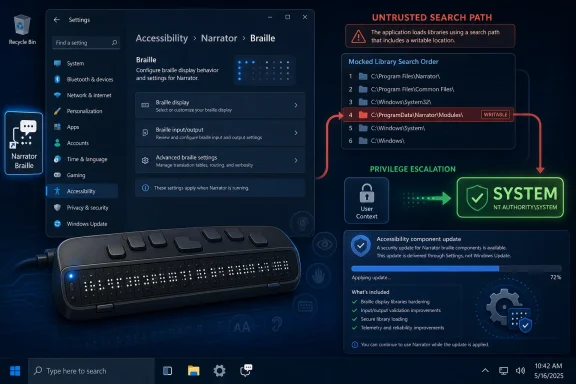
Microsoft published CVE-2026-48565 on June 9, 2026, identifying an Important-rated Windows Narrator Braille elevation-of-privilege vulnerability caused by an untrusted search path that can let a local authenticated attacker gain SYSTEM privileges. The patch path is not a normal cumulative Windows update entry but a BRLTTY feature update delivered through Windows Accessibility settings. That makes this a small-looking accessibility flaw with a larger operational lesson: Windows’ assistive-technology stack is now part of the privilege boundary administrators have to inventory, update, and defend like any other endpoint component.
The headline fact is straightforward enough. Microsoft says the vulnerable component is Windows Narrator Braille, the impact is elevation of privilege, the severity is Important, and the weakness is CWE-426, an untrusted search path. The CVSS 3.1 base score is 7.8, a familiar number for local privilege-escalation flaws that require some foothold but can produce high confidentiality, integrity, and availability impact.
The advisory’s most important sentence is not the score. It is Microsoft’s answer to what an attacker could gain: SYSTEM privileges. In Windows security terms, that is the difference between being a nuisance inside one user profile and having the keys to the local machine.
This is not a remote wormable bug. The attack vector is local, the attacker needs low privileges, and Microsoft says no user interaction is required. That places CVE-2026-48565 in the category defenders know too well: not the initial breach, but the post-compromise step that turns a phished user, stolen credential, or sandbox escape into full machine control.
The wrinkle is the affected surface. Narrator and Braille support are not the first places many administrators look when triaging privilege escalation. But Windows accessibility components run close to user logon, input, device integration, and assistive workflows, which is precisely why they deserve more than a shrug when Microsoft attaches SYSTEM to the consequence.
Report Confidence measures how much faith defenders should have in the vulnerability’s existence and technical credibility. A low-confidence vulnerability might be little more than a public allegation, a behavioral clue, or a half-understood crash. A confirmed vulnerability means the vendor or author has acknowledged it, detailed reports exist, or reproduction is credible enough to treat the issue as real rather than speculative.
For CVE-2026-48565, Microsoft is both the assigning CNA and the vendor confirming the bug. That does not mean exploit code is circulating; Microsoft separately lists exploit code maturity as Unproven and says exploitation is less likely. But it does mean patch teams should not confuse “less likely” with “maybe imaginary.”
That distinction is where many organizations get burned. A vulnerability can be confirmed, patched, and operationally relevant even when public exploit code is not available. Attackers do not need a GitHub proof of concept if the bug class is familiar and the affected component offers a path into privileged execution.
That pattern has appeared for years across Windows desktop software, installers, services, and enterprise agents. It is not glamorous. It does not need a speculative-execution diagram or a heap feng shui thread. But it keeps coming back because software still has to locate things on disk, inherit environment assumptions, and interact with plug-in ecosystems.
In this case, the affected product name points to Narrator’s Braille support, and Microsoft’s remediation guidance points to BRLTTY. BRLTTY is used to support refreshable Braille displays, making it part of the accessibility plumbing rather than the obvious Windows kernel or browser attack surface. That does not make it minor; it makes it easy to miss.
The security model problem is simple: accessibility tooling often needs broad integration to do its job. It must observe, translate, and sometimes mediate user interaction in ways ordinary applications do not. When those pathways are bundled with privileged loading behavior, a mundane search-order flaw can become a local privilege escalation.
But “Important” is sometimes misread as “wait until next quarter.” That would be the wrong instinct here, especially on shared workstations, accessibility-enabled endpoints, kiosk-adjacent systems, help-desk machines, lab computers, and any environment where local standard-user compromise is a realistic assumption.
The CVSS vector tells the story plainly. Attack vector is local, attack complexity is low, privileges required are low, and user interaction is none. Confidentiality, integrity, and availability impact are all rated high. In other words, once the attacker has a low-privilege local position, Microsoft’s scoring assumes a repeatable path to severe machine-level impact.
That is exactly the shape of a useful enterprise intrusion bug. Initial access gets the attacker onto the box; elevation of privilege gets them persistence, credential access, tampering ability, and security-tool interference. Local privilege escalation is not a footnote to an intrusion chain. It is often the hinge.
That is a very different workflow from the one Windows administrators live in every Patch Tuesday. Cumulative updates can be tracked through Windows Update, WSUS, Intune, Configuration Manager, and build reporting. A feature component downloaded through an accessibility settings panel is less likely to appear in the mental model of a patch manager staring at compliance dashboards.
This does not mean the fix is bad. It may be the cleanest way to update a bundled or on-demand component that is not present on every system. But it does mean defenders need to ask a more specific question than “Are my June updates installed?” They need to know whether BRLTTY is installed, whether Narrator Braille support has been enabled, and whether the latest available BRLTTY update has actually landed.
That difference matters in real environments. Accessibility components may be installed for a small number of users, but those users’ machines still sit on the same domain, carry the same tokens, and access the same data. Treating assistive technology as a special case outside normal inventory is not inclusive; it is insecure.
Narrator, on-screen keyboard, sticky keys, magnifier, and related support paths have all become part of the folklore of Windows privilege and persistence discussions. Some of that lore is outdated, some is oversimplified, and some is still painfully relevant. The lesson is not that accessibility features are dangerous. The lesson is that they are powerful.
That power carries a responsibility for Microsoft. Accessibility components should be engineered, serviced, and documented with the same seriousness as networking stacks and authentication brokers. They are not optional ornaments on top of Windows; for many users they are the interface to Windows.
It also carries a responsibility for enterprise IT. Disabling accessibility features wholesale is not a security strategy, and in many organizations it would be discriminatory, illegal, or operationally cruel. The better strategy is inventory, controlled deployment, update visibility, and least-privilege assumptions around every component that can influence the local desktop.
They should not prevent patching. “Less likely” in Microsoft’s exploitability language is not “won’t happen.” It is a current assessment made at publication time, based on known exploitability factors and the absence of observed public activity. That can change when researchers diff updates, when offensive teams study the component, or when attackers discover the bug independently.
The Report Confidence value being Confirmed adds another layer. Defenders are not dealing with rumor, but with a vendor-acknowledged flaw and an official fix. If exploit code maturity is unproven today, the timeline can still compress quickly once enough technical breadcrumbs exist.
This is especially true for untrusted search path issues. They often become practical when someone identifies the exact loading sequence, writable directory, file name, or dependency resolution behavior. The advisory does not provide those details, and responsible disclosure should not require it. But the bug class is not exotic.
Administrators should also resist the temptation to frame this only as an accessibility-user issue. If the component is installed on a shared device or image, it may be reachable in ways that do not map neatly to the person who requested or uses a Braille display. Enterprise images have a habit of accumulating components long after the original business requirement has faded.
The next step is to test the remediation path before issuing guidance to users. If the fix is delivered through the Accessibility settings experience, IT needs to know whether standard users can initiate it, whether admin rights are required, whether policy blocks the download, and whether endpoint management tooling can detect the updated state. A fix that exists but cannot be deployed consistently is not yet a mitigation.
Finally, security teams should update their local privilege escalation playbooks. If an alert shows a low-privilege process interacting unexpectedly with Narrator, accessibility folders, BRLTTY-related paths, or unusual local file placement around assistive components, that deserves attention. CVE advisories rarely hand defenders perfect detection logic, but they do point to surfaces worth watching.
That modularity has benefits. Microsoft can update some components faster, avoid pushing unnecessary bits to everyone, and keep specialized features closer to their upstream or partner-maintained projects. But modularity also creates blind spots for organizations whose patch posture is still built around “monthly Windows update installed: yes or no.”
For attackers, blind spots are opportunities. Optional features may be less scrutinized. Assistive components may be assumed benign. Update mechanisms outside the normal patch channel may be underreported. A local privilege-escalation bug does not need to be everywhere to be valuable; it only needs to be present on the right machine.
Microsoft could help by making these fixes more visible in enterprise tooling. If the recommended action is a feature update inside Accessibility settings, administrators need machine-readable detection, deployment guidance, and compliance reporting that does not require guesswork. Security guidance should meet administrators where they operate, not where a consumer settings page happens to live.
That is why flaws like CVE-2026-48565 matter even when they are not remotely exploitable. The perimeter is already porous in modern enterprises. Phishing, malicious OAuth grants, drive-by downloads, supply-chain abuse, and stolen credentials all create low-privilege footholds. The question then becomes whether the attacker stays boxed in or climbs.
The advisory’s high impact ratings for confidentiality, integrity, and availability reflect that reality. A successful attacker could move from user-level access to machine-level control. From there, they may dump secrets, install services, tamper with logs, interfere with endpoint detection, or stage further movement.
That does not make this the scariest bug of the year. It makes it part of the everyday machinery of intrusion. The dull bugs are often the ones that pay rent in attacker toolchains.
The involvement of a brokered disclosure program also helps explain the advisory’s shape. Microsoft can confirm the vulnerability without publishing exploit-ready internals. Researchers receive credit. Customers receive remediation. Attackers receive less than they would from an uncoordinated full disclosure.
This is the model working as intended, albeit with the usual caveat that defenders still have to act. A confirmed report and official fix only reduce risk when the affected component is updated. Disclosure is not remediation; it is the starting gun for remediation.
If patch teams only ask whether Windows cumulative updates installed successfully, they may miss the component-specific nature of this fix. The advisory lists no KB article, no download entry, and no fixed build number in the visible security-updates table. The remediation instruction is to update BRLTTY through the Narrator Braille workflow.
That should prompt a specific June checklist item for environments that use or deploy Braille display support. It should also prompt a broader review of how optional Windows features are tracked. The right answer is not to panic over every component, but to stop pretending the base OS update is the whole security story.
For managed environments, the real work is translating Microsoft’s user-facing instruction into administrator-facing control. Can Intune report the BRLTTY version? Can Configuration Manager inventory it? Can PowerShell detect whether the component is present and current? Can accessibility-dependent users receive the update without losing functionality? Those are the questions that determine whether the advisory becomes fixed risk or lingering exposure.
 A Braille Driver Bug Lands in the Privilege-Escalation Pile
The headline fact is straightforward enough. Microsoft says the vulnerable component is Windows Narrator Braille, the impact is elevation of privilege, the severity is Important, and the weakness is CWE-426, an untrusted search path. The CVSS 3.1 base score is 7.8, a familiar number for local privilege-escalation flaws that require some foothold but can produce high confidentiality, integrity, and availability impact.The advisory’s most important sentence is not the score. It is Microsoft’s answer to what an attacker could gain: SYSTEM privileges. In Windows security terms, that is the difference between being a nuisance inside one user profile and having the keys to the local machine.
This is not a remote wormable bug. The attack vector is local, the attacker needs low privileges, and Microsoft says no user interaction is required. That places CVE-2026-48565 in the category defenders know too well: not the initial breach, but the post-compromise step that turns a phished user, stolen credential, or sandbox escape into full machine control.
The wrinkle is the affected surface. Narrator and Braille support are not the first places many administrators look when triaging privilege escalation. But Windows accessibility components run close to user logon, input, device integration, and assistive workflows, which is precisely why they deserve more than a shrug when Microsoft attaches SYSTEM to the consequence.
The Report Confidence Field Is Doing More Work Than Usual
The user-supplied MSRC text explains the Report Confidence metric, and in this advisory Microsoft marks that metric as Confirmed. That matters because CVSS temporal scoring is often treated as decoration, something vulnerability scanners display beneath the base score while everyone chases severity colors. Here, it is a useful signal.Report Confidence measures how much faith defenders should have in the vulnerability’s existence and technical credibility. A low-confidence vulnerability might be little more than a public allegation, a behavioral clue, or a half-understood crash. A confirmed vulnerability means the vendor or author has acknowledged it, detailed reports exist, or reproduction is credible enough to treat the issue as real rather than speculative.
For CVE-2026-48565, Microsoft is both the assigning CNA and the vendor confirming the bug. That does not mean exploit code is circulating; Microsoft separately lists exploit code maturity as Unproven and says exploitation is less likely. But it does mean patch teams should not confuse “less likely” with “maybe imaginary.”
That distinction is where many organizations get burned. A vulnerability can be confirmed, patched, and operationally relevant even when public exploit code is not available. Attackers do not need a GitHub proof of concept if the bug class is familiar and the affected component offers a path into privileged execution.
Untrusted Search Path Is an Old Mistake in a Modern Corner
An untrusted search path vulnerability is one of those bug classes that feels too old to still be interesting. Software looks for a file, library, helper executable, configuration item, or dependency in a location an attacker can influence. If a privileged process loads the attacker-controlled object, the attacker may get code running with privileges they did not legitimately possess.That pattern has appeared for years across Windows desktop software, installers, services, and enterprise agents. It is not glamorous. It does not need a speculative-execution diagram or a heap feng shui thread. But it keeps coming back because software still has to locate things on disk, inherit environment assumptions, and interact with plug-in ecosystems.
In this case, the affected product name points to Narrator’s Braille support, and Microsoft’s remediation guidance points to BRLTTY. BRLTTY is used to support refreshable Braille displays, making it part of the accessibility plumbing rather than the obvious Windows kernel or browser attack surface. That does not make it minor; it makes it easy to miss.
The security model problem is simple: accessibility tooling often needs broad integration to do its job. It must observe, translate, and sometimes mediate user interaction in ways ordinary applications do not. When those pathways are bundled with privileged loading behavior, a mundane search-order flaw can become a local privilege escalation.
“Important” Does Not Mean Optional
Microsoft’s Important rating is accurate in the narrow sense. CVE-2026-48565 is local, not remotely exploitable over the network, and requires an authorized attacker. It is not the kind of bug that should make administrators yank Ethernet cables or emergency-reimage fleets overnight.But “Important” is sometimes misread as “wait until next quarter.” That would be the wrong instinct here, especially on shared workstations, accessibility-enabled endpoints, kiosk-adjacent systems, help-desk machines, lab computers, and any environment where local standard-user compromise is a realistic assumption.
The CVSS vector tells the story plainly. Attack vector is local, attack complexity is low, privileges required are low, and user interaction is none. Confidentiality, integrity, and availability impact are all rated high. In other words, once the attacker has a low-privilege local position, Microsoft’s scoring assumes a repeatable path to severe machine-level impact.
That is exactly the shape of a useful enterprise intrusion bug. Initial access gets the attacker onto the box; elevation of privilege gets them persistence, credential access, tampering ability, and security-tool interference. Local privilege escalation is not a footnote to an intrusion chain. It is often the hinge.
The BRLTTY Update Path Complicates Patch Hygiene
The most operationally awkward part of CVE-2026-48565 is Microsoft’s remediation guidance. Rather than pointing to a KB article or a Windows build number, the advisory tells customers to install the latest BRLTTY feature update through Windows Accessibility settings: Settings, Accessibility, Narrator, Use Braille display, Download BRLTTY.That is a very different workflow from the one Windows administrators live in every Patch Tuesday. Cumulative updates can be tracked through Windows Update, WSUS, Intune, Configuration Manager, and build reporting. A feature component downloaded through an accessibility settings panel is less likely to appear in the mental model of a patch manager staring at compliance dashboards.
This does not mean the fix is bad. It may be the cleanest way to update a bundled or on-demand component that is not present on every system. But it does mean defenders need to ask a more specific question than “Are my June updates installed?” They need to know whether BRLTTY is installed, whether Narrator Braille support has been enabled, and whether the latest available BRLTTY update has actually landed.
That difference matters in real environments. Accessibility components may be installed for a small number of users, but those users’ machines still sit on the same domain, carry the same tokens, and access the same data. Treating assistive technology as a special case outside normal inventory is not inclusive; it is insecure.
Accessibility Features Are Security Features Too
Windows accessibility has long occupied an uncomfortable place in endpoint security. The tools must be available early, work reliably, and support users who cannot simply wait for IT to debug broken input or display workflows. That has historically made accessibility paths attractive to both defenders and attackers: defenders because they provide necessary access, attackers because they sometimes cross boundaries ordinary apps cannot.Narrator, on-screen keyboard, sticky keys, magnifier, and related support paths have all become part of the folklore of Windows privilege and persistence discussions. Some of that lore is outdated, some is oversimplified, and some is still painfully relevant. The lesson is not that accessibility features are dangerous. The lesson is that they are powerful.
That power carries a responsibility for Microsoft. Accessibility components should be engineered, serviced, and documented with the same seriousness as networking stacks and authentication brokers. They are not optional ornaments on top of Windows; for many users they are the interface to Windows.
It also carries a responsibility for enterprise IT. Disabling accessibility features wholesale is not a security strategy, and in many organizations it would be discriminatory, illegal, or operationally cruel. The better strategy is inventory, controlled deployment, update visibility, and least-privilege assumptions around every component that can influence the local desktop.
The Absence of Exploitation Is Reassuring, Not Exculpatory
Microsoft says CVE-2026-48565 was not publicly disclosed and not exploited at the time of publication. It also rates exploitation as less likely. Those are useful signals, and they should prevent panic.They should not prevent patching. “Less likely” in Microsoft’s exploitability language is not “won’t happen.” It is a current assessment made at publication time, based on known exploitability factors and the absence of observed public activity. That can change when researchers diff updates, when offensive teams study the component, or when attackers discover the bug independently.
The Report Confidence value being Confirmed adds another layer. Defenders are not dealing with rumor, but with a vendor-acknowledged flaw and an official fix. If exploit code maturity is unproven today, the timeline can still compress quickly once enough technical breadcrumbs exist.
This is especially true for untrusted search path issues. They often become practical when someone identifies the exact loading sequence, writable directory, file name, or dependency resolution behavior. The advisory does not provide those details, and responsible disclosure should not require it. But the bug class is not exotic.
Where Sysadmins Should Look First
The first practical step is to identify where Windows Narrator Braille support and BRLTTY are present. Not every endpoint will have the vulnerable component installed or active in the same way, and the MSRC security-updates table lists Windows Narrator Braille as the product rather than a broad set of Windows SKUs. That makes asset discovery more important than generic OS version triage.Administrators should also resist the temptation to frame this only as an accessibility-user issue. If the component is installed on a shared device or image, it may be reachable in ways that do not map neatly to the person who requested or uses a Braille display. Enterprise images have a habit of accumulating components long after the original business requirement has faded.
The next step is to test the remediation path before issuing guidance to users. If the fix is delivered through the Accessibility settings experience, IT needs to know whether standard users can initiate it, whether admin rights are required, whether policy blocks the download, and whether endpoint management tooling can detect the updated state. A fix that exists but cannot be deployed consistently is not yet a mitigation.
Finally, security teams should update their local privilege escalation playbooks. If an alert shows a low-privilege process interacting unexpectedly with Narrator, accessibility folders, BRLTTY-related paths, or unusual local file placement around assistive components, that deserves attention. CVE advisories rarely hand defenders perfect detection logic, but they do point to surfaces worth watching.
Microsoft’s Fragmented Servicing Story Shows Through
CVE-2026-48565 is also a small example of a larger Windows servicing reality. Not every security fix arrives as a neat OS cumulative update with a KB number, a build bump, and a tidy compliance story. Windows is now a constellation of inbox apps, optional features, Store-delivered components, drivers, firmware-adjacent packages, language assets, AI add-ons, and accessibility modules.That modularity has benefits. Microsoft can update some components faster, avoid pushing unnecessary bits to everyone, and keep specialized features closer to their upstream or partner-maintained projects. But modularity also creates blind spots for organizations whose patch posture is still built around “monthly Windows update installed: yes or no.”
For attackers, blind spots are opportunities. Optional features may be less scrutinized. Assistive components may be assumed benign. Update mechanisms outside the normal patch channel may be underreported. A local privilege-escalation bug does not need to be everywhere to be valuable; it only needs to be present on the right machine.
Microsoft could help by making these fixes more visible in enterprise tooling. If the recommended action is a feature update inside Accessibility settings, administrators need machine-readable detection, deployment guidance, and compliance reporting that does not require guesswork. Security guidance should meet administrators where they operate, not where a consumer settings page happens to live.
The Risk Is Local, but the Blast Radius Is Enterprise
A local privilege escalation vulnerability sounds contained until one remembers what a Windows workstation contains. Browser tokens, cached credentials, VPN clients, device certificates, developer secrets, cloud sync folders, password managers, management agents, and security tools all sit on the endpoint. SYSTEM access changes what an attacker can read, alter, disable, or harvest.That is why flaws like CVE-2026-48565 matter even when they are not remotely exploitable. The perimeter is already porous in modern enterprises. Phishing, malicious OAuth grants, drive-by downloads, supply-chain abuse, and stolen credentials all create low-privilege footholds. The question then becomes whether the attacker stays boxed in or climbs.
The advisory’s high impact ratings for confidentiality, integrity, and availability reflect that reality. A successful attacker could move from user-level access to machine-level control. From there, they may dump secrets, install services, tamper with logs, interfere with endpoint detection, or stage further movement.
That does not make this the scariest bug of the year. It makes it part of the everyday machinery of intrusion. The dull bugs are often the ones that pay rent in attacker toolchains.
The Disclosure Credit Points to a Healthier Ecosystem
Microsoft credits Zeeshan Shaikh, working with Trend Micro’s Zero Day Initiative, for reporting the vulnerability. That matters because coordinated disclosure is the quiet infrastructure behind most uneventful patch days. The public sees a CVE entry and a fix; the useful work happened earlier, in the report, triage, reproduction, vendor coordination, and remediation.The involvement of a brokered disclosure program also helps explain the advisory’s shape. Microsoft can confirm the vulnerability without publishing exploit-ready internals. Researchers receive credit. Customers receive remediation. Attackers receive less than they would from an uncoordinated full disclosure.
This is the model working as intended, albeit with the usual caveat that defenders still have to act. A confirmed report and official fix only reduce risk when the affected component is updated. Disclosure is not remediation; it is the starting gun for remediation.
The June 2026 Patch Conversation Should Include Optional Components
CVE-2026-48565 arrived on June 9, 2026, the same date as Microsoft’s regular monthly security release cadence. In many organizations, that means it will be swept into the Patch Tuesday conversation. The danger is that it will also be flattened by it.If patch teams only ask whether Windows cumulative updates installed successfully, they may miss the component-specific nature of this fix. The advisory lists no KB article, no download entry, and no fixed build number in the visible security-updates table. The remediation instruction is to update BRLTTY through the Narrator Braille workflow.
That should prompt a specific June checklist item for environments that use or deploy Braille display support. It should also prompt a broader review of how optional Windows features are tracked. The right answer is not to panic over every component, but to stop pretending the base OS update is the whole security story.
For managed environments, the real work is translating Microsoft’s user-facing instruction into administrator-facing control. Can Intune report the BRLTTY version? Can Configuration Manager inventory it? Can PowerShell detect whether the component is present and current? Can accessibility-dependent users receive the update without losing functionality? Those are the questions that determine whether the advisory becomes fixed risk or lingering exposure.
The Practical Read on Microsoft’s Braille Bug
CVE-2026-48565 is not a remote-code-execution fire drill, but it is a confirmed local privilege-escalation flaw with a SYSTEM outcome and a nonstandard remediation path. The safest reading is calm urgency: identify exposure, update the component, and make sure accessibility tooling is represented in endpoint inventory.- CVE-2026-48565 was released on June 9, 2026, and affects Windows Narrator Braille rather than every Windows installation in the same obvious way.
- Microsoft rates the flaw Important with a CVSS 3.1 base score of 7.8 and says successful exploitation could grant SYSTEM privileges.
- The vulnerability is an untrusted search path issue, which is an old but still practical route to privilege escalation when privileged components load attacker-influenced files.
- Microsoft says the flaw was not publicly disclosed or exploited at publication time, and assesses exploitation as less likely.
- The Report Confidence metric is Confirmed, so defenders should treat the vulnerability as real even though exploit code maturity is currently unproven.
- Microsoft’s recommended protection is to install the latest BRLTTY feature update through Windows Accessibility settings, which may require extra attention from enterprise patch teams.
References
- Primary source: MSRC
Published: 2026-06-09T07:00:00-07:00
Security Update Guide - Microsoft Security Response Center
 msrc.microsoft.com
