

CVE-2026-50469 is a newly patched Windows Projected File System vulnerability that can let a locally authenticated attacker elevate privileges, potentially gaining complete control over a compromised machine. Microsoft released the fix on July 14, 2026, assigning the flaw a CVSS 3.1 score of 7.8 High and classifying its technical details as confirmed.
Detailed in Microsoft’s Security Update Guide and the National Vulnerability Database, the flaw affects Windows 10, Windows 11, Windows Server 2019, Windows Server 2022, and Windows Server 2025. Administrators should deploy the corresponding cumulative updates rather than treating the optional nature of Windows Projected File System as sufficient protection.
The vulnerability is not remotely exploitable by itself. An attacker must already have local access and low-level privileges, but exploitation requires no user interaction and Microsoft rates the attack complexity as low.
Windows Projected File System, commonly shortened to ProjFS, lets a user-mode provider expose hierarchical data as apparently local files and directories. Microsoft originally developed the technology for scenarios such as virtualizing very large Git repositories, where presenting every file locally would be inefficient.
ProjFS is delivered as an optional Windows component. On client editions, it can be enabled through Windows Features or with the
Microsoft identifies CVE-2026-50469 as CWE-59, or improper link resolution before file access. This class of weakness occurs when software follows a symbolic link, junction, mount point, or comparable redirection without adequately confirming where the resulting operation will land.
In a privilege-escalation scenario, an attacker may attempt to redirect a file operation performed in a more privileged context. Instead of reading from or writing to the intended location, the vulnerable component can be manipulated into touching a protected target selected by the attacker.
Microsoft’s public description does not specify the precise ProjFS operation involved, the privileged process targeted, or whether exploitation depends on a race condition. It also does not include proof-of-concept code or detailed reproduction steps. The available scoring nevertheless indicates that Microsoft expects repeatable exploitation under the required local conditions: attack complexity is low, user interaction is unnecessary, and successful exploitation carries high confidentiality, integrity, and availability impact.
That combination is why a local bug scores 7.8 rather than being relegated to a moderate maintenance issue. CVE-2026-50469 is best understood as a post-compromise escalation path: it does not provide the initial foothold, but it can make an existing foothold substantially more dangerous.
The Windows 11 26H1 entry deserves attention because its fixed threshold, build 28000.2269, corresponds to the June 9, 2026 cumulative update KB5095051. That means systems already running that build or a later 26H1 release meet Microsoft’s stated version requirement even though CVE-2026-50469 was published in July.
Windows 10 21H2 and 22H2 entries are relevant mainly to devices still covered through an applicable servicing or Extended Security Updates channel. An old build number cannot be made safe merely by enabling automatic updates if the installation is no longer entitled to receive security fixes.
Server Core installations of Windows Server 2019 and Windows Server 2025 are explicitly included. ProjFS should therefore not be treated as a desktop-only concern, particularly where development infrastructure, repository virtualization, build systems, or custom file providers are deployed on servers.
As of July 15, the NVD record shows CISA’s exploitation assessment as “none,” with the flaw categorized as not readily automatable but capable of total technical impact. Microsoft has not publicly described CVE-2026-50469 as an actively exploited zero-day.
That distinction matters for patch prioritization. Internet-facing remote-code-execution vulnerabilities and confirmed zero-days may demand emergency deployment ahead of normal testing, while this flaw requires an attacker to possess an authorized local account or another way to execute code on the machine.
However, local privilege escalation is a routine second stage in real intrusions. Malware delivered through phishing, a compromised developer tool, stolen credentials, or a vulnerable application may initially run with restricted user rights. A reliable elevation flaw can then help the attacker disable defenses, access other users’ data, dump credentials, establish persistence, or execute code as SYSTEM.
Endpoints shared by multiple users, developer workstations, build agents, virtual desktop hosts, and servers that run less-trusted workloads consequently deserve particular scrutiny. Security teams should also consider whether application-control rules or endpoint detection policies would identify suspicious creation and manipulation of links around ProjFS virtualization roots.
Administrators can verify the installed Windows revision with
Organizations can also inventory the ProjFS client component with PowerShell:
A disabled result may indicate reduced practical exposure on that endpoint, but it should not become a reason to withhold the cumulative update. Optional components can later be enabled by software deployments, development tooling, configuration changes, or administrators who are unaware that the underlying machine missed the security baseline.
Removing ProjFS could also disrupt applications that depend on it. Microsoft’s documentation describes provider applications as the mechanism that projects data from a backing store into the Windows namespace, so disabling the component without identifying those providers risks trading a security exposure for an operational outage.
The safer enterprise sequence is to patch supported systems, verify the resulting build, inventory machines where
Detailed in Microsoft’s Security Update Guide and the National Vulnerability Database, the flaw affects Windows 10, Windows 11, Windows Server 2019, Windows Server 2022, and Windows Server 2025. Administrators should deploy the corresponding cumulative updates rather than treating the optional nature of Windows Projected File System as sufficient protection.
The vulnerability is not remotely exploitable by itself. An attacker must already have local access and low-level privileges, but exploitation requires no user interaction and Microsoft rates the attack complexity as low.
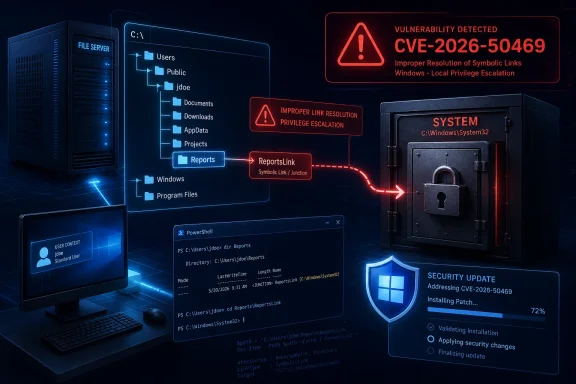 Link Following Opens the Privilege Boundary
Windows Projected File System, commonly shortened to ProjFS, lets a user-mode provider expose hierarchical data as apparently local files and directories. Microsoft originally developed the technology for scenarios such as virtualizing very large Git repositories, where presenting every file locally would be inefficient.ProjFS is delivered as an optional Windows component. On client editions, it can be enabled through Windows Features or with the
Client-ProjFS feature name in PowerShell. The fact that it is optional may reduce exposure on some ordinary PCs, but it does not remove the need to install the security update.Microsoft identifies CVE-2026-50469 as CWE-59, or improper link resolution before file access. This class of weakness occurs when software follows a symbolic link, junction, mount point, or comparable redirection without adequately confirming where the resulting operation will land.
In a privilege-escalation scenario, an attacker may attempt to redirect a file operation performed in a more privileged context. Instead of reading from or writing to the intended location, the vulnerable component can be manipulated into touching a protected target selected by the attacker.
Microsoft’s public description does not specify the precise ProjFS operation involved, the privileged process targeted, or whether exploitation depends on a race condition. It also does not include proof-of-concept code or detailed reproduction steps. The available scoring nevertheless indicates that Microsoft expects repeatable exploitation under the required local conditions: attack complexity is low, user interaction is unnecessary, and successful exploitation carries high confidentiality, integrity, and availability impact.
That combination is why a local bug scores 7.8 rather than being relegated to a moderate maintenance issue. CVE-2026-50469 is best understood as a post-compromise escalation path: it does not provide the initial foothold, but it can make an existing foothold substantially more dangerous.
Supported Windows Releases Need Different Build Floors
The NVD record supplied by Microsoft lists fixed-build thresholds across the affected Windows branches. Systems below the following builds should be considered exposed:- Windows 10 Version 1809 must be updated to build 17763.9020 or later.
- Windows 10 Versions 21H2 and 22H2 must be updated to builds 19044.7548 and 19045.7548, respectively.
- Windows 11 Version 24H2 must be updated to build 26100.8875 or later.
- Windows 11 Version 25H2 must be updated to build 26200.8875 or later.
- Windows 11 Version 26H1 must be on build 28000.2269 or later.
- Windows Server 2019 must be updated to build 17763.9020 or later.
- Windows Server 2022 must be updated to build 20348.5386 or later.
- Windows Server 2025 must be updated to build 26100.33158 or later.
The Windows 11 26H1 entry deserves attention because its fixed threshold, build 28000.2269, corresponds to the June 9, 2026 cumulative update KB5095051. That means systems already running that build or a later 26H1 release meet Microsoft’s stated version requirement even though CVE-2026-50469 was published in July.
Windows 10 21H2 and 22H2 entries are relevant mainly to devices still covered through an applicable servicing or Extended Security Updates channel. An old build number cannot be made safe merely by enabling automatic updates if the installation is no longer entitled to receive security fixes.
Server Core installations of Windows Server 2019 and Windows Server 2025 are explicitly included. ProjFS should therefore not be treated as a desktop-only concern, particularly where development infrastructure, repository virtualization, build systems, or custom file providers are deployed on servers.
Confirmed Does Not Mean Exploited
The “confirmed” report-confidence rating included in Microsoft’s CVSS data speaks to confidence in the vulnerability and its technical validity. It does not mean Microsoft has confirmed attacks in the wild.As of July 15, the NVD record shows CISA’s exploitation assessment as “none,” with the flaw categorized as not readily automatable but capable of total technical impact. Microsoft has not publicly described CVE-2026-50469 as an actively exploited zero-day.
That distinction matters for patch prioritization. Internet-facing remote-code-execution vulnerabilities and confirmed zero-days may demand emergency deployment ahead of normal testing, while this flaw requires an attacker to possess an authorized local account or another way to execute code on the machine.
However, local privilege escalation is a routine second stage in real intrusions. Malware delivered through phishing, a compromised developer tool, stolen credentials, or a vulnerable application may initially run with restricted user rights. A reliable elevation flaw can then help the attacker disable defenses, access other users’ data, dump credentials, establish persistence, or execute code as SYSTEM.
Endpoints shared by multiple users, developer workstations, build agents, virtual desktop hosts, and servers that run less-trusted workloads consequently deserve particular scrutiny. Security teams should also consider whether application-control rules or endpoint detection policies would identify suspicious creation and manipulation of links around ProjFS virtualization roots.
Patch First, Then Measure ProjFS Exposure
The primary remediation is the July cumulative update, or the applicable later update for each Windows branch. Microsoft has not documented a separate registry workaround or configuration-based mitigation for CVE-2026-50469.Administrators can verify the installed Windows revision with
winver, the Settings app, PowerShell, or their endpoint-management inventory. Checking only whether an update reports as successfully installed is less reliable than confirming that the resulting build meets or exceeds Microsoft’s fixed threshold.Organizations can also inventory the ProjFS client component with PowerShell:
Get-WindowsOptionalFeature -Online -FeatureName Client-ProjFSA disabled result may indicate reduced practical exposure on that endpoint, but it should not become a reason to withhold the cumulative update. Optional components can later be enabled by software deployments, development tooling, configuration changes, or administrators who are unaware that the underlying machine missed the security baseline.
Removing ProjFS could also disrupt applications that depend on it. Microsoft’s documentation describes provider applications as the mechanism that projects data from a backing store into the Windows namespace, so disabling the component without identifying those providers risks trading a security exposure for an operational outage.
The safer enterprise sequence is to patch supported systems, verify the resulting build, inventory machines where
Client-ProjFS is enabled, and monitor deployment failures. CVE-2026-50469 may begin with local access, but on an unpatched developer workstation or server, that limited foothold can become full Windows control without another user clicking anything.References
- Primary source: MSRC
Published: 2026-07-14T07:00:00-07:00
Security Update Guide - Microsoft Security Response Center
 msrc.microsoft.com
- Related coverage: tomshardware.com
Windows Server vulnerability can grant system privileges with just a malformed packet — domain controllers are being exploited in the wild | Tom's Hardware
System administrators, run the May 12 patch immediately if you haven't already.www.tomshardware.com - Related coverage: thewincentral.com
Windows 11 July 2026 Update KB5101650: Download link & What's new - WinCentral
Windows 11 KB5101650 brings Point-in-Time Restore, a new Windows Update calendar, File Explorer upgrades, Bluetooth improvements, redesigned Widgets, Accessibility features, and July 2026 security fixes. - Read in Windows 11 News on WinCentral thewincentral.com
- Official source: learn.microsoft.com
Enabling Windows Projected File System - Win32 apps | Microsoft Learn
Describes how to enable ProjFS on Windowslearn.microsoft.com
