

AV:L/AC:L/PR:N/UI:R/S:U/C:H/I:H/A:H.
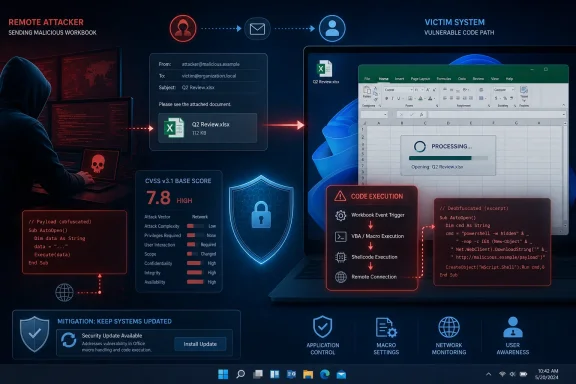
The apparently contradictory wording—“Remote Code Execution” paired with a Local attack vector—is intentional. Remote code execution describes the security impact and the attacker’s relationship to the victim, while AV:L describes how Excel reaches the vulnerable code path. The attacker can send the malicious file remotely, but exploitation occurs when Excel processes that file on the victim’s machine.
Microsoft makes that distinction directly in its Security Update Guide entry. The company says “Remote” refers to the attacker’s location and notes that this class of vulnerability may also be described as arbitrary code execution, or ACE.
The Spreadsheet Is the Delivery Vehicle
CVE-2026-50675 is a heap-based buffer overflow, catalogued as CWE-122, in Microsoft Office Excel. According to the Microsoft-authored CVE record published through the National Vulnerability Database, the flaw allows an unauthorized attacker to execute code locally.
A realistic attack could begin with a spreadsheet delivered through email, Microsoft Teams, a file-sharing service, a compromised website, or another remote channel. The attacker does not need to be sitting at the targeted computer, but the malicious workbook must reach Excel and be processed there.
That processing step is why CVSS assigns AV:L. Excel’s vulnerable file parser is not a network service listening for attacker-controlled packets. The workbook is first downloaded, copied, attached, or otherwise placed where the local Excel application can read it.
The Forum of Incident Response and Security Teams, which maintains CVSS, explicitly addresses this scenario in its CVSS 3.1 guidance. A document-parsing vulnerability is normally scored Local when exploitation depends on a user downloading or receiving malicious content and opening it in a vulnerable application. It remains Local even if the attacker distributes that document through a website or email.
This distinction prevents the delivery mechanism from being confused with the vulnerable component. Email may transport the file over a network, but email is not the component containing CVE-2026-50675. Excel encounters the vulnerability after it begins parsing the file locally.
“Remote” Describes the Outcome, Not a Network Service
In ordinary security reporting, remote code execution often evokes a server flaw that can be triggered directly over the internet. An attacker sends a request, the target service processes it, and attacker-controlled code runs without anyone touching the machine.
That is one form of RCE, but it is not the only form.
Client-side applications such as Excel, Word, browsers, PDF readers, and media players can also contain RCE vulnerabilities. In those cases, the attacker is remote and supplies hostile content, but the vulnerable application executes on the user’s endpoint. The resulting code execution is therefore local to the compromised computer even though the attacker initiated the campaign remotely.
Microsoft’s title is classifying the maximum impact: exploitation can move beyond an Excel crash or unintended data exposure and reach attacker-controlled code execution. The CVSS Attack Vector metric answers a narrower question: what access path is required to exercise the vulnerable functionality?
For CVE-2026-50675, the answers are:
- The attacker can prepare and distribute a malicious Excel file from another location.
- A victim must interact with that content, reflected by
UI:R. - Excel processes the file on the endpoint, producing
AV:L. - Successful exploitation can compromise confidentiality, integrity, and availability, each rated High in the vector.
The vector also contains PR:N, meaning the attacker does not need existing privileges on the target system before attempting exploitation. AC:L indicates that Microsoft does not consider exploitation to require unusually complex conditions.
The S:U component means the security impact remains within the vulnerable component’s security authority rather than crossing a CVSS-defined authorization boundary. It does not mean the consequences are confined to one spreadsheet or that arbitrary code execution is harmless.
User Interaction Keeps the Score Below Critical
CVE-2026-50675 carries a 7.8 High CVSS base score, while Microsoft classifies its severity as Important. The required user interaction and Local attack vector reduce the base score compared with an internet-facing vulnerability that can be exploited directly without authentication or victim action.
Those factors should shape prioritization, but they are not reasons to defer the update indefinitely. Spreadsheet attachments are routine business objects, and attackers routinely disguise malicious documents as invoices, financial reports, purchase orders, payroll files, or internal planning material.
The danger is also not limited to macro-enabled .xlsm workbooks. A parser-level memory corruption vulnerability concerns how an application handles crafted file data, not necessarily whether the user enables Visual Basic for Applications macros. Disabling macros is valuable security hygiene, but it should not be treated as a complete substitute for the security update unless Microsoft explicitly identifies it as a mitigation for this CVE.
Protected View, Microsoft Defender for Office 365, attachment sandboxing, web-content filtering, and application-control policies can reduce exposure. Their effectiveness depends on how the file arrives, whether users can bypass warnings, and whether a protected processing path itself reaches the vulnerable functionality. The vendor patch remains the primary fix.
Excel Builds Across Windows and macOS Need Attention
Microsoft’s affected-product data includes Microsoft 365 Apps for Enterprise, Excel 2016, Office 2019, Office LTSC 2021, and Office LTSC 2024 on Windows. Microsoft 365 for Mac, Office LTSC for Mac 2021, Office LTSC for Mac 2024, and Office Online Server are also represented in the affected configurations.
For administrators, that breadth makes inventory more important than simply checking Windows Update compliance. Microsoft 365 Apps may receive Office servicing through Click-to-Run channels, while perpetual Office installations, Office Online Server, and managed Mac deployments can follow different update mechanisms.
Security teams should verify that the July 14, 2026 Office security releases have reached every supported deployment channel in use. They should also account for devices that rarely connect to corporate management infrastructure, systems pinned to deferred Microsoft 365 Apps update channels, and Office installations excluded from normal update policies.
Email gateways and endpoint detection systems can provide additional visibility while deployment proceeds. Useful hunting targets include unusual Excel child processes, unexpected script interpreters or command shells launched after EXCEL.EXE, and Office processes writing executable content into user-writable directories. These signals are not proof of CVE-2026-50675 exploitation, but they align with the behavior defenders would expect from successful document-driven code execution.
The practical reading is straightforward: AV:L does not require the attacker to have physical access, sign in locally, or already control the PC. It means the vulnerable Excel code is exercised through a file processed on the endpoint rather than through Excel acting as a remotely reachable network service. Applying Microsoft’s July 2026 Office updates closes that parsing path before a remotely delivered workbook can turn a routine user action into local code execution.
References
- CVE-2026-50675 Microsoft Excel Remote Code Execution Vulnerability MSRC · 2026-07-14T07:00:00-07:00