

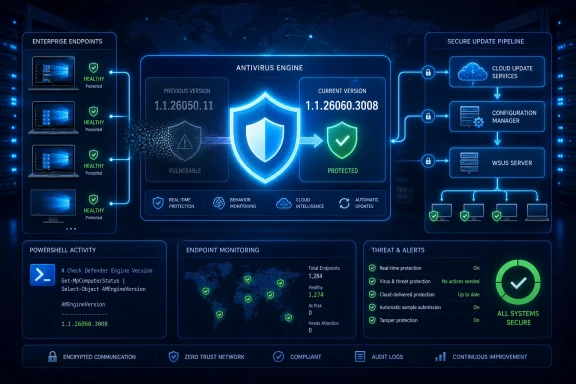
Microsoft has fixed CVE-2026-55012, a remote code execution vulnerability in the Microsoft Malware Protection Engine used by Microsoft Defender and several legacy antimalware products. The last affected engine is version 1.1.26050.11, while version 1.1.26060.3008 is the first release containing the correction.
Detailed in a Microsoft Security Response Center advisory published July 14, 2026, the vulnerability is being addressed through Defender’s normal protection-update system rather than a conventional Windows cumulative update. Microsoft says no separate installation action is required for systems receiving Malware Protection Engine updates automatically, but administrators should verify that their update infrastructure has actually delivered the fixed engine.
That distinction matters in managed environments. A device can be current on Windows patches while still running an outdated Defender engine because its WSUS approvals, Microsoft Configuration Manager deployment, network-share fallback, or security intelligence update policies are not working as intended.
CVE-2026-55012 affects
The version boundary is the clearest way to assess exposure:
The advisory also says the new engine contains defense-in-depth changes beyond the specific CVE correction. Microsoft has not characterized those additional changes in the supplied advisory, so administrators should not treat them as separate disclosed vulnerabilities.
Although the update is designed to arrive automatically, “no action required” should not be read as “no validation required.” It means there is no standalone patch that every administrator must manually download and install. Organizations remain responsible for confirming that their selected Defender update channel is healthy.
The returned
These values represent different parts of Defender servicing.
Microsoft’s Defender documentation says engine and platform updates normally follow a monthly cadence, while security intelligence arrives multiple times per day. Those frequent definition downloads do not necessarily include a new engine, which makes version-focused inventory particularly important for this vulnerability.
Organizations using Microsoft Defender for Endpoint can also review engine-version and update-health reporting in the Microsoft Defender portal. Microsoft’s device health documentation describes separate reporting cards for the antivirus engine, security intelligence, and Defender platform, allowing administrators to identify machines that are behind rather than relying on a general endpoint health status.
A useful enterprise query should account for devices that have stopped reporting. A dashboard showing no outdated engines can still provide false reassurance if a subset of systems is powered off, disconnected, unable to reach the reporting service, or excluded from normal management.
Third-party scanners commonly identify vulnerable software by checking for a known binary and comparing its file or product version against the affected range. Disabling Defender does not necessarily remove its files from Windows, so an older copy of the Malware Protection Engine may remain on disk and satisfy the scanner’s detection rule.
Microsoft says systems where Defender is disabled are not in an exploitable state, even though the affected files remain present. That creates a difference between binary presence and operational exposure: the scanner has found vulnerable code, but the component is not active in the configuration Microsoft considers exploitable.
Administrators should avoid blindly suppressing every such detection. First confirm that Defender is genuinely disabled rather than running in active or passive mode, and document which endpoint security product has replaced it. Passive mode, periodic scanning, onboarding changes, product removal, or a future policy shift could alter whether the Defender engine is used.
Keeping the dormant engine updated is therefore still the cleaner operational outcome. It reduces scanner noise, prevents stale binaries from becoming relevant if Defender is re-enabled, and avoids relying on an exception whose validity depends on configuration remaining unchanged.
Scanner vendors may also need time to refine their detection logic. A version-only rule can accurately identify the affected binary without accurately representing exploitability, so security teams should distinguish “vulnerable file detected” from “vulnerable service active” in remediation records.
Each introduces potential failure points. WSUS deployments may be missing approvals, Configuration Manager collections can exclude devices, file shares can contain stale packages, and restrictive network policies can block fallback sources. Devices used intermittently, including lab machines and nonpersistent virtual desktops, may also miss the normal rollout window.
Microsoft’s Defender troubleshooting guidance recommends checking the configured update-source order when security intelligence or protection updates stop arriving. In WSUS environments, administrators should verify that applicable Microsoft Defender Antivirus updates are synchronized and approved rather than assuming Windows cumulative-update approvals cover the engine.
A manual update check can be initiated with Defender’s command-line utility from the currently installed platform directory:
Administrators can then rerun
Golden images and offline installation media deserve separate attention. A patched running endpoint does not automatically make an old Windows image current. Newly provisioned devices may briefly begin life with an affected engine until their first successful protection update, particularly on isolated networks or during restricted deployment workflows.
The same review applies to products beyond the built-in Defender client. Microsoft identifies System Center Endpoint Protection, System Center 2012 Endpoint Protection, System Center 2012 R2 Endpoint Protection, and Microsoft Security Essentials as products that use the Malware Protection Engine. Some of those products belong to legacy estates where update failures may be more common and visibility less complete.
For CVE-2026-55012, the immediate administrative target is unambiguous: inventory
Detailed in a Microsoft Security Response Center advisory published July 14, 2026, the vulnerability is being addressed through Defender’s normal protection-update system rather than a conventional Windows cumulative update. Microsoft says no separate installation action is required for systems receiving Malware Protection Engine updates automatically, but administrators should verify that their update infrastructure has actually delivered the fixed engine.
That distinction matters in managed environments. A device can be current on Windows patches while still running an outdated Defender engine because its WSUS approvals, Microsoft Configuration Manager deployment, network-share fallback, or security intelligence update policies are not working as intended.
 The Fix Arrives Outside the Monthly Windows Package
CVE-2026-55012 affects mpengine.dll, the Microsoft Malware Protection Engine component responsible for scanning, detection, and malware removal. On supported Windows installations, the engine underpins Microsoft Defender Antivirus and is serviced more frequently than the operating system itself.The version boundary is the clearest way to assess exposure:
- Microsoft Malware Protection Engine 1.1.26050.11 is the final version affected by CVE-2026-55012.
- Microsoft Malware Protection Engine 1.1.26060.3008 is the first version in which Microsoft says the vulnerability is addressed.
- Any later engine release should contain the fix, assuming Microsoft’s normal cumulative engine-servicing model.
The advisory also says the new engine contains defense-in-depth changes beyond the specific CVE correction. Microsoft has not characterized those additional changes in the supplied advisory, so administrators should not treat them as separate disclosed vulnerabilities.
Although the update is designed to arrive automatically, “no action required” should not be read as “no validation required.” It means there is no standalone patch that every administrator must manually download and install. Organizations remain responsible for confirming that their selected Defender update channel is healthy.
Check the Engine, Not Just the Signature Date
Administrators can inspect the installed engine from an elevated PowerShell session:Get-MpComputerStatus | Select-Object AMEngineVersionThe returned
AMEngineVersion should be 1.1.26060.3008 or later. A broader status check can help distinguish the scanning engine from the Defender platform and security intelligence packages:
Code:
Get-MpComputerStatus | Select-Object `
    AMEngineVersion, `
    AMProductVersion, `
    AntivirusSignatureVersion, `
AntivirusSignatureLastUpdatedAMEngineVersion is the important field for CVE-2026-55012; a recent AntivirusSignatureVersion alone does not prove that the corrected engine is installed.Microsoft’s Defender documentation says engine and platform updates normally follow a monthly cadence, while security intelligence arrives multiple times per day. Those frequent definition downloads do not necessarily include a new engine, which makes version-focused inventory particularly important for this vulnerability.
Organizations using Microsoft Defender for Endpoint can also review engine-version and update-health reporting in the Microsoft Defender portal. Microsoft’s device health documentation describes separate reporting cards for the antivirus engine, security intelligence, and Defender platform, allowing administrators to identify machines that are behind rather than relying on a general endpoint health status.
A useful enterprise query should account for devices that have stopped reporting. A dashboard showing no outdated engines can still provide false reassurance if a subset of systems is powered off, disconnected, unable to reach the reporting service, or excluded from normal management.
Disabled Defender Can Still Trigger Scanner Alerts
Microsoft specifically addresses a likely source of confusion: vulnerability scanners may report CVE-2026-55012 on machines where Defender Antivirus is disabled.Third-party scanners commonly identify vulnerable software by checking for a known binary and comparing its file or product version against the affected range. Disabling Defender does not necessarily remove its files from Windows, so an older copy of the Malware Protection Engine may remain on disk and satisfy the scanner’s detection rule.
Microsoft says systems where Defender is disabled are not in an exploitable state, even though the affected files remain present. That creates a difference between binary presence and operational exposure: the scanner has found vulnerable code, but the component is not active in the configuration Microsoft considers exploitable.
Administrators should avoid blindly suppressing every such detection. First confirm that Defender is genuinely disabled rather than running in active or passive mode, and document which endpoint security product has replaced it. Passive mode, periodic scanning, onboarding changes, product removal, or a future policy shift could alter whether the Defender engine is used.
Keeping the dormant engine updated is therefore still the cleaner operational outcome. It reduces scanner noise, prevents stale binaries from becoming relevant if Defender is re-enabled, and avoids relying on an exception whose validity depends on configuration remaining unchanged.
Scanner vendors may also need time to refine their detection logic. A version-only rule can accurately identify the affected binary without accurately representing exploitability, so security teams should distinguish “vulnerable file detected” from “vulnerable service active” in remediation records.
Update Infrastructure Is the Real Control Point
The practical risk for enterprise IT lies with systems that do not receive Defender servicing directly from Microsoft Update. Microsoft supports several update sources and management paths, including Windows Update, WSUS, Microsoft Configuration Manager, network file shares, and Microsoft’s security intelligence update services.Each introduces potential failure points. WSUS deployments may be missing approvals, Configuration Manager collections can exclude devices, file shares can contain stale packages, and restrictive network policies can block fallback sources. Devices used intermittently, including lab machines and nonpersistent virtual desktops, may also miss the normal rollout window.
Microsoft’s Defender troubleshooting guidance recommends checking the configured update-source order when security intelligence or protection updates stop arriving. In WSUS environments, administrators should verify that applicable Microsoft Defender Antivirus updates are synchronized and approved rather than assuming Windows cumulative-update approvals cover the engine.
A manual update check can be initiated with Defender’s command-line utility from the currently installed platform directory:
Update-MpSignatureAdministrators can then rerun
Get-MpComputerStatus to confirm whether the engine advanced to 1.1.26060.3008 or newer. If signatures update but the engine remains behind, the next step is to investigate the configured servicing source, rollout channel, and any approval or synchronization delays.Golden images and offline installation media deserve separate attention. A patched running endpoint does not automatically make an old Windows image current. Newly provisioned devices may briefly begin life with an affected engine until their first successful protection update, particularly on isolated networks or during restricted deployment workflows.
The same review applies to products beyond the built-in Defender client. Microsoft identifies System Center Endpoint Protection, System Center 2012 Endpoint Protection, System Center 2012 R2 Endpoint Protection, and Microsoft Security Essentials as products that use the Malware Protection Engine. Some of those products belong to legacy estates where update failures may be more common and visibility less complete.
For CVE-2026-55012, the immediate administrative target is unambiguous: inventory
AMEngineVersion, investigate active Defender installations below 1.1.26060.3008, and separately classify disabled installations that scanners flag because the old binaries remain on disk. The update may be automatic, but proving that it arrived is still an IT operation.References
- Primary source: MSRC
Published: 2026-07-14T07:00:00-07:00
Security Update Guide - Microsoft Security Response Center
 msrc.microsoft.com
- Official source: learn.microsoft.com
Manage how and where Microsoft Defender Antivirus receives updates - Microsoft Defender for Endpoint | Microsoft Learn
Manage the fallback order for how Microsoft Defender Antivirus receives protection updates.learn.microsoft.com
