

Google and Microsoft disclosed CVE-2026-7357 on April 28, 2026, a high-severity use-after-free flaw in Chrome’s GPU component that affects Google Chrome versions before 147.0.7727.138 and can be triggered through a crafted HTML page after renderer compromise. The short version for WindowsForum readers is simple: update Chrome, Edge, and any Chromium-family browser as soon as your vendor ships the matching build. The more interesting version is that this bug is another reminder that the modern browser’s attack surface now extends deep into graphics stacks, hardware acceleration, sandbox boundaries, and enterprise patch pipelines. A “browser bug” is no longer just a browser bug; it is a miniature operating-system incident wearing a tab-shaped disguise.
CVE-2026-7357 lands in a part of Chrome that most users never think about and most administrators only notice when video playback breaks: the GPU process. That process exists because the modern web is graphics-heavy by default. Canvas, WebGL, WebGPU, video decode, compositing, and accelerated rendering are not luxuries bolted onto the side of the browser; they are part of the ordinary page-load path for everything from Office web apps to mapping tools to conference calls.
That is why “use after free in GPU” should not be read as a niche bug for gamers or CAD users. A use-after-free vulnerability means code continues to reference memory after it has been released, opening the door to heap corruption if an attacker can shape the right sequence of allocations and accesses. In browser land, those memory lifetime mistakes are often the difference between a crash and a reliable exploit primitive.
The important constraint in the description is that the attacker first needs to have compromised the renderer process. That matters, because Chrome’s multi-process architecture is designed to contain hostile web content inside a renderer sandbox. But it should not make defenders relax. Many serious browser compromises are chains, not single bugs: one flaw gets execution in a renderer, another helps escape or widen control, and a third may reach the host more directly.
The GPU process has long been a tempting middle ground in that chain. It is privileged enough to interact with graphics drivers and low-level rendering interfaces, yet exposed enough that web content can influence it through standardized APIs. Sandboxing reduced the blast radius of the old monolithic browser, but it also made attackers more interested in the seams between processes.
The high attack complexity is worth taking seriously. It does not mean “safe.” It means exploitation likely depends on conditions that are harder to line up reliably, such as memory layout, timing, prior renderer compromise, or a particular interaction between components. In practice, sophisticated actors build exploit chains precisely to satisfy those prerequisites.
For enterprise IT, the phrase “had compromised the renderer process” should sound less like a comfort clause and more like a dependency statement. The bug is not described as a one-click direct host takeover from a clean page load. It is described as a powerful link in a chain that begins after the browser’s first containment layer has already failed.
That distinction matters for prioritization. A GPU use-after-free may not receive the same breathless treatment as an actively exploited zero-day with confirmed remote code execution in the wild. But in a browser ecosystem where memory safety issues cluster across rendering, graphics, scripting, and media components, administrators should assume attackers are always looking for chainable parts.
This is not a theoretical problem. Anyone who has managed Chrome, Edge, Brave, Vivaldi, or Chromium packages at scale has seen the mismatch between vulnerability databases, vendor release notes, scanner logic, and what actually exists in the update channel. Sometimes the recommended version is not available on every platform at the same moment. Sometimes the CPE says one thing, the vendor package says another, and the help desk becomes the translation layer.
The NVD configuration for CVE-2026-7357 lists Google Chrome versions up to but excluding 147.0.7727.138, with Windows, Linux, and macOS as platform contexts. That is a reasonable database representation, but it is not the same as a deployment plan. A Windows administrator should target the fixed Windows build. A Linux administrator should check distribution packaging and vendor channel status. A security team should avoid treating the CPE as gospel when the upstream release note contains platform-specific versioning.
This is where Microsoft’s listing matters for WindowsForum readers. Microsoft tracks Chromium CVEs because Edge is built on Chromium, and the Security Update Guide is how many Windows shops discover that a “Chrome bug” is also an Edge risk. The browser monoculture is not total, but Chromium’s footprint is large enough that a single upstream issue can ripple through the default browser on Windows, third-party browsers, Electron apps, and embedded web runtimes.
That does not automatically mean every Chromium CVE affects every Chromium-derived product in the same way on the same day. Vendors backport, stagger releases, disable features, or carry patches on different schedules. But the operational reality is that Microsoft’s MSRC page for a Chromium vulnerability is no longer a courtesy mirror. It is part of the Windows security workflow.
For administrators, this creates an awkward double-check. Chrome’s release blog tells you what Google fixed upstream. MSRC tells you how Microsoft is presenting the issue to its customers. Browser vendor release notes tell you when the fix arrived in each downstream product. Endpoint inventory tells you what actually runs on users’ machines. Miss any layer, and you end up with false confidence.
The deeper point is that Windows security has become more web-runtime security. Outlook add-ins, Teams components, enterprise portals, identity flows, help-desk consoles, admin dashboards, remote monitoring tools, and cloud management interfaces all live inside browsers or browser-like containers. A memory bug in Chromium’s GPU path may look far removed from domain administration, but the browser session is often where privileged work now happens.
Modern browsers try to reduce the exploitability of these mistakes with partitioned allocators, pointer hardening, sandboxing, site isolation, control-flow protections, and increasingly aggressive fuzzing. Those defenses matter. They turn many bugs into crashes and many exploit attempts into unreliable science projects. But they do not erase the bug class.
Chrome’s long-term answer, like much of the industry’s, is a gradual move toward memory-safe languages where possible and better compartmentalization where not. That is a decade-long engineering migration, not a Tuesday patch. The browser codebase still contains vast amounts of C++, and the performance-sensitive graphics stack is exactly the kind of place where unsafe code tends to persist.
The GPU component also sits at the intersection of browser code, graphics libraries, shader translation, operating-system APIs, and hardware drivers. That intersection is difficult to reason about. Memory safety in one layer does not guarantee safety in another, and attackers are perfectly happy to exploit edge cases created by the boundary.
Renderer bugs may come from JavaScript engines, DOM logic, media parsers, font handling, WebAssembly, or any of the complex subsystems that process hostile web content. Once an attacker gets execution inside the renderer, the question becomes what additional attack surfaces are reachable from there. The GPU process is one of the obvious candidates because web content legitimately requests graphics work.
Chrome’s security model assumes renderers are risky and tries to confine them. But confinement depends on the surrounding processes being robust. A vulnerability in a broker, GPU process, utility process, or IPC boundary can turn a contained compromise into something more consequential. CVE-2026-7357 is described in exactly that post-renderer-compromise territory.
This is also why user interaction does not imply negligence by the victim. “User interaction required” in browser CVEs often means the user must visit a page or open content. In 2026, that is not a meaningful human safeguard. Users visit pages all day because their jobs require it, and attackers have spent decades perfecting phishing, malvertising, compromised legitimate sites, and watering-hole attacks.
The same release included a critical use-after-free in Canvas and other high-severity issues across Chrome components. For administrators, the practical lesson is not to overfit on the one CVE that appeared in a Microsoft or NVD alert. A browser update is a security train; if you miss it, you miss the whole cargo.
This bundling is both a strength and a challenge. It is a strength because users receive many fixes through one update mechanism, often automatically. It is a challenge because risk communication becomes fuzzy. The one CVE that triggers a scanner ticket may not be the most exploitable issue in the release, and the bug most relevant to your environment may be buried in the release notes with limited public detail.
Google also routinely restricts access to bug details until most users have received the fix. That is a sensible defensive practice, but it means enterprises must act without full exploit-level information. Waiting for a proof-of-concept before patching a browser is not prudence. It is a way of volunteering your fleet for the period when attackers are diffing patches and defenders are still debating severity labels.
CPE was designed to give vulnerability databases a structured way to name affected platforms. But browsers move faster than the taxonomies around them. A browser may have multiple channels, platform-specific versions, enterprise installers, extended stable releases, auto-updaters, distribution packages, portable builds, and downstream forks. CPE does not always capture that nuance cleanly.
In CVE-2026-7357, the NVD configuration describes Chrome versions before 147.0.7727.138 across major desktop operating systems. That is useful as a broad signal. It is not enough to decide whether a particular Linux Chromium snap, enterprise MSI, Edge stable build, or third-party Chromium fork is fixed.
This is why mature vulnerability programs increasingly pair scanner output with vendor release intelligence. The scanner finds likely exposure. The vendor advisory explains fixed builds. Endpoint telemetry confirms what is installed and running. Change management determines how quickly the update can move without breaking business workflows. None of these replaces the others.
WebView2 is attractive to developers because it gives them a modern embedded web engine without shipping their own browser stack. It is attractive to Microsoft because it standardizes web rendering across desktop apps. It is attractive to enterprises because it reduces the number of ancient embedded engines lurking in business software. But it also means Chromium security issues can matter even where users never consciously open a browser.
The good news is that WebView2 Runtime has its own update mechanisms and is designed to stay current. The bad news is that enterprise environments have a talent for pinning, blocking, delaying, or half-deploying update systems in the name of stability. Those decisions may be defensible in narrow cases, but they turn browser-runtime vulnerabilities into inventory problems.
For CVE-2026-7357, the immediate action remains checking fixed browser builds. The strategic action is mapping where Chromium lives. If your asset inventory says Chrome is patched but ignores Edge, WebView2, Brave, Vivaldi, Opera, Electron apps, or packaged Chromium runtimes, it is not an inventory. It is a partial diary.
That last mile matters. Installing a fixed browser is not always the same as running a fixed browser. Chrome and Edge can stage updates while the old process remains alive until restart. In a high-risk browser release, the operational metric should not be “package deployed” alone. It should be “fixed version running after browser restart.”
This is where executive risk enters. Browsers are among the most exposed applications in the enterprise, and browser exploit chains are valuable to both criminal and state-backed actors. Yet many organizations still treat browser restarts as a user convenience issue rather than a security control. That mismatch is increasingly untenable.
A reasonable policy is not to reboot every user instantly for every medium browser fix. But high-severity memory corruption issues in exposed browser components deserve defined restart deadlines. If the organization can mandate endpoint sensor updates and VPN client patches, it can mandate browser relaunches when the web-facing attack surface changes.
The browser GPU architecture exists because the modern web would be worse without it. Video conferencing, high-resolution media, web apps with complex UI, and graphics-heavy workloads all benefit from hardware acceleration. In managed environments, disabling it across the board may create more support tickets than security value.
For targeted high-risk systems, temporary mitigation may make sense. A kiosk that visits a narrow set of sites, a jump box used for sensitive admin work, or an environment waiting for a vendor-certified browser update might justify stricter graphics settings. But for most fleets, the better answer is fast patching, controlled restarts, and browser isolation policies where appropriate.
The larger lesson is that security teams need to understand browser feature exposure. WebGL, WebGPU, site isolation, extension policy, remote debugging, third-party extensions, and GPU acceleration are not obscure settings anymore. They are part of the enterprise attack surface, and they deserve the same policy literacy that administrators already apply to macros, PowerShell, and RDP.
Attackers do not need a narrative write-up to begin work. They can compare fixed and vulnerable builds, study commit patterns, inspect tests, and try to infer the vulnerable code path. Public exploit details accelerate that process. Delaying full disclosure until the update has reached a majority of users is an imperfect but rational tradeoff.
For defenders, the absence of public technical detail should shift the question from “Can we prove exploitability?” to “Do we trust the vendor severity and component enough to act?” In this case, the answer should be yes. A high-severity use-after-free in Chrome’s GPU component, reachable after renderer compromise via crafted HTML, is not a curiosity.
There is a tendency in some patch meetings to treat unknown details as uncertainty that lowers urgency. Browser security works the other way. If a vendor is vague because details are restricted during rollout, that often means the information is sensitive enough to withhold while users update.
That race is not evenly matched. A well-resourced attacker can begin analyzing the patch as soon as binaries or source changes become available. A large enterprise may need days to push, verify, and force a relaunch across a global fleet. The defensive strategy has to assume that the exploitability window begins before every endpoint is patched.
This is one reason auto-update is so valuable for browsers. It compresses the window for ordinary users and removes human hesitation from routine security work. But enterprises often weaken auto-update in pursuit of control. Control is not inherently bad; uncontrolled updates can break workflows. But control without speed is just latency with a policy document.
For CVE-2026-7357, the sensible approach is controlled acceleration. Test the stable build quickly against critical web apps, release it broadly, monitor crash and help-desk signals, and enforce restarts on a defined schedule. Do not wait for the NVD score to become final. Do not wait for a public exploit. Do not wait for the next monthly patch cycle if your browser update channel can move faster.
The second fact is that this is not merely a Chrome desktop concern. Any organization with Chromium-derived browsers should verify the downstream vendor’s update status. That includes Edge, Brave, Vivaldi, Opera, Chromium packages, and managed runtimes. Some will move quickly; some may lag; some may carry different version strings while incorporating the same fix.
The third fact is that a fixed package is not enough if the vulnerable process keeps running. Browser restart compliance should be visible in endpoint telemetry. If your patch dashboard cannot distinguish between an installed update and an active vulnerable browser session, it is missing the piece that matters most to the attacker.
The final fact is that GPU-related browser flaws are likely to remain with us. The web platform keeps absorbing capabilities that once belonged to native applications. As more rendering, compute, and media work moves through browser-accessible interfaces, the graphics stack will keep attracting both researchers and adversaries.
Source: NVD / Chromium Security Update Guide - Microsoft Security Response Center
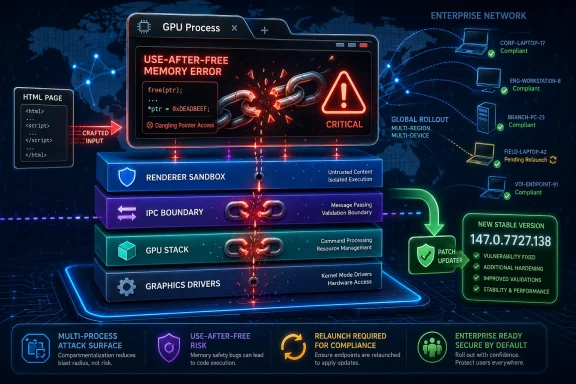 The GPU Is Now Part of the Browser’s Security Perimeter
CVE-2026-7357 lands in a part of Chrome that most users never think about and most administrators only notice when video playback breaks: the GPU process. That process exists because the modern web is graphics-heavy by default. Canvas, WebGL, WebGPU, video decode, compositing, and accelerated rendering are not luxuries bolted onto the side of the browser; they are part of the ordinary page-load path for everything from Office web apps to mapping tools to conference calls.That is why “use after free in GPU” should not be read as a niche bug for gamers or CAD users. A use-after-free vulnerability means code continues to reference memory after it has been released, opening the door to heap corruption if an attacker can shape the right sequence of allocations and accesses. In browser land, those memory lifetime mistakes are often the difference between a crash and a reliable exploit primitive.
The important constraint in the description is that the attacker first needs to have compromised the renderer process. That matters, because Chrome’s multi-process architecture is designed to contain hostile web content inside a renderer sandbox. But it should not make defenders relax. Many serious browser compromises are chains, not single bugs: one flaw gets execution in a renderer, another helps escape or widen control, and a third may reach the host more directly.
The GPU process has long been a tempting middle ground in that chain. It is privileged enough to interact with graphics drivers and low-level rendering interfaces, yet exposed enough that web content can influence it through standardized APIs. Sandboxing reduced the blast radius of the old monolithic browser, but it also made attackers more interested in the seams between processes.
A High-Severity Bug With a Chain-Shaped Threat Model
The CVSS vector attached by CISA-ADP tells its own story: network attack vector, no privileges required, user interaction required, high attack complexity, unchanged scope, and high impact to confidentiality, integrity, and availability. That is bureaucratic language, but it maps to a familiar browser scenario. A user visits or is lured to a malicious page; the page exercises a crafted sequence of browser behavior; exploitation is not trivial, but if successful the damage can be severe.The high attack complexity is worth taking seriously. It does not mean “safe.” It means exploitation likely depends on conditions that are harder to line up reliably, such as memory layout, timing, prior renderer compromise, or a particular interaction between components. In practice, sophisticated actors build exploit chains precisely to satisfy those prerequisites.
For enterprise IT, the phrase “had compromised the renderer process” should sound less like a comfort clause and more like a dependency statement. The bug is not described as a one-click direct host takeover from a clean page load. It is described as a powerful link in a chain that begins after the browser’s first containment layer has already failed.
That distinction matters for prioritization. A GPU use-after-free may not receive the same breathless treatment as an actively exploited zero-day with confirmed remote code execution in the wild. But in a browser ecosystem where memory safety issues cluster across rendering, graphics, scripting, and media components, administrators should assume attackers are always looking for chainable parts.
The Patch Number Is the Message
Google’s desktop stable update moved Chrome to 147.0.7727.137 or 147.0.7727.138 for Windows and Mac, and 147.0.7727.137 for Linux, with rollout happening over days or weeks. That familiar split-version pattern is exactly where vulnerability management programs stumble. A scanner may flag anything below 147.0.7727.138, while a Linux fleet may be on a vendor-approved 147.0.7727.137 and still be aligned with the upstream stable release for that platform.This is not a theoretical problem. Anyone who has managed Chrome, Edge, Brave, Vivaldi, or Chromium packages at scale has seen the mismatch between vulnerability databases, vendor release notes, scanner logic, and what actually exists in the update channel. Sometimes the recommended version is not available on every platform at the same moment. Sometimes the CPE says one thing, the vendor package says another, and the help desk becomes the translation layer.
The NVD configuration for CVE-2026-7357 lists Google Chrome versions up to but excluding 147.0.7727.138, with Windows, Linux, and macOS as platform contexts. That is a reasonable database representation, but it is not the same as a deployment plan. A Windows administrator should target the fixed Windows build. A Linux administrator should check distribution packaging and vendor channel status. A security team should avoid treating the CPE as gospel when the upstream release note contains platform-specific versioning.
This is where Microsoft’s listing matters for WindowsForum readers. Microsoft tracks Chromium CVEs because Edge is built on Chromium, and the Security Update Guide is how many Windows shops discover that a “Chrome bug” is also an Edge risk. The browser monoculture is not total, but Chromium’s footprint is large enough that a single upstream issue can ripple through the default browser on Windows, third-party browsers, Electron apps, and embedded web runtimes.
Microsoft’s Role Is Not Secondary Anymore
There was a time when a Chrome CVE was something Windows admins could mentally file under “third-party app.” That era is gone. Microsoft Edge is Chromium-based, WebView2 is a major application platform, and enterprise Windows fleets often contain multiple Chromium consumers even when Chrome itself is not officially deployed.That does not automatically mean every Chromium CVE affects every Chromium-derived product in the same way on the same day. Vendors backport, stagger releases, disable features, or carry patches on different schedules. But the operational reality is that Microsoft’s MSRC page for a Chromium vulnerability is no longer a courtesy mirror. It is part of the Windows security workflow.
For administrators, this creates an awkward double-check. Chrome’s release blog tells you what Google fixed upstream. MSRC tells you how Microsoft is presenting the issue to its customers. Browser vendor release notes tell you when the fix arrived in each downstream product. Endpoint inventory tells you what actually runs on users’ machines. Miss any layer, and you end up with false confidence.
The deeper point is that Windows security has become more web-runtime security. Outlook add-ins, Teams components, enterprise portals, identity flows, help-desk consoles, admin dashboards, remote monitoring tools, and cloud management interfaces all live inside browsers or browser-like containers. A memory bug in Chromium’s GPU path may look far removed from domain administration, but the browser session is often where privileged work now happens.
“Use After Free” Remains the Bug Class That Will Not Retire
CWE-416 is one of those identifiers that appears so often in browser advisories that it risks becoming wallpaper. That familiarity is dangerous. Use-after-free bugs remain potent because they exploit a fundamental problem in unsafe memory management: the program’s idea of object lifetime diverges from reality.Modern browsers try to reduce the exploitability of these mistakes with partitioned allocators, pointer hardening, sandboxing, site isolation, control-flow protections, and increasingly aggressive fuzzing. Those defenses matter. They turn many bugs into crashes and many exploit attempts into unreliable science projects. But they do not erase the bug class.
Chrome’s long-term answer, like much of the industry’s, is a gradual move toward memory-safe languages where possible and better compartmentalization where not. That is a decade-long engineering migration, not a Tuesday patch. The browser codebase still contains vast amounts of C++, and the performance-sensitive graphics stack is exactly the kind of place where unsafe code tends to persist.
The GPU component also sits at the intersection of browser code, graphics libraries, shader translation, operating-system APIs, and hardware drivers. That intersection is difficult to reason about. Memory safety in one layer does not guarantee safety in another, and attackers are perfectly happy to exploit edge cases created by the boundary.
Renderer Compromise Is the Clause That Should Keep Defenders Awake
The most tempting reading of CVE-2026-7357 is that it requires a prior renderer compromise, so it can wait behind cleaner remote code execution bugs. That is understandable and incomplete. Browser exploit developers think in chains because browsers are built in layers. A renderer compromise is not the finish line; it is often the beginning of the serious work.Renderer bugs may come from JavaScript engines, DOM logic, media parsers, font handling, WebAssembly, or any of the complex subsystems that process hostile web content. Once an attacker gets execution inside the renderer, the question becomes what additional attack surfaces are reachable from there. The GPU process is one of the obvious candidates because web content legitimately requests graphics work.
Chrome’s security model assumes renderers are risky and tries to confine them. But confinement depends on the surrounding processes being robust. A vulnerability in a broker, GPU process, utility process, or IPC boundary can turn a contained compromise into something more consequential. CVE-2026-7357 is described in exactly that post-renderer-compromise territory.
This is also why user interaction does not imply negligence by the victim. “User interaction required” in browser CVEs often means the user must visit a page or open content. In 2026, that is not a meaningful human safeguard. Users visit pages all day because their jobs require it, and attackers have spent decades perfecting phishing, malvertising, compromised legitimate sites, and watering-hole attacks.
The 30-Fix Chrome Update Is Bigger Than One CVE
The April 28 stable update included 30 security fixes, with CVE-2026-7357 appearing among a broader cluster of memory and graphics-related issues. That context matters because defenders rarely patch one browser CVE in isolation. They patch a build, and the build represents a bundle of fixed attack surface.The same release included a critical use-after-free in Canvas and other high-severity issues across Chrome components. For administrators, the practical lesson is not to overfit on the one CVE that appeared in a Microsoft or NVD alert. A browser update is a security train; if you miss it, you miss the whole cargo.
This bundling is both a strength and a challenge. It is a strength because users receive many fixes through one update mechanism, often automatically. It is a challenge because risk communication becomes fuzzy. The one CVE that triggers a scanner ticket may not be the most exploitable issue in the release, and the bug most relevant to your environment may be buried in the release notes with limited public detail.
Google also routinely restricts access to bug details until most users have received the fix. That is a sensible defensive practice, but it means enterprises must act without full exploit-level information. Waiting for a proof-of-concept before patching a browser is not prudence. It is a way of volunteering your fleet for the period when attackers are diffing patches and defenders are still debating severity labels.
The CPE Problem Is a Symptom of Security’s Translation Layer
The user-facing question buried in the NVD entry — “Are we missing a CPE here?” — is more revealing than it looks. Vulnerability management is full of translation layers: CVE to CPE, CPE to product, product to package, package to installed binary, installed binary to running process, running process to actual exposure. Every layer introduces ambiguity.CPE was designed to give vulnerability databases a structured way to name affected platforms. But browsers move faster than the taxonomies around them. A browser may have multiple channels, platform-specific versions, enterprise installers, extended stable releases, auto-updaters, distribution packages, portable builds, and downstream forks. CPE does not always capture that nuance cleanly.
In CVE-2026-7357, the NVD configuration describes Chrome versions before 147.0.7727.138 across major desktop operating systems. That is useful as a broad signal. It is not enough to decide whether a particular Linux Chromium snap, enterprise MSI, Edge stable build, or third-party Chromium fork is fixed.
This is why mature vulnerability programs increasingly pair scanner output with vendor release intelligence. The scanner finds likely exposure. The vendor advisory explains fixed builds. Endpoint telemetry confirms what is installed and running. Change management determines how quickly the update can move without breaking business workflows. None of these replaces the others.
Edge, WebView2, and the Hidden Chromium Estate
Windows administrators should be especially careful not to equate browser patching with the Chrome icon on the desktop. Chromium is now infrastructure. Edge is the obvious piece, but WebView2 has made Chromium a runtime dependency for a growing population of Windows applications.WebView2 is attractive to developers because it gives them a modern embedded web engine without shipping their own browser stack. It is attractive to Microsoft because it standardizes web rendering across desktop apps. It is attractive to enterprises because it reduces the number of ancient embedded engines lurking in business software. But it also means Chromium security issues can matter even where users never consciously open a browser.
The good news is that WebView2 Runtime has its own update mechanisms and is designed to stay current. The bad news is that enterprise environments have a talent for pinning, blocking, delaying, or half-deploying update systems in the name of stability. Those decisions may be defensible in narrow cases, but they turn browser-runtime vulnerabilities into inventory problems.
For CVE-2026-7357, the immediate action remains checking fixed browser builds. The strategic action is mapping where Chromium lives. If your asset inventory says Chrome is patched but ignores Edge, WebView2, Brave, Vivaldi, Opera, Electron apps, or packaged Chromium runtimes, it is not an inventory. It is a partial diary.
The Browser Patch Window Has Become an Executive Risk
In consumer Chrome, the update experience is mostly invisible until a relaunch prompt appears. In enterprises, it is less elegant. Users keep browsers open for weeks. Critical line-of-business apps are “certified” against old builds. VDI images lag. Kiosk systems are forgotten. Update services are disabled during troubleshooting and never re-enabled. Security tools detect the vulnerable binary but cannot force the running process to restart.That last mile matters. Installing a fixed browser is not always the same as running a fixed browser. Chrome and Edge can stage updates while the old process remains alive until restart. In a high-risk browser release, the operational metric should not be “package deployed” alone. It should be “fixed version running after browser restart.”
This is where executive risk enters. Browsers are among the most exposed applications in the enterprise, and browser exploit chains are valuable to both criminal and state-backed actors. Yet many organizations still treat browser restarts as a user convenience issue rather than a security control. That mismatch is increasingly untenable.
A reasonable policy is not to reboot every user instantly for every medium browser fix. But high-severity memory corruption issues in exposed browser components deserve defined restart deadlines. If the organization can mandate endpoint sensor updates and VPN client patches, it can mandate browser relaunches when the web-facing attack surface changes.
Hardware Acceleration Is Not a Simple Switch
Whenever a GPU bug appears, someone suggests disabling hardware acceleration. That advice has a place, but it is not a universal solution. Turning off acceleration can reduce exposure to certain graphics paths, but it can also degrade performance, break video workflows, increase CPU usage, and push users toward unsupported workarounds.The browser GPU architecture exists because the modern web would be worse without it. Video conferencing, high-resolution media, web apps with complex UI, and graphics-heavy workloads all benefit from hardware acceleration. In managed environments, disabling it across the board may create more support tickets than security value.
For targeted high-risk systems, temporary mitigation may make sense. A kiosk that visits a narrow set of sites, a jump box used for sensitive admin work, or an environment waiting for a vendor-certified browser update might justify stricter graphics settings. But for most fleets, the better answer is fast patching, controlled restarts, and browser isolation policies where appropriate.
The larger lesson is that security teams need to understand browser feature exposure. WebGL, WebGPU, site isolation, extension policy, remote debugging, third-party extensions, and GPU acceleration are not obscure settings anymore. They are part of the enterprise attack surface, and they deserve the same policy literacy that administrators already apply to macros, PowerShell, and RDP.
Public Details Are Scarce by Design, and That Is Fine
At publication time, the Chromium issue linked to CVE-2026-7357 is restricted. That will frustrate researchers who want technical detail and administrators who want proof before prioritizing the patch. But restricted bug access is one of the few levers vendors have to reduce copycat exploitation immediately after disclosure.Attackers do not need a narrative write-up to begin work. They can compare fixed and vulnerable builds, study commit patterns, inspect tests, and try to infer the vulnerable code path. Public exploit details accelerate that process. Delaying full disclosure until the update has reached a majority of users is an imperfect but rational tradeoff.
For defenders, the absence of public technical detail should shift the question from “Can we prove exploitability?” to “Do we trust the vendor severity and component enough to act?” In this case, the answer should be yes. A high-severity use-after-free in Chrome’s GPU component, reachable after renderer compromise via crafted HTML, is not a curiosity.
There is a tendency in some patch meetings to treat unknown details as uncertainty that lowers urgency. Browser security works the other way. If a vendor is vague because details are restricted during rollout, that often means the information is sensitive enough to withhold while users update.
The Real Race Is Between Rollout and Patch Diffing
The phrase “roll out over the coming days/weeks” is standard Chrome release language, but it contains the central tension of browser security. Vendors stagger updates for reliability. Attackers diff updates for opportunity. Enterprises delay updates for compatibility. Users delay restarts because tabs are a lifestyle.That race is not evenly matched. A well-resourced attacker can begin analyzing the patch as soon as binaries or source changes become available. A large enterprise may need days to push, verify, and force a relaunch across a global fleet. The defensive strategy has to assume that the exploitability window begins before every endpoint is patched.
This is one reason auto-update is so valuable for browsers. It compresses the window for ordinary users and removes human hesitation from routine security work. But enterprises often weaken auto-update in pursuit of control. Control is not inherently bad; uncontrolled updates can break workflows. But control without speed is just latency with a policy document.
For CVE-2026-7357, the sensible approach is controlled acceleration. Test the stable build quickly against critical web apps, release it broadly, monitor crash and help-desk signals, and enforce restarts on a defined schedule. Do not wait for the NVD score to become final. Do not wait for a public exploit. Do not wait for the next monthly patch cycle if your browser update channel can move faster.
The Practical Read for Windows Shops
The most important operational fact is that Chrome before 147.0.7727.138 is flagged as vulnerable for CVE-2026-7357, while the April 28 stable update is the relevant upstream fix train. Windows and Mac users may see the 147.0.7727.137/138 pairing, while Linux packaging needs to be interpreted through the vendor’s platform-specific release. Edge administrators should watch Microsoft’s channels and MSRC entry rather than assuming Google’s exact version number maps one-to-one to Edge.The second fact is that this is not merely a Chrome desktop concern. Any organization with Chromium-derived browsers should verify the downstream vendor’s update status. That includes Edge, Brave, Vivaldi, Opera, Chromium packages, and managed runtimes. Some will move quickly; some may lag; some may carry different version strings while incorporating the same fix.
The third fact is that a fixed package is not enough if the vulnerable process keeps running. Browser restart compliance should be visible in endpoint telemetry. If your patch dashboard cannot distinguish between an installed update and an active vulnerable browser session, it is missing the piece that matters most to the attacker.
The final fact is that GPU-related browser flaws are likely to remain with us. The web platform keeps absorbing capabilities that once belonged to native applications. As more rendering, compute, and media work moves through browser-accessible interfaces, the graphics stack will keep attracting both researchers and adversaries.
The Patch That Matters Is the One Users Actually Relaunch
The concrete response to CVE-2026-7357 is not complicated, but it is easy to do incompletely. Treat this as a browser-runtime update event, not a single-product paperwork exercise.- Confirm that Chrome on Windows and macOS has moved to a fixed 147.0.7727.138-era build, and do not rely solely on a scanner’s generic CPE interpretation where platform versioning differs.
- Check Microsoft Edge separately through Microsoft’s release and security channels, because Chromium lineage does not guarantee identical version numbers or timing.
- Inventory other Chromium-based browsers and embedded runtimes, especially in developer workstations, VDI images, kiosks, and packaged business applications.
- Require users to relaunch browsers after deployment, because staged updates do not protect sessions that continue running vulnerable code.
- Treat GPU, Canvas, WebGL, WebGPU, and media bugs as mainstream browser exposure, not specialist graphics issues.
- Avoid waiting for public exploit details, because restricted Chromium bug reports are a normal part of protecting users during rollout.
Source: NVD / Chromium Security Update Guide - Microsoft Security Response Center
