

Google and the Chromium project disclosed CVE-2026-7914 on May 6, 2026, describing a high-severity Windows-only Chrome accessibility bug fixed in Chrome 148.0.7778.96 that could let an attacker escape the browser sandbox after first compromising a renderer process. That short description is doing a lot of work. This is not a garden-variety “visit a bad page and instantly lose the machine” bug, but it is exactly the kind of chained browser flaw defenders should treat as strategically important. The interesting part is not just the type confusion; it is where the confusion lives: accessibility, a trusted bridge between web content and the operating system.
Modern Chromium security assumes that web content is hostile. The renderer process is where JavaScript, HTML, CSS, media parsing, and a large chunk of the web platform run; it is also where attackers most often get their first foothold. The sandbox exists because browser vendors long ago accepted that renderer bugs will happen.
CVE-2026-7914 matters because it sits on the other side of that assumption. Google’s description says exploitation required a compromised renderer process and a crafted HTML page, with the possible result being a sandbox escape. In plain English: this was a second-stage vulnerability, the kind an attacker would pair with a renderer exploit to move from “I control a trapped browser process” to “I may be able to reach the wider Windows desktop.”
That distinction should calm panic without encouraging complacency. A standalone renderer crash is bad; a renderer escape is the upgrade path from browser bug to endpoint compromise. The exploit chain is the story.
The accessibility component makes the issue more uncomfortable. Accessibility APIs are designed to let assistive technologies, automation tools, and the operating system understand what is happening inside application windows. That means they routinely translate between internal browser objects and external platform interfaces. Translation layers are where type assumptions go to die.
That is why a type confusion in accessibility is not merely a bug in a convenience feature. Type confusion means software treated one kind of object as another incompatible kind of object. In memory-safe terms, it is a failure of identity; in exploit terms, it can become a way to steer code into reading or writing the wrong memory through the wrong shape.
The CVE’s CWE assignment, CWE-843, captures that generic failure: accessing a resource using an incompatible type. But the generic label hides the browser-specific risk. If the confused object is involved in communication between a sandboxed renderer and a browser or OS-facing accessibility service, the attacker may be able to influence code that was supposed to be less exposed than the web content engine.
This is why Chromium security bugs often sound oddly bureaucratic: “type confusion in accessibility,” “use-after-free in navigation,” “inappropriate implementation in permissions.” The phrasing is dry because the vulnerable code is deep inside a large system of brokers, helpers, proxies, and process boundaries. But those layers are precisely where modern browser exploitation lives.
Probably not in the narrow sense. The vulnerability description itself says “Google Chrome on Windows,” and the NVD configuration reflects that by modeling the affected application and the operating system together. If the vulnerable behavior depends on Windows accessibility plumbing, the OS qualifier is part of the affected configuration rather than an afterthought.
That does not mean the data is perfect. CPE modeling has always been awkward for browsers because Chromium is both a product and an upstream codebase. A single Chromium vulnerability can affect Google Chrome, Microsoft Edge, Brave, Vivaldi, Electron apps, WebView runtimes, embedded browsers, and downstream Linux packages depending on whether they include the vulnerable component, enable the feature, or carry the patch. The CVE entry is not a complete asset inventory.
The practical reading is simple: the CPE is right to call out Chrome on Windows, but defenders should not stop there. If a fleet runs Chromium-derived browsers or runtimes on Windows, administrators should check vendor advisories and deployed versions rather than assuming that the Google Chrome CPE is the full blast radius. CVE records are coordinates, not maps.
Microsoft’s appearance in the user-facing source path adds another layer. Microsoft tracks Chromium vulnerabilities in the Security Update Guide because Chromium-based Edge inherits security-relevant upstream code. But an MSRC page pointing at a Chromium CVE is not the same thing as proof that every Edge channel, WebView2 runtime, or embedded Chromium consumer is vulnerable in the same way on the same day. It is a prompt to verify Microsoft’s patched Edge and WebView2 versions across the estate.
For home users, that may sound like a high bar. For exploit developers, it is a familiar architecture. Browser exploits are often chained: one bug to get into the renderer, another to escape the sandbox, and sometimes a third to elevate privileges or persist. The renderer compromise is the opening move, not the whole game.
The CVSS vector assigned by CISA’s ADP entry reflects this nuance. Network attack vector, no privileges required, user interaction required, high attack complexity, changed scope, and high impact across confidentiality, integrity, and availability is a fairly accurate portrait of a chained browser escape. It is not trivial, but it is serious.
High attack complexity also does not mean “unlikely to matter.” It often means exploitation requires precise heap state, a race, a particular platform path, or a preceding condition. Those are engineering problems. For targeted attackers, exploit reliability is expensive but achievable; for defenders, the relevant question is whether patching is cheaper than betting against that engineering.
Early reporting on the Chrome 148 cycle described a large batch of security fixes, including multiple critical issues elsewhere in Chromium. CVE-2026-7914 was not the loudest bug in that crowd. It was marked high, not critical, and it required a renderer compromise before the sandbox escape became relevant.
That is exactly why it deserves attention. Security teams are conditioned to chase the red siren: critical, exploited in the wild, public proof-of-concept. The quieter high-severity escape bugs are the ones that become valuable links in private chains. A renderer exploit without an escape may be contained; an escape without a renderer bug may be inert; together they become a campaign.
This is also why “we have automatic updates” is a partial answer. Chrome’s consumer update machinery is strong, but enterprise reality is messier. Browser restarts are deferred, VDI images lag, golden images are stale, kiosks are brittle, and regulated environments test even urgent updates before deployment. The calendar between “released” and “actually running everywhere” is where attackers live.
The operational trap is version visibility. Inventory systems may report an installed Chrome package at or above the fixed version while users are still running old browser processes. A browser that downloaded an update but has not restarted is not patched in the way security teams care about. The executable on disk may be new; the code in memory may not be.
That matters more for chained browser bugs than for many ordinary application vulnerabilities. A crafted page is delivered to a live browsing session. If the vulnerable process remains alive for days because a user never restarts, the patch has not crossed the boundary from policy to protection.
The right response is not reckless forced restarts every time Chromium ships a point release. It is to distinguish routine browser hygiene from security-driven browser hygiene. When a bug has sandbox-escape potential, restart compliance becomes a control, not a nicety.
The better lesson is architectural. Accessibility code needs to be treated like an IPC boundary, not a UI afterthought. It marshals structured representations of page content, maps browser objects into OS-facing abstractions, and responds to events that may be influenced by web content. That is a privileged translation problem.
Chromium has spent years hardening site isolation, sandboxing, memory safety, and brokered services. Yet the browser keeps expanding sideways into more operating-system integration: passkeys, payments, screen capture, notifications, file handling, installed web apps, AI-assisted writing tools, and richer accessibility. Every bridge is a feature; every bridge is also an attack surface.
CVE-2026-7914 is therefore less surprising than it looks. As browsers become the universal client, the riskiest code is often not the JavaScript engine everyone watches. It is the connective tissue that lets web content behave like a native application.
That is enough for patch prioritization. The vulnerable product is Chrome on Windows before 148.0.7778.96. The attack vector is remote through crafted HTML. User interaction is required, which in browser terms often means visiting or being directed to a page. The security boundary at stake is the renderer sandbox.
It is not enough for exploit reconstruction, and that is by design. Publicly detailed browser escape bugs can become exploit templates. Vendors have to balance transparency with herd immunity: disclose enough for administrators to patch, withhold enough to avoid arming copycat attackers before the update saturates.
For WindowsForum readers, the takeaway is to resist both extremes. This is not a reason to declare Chrome unsafe in some sweeping way; all major browsers carry complex attack surfaces. It is also not a reason to shrug because there is no public exploit. The absence of a public exploit is not the same thing as the absence of exploitability.
This has changed the rhythm of Windows security operations. Patch Tuesday used to dominate the month. Now browser security runs on a faster, vendor-driven clock, and Chromium fixes can land outside the traditional Windows update cycle. Administrators who still think in monthly patch windows are already behind the browser threat model.
WebView2 complicates the picture further. Many Windows applications use the Edge WebView2 Runtime to render web content inside desktop apps. If a Chromium vulnerability affects code paths reachable through WebView2, the security question is not limited to “which browser do users launch?” It becomes “which applications embed the web platform, and which runtime are they using?”
CVE-2026-7914 is specifically described as Chrome on Windows, not generically as every Chromium consumer. Still, the shared-supply-chain lesson holds. The browser engine is no longer a single app in the Start menu. It is a substrate.
Yet browser update governance is often split awkwardly between desktop engineering, security operations, application owners, and user-experience teams. One group owns the package, another owns policy, another owns vulnerability scanning, and no one owns the actual restart moment. That fragmentation is how high-severity browser bugs linger.
A sane enterprise process should answer three questions quickly after a Chromium security release. What fixed version is required? Which assets are below it? Which running sessions have not restarted into it? The third question is the one many organizations cannot answer.
There is also a cultural issue. Users have been trained to keep hundreds of tabs alive as a form of working memory. Forced browser restarts feel disruptive because they are disruptive. But if organizations want to preserve that workflow, they need browser state restoration, staged warnings, and deadline-based relaunch policies that make security updates predictable rather than arbitrary.
Attackers do not need every bug to be spectacular. They need compatible pieces. A renderer bug in Blink or V8, an escape in accessibility or IPC, a bypass for a mitigation, and a persistence technique can be chained into something far more dangerous than the individual CVE blurbs suggest. Defenders reading CVEs one at a time miss the composition.
That is why prioritization should consider exploit-chain value. A bug that requires a renderer compromise but crosses the sandbox boundary may be more operationally important than its headline severity suggests. It may be useless alone and priceless in combination.
This also argues for defense in depth beyond patching. Site isolation, exploit mitigations, endpoint detection, constrained browser extensions, attack surface reduction rules, application control, and least-privilege user accounts all matter because no one layer is guaranteed to hold. Patching closes known doors; architecture limits what happens when one remains open.
For individual users, the path is mundane: open the browser’s About page, let it check for updates, and relaunch. For managed Windows environments, the path is less glamorous but more important: verify policy, confirm package deployment, measure relaunch compliance, and identify systems where Chrome is present but unmanaged.
Administrators should also check Edge and WebView2 through Microsoft’s release channels rather than relying on Chrome version numbers. Chromium vulnerabilities often move through downstream products with different build identifiers. Matching by major Chromium version alone is not always enough.
The larger point is that browser updates are not complete when the update service runs. They are complete when the vulnerable processes are gone. If a user has had Chrome open since before the update, that machine may still be presenting the old attack surface to the web.
In this case, the Windows qualifier appears intentional because the vulnerability is described as Windows-specific. The NVD configuration joining Chrome versions before 148.0.7778.96 with Microsoft Windows is a reasonable expression of that scope. It tells scanners that the vulnerable state is not merely “Chrome before X,” but “Chrome before X on Windows.”
But CPEs cannot fully model today’s browser ecosystem. They struggle with evergreen apps, embedded runtimes, vendor forks, channel differences, staged rollouts, and components that are present but unreachable under certain platform conditions. A clean CPE match is useful; a missing one is not proof of safety.
Security programs should treat CPE data as a starting signal and then enrich it with software inventory, process telemetry, browser management data, and vendor-specific release information. The asset question is no longer “is Google Chrome installed?” It is “which Chromium-derived execution environments are reachable by untrusted content on this Windows device?”
CVE-2026-7914 will probably fade quickly from public attention, displaced by the next Chromium advisory and the next Windows cumulative update. But it captures the direction of travel: the browser is now a privileged Windows integration layer that happens to render websites, and its strangest bridges are often its most consequential attack surfaces. The organizations that handle this well will be the ones that stop asking whether a browser bug is “just Chrome” and start treating every serious Chromium boundary flaw as a test of their whole Windows endpoint discipline.
Source: NVD / Chromium Security Update Guide - Microsoft Security Response Center
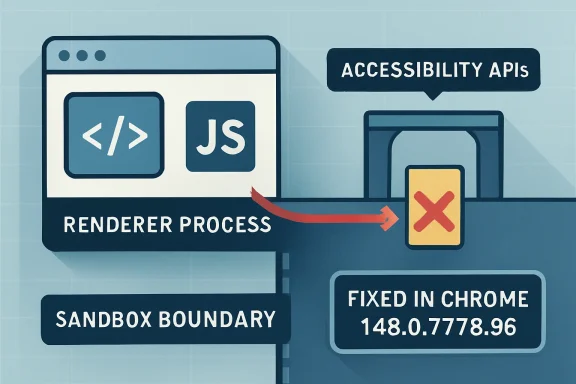 The Browser Sandbox Is Only as Strong as Its Weirdest Bridge
Modern Chromium security assumes that web content is hostile. The renderer process is where JavaScript, HTML, CSS, media parsing, and a large chunk of the web platform run; it is also where attackers most often get their first foothold. The sandbox exists because browser vendors long ago accepted that renderer bugs will happen.CVE-2026-7914 matters because it sits on the other side of that assumption. Google’s description says exploitation required a compromised renderer process and a crafted HTML page, with the possible result being a sandbox escape. In plain English: this was a second-stage vulnerability, the kind an attacker would pair with a renderer exploit to move from “I control a trapped browser process” to “I may be able to reach the wider Windows desktop.”
That distinction should calm panic without encouraging complacency. A standalone renderer crash is bad; a renderer escape is the upgrade path from browser bug to endpoint compromise. The exploit chain is the story.
The accessibility component makes the issue more uncomfortable. Accessibility APIs are designed to let assistive technologies, automation tools, and the operating system understand what is happening inside application windows. That means they routinely translate between internal browser objects and external platform interfaces. Translation layers are where type assumptions go to die.
Accessibility Is Not an Edge Case When It Crosses a Privilege Boundary
Accessibility is often treated as a user-interface feature, which understates its security role. In Chromium on Windows, accessibility has to expose page structure, controls, focus state, text ranges, events, and relationships to Windows accessibility frameworks. It is a compatibility layer, an interoperability layer, and in some cases a privileged information broker.That is why a type confusion in accessibility is not merely a bug in a convenience feature. Type confusion means software treated one kind of object as another incompatible kind of object. In memory-safe terms, it is a failure of identity; in exploit terms, it can become a way to steer code into reading or writing the wrong memory through the wrong shape.
The CVE’s CWE assignment, CWE-843, captures that generic failure: accessing a resource using an incompatible type. But the generic label hides the browser-specific risk. If the confused object is involved in communication between a sandboxed renderer and a browser or OS-facing accessibility service, the attacker may be able to influence code that was supposed to be less exposed than the web content engine.
This is why Chromium security bugs often sound oddly bureaucratic: “type confusion in accessibility,” “use-after-free in navigation,” “inappropriate implementation in permissions.” The phrasing is dry because the vulnerable code is deep inside a large system of brokers, helpers, proxies, and process boundaries. But those layers are precisely where modern browser exploitation lives.
The Windows-Only CPE Is a Clue, Not a Clerical Error
The NVD change record for CVE-2026-7914 added a configuration that effectively combines Chrome before 148.0.7778.96 with Microsoft Windows. That has already prompted the obvious question: are we missing a CPE?Probably not in the narrow sense. The vulnerability description itself says “Google Chrome on Windows,” and the NVD configuration reflects that by modeling the affected application and the operating system together. If the vulnerable behavior depends on Windows accessibility plumbing, the OS qualifier is part of the affected configuration rather than an afterthought.
That does not mean the data is perfect. CPE modeling has always been awkward for browsers because Chromium is both a product and an upstream codebase. A single Chromium vulnerability can affect Google Chrome, Microsoft Edge, Brave, Vivaldi, Electron apps, WebView runtimes, embedded browsers, and downstream Linux packages depending on whether they include the vulnerable component, enable the feature, or carry the patch. The CVE entry is not a complete asset inventory.
The practical reading is simple: the CPE is right to call out Chrome on Windows, but defenders should not stop there. If a fleet runs Chromium-derived browsers or runtimes on Windows, administrators should check vendor advisories and deployed versions rather than assuming that the Google Chrome CPE is the full blast radius. CVE records are coordinates, not maps.
Microsoft’s appearance in the user-facing source path adds another layer. Microsoft tracks Chromium vulnerabilities in the Security Update Guide because Chromium-based Edge inherits security-relevant upstream code. But an MSRC page pointing at a Chromium CVE is not the same thing as proof that every Edge channel, WebView2 runtime, or embedded Chromium consumer is vulnerable in the same way on the same day. It is a prompt to verify Microsoft’s patched Edge and WebView2 versions across the estate.
The “Compromised Renderer” Requirement Is a Speed Bump, Not a Wall
The most reassuring phrase in the CVE description is also the most easily misread: the attacker had to have compromised the renderer process. That means CVE-2026-7914 was not, by itself, the front door. The attacker needed another vulnerability or technique to get code execution inside the renderer first.For home users, that may sound like a high bar. For exploit developers, it is a familiar architecture. Browser exploits are often chained: one bug to get into the renderer, another to escape the sandbox, and sometimes a third to elevate privileges or persist. The renderer compromise is the opening move, not the whole game.
The CVSS vector assigned by CISA’s ADP entry reflects this nuance. Network attack vector, no privileges required, user interaction required, high attack complexity, changed scope, and high impact across confidentiality, integrity, and availability is a fairly accurate portrait of a chained browser escape. It is not trivial, but it is serious.
High attack complexity also does not mean “unlikely to matter.” It often means exploitation requires precise heap state, a race, a particular platform path, or a preceding condition. Those are engineering problems. For targeted attackers, exploit reliability is expensive but achievable; for defenders, the relevant question is whether patching is cheaper than betting against that engineering.
Chrome 148 Was a Security Release Wearing a Feature Release Jacket
Chrome 148 arrived on the stable channel for Windows, macOS, and Linux on May 5, 2026, with Windows and macOS builds listed as 148.0.7778.96/97 and Linux as 148.0.7778.96. The release also carried the usual web-platform feature churn: CSS changes, worker behavior, API trials, and developer-facing improvements. But for administrators, the security payload is what matters.Early reporting on the Chrome 148 cycle described a large batch of security fixes, including multiple critical issues elsewhere in Chromium. CVE-2026-7914 was not the loudest bug in that crowd. It was marked high, not critical, and it required a renderer compromise before the sandbox escape became relevant.
That is exactly why it deserves attention. Security teams are conditioned to chase the red siren: critical, exploited in the wild, public proof-of-concept. The quieter high-severity escape bugs are the ones that become valuable links in private chains. A renderer exploit without an escape may be contained; an escape without a renderer bug may be inert; together they become a campaign.
This is also why “we have automatic updates” is a partial answer. Chrome’s consumer update machinery is strong, but enterprise reality is messier. Browser restarts are deferred, VDI images lag, golden images are stale, kiosks are brittle, and regulated environments test even urgent updates before deployment. The calendar between “released” and “actually running everywhere” is where attackers live.
Enterprise Risk Lives in the Gap Between Installed and Running
On Windows fleets, browser patching is no longer just a desktop-support chore. Chrome, Edge, and WebView2 are application platforms. They render identity portals, admin consoles, SaaS dashboards, helpdesk tools, device enrollment flows, financial systems, and internal apps that were never threat-modeled as exposed attack surfaces because they “only run in the browser.”The operational trap is version visibility. Inventory systems may report an installed Chrome package at or above the fixed version while users are still running old browser processes. A browser that downloaded an update but has not restarted is not patched in the way security teams care about. The executable on disk may be new; the code in memory may not be.
That matters more for chained browser bugs than for many ordinary application vulnerabilities. A crafted page is delivered to a live browsing session. If the vulnerable process remains alive for days because a user never restarts, the patch has not crossed the boundary from policy to protection.
The right response is not reckless forced restarts every time Chromium ships a point release. It is to distinguish routine browser hygiene from security-driven browser hygiene. When a bug has sandbox-escape potential, restart compliance becomes a control, not a nicety.
Accessibility Code Is a Security Surface Because It Has to Be Useful
There is a temptation to respond to accessibility bugs by asking whether accessibility can simply be disabled. That instinct is understandable and usually wrong. Accessibility is not an optional ornament for many users, and in enterprise environments it is frequently entangled with testing, automation, screen readers, remote support, compliance tooling, and custom workflows.The better lesson is architectural. Accessibility code needs to be treated like an IPC boundary, not a UI afterthought. It marshals structured representations of page content, maps browser objects into OS-facing abstractions, and responds to events that may be influenced by web content. That is a privileged translation problem.
Chromium has spent years hardening site isolation, sandboxing, memory safety, and brokered services. Yet the browser keeps expanding sideways into more operating-system integration: passkeys, payments, screen capture, notifications, file handling, installed web apps, AI-assisted writing tools, and richer accessibility. Every bridge is a feature; every bridge is also an attack surface.
CVE-2026-7914 is therefore less surprising than it looks. As browsers become the universal client, the riskiest code is often not the JavaScript engine everyone watches. It is the connective tissue that lets web content behave like a native application.
The CVE Record Tells Defenders Just Enough to Act
The public record for CVE-2026-7914 is sparse, and that is normal. Chromium bug details are frequently restricted until enough users have updated. The issue-tracker link exists, but access is limited. That leaves defenders with the vendor advisory, the CVE description, the affected version threshold, the CWE, and the CVSS vector.That is enough for patch prioritization. The vulnerable product is Chrome on Windows before 148.0.7778.96. The attack vector is remote through crafted HTML. User interaction is required, which in browser terms often means visiting or being directed to a page. The security boundary at stake is the renderer sandbox.
It is not enough for exploit reconstruction, and that is by design. Publicly detailed browser escape bugs can become exploit templates. Vendors have to balance transparency with herd immunity: disclose enough for administrators to patch, withhold enough to avoid arming copycat attackers before the update saturates.
For WindowsForum readers, the takeaway is to resist both extremes. This is not a reason to declare Chrome unsafe in some sweeping way; all major browsers carry complex attack surfaces. It is also not a reason to shrug because there is no public exploit. The absence of a public exploit is not the same thing as the absence of exploitability.
The Microsoft Angle Is About Shared Supply Chains
Because Microsoft Edge is Chromium-based, every Chromium security bulletin now has a Microsoft echo. That does not mean Edge and Chrome are identical. Microsoft carries its own services, policies, updater, enterprise controls, UI features, and release cadence. But the shared engine means certain classes of vulnerability move through both ecosystems.This has changed the rhythm of Windows security operations. Patch Tuesday used to dominate the month. Now browser security runs on a faster, vendor-driven clock, and Chromium fixes can land outside the traditional Windows update cycle. Administrators who still think in monthly patch windows are already behind the browser threat model.
WebView2 complicates the picture further. Many Windows applications use the Edge WebView2 Runtime to render web content inside desktop apps. If a Chromium vulnerability affects code paths reachable through WebView2, the security question is not limited to “which browser do users launch?” It becomes “which applications embed the web platform, and which runtime are they using?”
CVE-2026-7914 is specifically described as Chrome on Windows, not generically as every Chromium consumer. Still, the shared-supply-chain lesson holds. The browser engine is no longer a single app in the Start menu. It is a substrate.
Patch Management Has to Stop Treating Browsers Like Consumer Apps
The browser is now the most exposed application on many Windows endpoints. It processes untrusted code all day, talks to identity providers, stores session tokens, syncs passwords or passkeys, mediates downloads, launches helper apps, and increasingly hosts enterprise workflows. If the browser falls, the endpoint may not be far behind.Yet browser update governance is often split awkwardly between desktop engineering, security operations, application owners, and user-experience teams. One group owns the package, another owns policy, another owns vulnerability scanning, and no one owns the actual restart moment. That fragmentation is how high-severity browser bugs linger.
A sane enterprise process should answer three questions quickly after a Chromium security release. What fixed version is required? Which assets are below it? Which running sessions have not restarted into it? The third question is the one many organizations cannot answer.
There is also a cultural issue. Users have been trained to keep hundreds of tabs alive as a form of working memory. Forced browser restarts feel disruptive because they are disruptive. But if organizations want to preserve that workflow, they need browser state restoration, staged warnings, and deadline-based relaunch policies that make security updates predictable rather than arbitrary.
The Real Risk Is Not This One CVE, But the Shape of the Chain
CVE-2026-7914 is a high-severity sandbox escape candidate, not a confirmed mass-exploitation crisis. The difference matters. But the vulnerability’s shape is a useful reminder of how modern browser compromise is assembled.Attackers do not need every bug to be spectacular. They need compatible pieces. A renderer bug in Blink or V8, an escape in accessibility or IPC, a bypass for a mitigation, and a persistence technique can be chained into something far more dangerous than the individual CVE blurbs suggest. Defenders reading CVEs one at a time miss the composition.
That is why prioritization should consider exploit-chain value. A bug that requires a renderer compromise but crosses the sandbox boundary may be more operationally important than its headline severity suggests. It may be useless alone and priceless in combination.
This also argues for defense in depth beyond patching. Site isolation, exploit mitigations, endpoint detection, constrained browser extensions, attack surface reduction rules, application control, and least-privilege user accounts all matter because no one layer is guaranteed to hold. Patching closes known doors; architecture limits what happens when one remains open.
The Fixed Build Is the Only Version That Matters This Week
The most concrete number in this story is 148.0.7778.96. For Google Chrome on Windows, anything before that is on the wrong side of CVE-2026-7914. Windows and macOS Chrome 148 also appeared with a 148.0.7778.97 build variant, while Linux is listed at 148.0.7778.96.For individual users, the path is mundane: open the browser’s About page, let it check for updates, and relaunch. For managed Windows environments, the path is less glamorous but more important: verify policy, confirm package deployment, measure relaunch compliance, and identify systems where Chrome is present but unmanaged.
Administrators should also check Edge and WebView2 through Microsoft’s release channels rather than relying on Chrome version numbers. Chromium vulnerabilities often move through downstream products with different build identifiers. Matching by major Chromium version alone is not always enough.
The larger point is that browser updates are not complete when the update service runs. They are complete when the vulnerable processes are gone. If a user has had Chrome open since before the update, that machine may still be presenting the old attack surface to the web.
The CPE Debate Reveals a Bigger Inventory Problem
The user’s question about a missing CPE is the kind of detail security teams should care about. CPEs drive scanners, dashboards, compliance reports, and executive summaries. If the affected configuration is modeled poorly, risk can disappear from view.In this case, the Windows qualifier appears intentional because the vulnerability is described as Windows-specific. The NVD configuration joining Chrome versions before 148.0.7778.96 with Microsoft Windows is a reasonable expression of that scope. It tells scanners that the vulnerable state is not merely “Chrome before X,” but “Chrome before X on Windows.”
But CPEs cannot fully model today’s browser ecosystem. They struggle with evergreen apps, embedded runtimes, vendor forks, channel differences, staged rollouts, and components that are present but unreachable under certain platform conditions. A clean CPE match is useful; a missing one is not proof of safety.
Security programs should treat CPE data as a starting signal and then enrich it with software inventory, process telemetry, browser management data, and vendor-specific release information. The asset question is no longer “is Google Chrome installed?” It is “which Chromium-derived execution environments are reachable by untrusted content on this Windows device?”
What Windows Admins Should Do Before This Becomes Just Another Dashboard Item
CVE-2026-7914 is manageable if it is treated as a browser-boundary bug rather than a line item in a vulnerability feed. The response should be quick, boring, and verifiable.- Confirm that Google Chrome on Windows is updated to 148.0.7778.96 or later, and do not count machines as remediated until the browser has relaunched into the fixed build.
- Review Microsoft Edge and WebView2 release status separately, because Chromium-derived products do not always share Google Chrome’s exact build numbers or publication timing.
- Treat accessibility-related browser bugs as meaningful attack-surface issues, especially on Windows systems where assistive technology, automation, remote support, or testing tools interact with browser content.
- Use vulnerability scanner results as a cue for investigation, not as the sole source of truth, because CPEs can understate or oversimplify Chromium’s downstream exposure.
- For managed fleets, enforce restart deadlines for high-severity browser updates and measure running-process versions, not merely installed package versions.
CVE-2026-7914 will probably fade quickly from public attention, displaced by the next Chromium advisory and the next Windows cumulative update. But it captures the direction of travel: the browser is now a privileged Windows integration layer that happens to render websites, and its strangest bridges are often its most consequential attack surfaces. The organizations that handle this well will be the ones that stop asking whether a browser bug is “just Chrome” and start treating every serious Chromium boundary flaw as a test of their whole Windows endpoint discipline.
Source: NVD / Chromium Security Update Guide - Microsoft Security Response Center
