

Google and Microsoft published CVE-2026-7917 on May 6, 2026, describing a high-severity use-after-free flaw in Chromium’s Fullscreen component on Windows before Chrome 148.0.7778.96 that could help a renderer-compromise chain escape the browser sandbox. The important phrase is not “Fullscreen,” and it is not even “crafted HTML page.” The important phrase is sandbox escape, because that is where an ordinary browser bug stops being ordinary. For Windows administrators, this is less a curiosity in Chromium internals than another reminder that the browser has become part of the operating system’s security perimeter.
The modern browser is often described as an application, but that undersells its role on Windows. Chrome, Edge, Brave, Vivaldi, and other Chromium-derived browsers sit between users and the hostile internet for most of the working day. They parse untrusted code, media, documents, GPU workloads, identity flows, password stores, and enterprise SaaS sessions at a scale no traditional desktop application ever had to survive.
That is why CVE-2026-7917 matters even though the published description is narrow. It is not presented as a one-click remote code execution bug that instantly hands over the machine. The attacker first needs to have compromised the renderer process, and the attack requires user interaction in the familiar browser sense: a victim must load or interact with crafted web content.
But browser exploitation is rarely about one beautiful vulnerability anymore. It is about chains. One bug gets code running in a renderer; another bug escapes the sandbox; a third abuses local privilege or persistence. CVE-2026-7917 sits in that second category, the stage that can turn a contained browser compromise into something much more serious.
The Windows qualifier is also significant. NVD’s early configuration data ties the affected Chrome application to Microsoft Windows, which suggests the vulnerable path depends on platform-specific behavior rather than a purely cross-platform logic flaw. In practical terms, that means Windows patch teams should not dismiss it as generic Chromium noise.
A use-after-free in that territory deserves attention. Use-after-free bugs happen when software continues to use memory after it has been released. In C and C++ codebases, that can create a path to memory corruption, type confusion, or attacker-controlled object reuse if the conditions line up.
Chromium has spent years raising the cost of exploiting these flaws. Site isolation, sandboxing, memory hardening, MiraclePtr-style mitigations, compiler protections, and continuous fuzzing all make the easy version of browser exploitation much harder than it used to be. Yet the recurring appearance of use-after-free CVEs in Chrome updates shows that browser memory safety remains an unfinished migration, not a solved problem.
Fullscreen is especially interesting because it is user-visible but also security-sensitive. Browsers must prevent websites from spoofing system dialogs, hiding origin information, tricking users into credential entry, or creating deceptive kiosk-like experiences. The very defenses designed to make fullscreen safe add complexity, and complexity is where memory lifetime bugs like to hide.
That combination is a sober assessment rather than a hype cycle. “High attack complexity” and “user interaction required” mean this is not being described as a trivial mass-exploitation primitive. But “scope changed” and high impact across the CIA triad signal that a successful exploit could break out of the boundaries the browser normally enforces.
This is the kind of vulnerability that security teams sometimes mishandle because it does not fit neatly into either bucket. It is not a confirmed exploited zero-day, at least based on the public information available at publication time. It is also not a low-risk nuisance that can wait for the next leisurely desktop maintenance window.
The right response is urgency without theater. Browsers update quickly for a reason, and Chromium vendors have built rapid-release machinery precisely because the exploitability window for browser bugs can collapse fast once fixes become public. Even when bug details remain restricted, attackers can diff patches, study neighboring code, and infer what changed.
The industry has become oddly numb to this cadence. A browser update can fix dozens or hundreds of vulnerabilities, and the reaction is often limited to a small line in a patch dashboard. If Windows itself shipped that many fixes in a single component with active web exposure, the enterprise security conversation would sound different.
Part of the complacency comes from Chrome’s success. Chrome updates so reliably on consumer systems that many people assume the problem has already solved itself. But enterprise Windows environments are different. Updates can be delayed by packaging, change-control windows, virtual desktop images, application compatibility testing, network segmentation, proxy behavior, or simple user reluctance to relaunch.
That last detail matters more than it should. A browser can download an update and still remain vulnerable until it restarts into the patched build. On shared workstations, jump boxes, call-center desktops, and always-open SaaS terminals, “pending relaunch” can become a silent exposure state.
That does not mean Edge version numbers map cleanly to Chrome version numbers. Chrome 148.0.7778.96 is the fixed Chrome build named in the CVE text, while Edge maintains its own versioning line. Administrators should therefore validate Edge through Microsoft’s release notes, enterprise update channels, and the browser’s own About page rather than searching for the exact Chrome build string on an Edge estate.
This distinction is not pedantry. Vulnerability scanners often reason through CPEs, version strings, and product mappings, and Chromium forks complicate all three. A scanner that sees “Chrome before 148.0.7778.96 on Windows” may not automatically tell the whole story for Edge, Brave, Electron apps, embedded WebView2 runtimes, or managed application bundles that include Chromium components.
The safe enterprise habit is to treat Chromium fixes as an ecosystem event. If Chrome has a sandbox escape fix, ask which Chromium-based browsers and runtimes are present, how they update, whether they require restart, and whether any of them are frozen by policy. Browser monoculture has made web compatibility easier, but it has also synchronized security risk.
But CPE data is not a complete threat model. It is a standardized naming system trying to describe real-world software deployment, and real-world Chromium deployment is messy. Enterprises may have system-level Chrome, user-level Chrome, Edge, Edge WebView2 runtime, portable Chromium-based browsers, managed browser channels, and third-party applications that embed browser components.
For CVE-2026-7917 specifically, the published description is Chrome on Windows. That means defenders should avoid overclaiming impact beyond the advisory. At the same time, they should not let the absence of a neat CPE entry for every Chromium-adjacent product become an excuse for inaction.
The CPE question is also a reminder that vulnerability management is only as good as discovery. If inventory cannot distinguish Chrome stable from beta, user-installed Chrome from enterprise-installed Chrome, or Edge stable from WebView2 runtime, then the patch status view is probably less authoritative than the dashboard suggests.
Renderers are expected to handle hostile content. The sandbox assumes that renderer bugs will happen and tries to contain them. A sandbox escape is valuable precisely because it crosses the boundary from compromised web content into broader system reach.
This is why browser exploit chains are often modular. A renderer RCE without a sandbox escape may be useful for limited theft or browser-context actions, but it is constrained. A sandbox escape without a renderer entry point may be hard to weaponize alone. Put them together, and the risk profile changes dramatically.
CVE-2026-7917 appears to live in that hinge position. It is not necessarily the first domino, but it may be the one that makes the first domino matter. That is enough to justify aggressive patching, especially on endpoints used by administrators, developers, finance teams, executives, and anyone with privileged access to cloud consoles.
This creates a strange security limbo. The patch may already be on disk. The update service may have done its job. The management console may even show progress. But the running process can still be the old vulnerable build until the browser exits and returns.
For administrators, that means “deployed” and “effective” are not synonyms. Browser patch SLAs should measure not only package availability but active process version. If a high-severity sandbox escape lands, forcing or scheduling a browser restart may be the difference between a theoretical fix and an actual one.
There is also a user-communication lesson here. “Restart your browser” sounds trivial to IT, but to a user with twenty tabs, half-finished forms, web meetings, and SaaS dashboards, it feels disruptive. Organizations that want faster browser patching should make session restore reliable, warn users clearly, and normalize browser restarts as ordinary hygiene rather than emergency punishment.
The old mental model placed “the browser” in one icon on the taskbar. The new model spreads browser technology across the desktop. Users may encounter web content inside applications that do not look like browsers, and developers may rely on runtimes that patch through different channels than Chrome itself.
This does not mean CVE-2026-7917 should be treated as a confirmed WebView2 vulnerability unless Microsoft says so. It does mean security teams should know how WebView2 is updated in their environment and whether runtime versions lag behind. The broader Chromium ecosystem rewards teams that understand dependencies before the incident ticket arrives.
Enterprise software vendors also need scrutiny. If a product bundles its own Chromium rather than using a maintained system runtime, it can become a permanently stale browser disguised as a desktop app. That pattern has caused trouble before, and it will keep causing trouble as more software becomes a web app with native packaging.
This limited disclosure period creates a familiar information gap. Defenders know the component, class, severity, affected version, and rough exploitation condition. They usually do not know the exact code path, proof-of-concept trigger, exploit reliability, or whether the bug composes neatly with other vulnerabilities.
That gap is why patch prioritization must lean on patterns. A high-severity Chromium use-after-free on Windows with sandbox escape potential should move quickly even without a public exploit. Waiting for proof-of-concept code is not prudence; it is often just choosing to patch after adversaries have a better test case.
The responsible-publication model also relies on speed. Vendors restrict details so users can update first. If organizations then hold browser patches for weeks, they break the bargain from their side. The security ecosystem assumes most endpoints move fast enough to justify temporary opacity.
The deeper story is memory safety. Rust, hardened allocators, safer C++ patterns, static analysis, fuzzing, and architectural isolation all help. But a codebase the size of Chromium cannot simply become memory-safe overnight. Components are rewritten selectively, new mitigations arrive gradually, and legacy assumptions remain embedded in high-performance paths.
This is where policy and engineering meet. Governments and security agencies increasingly pressure vendors to reduce memory-unsafe code in critical attack surfaces. Browser vendors can point to real progress, but CVE feeds continue to show the residual risk. Users do not need to understand allocators to feel the result: another urgent browser restart.
For Windows defenders, the lesson is not that Chromium is uniquely bad. The lesson is that the most exposed software on the endpoint is still full of memory-management edge cases, and the only practical defense is layered. Fast patching, exploit mitigations, least privilege, EDR visibility, web isolation for high-risk users, and disciplined browser extension control all matter.
Update deferrals are particularly risky for browsers. A seven-day delay may sound conservative for operating-system patches, where regression testing can be complex. For a browser sandbox escape, seven days can be a large fraction of the exploit-development window.
The same applies to Extended Stable channels. They exist for organizations that need slower feature change, not as a license to ignore security movement. When security fixes are backported promptly, Extended Stable can be a reasonable compromise. When visibility is poor, it can become a place where teams assume they are safer than they are.
Extension policy deserves its own mention. A renderer compromise may come from a web bug, but browser extensions expand the browser’s trust surface. Organizations that allow broad extension installation are effectively letting small third-party codebases run close to the most valuable user sessions in the company. CVE-2026-7917 is not an extension bug, but it belongs to the same risk conversation: the browser is a platform, not a window.
CVE-2026-7917 fits this shift neatly. It is cataloged through MSRC because Microsoft must account for Chromium risk in Edge. It is tracked through NVD because vulnerability management needs standardized identifiers. It is fixed through browser release channels because the browser moves faster than the OS. And it lands on the Windows admin’s desk because users experience the internet through that stack.
This is why browser patching should be reported to leadership alongside OS patching. If the browser is where most untrusted code executes, then browser lag is not a secondary metric. It is one of the core indicators of endpoint exposure.
The best shops already know this. They measure Chrome and Edge versions continuously, force relaunches for high-risk fixes, restrict unmanaged browsers, and treat unknown Chromium forks as shadow IT. The weaker shops still think of browser updates as convenience updates that users can accept whenever the little arrow turns red.
Source: NVD / Chromium Security Update Guide - Microsoft Security Response Center
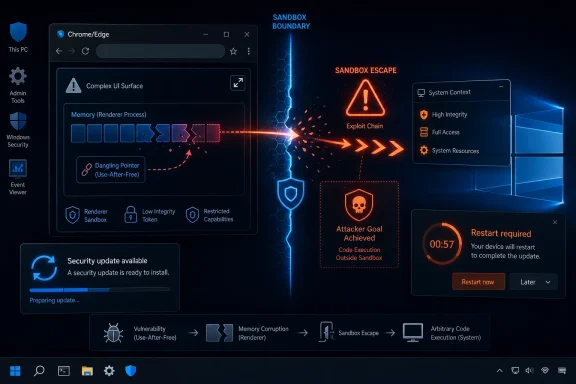 A Browser Bug Becomes a Windows Problem the Moment the Sandbox Is in Play
The modern browser is often described as an application, but that undersells its role on Windows. Chrome, Edge, Brave, Vivaldi, and other Chromium-derived browsers sit between users and the hostile internet for most of the working day. They parse untrusted code, media, documents, GPU workloads, identity flows, password stores, and enterprise SaaS sessions at a scale no traditional desktop application ever had to survive.That is why CVE-2026-7917 matters even though the published description is narrow. It is not presented as a one-click remote code execution bug that instantly hands over the machine. The attacker first needs to have compromised the renderer process, and the attack requires user interaction in the familiar browser sense: a victim must load or interact with crafted web content.
But browser exploitation is rarely about one beautiful vulnerability anymore. It is about chains. One bug gets code running in a renderer; another bug escapes the sandbox; a third abuses local privilege or persistence. CVE-2026-7917 sits in that second category, the stage that can turn a contained browser compromise into something much more serious.
The Windows qualifier is also significant. NVD’s early configuration data ties the affected Chrome application to Microsoft Windows, which suggests the vulnerable path depends on platform-specific behavior rather than a purely cross-platform logic flaw. In practical terms, that means Windows patch teams should not dismiss it as generic Chromium noise.
Fullscreen Is Not Cosmetic When It Touches Trust Boundaries
“Fullscreen” sounds like a feature users notice only when watching video, presenting slides, or hiding browser chrome during a web app session. That makes it easy to underestimate. In browser architecture, however, fullscreen is tied to permissions, window state, focus, display surfaces, user gestures, and security prompts — all the awkward boundary areas where web content and native operating-system behavior meet.A use-after-free in that territory deserves attention. Use-after-free bugs happen when software continues to use memory after it has been released. In C and C++ codebases, that can create a path to memory corruption, type confusion, or attacker-controlled object reuse if the conditions line up.
Chromium has spent years raising the cost of exploiting these flaws. Site isolation, sandboxing, memory hardening, MiraclePtr-style mitigations, compiler protections, and continuous fuzzing all make the easy version of browser exploitation much harder than it used to be. Yet the recurring appearance of use-after-free CVEs in Chrome updates shows that browser memory safety remains an unfinished migration, not a solved problem.
Fullscreen is especially interesting because it is user-visible but also security-sensitive. Browsers must prevent websites from spoofing system dialogs, hiding origin information, tricking users into credential entry, or creating deceptive kiosk-like experiences. The very defenses designed to make fullscreen safe add complexity, and complexity is where memory lifetime bugs like to hide.
The CVSS Score Tells a Story of Chain Risk, Not Drive-By Panic
CISA’s ADP scoring gives CVE-2026-7917 a CVSS 3.1 base score of 8.3, high severity. The vector is revealing: network attack vector, high attack complexity, no privileges required, user interaction required, changed scope, and high impact to confidentiality, integrity, and availability.That combination is a sober assessment rather than a hype cycle. “High attack complexity” and “user interaction required” mean this is not being described as a trivial mass-exploitation primitive. But “scope changed” and high impact across the CIA triad signal that a successful exploit could break out of the boundaries the browser normally enforces.
This is the kind of vulnerability that security teams sometimes mishandle because it does not fit neatly into either bucket. It is not a confirmed exploited zero-day, at least based on the public information available at publication time. It is also not a low-risk nuisance that can wait for the next leisurely desktop maintenance window.
The right response is urgency without theater. Browsers update quickly for a reason, and Chromium vendors have built rapid-release machinery precisely because the exploitability window for browser bugs can collapse fast once fixes become public. Even when bug details remain restricted, attackers can diff patches, study neighboring code, and infer what changed.
Chrome 148 Is a Reminder That Patch Volume Is Now Normal
Chrome 148 arrived with a large security payload, and CVE-2026-7917 was only one item in a broader release. Reports around the stable-channel update describe more than 100 fixes, including critical and high-severity Chromium issues. For users, that looks like just another restart prompt; for defenders, it is a monthly demonstration of how much browser attack surface exists.The industry has become oddly numb to this cadence. A browser update can fix dozens or hundreds of vulnerabilities, and the reaction is often limited to a small line in a patch dashboard. If Windows itself shipped that many fixes in a single component with active web exposure, the enterprise security conversation would sound different.
Part of the complacency comes from Chrome’s success. Chrome updates so reliably on consumer systems that many people assume the problem has already solved itself. But enterprise Windows environments are different. Updates can be delayed by packaging, change-control windows, virtual desktop images, application compatibility testing, network segmentation, proxy behavior, or simple user reluctance to relaunch.
That last detail matters more than it should. A browser can download an update and still remain vulnerable until it restarts into the patched build. On shared workstations, jump boxes, call-center desktops, and always-open SaaS terminals, “pending relaunch” can become a silent exposure state.
Edge Inherits the Chromium Clock but Not Always the Chrome Version Number
Microsoft’s involvement makes this CVE especially relevant to WindowsForum readers. The MSRC page tracks CVE-2026-7917 because Chromium vulnerabilities can affect Microsoft Edge, even when the original advisory is framed around Google Chrome. Edge is Chromium-based, and Microsoft routinely incorporates Chromium security fixes into Edge stable updates.That does not mean Edge version numbers map cleanly to Chrome version numbers. Chrome 148.0.7778.96 is the fixed Chrome build named in the CVE text, while Edge maintains its own versioning line. Administrators should therefore validate Edge through Microsoft’s release notes, enterprise update channels, and the browser’s own About page rather than searching for the exact Chrome build string on an Edge estate.
This distinction is not pedantry. Vulnerability scanners often reason through CPEs, version strings, and product mappings, and Chromium forks complicate all three. A scanner that sees “Chrome before 148.0.7778.96 on Windows” may not automatically tell the whole story for Edge, Brave, Electron apps, embedded WebView2 runtimes, or managed application bundles that include Chromium components.
The safe enterprise habit is to treat Chromium fixes as an ecosystem event. If Chrome has a sandbox escape fix, ask which Chromium-based browsers and runtimes are present, how they update, whether they require restart, and whether any of them are frozen by policy. Browser monoculture has made web compatibility easier, but it has also synchronized security risk.
The CPE Entry Is Useful, but It Is Not the Whole Asset Inventory
The user-facing NVD note asks whether a CPE is missing, and that is the right instinct. The initial NVD configuration lists Google Chrome versions before 148.0.7778.96 and Microsoft Windows as the operating-system condition. That captures the core vulnerable software relationship: Chrome on Windows.But CPE data is not a complete threat model. It is a standardized naming system trying to describe real-world software deployment, and real-world Chromium deployment is messy. Enterprises may have system-level Chrome, user-level Chrome, Edge, Edge WebView2 runtime, portable Chromium-based browsers, managed browser channels, and third-party applications that embed browser components.
For CVE-2026-7917 specifically, the published description is Chrome on Windows. That means defenders should avoid overclaiming impact beyond the advisory. At the same time, they should not let the absence of a neat CPE entry for every Chromium-adjacent product become an excuse for inaction.
The CPE question is also a reminder that vulnerability management is only as good as discovery. If inventory cannot distinguish Chrome stable from beta, user-installed Chrome from enterprise-installed Chrome, or Edge stable from WebView2 runtime, then the patch status view is probably less authoritative than the dashboard suggests.
The Renderer Requirement Is a Barrier, Not a Comfort Blanket
The phrase “attacker who had compromised the renderer process” may tempt some readers to downgrade the risk. After all, if the attacker already has a renderer compromise, isn’t the game already over? In modern Chromium, the answer is no — and that is the point of the sandbox.Renderers are expected to handle hostile content. The sandbox assumes that renderer bugs will happen and tries to contain them. A sandbox escape is valuable precisely because it crosses the boundary from compromised web content into broader system reach.
This is why browser exploit chains are often modular. A renderer RCE without a sandbox escape may be useful for limited theft or browser-context actions, but it is constrained. A sandbox escape without a renderer entry point may be hard to weaponize alone. Put them together, and the risk profile changes dramatically.
CVE-2026-7917 appears to live in that hinge position. It is not necessarily the first domino, but it may be the one that makes the first domino matter. That is enough to justify aggressive patching, especially on endpoints used by administrators, developers, finance teams, executives, and anyone with privileged access to cloud consoles.
The Real Exposure Is the Time Between Downloaded and Relaunched
Chrome’s update model is one of the best in consumer software, but it has a human-shaped hole. The browser usually updates in the background, then waits for a restart. Many users keep browser sessions open for days, and some enterprise users treat a browser relaunch as a productivity event requiring negotiation.This creates a strange security limbo. The patch may already be on disk. The update service may have done its job. The management console may even show progress. But the running process can still be the old vulnerable build until the browser exits and returns.
For administrators, that means “deployed” and “effective” are not synonyms. Browser patch SLAs should measure not only package availability but active process version. If a high-severity sandbox escape lands, forcing or scheduling a browser restart may be the difference between a theoretical fix and an actual one.
There is also a user-communication lesson here. “Restart your browser” sounds trivial to IT, but to a user with twenty tabs, half-finished forms, web meetings, and SaaS dashboards, it feels disruptive. Organizations that want faster browser patching should make session restore reliable, warn users clearly, and normalize browser restarts as ordinary hygiene rather than emergency punishment.
WebView2 and Embedded Chromium Keep Expanding the Blast Radius
Windows has another Chromium dependency that deserves mention: WebView2. Microsoft’s embedded web runtime powers parts of Office, Teams, widgets, enterprise apps, installers, dashboards, and line-of-business software. It is not automatically implicated by every Chrome CVE description, but it changes how defenders should think about browser-class vulnerabilities.The old mental model placed “the browser” in one icon on the taskbar. The new model spreads browser technology across the desktop. Users may encounter web content inside applications that do not look like browsers, and developers may rely on runtimes that patch through different channels than Chrome itself.
This does not mean CVE-2026-7917 should be treated as a confirmed WebView2 vulnerability unless Microsoft says so. It does mean security teams should know how WebView2 is updated in their environment and whether runtime versions lag behind. The broader Chromium ecosystem rewards teams that understand dependencies before the incident ticket arrives.
Enterprise software vendors also need scrutiny. If a product bundles its own Chromium rather than using a maintained system runtime, it can become a permanently stale browser disguised as a desktop app. That pattern has caused trouble before, and it will keep causing trouble as more software becomes a web app with native packaging.
Bug Secrecy Is Frustrating, but It Is Also Part of the Defense
The Chromium issue tracker entry for this CVE is access-restricted, which is normal for recently patched browser vulnerabilities. Researchers, administrators, and journalists all prefer details, but public exploit clues before most users update would be a gift to attackers. The tradeoff is uncomfortable but rational.This limited disclosure period creates a familiar information gap. Defenders know the component, class, severity, affected version, and rough exploitation condition. They usually do not know the exact code path, proof-of-concept trigger, exploit reliability, or whether the bug composes neatly with other vulnerabilities.
That gap is why patch prioritization must lean on patterns. A high-severity Chromium use-after-free on Windows with sandbox escape potential should move quickly even without a public exploit. Waiting for proof-of-concept code is not prudence; it is often just choosing to patch after adversaries have a better test case.
The responsible-publication model also relies on speed. Vendors restrict details so users can update first. If organizations then hold browser patches for weeks, they break the bargain from their side. The security ecosystem assumes most endpoints move fast enough to justify temporary opacity.
Memory Safety Is the Unfinished Business Behind the Browser Patch Treadmill
CVE-2026-7917 is another entry in a long list of use-after-free issues in Chromium and other large C++ projects. That is not because browser engineers are careless. It is because browsers are among the most complex, performance-sensitive, backward-compatible software systems ever shipped to consumers.The deeper story is memory safety. Rust, hardened allocators, safer C++ patterns, static analysis, fuzzing, and architectural isolation all help. But a codebase the size of Chromium cannot simply become memory-safe overnight. Components are rewritten selectively, new mitigations arrive gradually, and legacy assumptions remain embedded in high-performance paths.
This is where policy and engineering meet. Governments and security agencies increasingly pressure vendors to reduce memory-unsafe code in critical attack surfaces. Browser vendors can point to real progress, but CVE feeds continue to show the residual risk. Users do not need to understand allocators to feel the result: another urgent browser restart.
For Windows defenders, the lesson is not that Chromium is uniquely bad. The lesson is that the most exposed software on the endpoint is still full of memory-management edge cases, and the only practical defense is layered. Fast patching, exploit mitigations, least privilege, EDR visibility, web isolation for high-risk users, and disciplined browser extension control all matter.
The Enterprise Policy Layer Can Either Help or Hurt
Managed Chrome and Edge environments have strong policy controls, but those controls can create false confidence. Administrators can set update policies, target channels, extension allowlists, site isolation options, and relaunch notifications. Yet every one of those settings must be validated against real endpoint behavior.Update deferrals are particularly risky for browsers. A seven-day delay may sound conservative for operating-system patches, where regression testing can be complex. For a browser sandbox escape, seven days can be a large fraction of the exploit-development window.
The same applies to Extended Stable channels. They exist for organizations that need slower feature change, not as a license to ignore security movement. When security fixes are backported promptly, Extended Stable can be a reasonable compromise. When visibility is poor, it can become a place where teams assume they are safer than they are.
Extension policy deserves its own mention. A renderer compromise may come from a web bug, but browser extensions expand the browser’s trust surface. Organizations that allow broad extension installation are effectively letting small third-party codebases run close to the most valuable user sessions in the company. CVE-2026-7917 is not an extension bug, but it belongs to the same risk conversation: the browser is a platform, not a window.
The Windows Desktop Is Now a Browser Security Platform
For years, Windows security meant Windows Update, antivirus, firewall policy, and maybe application control. That model is obsolete. A secure Windows endpoint now depends heavily on browser update velocity, identity provider hardening, phishing-resistant authentication, and SaaS session protection.CVE-2026-7917 fits this shift neatly. It is cataloged through MSRC because Microsoft must account for Chromium risk in Edge. It is tracked through NVD because vulnerability management needs standardized identifiers. It is fixed through browser release channels because the browser moves faster than the OS. And it lands on the Windows admin’s desk because users experience the internet through that stack.
This is why browser patching should be reported to leadership alongside OS patching. If the browser is where most untrusted code executes, then browser lag is not a secondary metric. It is one of the core indicators of endpoint exposure.
The best shops already know this. They measure Chrome and Edge versions continuously, force relaunches for high-risk fixes, restrict unmanaged browsers, and treat unknown Chromium forks as shadow IT. The weaker shops still think of browser updates as convenience updates that users can accept whenever the little arrow turns red.
The Practical Read From This Fullscreen Flaw Is Narrow but Urgent
The concrete response to CVE-2026-7917 is simple, but the surrounding lesson is broader. Patch Chrome on Windows to 148.0.7778.96 or later, verify Edge and other Chromium-based browsers through their vendor channels, and make sure the patched browser has actually relaunched. Then use this CVE as a reason to tighten the browser inventory you will need for the next one.- Organizations should prioritize Chrome updates on Windows endpoints running versions earlier than 148.0.7778.96.
- Administrators should verify Microsoft Edge separately through Microsoft’s release information instead of assuming Chrome version numbers apply directly.
- Security teams should treat the renderer-compromise prerequisite as evidence of exploit-chain risk, not as a reason to defer patching.
- Vulnerability management teams should review whether their scanners can see user-installed browsers, portable browsers, and Chromium-based application bundles.
- Help desks should be ready to push browser relaunches, because a downloaded browser update is not fully protective until the old process exits.
- Asset owners should treat CPE data as a starting point and investigate Chromium dependencies that may not appear cleanly in a single NVD configuration.
Source: NVD / Chromium Security Update Guide - Microsoft Security Response Center
