

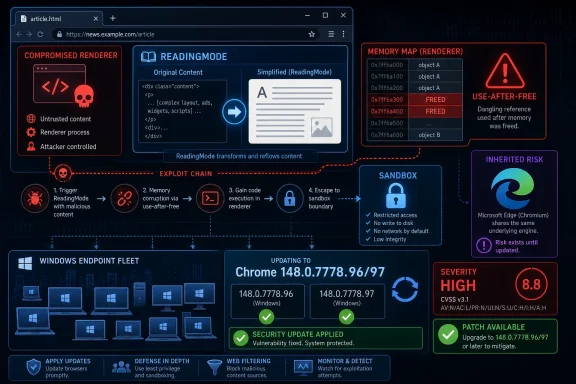
CVE-2026-7984 is a newly published Chromium use-after-free vulnerability in Chrome’s ReadingMode component, fixed in Google Chrome 148.0.7778.96 for Linux and 148.0.7778.96/97 for Windows and macOS after disclosure on May 6, 2026, and tracked by Microsoft because Edge inherits Chromium security exposure. Its oddity is not that it is the scariest bug in Chrome 148. It is that a “Medium” Chromium flaw can still carry a high CVSS score, a remote-code-execution description, and real patch urgency for Windows fleets. That tension is exactly where browser security now lives: not in the headline severity alone, but in the chain an attacker can build around it.
On paper, CVE-2026-7984 sounds almost modest. Google classifies it as a Medium-severity Chromium issue, and it sits inside ReadingMode rather than a glamour target like V8, Blink, WebRTC, or the GPU stack. The National Vulnerability Database entry, as of its initial publication window, has not yet supplied its own NVD CVSS score, while CISA’s ADP enrichment assigns a CVSS 3.1 score of 8.8 High.
That discrepancy is not a clerical quirk. It is a reminder that browser bug severity is often a story told from two perspectives. Chromium’s internal severity tends to reflect exploitability in the browser’s layered architecture, while CVSS tries to describe impact under a standardized model that can make even a sandbox-contained code execution bug look severe.
The description says the attacker must already have compromised the renderer process. That condition matters. CVE-2026-7984 is not described as a one-click full-system takeover by itself; it is described as a way for an attacker who already has code execution in the renderer to execute arbitrary code inside a sandbox through a crafted HTML page.
For defenders, that distinction should narrow the response, not soften it. Modern browser intrusions are rarely one-bug affairs. The realistic risk is the exploit chain: one vulnerability gets the attacker into a renderer, another improves code execution reliability, a third escapes the sandbox or reaches a privileged broker, and the user’s browser session becomes the launchpad for credential theft, token abuse, or post-exploitation tooling.
A use-after-free vulnerability is a memory safety failure in which software continues to use an object after it has been freed. In C and C++ codebases, that can become exploitable when an attacker can influence what occupies the freed memory next. The browser may believe it is handling one kind of object while the attacker has maneuvered memory into holding something else.
That is why use-after-free bugs keep appearing in Chrome advisories after years of sandboxing, fuzzing, MiraclePtr-style hardening, partitioned allocators, and increasingly aggressive exploit mitigations. The mitigations raise the cost. They do not repeal the core difficulty of writing a giant, multi-process, backward-compatible browser in memory-unsafe languages while feeding it the entire public internet.
ReadingMode adds another subtle wrinkle. Features that restructure pages can sit between the document model, accessibility machinery, layout state, and user interface code. Even if the component is not a scripting engine, it may touch complex, mutable objects created by one subsystem and consumed by another. That kind of crossing point is where lifetime bugs like to breed.
That matters because administrators are not patching CVE-2026-7984 in isolation. They are absorbing an entire Chromium security train, with a mix of Critical, High, Medium, and Low issues across the browser. A security team that waits because this one ReadingMode bug is labeled Medium is still leaving the rest of the train sitting in the yard.
The Chrome release cadence has trained many users to treat browser updates as background weather. That is mostly a triumph. Auto-update is one of the few consumer-security mechanisms that works at planetary scale without depending on user judgment.
Enterprise reality is messier. Chrome, Edge, and other Chromium-based browsers often sit behind testing rings, change freezes, virtual desktop images, app compatibility exceptions, and security tooling that inventories browser versions only after the fact. The update may be available, but exposure remains until the managed endpoint actually runs the patched build.
As of Microsoft’s Edge security release notes on May 6, Microsoft stated it was aware of recent Chromium security fixes and was actively working on releasing a security fix. That phrasing is familiar to anyone who has watched Chromium advisories propagate into Edge: Google’s stable release lands, Chromium CVEs become public, and Microsoft follows with the Edge build that incorporates the relevant upstream patches.
This is not evidence that Edge is uniquely laggard. It is evidence that Chromium monoculture has operational consequences. A single upstream patch event can become a patch event for Chrome, Edge, Brave, Vivaldi, Opera, Electron-based applications, embedded Chromium runtimes, and Linux distribution packages, each with its own lag, versioning, and user base.
For WindowsForum readers, Edge deserves particular attention because it is present by default on Windows systems and often integrated into enterprise identity, management, and web-app workflows. A Chrome advisory may look like Google’s problem, but the underlying Chromium issue may be Microsoft’s problem, your VDI image’s problem, your kiosk browser’s problem, and your line-of-business web wrapper’s problem.
But in exploit development, “requires renderer compromise” can mean “use this after you already used something else.” Attackers do not experience vulnerabilities as isolated CVE entries. They experience them as building blocks.
A crafted HTML page is still the delivery mechanism in the description. User interaction is required under the CISA CVSS vector, which usually means a victim must visit or be lured to content rather than being attacked without any user action. In the browser world, that is a low bar. Phishing, malvertising, compromised legitimate sites, poisoned search results, and drive-by exploit infrastructure all exist to produce exactly that interaction.
The sandbox phrasing is also worth reading carefully. “Execute arbitrary code inside a sandbox” is not the same as “escape the sandbox.” Still, reliable sandboxed code execution can be valuable. It can inspect reachable process state, stage a second exploit, manipulate browser-exposed surfaces, or strengthen an exploit chain that would otherwise be too brittle to monetize.
This is why defenders should resist the urge to sort browser CVEs into “real” and “theoretical” bins based only on single-line descriptions. Browser exploitation is modular. A Medium bug in the wrong place can become the hinge that makes a High or Critical bug practical.
That looks dramatic beside Chromium’s Medium severity. But CVSS is a broad measuring instrument, not a browser-specific threat model. If arbitrary code execution is in scope, the confidentiality, integrity, and availability impacts often become High in CVSS terms even when practical exploitation depends on a preceding renderer compromise.
There is a recurring mismatch here. Vendors frequently use severity labels to guide patch prioritization within their own architecture. CVSS tries to normalize across products, industries, and vulnerability types. Neither is useless, and neither is complete.
For security teams, the answer is not to pick a favorite number. The answer is to combine them. Chromium’s Medium tells you this is not the flagship catastrophe of Chrome 148. The CVSS 8.8 tells you it is still an internet-delivered memory safety issue with meaningful impact if chained correctly. The release context tells you the update contains many other fixes. Together, those facts say: patch promptly, but do not panic as if this CVE alone is confirmed in-the-wild zero-day exploitation.
But the practical boundary in this case is plain: Google Chrome before 148.0.7778.96 is affected, with the Windows and macOS stable build line also showing 148.0.7778.97 in the desktop release. If your asset inventory can answer which endpoints are running Chrome below that threshold, you have the core operational answer.
The NVD change record indicates a Chrome CPE configuration for versions up to but excluding 148.0.7778.96, paired with operating-system CPEs for Windows, Linux, and macOS. That structure is a common way to represent an application vulnerability across supported desktop platforms, but it can look odd to administrators expecting a clean per-product list.
The bigger problem is that CPEs do not capture the Chromium ecosystem well. Edge has its own release train. Electron applications may embed Chromium at different versions. Linux distributions may ship Chromium through snaps, distro packages, or third-party repositories. Managed macOS fleets may have Chrome, Edge, and Chromium side by side.
So yes, metadata quality matters. But if the question is “are we missing a CPE,” the more useful answer for defenders is that CPE coverage is only the first mile. Version detection, browser channel awareness, and application-specific inventory are what decide whether the organization is actually exposed.
That has changed the rhythm of endpoint security. The browser is no longer just another desktop application. It is the user’s document viewer, identity broker, password manager front-end, SaaS runtime, PDF reader, conference room, admin console, and sometimes the thin client for the entire business.
A vulnerability in ReadingMode may sound narrower than a vulnerability in the kernel, but the browser’s exposure profile is wider. It faces untrusted input constantly. It runs on every endpoint. It carries authenticated sessions to cloud services. It is the place where social engineering meets code execution.
The Windows ecosystem also adds a twist: many organizations have spent years hardening Windows itself while leaving browser diversity and update status as a secondary inventory problem. That is backwards in 2026. If the endpoint is fully patched but the default browser, secondary browser, and embedded Chromium runtimes are drifting, the attack surface is still wide open.
Chrome’s fix threshold is clear: move to 148.0.7778.96 or later on Linux, and to the corresponding 148.0.7778.96/97 line on Windows and macOS. Edge administrators should track Microsoft’s security release notes and the MSRC entry for the Edge build that incorporates the Chromium fixes. Those are related actions, not interchangeable ones.
Managed environments should verify, not merely deploy. A browser that downloads an update but waits for restart may remain exposed. A user with 40 tabs and a week-old browser process is not protected just because the new build is staged on disk. Restart enforcement, user prompts, and grace periods are part of the security control.
The same applies to virtual desktops and golden images. If a nonpersistent VDI pool reverts to a vulnerable browser at each logon and then waits for update services to catch up, the environment can remain perpetually behind. Browser updates belong in image pipelines, not only in post-boot remediation scripts.
Google often restricts access to bug details until a majority of users are updated. That practice is sensible, but it is not magic. Attackers can compare patched and unpatched code, watch commit histories where available, and focus on components named in public advisories. The name ReadingMode is already a breadcrumb.
This does not mean CVE-2026-7984 is being actively exploited. The public description provided here does not say that, and defenders should avoid inventing a zero-day narrative where one has not been established. But the absence of known exploitation is not a reason to drift.
The rational posture is urgency without theatre. Push the update through normal emergency browser channels. Confirm adoption. Watch for Edge follow-through. Do not write a board-level incident memo claiming active exploitation unless telemetry or authoritative reporting supports it.
But controls are layered for a reason. A web filter will not block every compromised legitimate site. A sandbox can contain many exploits but not all chains. Memory protections can convert reliable exploitation into unreliable crashing, but attackers often accept crashes during development and keep iterating.
ReadingMode itself may be controllable in some managed environments depending on browser policy and feature exposure, but disabling a feature is rarely the clean answer unless a vendor recommends it or a particular organization has a high-risk workflow. The durable fix is the patched build.
For high-risk users, the calculus may differ. Administrators supporting journalists, executives, developers with production access, help-desk staff, financial operators, or government users should treat browser lag as a privileged-access issue. A compromised browser session for the wrong user can be more valuable than local admin on a random workstation.
The immature response is to argue about whether Medium or High is the “real” rating. The mature response is to ask how quickly the organization can answer five questions: where Chrome is installed, what version is running, where Edge is installed, whether the Edge fix has shipped for the relevant channel, and whether users have restarted into the patched browser.
This is where many otherwise capable Windows shops still stumble. They can report Windows cumulative update compliance to the decimal point but cannot reliably identify unmanaged browsers, stale portable installations, old Chromium-based developer tools, or line-of-business apps embedding ancient browser runtimes.
The browser has become a supply-chain dependency hiding in plain sight. Treating it as a normal app undersells the risk. Treating every browser CVE as an apocalypse burns out the team. The middle path is disciplined, fast, boring operational control.
Source: NVD / Chromium Security Update Guide - Microsoft Security Response Center
 The “Medium” Label Hides a Very Modern Browser Problem
On paper, CVE-2026-7984 sounds almost modest. Google classifies it as a Medium-severity Chromium issue, and it sits inside ReadingMode rather than a glamour target like V8, Blink, WebRTC, or the GPU stack. The National Vulnerability Database entry, as of its initial publication window, has not yet supplied its own NVD CVSS score, while CISA’s ADP enrichment assigns a CVSS 3.1 score of 8.8 High.That discrepancy is not a clerical quirk. It is a reminder that browser bug severity is often a story told from two perspectives. Chromium’s internal severity tends to reflect exploitability in the browser’s layered architecture, while CVSS tries to describe impact under a standardized model that can make even a sandbox-contained code execution bug look severe.
The description says the attacker must already have compromised the renderer process. That condition matters. CVE-2026-7984 is not described as a one-click full-system takeover by itself; it is described as a way for an attacker who already has code execution in the renderer to execute arbitrary code inside a sandbox through a crafted HTML page.
For defenders, that distinction should narrow the response, not soften it. Modern browser intrusions are rarely one-bug affairs. The realistic risk is the exploit chain: one vulnerability gets the attacker into a renderer, another improves code execution reliability, a third escapes the sandbox or reaches a privileged broker, and the user’s browser session becomes the launchpad for credential theft, token abuse, or post-exploitation tooling.
ReadingMode Is Not a Toy Feature When It Parses the Web
ReadingMode sounds like a convenience feature, the sort of accessibility-adjacent polish that strips a page down to text and images. But any browser feature that ingests hostile web content, interprets document structure, transforms a page, or maintains object lifetimes across asynchronous browser internals belongs in the attack surface. The web platform has a way of turning “nice to have” into “must secure.”A use-after-free vulnerability is a memory safety failure in which software continues to use an object after it has been freed. In C and C++ codebases, that can become exploitable when an attacker can influence what occupies the freed memory next. The browser may believe it is handling one kind of object while the attacker has maneuvered memory into holding something else.
That is why use-after-free bugs keep appearing in Chrome advisories after years of sandboxing, fuzzing, MiraclePtr-style hardening, partitioned allocators, and increasingly aggressive exploit mitigations. The mitigations raise the cost. They do not repeal the core difficulty of writing a giant, multi-process, backward-compatible browser in memory-unsafe languages while feeding it the entire public internet.
ReadingMode adds another subtle wrinkle. Features that restructure pages can sit between the document model, accessibility machinery, layout state, and user interface code. Even if the component is not a scripting engine, it may touch complex, mutable objects created by one subsystem and consumed by another. That kind of crossing point is where lifetime bugs like to breed.
Chrome 148 Turns One CVE Into a Fleet-Wide Patch Event
CVE-2026-7984 arrived as part of a much larger Chrome 148 security update, not a quiet standalone footnote. Google promoted Chrome 148 to the stable channel for Windows, macOS, and Linux on May 5, 2026, with version 148.0.7778.96 for Linux and 148.0.7778.96/97 for Windows and macOS. Reporting around the release says the update fixes 127 security vulnerabilities, including three Critical issues.That matters because administrators are not patching CVE-2026-7984 in isolation. They are absorbing an entire Chromium security train, with a mix of Critical, High, Medium, and Low issues across the browser. A security team that waits because this one ReadingMode bug is labeled Medium is still leaving the rest of the train sitting in the yard.
The Chrome release cadence has trained many users to treat browser updates as background weather. That is mostly a triumph. Auto-update is one of the few consumer-security mechanisms that works at planetary scale without depending on user judgment.
Enterprise reality is messier. Chrome, Edge, and other Chromium-based browsers often sit behind testing rings, change freezes, virtual desktop images, app compatibility exceptions, and security tooling that inventories browser versions only after the fact. The update may be available, but exposure remains until the managed endpoint actually runs the patched build.
Microsoft’s Edge Problem Is Chromium’s Gravity
The user-supplied MSRC reference is not incidental. Microsoft tracks Chromium CVEs because Microsoft Edge is now a Chromium browser, and its security fate is tied to Google’s upstream project even when Microsoft ships its own channel, policies, enterprise features, and release notes. When Chromium has a memory safety bug, Edge administrators should assume they need to watch Microsoft’s release cadence closely.As of Microsoft’s Edge security release notes on May 6, Microsoft stated it was aware of recent Chromium security fixes and was actively working on releasing a security fix. That phrasing is familiar to anyone who has watched Chromium advisories propagate into Edge: Google’s stable release lands, Chromium CVEs become public, and Microsoft follows with the Edge build that incorporates the relevant upstream patches.
This is not evidence that Edge is uniquely laggard. It is evidence that Chromium monoculture has operational consequences. A single upstream patch event can become a patch event for Chrome, Edge, Brave, Vivaldi, Opera, Electron-based applications, embedded Chromium runtimes, and Linux distribution packages, each with its own lag, versioning, and user base.
For WindowsForum readers, Edge deserves particular attention because it is present by default on Windows systems and often integrated into enterprise identity, management, and web-app workflows. A Chrome advisory may look like Google’s problem, but the underlying Chromium issue may be Microsoft’s problem, your VDI image’s problem, your kiosk browser’s problem, and your line-of-business web wrapper’s problem.
The Renderer Caveat Is a Clue, Not a Comfort Blanket
The most important sentence in the CVE description is the condition: the attacker must have compromised the renderer process. That sounds like a mitigation because Chrome’s renderer sandbox is designed precisely to contain hostile web content. If malicious JavaScript, malformed HTML, or a compromised site gets code running in a renderer, the sandbox is supposed to make that bad day survivable.But in exploit development, “requires renderer compromise” can mean “use this after you already used something else.” Attackers do not experience vulnerabilities as isolated CVE entries. They experience them as building blocks.
A crafted HTML page is still the delivery mechanism in the description. User interaction is required under the CISA CVSS vector, which usually means a victim must visit or be lured to content rather than being attacked without any user action. In the browser world, that is a low bar. Phishing, malvertising, compromised legitimate sites, poisoned search results, and drive-by exploit infrastructure all exist to produce exactly that interaction.
The sandbox phrasing is also worth reading carefully. “Execute arbitrary code inside a sandbox” is not the same as “escape the sandbox.” Still, reliable sandboxed code execution can be valuable. It can inspect reachable process state, stage a second exploit, manipulate browser-exposed surfaces, or strengthen an exploit chain that would otherwise be too brittle to monetize.
This is why defenders should resist the urge to sort browser CVEs into “real” and “theoretical” bins based only on single-line descriptions. Browser exploitation is modular. A Medium bug in the wrong place can become the hinge that makes a High or Critical bug practical.
CVSS Says High Because the Model Sees the Worst Case
The CISA ADP vector for CVE-2026-7984 is AV:N/AC:L/PR:N/UI:R/S:U/C:H/I:H/A:H, which produces an 8.8 High score under CVSS 3.1. That vector says the vulnerability is network reachable, low complexity, requires no privileges, requires user interaction, keeps scope unchanged, and can have high confidentiality, integrity, and availability impact.That looks dramatic beside Chromium’s Medium severity. But CVSS is a broad measuring instrument, not a browser-specific threat model. If arbitrary code execution is in scope, the confidentiality, integrity, and availability impacts often become High in CVSS terms even when practical exploitation depends on a preceding renderer compromise.
There is a recurring mismatch here. Vendors frequently use severity labels to guide patch prioritization within their own architecture. CVSS tries to normalize across products, industries, and vulnerability types. Neither is useless, and neither is complete.
For security teams, the answer is not to pick a favorite number. The answer is to combine them. Chromium’s Medium tells you this is not the flagship catastrophe of Chrome 148. The CVSS 8.8 tells you it is still an internet-delivered memory safety issue with meaningful impact if chained correctly. The release context tells you the update contains many other fixes. Together, those facts say: patch promptly, but do not panic as if this CVE alone is confirmed in-the-wild zero-day exploitation.
The Missing CPE Detail Is Less Important Than the Version Boundary
The NVD entry’s “Are we missing a CPE here?” prompt is the kind of thing that can derail vulnerability-management conversations. CPE metadata matters because scanners, dashboards, and compliance reports depend on it. A missing or awkward CPE can lead to false negatives, false positives, and ugly exception handling.But the practical boundary in this case is plain: Google Chrome before 148.0.7778.96 is affected, with the Windows and macOS stable build line also showing 148.0.7778.97 in the desktop release. If your asset inventory can answer which endpoints are running Chrome below that threshold, you have the core operational answer.
The NVD change record indicates a Chrome CPE configuration for versions up to but excluding 148.0.7778.96, paired with operating-system CPEs for Windows, Linux, and macOS. That structure is a common way to represent an application vulnerability across supported desktop platforms, but it can look odd to administrators expecting a clean per-product list.
The bigger problem is that CPEs do not capture the Chromium ecosystem well. Edge has its own release train. Electron applications may embed Chromium at different versions. Linux distributions may ship Chromium through snaps, distro packages, or third-party repositories. Managed macOS fleets may have Chrome, Edge, and Chromium side by side.
So yes, metadata quality matters. But if the question is “are we missing a CPE,” the more useful answer for defenders is that CPE coverage is only the first mile. Version detection, browser channel awareness, and application-specific inventory are what decide whether the organization is actually exposed.
The Browser Has Become the Patch Tuesday That Never Ends
Windows administrators grew up around Patch Tuesday. Browser administrators live in something closer to Patch Always. Chrome stable updates roll out over days or weeks, emergency fixes can land out of band, and Chromium-based browsers inherit security urgency on a cadence that does not care about your monthly maintenance window.That has changed the rhythm of endpoint security. The browser is no longer just another desktop application. It is the user’s document viewer, identity broker, password manager front-end, SaaS runtime, PDF reader, conference room, admin console, and sometimes the thin client for the entire business.
A vulnerability in ReadingMode may sound narrower than a vulnerability in the kernel, but the browser’s exposure profile is wider. It faces untrusted input constantly. It runs on every endpoint. It carries authenticated sessions to cloud services. It is the place where social engineering meets code execution.
The Windows ecosystem also adds a twist: many organizations have spent years hardening Windows itself while leaving browser diversity and update status as a secondary inventory problem. That is backwards in 2026. If the endpoint is fully patched but the default browser, secondary browser, and embedded Chromium runtimes are drifting, the attack surface is still wide open.
Patch Management Needs to Treat Chrome and Edge as Separate Assets
One mistake is to assume that fixing Chrome fixes the browser problem. Another is to assume that Edge updates are covered because Windows Update is healthy. The truth depends on channel, policy, updater health, and whether the organization has intentionally disabled or delayed browser self-updating.Chrome’s fix threshold is clear: move to 148.0.7778.96 or later on Linux, and to the corresponding 148.0.7778.96/97 line on Windows and macOS. Edge administrators should track Microsoft’s security release notes and the MSRC entry for the Edge build that incorporates the Chromium fixes. Those are related actions, not interchangeable ones.
Managed environments should verify, not merely deploy. A browser that downloads an update but waits for restart may remain exposed. A user with 40 tabs and a week-old browser process is not protected just because the new build is staged on disk. Restart enforcement, user prompts, and grace periods are part of the security control.
The same applies to virtual desktops and golden images. If a nonpersistent VDI pool reverts to a vulnerable browser at each logon and then waits for update services to catch up, the environment can remain perpetually behind. Browser updates belong in image pipelines, not only in post-boot remediation scripts.
Attackers Do Not Need Every User, Only the Slow Ring
The staged rollout model is rational engineering. It lets vendors catch regressions before an update reaches everyone. But attackers understand staged rollouts too. Once a CVE is public and a patch is available, the clock starts for patch diffing, exploit reconstruction, and opportunistic targeting of users who have not yet crossed the version boundary.Google often restricts access to bug details until a majority of users are updated. That practice is sensible, but it is not magic. Attackers can compare patched and unpatched code, watch commit histories where available, and focus on components named in public advisories. The name ReadingMode is already a breadcrumb.
This does not mean CVE-2026-7984 is being actively exploited. The public description provided here does not say that, and defenders should avoid inventing a zero-day narrative where one has not been established. But the absence of known exploitation is not a reason to drift.
The rational posture is urgency without theatre. Push the update through normal emergency browser channels. Confirm adoption. Watch for Edge follow-through. Do not write a board-level incident memo claiming active exploitation unless telemetry or authoritative reporting supports it.
Enterprise Controls Can Reduce the Blast Radius, But They Do Not Replace the Fix
Browser hardening still matters. Site isolation, sandboxing, exploit mitigations, enterprise policies, enhanced security modes, attack surface reduction rules, and web filtering can all make exploitation harder or less useful. They are part of why “renderer compromise” is not automatically “device compromise.”But controls are layered for a reason. A web filter will not block every compromised legitimate site. A sandbox can contain many exploits but not all chains. Memory protections can convert reliable exploitation into unreliable crashing, but attackers often accept crashes during development and keep iterating.
ReadingMode itself may be controllable in some managed environments depending on browser policy and feature exposure, but disabling a feature is rarely the clean answer unless a vendor recommends it or a particular organization has a high-risk workflow. The durable fix is the patched build.
For high-risk users, the calculus may differ. Administrators supporting journalists, executives, developers with production access, help-desk staff, financial operators, or government users should treat browser lag as a privileged-access issue. A compromised browser session for the wrong user can be more valuable than local admin on a random workstation.
The Real Lesson Is Inventory, Not Alarm
CVE-2026-7984 is a useful test of vulnerability-management maturity because it is not the loudest possible emergency. It is a medium-labeled Chromium memory bug with a high CVSS enrichment, a clear fixed version, a renderer-compromise caveat, and relevance to Microsoft Edge. That combination forces teams to move past severity sorting.The immature response is to argue about whether Medium or High is the “real” rating. The mature response is to ask how quickly the organization can answer five questions: where Chrome is installed, what version is running, where Edge is installed, whether the Edge fix has shipped for the relevant channel, and whether users have restarted into the patched browser.
This is where many otherwise capable Windows shops still stumble. They can report Windows cumulative update compliance to the decimal point but cannot reliably identify unmanaged browsers, stale portable installations, old Chromium-based developer tools, or line-of-business apps embedding ancient browser runtimes.
The browser has become a supply-chain dependency hiding in plain sight. Treating it as a normal app undersells the risk. Treating every browser CVE as an apocalypse burns out the team. The middle path is disciplined, fast, boring operational control.
The Version Number Is the Only Safe Place to Stand
The cleanest way to handle CVE-2026-7984 is to anchor on the fixed versions and then widen the search to the Chromium ecosystem. This is not a vulnerability that calls for exotic mitigations before basic hygiene. It calls for proof that the patched browser is actually running.- Chrome desktop installations should be updated to 148.0.7778.96 or later on Linux and to the 148.0.7778.96/97 line or later on Windows and macOS.
- Microsoft Edge administrators should track Microsoft’s security release notes and MSRC guidance for the Edge build that incorporates the latest Chromium security fixes.
- Vulnerability scanners should not rely blindly on incomplete or delayed CPE enrichment when direct browser version inventory is available.
- Restart enforcement matters because a downloaded browser update does not protect a user who continues running the old process.
- Chromium-based applications beyond Chrome and Edge should be reviewed separately because upstream fixes do not automatically mean downstream runtimes are patched.
Source: NVD / Chromium Security Update Guide - Microsoft Security Response Center
