

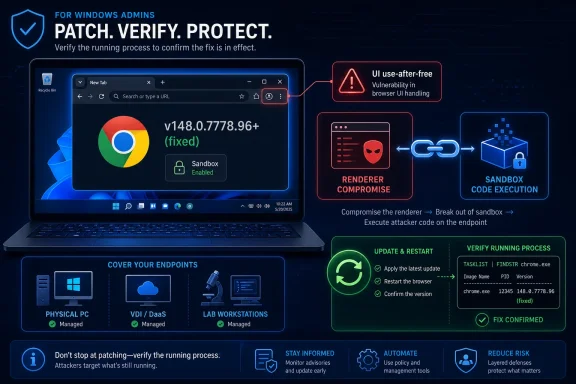
Google Chrome before 148.0.7778.96 contains CVE-2026-7991, a use-after-free flaw in the browser UI that could let a remote attacker with a compromised renderer process execute code inside Chrome’s sandbox through a crafted HTML page. The vulnerability landed in public tracking on May 6, 2026, alongside Chrome 148’s unusually large desktop security update. Its official Chromium severity is “Medium,” but the CISA ADP CVSS 3.1 score attached to the record is 8.8, which is a useful reminder that browser risk rarely fits neatly into one word. For Windows users and administrators, the right response is not panic; it is verification that Chrome, Edge’s Chromium base where applicable, and managed browser fleets are actually moving to fixed builds.
CVE-2026-7991 is the sort of Chrome vulnerability that looks modest until you read the exploit precondition carefully. The flaw is described as a use-after-free in Chrome’s UI, and exploitation requires that the attacker has already compromised the renderer process. That means it is not, by itself, the whole browser escape chain.
But modern browser attacks are rarely single-vulnerability affairs. A renderer compromise is often the first rung on the ladder: malicious JavaScript, a crafted HTML page, a memory corruption flaw in a web-facing engine, and then a second bug to move somewhere more useful. CVE-2026-7991 matters because it sits in that second-act territory, where a foothold in the renderer can be turned into code execution inside the sandboxed browser environment.
That distinction is why “Medium” should not be read as “optional.” Chromium’s severity reflects the bug in isolation and the assumptions around exploitation. Enterprise defenders have to think in chains, not isolated CVE cards. A medium-severity escape-enabling primitive can become strategically important when paired with a high-severity renderer bug, a phishing lure, or a drive-by compromise.
The NVD entry, as of its early publication state, had not yet supplied its own CVSS score, while CISA’s ADP enrichment attached a CVSS 3.1 vector of network attack complexity low, no privileges required, user interaction required, and high impact to confidentiality, integrity, and availability. That does not mean every Chrome user is one click away from total host compromise. It means the vulnerability sits close enough to dangerous exploitation paths that patch latency is the real exposure.
That is precisely what makes it easy to miss. Security teams tend to triage around the words “critical,” “zero-day,” and “exploited in the wild.” Chrome 148 includes critical and high-severity vulnerabilities that will naturally draw the first wave of attention. A medium UI use-after-free can disappear into the spreadsheet.
The browser, however, is no longer a mere application in the Windows estate. It is an application runtime, an identity front end, a SaaS control plane, a password vault, a WebAuthn broker, a PDF viewer, a remote desktop adjunct, and, in many organizations, the most exposed process on the endpoint. When that runtime ships 127 security fixes, version compliance should be treated as an operational event.
For home users, the answer is simple: restart Chrome after it updates, and check the version if the browser has been open for days. For managed Windows environments, the question is more complicated: whether update policies are working, whether users can defer restarts indefinitely, and whether security tools can distinguish “downloaded update” from “running fixed binary.”
A vulnerability in UI code reachable after renderer compromise is therefore interesting because it points at the seams between compartments. The web page is not supposed to be able to treat browser UI internals as a playground. Browser vendors have spent years hardening those seams because they are the difference between tab-level mischief and something more durable.
Use-after-free bugs are familiar territory in browser exploitation. They occur when software continues to use memory after it has been freed, potentially allowing an attacker to manipulate program state in ways the original developers did not intend. The details matter enormously — allocation patterns, object lifetime, mitigations, and exploit reliability all determine whether a bug is merely ugly or operationally useful.
The public issue tracker entry for this vulnerability is permission-restricted, which is standard practice for Chrome security bugs until enough users have received the fix. That silence is not evidence of active exploitation, and the public description does not claim exploitation in the wild. But it does mean defenders should avoid armchair exploitability judgments based on the short CVE summary alone.
For WindowsForum readers, this is the modern browser supply chain in miniature. Chrome bugs are not only Chrome bugs; they ripple into Edge, WebView2-dependent applications, embedded browser controls, Electron apps, and enterprise policy stacks. The Chromium project’s security work now underpins far more than the Google-branded browser.
That does not mean the Chrome version number maps one-to-one onto every downstream product at the same moment. Chromium consumers have their own release trains, backport practices, and platform-specific packaging delays. A Windows administrator who patches Chrome but ignores Edge, WebView2 runtime channels, or bundled Chromium frameworks has solved only the most visible part of the problem.
This is where Microsoft’s update guidance matters even when the originating advisory is Google’s. Windows estates are increasingly composed of shared browser components and web-rendering runtimes. Vulnerability management programs that still treat “browser” as a single installed application are behind the architecture they are defending.
The “Are we missing a CPE here?” prompt in NVD is not just boilerplate; it reflects the difficult job of mapping fast-moving software into rigid product identifiers. Browsers update rapidly, ship across platforms, and sometimes exist in multiple channels on the same machine. Chrome Stable, Extended Stable, Beta, Dev, Canary, enterprise MSI deployments, user-level installs, and packaged Linux variants can all complicate the simple question of whether a host is vulnerable.
CPEs also struggle with downstream Chromium. A vulnerability may originate in Google Chrome, but the vulnerable code may exist in other Chromium-based products before they pull the fix. Scanners that match only the Google Chrome CPE will miss some exposure; scanners that overgeneralize across every Chromium derivative will generate noise.
The answer is not to abandon CPEs. They remain useful for baseline detection, asset inventory, and automated prioritization. The answer is to treat CPE matching as one signal among several: actual binary version, browser channel, package source, runtime usage, and whether the vulnerable code path is present in the product being assessed.
Vendor severity often reflects product-specific context, exploitability knowledge, and internal security taxonomy. CVSS tries to provide a standardized impact model that works across products. CISA ADP enrichment fills gaps quickly so defenders and tooling do not stare at a blank score field during the most important early patch window.
The problem is that browser vulnerabilities are chain-shaped, while many scoring discussions are card-shaped. A UI use-after-free that requires renderer compromise may not be independently catastrophic. In a realistic exploit chain, though, the renderer compromise may come from another bug in the same release, an older unpatched flaw, or a technique that varies by target.
This is why mature security teams do not argue themselves into inaction over whether a browser CVE is Medium or High. They ask whether the affected software is internet-exposed, broadly deployed, frequently targeted, and easy to update. Chrome checks all four boxes.
That sounds trivial until you look at real desktops. Users keep browser sessions open for weeks. Developers run multiple profiles. Help desks avoid forced restarts because tab loss creates tickets. Kiosk machines, conference room PCs, VDI sessions, and lab systems often sit outside the neat assumptions of consumer auto-update.
In enterprises, update policy can also be a victim of its own customization. Some organizations pin versions for application compatibility. Others stage updates through rings that made sense when browser releases were slower and less security-dense. A delay policy that feels conservative during a feature rollout can become a liability during a 127-fix security release.
The operational goal should be simple: confirm the running browser version, not merely the installed update state. If Chrome reports 148.0.7778.96 or later on Linux, or 148.0.7778.96/97 or later on Windows and macOS for this release line, the specific Chrome-side exposure described here is addressed. If the browser has downloaded an update but is waiting on a relaunch, the endpoint remains in the gray zone defenders should dislike most.
CVE-2026-7991 is a good excuse to find those browser islands. Not because this one bug is uniquely catastrophic, but because the same unmanaged pockets will still be unmanaged when the next actively exploited Chrome zero-day arrives. The best patch response is one that improves the next patch response.
Windows environments should also remember that Edge and WebView2 are part of the same conversation. Even when a vulnerability is filed under Google Chrome, Chromium fixes propagate through Microsoft’s browser stack on Microsoft’s schedule. The right inventory question is not “Do we have Chrome?” It is “Where do we execute Chromium-derived code?”
That question reaches into places traditional endpoint inventories may undercount. Collaboration apps, password managers, embedded web panels, line-of-business tools, and developer utilities can all carry Chromium in some form. Not every bundled Chromium runtime is affected by every Chrome CVE, but pretending the estate begins and ends with chrome.exe is no longer defensible.
Ubuntu’s security tracker lists CVE-2026-7991 with a Medium priority and notes the packaging distinction that modern Ubuntu releases use a chromium-browser package that effectively installs the Chromium snap. That kind of packaging detail sounds mundane, but it determines whether your scanner, your patch tool, and your actual system state agree.
On macOS, Chrome’s update mechanics are usually smooth, but managed environments still face the relaunch problem. Users can run stale browser processes after an update is staged. Security teams that rely on MDM inventory snapshots may need to validate process versions if they are trying to close exposure quickly.
The cross-platform nature of the bug also reinforces a broader truth: browsers flattened endpoint risk. A crafted HTML page does not care whether the user is a Windows admin, a Mac designer, or a Linux engineer until the exploit chain reaches platform-specific territory. The initial exposure is the browser, and the browser is everywhere.
CVE-2026-7991 does not say an attacker can steal tokens or escape to the operating system outright. The public description is narrower: code execution inside a sandbox after renderer compromise. But defenders should resist the old mental model that sandboxed browser execution is harmless until it becomes kernel-level control.
A compromised browser context can be valuable even before full host takeover. It may enable data access inside authenticated sessions, interaction with browser-mediated workflows, or chaining with additional local vulnerabilities. The browser is where many users are already authenticated to the things attackers want.
This is also why user interaction in the CVSS vector should be read realistically. Yes, the attack requires a user to visit or interact with a crafted page. In 2026, getting users to load web content is not a high bar. Phishing, malvertising, compromised legitimate sites, poisoned search results, and messaging platforms all exist to deliver URLs to humans.
But “not known to be exploited” is a weak reason to defer a browser update. Chrome vulnerabilities have a short half-life once patches ship. Attackers can diff open-source code, watch commits, study release notes, and test older builds. The window between patch publication and practical exploitation is not always long, especially when a bug class is familiar.
Google’s practice of restricting bug details until a majority of users are updated is a defensive compromise. It slows casual weaponization while the update wave rolls out. It also signals that the details are sensitive enough to withhold temporarily.
Security teams should treat that period as the time to move, not the time to wait for proof of exploitation. Once public exploit details exist, the easy part of patching should already be done.
Google deserves credit for the machinery that finds and fixes these bugs. AddressSanitizer, MemorySanitizer, UndefinedBehaviorSanitizer, Control Flow Integrity, libFuzzer, AFL, internal audits, and external researchers all contribute to the churn of vulnerabilities caught before or around stable release. The uncomfortable truth is that success looks like a constant stream of CVEs.
For users, that can feel like failure. Why does the browser need so many security fixes? The better question is what the internet would look like if those fixes did not arrive continuously. Modern browsers are among the most attacked and most hardened consumer applications ever built.
Still, the pattern reinforces why the industry’s push toward memory-safe languages matters. Sandboxes and mitigations reduce impact, but they do not erase entire bug classes. Use-after-free vulnerabilities remain common because object lifetime in complex native code is hard, especially in software that must parse the entire hostile creativity of the web at speed.
Browser governance now needs a release-channel strategy, a restart-enforcement strategy, extension risk controls, telemetry on actual running versions, and incident playbooks for emergency updates. It also needs ownership. If endpoint engineering, security operations, and application compatibility teams each assume someone else owns browser currency, stale builds will persist.
The Extended Stable channel can be valuable for organizations that need slower feature churn. But it should not become a euphemism for slow security response. When a security fix applies to the channel, the operational muscle still has to exist to deploy it quickly.
There is also a cultural component. Users have been trained to see browser restarts as interruptions and update prompts as background noise. IT has to make the secure path less annoying: session restore should work, critical apps should be tested against stable releases promptly, and forced relaunch policies should be predictable rather than punitive.
Source: NVD / Chromium Security Update Guide - Microsoft Security Response Center
 A Medium Bug With High-Severity Consequences
CVE-2026-7991 is the sort of Chrome vulnerability that looks modest until you read the exploit precondition carefully. The flaw is described as a use-after-free in Chrome’s UI, and exploitation requires that the attacker has already compromised the renderer process. That means it is not, by itself, the whole browser escape chain.But modern browser attacks are rarely single-vulnerability affairs. A renderer compromise is often the first rung on the ladder: malicious JavaScript, a crafted HTML page, a memory corruption flaw in a web-facing engine, and then a second bug to move somewhere more useful. CVE-2026-7991 matters because it sits in that second-act territory, where a foothold in the renderer can be turned into code execution inside the sandboxed browser environment.
That distinction is why “Medium” should not be read as “optional.” Chromium’s severity reflects the bug in isolation and the assumptions around exploitation. Enterprise defenders have to think in chains, not isolated CVE cards. A medium-severity escape-enabling primitive can become strategically important when paired with a high-severity renderer bug, a phishing lure, or a drive-by compromise.
The NVD entry, as of its early publication state, had not yet supplied its own CVSS score, while CISA’s ADP enrichment attached a CVSS 3.1 vector of network attack complexity low, no privileges required, user interaction required, and high impact to confidentiality, integrity, and availability. That does not mean every Chrome user is one click away from total host compromise. It means the vulnerability sits close enough to dangerous exploitation paths that patch latency is the real exposure.
Chrome 148 Is a Security Release Wearing a Feature Version Number
Google’s Chrome 148 stable desktop release arrived for Windows, macOS, and Linux in early May 2026, with Linux moving to 148.0.7778.96 and Windows/macOS receiving 148.0.7778.96 or 148.0.7778.97. The release notes describe 127 security fixes, a volume large enough to make this more than a routine point update. CVE-2026-7991 is one item in a crowded field, not the headline act.That is precisely what makes it easy to miss. Security teams tend to triage around the words “critical,” “zero-day,” and “exploited in the wild.” Chrome 148 includes critical and high-severity vulnerabilities that will naturally draw the first wave of attention. A medium UI use-after-free can disappear into the spreadsheet.
The browser, however, is no longer a mere application in the Windows estate. It is an application runtime, an identity front end, a SaaS control plane, a password vault, a WebAuthn broker, a PDF viewer, a remote desktop adjunct, and, in many organizations, the most exposed process on the endpoint. When that runtime ships 127 security fixes, version compliance should be treated as an operational event.
For home users, the answer is simple: restart Chrome after it updates, and check the version if the browser has been open for days. For managed Windows environments, the question is more complicated: whether update policies are working, whether users can defer restarts indefinitely, and whether security tools can distinguish “downloaded update” from “running fixed binary.”
The Renderer Compromise Requirement Is a Boundary, Not a Comfort Blanket
The phrase “attacker who had compromised the renderer process” is doing a lot of work in CVE-2026-7991’s description. Chrome’s multi-process architecture is designed so that risky web content runs in constrained renderer processes. If something goes wrong there, the sandbox is supposed to contain the blast.A vulnerability in UI code reachable after renderer compromise is therefore interesting because it points at the seams between compartments. The web page is not supposed to be able to treat browser UI internals as a playground. Browser vendors have spent years hardening those seams because they are the difference between tab-level mischief and something more durable.
Use-after-free bugs are familiar territory in browser exploitation. They occur when software continues to use memory after it has been freed, potentially allowing an attacker to manipulate program state in ways the original developers did not intend. The details matter enormously — allocation patterns, object lifetime, mitigations, and exploit reliability all determine whether a bug is merely ugly or operationally useful.
The public issue tracker entry for this vulnerability is permission-restricted, which is standard practice for Chrome security bugs until enough users have received the fix. That silence is not evidence of active exploitation, and the public description does not claim exploitation in the wild. But it does mean defenders should avoid armchair exploitability judgments based on the short CVE summary alone.
Microsoft’s Role Is the Chromium Reality Windows Admins Live In
The user-facing source for this CVE comes through Microsoft’s Security Update Guide, which may look odd at first glance for a Google Chrome vulnerability. It is not odd in practice. Microsoft ships a Chromium-based browser, maintains an enormous Windows endpoint ecosystem, and tracks third-party Chromium issues that affect Microsoft products or customers’ security posture.For WindowsForum readers, this is the modern browser supply chain in miniature. Chrome bugs are not only Chrome bugs; they ripple into Edge, WebView2-dependent applications, embedded browser controls, Electron apps, and enterprise policy stacks. The Chromium project’s security work now underpins far more than the Google-branded browser.
That does not mean the Chrome version number maps one-to-one onto every downstream product at the same moment. Chromium consumers have their own release trains, backport practices, and platform-specific packaging delays. A Windows administrator who patches Chrome but ignores Edge, WebView2 runtime channels, or bundled Chromium frameworks has solved only the most visible part of the problem.
This is where Microsoft’s update guidance matters even when the originating advisory is Google’s. Windows estates are increasingly composed of shared browser components and web-rendering runtimes. Vulnerability management programs that still treat “browser” as a single installed application are behind the architecture they are defending.
CPE Metadata Is Messy Because Browser Reality Is Messy
The NVD change history for CVE-2026-7991 shows a CPE configuration for Google Chrome versions earlier than 148.0.7778.96, with operating-system nodes for Windows, Linux, and macOS. That is the expected shape for a desktop Chrome vulnerability. It is also the kind of metadata that security scanners depend on and administrators quietly distrust.The “Are we missing a CPE here?” prompt in NVD is not just boilerplate; it reflects the difficult job of mapping fast-moving software into rigid product identifiers. Browsers update rapidly, ship across platforms, and sometimes exist in multiple channels on the same machine. Chrome Stable, Extended Stable, Beta, Dev, Canary, enterprise MSI deployments, user-level installs, and packaged Linux variants can all complicate the simple question of whether a host is vulnerable.
CPEs also struggle with downstream Chromium. A vulnerability may originate in Google Chrome, but the vulnerable code may exist in other Chromium-based products before they pull the fix. Scanners that match only the Google Chrome CPE will miss some exposure; scanners that overgeneralize across every Chromium derivative will generate noise.
The answer is not to abandon CPEs. They remain useful for baseline detection, asset inventory, and automated prioritization. The answer is to treat CPE matching as one signal among several: actual binary version, browser channel, package source, runtime usage, and whether the vulnerable code path is present in the product being assessed.
The Score Disagreement Tells Us How to Read Browser CVEs
Chromium calls CVE-2026-7991 Medium. CISA’s ADP enrichment gives it an 8.8 High under CVSS 3.1. NVD had not yet supplied its own enrichment at the time the record was circulating. That spread is not a scandal; it is a lesson in what scoring systems are trying to measure.Vendor severity often reflects product-specific context, exploitability knowledge, and internal security taxonomy. CVSS tries to provide a standardized impact model that works across products. CISA ADP enrichment fills gaps quickly so defenders and tooling do not stare at a blank score field during the most important early patch window.
The problem is that browser vulnerabilities are chain-shaped, while many scoring discussions are card-shaped. A UI use-after-free that requires renderer compromise may not be independently catastrophic. In a realistic exploit chain, though, the renderer compromise may come from another bug in the same release, an older unpatched flaw, or a technique that varies by target.
This is why mature security teams do not argue themselves into inaction over whether a browser CVE is Medium or High. They ask whether the affected software is internet-exposed, broadly deployed, frequently targeted, and easy to update. Chrome checks all four boxes.
The Patch Is Easy; The Restart Is the Hard Part
Chrome’s auto-update mechanism is one of the great quiet successes of consumer security. For many users, the fixed version will arrive without ceremony. The catch is that the new binary does not protect the user until the browser actually restarts.That sounds trivial until you look at real desktops. Users keep browser sessions open for weeks. Developers run multiple profiles. Help desks avoid forced restarts because tab loss creates tickets. Kiosk machines, conference room PCs, VDI sessions, and lab systems often sit outside the neat assumptions of consumer auto-update.
In enterprises, update policy can also be a victim of its own customization. Some organizations pin versions for application compatibility. Others stage updates through rings that made sense when browser releases were slower and less security-dense. A delay policy that feels conservative during a feature rollout can become a liability during a 127-fix security release.
The operational goal should be simple: confirm the running browser version, not merely the installed update state. If Chrome reports 148.0.7778.96 or later on Linux, or 148.0.7778.96/97 or later on Windows and macOS for this release line, the specific Chrome-side exposure described here is addressed. If the browser has downloaded an update but is waiting on a relaunch, the endpoint remains in the gray zone defenders should dislike most.
Windows Shops Should Hunt for Browser Islands
The most exposed systems are not always the least managed systems. Sometimes they are the weirdly managed ones: the old jump box with a user-installed Chrome, the shared workstation in a lab, the developer machine running a side-channel browser for testing, the VDI image that updates only at recomposition, or the server where someone installed Chrome years ago for “temporary” troubleshooting.CVE-2026-7991 is a good excuse to find those browser islands. Not because this one bug is uniquely catastrophic, but because the same unmanaged pockets will still be unmanaged when the next actively exploited Chrome zero-day arrives. The best patch response is one that improves the next patch response.
Windows environments should also remember that Edge and WebView2 are part of the same conversation. Even when a vulnerability is filed under Google Chrome, Chromium fixes propagate through Microsoft’s browser stack on Microsoft’s schedule. The right inventory question is not “Do we have Chrome?” It is “Where do we execute Chromium-derived code?”
That question reaches into places traditional endpoint inventories may undercount. Collaboration apps, password managers, embedded web panels, line-of-business tools, and developer utilities can all carry Chromium in some form. Not every bundled Chromium runtime is affected by every Chrome CVE, but pretending the estate begins and ends with chrome.exe is no longer defensible.
Linux and macOS Are Not Footnotes
The CPE configuration attached to the NVD record includes Windows, Linux, and macOS. That matters for mixed fleets, especially organizations where Chrome on Linux developer workstations is treated as a user-managed convenience rather than an IT-owned asset. Developer endpoints are high-value targets precisely because they blend internet exposure, credentials, source access, and local experimentation.Ubuntu’s security tracker lists CVE-2026-7991 with a Medium priority and notes the packaging distinction that modern Ubuntu releases use a chromium-browser package that effectively installs the Chromium snap. That kind of packaging detail sounds mundane, but it determines whether your scanner, your patch tool, and your actual system state agree.
On macOS, Chrome’s update mechanics are usually smooth, but managed environments still face the relaunch problem. Users can run stale browser processes after an update is staged. Security teams that rely on MDM inventory snapshots may need to validate process versions if they are trying to close exposure quickly.
The cross-platform nature of the bug also reinforces a broader truth: browsers flattened endpoint risk. A crafted HTML page does not care whether the user is a Windows admin, a Mac designer, or a Linux engineer until the exploit chain reaches platform-specific territory. The initial exposure is the browser, and the browser is everywhere.
A Browser Bug Is Also an Identity Bug Now
The security stakes around Chrome have changed because the browser has become the front door to identity. Single sign-on, passkeys, OAuth flows, admin portals, privileged SaaS consoles, cloud shells, and remote management tools all live in tabs. A vulnerability that helps an attacker move within the browser process is not just a memory-safety concern; it is adjacent to the trust fabric of work.CVE-2026-7991 does not say an attacker can steal tokens or escape to the operating system outright. The public description is narrower: code execution inside a sandbox after renderer compromise. But defenders should resist the old mental model that sandboxed browser execution is harmless until it becomes kernel-level control.
A compromised browser context can be valuable even before full host takeover. It may enable data access inside authenticated sessions, interaction with browser-mediated workflows, or chaining with additional local vulnerabilities. The browser is where many users are already authenticated to the things attackers want.
This is also why user interaction in the CVSS vector should be read realistically. Yes, the attack requires a user to visit or interact with a crafted page. In 2026, getting users to load web content is not a high bar. Phishing, malvertising, compromised legitimate sites, poisoned search results, and messaging platforms all exist to deliver URLs to humans.
“No Known Exploitation” Is Not a Patch Strategy
The available public material does not indicate that CVE-2026-7991 is being exploited in the wild. That is important, and it should keep the story grounded. There is no need to invent a crisis where the record describes a patched vulnerability with restricted technical details.But “not known to be exploited” is a weak reason to defer a browser update. Chrome vulnerabilities have a short half-life once patches ship. Attackers can diff open-source code, watch commits, study release notes, and test older builds. The window between patch publication and practical exploitation is not always long, especially when a bug class is familiar.
Google’s practice of restricting bug details until a majority of users are updated is a defensive compromise. It slows casual weaponization while the update wave rolls out. It also signals that the details are sensitive enough to withhold temporarily.
Security teams should treat that period as the time to move, not the time to wait for proof of exploitation. Once public exploit details exist, the easy part of patching should already be done.
Chrome’s Memory-Safety Debt Keeps Coming Due
The long list of Chrome 148 fixes includes many familiar bug classes: use-after-free, out-of-bounds access, integer overflow, type confusion, and insufficient validation. That list is not an indictment of Chrome alone. It is a reminder that large C++ codebases at web scale remain fertile ground for memory-safety failures despite years of fuzzing, sandboxing, and hardening.Google deserves credit for the machinery that finds and fixes these bugs. AddressSanitizer, MemorySanitizer, UndefinedBehaviorSanitizer, Control Flow Integrity, libFuzzer, AFL, internal audits, and external researchers all contribute to the churn of vulnerabilities caught before or around stable release. The uncomfortable truth is that success looks like a constant stream of CVEs.
For users, that can feel like failure. Why does the browser need so many security fixes? The better question is what the internet would look like if those fixes did not arrive continuously. Modern browsers are among the most attacked and most hardened consumer applications ever built.
Still, the pattern reinforces why the industry’s push toward memory-safe languages matters. Sandboxes and mitigations reduce impact, but they do not erase entire bug classes. Use-after-free vulnerabilities remain common because object lifetime in complex native code is hard, especially in software that must parse the entire hostile creativity of the web at speed.
The Enterprise Browser Policy Has to Grow Up
Many organizations still manage browsers as productivity software rather than as security infrastructure. They standardize extensions, set a homepage, maybe disable password saving, and call it governance. CVE-2026-7991 is a small case study in why that is not enough.Browser governance now needs a release-channel strategy, a restart-enforcement strategy, extension risk controls, telemetry on actual running versions, and incident playbooks for emergency updates. It also needs ownership. If endpoint engineering, security operations, and application compatibility teams each assume someone else owns browser currency, stale builds will persist.
The Extended Stable channel can be valuable for organizations that need slower feature churn. But it should not become a euphemism for slow security response. When a security fix applies to the channel, the operational muscle still has to exist to deploy it quickly.
There is also a cultural component. Users have been trained to see browser restarts as interruptions and update prompts as background noise. IT has to make the secure path less annoying: session restore should work, critical apps should be tested against stable releases promptly, and forced relaunch policies should be predictable rather than punitive.
The Concrete Read From This Chrome 148 Patch Window
CVE-2026-7991 is not the biggest Chrome bug in the May 2026 stable release, but it is a useful signal of how defenders should read browser advisories. The interesting part is not only the UI use-after-free; it is the combination of renderer-compromise precondition, sandboxed code execution impact, cross-platform exposure, and the gap between vendor severity and CVSS enrichment.- Chrome desktop installations should be verified at 148.0.7778.96 or later on Linux and at the fixed 148.0.7778.96/97 line or later on Windows and macOS.
- A downloaded browser update should not be counted as remediation until the running Chrome process has restarted into the fixed version.
- Security teams should review Edge, WebView2, and other Chromium-derived runtimes separately rather than assuming the Google Chrome advisory covers the whole estate.
- Vulnerability scanners that depend on CPE matching should be checked against actual browser inventory, especially where user-level installs or multiple release channels exist.
- The absence of public exploit claims for CVE-2026-7991 should lower panic, not priority, because browser exploitability can change quickly after patches ship.
- The larger Chrome 148 release deserves attention as a security event because it fixes 127 vulnerabilities, including several more severe issues alongside this medium-rated UI flaw.
Source: NVD / Chromium Security Update Guide - Microsoft Security Response Center
