

Microsoft is making Dataverse Bulk Deletion generally available with new run visibility, solution-aware configuration transport, a permanent-deletion option, and a sandbox-focused fast-delete mode beginning June 2026, giving Power Platform administrators more control over scheduled data cleanup across environments without custom scripts. The announcement sounds narrow, almost housekeeping-grade, but it lands in one of the places where low-code platforms become very real: storage bills, audit risk, and operational drag. Dataverse has grown into the persistence layer for serious business applications, and serious business applications generate debris. Microsoft’s message is simple enough: deletion should be designed, promoted, monitored, and governed like the rest of the application lifecycle.
For years, bulk deletion in Dataverse has lived in the mental bucket of administrative maintenance. It was the thing an admin reached for when workflow logs ballooned, system jobs piled up, or a sandbox copied from production needed to be made usable again. That framing was always too small.
The more Dataverse becomes the backbone for Power Apps, Dynamics 365 workloads, Power Automate processes, and custom business systems, the more deletion becomes part of architecture rather than janitorial work. Every table with transient data has a second design question hiding behind its schema: when does this record stop being useful?
Microsoft’s June 2026 update is notable because it acknowledges that reality. Bulk Deletion is no longer just a wizard for removing old rows. It is being treated as a lifecycle artifact, something that can move through solutions, produce clearer operational evidence, and support different deletion paths depending on whether the data is business-critical, disposable, or merely copied into a sandbox.
That is a healthy shift. In enterprise software, the most expensive data is often not the data someone forgot to collect. It is the data no one remembered to delete.
The problem is that many organizations treat the shelf life as a future administrative decision. They build the app, ship the flow, integrate the line-of-business system, and only later ask why capacity alerts are appearing in the Power Platform admin center. By then, cleanup is not a policy. It is a recovery project.
Bulk Deletion is Microsoft’s native answer to that pattern. Administrators define a query, choose what records qualify, and let Dataverse delete them in the background. Jobs can run once or recur on a schedule. They can target system and custom tables. They can send completion notifications. They also obey the platform’s normal rules, including security, cascading behavior, plug-ins, and workflows, unless a specialized mode says otherwise.
That last point matters. Bulk Deletion is not a backdoor around Dataverse governance. In its standard form, it is a platform-scale version of a regular delete. That makes it safer than many custom scripts, but also slower and more complex than a raw database purge. The update does not change that fundamental bargain. It makes the bargain easier to inspect, move, and tune.
A deletion job that stops midway is not merely an inconvenience. It raises practical questions an admin must answer before doing anything else. Did the job fail before it started? Did it delete some records and fail on others? Was the problem a permission issue, a cascading relationship constraint, a plug-in exception, or something else entirely?
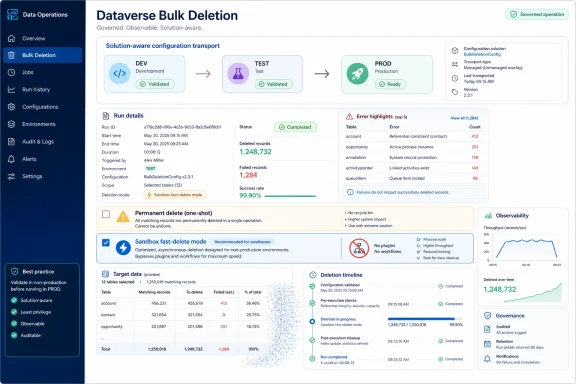
Microsoft says every bulk deletion job now includes a Run details tab with start time, end time, status, records deleted, records failed, and errors encountered. Jobs can show that they completed while still recording errors encountered along the way, or that they failed before starting. That distinction is not cosmetic. It changes the response from “try again and hope” to “diagnose the failed subset.”
This is where the update feels like Microsoft listening to administrators rather than simply adding feature checkboxes. In a system where deletes can trigger workflows, invoke plug-ins, and traverse relationship rules, a clean failure explanation is not a luxury. It is the difference between safe operations and superstition.
Application lifecycle management in Power Platform depends on moving tested configuration from development to test to production. Tables, columns, apps, flows, security roles, and other components can be packaged and promoted through solutions. If deletion policy remains outside that machinery, it becomes a manual afterthought in every environment.
That manual step is where drift enters. A development environment might have a bulk delete job that removes completed system jobs after 30 days. Test might use 60. Production might be missing the job entirely because someone forgot to recreate it during deployment. Or worse, production might have a job with a subtly different filter that deletes more than intended.
By allowing bulk deletion configurations to travel with solutions, Microsoft is nudging admins and makers toward a more mature model. Cleanup logic can be built and validated in lower environments, then exported and imported like other solution components. The job name, filters, and schedule can move together.
That does not remove the need for review. Production deletion policy still deserves explicit sign-off, especially where compliance or business retention rules are involved. But it does mean deletion is less likely to become tribal knowledge locked in an administrator’s checklist.
When deleted records keeping is enabled, bulk deletion jobs copy records to deleted-records tables before removal. For business-critical data, that is the right default. Mistaken deletion is one of the oldest failure modes in IT, and recoverability is often worth the additional storage and processing overhead.
But not every record deserves a recovery window. Old plug-in traces, expired workflow logs, transient staging records, and stale telemetry often have no business value after their retention period. Keeping recoverable copies of such data can be wasteful, particularly when the whole point of the job is to reclaim capacity and reduce clutter.
The new checkbox lets administrators opt out of deleted records keeping for a specific one-shot job. When selected, deleted records cannot be recovered, no additional storage is consumed by retained deleted records, and the job can run faster because the platform skips some preservation work.
Microsoft’s design constraint is telling: permanent deletion is available only for one-shot, non-recurring jobs. That is the right kind of friction. A recurring permanent-delete job created months earlier could become a quiet disaster, especially after table usage changes or business policy evolves. By limiting the option to deliberate one-time cleanup, Microsoft is making the admin touch the hot stove knowingly.
This is not a feature to use casually. It is a feature for cases where the organization has already decided the data is disposable, the query has been verified, and recoverability would be theater rather than protection.
In those cases, standard deletion can be heavier than necessary. Business logic that makes sense in production may be actively unhelpful in a sandbox cleanup. Plug-ins and workflows can fire during deletion. Deleted records keeping can preserve data that nobody intends to recover. Large-scale cleanup becomes slower and noisier than the scenario warrants.
Microsoft’s sandbox deletion mode, enabled through the RunJobForSandbox option in the BulkDelete API, skips plug-ins, workflows, and deleted records keeping while still using the cascade engine directly. It respects cascade rules and referential integrity, but it avoids some of the surrounding business logic and recovery machinery.
That is a pragmatic compromise. It recognizes that a sandbox is not merely a smaller production. It is often a temporary workspace where the goal is to reshape data quickly without pretending every production safeguard has the same value.
The caution is equally important. This mode permanently deletes records, offers no recovery path, and does not fire delete-time business logic. That makes it useful for post-copy cleanup, not for routine production retention. If an organization depends on plug-ins or workflows to maintain related state during deletion, skipping them is not an optimization. It is a semantic change.
A Dataverse table that accumulates logs, transactions, temporary records, or integration artifacts needs a retention answer from the beginning. How long does the business need the data? What regulation or internal policy governs it? Who owns the cleanup rule? How will deletion be tested? Does the job recur, or is deletion tied to a lifecycle event?
Those are not purely administrative questions. They shape table design, relationship behavior, audit settings, reporting strategy, and support processes. If a table’s records are used for month-end reconciliation, deleting after 30 days may be reckless. If the table only stores transient processing results, keeping records for years may be equally reckless.
The database world has long understood this through partitioning, retention policies, archival tiers, and scheduled maintenance. Low-code platforms sometimes obscure the issue because they make table creation easy. But easy creation does not eliminate lifecycle cost. It multiplies it.
In that sense, Microsoft’s update is less about one Dataverse feature than about Power Platform’s maturation. The platform is becoming enterprise infrastructure, and enterprise infrastructure needs boring, repeatable hygiene.
But storage is only the first cost. Bloated operational tables can complicate troubleshooting, slow administrative queries, increase backup and copy overhead, and make lower environments harder to use. They can also create privacy and compliance exposure when test data, stale transactional records, or copied production data lingers longer than necessary.
There is also a human cost. Reactive cleanup consumes the time of senior administrators who should be improving platform governance, not reverse-engineering which records are safe to delete. It creates approval bottlenecks because nobody wants to authorize a massive deletion job without confidence in the filter. It encourages custom scripts because the native path feels too opaque or too slow.
The June 2026 improvements target that human cost as much as the technical one. Run details reduce guesswork. Solution awareness reduces environment-by-environment recreation. Permanent deletion creates a faster path for clearly disposable data. Sandbox mode gives admins a purpose-built cleanup lane after environment copies.
None of those turns Dataverse into a self-cleaning platform. But they reduce the number of excuses for letting data rot indefinitely.
Organizations should decide which classes of data require retention, recovery, archival, anonymization, or deletion. System jobs and workflow logs may have one policy. Audit records may have another. Customer transactional data may be governed by legal obligations. Sandbox copies may require stricter privacy handling than production because more makers and testers can access them.
The new features make those distinctions more enforceable. A recurring job can handle routine log cleanup. A solution-aware configuration can standardize retention across environments. A one-shot permanent deletion can clear known-disposable records after a migration. Sandbox deletion mode can strip nonessential copied data before developers begin work.
The risk is that administrators see “permanent deletion” and “fast sandbox cleanup” as universal accelerators. They are not. They are specialized paths for cases where recoverability and delete-time business logic are intentionally unnecessary.
In mature shops, these settings should be documented in the same governance materials that cover environment strategy, DLP policies, security roles, and solution deployment. A deletion job is not merely a scheduled task. It is an expression of business policy.
Table relationships determine cascading behavior. Plug-ins and workflows determine what happens when records are deleted. Custom tables used for staging or telemetry determine whether the environment accumulates low-value data. App designs determine whether users can distinguish active records from records that should age out.
If a developer builds a transient processing table without a retention column, cleanup becomes harder. If a plug-in blocks deletion without clear errors, bulk jobs become harder to diagnose. If a solution ships with tables but no lifecycle plan, the admin inherits a mess disguised as an application.
The solution-aware nature of bulk deletion jobs should help close that gap. Makers and developers can include cleanup behavior alongside the rest of the solution. That creates an opportunity for pull-request-style review, deployment validation, and environment parity.
This is especially important for managed solutions and repeatable industry apps. If a vendor ships Dataverse components that generate operational data, the cleanup strategy should not be buried in documentation. It should be part of the deployable package where appropriate.
The June 2026 update is not flashy in the way AI features are flashy. It will not demo well on stage. Nobody buys a platform because the deletion wizard has better run details. But features like this are how platforms earn the right to host more important workloads.
Enterprise buyers care about what happens after year one. They care about the environment with five years of process history, 40 custom tables, dozens of flows, and a production copy that has to become a safe sandbox by Monday morning. They care about whether cleanup can be standardized and audited instead of performed by a heroic admin with a spreadsheet.
Microsoft’s additions suggest it understands that low-code success creates low-code sprawl unless the platform supplies controls. Dataverse is not just competing with spreadsheets and departmental databases anymore. It is competing for space in enterprise architecture, where data lifecycle is not optional.
That is the trade-off with mature tooling. It reduces accidental complexity but increases the importance of judgment. A vague delete query is still a vague delete query. A poorly understood cascade relationship can still remove more than expected. A sandbox fast-delete job can still bypass business logic that someone assumed would fire.
The practical safeguard is process. Test filters in lower environments. Review record counts before executing. Separate recurring hygiene from one-time destructive cleanup. Document why permanent deletion is appropriate. Make sure business owners, not just platform admins, understand retention windows for important data.
Microsoft has improved the machinery. It has not removed the need for discipline.
Microsoft’s Bulk Deletion update will not make data lifecycle management automatic, and it will not save organizations from bad retention policy masquerading as convenience. But it gives Power Platform teams a cleaner operating model: define what expires, move that policy with the solution, observe what happened when the platform deletes it, and reserve irreversible deletion for the cases where the data truly has no future. As Dataverse continues to absorb more business-critical workloads, the winners will not be the environments that store everything forever; they will be the ones designed from day one to know when data has done its job.
 Microsoft Turns Cleanup From Chore Into Architecture
For years, bulk deletion in Dataverse has lived in the mental bucket of administrative maintenance. It was the thing an admin reached for when workflow logs ballooned, system jobs piled up, or a sandbox copied from production needed to be made usable again. That framing was always too small.The more Dataverse becomes the backbone for Power Apps, Dynamics 365 workloads, Power Automate processes, and custom business systems, the more deletion becomes part of architecture rather than janitorial work. Every table with transient data has a second design question hiding behind its schema: when does this record stop being useful?
Microsoft’s June 2026 update is notable because it acknowledges that reality. Bulk Deletion is no longer just a wizard for removing old rows. It is being treated as a lifecycle artifact, something that can move through solutions, produce clearer operational evidence, and support different deletion paths depending on whether the data is business-critical, disposable, or merely copied into a sandbox.
That is a healthy shift. In enterprise software, the most expensive data is often not the data someone forgot to collect. It is the data no one remembered to delete.
The Platform Has Been Keeping Receipts
Dataverse environments are not static databases. They are living systems that accumulate operational residue from workflows, plug-ins, system jobs, audit trails, test imports, integration staging, telemetry, and failed automation experiments. Some of that data is essential for compliance or troubleshooting. Much of it has a shelf life.The problem is that many organizations treat the shelf life as a future administrative decision. They build the app, ship the flow, integrate the line-of-business system, and only later ask why capacity alerts are appearing in the Power Platform admin center. By then, cleanup is not a policy. It is a recovery project.
Bulk Deletion is Microsoft’s native answer to that pattern. Administrators define a query, choose what records qualify, and let Dataverse delete them in the background. Jobs can run once or recur on a schedule. They can target system and custom tables. They can send completion notifications. They also obey the platform’s normal rules, including security, cascading behavior, plug-ins, and workflows, unless a specialized mode says otherwise.
That last point matters. Bulk Deletion is not a backdoor around Dataverse governance. In its standard form, it is a platform-scale version of a regular delete. That makes it safer than many custom scripts, but also slower and more complex than a raw database purge. The update does not change that fundamental bargain. It makes the bargain easier to inspect, move, and tune.
The Old Failure Mode Was Not Deletion, But Ambiguity
The most interesting part of Microsoft’s announcement is not that bulk delete jobs can remove lots of records. They already could. The more important change is the new Run details experience, because operational ambiguity has been one of the most irritating failure modes in Dataverse administration.A deletion job that stops midway is not merely an inconvenience. It raises practical questions an admin must answer before doing anything else. Did the job fail before it started? Did it delete some records and fail on others? Was the problem a permission issue, a cascading relationship constraint, a plug-in exception, or something else entirely?
Microsoft says every bulk deletion job now includes a Run details tab with start time, end time, status, records deleted, records failed, and errors encountered. Jobs can show that they completed while still recording errors encountered along the way, or that they failed before starting. That distinction is not cosmetic. It changes the response from “try again and hope” to “diagnose the failed subset.”
This is where the update feels like Microsoft listening to administrators rather than simply adding feature checkboxes. In a system where deletes can trigger workflows, invoke plug-ins, and traverse relationship rules, a clean failure explanation is not a luxury. It is the difference between safe operations and superstition.
Solution Awareness Makes Deletion Part of ALM
The second major change is that bulk deletion jobs are now solution-aware. That may sound like an implementation detail, but for serious Power Platform teams it is arguably the headline.Application lifecycle management in Power Platform depends on moving tested configuration from development to test to production. Tables, columns, apps, flows, security roles, and other components can be packaged and promoted through solutions. If deletion policy remains outside that machinery, it becomes a manual afterthought in every environment.
That manual step is where drift enters. A development environment might have a bulk delete job that removes completed system jobs after 30 days. Test might use 60. Production might be missing the job entirely because someone forgot to recreate it during deployment. Or worse, production might have a job with a subtly different filter that deletes more than intended.
By allowing bulk deletion configurations to travel with solutions, Microsoft is nudging admins and makers toward a more mature model. Cleanup logic can be built and validated in lower environments, then exported and imported like other solution components. The job name, filters, and schedule can move together.
That does not remove the need for review. Production deletion policy still deserves explicit sign-off, especially where compliance or business retention rules are involved. But it does mean deletion is less likely to become tribal knowledge locked in an administrator’s checklist.
The New Permanent Delete Option Is a Scalpel With a Warning Label
Microsoft’s new Permanent deletion checkbox is the sharpest instrument in this release. It exists because Dataverse now has a stronger safety net for deleted records, but safety nets have costs.When deleted records keeping is enabled, bulk deletion jobs copy records to deleted-records tables before removal. For business-critical data, that is the right default. Mistaken deletion is one of the oldest failure modes in IT, and recoverability is often worth the additional storage and processing overhead.
But not every record deserves a recovery window. Old plug-in traces, expired workflow logs, transient staging records, and stale telemetry often have no business value after their retention period. Keeping recoverable copies of such data can be wasteful, particularly when the whole point of the job is to reclaim capacity and reduce clutter.
The new checkbox lets administrators opt out of deleted records keeping for a specific one-shot job. When selected, deleted records cannot be recovered, no additional storage is consumed by retained deleted records, and the job can run faster because the platform skips some preservation work.
Microsoft’s design constraint is telling: permanent deletion is available only for one-shot, non-recurring jobs. That is the right kind of friction. A recurring permanent-delete job created months earlier could become a quiet disaster, especially after table usage changes or business policy evolves. By limiting the option to deliberate one-time cleanup, Microsoft is making the admin touch the hot stove knowingly.
This is not a feature to use casually. It is a feature for cases where the organization has already decided the data is disposable, the query has been verified, and recoverability would be theater rather than protection.
Sandbox Cleanup Finally Gets Its Own Lane
The new sandbox deletion mode addresses a different pain point: the full-copy sandbox that arrives with too much production baggage. Anyone who has worked with enterprise Dataverse environments knows the pattern. Production is copied into a sandbox for testing, development, validation, or troubleshooting. Then the team discovers that the copied data set is too large, too sensitive, too slow, or simply irrelevant for the work at hand.In those cases, standard deletion can be heavier than necessary. Business logic that makes sense in production may be actively unhelpful in a sandbox cleanup. Plug-ins and workflows can fire during deletion. Deleted records keeping can preserve data that nobody intends to recover. Large-scale cleanup becomes slower and noisier than the scenario warrants.
Microsoft’s sandbox deletion mode, enabled through the RunJobForSandbox option in the BulkDelete API, skips plug-ins, workflows, and deleted records keeping while still using the cascade engine directly. It respects cascade rules and referential integrity, but it avoids some of the surrounding business logic and recovery machinery.
That is a pragmatic compromise. It recognizes that a sandbox is not merely a smaller production. It is often a temporary workspace where the goal is to reshape data quickly without pretending every production safeguard has the same value.
The caution is equally important. This mode permanently deletes records, offers no recovery path, and does not fire delete-time business logic. That makes it useful for post-copy cleanup, not for routine production retention. If an organization depends on plug-ins or workflows to maintain related state during deletion, skipping them is not an optimization. It is a semantic change.
Deletion Policies Belong on Day One
The strongest argument in Microsoft’s post is also the least glamorous: create deletion jobs when the environment or table is provisioned, not after storage pressure appears. This is the part many teams will nod at and still fail to do.A Dataverse table that accumulates logs, transactions, temporary records, or integration artifacts needs a retention answer from the beginning. How long does the business need the data? What regulation or internal policy governs it? Who owns the cleanup rule? How will deletion be tested? Does the job recur, or is deletion tied to a lifecycle event?
Those are not purely administrative questions. They shape table design, relationship behavior, audit settings, reporting strategy, and support processes. If a table’s records are used for month-end reconciliation, deleting after 30 days may be reckless. If the table only stores transient processing results, keeping records for years may be equally reckless.
The database world has long understood this through partitioning, retention policies, archival tiers, and scheduled maintenance. Low-code platforms sometimes obscure the issue because they make table creation easy. But easy creation does not eliminate lifecycle cost. It multiplies it.
In that sense, Microsoft’s update is less about one Dataverse feature than about Power Platform’s maturation. The platform is becoming enterprise infrastructure, and enterprise infrastructure needs boring, repeatable hygiene.
The Hidden Cost Is Not Just Storage
Microsoft frames Bulk Deletion partly around storage consumption, and that is the obvious pressure point. Dataverse capacity is metered, visible, and financially meaningful. When environments grow beyond entitlement, administrators eventually have to explain why.But storage is only the first cost. Bloated operational tables can complicate troubleshooting, slow administrative queries, increase backup and copy overhead, and make lower environments harder to use. They can also create privacy and compliance exposure when test data, stale transactional records, or copied production data lingers longer than necessary.
There is also a human cost. Reactive cleanup consumes the time of senior administrators who should be improving platform governance, not reverse-engineering which records are safe to delete. It creates approval bottlenecks because nobody wants to authorize a massive deletion job without confidence in the filter. It encourages custom scripts because the native path feels too opaque or too slow.
The June 2026 improvements target that human cost as much as the technical one. Run details reduce guesswork. Solution awareness reduces environment-by-environment recreation. Permanent deletion creates a faster path for clearly disposable data. Sandbox mode gives admins a purpose-built cleanup lane after environment copies.
None of those turns Dataverse into a self-cleaning platform. But they reduce the number of excuses for letting data rot indefinitely.
Governance Teams Should Treat This as a Policy Trigger
For administrators, the immediate temptation will be to open old environments and start creating jobs. That is understandable, but the better response is to treat the update as a policy trigger. Bulk Deletion is a tool; data lifecycle management is the discipline.Organizations should decide which classes of data require retention, recovery, archival, anonymization, or deletion. System jobs and workflow logs may have one policy. Audit records may have another. Customer transactional data may be governed by legal obligations. Sandbox copies may require stricter privacy handling than production because more makers and testers can access them.
The new features make those distinctions more enforceable. A recurring job can handle routine log cleanup. A solution-aware configuration can standardize retention across environments. A one-shot permanent deletion can clear known-disposable records after a migration. Sandbox deletion mode can strip nonessential copied data before developers begin work.
The risk is that administrators see “permanent deletion” and “fast sandbox cleanup” as universal accelerators. They are not. They are specialized paths for cases where recoverability and delete-time business logic are intentionally unnecessary.
In mature shops, these settings should be documented in the same governance materials that cover environment strategy, DLP policies, security roles, and solution deployment. A deletion job is not merely a scheduled task. It is an expression of business policy.
Developers Have Skin in This Game Too
It would be easy to cast Bulk Deletion as an administrator-only feature. That would be a mistake. Developers and makers shape whether deletion is safe long before an admin schedules a job.Table relationships determine cascading behavior. Plug-ins and workflows determine what happens when records are deleted. Custom tables used for staging or telemetry determine whether the environment accumulates low-value data. App designs determine whether users can distinguish active records from records that should age out.
If a developer builds a transient processing table without a retention column, cleanup becomes harder. If a plug-in blocks deletion without clear errors, bulk jobs become harder to diagnose. If a solution ships with tables but no lifecycle plan, the admin inherits a mess disguised as an application.
The solution-aware nature of bulk deletion jobs should help close that gap. Makers and developers can include cleanup behavior alongside the rest of the solution. That creates an opportunity for pull-request-style review, deployment validation, and environment parity.
This is especially important for managed solutions and repeatable industry apps. If a vendor ships Dataverse components that generate operational data, the cleanup strategy should not be buried in documentation. It should be part of the deployable package where appropriate.
Microsoft Is Quietly Hardening the Enterprise Story
The Power Platform’s enterprise story has often oscillated between empowerment and control. Microsoft wants business users to build quickly, but IT departments need governance, auditability, lifecycle management, and predictable operations. Bulk Deletion sits squarely in that tension.The June 2026 update is not flashy in the way AI features are flashy. It will not demo well on stage. Nobody buys a platform because the deletion wizard has better run details. But features like this are how platforms earn the right to host more important workloads.
Enterprise buyers care about what happens after year one. They care about the environment with five years of process history, 40 custom tables, dozens of flows, and a production copy that has to become a safe sandbox by Monday morning. They care about whether cleanup can be standardized and audited instead of performed by a heroic admin with a spreadsheet.
Microsoft’s additions suggest it understands that low-code success creates low-code sprawl unless the platform supplies controls. Dataverse is not just competing with spreadsheets and departmental databases anymore. It is competing for space in enterprise architecture, where data lifecycle is not optional.
The Risks Move From Platform Gaps to Administrative Judgment
The update closes some real gaps, but it also shifts responsibility back toward administrators. Better visibility means fewer excuses for not investigating failures. Solution-aware jobs mean fewer excuses for inconsistent configuration. Permanent deletion means admins have more power to do exactly what they asked the system to do, even when that request is dangerous.That is the trade-off with mature tooling. It reduces accidental complexity but increases the importance of judgment. A vague delete query is still a vague delete query. A poorly understood cascade relationship can still remove more than expected. A sandbox fast-delete job can still bypass business logic that someone assumed would fire.
The practical safeguard is process. Test filters in lower environments. Review record counts before executing. Separate recurring hygiene from one-time destructive cleanup. Document why permanent deletion is appropriate. Make sure business owners, not just platform admins, understand retention windows for important data.
Microsoft has improved the machinery. It has not removed the need for discipline.
The June 2026 Dataverse Cleanup Contract Is Clear
The practical lesson from this release is that Dataverse cleanup should become routine, portable, and observable. Microsoft is giving administrators better tools, but the organizations that benefit most will be the ones that turn those tools into operating practice rather than emergency response.- Bulk Deletion should be configured early for any Dataverse table that accumulates temporary, transactional, log, or test data.
- The new Run details view should reduce guesswork by showing timing, status, deleted counts, failed counts, and inline errors for deletion jobs.
- Solution-aware bulk deletion jobs make cleanup configuration easier to promote consistently from development through production.
- The Permanent deletion checkbox is best reserved for one-time cleanup of data that has no realistic recovery value.
- Sandbox deletion mode is designed for fast cleanup after environment copies, not as a shortcut for normal production retention.
- Administrators should treat deletion jobs as governance artifacts that deserve review, documentation, and ownership.
Microsoft’s Bulk Deletion update will not make data lifecycle management automatic, and it will not save organizations from bad retention policy masquerading as convenience. But it gives Power Platform teams a cleaner operating model: define what expires, move that policy with the solution, observe what happened when the platform deletes it, and reserve irreversible deletion for the cases where the data truly has no future. As Dataverse continues to absorb more business-critical workloads, the winners will not be the environments that store everything forever; they will be the ones designed from day one to know when data has done its job.
References
- Primary source: Microsoft
Published: 2026-06-10T15:50:27.664785
Bulk Deletion in Microsoft Dataverse: New Capabilities for Data Lifecycle Management - Microsoft Power Platform Blog
Bulk Deletion is the native Dataverse capability built for administrators to manage accumulated data that eats up storage capacity.www.microsoft.com - Official source: learn.microsoft.com
Improve bulk delete user experience | Microsoft Learn
Improves bulk delete in Microsoft Dataverse by making jobs portable across environments (solution aware) and enhancing error handling.learn.microsoft.com - Official source: releaseplans.microsoft.com
Microsoft Release Planner · Microsoft Release Planner
Find out what's new in Dynamics 365 (including Sales, Service, Marketing, Finance, Supply Chain Management, Human Resources, Business Central, and Commerce apps) and Power Platform (including Power BI, Power Apps, Power Automate, and Power Virtual Agents)releaseplans.microsoft.com - Related coverage: stackoverflow.com
Dataverse bulk operation logging - Stack Overflow
In dataverse if one uses bulkoperations to delete larger amount of data from table, does one need to worry about logs piling up and taking space from the database? Forexample in Azure SQL if trunca...stackoverflow.com
- Related coverage: mytrial365.com
Mastering Dataverse Bulk Delete – Track, Audit, and Debug Your Bulk Deletion Jobs – My Trial
So far in this series, we’ve explored how to initiate and automate bulk deletions in Dataverse, and how to protect critical records through retention. But how do you know your deletion job actually…mytrial365.com - Related coverage: guides.dataverse.org
- Related coverage: dataverse-guides.readthedocs.io
