Hi
Qim,
Your thinking is
sound.
In fact, if your goal is to make the PC clean
without losing old Andorra mail, the
simplest route is:
Best plan
- Back up the old Andorra mail to a USB pen drive
- Remove the Andorra mailboxes from this PC
- Run ESET again
- If ESET is then clean for Andorra, move on to the Yahoo mailbox
Important improvement to your plan
If you already copied the old Andorra mail into
AndorraIN under
[email][email protected][/email], then you may
not need to delete 1–2 years at a time
unless you want to keep that archive live on this PC.
So there are really 2 choices:
Option A — easiest and cleanest
If you only want to
keep the old Andorra mail somewhere safe:
- Copy
AndorraIN to a USB drive
- Also copy any old
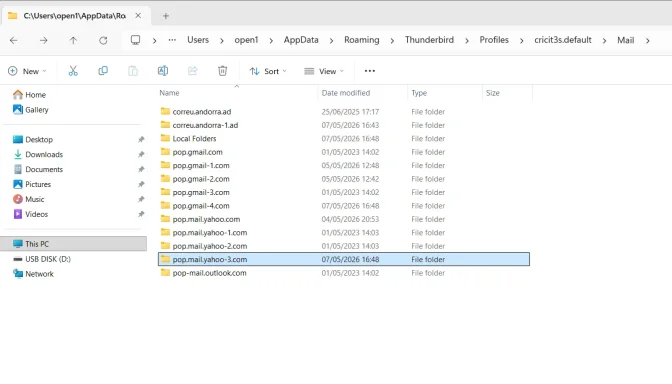
correu.andorra* mailbox files to the USB drive
- Delete all Andorra-related mailbox data from this PC
- Unplug the USB drive
- Run ESET
If ESET no longer finds the Andorra detection, you are done with Andorra.
This is my recommended option.
Option B — keep Andorra archive searchable on this PC
If you want
AndorraIN to remain searchable in Thunderbird on this PC:
- Back it up first
- Then prune by date ranges
- Compact folders
- Scan after each round
That works, but it is slower and more work.
My recommendation for you
Since you said:
- the old Andorra account is useless
- you already copied the mail
- you want to reduce confusion
I would do this:
Step-by-step
1. Back up to USB
Copy these to the pen drive:
- the old
correu.andorra* mailbox folders/files
- the Gmail archive folder/mailbox that contains
AndorraIN
2. Close Thunderbird
Make sure it is fully closed.
3. Remove Andorra mail from this PC
Delete or move off this PC:
correu.andorra.adcorreu.andorra-1.ad- the local mailbox containing
AndorraIN under the Gmail storage
4. Open Thunderbird
Confirm the old Andorra material is gone from live mail on this PC.
5. Unplug the USB drive
This is important — otherwise ESET may scan the backup too.
6. Run ESET again
Then you will know whether the Andorra issue is fully isolated and gone.
Important warning
If the
USB pen is plugged in, ESET may still find the same bad old email content there.
So:
- back up to USB
- remove from PC
- unplug USB
- scan
About deleting 1–2 years at a time
That is only worth doing if:
- you insist on keeping the Andorra archive live in Thunderbird on this PC
Otherwise it is unnecessary.
So:
- If your goal is keep data → back it up off-PC
- If your goal is clean PC → remove it from PC entirely
Then later
Yes, after Andorra is sorted, you can deal with:
separately.
Short answer
*
Yes — deleting the old `correu.andorramail from the PC is a good idea, provided you first back it up to another medium.** And ifAndorraIN` is only an archive copy, the easiest solution is to back that up too and remove it from the PC rather than pruning year by year.
If you want, I can next help you identify exactly
which folder/file on disk contains AndorraIN so you remove the right one.