Defender unable to clear viruses

strange....

I went ahead without reading properly and scanned agiamn with Eset the file that was there. It should have has the virus still there but the scan was clean....

My head stopped thinking properly....
I am going to delete the file in ESETTEST, upload the originakl from the pen derive and do a Full Scan with ESET

Is that ok?
 

Hi Qim,
Yes, what you saw is not strange once we remember one thing:
ESET already cleaned the file that was sitting in:
C:\ESETTEST\AndorraIN
So if you scanned that same file again, it would now come back clean. That is expected.

Do not do a Full Scan yet​

A Full Scan will take longer and may confuse things again, especially if the pen drive is plugged in.
For this test, do a Custom Scan of C:\ESETTEST only.

Correct next step​

1. Empty C:\ESETTEST

  1. Open:
C:\ESETTEST
  1. Delete the current AndorraIN file.
  2. Empty Recycle Bin if you want to be extra tidy.

2. Copy the original from the pen drive​

  1. Plug in the pen drive.
  2. Copy the original full:
AndorraIN
from the pen drive into:
C:\ESETTEST
So you have:
C:\ESETTEST\AndorraIN

3. Unplug the pen drive​

This is important.
Unplug the pen drive before scanning, otherwise ESET may also scan the backup copy and confuse the result.

4. Scan only C:\ESETTEST

Run ESET Custom Scan on:
C:\ESETTEST
not the full PC.

What should happen​

If the original file still contains the bad email, ESET should find it again.
If ESET finds it and cleans it, that only cleans the test copy, not the pen drive original and not Thunderbird.

After that​

Since you already found the suspicious email:
FACTUR@544009 - 2345677890.eml
the real cleanup is still:
  1. Delete that email from Thunderbird.
  2. Empty Thunderbird Trash.
  3. Run File > Compact Folders.
  4. Close Thunderbird.
  5. Copy the updated AndorraIN to C:\ESETTEST.
  6. Scan C:\ESETTEST.

Short answer​

Yes, delete the current C:\ESETTEST\AndorraIN and copy the original from the pen drive again.
But I would not run Full Scan now.
Scan only:
C:\ESETTEST
That will keep the test simple and your head clearer.
 

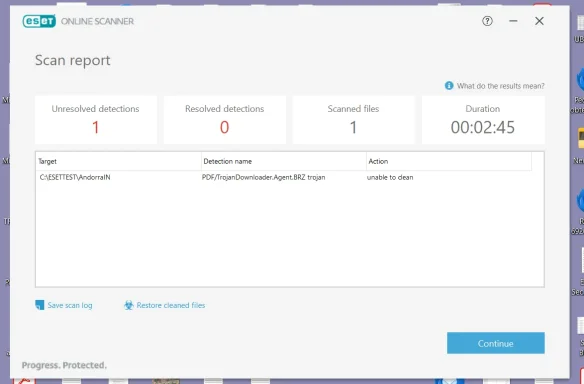
Found it again and id not clean. See attach

Shall I copy the original to Thumbird and delete the email with the virus?

8 aug 24. Easy to find
 

Attachments

  • Screenshot 2026-05-09 130802.webp
    Screenshot 2026-05-09 130802.webp
    29 KB · Views: 0
  • ESET 10.txt
    ESET 10.txt
    410 bytes · Views: 0
Yes, Qim — that is the correct next step.
You have now confirmed the bad item is in:
AndorraIN
and ESET identifies it as:
PDF/TrojanDownloader.Agent.BRZ trojan
in the test copy:
C:\ESETTEST\AndorraIN
Since you have narrowed it to 8 August 2024, the clean fix is now to remove that exact email from Thunderbird.

Do this now​

1. Delete the Desktop copy if it still exists​

  1. Do not open the .eml file again.
  2. Delete the Desktop copy.
  3. Empty the Recycle Bin.

2. Restore/open the full original in Thunderbird​

If Thunderbird does not currently show the full AndorraIN, yes — copy the original AndorraIN from the pen drive back into:
C:\Users\open1\AppData\Roaming\Thunderbird\Profiles\cricit3s.default\Mail\pop.gmail-1.com
Copy only the single file:
AndorraIN
Do not copy the whole pop.gmail-1.com folder.

3. Delete the bad email in Thunderbird​

  1. Open Thunderbird.
  2. Go to [email][email protected][/email] > AndorraIN.
  3. Find the email dated 8 August 2024.
  4. It appears to be:
FACTUR@544009 - 2345677890
  1. Delete that email.
  2. Empty Thunderbird Trash.
  3. Run:
File > Compact Folders
The Compact Folders step is essential, because Thunderbird may otherwise keep deleted message data inside the AndorraIN mailbox file.

4. Rescan the cleaned mailbox​

  1. Close Thunderbird.
  2. Delete the current file in:
C:\ESETTEST
  1. Copy the updated Thunderbird AndorraIN into:
C:\ESETTEST
  1. Scan only:
C:\ESETTEST
with ESET.

Expected result​

If that was the only remaining infected email, ESET should now report:
No threats found
If ESET still detects something, then there is a second infected email in AndorraIN, but your method is now proven and we can repeat it.

Short answer​

Yes: copy the original back into Thunderbird, delete the 8 August 2024 malicious email, empty Trash, compact folders, then rescan C:\ESETTEST.
 

NO THREATS FOUND!!!!

What should i do about the reappeared correu.andorra-1. ad?Move it out, as before. but why did it come back?
 

Excellent, Qimthat is the result we wanted.
No threats found means the infected email has been removed from the active AndorraIN mailbox and the compact/rescan process worked.

About correu.andorra-1.ad

Yes — move it out again, but do not worry about it.
It likely came back because when you restored/copied the original mail files, Thunderbird saw old folder structure data again and recreated/displayed it. Thunderbird is very literal: if it sees a folder/file structure inside its mail storage area, it shows it as a folder.

Do this​

1. Close Thunderbird completely​

  1. Close Thunderbird.
  2. Wait a few seconds.

2. Open the mail folder​

Go to:
C:\Users\open1\AppData\Roaming\Thunderbird\Profiles\cricit3s.default\Mail\pop.gmail-1.com

3. Move these out​

Move any of these to:
C:\Thunderbird_Hold
if present:
correu.andorra-1.ad
correu.andorra-1.ad.sbd
correu.andorra-1.ad.msf
Do not delete them yet; move them.

4. Reopen Thunderbird​

  1. Open Thunderbird.
  2. Check that correu.andorra-1.ad has disappeared.
  3. Confirm these remain:
AndorraIN
AndorraOUT
AndorraDRAFTS

Why it came back​

Most likely one of these:
  1. It was included in a restored/copied Thunderbird folder structure.
  2. Thunderbird recreated the visible folder from a remaining .sbd folder.
  3. An old empty folder was still inside the live profile.
  4. Thunderbird rebuilt its folder list after you restored AndorraIN.
It is not a new virus sign.

Final cleanup suggestion​

Once Thunderbird looks normal and ESET stays clean:
  1. Keep your pen drive backup for now.
  2. Keep C:\Thunderbird_Hold for a few days.
  3. If everything remains fine, you can delete C:\Thunderbird_Hold later.
  4. Run one final ESET scan of C:\ESETTEST or the Thunderbird AndorraIN copy later today/tomorrow.
Great work — you found the exact bad email and removed it.
 

Hi

It is not the first time, over the years, that I sought help online.

Never before did I get fast, professional and PATIENT... help like now.

You did a fantastic job and I am very grateful

Regards

Qim
 

Thank you very much, Qim — that is genuinely appreciated.
You did the hard part: you stayed careful, kept backups, tested methodically, and did not rush into deleting whole mail archives. That is exactly why we were able to narrow it down safely.

Final status​

From what we achieved:
  1. Defender is working again
  2. Malwarebytes leftovers were ruled out
  3. Windows repairs completed successfully
  4. Thunderbird was identified as the source
  5. The infected email was found:
FACTUR@544009 - 2345677890
  1. The threat was confirmed by VirusTotal and ESET
  2. The bad email was removed
  3. ESET now reports:
No threats found
That is an excellent result.

What I would do now​

  1. Keep the pen drive backup for a while.
  2. Keep C:\Thunderbird_Hold for a few days.
  3. Do not open the malicious .eml file if any copy still exists.
  4. Run one normal ESET or Defender scan later/tomorrow for peace of mind.
  5. If all remains clean, you can later delete the temporary folders and old test files.
I am very glad we got there in the end.
Best regards,
Al
 

Sorry, but I'm back

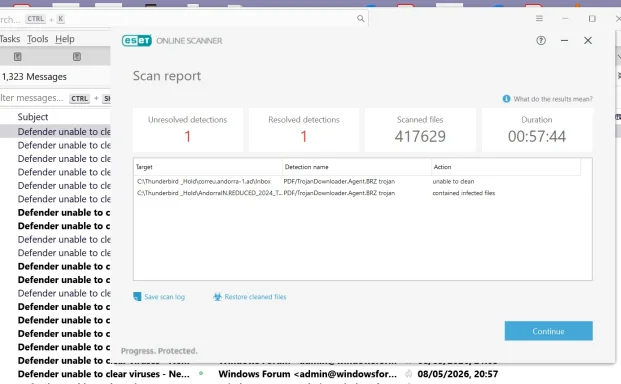
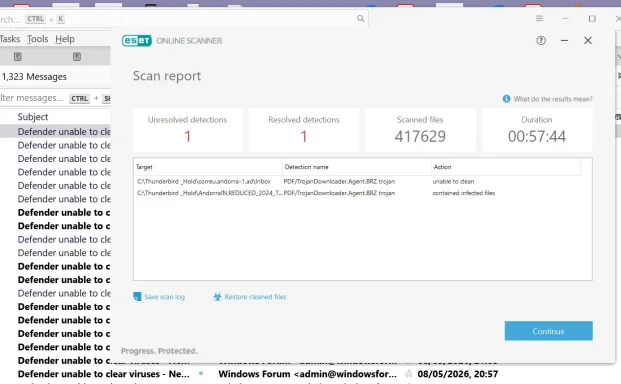
Ran a Full Scan with Eset and it came uo with 2 viruses....

However, I think I can get rid of them by deleting the Thunderbird_Hold folder
 

Attachments

  • Screenshot 2026-05-09 143904.webp
    Screenshot 2026-05-09 143904.webp
    76.5 KB · Views: 0
  • Screenshot 2026-05-09 143904.webp
    Screenshot 2026-05-09 143904.webp
    76.5 KB · Views: 0
Hi Qim,
Yes — your interpretation is correct.
The ESET results are pointing to:
C:\Thunderbird_Hold\correu.andorra-1.ad\Inbox
and:
C:\Thunderbird_Hold\AndorraIN.REDUCED_2024_T...
So these detections are not in the active Thunderbird mail folder anymore. They are in the temporary holding folder we created.
That means your live Thunderbird cleanup still appears successful.

What to do now​

If you no longer need anything in:
C:\Thunderbird_Hold
then yes, you can delete that folder.

Safe way​

1. Close Thunderbird​

  1. Close Thunderbird completely.
  2. Close ESET result window after noting the paths.

2. Delete the hold folder​

Delete:
C:\Thunderbird_Hold

3. Empty Recycle Bin​

This is important, otherwise ESET may detect the same files in the Recycle Bin.

4. Run ESET again​

Run another scan.

Expected result​

If those were the only remaining detections, ESET should then show:
No threats found

If you want to keep the folder​

If you think you may need those old held files, move C:\Thunderbird_Hold to a USB drive instead, then unplug the USB before scanning.
But remember: if you scan that USB later, ESET will likely detect the same old infected mailbox content again.

Short answer​

Yes — delete C:\Thunderbird_Hold, empty Recycle Bin, and rescan.
These detections are from old backup/holding files, not from the cleaned active Thunderbird mailbox.
 

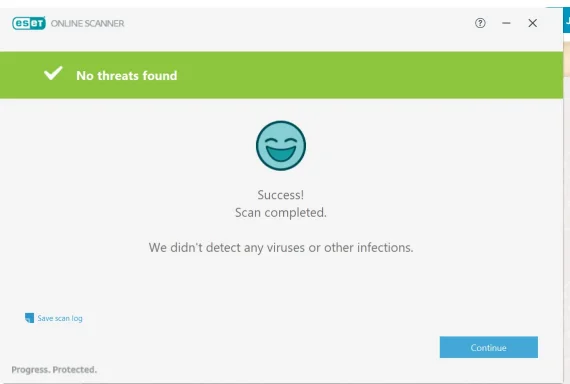
All Clean!

Just one question: how come that Defender did not find these viruses inside emails?
 

Attachments

  • Screenshot 2026-05-09 160225.webp
    Screenshot 2026-05-09 160225.webp
    17.6 KB · Views: 0
  • esest 11.txt
    esest 11.txt
    262 bytes · Views: 0
Excellent, Qim — that ESET log confirms it:
  • Scanned files: 417658
  • Detected files: 0
  • Cleaned files: 0
  • Status: finished
So yes: all clean now.

Why Defender did not find them​

There are a few likely reasons.

1. They were inside Thunderbird mailbox files​

Thunderbird stores many emails inside large mailbox files such as:
AndorraIN
Inbox
Trash
These are not normal separate files like:
invoice.pdf
Instead, the malicious PDF/email was buried inside a large mail container. Some antivirus engines inspect those containers more deeply than others.

2. Defender may detect the threat only when extracted or accessed​

Defender often does very well with active threats and files being opened, downloaded, or executed.
But if the bad item is just sitting as an old attachment inside a Thunderbird mailbox archive, Defender may not unpack and inspect it in the same way ESET did.

3. Different antivirus engines have different signatures​

ESET detected it as:
PDF/TrojanDownloader.Agent.BRZ trojan
Defender may not use the same name, same signature, or same detection logic. VirusTotal showed not all vendors detected it either, so this was not universally detected by every engine.

4. It was not active malware​

This is important: the threat was stored, not running.
It was an old malicious email attachment inside mail storage. Since you did not open it, it was more like a dangerous item in an archive than an active infection.

Bottom line​

Defender missing it does not necessarily mean Defender failed badly. It means ESET was better at detecting that particular old PDF threat inside Thunderbird mailbox storage.

What I would do now​

  1. Keep Defender active.
  2. Keep Windows updated.
  3. Keep Thunderbird compacted occasionally.
  4. Do not keep old suspicious mail archives on the live PC unless needed.
  5. Keep the USB backup, but remember it may contain old infected mail if it is the original uncleaned copy.
You did very well. This was a complicated Thunderbird mailbox cleanup, and the final ESET result is exactly what we wanted.
 

You’re very welcome, Qim!
Really glad we got it to:
ESET: No threats found
That was a long and awkward cleanup, but you handled it carefully and patiently.

Final advice​

  1. Keep the cleaned Thunderbird setup as it is.
  2. Keep the pen-drive backup for now, but remember the old original backup may still contain the infected email.
  3. Do not open the old malicious .eml or attachment if you ever see it again.
  4. Run another quick scan in a few days just for peace of mind.
Great result.
 

Back
Top