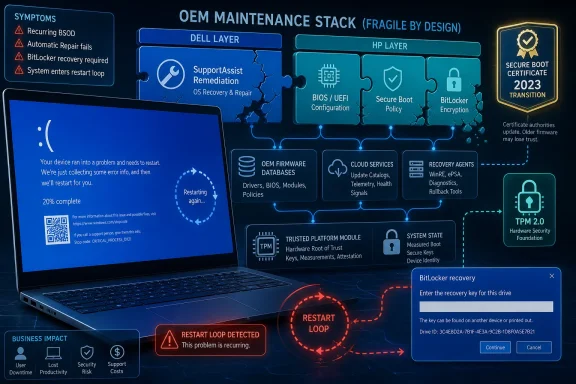
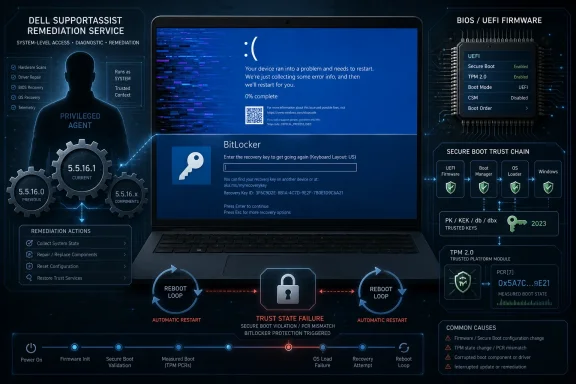
Dell has released SupportAssist Remediation 5.5.16.1 to fix blue screen crashes and reboot instability caused by version 5.5.16.0 on some Dell and Alienware PCs, while HP is separately investigating BitLocker recovery loops tied to recent BIOS and Secure Boot certificate changes. The common thread is not a single broken Windows update but the increasingly fragile choreography between Windows, OEM utilities, firmware, encryption, and Secure Boot. That distinction matters, because blaming “Windows” for every boot failure obscures where modern PC risk actually lives. The operating system is still central, but the blast radius now extends deep into vendor recovery agents and UEFI configuration screens most users never knowingly touch.
The Dell incident is the cleaner of the two stories, which is not the same thing as saying it is harmless. Dell has identified SupportAssist Remediation version 5.5.16.0 as the culprit behind unexpected BSODs, sudden restarts, and general system instability on affected systems. Alienware machines are included because Alienware SupportAssist Remediation uses the same underlying remediation component.
The important nuance is that Dell is not telling customers to rip out the main SupportAssist application. The broken component is SupportAssist Remediation, a separate service associated with SupportAssist OS Recovery Tools. That distinction will sound pedantic until you are the person trying to decide whether to uninstall a familiar Dell-branded utility from a machine that keeps crashing during the workday.
This is where OEM software earns its mixed reputation. Vendors ship recovery agents, update managers, telemetry collectors, driver assistants, hardware diagnostics, and firmware installers because Windows alone cannot reasonably manage every device-specific contingency. But every one of those helpers also becomes privileged software with the ability to destabilize a machine in ways that look, to an ordinary user, indistinguishable from an operating system failure.
SupportAssist is supposed to reduce friction when something goes wrong. In this case, the remediation layer became the thing needing remediation. That irony is obvious, but the operational lesson is sharper: the more recovery infrastructure vendors preload, the more that infrastructure has to be treated like production software rather than harmless convenienceware.
That guidance is sensible, but it also reveals the awkward dependency loop that defines many OEM support stacks. If the tool responsible for keeping a device healthy is crashing the device, the user may need to keep the machine stable long enough to update the tool that is making it unstable. Dell’s advice to back up important files and keep the device connected to power is routine, but in this context it reads less like boilerplate and more like a tacit acknowledgement that recovery software now participates in the same failure domain as firmware updates and system patches.
For enterprise administrators, the Dell case should trigger a familiar inventory question: where exactly is SupportAssist Remediation installed, and what version is deployed? Consumer users may discover the component only after a crash. Managed environments do not have that luxury.
The least interesting response is to declare all OEM utilities bad and remove them everywhere. The more useful response is to treat them as part of the endpoint management estate. If a vendor tool can install drivers, stage recovery media, modify boot-adjacent components, or run services with elevated privileges, it deserves version control, staged deployment, and rollback planning.
That certificate migration is not cosmetic. The PC ecosystem has been moving away from older Secure Boot certificates toward newer 2023-era certificates because boot trust chains age, expire, and eventually need replacement. In theory, this is the kind of maintenance security-minded users should want: stronger, refreshed trust anchors for the code that runs before Windows starts.
In practice, Secure Boot certificate updates sit at the intersection of firmware, bootloaders, Windows servicing, TPM measurements, and BitLocker’s view of whether the boot environment has changed. When that chain is not applied cleanly, BitLocker may do exactly what it is designed to do: assume the boot path is no longer trustworthy and demand a recovery key. The user sees a lockout. The security model sees a changed platform state.
That distinction does not make the experience less disruptive. A BitLocker recovery key prompt on every boot is not “working as intended” in any useful operational sense. It is a system telling the truth so aggressively that the machine becomes impractical to use.
HP’s guidance centers on updating affected systems to the latest BIOS version and ensuring the required Secure Boot certificates are properly configured before installing current Windows security updates. Systems already stuck in a loop may require BIOS-level changes to restore normal boot behavior. That is an uncomfortable sentence for any IT department with remote users, encrypted drives, and a large fleet of similar-but-not-identical hardware revisions.
The deeper problem is sequencing. Windows Update may deliver operating system changes. OEM channels may deliver firmware changes. Management tools may enforce BitLocker policy. Secure Boot certificate settings may live behind firmware menus or vendor-specific configuration utilities. Each component may be correct in isolation while the combined order of operations produces a bad day.
This is why firmware updates deserve the same change-management seriousness as cumulative updates. For years, many organizations treated BIOS updates as occasional hardware hygiene, often left to OEM utilities or Windows Update unless a specific vulnerability forced action. The Secure Boot certificate transition makes that posture harder to defend.
But the same mechanism fires when legitimate servicing changes the measured environment in ways the platform cannot reconcile. That is the tension at the heart of the HP reports. From the user’s perspective, nothing malicious happened; they installed updates. From the device’s perspective, the chain of trust may have changed enough to warrant recovery.
The practical consequence is that BitLocker key escrow is no longer an administrative footnote. Home users need to know where their recovery key is stored, often in a Microsoft account. Business users need keys reliably escrowed in Entra ID, Active Directory, or their endpoint management platform. A modern encrypted PC without recoverable recovery metadata is not secure; it is one firmware mishap away from data loss.
This also complicates advice around delaying updates. Skipping firmware and security updates indefinitely is not a strategy. But installing them blindly across a fleet without confirming Secure Boot state, BIOS readiness, and recovery key escrow is not a strategy either. The safe path is slower, more staged, and less convenient than either extreme.
Microsoft is not absent from this story. Windows Update increasingly participates in firmware delivery, Secure Boot modernization, driver distribution, and recovery workflows. The company benefits from a unified servicing model when it works and inherits reputational damage when any part of that model misfires.
Still, the Dell and HP cases show why “Windows update broke my PC” is often too blunt an explanation. The Dell crash path points to OEM remediation software. The HP loop points toward firmware, Secure Boot certificates, and BitLocker’s trust model. Windows is the stage, but not always the actor holding the knife.
For administrators, that means incident response has to start wider than the last cumulative update. Event logs, installed OEM package versions, BIOS revisions, Secure Boot certificate state, TPM policy, and recent firmware deliveries all belong in the first pass. The machine that looks like it has a Windows problem may have an OEM lifecycle problem.
That mismatch between hidden complexity and visible failure is becoming a defining feature of modern Windows PCs. Security has improved. Recovery tooling has improved. Firmware updates are more automated than they used to be. But the system is also more layered, and each layer can fail in a way that requires knowledge the average user does not have.
This is especially rough for small businesses. Large enterprises may have endpoint telemetry, staged rings, vendor account teams, and scripted BIOS configuration tools. A ten-person office may have a mix of Dell laptops, HP desktops, personal Microsoft accounts, and one person who “knows computers.” For that environment, a BitLocker loop or repeated BSODs is not a puzzle; it is lost work.
OEMs should therefore be judged not only by how quickly they ship fixes, but by how clearly they communicate failure boundaries. “Do not uninstall SupportAssist; update SupportAssist Remediation” is useful because it narrows the action. “Update BIOS and verify Secure Boot certificates” may be technically accurate, but it still leaves many users in firmware-menu territory with little confidence that the next reboot will be better.
Dell’s fix should be relatively easy to validate: identify systems with SupportAssist Remediation 5.5.16.0 and move them to 5.5.16.1. The HP situation demands more care because firmware versions, Secure Boot settings, and BitLocker policy can vary across models and generations. In both cases, the winning move is not superstition but visibility.
Administrators should treat OEM utilities as managed software, not vendor decoration. They should know whether Dell Command Update, HP Image Assistant, Windows Update, Intune, Group Policy, or another tool is responsible for firmware and driver delivery. They should also avoid having multiple tools compete to manage the same class of updates without a clear owner.
For individual users, the practical advice is narrower but still important. Check whether your system vendor has issued guidance before uninstalling random components. Make sure important files are backed up. Confirm that BitLocker recovery keys are accessible before applying BIOS or major security updates. Those steps will not prevent every bad update, but they turn a lockout from a crisis into an inconvenience.
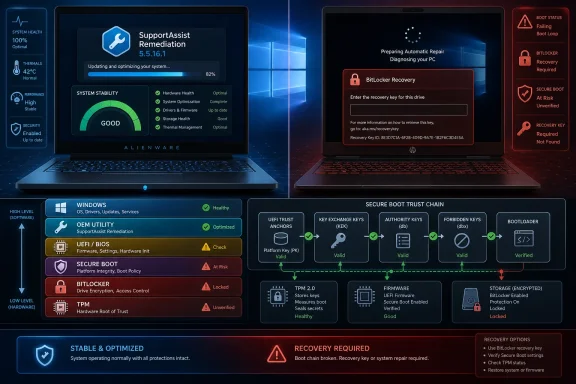 The OEM Layer Is No Longer Background Noise
The Dell incident is the cleaner of the two stories, which is not the same thing as saying it is harmless. Dell has identified SupportAssist Remediation version 5.5.16.0 as the culprit behind unexpected BSODs, sudden restarts, and general system instability on affected systems. Alienware machines are included because Alienware SupportAssist Remediation uses the same underlying remediation component.The important nuance is that Dell is not telling customers to rip out the main SupportAssist application. The broken component is SupportAssist Remediation, a separate service associated with SupportAssist OS Recovery Tools. That distinction will sound pedantic until you are the person trying to decide whether to uninstall a familiar Dell-branded utility from a machine that keeps crashing during the workday.
This is where OEM software earns its mixed reputation. Vendors ship recovery agents, update managers, telemetry collectors, driver assistants, hardware diagnostics, and firmware installers because Windows alone cannot reasonably manage every device-specific contingency. But every one of those helpers also becomes privileged software with the ability to destabilize a machine in ways that look, to an ordinary user, indistinguishable from an operating system failure.
SupportAssist is supposed to reduce friction when something goes wrong. In this case, the remediation layer became the thing needing remediation. That irony is obvious, but the operational lesson is sharper: the more recovery infrastructure vendors preload, the more that infrastructure has to be treated like production software rather than harmless convenienceware.
Dell’s Fix Is Simple, but the Failure Mode Was Not
Dell’s prescribed fix is straightforward: update SupportAssist Remediation to version 5.5.16.1. Users can check the installed version through Windows Settings by opening the Installed Apps list and looking for SupportAssist Remediation. Dell recommends installing the update through SupportAssist’s “Update Software” function or through Dell Command Update.That guidance is sensible, but it also reveals the awkward dependency loop that defines many OEM support stacks. If the tool responsible for keeping a device healthy is crashing the device, the user may need to keep the machine stable long enough to update the tool that is making it unstable. Dell’s advice to back up important files and keep the device connected to power is routine, but in this context it reads less like boilerplate and more like a tacit acknowledgement that recovery software now participates in the same failure domain as firmware updates and system patches.
For enterprise administrators, the Dell case should trigger a familiar inventory question: where exactly is SupportAssist Remediation installed, and what version is deployed? Consumer users may discover the component only after a crash. Managed environments do not have that luxury.
The least interesting response is to declare all OEM utilities bad and remove them everywhere. The more useful response is to treat them as part of the endpoint management estate. If a vendor tool can install drivers, stage recovery media, modify boot-adjacent components, or run services with elevated privileges, it deserves version control, staged deployment, and rollback planning.
HP’s BitLocker Loop Is the More Complicated Warning
HP’s parallel problem is murkier and more revealing. Some HP systems have reportedly begun prompting repeatedly for BitLocker recovery keys after recent Windows 11 updates and BIOS changes, with affected machines falling into a recovery loop even though Windows itself may remain otherwise intact. HP has linked the behavior to Secure Boot certificate configuration, specifically the Microsoft 2023 UEFI certificate transition.That certificate migration is not cosmetic. The PC ecosystem has been moving away from older Secure Boot certificates toward newer 2023-era certificates because boot trust chains age, expire, and eventually need replacement. In theory, this is the kind of maintenance security-minded users should want: stronger, refreshed trust anchors for the code that runs before Windows starts.
In practice, Secure Boot certificate updates sit at the intersection of firmware, bootloaders, Windows servicing, TPM measurements, and BitLocker’s view of whether the boot environment has changed. When that chain is not applied cleanly, BitLocker may do exactly what it is designed to do: assume the boot path is no longer trustworthy and demand a recovery key. The user sees a lockout. The security model sees a changed platform state.
That distinction does not make the experience less disruptive. A BitLocker recovery key prompt on every boot is not “working as intended” in any useful operational sense. It is a system telling the truth so aggressively that the machine becomes impractical to use.
Secure Boot Modernization Is Becoming a Fleet Management Problem
The HP issue is a reminder that Secure Boot is not a set-and-forget checkbox from a Windows 8-era BIOS menu. It is now an actively maintained trust system, and that means vendors, Microsoft, and administrators all have to coordinate changes across firmware and the OS. When the coordination fails, the user ends up staring at a BitLocker screen.HP’s guidance centers on updating affected systems to the latest BIOS version and ensuring the required Secure Boot certificates are properly configured before installing current Windows security updates. Systems already stuck in a loop may require BIOS-level changes to restore normal boot behavior. That is an uncomfortable sentence for any IT department with remote users, encrypted drives, and a large fleet of similar-but-not-identical hardware revisions.
The deeper problem is sequencing. Windows Update may deliver operating system changes. OEM channels may deliver firmware changes. Management tools may enforce BitLocker policy. Secure Boot certificate settings may live behind firmware menus or vendor-specific configuration utilities. Each component may be correct in isolation while the combined order of operations produces a bad day.
This is why firmware updates deserve the same change-management seriousness as cumulative updates. For years, many organizations treated BIOS updates as occasional hardware hygiene, often left to OEM utilities or Windows Update unless a specific vulnerability forced action. The Secure Boot certificate transition makes that posture harder to defend.
BitLocker Is Doing Its Job, Which Is Exactly the Problem
BitLocker’s recovery prompt has always been both a security feature and a support burden. It exists because disk encryption cannot simply trust that the boot environment is unchanged when measurements shift. If an attacker tampers with firmware, bootloaders, or security policy, BitLocker should stop and ask for proof that the owner still controls the machine.But the same mechanism fires when legitimate servicing changes the measured environment in ways the platform cannot reconcile. That is the tension at the heart of the HP reports. From the user’s perspective, nothing malicious happened; they installed updates. From the device’s perspective, the chain of trust may have changed enough to warrant recovery.
The practical consequence is that BitLocker key escrow is no longer an administrative footnote. Home users need to know where their recovery key is stored, often in a Microsoft account. Business users need keys reliably escrowed in Entra ID, Active Directory, or their endpoint management platform. A modern encrypted PC without recoverable recovery metadata is not secure; it is one firmware mishap away from data loss.
This also complicates advice around delaying updates. Skipping firmware and security updates indefinitely is not a strategy. But installing them blindly across a fleet without confirming Secure Boot state, BIOS readiness, and recovery key escrow is not a strategy either. The safe path is slower, more staged, and less convenient than either extreme.
Windows Gets the Blame Because Windows Owns the Screen
The first blue screen or BitLocker recovery prompt a user sees carries Microsoft’s visual language, not Dell’s or HP’s. That is why Windows receives blame even when the trigger is a vendor service or firmware state. The screen says Windows, so the failure becomes Windows in the public imagination.Microsoft is not absent from this story. Windows Update increasingly participates in firmware delivery, Secure Boot modernization, driver distribution, and recovery workflows. The company benefits from a unified servicing model when it works and inherits reputational damage when any part of that model misfires.
Still, the Dell and HP cases show why “Windows update broke my PC” is often too blunt an explanation. The Dell crash path points to OEM remediation software. The HP loop points toward firmware, Secure Boot certificates, and BitLocker’s trust model. Windows is the stage, but not always the actor holding the knife.
For administrators, that means incident response has to start wider than the last cumulative update. Event logs, installed OEM package versions, BIOS revisions, Secure Boot certificate state, TPM policy, and recent firmware deliveries all belong in the first pass. The machine that looks like it has a Windows problem may have an OEM lifecycle problem.
The Support Burden Falls on the Least Prepared User
The most frustrating part of both incidents is that the affected users are unlikely to have opted into the relevant complexity. Dell users did not choose to run a recovery service that could trigger BSODs; it likely arrived as part of the OEM support experience. HP users did not wake up eager to reason about Microsoft UEFI CA 2023 certificates; they encountered BitLocker because the boot trust chain changed beneath them.That mismatch between hidden complexity and visible failure is becoming a defining feature of modern Windows PCs. Security has improved. Recovery tooling has improved. Firmware updates are more automated than they used to be. But the system is also more layered, and each layer can fail in a way that requires knowledge the average user does not have.
This is especially rough for small businesses. Large enterprises may have endpoint telemetry, staged rings, vendor account teams, and scripted BIOS configuration tools. A ten-person office may have a mix of Dell laptops, HP desktops, personal Microsoft accounts, and one person who “knows computers.” For that environment, a BitLocker loop or repeated BSODs is not a puzzle; it is lost work.
OEMs should therefore be judged not only by how quickly they ship fixes, but by how clearly they communicate failure boundaries. “Do not uninstall SupportAssist; update SupportAssist Remediation” is useful because it narrows the action. “Update BIOS and verify Secure Boot certificates” may be technically accurate, but it still leaves many users in firmware-menu territory with little confidence that the next reboot will be better.
The Real Lesson Is Inventory, Not Panic
There is a temptation after incidents like this to flatten the story into a warning against automatic updates. That is understandable and usually wrong. The answer is not to freeze PCs in amber; it is to know what is installed, what can update itself, and which components are allowed to touch the boot path.Dell’s fix should be relatively easy to validate: identify systems with SupportAssist Remediation 5.5.16.0 and move them to 5.5.16.1. The HP situation demands more care because firmware versions, Secure Boot settings, and BitLocker policy can vary across models and generations. In both cases, the winning move is not superstition but visibility.
Administrators should treat OEM utilities as managed software, not vendor decoration. They should know whether Dell Command Update, HP Image Assistant, Windows Update, Intune, Group Policy, or another tool is responsible for firmware and driver delivery. They should also avoid having multiple tools compete to manage the same class of updates without a clear owner.
For individual users, the practical advice is narrower but still important. Check whether your system vendor has issued guidance before uninstalling random components. Make sure important files are backed up. Confirm that BitLocker recovery keys are accessible before applying BIOS or major security updates. Those steps will not prevent every bad update, but they turn a lockout from a crisis into an inconvenience.
The Clues Administrators Should Not Ignore
The Dell and HP incidents are different failures with the same operational message: the modern Windows endpoint is a supply chain of local trust decisions. A blue screen can come from a vendor recovery service. A BitLocker loop can come from a Secure Boot migration. The old mental model, where Windows sat above firmware and OEM tools sat politely off to the side, no longer matches the machine on the desk.- Dell users should check for SupportAssist Remediation version 5.5.16.0 and update to version 5.5.16.1 rather than removing the main SupportAssist application by reflex.
- Alienware systems should be treated as part of the same Dell remediation pool because the affected Alienware component shares the underlying remediation software.
- HP administrators should verify BIOS versions, Secure Boot certificate settings, and BitLocker recovery key escrow before pushing recent firmware and Windows security changes broadly.
- BitLocker recovery loops should be investigated as boot-trust and firmware-state problems, not merely as user password or account issues.
- Organizations should assign one clear management path for OEM firmware and utility updates instead of letting Windows Update, vendor tools, and endpoint platforms act independently.
- Home users should confirm that recovery keys and backups are available before applying BIOS updates, because encryption failure modes often become urgent only after the reboot.
References
- Primary source: Windows Report
Published: 2026-06-08T14:10:07.938512
Dell Releases Fix for SupportAssist BSOD Issue While HP Investigates BitLocker Boot Loops
Dell has fixed a SupportAssist bug causing BSOD crashes, while HP is dealing with BitLocker recovery loops linked to Secure Boot certificates. windowsreport.com
- Related coverage: windowslatest.com
HP admits its latest BIOS update is bricking Windows 11 with BitLocker loop, blocking Secure Boot 2023 fix
HP business laptops are stuck in BitLocker recovery loops after a faulty BIOS update that also disrupted Microsoft's Secure Boot 2023 rollout www.windowslatest.com
- Related coverage: dell.com
Dell SupportAssist Remediation and Alienware SupportAssist Remediation Version 5.5.16.0 Causes Blue Screen Errors and Restarts | Dell US
Learn how to fix blue screen errors and unexpected restarts caused by the Dell SupportAssist Remediation or Alienware SupportAssist Remediation service.www.dell.com - Related coverage: tomshardware.com
Dell SupportAssist update is crashing PCs with constant blue screens and reboot loops — the boot service built for system recovery is the culprit of unending instability | Tom's Hardware
Version 5.5.16.0 of Dell's SupportAssist Remediation software is the culprit.www.tomshardware.com - Related coverage: fdaytalk.com
Fix HP BIOS Update BitLocker Recovery Loop on Windows 11
HP's April 2026 BIOS update is causing an HP BIOS update BitLocker recovery loop on EliteBook, ProBook, and ZBook laptops. Use F10 BIOS workaround to fix it.www.fdaytalk.com - Related coverage: windowsnews.ai
HP April 2026 BIOS Update Bricking PCs With BitLocker Loops and Secure Boot Errors - Windows News
HP's April 2026 BIOS updates trigger BitLocker recovery loops and Secure Boot errors on Windows 11 PCs. Learn about the root causes, affected models,...windowsnews.ai
- Related coverage: windowscentral.com
A recent HP laptop BIOS bug is leaving high-end Windows 11 PCs stuck in an endless BitLocker recovery loop | Windows Central
HP confirms its BIOS update is breaking expensive workstations, sparking outrage among users.www.windowscentral.com - Related coverage: windowsforum.com
HP April 2026 BIOS Updates Trigger BitLocker Recovery Loops & Secure Boot 2023 Issues | Windows Forum
HP’s April 2026 BIOS updates for commercial Windows 11 PCs have triggered BitLocker recovery loops and boot failures across HP notebooks, desktops, and...windowsforum.com - Official source: support.microsoft.com
Surface Secure Boot Certificates | Microsoft Support
Secure Boot in UEFI firmware verifies pre-boot software using trusted certificates. Microsoft will update expiring Windows Secure Boot certificates starting June 2026 to maintain device protection.support.microsoft.com - Related coverage: cisco.com