

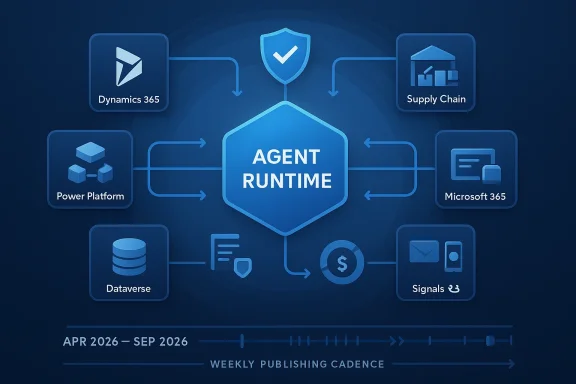
Microsoft has opened the 2026 release wave 1 planning cycle for Dynamics 365, Power Platform, and role-based Copilot offerings, and the headline is unmistakable: Microsoft is moving business applications further into agentic AI, not just adding another layer of chat-based assistance. The official planning window runs from April 2026 through September 2026, with the release plans published on March 18, 2026, and Microsoft says the wave will continue shifting business apps toward deeper automation, richer data grounding, and stronger governance. That change matters because the company is also moving to more frequent business applications updates, replacing the old twice-yearly reveal rhythm with a steadier cadence that better matches how AI features actually ship.
Microsoft’s release-wave model has always been about predictability, but the 2026 wave 1 cycle shows how much the company’s ambitions have changed. In earlier generations, these plans were largely about feature packaging and upgrade timing; now they are a strategic map for how Microsoft intends to fuse Copilot, agents, Dataverse, and core enterprise workflows into a single operating model. The result is a product strategy that looks less like traditional ERP and CRM evolution and more like a platform shift toward AI-assisted work orchestration.
The timing is also important. Microsoft says the 2026 wave 1 general availability rollout begins in early April 2026, while the initial release plans are already available in English as of March 18, 2026. In other words, the company is giving customers a runway to evaluate changes before production rollout, but it is also signaling that the pace of change will remain fast and continuous rather than bundled into a few big events each year.
That cadence shift is more than a marketing tweak. Microsoft’s own Power Platform guidance says the release notes now follow a weekly publish cadence, with the initial 2026 wave 1 plan available on March 18 and updates following as features become ready. For enterprise teams, that means the practical task is no longer “review the spring launch” or “prepare for fall wave 2.” It is now continuous governance: tracking which features are in preview, which are generally available, and which can be safely allowed into production on a rolling basis.
At a high level, this wave reinforces Microsoft’s thesis that the future of business software is not just software with AI inside it, but AI that can act inside business software. That distinction drives almost every product family in the plan, from seller copilots that pull in Microsoft 365 signals to finance assistants that work in the flow of Excel and Outlook. It also raises the stakes for data quality, permissions, auditability, and process design, because an agent that can reason over data is only as trustworthy as the systems feeding it.
This is also why the release wave spans both application suites and infrastructure services. Microsoft is not just shipping new UI; it is updating the grounding layer, the governance layer, and the agent runtime layer. That makes the wave strategically broader than a normal feature pack, because it influences how partners build solutions, how admins govern them, and how customers measure value. That is the real story hiding behind the feature list.
It also reflects competitive reality. Salesforce, ServiceNow, SAP, and Oracle have all pushed deeper into AI-assisted enterprise workflows, and Microsoft’s advantage has always been the breadth of its installed base. By weaving AI through Dynamics 365, Power Platform, and Microsoft 365 Copilot simultaneously, Microsoft is trying to make the entire stack feel native rather than stitched together.
The deeper implication is that Microsoft is blending two different data worlds: structured CRM data and the less structured conversational and scheduling signals that live in Microsoft 365. When that works well, sellers get a more complete picture of deal health, account activity, and follow-up priorities. When it works poorly, the risk is hallucinated confidence around incomplete data, which is why Microsoft’s emphasis on grounding and governance is so central.
The competitive edge here is not merely AI generation. It is workflow continuity. If a seller can ask for a deal summary in Teams, inspect an opportunity in Dynamics, and then follow up in Outlook without losing context, the friction cost of sales work drops sharply. For enterprise leaders, that could translate into better activity quality, faster response times, and more consistent forecasting discipline.
The contact center story is especially interesting. Dynamics 365 Contact Center is expanding AI-powered self-service, assisted service, supervisor insights, emerging channels, and extensibility. That positions Microsoft to compete not only with CRM vendors, but also with specialized CX and CCaaS platforms that have spent years building omnichannel orchestration. The risk for rivals is that Microsoft can package contact center capabilities into a broader enterprise relationship platform, making standalone tools harder to justify.
The inclusion of role-based agents in Finance Agent reinforces that theme. Microsoft says the assistant will keep expanding support for reconciliation, variance analysis, Excel-based preparation, and customer communications in Outlook. That pushes finance copilots beyond ad hoc summarization and into recurring operational work, which is where the most compelling ROI usually lives.
Field Service also gets a meaningful upgrade, with a focus on technician productivity, scheduling intelligence, mobile reliability, and end-to-end execution across assets, projects, and financial operations. That matters because field work is one of the hardest enterprise domains to automate cleanly: the work is physical, dynamic, and often messy. If Microsoft can improve scheduling and execution without overcomplicating the mobile experience, the payoff could be substantial.
Project Operations is likewise getting practical improvements: change order support, smarter planning, smoother quoting and budgeting, item consumption upgrades, mobile expense management, subscription billing, and migration support for modern architecture. Microsoft seems intent on making project-based work less fragmented. In industries where projects tie together services, billing, staffing, and delivery, that sort of end-to-end coherence is often more valuable than one flashy AI feature.
That developer emphasis matters just as much as the end-user features. If Microsoft can make Business Central easier to extend safely, it broadens the ecosystem of partners and niche solutions that can build on top of it. In practice, that may be what decides whether agentic ERP reaches broad adoption or stays confined to demos.
The broader implication is that Microsoft wants Dynamics 365 Commerce to be a modern omnichannel execution layer, not just a storefront back end. By improving assisted selling, order management, and pricing agility, Microsoft is trying to help retailers and distributors respond faster to demand shifts while protecting cash flow. That is especially relevant in a market where every extra click can cost sales.
That restraint is smart. In HR, trust is a product feature, and overly aggressive automation can backfire quickly. If Microsoft can provide better workflows while preserving transparency and auditability, the platform could become more attractive to enterprises that are cautious about letting AI touch employee processes.
Power Pages is also being positioned more aggressively for portal scenarios involving employees, customers, citizens, and partners. Microsoft is emphasizing better integration with AI tools and stronger security agent support for makers, developers, and admins. That combination suggests a future where portal building becomes less about static forms and more about guided, intelligence-assisted experiences.
Copilot Studio continues its push toward full enterprise agent development. Microsoft says makers will be able to customize agents built with Agent Builder in Microsoft 365 Copilot, use high-value AI actions, and scale with deeper governance, multi-agent orchestration, and evaluations. Microsoft also points to connections with Microsoft Foundry and Work IQ, which is a strong sign that it wants agents to draw on both cutting-edge models and organizational context.
The governance story is equally important. Microsoft is adding admin controls for agent security, real-time risk assessment in Copilot Studio, AI-powered governance agents, stronger visibility into usage, pay-as-you-go credit caps, connector dependencies, and deployment-from-Git maturity for ALM. This is the kind of work that often decides whether AI platforms scale in the enterprise or stall in pilot purgatory. Good governance is not friction; it is enablement.
That could be a meaningful shift for customer-facing teams because it reduces the burden of searching for context. If the assistant can summarize a customer, surface the right meeting history, and help draft a follow-up without leaving the flow of work, sellers spend more time selling and less time assembling information.
The strategic significance is that Microsoft is embedding financial intelligence directly into productivity tools, not forcing users to hop between ERP and office apps. That can speed investigation, reduce manual reconciliation, and improve responsiveness to stakeholders. The caveat, of course, is that the assistant has to stay rooted in trustworthy ERP data and clear permission boundaries.
That shift may favor mature Microsoft customers with strong Power Platform and Dynamics governance practices, while exposing weaker teams that have relied on ad hoc app sprawl. The upside is faster innovation; the downside is faster chaos if controls are missing.
Microsoft is also likely to face more scrutiny around transparency, cost control, and the actual business impact of agents. As AI features become more embedded in sales, finance, service, and operations, buyers will expect evidence, not just aspiration. The companies that win with this wave will be the ones that treat the release plan as a starting point, not a finish line.
Source: Microsoft 2026 release wave 1 plans for Microsoft Dynamics 365, Microsoft Power Platform, and Copilot Studio offerings - Microsoft Dynamics 365 Blog
 Overview
Microsoft’s release-wave model has always been about predictability, but the 2026 wave 1 cycle shows how much the company’s ambitions have changed. In earlier generations, these plans were largely about feature packaging and upgrade timing; now they are a strategic map for how Microsoft intends to fuse Copilot, agents, Dataverse, and core enterprise workflows into a single operating model. The result is a product strategy that looks less like traditional ERP and CRM evolution and more like a platform shift toward AI-assisted work orchestration.The timing is also important. Microsoft says the 2026 wave 1 general availability rollout begins in early April 2026, while the initial release plans are already available in English as of March 18, 2026. In other words, the company is giving customers a runway to evaluate changes before production rollout, but it is also signaling that the pace of change will remain fast and continuous rather than bundled into a few big events each year.
That cadence shift is more than a marketing tweak. Microsoft’s own Power Platform guidance says the release notes now follow a weekly publish cadence, with the initial 2026 wave 1 plan available on March 18 and updates following as features become ready. For enterprise teams, that means the practical task is no longer “review the spring launch” or “prepare for fall wave 2.” It is now continuous governance: tracking which features are in preview, which are generally available, and which can be safely allowed into production on a rolling basis.
At a high level, this wave reinforces Microsoft’s thesis that the future of business software is not just software with AI inside it, but AI that can act inside business software. That distinction drives almost every product family in the plan, from seller copilots that pull in Microsoft 365 signals to finance assistants that work in the flow of Excel and Outlook. It also raises the stakes for data quality, permissions, auditability, and process design, because an agent that can reason over data is only as trustworthy as the systems feeding it.
The big strategic shift
The clearest takeaway from the 2026 plan is that Microsoft is tightening the loop between workflow, data, and action. Instead of treating Copilot as a front-end helper bolted onto business apps, Microsoft is positioning it as an operational layer that can surface recommendations, trigger actions, and coordinate across applications. That is a meaningful evolution, because it moves the conversation from “Can AI help users write faster?” to “Can AI help the business run faster?”From copilots to agents
Microsoft’s language matters here. The company repeatedly uses terms like agentic experiences, autonomous workflows, and daily command centers. Those phrases reflect a broader industry shift: copilots are becoming entry points, while agents are becoming the executors. In practical terms, Microsoft is moving toward assistants that can interpret context, pull from enterprise data, and take action across Outlook, Teams, Dynamics 365, and Power Platform services.This is also why the release wave spans both application suites and infrastructure services. Microsoft is not just shipping new UI; it is updating the grounding layer, the governance layer, and the agent runtime layer. That makes the wave strategically broader than a normal feature pack, because it influences how partners build solutions, how admins govern them, and how customers measure value. That is the real story hiding behind the feature list.
- Microsoft is emphasizing agentic automation over passive assistance.
- The release wave ties together applications, data, and governance.
- Business apps are becoming more tightly integrated with Microsoft 365 signals.
- The cadence is shifting toward continuous delivery, not occasional launches.
Why this matters now
The timing aligns with customer pressure to get measurable ROI from AI investments. Many enterprises have already piloted copilots, but they now want more than novelty: they want repeatable workflow automation, role-specific productivity gains, and clear controls. Microsoft’s wave 1 plan reads like a response to that demand, with stronger controls, more extensibility, and more data-grounded assistance across functions.It also reflects competitive reality. Salesforce, ServiceNow, SAP, and Oracle have all pushed deeper into AI-assisted enterprise workflows, and Microsoft’s advantage has always been the breadth of its installed base. By weaving AI through Dynamics 365, Power Platform, and Microsoft 365 Copilot simultaneously, Microsoft is trying to make the entire stack feel native rather than stitched together.
Dynamics 365 Sales and customer engagement
Sales remains one of Microsoft’s most visible AI battlegrounds, and the 2026 wave doubles down on that position. Dynamics 365 Sales is being framed as a pipeline accelerator, with Copilot experiences that can draw on CRM records and Microsoft 365 signals such as email and meeting recaps to surface actionable insights. That matters because seller productivity is not just about drafting messages faster; it is about reducing context switching and improving the quality of next-best actions.The deeper implication is that Microsoft is blending two different data worlds: structured CRM data and the less structured conversational and scheduling signals that live in Microsoft 365. When that works well, sellers get a more complete picture of deal health, account activity, and follow-up priorities. When it works poorly, the risk is hallucinated confidence around incomplete data, which is why Microsoft’s emphasis on grounding and governance is so central.
Sales as a command center
Microsoft’s vision for the seller experience is increasingly about orchestration. The 2026 wave points to richer summaries, contextual support, and tighter integration across desktop and mobile experiences, while role-based agents in Microsoft 365 Copilot are being positioned as daily command centers. That combination suggests Microsoft wants sellers to manage deals through a conversational interface without losing access to core CRM system-of-record controls.The competitive edge here is not merely AI generation. It is workflow continuity. If a seller can ask for a deal summary in Teams, inspect an opportunity in Dynamics, and then follow up in Outlook without losing context, the friction cost of sales work drops sharply. For enterprise leaders, that could translate into better activity quality, faster response times, and more consistent forecasting discipline.
- CRM grounding plus Microsoft 365 signals should reduce manual lookup time.
- Mobile and desktop parity matters because sellers rarely work in one place.
- Contextual support in Outlook and Teams may shorten the path from insight to action.
- Governance controls are essential if AI is going to recommend customer-facing communications.
Customer service and contact center depth
Dynamics 365 Customer Service is also getting an agentic push, with improvements across case management, email, customer intent, quality evaluation, and knowledge management. That is significant because service organizations are increasingly judged on resolution speed, not just response speed. Microsoft appears to be aiming at both by improving end-to-end orchestration from intent detection to workflow execution.The contact center story is especially interesting. Dynamics 365 Contact Center is expanding AI-powered self-service, assisted service, supervisor insights, emerging channels, and extensibility. That positions Microsoft to compete not only with CRM vendors, but also with specialized CX and CCaaS platforms that have spent years building omnichannel orchestration. The risk for rivals is that Microsoft can package contact center capabilities into a broader enterprise relationship platform, making standalone tools harder to justify.
Finance, supply chain, and operations
The finance and operations parts of the wave are where Microsoft’s AI story becomes more operationally serious. Finance, supply chain, field service, project operations, and sustainability are all receiving targeted updates designed to reduce manual work, strengthen compliance, and improve decision-making. That breadth is a clue that Microsoft sees AI not as a front-office convenience, but as an engine for core business execution.Finance and planning
Dynamics 365 Finance is described as getting continued global-scale improvements that support automation, regulatory compliance, and planning analytics. For multinational companies, this is not a cosmetic category. It is the difference between a finance platform that merely records transactions and one that actively helps teams manage complexity across entities, jurisdictions, and reporting cycles.The inclusion of role-based agents in Finance Agent reinforces that theme. Microsoft says the assistant will keep expanding support for reconciliation, variance analysis, Excel-based preparation, and customer communications in Outlook. That pushes finance copilots beyond ad hoc summarization and into recurring operational work, which is where the most compelling ROI usually lives.
- Faster reconciliation can reduce month-end pressure.
- Better variance analysis can improve exception handling.
- Excel and Outlook integration can reduce swivel-chair work.
- Compliance-focused automation can lessen manual review load.
Supply chain and field execution
Supply Chain Management is getting some of the most concrete operational features in the wave, including price-demand correlation, capacity-to-promise date protection, supplier communication improvements, and warehouse features like AI-powered picking and inventory rebalancing. These are the kinds of capabilities that matter when margin is tight and service levels are fragile. In supply chain, every percentage point of planning accuracy can ripple into inventory carrying costs, customer satisfaction, and working capital.Field Service also gets a meaningful upgrade, with a focus on technician productivity, scheduling intelligence, mobile reliability, and end-to-end execution across assets, projects, and financial operations. That matters because field work is one of the hardest enterprise domains to automate cleanly: the work is physical, dynamic, and often messy. If Microsoft can improve scheduling and execution without overcomplicating the mobile experience, the payoff could be substantial.
Sustainability and project operations
Sustainability may be less glamorous than sales or finance, but the wave’s changes there are still consequential. Microsoft is adding more intuitive reporting navigation, calculation versioning, data locking, finance integration, and updated templates and factor libraries. The theme is governance, not spectacle, and that is exactly what sustainability reporting needs in regulated environments.Project Operations is likewise getting practical improvements: change order support, smarter planning, smoother quoting and budgeting, item consumption upgrades, mobile expense management, subscription billing, and migration support for modern architecture. Microsoft seems intent on making project-based work less fragmented. In industries where projects tie together services, billing, staffing, and delivery, that sort of end-to-end coherence is often more valuable than one flashy AI feature.
Business Central, commerce, and HR
Microsoft is not limiting the AI story to large enterprise ERP. Business Central remains a key part of the wave because it brings agentic ERP ideas to smaller and midsize organizations that need automation but not necessarily a heavyweight transformation program. That is strategically important: the midmarket often adopts faster than the largest enterprises, especially when AI features reduce admin burden rather than introduce it.Business Central’s agentic push
Business Central in wave 1 focuses on AI-powered agents that automate sales and purchase scenarios, alongside developer productivity gains such as better AL testing, debugging, Copilot extensibility, and agent design. The message is clear: Microsoft wants the application to feel like an ERP platform with embedded assistance, not a basic accounting system with a chatbot bolted on.That developer emphasis matters just as much as the end-user features. If Microsoft can make Business Central easier to extend safely, it broadens the ecosystem of partners and niche solutions that can build on top of it. In practice, that may be what decides whether agentic ERP reaches broad adoption or stays confined to demos.
- Sales and purchasing workflows are a natural fit for automation.
- AL tooling improvements reduce friction for partners.
- Copilot extensibility can drive industry-specific differentiation.
- Better agent design support lowers the barrier to experimentation.
Commerce and retail operations
Commerce is getting a more retail- and B2B-friendly focus, including multi-outlet ordering, unified sign-in, outlet-specific catalogs, built-in credit management, cross-legal-entity inventory lookup, and attribute-based pricing. Those changes may sound incremental, but for commerce operators they address real operational pain: fragmented ordering, inconsistent catalogs, and slow pricing updates.The broader implication is that Microsoft wants Dynamics 365 Commerce to be a modern omnichannel execution layer, not just a storefront back end. By improving assisted selling, order management, and pricing agility, Microsoft is trying to help retailers and distributors respond faster to demand shifts while protecting cash flow. That is especially relevant in a market where every extra click can cost sales.
HR and workforce management
Human Resources gets a quieter but still important update path, centered on recruitment, onboarding, reporting, and workforce management integration. HR is one of the hardest areas to automate because it sits at the intersection of policy, local labor rules, employee experience, and sensitive personal data. Microsoft’s focus on user experience and ecosystem integration suggests it is aiming to reduce administrative load without overreaching into decision areas that customers may want to keep tightly controlled.That restraint is smart. In HR, trust is a product feature, and overly aggressive automation can backfire quickly. If Microsoft can provide better workflows while preserving transparency and auditability, the platform could become more attractive to enterprises that are cautious about letting AI touch employee processes.
Power Platform and Copilot Studio
If Dynamics 365 is the business-app face of the wave, Power Platform is the engine room. Microsoft is pushing modern app experiences in Power Apps and Power Pages, AI-driven automation in Power Automate and Copilot Studio, deeper Dataverse intelligence, and more mature governance and cost controls. This is where Microsoft turns AI ambition into something makers and admins can actually deploy.Power Apps and Power Pages
Power Apps is getting a refreshed model-driven UI, stronger mobile and offline capabilities, improved search, and expanded AI features. That may seem modest compared with the agent headlines, but app usability is what determines whether enterprise users accept or reject the system. Standardized modern theming and real-time Dataverse access for offline-first canvas apps are especially notable because they improve both consistency and field usability.Power Pages is also being positioned more aggressively for portal scenarios involving employees, customers, citizens, and partners. Microsoft is emphasizing better integration with AI tools and stronger security agent support for makers, developers, and admins. That combination suggests a future where portal building becomes less about static forms and more about guided, intelligence-assisted experiences.
Power Automate and Copilot Studio
Power Automate gets one of the most consequential sets of updates in the wave: AI agent authoring, optimization, and self-healing for desktop flows, plus Copilot Studio-powered actions in cloud flows. Those capabilities push automation from deterministic scripts toward more adaptive workflows, which could significantly reduce the maintenance burden of brittle process automations.Copilot Studio continues its push toward full enterprise agent development. Microsoft says makers will be able to customize agents built with Agent Builder in Microsoft 365 Copilot, use high-value AI actions, and scale with deeper governance, multi-agent orchestration, and evaluations. Microsoft also points to connections with Microsoft Foundry and Work IQ, which is a strong sign that it wants agents to draw on both cutting-edge models and organizational context.
Dataverse, programmability, and governance
Dataverse remains the critical substrate for the whole ecosystem, and Microsoft is investing in what it calls enterprise-ready agentic and low-code data platform capabilities. The plan highlights Work IQ and Copilot integration, organization-specific decisions with adaptive learning and auditability, plus Dataverse APIs, MCP servers, Python SDK support, and storage management tooling. That is a major clue that Microsoft wants Dataverse to be not only a data store, but an intelligent decision backbone.The governance story is equally important. Microsoft is adding admin controls for agent security, real-time risk assessment in Copilot Studio, AI-powered governance agents, stronger visibility into usage, pay-as-you-go credit caps, connector dependencies, and deployment-from-Git maturity for ALM. This is the kind of work that often decides whether AI platforms scale in the enterprise or stall in pilot purgatory. Good governance is not friction; it is enablement.
- Dataverse is becoming the central intelligence and compliance layer.
- MCP servers and Python SDK support widen developer options.
- Governance agents could automate parts of tenant monitoring and remediation.
- Better credit tracking and PAYG caps help finance teams control AI spend.
Role-based Copilot agents
Microsoft’s role-based agents in Microsoft 365 Copilot are becoming more specialized and more embedded in daily work. The two headline experiences in this wave are Sales Agent and Finance Agent, both of which are being framed as role-specific command centers rather than generic chat bots. That is a sign that Microsoft believes the future of Copilot is less about one assistant for everyone and more about a family of assistants tailored to job function.Sales Agent
Sales Agent is getting richer Sales Chat and Sales Home experiences across desktop and mobile, plus configurable record summaries, contextual support in Outlook and Teams, and better email and meeting intelligence. The goal is obvious: make the seller’s operating environment feel less like a stack of disconnected apps and more like one continuous workspace.That could be a meaningful shift for customer-facing teams because it reduces the burden of searching for context. If the assistant can summarize a customer, surface the right meeting history, and help draft a follow-up without leaving the flow of work, sellers spend more time selling and less time assembling information.
Finance Agent
Finance Agent is evolving into a practical assistant for reconciliation, variance analysis, Excel-based data prep, and customer communication in Outlook. These are not flashy, consumer-friendly features; they are the workhorse tasks that consume time in finance departments every day. That makes the agent potentially more valuable than a generic conversational assistant because it is targeting repeatable, high-friction work.The strategic significance is that Microsoft is embedding financial intelligence directly into productivity tools, not forcing users to hop between ERP and office apps. That can speed investigation, reduce manual reconciliation, and improve responsiveness to stakeholders. The caveat, of course, is that the assistant has to stay rooted in trustworthy ERP data and clear permission boundaries.
Why the cadence change matters
Microsoft’s move away from bi-annual launch events toward lighter, more frequent business applications updates is a quiet but powerful operational change. It acknowledges that AI products do not mature on a six-month schedule; they evolve weekly, sometimes daily, as models, policies, and integrations change. For customers, that means less waiting for the next big reveal and more need for disciplined release management.What enterprises should do differently
The new cadence rewards organizations that treat release planning as a continuous program rather than a one-time project. Admin teams will need to watch weekly updates, map features to business risk, and create internal review gates for automation, data access, and agent deployment. In other words, the tech stack is becoming more capable just as the governance burden is becoming more important.That shift may favor mature Microsoft customers with strong Power Platform and Dynamics governance practices, while exposing weaker teams that have relied on ad hoc app sprawl. The upside is faster innovation; the downside is faster chaos if controls are missing.
Strengths and Opportunities
The 2026 wave has a lot going for it, especially for organizations already invested in Microsoft’s ecosystem. The combination of Dynamics 365, Power Platform, Copilot Studio, and role-based agents gives Microsoft a rare chance to deliver a coherent AI story across front-office, back-office, and developer workflows. If executed well, that breadth can turn fragmented productivity gains into system-wide operational gains.- Unified platform depth across CRM, ERP, low-code, and copilots.
- Stronger data grounding through Dataverse and Microsoft 365 signals.
- Better workflow automation in sales, finance, supply chain, and service.
- Improved governance and auditability for enterprise adoption.
- More mobile and offline usability for field and frontline workers.
- Expanded developer extensibility through APIs, MCP, and SDKs.
- A more realistic continuous release cadence for AI-era software.
Risks and Concerns
The same features that make this wave compelling also introduce real risks. AI-heavy business apps can create governance headaches if permissions are unclear, data quality is inconsistent, or admins cannot trace why an agent recommended a particular action. Microsoft’s push for speed will only help customers if it is matched by controls strong enough to keep errors, leaks, and runaway costs in check.- Hallucination risk if agents act on incomplete or stale data.
- Governance complexity as more agents and automations go live.
- Cost opacity if AI usage and credits are not tightly monitored.
- Integration sprawl between Dynamics, Power Platform, and Microsoft 365.
- User trust issues if assistants overstep or feel intrusive.
- Migration burden for customers with older customizations and workflows.
- Change fatigue from a faster, more continuous release rhythm.
Looking Ahead
What happens next will depend less on the marketing language and more on implementation quality. The most important questions are whether customers can safely govern agents at scale, whether Microsoft can keep models grounded in trustworthy enterprise data, and whether the promised productivity gains show up in measurable business outcomes. Those are hard problems, and they will separate real platform value from AI theater.Microsoft is also likely to face more scrutiny around transparency, cost control, and the actual business impact of agents. As AI features become more embedded in sales, finance, service, and operations, buyers will expect evidence, not just aspiration. The companies that win with this wave will be the ones that treat the release plan as a starting point, not a finish line.
- Watch for early access validation before production rollout.
- Track how quickly Copilot Studio matures into multi-agent orchestration.
- Monitor whether Dynamics 365 Sales and Finance produce measurable ROI.
- Observe how governance agents reduce admin overhead in the Power Platform.
- Pay attention to Dataverse and MCP support as the developer ecosystem evolves.
Source: Microsoft 2026 release wave 1 plans for Microsoft Dynamics 365, Microsoft Power Platform, and Copilot Studio offerings - Microsoft Dynamics 365 Blog
