

Overview
For years, customer experience leaders have faced an uncomfortable equation: better service usually required more people, more training, more queue capacity, and more operational complexity. Businesses invested in chatbots, self-service portals, agent-assist tools, and analytics dashboards, but many of those systems remained isolated from one another. A bot might handle the first question, a human agent might handle the escalation, and a quality team might review the interaction days later, but the context often fractured along the way.
Microsoft’s latest announcement attempts to solve that fragmentation by bringing agentic AI into the full customer lifecycle. Instead of positioning AI as a passive assistant that summarizes notes or suggests answers, Microsoft is increasingly framing agents as software workers that can interpret signals, trigger workflows, update systems, and guide human teams toward better decisions. That distinction matters because customer experience is not a single department; it is a chain of handoffs across marketing, sales, service, operations, compliance, and analytics.
The timing is significant. Enterprises have spent the past two years experimenting with generative AI in customer support, but many deployments have been limited by latency, lack of system integration, weak governance, and poor escalation design. Customers quickly lose trust when an AI assistant misunderstands them, repeats canned answers, or forces them to restart the conversation with a human. Microsoft is betting that a tightly integrated stack, anchored in Dynamics 365 and Copilot Studio, can reduce those failure points.
The announcement also reflects a broader shift in Microsoft’s business applications strategy. Dynamics 365 is no longer being presented merely as a CRM or ERP suite, but as a platform where systems of record become systems of action. In practical terms, that means customer data should not just sit in fields and dashboards; it should drive outreach, service resolution, sales prioritization, quality monitoring, and operational tuning.
Real-Time Voice Moves CX Beyond IVR
Voice is the most consequential part of this release because it targets one of the oldest frustrations in customer service: the traditional Interactive Voice Response tree. Old IVR systems force callers into menus, keywords, and predetermined routes. Real-time voice agents promise a different model, where customers can speak naturally, interrupt, switch languages, and move between self-service and human support without losing context.
Why voice still matters
The surprise is not that Microsoft is investing in voice, but that voice remains so central in an era dominated by apps, chat, and messaging. Complex, emotional, or urgent issues still tend to escalate to a phone call. When a bank account is locked, a flight is canceled, or a medical bill is wrong, customers often want a conversation that feels immediate and accountable.
Microsoft’s pitch is that real-time voice agents can make those conversations less mechanical. Instead of listening for a narrow phrase, the system can infer intent, ask clarifying questions, and connect to customer data or workflows. That could reduce call transfers and shorten resolution times, but only if the implementation is carefully governed.
Key capabilities include:
- Natural language understanding instead of rigid menu navigation
- Real-time responsiveness for more fluid turn-taking
- Context awareness across the conversation
- Multilingual support for customers who switch languages
- CRM and workflow integration through Dynamics 365 and Power Platform
- Deterministic controls for regulated or high-risk processes
The technical caveat is just as important as the headline. Microsoft’s documentation indicates regional and compliance limitations, including North America hosting for the real-time voice AI model as of April 2026 and restrictions for some EU Data Boundary scenarios. That means global enterprises will need to evaluate data residency, cross-geo processing, and regulatory exposure before rolling out voice agents at scale.
Dynamics 365 Contact Center Becomes a Lifecycle Layer
The new Dynamics 365 Contact Center agents show Microsoft trying to unify what many organizations still manage as separate tools. Contact center AI has often been deployed in islands: one tool for self-service, another for agent assist, another for quality assurance, and another for workforce or operations analytics. The result is a patchwork where information is captured but not always reused.
Three agents, one operating model
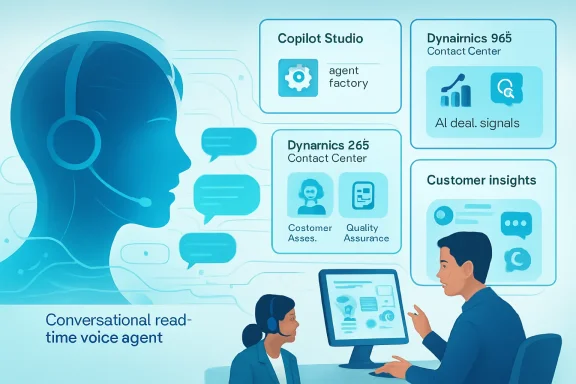
Microsoft’s new contact center model centers on Customer Assist Agent, Quality Assurance Agent, and Service Operations Agent. Together, they are designed to cover the journey from incoming customer intent to resolution, review, and operational improvement. That is a more comprehensive vision than a chatbot bolted onto an existing service desk.
Customer Assist Agent is generally available and handles high-volume requests across voice and digital channels. Quality Assurance Agent is also generally available and evaluates AI and human interactions for sentiment, compliance, quality, and resolution effectiveness. Service Operations Agent is in public preview and is intended to help leaders configure and optimize contact center operations through guided, conversational setup.
The strategic move is clear: Microsoft wants Dynamics 365 Contact Center to become the operational brain of service, not just the interface where agents answer calls. If quality monitoring happens in real time, supervisors can intervene earlier. If operations settings can be tuned conversationally, contact center leaders may be less dependent on specialist administrators for every routing or workflow adjustment.
The contact center package can be understood in four layers:
- Self-service resolution through voice and digital agents
- Human agent assistance when empathy or judgment is required
- Quality monitoring across both AI and human interactions
- Operational governance for routing, configuration, and optimization
The opportunity is substantial because contact centers generate enormous amounts of customer intent data. Historically, much of that data has been buried in transcripts, recordings, case notes, and post-call surveys. Agentic systems can turn that exhaust into operational feedback, but businesses must decide how much autonomy they are willing to grant.
Sales Agents Target the Data Drag Problem
Microsoft’s Dynamics 365 Sales updates focus on a pain point every CRM user knows: sellers do not lack information, they lack usable momentum. Account data sits in emails, meeting notes, spreadsheets, Teams chats, proposals, and CRM fields. The more complex the deal, the more likely it is that the seller spends time maintaining the system instead of moving the relationship forward.
Signal to action
The new sales capabilities include Sales Opportunity Agent, Sales Research Agent with Operations Research, Data Enrichment, Recommended Actions, and Voice to CRM notes. Some are generally available, while others are limited to Premium customers or remain in public preview. The common thread is automation of the tedious middle layer between customer signal and seller action.
Sales Opportunity Agent acts as what Microsoft calls an AI deal brain, synthesizing information from Dynamics 365 and Microsoft 365. That matters because sales activity rarely lives inside CRM alone. The real clues about deal health often appear in meeting cadence, email responsiveness, stakeholder participation, document revisions, and shifting language from the customer.
A practical workflow might look like this:
- A seller finishes a customer meeting and dictates notes into Outlook or a Microsoft 365 mobile app.
- The system extracts relevant updates, such as budget changes, close-date shifts, or new stakeholders.
- Dynamics 365 Sales updates the opportunity record without requiring manual field entry.
- Recommended Actions suggests the next best move for the account.
- Sales leadership sees risk signals before the forecast call, not after the quarter slips.
The most valuable part may be Data Enrichment, because CRM quality has always depended on seller discipline. If agents can keep budget, contacts, close dates, and account details current, sales operations teams may finally get cleaner data without turning sellers into administrators. The danger is that automated updates must be explainable and reversible, especially when forecasts, compensation, and pipeline reviews depend on the data.
Customer Insights Turns Campaigns Into Conversations
The Customer Insights announcement extends Microsoft’s agentic CX story into marketing and customer engagement. Conversational Journeys in Dynamics 365 Customer Insights and Dynamics 365 Contact Center allow teams to design multi-channel journeys that include AI-powered two-way interactions. Microsoft says the capability is already available for phone interactions and is expanding to SMS.
From broadcast to dialogue
Traditional marketing automation often behaves like a scheduler. It sends reminders, offers, renewals, and follow-ups based on segmentation rules, but it does not always handle the customer’s response intelligently. Conversational Journeys point toward a model where the campaign can become a service interaction, a reorder flow, a loyalty moment, or a sales handoff.
That changes the role of marketing teams. Instead of measuring only opens, clicks, and conversions, they may need to measure task completion, sentiment, escalation quality, and downstream revenue. The campaign becomes less like a message blast and more like a guided interaction that can adapt in real time.
This is particularly relevant for industries where customer intent appears in short, direct interactions. A patient might confirm an appointment, a shopper might reorder a product, a policyholder might ask about coverage, or a subscriber might respond to a renewal reminder. If the AI agent can complete the task inside the conversation, the business reduces friction and captures more intent.
The SMS expansion matters because text messaging remains one of the most immediate communication channels. However, it also raises consent, compliance, and fatigue concerns. A conversational agent that is useful will feel convenient; one that is overused will feel invasive.
Potential use cases include:
- Appointment reminders that can reschedule without a call
- Reorder prompts that complete a purchase in conversation
- Loyalty offers tailored to recent service or purchase history
- Case follow-ups that confirm resolution and capture sentiment
- Proactive service alerts that offer next steps before customers ask
Copilot Studio Becomes the Agent Factory
Copilot Studio is the connective tissue in this announcement. Microsoft positions it as the enterprise platform for building, managing, and deploying custom agents. With real-time voice now generally available, Copilot Studio moves beyond text-based bots and workflow copilots into one of the most demanding customer interaction channels.
Governance as a differentiator
The platform strategy matters because enterprises do not want one-off AI demos; they want managed AI systems. Copilot Studio’s value is not just that business users can create agents, but that IT can define controls, connect systems, manage deployment, and apply governance. In regulated sectors, that governance layer may be more important than model fluency.
Microsoft’s approach combines generative AI with structured topic flows and enterprise connectors. That hybrid model is critical. Fully open-ended AI may be flexible, but customer service often requires consistency, auditability, and compliance boundaries. Deterministic flows can keep the agent inside approved processes when the stakes are high.
Copilot Studio also benefits from the broader Microsoft ecosystem. Dynamics 365, Microsoft 365, Power Automate, Microsoft Graph, Azure AI, and security tooling create a dense environment for agents to operate in. For companies already standardized on Microsoft, this reduces integration friction compared with stitching together multiple third-party AI and CRM platforms.
Still, the agent factory concept introduces new governance challenges. If every department can create agents, organizations need standards for naming, testing, monitoring, permissions, escalation, and retirement. Agent sprawl could become the next version of app sprawl.
Enterprise teams should define:
- Ownership models for each production agent
- Escalation rules for ambiguous or high-risk cases
- Testing benchmarks before deployment
- Audit trails for automated decisions
- Data access policies based on role and purpose
- Retirement processes for outdated agents
Enterprise Impact: From Cost Center to Revenue System
For enterprise customers, the most important implication is not simply lower service cost. The bigger opportunity is connecting CX data to revenue, retention, and operational decision-making. If every interaction can teach the organization something about intent, friction, product quality, or churn risk, customer experience becomes a strategic signal system.
Measuring the new CX equation
The old contact center scorecard focused heavily on handle time, abandonment rate, first-contact resolution, and customer satisfaction. Those metrics still matter, but agentic CX adds new questions. Did the AI identify a churn risk? Did it update the account record? Did it trigger a proactive retention offer? Did it route the case to the right specialist before frustration escalated?
For CIOs and chief customer officers, the value proposition is scale without linear headcount growth. Routine, predictable work can be automated while human teams focus on exceptions, empathy, negotiation, and judgment. That is a compelling story in a period when many organizations face flat staffing and rising service expectations.
Sales leaders may see a parallel benefit. Cleaner CRM data and real-time deal signals can improve forecasting, coaching, and territory management. If agents reduce administrative drag, sellers may spend more time in customer conversations and less time reconstructing account history.
Enterprise value will likely depend on these outcomes:
- Reduced repeat contacts through better context carryover
- Higher first-contact resolution for common issues
- Improved CRM completeness without seller burden
- Earlier risk detection in service and sales workflows
- More consistent compliance monitoring across channels
- Faster operational tuning by contact center leaders
The risk is that executives may over-index on cost reduction. Microsoft’s messaging emphasizes freeing teams for higher-value work, but some organizations will inevitably view AI agents as a way to cut staffing. That may produce short-term savings while damaging customer trust if escalation paths are under-resourced.
Consumer Impact: Faster Help, Less Repetition
For consumers, the promise is simple: fewer menus, fewer transfers, fewer repeated explanations. Anyone who has moved from chatbot to phone agent and had to restate the entire problem understands the frustration Microsoft is targeting. A continuous context layer could make support feel less like a maze.
Trust is the real user interface
Natural voice can build confidence when it works well. It can also destroy confidence quickly when latency, misunderstanding, or synthetic overconfidence appears. Customers may forgive a simple chatbot for being limited, but they expect a voice interaction to understand urgency, tone, and nuance.
The most successful deployments will likely be transparent about what the agent can and cannot do. Customers should know when they are speaking with AI, how to reach a human, and whether the conversation affects account records or service decisions. Convenience without clarity will invite backlash.
Real-time language switching could be particularly useful in multilingual households and diverse markets. A customer may begin in English, clarify in Spanish, and expect the system to follow. That kind of flexibility is difficult for traditional IVR and can improve accessibility when implemented responsibly.
Consumers should benefit most in scenarios such as:
- Password resets and account access issues
- Order status and delivery changes
- Billing questions with clear account data
- Appointment scheduling and reminders
- Warranty or policy lookups
- Simple claims or service requests
The more sensitive the issue, the more human oversight matters. A refund dispute, medical concern, legal notice, or financial hardship request may require empathy and discretion beyond automated workflow completion. Microsoft’s own caution that AI-generated insights should be reviewed by qualified personnel is an important reminder.
Competitive Landscape: Microsoft’s Platform Bet
Microsoft is entering a fiercely competitive field. Salesforce, ServiceNow, Google Cloud, Amazon Connect, Genesys, NICE, Zendesk, and numerous AI-native startups are all racing to define the next generation of customer experience automation. The market is not waiting for a single winner; it is fragmenting across CRM, contact center as a service, workflow automation, and model orchestration.
The Microsoft advantage
Microsoft’s advantage is distribution and integration. Many enterprises already live in Teams, Outlook, SharePoint, Azure, Power Platform, and Dynamics 365. An agent that can reason across those systems has a natural foothold, particularly where IT leaders prefer fewer vendors and stronger identity governance.
Dynamics 365 Contact Center also gives Microsoft a clearer story against CCaaS providers. Rather than asking customers to bolt AI onto a separate contact center stack, Microsoft can argue for a unified data and workflow layer. That is attractive for organizations trying to reduce integration complexity.
The challenge is depth. Specialist contact center platforms have years of maturity in routing, workforce engagement, call recording, analytics, compliance workflows, and telephony ecosystems. Microsoft must prove that its AI-first experience does not come at the expense of operational reliability.
Competitive pressure will likely center on:
- Voice quality and latency compared with AI-native rivals
- Contact center maturity versus established CCaaS vendors
- CRM integration depth versus Salesforce and ServiceNow
- Governance controls for regulated enterprises
- Pricing clarity for Premium and consumption-based features
- Partner ecosystem readiness for implementation at scale
The winner may not be the vendor with the flashiest demo. It will be the vendor that can support messy enterprise reality: legacy systems, compliance boundaries, noisy data, multilingual customers, unionized workforces, and executives demanding measurable ROI.
Implementation Playbook
The biggest mistake organizations can make is treating agentic CX as a switch to flip. These systems touch customer trust, employee workflows, regulated data, and brand reputation. A careful rollout should start with constrained, high-volume use cases before expanding into complex journeys.
Start narrow, then connect
A good first deployment might be a predictable service scenario with clear success criteria. Examples include order status, appointment changes, account verification, warranty eligibility, or subscription renewal. These interactions have enough volume to matter but enough structure to govern.
Once the first use case works, organizations can connect it to adjacent workflows. A service interaction might trigger a retention offer. A sales conversation might update CRM fields. A marketing journey might become a support case. The goal is not to automate everything at once, but to build an expanding loop of context and action.
A practical rollout sequence should include:
- Identify the highest-volume customer intents with low regulatory complexity.
- Map the current journey, including handoffs and failure points.
- Define what the AI agent may do, suggest, update, and escalate.
- Connect only the systems required for that first use case.
- Test with real transcripts, accents, background noise, and edge cases.
- Launch with human supervision and clear fallback paths.
- Review quality, compliance, sentiment, and resolution data weekly.
IT and business teams must work together from the beginning. CX leaders understand pain points, but IT understands identity, permissions, integration, and data protection. Legal and compliance teams should be involved before production, not after a problematic interaction becomes discoverable evidence.
Implementation teams should prepare:
- Approved knowledge sources for agent responses
- Fallback messages when confidence is low
- Human handoff rules based on risk and sentiment
- Monitoring dashboards for quality and safety
- Change management plans for frontline employees
- Customer disclosure language for AI interactions
Employee Experience and Workforce Change
Microsoft’s messaging emphasizes that agents are not meant to replace customer teams, but to remove drudgery and help employees focus on higher-value work. That is the right framing, but employees will judge the technology by how it changes their day. If AI becomes another monitoring tool without reducing workload, adoption will suffer.
Coaching, not just surveillance
Quality Assurance Agent is especially sensitive because it evaluates both AI and human interactions. Real-time quality tracking can help supervisors intervene earlier and coach more effectively. It can also feel punitive if employees believe every phrase, pause, and sentiment score is being used against them.
The best contact centers will use AI evaluation to identify training needs, process defects, and knowledge gaps. If many agents struggle with the same issue, the problem may be the policy or workflow, not the worker. AI can surface patterns, but managers must interpret them with context.
Sales teams face a different adoption hurdle. Sellers often resist CRM tools because they feel like management systems rather than selling systems. Voice to CRM notes and automated enrichment could win support if they genuinely reduce manual entry and improve follow-up quality.
Workforce success will depend on:
- Clear communication about what AI monitors and why
- Employee feedback loops before and after deployment
- Training programs for working alongside AI agents
- Manager coaching standards that prevent misuse of metrics
- Recognition of human skills such as empathy and negotiation
- Workflow redesign so automation actually removes tasks
The cultural shift may be larger than the technical one. Organizations must redefine what good performance looks like when AI handles routine steps. Human employees may become exception managers, relationship builders, escalation specialists, and judgment providers.
Data, Compliance, and Responsible AI
Agentic CX systems are powerful because they act on data, but that is also what makes them risky. A customer-facing agent may access CRM records, order histories, policy documents, call transcripts, payment status, and identity signals. Every additional connection increases both usefulness and exposure.
Control the blast radius
The principle of least privilege should guide every deployment. An agent that handles appointment reminders does not need access to full financial history. A sales research agent does not need permission to alter contractual terms. Granular permissions are not bureaucracy; they are how enterprises prevent AI mistakes from becoming operational incidents.
Voice adds another layer of complexity. Audio data, transcripts, sentiment analysis, and identity verification workflows may be subject to different rules depending on geography and industry. Organizations operating across borders must pay close attention to data residency and cross-geo processing.
Responsible AI also requires testing against real-world messiness. Customers interrupt, mumble, change topics, speak with accents, call from noisy environments, and express frustration indirectly. A polished lab demo is not enough.
Responsible deployment should require:
- Data minimization for every agent workflow
- Human review for high-impact decisions
- Explainability logs for recommendations and updates
- Consent and disclosure for AI-driven interactions
- Bias and language testing across customer populations
- Incident response plans for unsafe or incorrect outputs
Microsoft’s inclusion of preview disclaimers and review warnings is not boilerplate. It is a signal that agentic CX remains an evolving category. Enterprises should treat these systems as operational AI, not as ordinary software features.
Strengths and Opportunities
Microsoft’s announcement is strongest where it connects customer-facing AI to the systems employees already use. The value is not just a smarter bot, but a more continuous operating model across service, sales, and marketing. For Microsoft-centric enterprises, the opportunity is to turn Dynamics 365 and Copilot Studio into a shared AI layer for customer growth.
- Real-time voice agents could finally modernize IVR experiences that customers have disliked for decades.
- Context carryover can reduce repetition when customers move from self-service to human support.
- Dynamics 365 integration gives agents access to CRM workflows rather than leaving them trapped in chat windows.
- Sales automation can improve CRM quality while reducing seller administration.
- Conversational Journeys can turn marketing outreach into task completion, not just engagement.
- Quality Assurance Agent can create faster coaching loops and more consistent compliance oversight.
- Copilot Studio governance gives IT a central platform for building and managing enterprise agents.
Risks and Concerns
The risks are equally real because agentic customer experience touches live customers, regulated data, employee performance, and brand trust. The technology will be judged less by its best demo and more by its worst escalation. Microsoft and its customers must prove that automation can improve experience without making support feel colder, more opaque, or harder to escape.
- Regional limitations may slow global deployment, especially for organizations with strict data boundary requirements.
- AI hallucinations in customer-facing interactions could create compliance, financial, or reputational harm.
- Agent sprawl may occur if departments build overlapping agents without governance.
- Over-automation could frustrate customers who need immediate human empathy or discretion.
- Pricing and licensing complexity may complicate ROI calculations for Premium capabilities.
- Employee mistrust could grow if quality analytics are used punitively rather than constructively.
- Integration debt may limit results for companies with fragmented CRM, telephony, and knowledge systems.
Looking Ahead
The next phase of agentic CX will be about proof, not promise. Enterprises will want evidence that real-time voice agents can handle noisy environments, diverse accents, complex authentication flows, and emotionally charged conversations. They will also want to know whether these systems reduce total cost while improving satisfaction, retention, and revenue outcomes.
Microsoft’s broader advantage is that it can connect agentic CX to productivity and business process tools beyond the contact center. A service issue can become a Teams escalation, a CRM update, a Power Automate workflow, a sales risk signal, or a Customer Insights journey. That cross-application reach is where Microsoft can differentiate, provided the experience remains coherent.
What to watch next:
- Global availability for real-time voice models and clearer data residency options
- Preview-to-GA timelines for Recommended Actions, Voice to CRM notes, and Service Operations Agent
- Customer case studies showing measurable ROI beyond pilot deployments
- Partner implementation patterns for regulated industries and multilingual contact centers
- Competitive responses from Salesforce, ServiceNow, Genesys, NICE, Google, and Amazon
The direction is unmistakable: customer experience software is moving from passive recordkeeping to active orchestration. Microsoft’s latest Dynamics 365 and Copilot Studio updates bring that future closer by putting voice, sales signals, quality monitoring, and conversational journeys under one agentic umbrella. The companies that benefit most will not be those that simply deploy the newest AI feature, but those that redesign customer journeys around trust, context, governance, and human judgment. If Microsoft can deliver reliability at enterprise scale, agentic CX may become one of the clearest business cases yet for AI in everyday operations.