

Microsoft’s Service Agent for Dynamics 365 Customer Service is now generally available, moving Copilot beyond case summaries and drafted replies into actions such as updating, assigning, and closing cases directly from a conversation. The agent runs across Copilot Service workspace, Microsoft 365 Copilot, Outlook, and other supported Microsoft 365 experiences, carrying service context closer to wherever representatives are working.
Detailed in a July 15 Microsoft Dynamics 365 blog post and updated Microsoft Learn documentation, Service Agent combines Dynamics 365 data with Microsoft 365 context rather than confining assistance to the CRM pane. Microsoft says the general-availability release is powered by a service-specific Model Context Protocol server offering more than 90 MCP tools and MCP-based apps.
That expansion changes the practical question for IT departments. Service Agent is no longer just another text-generation feature to enable; it is an action layer that administrators must license, provision, permission, and monitor.
Existing Copilot features in Dynamics 365 Customer Service are primarily designed to help representatives understand information already in the system. They can summarize cases and conversations, search knowledge, draft emails, suggest responses, and surface insights during customer interactions.
Service Agent retains those capabilities but can also perform supported tasks across the resolution workflow. A representative can ask it to retrieve a case, update its fields, add notes, reassign it, select work from a queue, or close the record. Microsoft also lists a combined “resolve and pick next” action intended to reduce the administrative gap between finishing one case and starting another.
The available tools cover several parts of service operations:
The distinction matters because much of customer-service overhead occurs after the substantive interaction. Case status, notes, assignments, follow-up activities, and resolution fields still need to be maintained even when an employee already knows the answer. Bringing those actions into Copilot could improve case hygiene, although the result will depend on whether organizations configure their forms, queues, permissions, and business processes cleanly enough for the agent to use them reliably.
In Outlook, for example, Service Agent can use the open email thread as context. A representative could review the customer’s message, retrieve the associated Dynamics 365 record, prepare a response, and update the case without reconstructing the situation manually in each application.
Microsoft says chat history and context can carry across supported applications. The aim is to make Service Agent a consistent service identity rather than a separate assistant that starts over whenever the user moves from Dynamics 365 to Outlook or Microsoft 365 Copilot.
That continuity is potentially more important than any single generative AI feature. Customer-service information is often fragmented across CRM records, messages, files, meeting notes, and internal conversations. Giving Copilot permission-aware access to those sources can reduce searching and application switching, particularly for complex cases with several handoffs.
It also increases the importance of existing access controls. Copilot does not make weak permissions harmless. Organizations should review who can access customer records, mail, knowledge repositories, and collaboration content before enabling a tool designed to retrieve and combine that information conversationally.
Administrators can enable individual tools and make availability dependent on user roles. Microsoft also supports customization of the MCP app presented inside chat experiences, giving organizations a way to tailor the agent to specific service processes rather than exposing every capability to every employee.
Those controls should be central to deployment. Retrieving a case summary is a lower-risk operation than sending an email, reassigning a high-priority incident, changing an SLA-related field, or closing a record. A broad rollout that treats all tools identically could give employees more conversational authority than their service role requires.
Microsoft says further human-in-the-loop controls, approvals, and policy-aware execution are on the roadmap. That wording suggests some of the guardrails needed for higher-risk automation are still developing. Organizations operating in regulated sectors should therefore distinguish between tools that read or draft information and tools that commit changes or communicate externally.
A cautious configuration might initially permit representatives to search, summarize, draft, and add internal notes while reserving case closure, reassignment, and outbound sending for narrower roles. Because Microsoft provides per-role, per-app-module, and per-queue controls, teams can run Service Agent alongside existing Copilot experiences instead of forcing an immediate cutover.
Provisioning crosses Microsoft 365 and Dynamics 365 administration. Microsoft’s setup documentation instructs a Microsoft 365 administrator to install and enable the Service in Microsoft 365 Copilot app, after which the Dynamics 365 administrator connects the Microsoft 365 Copilot application to the relevant environment. Appropriate Copilot features and experience profiles must also be enabled for the intended representatives.
That division may require coordination among Microsoft 365, Power Platform, Dynamics 365, Teams, and security administrators. Enterprises should also verify geographic availability and data-movement settings, particularly when Azure OpenAI capacity or Dynamics 365 processing could occur outside the tenant’s configured region.
A controlled pilot should test more than response quality. Administrators need to confirm which records the agent can retrieve, which actions are exposed to each role, how updates appear in auditing, whether email sending is appropriately constrained, and what happens when a user’s Microsoft 365 and Dynamics 365 permissions differ.
Microsoft lists mobile support in the Microsoft 365 Copilot app, more proactive service prompts, stronger guardrails, and additional MCP tools as future investment areas rather than current guarantees. For now, the immediate milestone is a governed general-availability rollout: enable Service Agent for a limited queue, expose only the tools needed for that workflow, and validate every write action before expanding it across the service organization.
Detailed in a July 15 Microsoft Dynamics 365 blog post and updated Microsoft Learn documentation, Service Agent combines Dynamics 365 data with Microsoft 365 context rather than confining assistance to the CRM pane. Microsoft says the general-availability release is powered by a service-specific Model Context Protocol server offering more than 90 MCP tools and MCP-based apps.
That expansion changes the practical question for IT departments. Service Agent is no longer just another text-generation feature to enable; it is an action layer that administrators must license, provision, permission, and monitor.
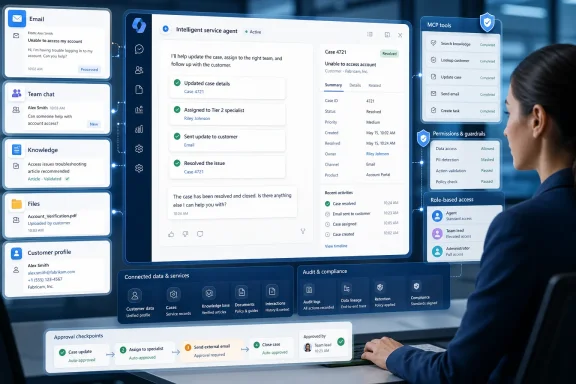 Copilot Can Now Change the Case, Not Just Explain It
Existing Copilot features in Dynamics 365 Customer Service are primarily designed to help representatives understand information already in the system. They can summarize cases and conversations, search knowledge, draft emails, suggest responses, and surface insights during customer interactions.Service Agent retains those capabilities but can also perform supported tasks across the resolution workflow. A representative can ask it to retrieve a case, update its fields, add notes, reassign it, select work from a queue, or close the record. Microsoft also lists a combined “resolve and pick next” action intended to reduce the administrative gap between finishing one case and starting another.
The available tools cover several parts of service operations:
- Service Agent can create cases from email, enrich records, find matching cases, and manage assignments.
- It can summarize accounts, contacts, customer interactions, timelines, and service activities.
- It can search knowledge, generate grounded answers, draft knowledge articles, and filter content by category.
- It can view, draft, and send email, apply templates, change tone, translate text, insert knowledge content, and add signatures.
- It can surface next-best actions, follow-up cadence, evaluation results, coaching recommendations, SLA information, and queue conditions.
- It can work with uploaded files and images, generate charts from service data, and create Word, Excel, and PowerPoint files.
The distinction matters because much of customer-service overhead occurs after the substantive interaction. Case status, notes, assignments, follow-up activities, and resolution fields still need to be maintained even when an employee already knows the answer. Bringing those actions into Copilot could improve case hygiene, although the result will depend on whether organizations configure their forms, queues, permissions, and business processes cleanly enough for the agent to use them reliably.
Microsoft Graph Broadens the Agent’s View
Service Agent is grounded in Dataverse, but it can also use Microsoft 365 context through Microsoft Graph and Microsoft’s Work IQ layer. That lets the agent connect a Dynamics 365 case with relevant information from an Outlook email thread, Teams collaboration, SharePoint knowledge, and other permitted Microsoft 365 sources.In Outlook, for example, Service Agent can use the open email thread as context. A representative could review the customer’s message, retrieve the associated Dynamics 365 record, prepare a response, and update the case without reconstructing the situation manually in each application.
Microsoft says chat history and context can carry across supported applications. The aim is to make Service Agent a consistent service identity rather than a separate assistant that starts over whenever the user moves from Dynamics 365 to Outlook or Microsoft 365 Copilot.
That continuity is potentially more important than any single generative AI feature. Customer-service information is often fragmented across CRM records, messages, files, meeting notes, and internal conversations. Giving Copilot permission-aware access to those sources can reduce searching and application switching, particularly for complex cases with several handoffs.
It also increases the importance of existing access controls. Copilot does not make weak permissions harmless. Organizations should review who can access customer records, mail, knowledge repositories, and collaboration content before enabling a tool designed to retrieve and combine that information conversationally.
MCP Turns Extensibility Into a Governance Decision
Model Context Protocol provides the tool interface behind much of Service Agent’s new ability to act. Microsoft is shipping a catalog of service-oriented MCP tools, while also allowing organizations to connect their own MCP tools and Copilot Studio agents.Administrators can enable individual tools and make availability dependent on user roles. Microsoft also supports customization of the MCP app presented inside chat experiences, giving organizations a way to tailor the agent to specific service processes rather than exposing every capability to every employee.
Those controls should be central to deployment. Retrieving a case summary is a lower-risk operation than sending an email, reassigning a high-priority incident, changing an SLA-related field, or closing a record. A broad rollout that treats all tools identically could give employees more conversational authority than their service role requires.
Microsoft says further human-in-the-loop controls, approvals, and policy-aware execution are on the roadmap. That wording suggests some of the guardrails needed for higher-risk automation are still developing. Organizations operating in regulated sectors should therefore distinguish between tools that read or draft information and tools that commit changes or communicate externally.
A cautious configuration might initially permit representatives to search, summarize, draft, and add internal notes while reserving case closure, reassignment, and outbound sending for narrower roles. Because Microsoft provides per-role, per-app-module, and per-queue controls, teams can run Service Agent alongside existing Copilot experiences instead of forcing an immediate cutover.
Licensing and Provisioning Require Two Admin Planes
Access to Dynamics 365 service data and workflows requires a Dynamics 365 Customer Service Enterprise or Premium license. Microsoft says a Microsoft 365 Copilot license unlocks the integrated experience spanning case context, Microsoft 365 information, and AI-driven actions, while premium tools can consume Copilot Credits.Provisioning crosses Microsoft 365 and Dynamics 365 administration. Microsoft’s setup documentation instructs a Microsoft 365 administrator to install and enable the Service in Microsoft 365 Copilot app, after which the Dynamics 365 administrator connects the Microsoft 365 Copilot application to the relevant environment. Appropriate Copilot features and experience profiles must also be enabled for the intended representatives.
That division may require coordination among Microsoft 365, Power Platform, Dynamics 365, Teams, and security administrators. Enterprises should also verify geographic availability and data-movement settings, particularly when Azure OpenAI capacity or Dynamics 365 processing could occur outside the tenant’s configured region.
A controlled pilot should test more than response quality. Administrators need to confirm which records the agent can retrieve, which actions are exposed to each role, how updates appear in auditing, whether email sending is appropriately constrained, and what happens when a user’s Microsoft 365 and Dynamics 365 permissions differ.
Microsoft lists mobile support in the Microsoft 365 Copilot app, more proactive service prompts, stronger guardrails, and additional MCP tools as future investment areas rather than current guarantees. For now, the immediate milestone is a governed general-availability rollout: enable Service Agent for a limited queue, expose only the tools needed for that workflow, and validate every write action before expanding it across the service organization.
References
- Primary source: Microsoft
Published: 2026-07-15T15:00:00+00:00
Service Agent in Microsoft 365 Copilot: What's New for Dynamics 365
Discover how Service Agent in Microsoft 365 Copilot helps Dynamics 365 Customer Service teams resolve cases faster with MCP tools, workflow automation, and AI-powered actions.www.microsoft.com - Official source: learn.microsoft.com
Improve customer outcomes with Service Agent in Microsoft 365 Copilot | Microsoft Learn
Enable users to leverage Service Agent in Dynamics 365 Customer Service and in the standalone Microsoft 365 Copilot application.learn.microsoft.com
