Microsoft Wants the Supervisor to Become the AI-Era Operator
For years, the contact center supervisor’s job was framed around queues, schedules, escalations, and scorecards. That was already harder than it sounded, because every one of those words hid a different system, a different report, and a different version of the truth. AI does not simplify that world by default; it multiplies the number of decisions that must be made in the moment.
The new pressure is obvious. A supervisor now has to know whether a customer should remain with an AI agent, whether a human representative needs help before a conversation goes sideways, whether demand is shifting from voice to chat, and whether the day’s staffing plan still matches reality. These are not quarterly transformation questions. They are minute-by-minute operating questions.
That is why Microsoft’s Dynamics 365 announcement matters beyond the usual product-update churn. The company is trying to define the customer experience leader as an operator of a blended human-and-agent system. In that model, AI is not a feature sitting beside the contact center. It becomes another class of labor to be planned, measured, coached, and governed.
The risk, of course, is that the language gets grander than the implementation. Enterprise software vendors have a long history of promising unified experience while leaving customers with migration projects, licensing complexity, and integration work. But Microsoft is at least pointing at the right problem: the constraint is no longer whether AI can answer a question, but whether the organization can absorb AI into the way service actually runs.
The Work Trend Index Becomes a Sales Argument for Rewiring Operations
Microsoft’s 2026 Work Trend Index supplies the framing. Its central claim is that many employees have gained capacity through AI faster than their organizations have changed to support that capacity. The bottleneck, in other words, is not simply human resistance or lack of tools. It is the operating model.
That distinction is important for customer service. A service rep with Copilot help may answer faster, summarize better, or find knowledge more easily. But if scheduling still depends on stale forecasts, if quality review happens days later, and if supervisors have to reconcile five dashboards to understand live demand, the productivity gain leaks out of the system.
Microsoft has been using the phrase Frontier Firm to describe organizations that redesign work around AI rather than sprinkling copilots over existing processes. In customer experience, that concept becomes concrete very quickly. The contact center is where organizational design collides with customers who are already irritated, confused, or pressed for time.
This is also where the rhetoric of AI transformation faces a brutal test. A bad AI summary is annoying. A mishandled service escalation can lose a customer, trigger a compliance problem, or damage a brand in a public channel. The contact center is not a sandbox for abstract productivity theory; it is a live production environment for trust.
Dynamics 365’s new capabilities should be read through that lens. Microsoft is not just announcing workforce management features, coaching prompts, and wallboards. It is arguing that the customer experience stack has to become a feedback loop.
Workforce Engagement Management Moves From Sidecar to System Layer
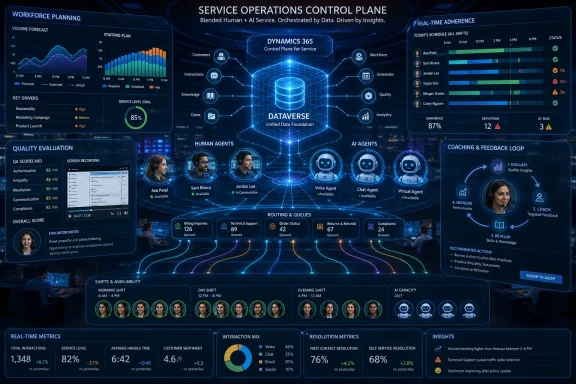
The most consequential part of the announcement may be the least flashy: Dynamics 365 now includes a broader set of workforce engagement management capabilities inside the customer service and contact center experience. That includes forecasting, scheduling, adherence, intraday shift swapping, bidding, and time recording. In plain English, Microsoft wants the staffing and performance machinery of the contact center to stop living off to the side.
That matters because workforce management has always been where idealized customer experience strategies meet arithmetic. Demand arrives unevenly. Customers choose different channels at different times. Some issues need humans, some can be deflected, and some should never have been deflected in the first place. If the planning system does not understand the interaction data, staffing becomes a lagging guess.
Microsoft’s argument is that workforce planning should be grounded in the same customer and case data that powers the interaction itself. Instead of importing demand signals into a separate planning tool, Dynamics 365 is meant to use conversations, email, cases, and channel activity as direct inputs. That is the closed-loop dream: real demand informs forecasts, forecasts shape staffing, live conditions change execution, and operational outcomes feed the next plan.
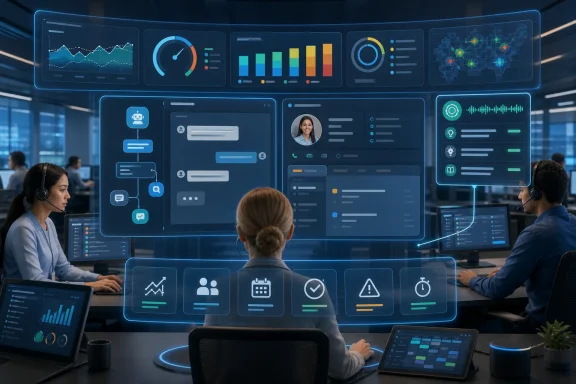
For supervisors, the attraction is not hard to understand. A single operating picture reduces the time spent reconciling reports and increases the time available for judgment. If the system can show that chat demand is spiking, voice abandonment is rising, and AI containment is dropping in a particular issue category, the supervisor has a fighting chance to act before the end-of-day report confirms what customers already felt.
For employees, the promise is more ambiguous but potentially meaningful. Better forecasting and more responsive scheduling can reduce the grind of badly balanced workloads. Real-time adherence and monitoring, however, can also feel like another layer of surveillance if implemented without trust, transparency, and humane policy. The technology can support better work; it can also make bad management more efficient.
The Blended Workforce Is a Management Problem, Not a Bot Demo
The phrase “blended workforce” is doing a lot of work here. It suggests a future in which human representatives and AI agents are coordinated as parts of the same service operation. That is more sophisticated than the old chatbot narrative, where automation was mostly sold as a way to absorb repetitive volume and lower costs.
But a blended workforce is not automatically a better workforce. If AI agents take the easy interactions and leave humans with only the messy, emotional, high-stakes cases, then the job of the human rep becomes harder even as average handle time statistics improve somewhere else. If AI agents handle too much without enough escalation discipline, customer frustration rises. If supervisors lack visibility into both human and AI performance, accountability becomes foggy.
This is where embedded workforce engagement management becomes strategically important. Planning the human workforce without understanding AI behavior is increasingly unrealistic. The number of human reps needed on a Tuesday afternoon depends partly on how well AI agents are handling billing questions, password resets, order status inquiries, or troubleshooting flows. It also depends on when those agents fail.
Microsoft’s platform thesis is that AI and human labor should be managed against a shared operational context. That does not mean treating people like bots. It means acknowledging that service capacity now includes multiple kinds of actors, and that the customer does not care which internal category failed. The experience either worked or it did not.
The hard part will be governance. Organizations will need to decide which interactions AI can own, which require human handoff, and which require supervisory intervention. They will also need to audit those choices continuously, because customer behavior, product complexity, and regulatory expectations do not stand still.
Real-Time Coaching Turns Quality From Autopsy Into Intervention
The second major piece of the announcement is real-time coaching through the Quality Assurance Agent in Dynamics 365 Contact Center. Microsoft says the capability is generally available and aligned with the supervisor role. The important shift is from reviewing interactions after they end to assessing and guiding them while they are still happening.
Traditional quality assurance in contact centers has often been retrospective. A sample of calls or chats is reviewed, scored, discussed, and converted into coaching later. That process can improve training, but it rarely saves the interaction that exposed the problem. By the time the coaching lands, the customer may already have churned, escalated, complained, or simply decided the company is not worth another attempt.
Real-time evaluation changes the tempo. Microsoft describes a system that can score conversations against configurable criteria such as communication, empathy, compliance, and effectiveness. Supervisors can then see quality signals at aggregate and individual conversation levels. The goal is to identify quality gaps while they are emerging, not after the transcript becomes training material.
The coaching nudge is the sharper edge of this capability. A representative might receive a prompt to clarify next steps, acknowledge frustration, or address a compliance risk. In the best case, this is a useful whisper in the agent’s ear at exactly the right moment. In the worst case, it becomes Clippy for emotionally complex labor.
The difference will depend on design and restraint. Coaching prompts must be specific enough to help, sparse enough not to distract, and governed enough not to create robotic interactions. Nobody wants a service rep mechanically performing empathy because an AI meter dipped below threshold.
Human-in-the-Loop Is the New Compliance Theater Unless Supervisors Have Real Control
Microsoft is careful to describe the model as human-in-the-loop. Supervisors define rules, thresholds, and playbooks for how AI coaching is delivered. They maintain visibility and control over how AI is applied. That language is necessary, but it is not sufficient.
In enterprise AI, “human-in-the-loop” can mean anything from meaningful authority to a checkbox on a governance slide. The practical question is whether supervisors can actually tune the system, override it, understand why it flagged an interaction, and defend the resulting action to employees, customers, auditors, and executives. If they cannot, then the human is not in the loop; the human is in the blast radius.
Contact centers are especially sensitive because they sit at the intersection of labor monitoring, customer privacy, and regulatory risk. Real-time analysis of conversations may involve sensitive personal information, financial details, health-adjacent data, or emotionally charged disputes. Even when the AI is being used to improve service, the organization must be able to explain what is being evaluated and why.
This is where Microsoft’s broader enterprise posture helps. Dynamics 365 already lives in environments where identity, permissions, auditability, and compliance expectations matter. But customers should not mistake platform maturity for automatic governance. Administrators will still need policies for retention, access, scoring criteria, employee notification, escalation, and review.
The deeper issue is cultural. If quality scoring becomes a punitive scoreboard, employees will learn to game it. If coaching becomes a real-time support mechanism, it could improve both customer outcomes and employee confidence. The same feature can produce very different workplaces.
AI Agents Are Expanding From Conversation to Operations
Microsoft’s June announcement builds on its April introduction of three coordinated AI agents for Dynamics 365 Contact Center: Customer Assist Agent, Quality Assurance Agent, and Service Operations Agent. The pattern is revealing. Microsoft is not trying to sell a single conversational agent as the whole product. It is decomposing the contact center into engagement, quality, and operations.
Customer Assist Agent handles frontline interactions across voice and digital channels, including escalation to human representatives. Quality Assurance Agent evaluates and coaches interactions. Service Operations Agent focuses on setup, configuration, and ongoing optimization. Together, they represent Microsoft’s answer to what it calls Agentic CX.
That phrase will make some readers wince, and fairly so. The enterprise software industry has never met a noun it could not turn into a strategy deck. But beneath the branding is a real architectural shift. AI agents are moving from customer-facing chat boxes into the operational control surfaces that determine how service is delivered.
The most interesting agent may not be the one talking to customers. It may be the one helping supervisors understand whether the operation is working. In a large service organization, the costliest failures are often not single bad answers but systemic drift: a knowledge article goes stale, a routing rule misfires, an automation path traps customers, or staffing assumptions lag behind a product issue. AI that can detect and surface those patterns may be more valuable than AI that resolves another password reset.
Still, organizations should be skeptical of any implication that agents remove operational responsibility. They redistribute it. Someone must decide what the AI is allowed to do, how it is measured, when it escalates, and who is accountable when it performs confidently but incorrectly.
Wallboards Are Boring Until the Room Needs a Shared Reality
The third announcement, real-time wallboards, sounds almost quaint next to autonomous agents and AI coaching. Wallboards are old contact center furniture: big displays showing service levels, backlog, wait times, and performance metrics. Yet their persistence says something important. In operations, shared visibility still matters.
Microsoft is introducing ticker-style wallboards for Dynamics 365 Contact Center so supervisors can track metrics as conditions change. The stated goal is immediate insight into service levels, backlog, and performance without manual monitoring and status checks. That may sound incremental, but it completes the operational story Microsoft is trying to tell.
If workforce engagement management plans the day and real-time coaching shapes individual interactions, wallboards help the team see the state of the system. They create a common reference point. When volume spikes or service levels slip, the organization does not have to wait for someone to export a report or call a huddle based on intuition.
The question is whether wallboards become smarter or merely prettier. A display full of raw metrics can create panic without insight. A useful wallboard should distinguish between noise and signal, show the relationship between channels, and make visible the consequences of AI behavior. If an AI agent is resolving more interactions but human escalations are becoming longer and more complex, the wallboard should help supervisors see the tradeoff.
This is where Microsoft’s single-data-model argument becomes important again. Real-time dashboards are only as good as the data behind them. If the platform can connect customer interactions, AI agent behavior, human staffing, quality scores, and case outcomes, the wallboard becomes more than a scoreboard. It becomes an operating instrument.
The Fragmentation Tax Is the Enemy Microsoft Knows How to Sell Against
The recurring villain in Microsoft’s announcement is fragmentation. Supervisors work across disconnected systems for routing, quality, workforce planning, analytics, AI configuration, and case management. Each tool may be defensible on its own. Together, they produce delay, duplicate work, and uncertainty.
Microsoft is very good at selling against that pain. The company’s enterprise advantage has always been less about the elegance of any single application and more about the power of adjacency. Dynamics 365, Microsoft 365, Teams, Copilot, Azure, Power Platform, and identity infrastructure form a gravitational field. The more pieces a customer already uses, the stronger the argument for keeping new workflows inside the Microsoft estate.
For customer experience leaders, that can be appealing. A unified platform promises fewer integrations, fewer swivel-chair workflows, and fewer arguments over whose report is correct. It also promises a cleaner path for AI because the model has access to richer context and the actions it recommends can happen inside the same system.
But platform consolidation has a cost. Buyers should ask whether Microsoft’s native capabilities match best-of-breed tools in the areas that matter most to them. Workforce engagement management, quality management, and contact center analytics are mature categories with specialized vendors and deep feature sets. Microsoft does not need to beat every specialist feature-for-feature to win. It needs to convince customers that integration and AI-native workflow outweigh the advantages of separate systems.
That is a plausible argument, but not a universal one. A highly regulated enterprise with specialized workforce rules may need more configurability than a unified suite provides. A digital-native company with a heavily customized service stack may prefer composable tooling. A Microsoft-centric organization drowning in integration overhead may see Dynamics 365 as the obvious path.
The Employee Experience Stakes Are Bigger Than the Demo
One of the more interesting claims in Microsoft’s announcement is that embedded workforce engagement management can improve employee experience through clearer expectations, more balanced workloads, responsive scheduling, and real-time coaching. That is not just feel-good language. Contact center attrition, burnout, and emotional labor are persistent operational problems.
AI could help. If automation removes repetitive work, if forecasting better matches staffing to demand, and if coaching arrives in the moment rather than as delayed criticism, service jobs could become less chaotic. A representative who has better knowledge, clearer guidance, and fewer overloaded shifts may deliver better customer outcomes because the work itself is less punishing.
AI could also hurt. If automation strips away routine interactions and leaves humans with a constant stream of angry escalations, the human job becomes more stressful. If real-time quality scoring turns every conversation into an invisible exam, coaching may feel like surveillance. If scheduling optimization is designed only for service levels and cost, employees may experience “responsive scheduling” as instability.
The difference is not in the software alone. It is in the operating model. Microsoft’s announcement gives leaders more tools to observe, plan, and intervene. It does not guarantee they will use those tools wisely.
This is the part of AI transformation that executives often underplay. Contact center representatives will know very quickly whether AI is there to help them serve customers or to squeeze them harder. Customers will know whether AI is making service smoother or trapping them in polished dead ends. Supervisors will know whether the platform reduces complexity or simply centralizes it.
Dynamics 365 Is Becoming Microsoft’s Test Case for Enterprise Agent Management
Dynamics 365 Contact Center is a useful place to watch Microsoft’s broader AI strategy because the contact center forces abstractions into measurable outcomes. Did the customer get an answer? Did the case resolve? Did the escalation happen at the right time? Did the employee follow policy? Did the organization staff correctly?
That makes it different from many knowledge-work AI deployments, where success can be fuzzy. A better draft, a faster summary, or a more convenient search experience may matter, but measurement is often indirect. Customer service has harder edges. It has queues, service levels, handle times, satisfaction scores, compliance obligations, and renewal consequences.
If Microsoft can make AI agents useful in this environment, it strengthens the case for agents elsewhere in the enterprise. The same pattern could apply to sales operations, finance operations, field service, HR service delivery, and IT support. The agent is not just a helper. It becomes part of a managed workflow with planning, evaluation, escalation, and feedback.
That explains why workforce engagement management is so central. Agentic AI without workforce planning is a demo. Agentic AI with workforce planning starts to look like an operating system for business functions. It gives executives a way to think about capacity across humans and software agents together.
The unanswered question is how portable that model will be. Contact centers are structured environments with established metrics and repeatable interaction patterns. Other functions are messier. Microsoft may find that the contact center is both the perfect showcase and the easiest case.
The Buying Decision Is Really About Control
The practical decision for organizations is not whether AI belongs in customer experience. That argument is mostly over. The real decision is where control should live.
If AI is purchased as a collection of point solutions, leaders may get rapid experimentation but fragmented oversight. If AI is embedded inside a platform like Dynamics 365, leaders may get unified data and governance but become more dependent on one vendor’s roadmap. Neither option is inherently right. The right answer depends on the organization’s complexity, risk tolerance, existing Microsoft footprint, and appetite for integration work.
Microsoft’s advantage is that many organizations already live in its ecosystem. Dynamics 365 can connect naturally with Microsoft 365 Copilot, Teams, Power Platform, Azure services, and Entra identity. That gives Microsoft a distribution and integration story that few rivals can match. It also lets the company frame AI not as a new island but as an extension of work employees already do.
The danger is lock-in by convenience. Once workforce planning, contact center operations, AI coaching, wallboards, knowledge, case management, and productivity workflows converge inside one vendor stack, switching becomes harder. For some buyers, that is an acceptable trade for operational coherence. For others, it is a strategic risk.
IT leaders should therefore evaluate these capabilities with two questions in mind. First, does the platform give supervisors better control over real customer experience, or does it simply produce more metrics? Second, does it preserve enough transparency and interoperability for the organization to govern AI on its own terms?
Microsoft’s Customer Experience Bet Comes Down to Five Operational Claims
The announcement is broad, but the concrete implications are fairly easy to isolate. Microsoft is arguing that customer experience leadership is becoming a live operational discipline built around shared data, governed AI, and continuous feedback.
- Dynamics 365 is moving workforce engagement management into the same operational environment as customer service and contact center work.
- Microsoft is positioning supervisors as managers of both human representatives and AI agents, not merely as queue monitors or after-the-fact reviewers.
- Quality Assurance Agent’s real-time coaching turns quality management into an in-session intervention rather than a retrospective scoring exercise.
- Real-time wallboards are meant to give teams a shared view of service levels, backlog, and performance as conditions change.
- The biggest promise is reduced fragmentation, but the biggest risk is replacing a messy multi-vendor stack with a deeply centralized Microsoft dependency.
The most important word in Microsoft’s announcement is not “AI.” It is “operating.” Customer experience leaders are being asked to run systems that sense, decide, coach, escalate, and learn in real time. Dynamics 365 is Microsoft’s bid to become that system of control. Whether customers experience that as clarity or captivity will depend on how well organizations govern the tools, how honestly they measure outcomes, and how carefully they remember that the blended workforce still includes human beings on both sides of the conversation.
References
- Customer experience leadership in the age of AI: A new operating model with Dynamics 365 Microsoft · 2026-06-22T15:50:19.997130
- Workforce engagement management in Dynamics 365 Microsoft · 2026-06-22T15:42:07.173819
- news.microsoft.com news.microsoft.com