

Verdict: most Windows users should keep a known-good Eden build for now and wait for the project’s self-hosted release and update process to establish a dependable track record. Move immediately only if a newer build fixes a problem you actually have, and obtain it by navigating from Eden’s official project site to its self-hosted infrastructure—not from search results, mirrors, or reposted binaries.
The emulator itself has not simply disappeared. What changed is its distribution path: Nintendo DMCA notices affected GitHub-hosted repositories for Eden and other Nintendo Switch emulators in February 2026, after which an Eden developer said future releases and nightly builds would be distributed directly by the project. GitHub’s published DMCA notice identifies Eden-related repositories among the affected network, while Eden’s own source repository remains active on self-hosted infrastructure.
That makes this a Windows software-supply-chain decision rather than a basic compatibility question. An older Eden executable may continue launching normally, but users now need to decide which download origin, updater behavior, and release history they are prepared to trust.
There are three reasonable paths, but they serve different users.
Stay on your current build if it launches reliably, your existing configuration works, and you do not need a recent fix. This is the lowest-change option, especially for PCs where Eden is treated as a portable application rather than continuously updated software. Preserve the original archive if you still have it, record its hash, and back up emulator data before changing anything.
Move to a self-hosted stable release if the project documents a fix relevant to your Windows system or your current build no longer works acceptably. Begin at Eden’s official project site, eden-emu.dev, and follow its links to the project-controlled repository or release service. Do not substitute a similarly named GitHub organization, an unofficial nightly page, or a search result that merely uses Eden’s branding.
Wait longer if you depend on automatic updating, deploy applications through a managed Windows environment, or cannot easily verify where a downloaded package came from. Eden’s move away from GitHub releases may prove entirely workable, but a replacement channel must demonstrate more than availability. It needs consistent publishing, clear build identification, dependable update behavior, and enough history for users to distinguish official packages from convincing copies.
Nightly builds deserve the highest level of caution. Their purpose is rapid testing, so they combine normal development instability with a newly changed distribution chain. Unless you are actively testing fixes and can restore your previous installation, a nightly should not replace a working stable build.
If Microsoft Defender or another security product flags a package, do not immediately create an exclusion simply because emulator software can trigger false positives. Confirm that the file came through Eden’s official path, compare any project-provided verification data, and wait for clarification if the origin or alert remains uncertain.
Self-hosting transfers more of that responsibility to Eden. The project now controls the infrastructure connecting its source, releases, nightly builds, and updater, which reduces dependence on GitHub but also concentrates trust in Eden’s own services. A domain, repository, and binary channel can all be legitimate while still needing time to demonstrate operational resilience.
There is evidence that development continues. Eden’s self-hosted source repository remains active and lists 14 releases, 17 tags, more than 28,000 commits, and recent work involving Windows and MSVC-related fixes. That is materially different from an abandoned project whose old executables simply continue circulating.
Development activity, however, is not the same as distribution maturity. Windows users should watch whether releases are reproducibly labeled, whether stable and nightly packages remain clearly separated, and whether update failures leave users with a recoverable installation. The key test is whether a user can move from an installed build to an official replacement without guessing which repository, mirror, or package name is authentic.
This distinction matters particularly to administrators. An enthusiast can preserve two folders and roll back manually; an IT team needs a repeatable acquisition process, retained artifacts, change records, and preferably cryptographic verification. Until those controls are visible and consistent, Eden should be treated as manually reviewed portable software rather than a routine auto-updating application.
An updater can magnify that risk because it removes the moment when the user consciously chooses a source. Anyone running an older Eden build should therefore determine whether it attempts to contact the retired GitHub path, a project-controlled endpoint, or no working endpoint at all. If the answer is unclear, disable automatic updating where the installed build provides that choice, or block the application’s updater until the new channel is documented and tested.
Organizations should also avoid creating a broad firewall or antivirus exception for an entire Eden directory. Approve a specific reviewed artifact instead, retain its hash, and repeat the review when replacing it. That approach limits the damage if an unrelated executable later appears in the same folder.
The broader emulator community has long dealt with lookalike download sites and bundled installers, a concern reflected in older WindowsForum discussions about finding virus-free emulators. Readers interested in the wider Windows emulation landscape can also explore browser-based Windows emulators for nostalgia, testing, and learning or compare the more established distribution models covered in our guide to Android emulators for Windows 11.
A new stable build becomes worth adopting when it addresses a specific Windows problem, when its origin can be traced through the official project path, and when rollback remains possible. Conversely, unexpected domain changes, unsigned repackaged installers, unexplained archive replacements, or instructions to disable security software should stop an upgrade immediately.
For now, a working Eden build is safer to preserve than to replace casually. Eden’s active repository shows that the project has continued beyond the February 2026 GitHub DMCA shift, but the next milestone for Windows users is not another commit count. It is a self-hosted release and updater chain that can repeatedly deliver identifiable builds without forcing users to rely on trust, search-engine rankings, or unofficial mirrors.
The emulator itself has not simply disappeared. What changed is its distribution path: Nintendo DMCA notices affected GitHub-hosted repositories for Eden and other Nintendo Switch emulators in February 2026, after which an Eden developer said future releases and nightly builds would be distributed directly by the project. GitHub’s published DMCA notice identifies Eden-related repositories among the affected network, while Eden’s own source repository remains active on self-hosted infrastructure.
That makes this a Windows software-supply-chain decision rather than a basic compatibility question. An older Eden executable may continue launching normally, but users now need to decide which download origin, updater behavior, and release history they are prepared to trust.
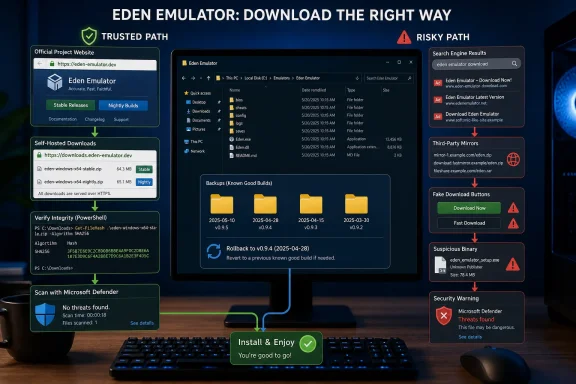 Choose Stability Unless a New Build Solves a Real Problem
There are three reasonable paths, but they serve different users.Stay on your current build if it launches reliably, your existing configuration works, and you do not need a recent fix. This is the lowest-change option, especially for PCs where Eden is treated as a portable application rather than continuously updated software. Preserve the original archive if you still have it, record its hash, and back up emulator data before changing anything.
Move to a self-hosted stable release if the project documents a fix relevant to your Windows system or your current build no longer works acceptably. Begin at Eden’s official project site, eden-emu.dev, and follow its links to the project-controlled repository or release service. Do not substitute a similarly named GitHub organization, an unofficial nightly page, or a search result that merely uses Eden’s branding.
Wait longer if you depend on automatic updating, deploy applications through a managed Windows environment, or cannot easily verify where a downloaded package came from. Eden’s move away from GitHub releases may prove entirely workable, but a replacement channel must demonstrate more than availability. It needs consistent publishing, clear build identification, dependable update behavior, and enough history for users to distinguish official packages from convincing copies.
Nightly builds deserve the highest level of caution. Their purpose is rapid testing, so they combine normal development instability with a newly changed distribution chain. Unless you are actively testing fixes and can restore your previous installation, a nightly should not replace a working stable build.
A Safer Windows Upgrade Procedure
Eden’s Windows packages and update process may evolve, so users should avoid assuming that instructions attached to an older GitHub release still describe the current channel. Use this procedure when evaluating a self-hosted download:- Close Eden and confirm that it is no longer running in Task Manager.
- Back up the folder containing your current Eden installation rather than overwriting it immediately.
- Back up any user data, configuration, and save locations you rely on.
- Open Eden’s official project site manually and use its repository or download links to reach the project-controlled release location.
- Select a stable Windows package unless you deliberately want a nightly build.
- Save the download into a new, empty folder so that files from different releases cannot be mixed accidentally.
- In Windows Security, open Virus & threat protection, select Scan options, choose Custom scan, and scan the downloaded archive or extracted folder.
- Record the file’s SHA-256 hash in PowerShell before running it:
Get-FileHash "C:\Path\To\Eden-Package.zip" -Algorithm SHA256- Extract the package into a separate directory and launch it without deleting the working installation.
- Test startup, configuration detection, input, graphics, and access to your existing data before treating the new build as your default.
- Keep the previous build and its recorded hash until the replacement has proved reliable.
If Microsoft Defender or another security product flags a package, do not immediately create an exclusion simply because emulator software can trigger false positives. Confirm that the file came through Eden’s official path, compare any project-provided verification data, and wait for clarification if the origin or alert remains uncertain.
The GitHub Exit Changes More Than the Download Button
GitHub previously gave users a familiar set of trust signals: repository ownership, release history, tags, visible automation, and links between source changes and downloadable artifacts. None of those signals is infallible, but together they make impersonation and unexplained package replacement easier to notice.Self-hosting transfers more of that responsibility to Eden. The project now controls the infrastructure connecting its source, releases, nightly builds, and updater, which reduces dependence on GitHub but also concentrates trust in Eden’s own services. A domain, repository, and binary channel can all be legitimate while still needing time to demonstrate operational resilience.
There is evidence that development continues. Eden’s self-hosted source repository remains active and lists 14 releases, 17 tags, more than 28,000 commits, and recent work involving Windows and MSVC-related fixes. That is materially different from an abandoned project whose old executables simply continue circulating.
Development activity, however, is not the same as distribution maturity. Windows users should watch whether releases are reproducibly labeled, whether stable and nightly packages remain clearly separated, and whether update failures leave users with a recoverable installation. The key test is whether a user can move from an installed build to an official replacement without guessing which repository, mirror, or package name is authentic.
This distinction matters particularly to administrators. An enthusiast can preserve two folders and roll back manually; an IT team needs a repeatable acquisition process, retained artifacts, change records, and preferably cryptographic verification. Until those controls are visible and consistent, Eden should be treated as manually reviewed portable software rather than a routine auto-updating application.
Automatic Updates Are Now Part of the Threat Model
The practical concern is not an allegation that Eden’s current downloads are malicious. It is that any project forced to change distribution channels creates an opportunity for impersonators, stale mirrors, and repackaged binaries to capture users following outdated instructions.An updater can magnify that risk because it removes the moment when the user consciously chooses a source. Anyone running an older Eden build should therefore determine whether it attempts to contact the retired GitHub path, a project-controlled endpoint, or no working endpoint at all. If the answer is unclear, disable automatic updating where the installed build provides that choice, or block the application’s updater until the new channel is documented and tested.
Organizations should also avoid creating a broad firewall or antivirus exception for an entire Eden directory. Approve a specific reviewed artifact instead, retain its hash, and repeat the review when replacing it. That approach limits the damage if an unrelated executable later appears in the same folder.
The broader emulator community has long dealt with lookalike download sites and bundled installers, a concern reflected in older WindowsForum discussions about finding virus-free emulators. Readers interested in the wider Windows emulation landscape can also explore browser-based Windows emulators for nostalgia, testing, and learning or compare the more established distribution models covered in our guide to Android emulators for Windows 11.
The Signals That Should Trigger an Upgrade
A dependable post-GitHub channel will be recognizable through consistency rather than promises. Windows users should look for releases linked from eden-emu.dev, matching identities across the official site and self-hosted repository, understandable stable-versus-nightly labeling, and a continuous history that does not require third-party mirrors to fill gaps.A new stable build becomes worth adopting when it addresses a specific Windows problem, when its origin can be traced through the official project path, and when rollback remains possible. Conversely, unexpected domain changes, unsigned repackaged installers, unexplained archive replacements, or instructions to disable security software should stop an upgrade immediately.
For now, a working Eden build is safer to preserve than to replace casually. Eden’s active repository shows that the project has continued beyond the February 2026 GitHub DMCA shift, but the next milestone for Windows users is not another commit count. It is a self-hosted release and updater chain that can repeatedly deliver identifiable builds without forcing users to rely on trust, search-engine rankings, or unofficial mirrors.
References
- Primary source: github.com
GitHub - eden-emulator/eden-emulator.github.io: Eden's Website · GitHub
Eden's Website. Contribute to eden-emulator/eden-emulator.github.io development by creating an account on GitHub. github.com
- Independent coverage: edenemu.com
Eden Emulator Firmware: Complete Guide for Gamers - Eden Emulator
Learn Eden Emulator Firmware is, why it’s needed, how to install it. Boost performance and run Nintendo Switch games smoothly.edenemu.com - Independent coverage: edenemulator.com
- Independent coverage: edenemulators.com
Uzuy Edge Emulator Latest Version Download - Nintendo Switch
The Eden Emulator is a free, open-source Nintendo Switch emulator developed by the Suyu team, built using C++. It focuses on delivering high performance, accuracy, and a smooth user experience, alongside regularly updated versions. Use the links below to download the latest and...edenemulators.com - Independent coverage: eden-emulator.com
- Independent coverage: git.eden-emu.dev
eden-emu/eden: The Eden Nintendo Switch Emulator - Eden: A Community Emulator
eden - The Eden Nintendo Switch Emulator git.eden-emu.dev
