

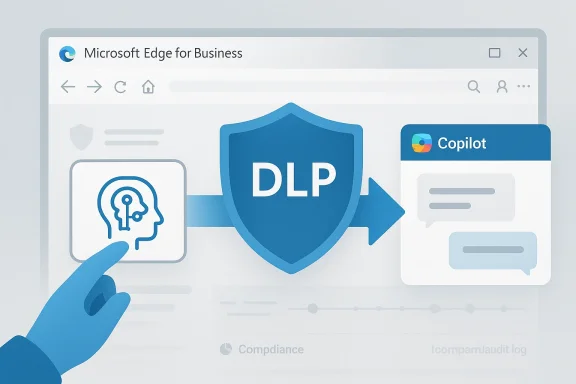
Microsoft is steadily turning Edge for Business into more than a browser. The company’s latest move, tracked on the Microsoft 365 Roadmap, points to an upcoming control that would let IT administrators steer users away from unsanctioned AI tools and toward Microsoft 365 Copilot instead. In practical terms, that means a prompt to open a rival AI site in Edge could be intercepted and replaced with a Microsoft-managed alternative, giving organizations a more direct way to curb “shadow AI” while keeping employees inside the Microsoft security boundary.
The significance of this change is bigger than a single browser policy. Microsoft has spent the past two years building a layered governance story around generative AI, and this feature fits neatly into that strategy. The company already documents ways to block sensitive prompts to consumer AI apps in Edge, and it also supports policy-driven controls through Microsoft Purview, including browser-based DLP and managed-device enforcement. (learn.microsoft.com)
What appears to be new is the user experience of enforcement. Instead of merely denying access, Microsoft is preparing an interface that can present a replacement path—effectively redirecting the employee to Copilot rather than leaving them at a dead end. That distinction matters because security teams often struggle to balance control with usability; a hard block may stop data leakage, but a guided redirect can preserve productivity and reduce help-desk friction. The feature also aligns with Microsoft’s broader effort to make Copilot the default enterprise AI layer across Microsoft 365. (microsoft.com)
The timing is notable. Microsoft’s roadmap is crowded with Copilot and agent updates, including new model choices, multi-model intelligence, and a more unified suite strategy. In that context, steering users toward Copilot is not just about security; it is also about reinforcing Microsoft’s platform gravity at the exact moment enterprises are deciding which AI assistants to bless, block, or monitor. (microsoft.com)
The larger market message is clear: Microsoft wants to become the default control plane for workplace AI. If IT can both restrict risky apps and provide a sanctioned alternative in the same workflow, then Copilot becomes more than a feature bundle—it becomes the company’s preferred answer to the chaos of unmanaged AI adoption. That has implications for rivals ranging from OpenAI’s consumer ChatGPT to Google Gemini, Perplexity, and a wide list of domain-specific AI tools already visible in Microsoft’s own policy guidance. (learn.microsoft.com)
This is where Microsoft Purview entered the picture. Purview’s DLP capabilities already extend into Microsoft Edge for Business, allowing organizations to inspect and block sensitive information before it leaves the browser. Microsoft says this browser-based protection can stop users from pasting or typing sensitive content into AI prompts, and it can also trigger alerting and reporting so security teams can see how the policy is performing. (learn.microsoft.com)
At the same time, Microsoft has worked to make Copilot feel like the safe and official AI endpoint for knowledge work. The browser policy documentation shows that the Copilot Chat icon can be controlled in the Edge toolbar, while broader Microsoft 365 documentation encourages organizations to use Edge policies, Purview DLP, and Defender for Cloud Apps as a stack for AI governance. That is a classic Microsoft move: make the product experience and the security architecture reinforce each other. (learn.microsoft.com)
The company’s own security guidance also suggests that AI governance is moving from app-by-app blocking to more systematic discovery and control. Microsoft Defender for Cloud Apps can catalog generative AI services, assign risk scores, and help admins decide what to monitor or block. In other words, the upcoming redirect feature is not an isolated gimmick; it is the next layer in a larger framework that mixes discovery, enforcement, and sanctioned replacement. (learn.microsoft.com)
That approach is also a competitive play. If organizations already standardize on Microsoft 365, then redirecting users into Copilot keeps the workflow inside the Microsoft ecosystem. It narrows the chance that a user will switch to another browser, another machine, or another AI service that security teams don’t control as well. That is the real battle, not merely whether a site is blocked. (learn.microsoft.com)
Microsoft’s roadmap language suggests the browser will show a button that opens a new tab with Microsoft 365 Copilot ready to go. If implemented as described, the policy would keep the browsing session productive without allowing the original AI destination to load. That would be especially useful in environments where employees simply need a fast answer and are not particularly loyal to any AI brand.
It also gives IT a story they can defend to executives. The policy is no longer just about saying no to ChatGPT, Gemini, or Perplexity; it is about saying yes to a managed enterprise assistant that fits the company’s compliance model. That framing is easier to sell in organizations where productivity and risk management are both board-level concerns. It is a governance feature and a persuasion feature at the same time. (learn.microsoft.com)
The company’s documentation specifically mentions consumer AI services such as ChatGPT, Google Gemini, DeepSeek, and Microsoft Copilot consumer experiences as targets for browser-side protection. It also highlights that browser data security can inspect prompts in real time before content is submitted. That is a crucial detail: Microsoft is not merely trying to track after the fact; it is trying to stop the leak at the moment of user intent. (learn.microsoft.com)
There is also an auditability advantage. If users are nudged into Copilot, and Copilot sits inside Microsoft’s enterprise controls, then the organization can more easily document what data was used, what policies applied, and what alerts fired. In regulated industries, that kind of traceability is often as important as the block itself. Audit trails beat guesswork every time. (learn.microsoft.com)
Microsoft also notes that when the policy is set to block, the effect can extend beyond Edge. On managed devices, users may be blocked from opening other browsers such as Firefox, and Chrome behavior can depend on whether the Microsoft Purview extension is present and current. That broader reach is important because it shows Microsoft is thinking beyond one browser window and toward the whole endpoint path the data might take. (learn.microsoft.com)
That layered approach reduces the chance of a one-off policy failure becoming a full-blown data-loss event. It also makes the browser less of a neutral transport layer and more of a security checkpoint. For enterprises, that is often exactly what they want. For users, it may feel more restrictive, but the trade-off is clearer governance. (learn.microsoft.com)
For consumers, the picture is simpler and less flattering: they are largely unaffected except indirectly, when an organization-managed device or profile changes browser behavior. That means the feature is not really about the general public at all. It is about managed work environments where the company has enough control over the browser and the endpoint to make redirection possible. (learn.microsoft.com)
The risk for Microsoft is that too much friction could push users toward unsanctioned mobile apps, personal devices, or non-managed browsers. The company clearly understands that, which is why it keeps emphasizing managed devices, browser security, and sanctioned alternatives in the same breath. Redirection is the softer edge of a much harder policy blade. (learn.microsoft.com)
That does not mean competitors are blocked out of the enterprise completely. But it does mean their path to casual workplace adoption gets steeper on Microsoft-managed estates. Rival tools may still win on model quality, workflow flexibility, or specialization, but Microsoft can make the default path much harder to bypass. That is often enough to tip adoption in a large organization. (learn.microsoft.com)
There is also a branding effect. A redirected user is reminded that their company has chosen a preferred AI platform. That message can be more powerful than a policy memo, because it is embedded in the workflow itself. The browser becomes the policy enforcer and the marketing surface. (learn.microsoft.com)
The deployment model also matters because the policy has to reach the right users at the right time. Microsoft says the user must be in scope of both the DLP policy and the Edge configuration policy for it to apply. That sort of dependency is common in enterprise software, but it also means admins will need to test carefully before broad rollout. One mis-scoped group can undo the whole plan.
The licensing story may also become a point of friction. If organizations need multiple Microsoft security components to make the experience work cleanly, that could limit the feature’s appeal outside larger enterprise accounts. On the other hand, the more Microsoft can bundle governance with Copilot value, the easier it becomes to justify broader spending. (learn.microsoft.com)
This is especially persuasive for organizations handling sensitive intellectual property, regulated data, or customer records. If a user is going to ask an AI to summarize a contract, draft an email, or brainstorm with internal context, then keeping the interaction in a governed environment is vastly preferable to a consumer-grade public chatbot. In that sense, redirecting to Copilot is a security control and a policy nudge. (learn.microsoft.com)
That visibility is important because security controls often fail when users do not understand them. A clear redirect reduces ambiguity and may even improve trust if employees see that the organization is offering a safer option instead of merely saying no. Security that explains itself is easier to adopt. (learn.microsoft.com)
There is also the question of user trust. Redirecting people to Copilot can be helpful, but it can also be interpreted as vendor steering if the organization does not clearly explain why the policy exists. The difference between governance and coercion is often communication. (learn.microsoft.com)
Another risk is displacement rather than elimination. Users can move to unmanaged devices, mobile apps, personal browsers, or out-of-band AI tools if they are determined enough. That does not make the policy useless, but it does mean the policy works best as part of a broader governance program, not as a standalone fix. (learn.microsoft.com)
The opportunity is not just to block shadow AI, but to normalize governed AI. That can increase Copilot adoption, reduce unsanctioned experimentation, and help IT present AI as a managed capability rather than a risk vector. That is a strong strategic position.
There is also a broader ecosystem concern. The more Microsoft channels workplace AI through Copilot, the more it can be accused of using security as a lever for platform lock-in. That criticism may be unfair in some contexts, but it will not be hard to make if the policy becomes a default expectation rather than an optional control. Enterprise trust is earned in the details. (learn.microsoft.com)
It will also be interesting to see how Microsoft positions the feature alongside its broader Copilot and agent roadmap. The company is clearly betting that the future of work will be mediated through more intelligent, more integrated, and more administratively controlled AI experiences. Redirecting users away from rogue AI apps and toward Copilot is one small but telling piece of that architecture. (microsoft.com)
Source: Neowin Microsoft will allow IT admins to force Copilot in Edge over other AI apps
 Overview
The significance of this change is bigger than a single browser policy. Microsoft has spent the past two years building a layered governance story around generative AI, and this feature fits neatly into that strategy. The company already documents ways to block sensitive prompts to consumer AI apps in Edge, and it also supports policy-driven controls through Microsoft Purview, including browser-based DLP and managed-device enforcement. (learn.microsoft.com)What appears to be new is the user experience of enforcement. Instead of merely denying access, Microsoft is preparing an interface that can present a replacement path—effectively redirecting the employee to Copilot rather than leaving them at a dead end. That distinction matters because security teams often struggle to balance control with usability; a hard block may stop data leakage, but a guided redirect can preserve productivity and reduce help-desk friction. The feature also aligns with Microsoft’s broader effort to make Copilot the default enterprise AI layer across Microsoft 365. (microsoft.com)
The timing is notable. Microsoft’s roadmap is crowded with Copilot and agent updates, including new model choices, multi-model intelligence, and a more unified suite strategy. In that context, steering users toward Copilot is not just about security; it is also about reinforcing Microsoft’s platform gravity at the exact moment enterprises are deciding which AI assistants to bless, block, or monitor. (microsoft.com)
The larger market message is clear: Microsoft wants to become the default control plane for workplace AI. If IT can both restrict risky apps and provide a sanctioned alternative in the same workflow, then Copilot becomes more than a feature bundle—it becomes the company’s preferred answer to the chaos of unmanaged AI adoption. That has implications for rivals ranging from OpenAI’s consumer ChatGPT to Google Gemini, Perplexity, and a wide list of domain-specific AI tools already visible in Microsoft’s own policy guidance. (learn.microsoft.com)
Background
Generative AI adoption inside enterprises has followed a familiar pattern: employees try consumer tools first, security teams discover data-sharing risk later, and governance catches up only after policy gaps become visible. Microsoft has been explicit that this “shadow AI” problem is not just theoretical. Its documentation now describes how organizations can discover AI app usage, monitor prompt activity, and block sensitive data from being shared with unmanaged AI services. (learn.microsoft.com)This is where Microsoft Purview entered the picture. Purview’s DLP capabilities already extend into Microsoft Edge for Business, allowing organizations to inspect and block sensitive information before it leaves the browser. Microsoft says this browser-based protection can stop users from pasting or typing sensitive content into AI prompts, and it can also trigger alerting and reporting so security teams can see how the policy is performing. (learn.microsoft.com)
At the same time, Microsoft has worked to make Copilot feel like the safe and official AI endpoint for knowledge work. The browser policy documentation shows that the Copilot Chat icon can be controlled in the Edge toolbar, while broader Microsoft 365 documentation encourages organizations to use Edge policies, Purview DLP, and Defender for Cloud Apps as a stack for AI governance. That is a classic Microsoft move: make the product experience and the security architecture reinforce each other. (learn.microsoft.com)
The company’s own security guidance also suggests that AI governance is moving from app-by-app blocking to more systematic discovery and control. Microsoft Defender for Cloud Apps can catalog generative AI services, assign risk scores, and help admins decide what to monitor or block. In other words, the upcoming redirect feature is not an isolated gimmick; it is the next layer in a larger framework that mixes discovery, enforcement, and sanctioned replacement. (learn.microsoft.com)
Why this matters now
AI policy has become a management problem, not just a technical one. Employees are using whatever tool gives them the fastest answer, while companies are trying to protect intellectual property, customer data, and compliance obligations. Microsoft’s answer is to reduce the friction of doing the right thing: if an AI app is blocked, point users to a compliant alternative immediately. (learn.microsoft.com)That approach is also a competitive play. If organizations already standardize on Microsoft 365, then redirecting users into Copilot keeps the workflow inside the Microsoft ecosystem. It narrows the chance that a user will switch to another browser, another machine, or another AI service that security teams don’t control as well. That is the real battle, not merely whether a site is blocked. (learn.microsoft.com)
How the New Redirect Model Changes Enforcement
The difference between “blocked” and “redirected” sounds small, but in enterprise UX terms it is enormous. A pure block tells users what they cannot do; a redirect tells them what they should do instead. That second option can reduce resistance because it replaces frustration with a sanctioned path, which is often the difference between compliance and workarounds.Microsoft’s roadmap language suggests the browser will show a button that opens a new tab with Microsoft 365 Copilot ready to go. If implemented as described, the policy would keep the browsing session productive without allowing the original AI destination to load. That would be especially useful in environments where employees simply need a fast answer and are not particularly loyal to any AI brand.
From denial to substitution
Substitution is a smarter security pattern than denial alone. It recognizes that users reach for AI because they are trying to complete work, not because they are trying to violate policy. By guiding them to Copilot, Microsoft can lower the temptation to find an unsanctioned workaround while still maintaining a controlled destination. (learn.microsoft.com)It also gives IT a story they can defend to executives. The policy is no longer just about saying no to ChatGPT, Gemini, or Perplexity; it is about saying yes to a managed enterprise assistant that fits the company’s compliance model. That framing is easier to sell in organizations where productivity and risk management are both board-level concerns. It is a governance feature and a persuasion feature at the same time. (learn.microsoft.com)
- The user gets a clear next step.
- The security team gets less policy evasion.
- The organization gets a stronger default AI posture.
- Microsoft gets more Copilot engagement.
- Help desks get fewer “why is this blocked?” tickets.
- Leadership gets a cleaner compliance narrative.
Shadow AI and the Compliance Argument
Microsoft’s own terminology around “shadow AI” is revealing. It frames unsanctioned AI not as a harmless productivity hack, but as a governance risk that can expose sensitive information without any formal review. That framing gives Microsoft a strong basis for tighter browser controls, because the browser is where a lot of accidental data exposure actually occurs. (learn.microsoft.com)The company’s documentation specifically mentions consumer AI services such as ChatGPT, Google Gemini, DeepSeek, and Microsoft Copilot consumer experiences as targets for browser-side protection. It also highlights that browser data security can inspect prompts in real time before content is submitted. That is a crucial detail: Microsoft is not merely trying to track after the fact; it is trying to stop the leak at the moment of user intent. (learn.microsoft.com)
Why organizations are interested
For many IT and compliance teams, the problem is not that employees are using AI. The problem is that they are using multiple AI tools with inconsistent data handling, unclear retention terms, and no standardized logging. Microsoft’s integrated stack—Purview, Edge, Defender, and Copilot—makes it easier to reduce that sprawl under one vendor umbrella. (learn.microsoft.com)There is also an auditability advantage. If users are nudged into Copilot, and Copilot sits inside Microsoft’s enterprise controls, then the organization can more easily document what data was used, what policies applied, and what alerts fired. In regulated industries, that kind of traceability is often as important as the block itself. Audit trails beat guesswork every time. (learn.microsoft.com)
- Better visibility into prompt activity
- Fewer unsanctioned AI destinations
- Stronger alignment with compliance policy
- Less reliance on user judgment
- More consistent enterprise logging
- Easier enforcement across managed devices
How This Fits Microsoft Purview and Edge for Business
The upcoming feature only makes sense when you look at Microsoft’s existing policy stack. Microsoft says Purview DLP policies can target Microsoft Edge for Business, and the browser becomes the control point where sensitive information can be blocked from reaching unmanaged AI apps. That means the browser is doing a lot of the heavy lifting, while Intune and Edge management services propagate the necessary configuration. (learn.microsoft.com)Microsoft also notes that when the policy is set to block, the effect can extend beyond Edge. On managed devices, users may be blocked from opening other browsers such as Firefox, and Chrome behavior can depend on whether the Microsoft Purview extension is present and current. That broader reach is important because it shows Microsoft is thinking beyond one browser window and toward the whole endpoint path the data might take. (learn.microsoft.com)
Policy architecture in plain English
The architecture is basically layered control. First, Microsoft identifies the managed user and the relevant browser context. Then Purview applies the DLP policy, Edge enforces the browser-side behavior, and the management service provisions the settings that keep the policy active. Finally, administrators monitor the resulting activity through Purview and related logs. (learn.microsoft.com)That layered approach reduces the chance of a one-off policy failure becoming a full-blown data-loss event. It also makes the browser less of a neutral transport layer and more of a security checkpoint. For enterprises, that is often exactly what they want. For users, it may feel more restrictive, but the trade-off is clearer governance. (learn.microsoft.com)
- Identify the AI app or category.
- Apply DLP or browser-data-security policy.
- Enforce it in Edge for Business.
- Log the activity.
- Redirect or block as policy dictates.
- Review outcomes and adjust thresholds.
- Edge is increasingly the enforcement boundary.
- Purview is the policy brain.
- Copilot is the preferred safe destination.
- Intune helps operationalize the configuration.
- Defender provides discovery and cataloging.
- The whole stack is designed to be mutually reinforcing.
Enterprise vs. Consumer Impact
For enterprises, the feature is about control, liability reduction, and operational consistency. A company that already standardizes on Microsoft 365 may welcome a policy that both blocks shadow AI and channels users into a compliant assistant with tenant isolation and data-protection boundaries. That can simplify procurement as well, because the organization can justify Copilot as part of the security and governance stack rather than as an optional productivity extra. (learn.microsoft.com)For consumers, the picture is simpler and less flattering: they are largely unaffected except indirectly, when an organization-managed device or profile changes browser behavior. That means the feature is not really about the general public at all. It is about managed work environments where the company has enough control over the browser and the endpoint to make redirection possible. (learn.microsoft.com)
The productivity trade-off
Some employees will see this as helpful. Others will see it as a guardrail that slows them down, especially if they prefer a different AI model or workflow. The truth is that both reactions are reasonable, because the policy is not designed to maximize freedom; it is designed to maximize enterprise confidence. That is a different optimization problem. (learn.microsoft.com)The risk for Microsoft is that too much friction could push users toward unsanctioned mobile apps, personal devices, or non-managed browsers. The company clearly understands that, which is why it keeps emphasizing managed devices, browser security, and sanctioned alternatives in the same breath. Redirection is the softer edge of a much harder policy blade. (learn.microsoft.com)
- Enterprises gain policy consistency.
- Users gain a safer default path.
- IT gains a better compliance story.
- Consumer users see little direct change.
- Workarounds remain a real possibility.
- The end result depends on how strict the admin model becomes.
Competitive Implications for AI Rivals
This is where the story moves beyond browser policy and into platform competition. If Microsoft can reliably funnel enterprise users toward Copilot whenever they try to open a competing AI app, it creates a material advantage for its own assistant. The benefit is not just conversion; it is habit formation. Users begin to treat Copilot as the enterprise-approved answer, which can gradually reduce openness to alternatives.That does not mean competitors are blocked out of the enterprise completely. But it does mean their path to casual workplace adoption gets steeper on Microsoft-managed estates. Rival tools may still win on model quality, workflow flexibility, or specialization, but Microsoft can make the default path much harder to bypass. That is often enough to tip adoption in a large organization. (learn.microsoft.com)
What rivals lose
Competitors lose frictionless access to the workday. In the consumer AI economy, curiosity is a growth engine; in the enterprise, default browser access is even more valuable. If Microsoft can interrupt that moment of curiosity and offer an immediately available substitute, then it can intercept demand before a rival gets the first prompt.There is also a branding effect. A redirected user is reminded that their company has chosen a preferred AI platform. That message can be more powerful than a policy memo, because it is embedded in the workflow itself. The browser becomes the policy enforcer and the marketing surface. (learn.microsoft.com)
- Rival AI tools face higher friction.
- Copilot gains a privileged enterprise position.
- Default behavior becomes more important than feature parity.
- Platform control starts to matter as much as model quality.
- Microsoft’s ecosystem lock-in gets stronger.
- AI adoption becomes a browser-policy issue, not just a product decision.
Licensing, Deployment, and Operational Reality
Microsoft’s documentation makes it clear that these controls are not magical one-click protections. They depend on policy scope, device management, browser configuration, and, in some cases, licensing or pay-as-you-go billing. That means the feature will likely appeal most to organizations already invested in Microsoft’s security stack rather than to smaller businesses looking for a cheap toggle. (learn.microsoft.com)The deployment model also matters because the policy has to reach the right users at the right time. Microsoft says the user must be in scope of both the DLP policy and the Edge configuration policy for it to apply. That sort of dependency is common in enterprise software, but it also means admins will need to test carefully before broad rollout. One mis-scoped group can undo the whole plan.
What IT teams will care about
IT admins will want to know how quickly the redirect works, whether it is visible to users as a block page or a seamless replacement, and whether exceptions can be set for specific teams. They will also care about audit logs, false positives, and whether this policy can coexist with existing browser rules. Microsoft’s own guidance repeatedly recommends simulation and careful scoping before enforcement, which is a clue that the company expects real-world tuning. (learn.microsoft.com)The licensing story may also become a point of friction. If organizations need multiple Microsoft security components to make the experience work cleanly, that could limit the feature’s appeal outside larger enterprise accounts. On the other hand, the more Microsoft can bundle governance with Copilot value, the easier it becomes to justify broader spending. (learn.microsoft.com)
- Requires careful policy scoping
- Depends on managed-device configuration
- May involve Purview licensing or billing considerations
- Needs testing before full rollout
- Benefits larger Microsoft-heavy deployments most
- Works best when paired with existing security controls
The Security Case for a Guided Copilot Default
From a security perspective, Microsoft’s argument is straightforward: if users must use AI, they should use the AI environment that offers enterprise data protection. Microsoft repeatedly emphasizes tenant isolation, compliance boundaries, and exclusion from model training as key advantages of its commercial Copilot experience. That gives the company a clean story for why redirection is better than a generic block.This is especially persuasive for organizations handling sensitive intellectual property, regulated data, or customer records. If a user is going to ask an AI to summarize a contract, draft an email, or brainstorm with internal context, then keeping the interaction in a governed environment is vastly preferable to a consumer-grade public chatbot. In that sense, redirecting to Copilot is a security control and a policy nudge. (learn.microsoft.com)
The governance story Microsoft wants to tell
Microsoft wants security teams to see Copilot as a controllable endpoint rather than a wildcard. That is why its documentation links discovery, monitoring, blocking, and sanctioned replacement into one narrative. The new redirect feature simply makes that narrative visible to end users in the moment they need it most. (learn.microsoft.com)That visibility is important because security controls often fail when users do not understand them. A clear redirect reduces ambiguity and may even improve trust if employees see that the organization is offering a safer option instead of merely saying no. Security that explains itself is easier to adopt. (learn.microsoft.com)
- Safer enterprise default for AI tasks
- Better alignment with data governance
- Lower chance of accidental data leakage
- More visible policy intent
- Easier employee education
- Stronger case for standardized Copilot use
Risks and Concerns
The biggest risk is simple: overreach. If the policy is too broad, too aggressive, or poorly scoped, employees may feel that legitimate work is being blocked without good reason. That can lead to workaround behavior, shadow accounts, or a broader sense that IT is treating every AI use case as a compliance threat rather than a productivity opportunity. (learn.microsoft.com)There is also the question of user trust. Redirecting people to Copilot can be helpful, but it can also be interpreted as vendor steering if the organization does not clearly explain why the policy exists. The difference between governance and coercion is often communication. (learn.microsoft.com)
Operational and policy risks
False positives remain a real concern in any DLP system. If a prompt is blocked because it contains something that resembles sensitive data but is actually harmless, the user experience deteriorates quickly. Microsoft itself encourages simulation, monitoring, and adjustment, which is a practical admission that tuning is part of the job. (learn.microsoft.com)Another risk is displacement rather than elimination. Users can move to unmanaged devices, mobile apps, personal browsers, or out-of-band AI tools if they are determined enough. That does not make the policy useless, but it does mean the policy works best as part of a broader governance program, not as a standalone fix. (learn.microsoft.com)
- Risk of overly broad blocking
- Possible user frustration and policy backlash
- False positives that disrupt legitimate work
- Workarounds on unmanaged devices
- Licensing and deployment complexity
- Potential perception of vendor lock-in
- Need for continuous tuning and communication
Strengths and Opportunities
Microsoft’s strategy is strongest when it combines security enforcement with a productive alternative. That makes the upcoming redirect feature appealing because it addresses the two objections enterprise users usually have: “Why are you blocking me?” and “What am I supposed to use instead?” If the rollout is polished, this could become one of the more pragmatic AI governance features in the Microsoft stack. (learn.microsoft.com)The opportunity is not just to block shadow AI, but to normalize governed AI. That can increase Copilot adoption, reduce unsanctioned experimentation, and help IT present AI as a managed capability rather than a risk vector. That is a strong strategic position.
- Stronger enterprise AI governance
- Better user guidance during policy enforcement
- Improved Copilot adoption potential
- Reduced unsanctioned AI usage
- Cleaner compliance messaging
- Tighter integration with Purview and Edge
- More value from existing Microsoft 365 investments
Risks and Concerns
Despite the upside, Microsoft will need to prove that the feature is precise, understandable, and easy to administer. If the redirect feels invasive or unpredictable, it could trigger pushback from employees and administrators alike. Security controls rarely fail because the intent is bad; they fail because the implementation is annoying, ambiguous, or impossible to tune at scale. (learn.microsoft.com)There is also a broader ecosystem concern. The more Microsoft channels workplace AI through Copilot, the more it can be accused of using security as a lever for platform lock-in. That criticism may be unfair in some contexts, but it will not be hard to make if the policy becomes a default expectation rather than an optional control. Enterprise trust is earned in the details. (learn.microsoft.com)
- Precise targeting will matter
- Admins need transparent policy controls
- User education will be essential
- Workflows must remain fast and intuitive
- Microsoft must avoid “lock-in” optics
- Simulation and logging need to be robust
- Exceptions must be manageable for specialized teams
Looking Ahead
The next step will be whether Microsoft can make this redirect feel like a natural part of the browser rather than a security interruption. If it works well, the feature could become a model for how enterprises should handle AI governance in the browser era: detect risky destinations, enforce policy, and immediately offer a compliant substitute. That is a much more mature pattern than simple allow-or-deny controls. (learn.microsoft.com)It will also be interesting to see how Microsoft positions the feature alongside its broader Copilot and agent roadmap. The company is clearly betting that the future of work will be mediated through more intelligent, more integrated, and more administratively controlled AI experiences. Redirecting users away from rogue AI apps and toward Copilot is one small but telling piece of that architecture. (microsoft.com)
What to watch next
- Whether Microsoft ships the feature as a visible interstitial or a seamless redirect
- How granular the admin controls will be for different user groups
- Whether Copilot licensing or policy prerequisites become a barrier
- How quickly Microsoft updates its documentation and deployment guidance
- Whether rivals respond with their own enterprise-guided workflows
Source: Neowin Microsoft will allow IT admins to force Copilot in Edge over other AI apps
Last edited:
