

Microsoft’s Xbox mode for Windows 11 arrived with the April 30, 2026 preview update KB5083631 for Windows 11 versions 24H2 and 25H2, but many users will not see the switch immediately because Microsoft is distributing it through a staged rollout. The short version is simple: install build 26100.8328 or 26200.8328, check Settings > Gaming, and if the Xbox mode page is missing, use ViVeTool to enable feature IDs 58989070 and 59765208. The longer version is more revealing. Xbox mode is not merely a new gaming button; it is Microsoft’s latest attempt to make Windows behave less like Windows when the user wants a console.
That contradiction is the whole story. Windows remains Microsoft’s greatest gaming platform and its most stubborn gaming problem. Xbox mode exists because the PC has won the performance war, the storefront war, and the backward-compatibility war — but it still loses the couch test every time a player reaches for a controller and is greeted by notifications, launchers, driver panels, and a desktop designed for a mouse.
KB5083631 is an optional non-security preview update, which means it is not the kind of update every machine receives at the same moment. For Windows 11 version 24H2 it moves systems to build 26100.8328, and for version 25H2 it moves systems to build 26200.8328. Microsoft’s own release notes describe Xbox mode as available on Windows 11 PCs, including laptops, desktops, and tablets, with entry points from the Xbox app, Game Bar settings, and the Windows key plus F11 shortcut.
That sounds universal, but Windows feature delivery is now more conditional than the word “available” suggests. Microsoft’s Controlled Feature Rollout system lets the company place code on a PC while withholding the visible switch until telemetry, eligibility, or rollout policy says it is time. The result is the strange modern Windows moment: two machines can run the same build, have the same update installed, and still expose different features.
This is not a bug in the old sense. It is the operating system behaving exactly as Microsoft designed it to behave. The feature is present, the public interface is gated, and the impatient user is left staring at Settings > Gaming wondering whether they did something wrong.
They probably did not. They simply arrived before the rollout flag did.
The process is straightforward. Download the current ViVeTool release from its official GitHub repository, extract it somewhere simple such as
If the command succeeds, ViVeTool reports that the feature configuration was set successfully. Restart the PC, then return to Settings > Gaming. On eligible builds, the Xbox mode entry should appear above the older gaming controls such as Game Bar, Captures, and Game Mode.
Reversal is just as direct:
That command disables the same feature IDs, though users should still treat forced feature activation as a tinkerer’s move rather than a guaranteed production configuration. If the machine is used for work, streaming, tournaments, lab testing, or anything where stability matters more than novelty, waiting for the staged rollout is the safer path.
That distinction is important. Game Mode, which has existed for years, is mostly about prioritization and system behavior while games are running. Xbox mode is a broader user-experience bet. It is about the path from power-on to play, the moment when a handheld or living-room PC should feel more like a console and less like a laptop with an HDMI cable.
Microsoft’s release notes say Xbox mode is inspired by the Xbox console experience and is meant for moments when a player wants to lean back, pick up a controller, and focus on the game. That language is marketing, but it is also unusually precise. Xbox mode is not trying to replace the desktop for everyone. It is trying to make the desktop disappear for a specific kind of session.
That is why the shortcut matters. Windows key plus F11 is not just a convenience; it signals that Microsoft wants Xbox mode to become a state of the system, not merely a page buried inside an app.
That tradeoff has been acceptable on a desk. It is much less acceptable on a handheld. Devices such as the ROG Ally, Lenovo Legion Go, MSI Claw, and their successors have made the gap painfully visible: Windows can run the games, but it often struggles to be the gaming environment.
SteamOS exposed the weakness. Valve did not beat Windows by supporting more games; it beat Windows in the handheld context by reducing friction. The Steam Deck boots into a game-first interface, sleeps and resumes predictably, and hides the Linux desktop until the user asks for it. Microsoft has spent years with the stronger game catalog and weaker appliance experience.
Xbox mode is an answer to that embarrassment. It does not turn Windows into SteamOS, and it does not eliminate the complexity underneath. But it is a public admission that the default Windows desktop is not good enough for every gaming form factor.
For years, PC gaming advice has treated Windows background consumption as weather: annoying, measurable, but mostly unavoidable. Close the browser. Disable startup apps. Remove vendor utilities. Pray that Windows Update does not decide your GPU driver needs a spiritual journey. Xbox mode reframes that mess as something the platform owner can manage directly.
A 1GB or 2GB memory swing will not transform a 64GB desktop with a high-end GPU. It may matter far more on handhelds, compact PCs, and mainstream gaming laptops where shared memory, thermals, and battery life collide. In those environments, reclaiming headroom is not only about frame rates. It is about fewer stutters, shorter interruptions, and less contention between the game and the shell.
This is where Xbox mode becomes more than cosmetic. If Microsoft can reliably reduce background activity, simplify input, and keep the game surface dominant, it begins to solve the problem Windows created for itself: too much platform showing through.
But rational engineering often produces irrational user experience. A person installs an update advertised as bringing Xbox mode, opens Settings, and sees nothing. The company can accurately say the feature is rolling out. The user can accurately say the feature is missing. Both are right, and that is precisely the problem.
The Windows enthusiast community has filled this gap with tools like ViVeTool because Microsoft’s own user-facing explanation remains too vague. “Gradual rollout” tells you why you may not have a feature. It does not tell you whether your device is blocked, delayed, incompatible, randomly unselected, or waiting for a server-side flag.
That uncertainty turns ordinary users into amateur release engineers. It also makes Microsoft look evasive even when it is merely being cautious.
That matters for expectations. A traditional PC gamer with three monitors, Discord on the side, telemetry tools in the corner, OBS running, and a browser open to a wiki may find Xbox mode constraining. The whole point of PC gaming for that user is simultaneity. Windows is valuable because it can be messy.
The couch player wants the opposite. They want the machine to stop behaving like a general-purpose computer until asked. They want one display, one controller, one front end, and a fast escape route back to the desktop only when necessary.
Microsoft appears to be choosing the second user as the primary target. That is wise. Trying to make Xbox mode satisfy every PC gaming style would turn it into another cluttered Windows surface. Its value comes from being opinionated.
That design is both its strength and its ceiling. It means Xbox mode can arrive through a cumulative update and work on ordinary Windows 11 PCs. It means users do not need to reinstall, dual-boot, or buy a new class of hardware. It also means the old Windows complexity is never far away.
For Microsoft, that compromise is strategic. The company does not want a clean-room gaming OS that competes with Windows; it wants Windows to impersonate one when useful. That lets it preserve compatibility, enterprise manageability, and the broader app ecosystem while borrowing the console’s simplicity.
The risk is that impersonation may not be enough. If notifications leak through, controllers behave inconsistently, display switching feels unpredictable, or launchers drag users back into mouse territory, Xbox mode will feel like a skin rather than a state change.
That attitude is understandable, but it carries risk. Microsoft may be withholding a feature from a device because of a known issue, a driver conflict, a telemetry signal, or a rollout cohort plan. ViVeTool does not know the difference. It flips the switch.
For readers comfortable with that tradeoff, the command is part of the fun. For everyone else, the better recommendation is to install the optional update, enable “Get the latest updates as soon as they’re available,” and wait. Optional preview updates already sit one step closer to the edge than Patch Tuesday security updates. Forcing hidden flags pushes farther still.
The irony is that Microsoft created the conditions for this behavior. If Windows exposed clearer rollout status — “feature installed but not enabled for this device yet,” “blocked because of known issue,” “expected within two weeks” — fewer users would reach for unofficial tools. Silence breeds tinkering.
That does not make the feature illegitimate. Every platform owner designs the front door around its own services. Valve does it with SteamOS. Sony does it with PlayStation. Nintendo does it with Switch. Microsoft’s challenge is that Windows users are unusually resistant to having a front door chosen for them.
The company therefore has to make Xbox mode useful enough that players accept the ecosystem framing. If it reduces friction, improves couch usability, and saves resources, users may forgive the Microsoft-first layout. If it feels like an advertisement wrapped around a launcher, they will bypass it.
This is the balance Microsoft has repeatedly struggled to strike in Windows 11. The company often has good platform ideas that are undermined by overbearing promotion. Xbox mode needs restraint. The best version of it is not the one that maximizes store impressions; it is the one that makes users voluntarily return.
The BitLocker caveat is especially important. Microsoft notes that some devices with an unrecommended BitLocker Group Policy configuration may be required to enter a recovery key on first restart after installing the update. The affected conditions are narrow, but they live in the exact kind of managed environment where surprises are least welcome.
That contrast captures the split personality of modern Windows servicing. The same package can deliver a consumer gaming shell, enterprise policy changes, driver security hardening, AI component updates, and file-management fixes. Microsoft calls this continuous innovation. Admins may call it bundling.
For business fleets, Xbox mode is likely something to test, document, and perhaps suppress depending on policy. For enthusiasts, it is the headline. For Microsoft, both audiences receive the same cumulative vehicle.
Windows was not built for that world, but it now has to compete in it. The old defense — Windows runs everything — is still powerful, but less decisive than it once was. Compatibility is table stakes. Experience is the differentiator.
Xbox mode suggests Microsoft understands this. The company is not abandoning the desktop; it is acknowledging that the desktop should not be the mandatory lobby for every gaming session. That is a subtle but important shift.
The question is whether Microsoft can iterate quickly enough. A full-screen dashboard is only the first layer. The harder work is power management, suspend and resume, shader compilation behavior, controller routing, launcher integration, overlay discipline, cloud save clarity, and update timing. The console feel is an ecosystem outcome, not a single toggle.
Source: Windows Latest How to force-enable Xbox Mode in Windows 11, and why Microsoft hides it
That contradiction is the whole story. Windows remains Microsoft’s greatest gaming platform and its most stubborn gaming problem. Xbox mode exists because the PC has won the performance war, the storefront war, and the backward-compatibility war — but it still loses the couch test every time a player reaches for a controller and is greeted by notifications, launchers, driver panels, and a desktop designed for a mouse.
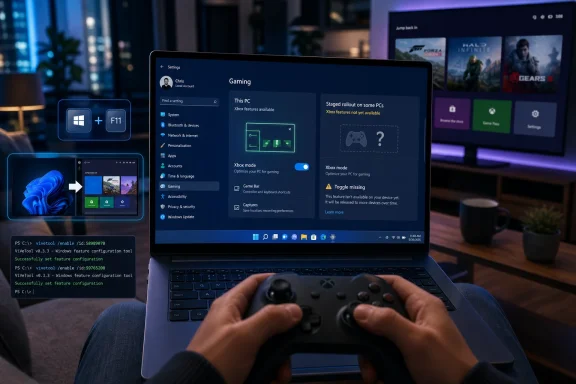 Microsoft Ships the Console, Then Hides the Door
KB5083631 is an optional non-security preview update, which means it is not the kind of update every machine receives at the same moment. For Windows 11 version 24H2 it moves systems to build 26100.8328, and for version 25H2 it moves systems to build 26200.8328. Microsoft’s own release notes describe Xbox mode as available on Windows 11 PCs, including laptops, desktops, and tablets, with entry points from the Xbox app, Game Bar settings, and the Windows key plus F11 shortcut.That sounds universal, but Windows feature delivery is now more conditional than the word “available” suggests. Microsoft’s Controlled Feature Rollout system lets the company place code on a PC while withholding the visible switch until telemetry, eligibility, or rollout policy says it is time. The result is the strange modern Windows moment: two machines can run the same build, have the same update installed, and still expose different features.
This is not a bug in the old sense. It is the operating system behaving exactly as Microsoft designed it to behave. The feature is present, the public interface is gated, and the impatient user is left staring at Settings > Gaming wondering whether they did something wrong.
They probably did not. They simply arrived before the rollout flag did.
The Force-Enable Route Is a Shortcut Through Microsoft’s Staging System
If your PC is already on build 26100.8328 or 26200.8328 and Xbox mode is still absent, the practical workaround is ViVeTool, the long-running open-source utility used by Windows enthusiasts to flip hidden feature configuration IDs. This is not an official Microsoft support path, and that matters. It changes feature state before Microsoft has chosen to expose the switch on that specific device.The process is straightforward. Download the current ViVeTool release from its official GitHub repository, extract it somewhere simple such as
C:\ViVeTool, open Command Prompt as administrator, and run:
Code:
cd C:\ViVeTool
vivetool /enable /id:58989070,59765208Reversal is just as direct:
Code:
cd C:\ViVeTool
vivetool /disable /id:58989070,59765208The Toggle Is New, but the Ambition Is Old
Xbox mode is Microsoft’s latest name for what earlier testing described as a full-screen Xbox-style experience on Windows. The interface reorganizes the Xbox app into a controller-first dashboard, with large tiles, horizontal rails, and fast access to the library, Game Pass, cloud gaming, and the store. The point is not to add another overlay to Windows. The point is to suppress the parts of Windows that make a gaming PC feel like a workstation.That distinction is important. Game Mode, which has existed for years, is mostly about prioritization and system behavior while games are running. Xbox mode is a broader user-experience bet. It is about the path from power-on to play, the moment when a handheld or living-room PC should feel more like a console and less like a laptop with an HDMI cable.
Microsoft’s release notes say Xbox mode is inspired by the Xbox console experience and is meant for moments when a player wants to lean back, pick up a controller, and focus on the game. That language is marketing, but it is also unusually precise. Xbox mode is not trying to replace the desktop for everyone. It is trying to make the desktop disappear for a specific kind of session.
That is why the shortcut matters. Windows key plus F11 is not just a convenience; it signals that Microsoft wants Xbox mode to become a state of the system, not merely a page buried inside an app.
Windows Has Always Been the Best and Worst Place to Play
The PC is the most flexible gaming platform ever built. It has Steam, Epic, GOG, Battle.net, itch.io, emulators, mods, ultrawide monitors, high-refresh displays, cloud saves, Discord, overlays, capture tools, and a hardware ecosystem that ranges from budget APUs to absurd graphics cards with power cables that resemble infrastructure projects. It also has driver prompts, background updaters, RGB daemons, browser tabs, printer services, Teams remnants, and a desktop shell that was never designed around a thumbstick.That tradeoff has been acceptable on a desk. It is much less acceptable on a handheld. Devices such as the ROG Ally, Lenovo Legion Go, MSI Claw, and their successors have made the gap painfully visible: Windows can run the games, but it often struggles to be the gaming environment.
SteamOS exposed the weakness. Valve did not beat Windows by supporting more games; it beat Windows in the handheld context by reducing friction. The Steam Deck boots into a game-first interface, sleeps and resumes predictably, and hides the Linux desktop until the user asks for it. Microsoft has spent years with the stronger game catalog and weaker appliance experience.
Xbox mode is an answer to that embarrassment. It does not turn Windows into SteamOS, and it does not eliminate the complexity underneath. But it is a public admission that the default Windows desktop is not good enough for every gaming form factor.
The Memory Savings Are the Most Interesting Part
Windows Latest reports early testing showing Xbox mode can free roughly 1 to 2GB of system memory by reducing desktop overhead and background components during a gaming session. That figure should be treated as workload-dependent, not as a universal benchmark. Still, the direction of travel is notable.For years, PC gaming advice has treated Windows background consumption as weather: annoying, measurable, but mostly unavoidable. Close the browser. Disable startup apps. Remove vendor utilities. Pray that Windows Update does not decide your GPU driver needs a spiritual journey. Xbox mode reframes that mess as something the platform owner can manage directly.
A 1GB or 2GB memory swing will not transform a 64GB desktop with a high-end GPU. It may matter far more on handhelds, compact PCs, and mainstream gaming laptops where shared memory, thermals, and battery life collide. In those environments, reclaiming headroom is not only about frame rates. It is about fewer stutters, shorter interruptions, and less contention between the game and the shell.
This is where Xbox mode becomes more than cosmetic. If Microsoft can reliably reduce background activity, simplify input, and keep the game surface dominant, it begins to solve the problem Windows created for itself: too much platform showing through.
Controlled Rollouts Are Sensible Engineering and Terrible Communication
Microsoft hides Xbox mode for a defensible reason. Staged rollouts reduce blast radius. If a feature breaks a subset of systems, Microsoft can pause or adjust the rollout before every Windows 11 PC receives the same problem. With gaming hardware, that caution is especially rational: GPUs, display paths, controllers, overlays, capture tools, anti-cheat systems, and multi-monitor setups create a compatibility matrix large enough to humble any test lab.But rational engineering often produces irrational user experience. A person installs an update advertised as bringing Xbox mode, opens Settings, and sees nothing. The company can accurately say the feature is rolling out. The user can accurately say the feature is missing. Both are right, and that is precisely the problem.
The Windows enthusiast community has filled this gap with tools like ViVeTool because Microsoft’s own user-facing explanation remains too vague. “Gradual rollout” tells you why you may not have a feature. It does not tell you whether your device is blocked, delayed, incompatible, randomly unselected, or waiting for a server-side flag.
That uncertainty turns ordinary users into amateur release engineers. It also makes Microsoft look evasive even when it is merely being cautious.
The Multi-Monitor Behavior Shows Who This Mode Is Really For
One early observation from Windows Latest is that Xbox mode may disable an external monitor when launched on a laptop connected to another display. That behavior will annoy some desktop users, but it is consistent with the feature’s design center. Xbox mode is not a multi-window productivity environment. It is a full-screen, controller-first session.That matters for expectations. A traditional PC gamer with three monitors, Discord on the side, telemetry tools in the corner, OBS running, and a browser open to a wiki may find Xbox mode constraining. The whole point of PC gaming for that user is simultaneity. Windows is valuable because it can be messy.
The couch player wants the opposite. They want the machine to stop behaving like a general-purpose computer until asked. They want one display, one controller, one front end, and a fast escape route back to the desktop only when necessary.
Microsoft appears to be choosing the second user as the primary target. That is wise. Trying to make Xbox mode satisfy every PC gaming style would turn it into another cluttered Windows surface. Its value comes from being opinionated.
The Escape Hatch Keeps Windows in the Room
The most revealing detail may be that users can jump back to the regular desktop with Windows key plus Tab and select the Windows desktop. Xbox mode is not a separate operating system, a gaming partition, or a console shell replacing Explorer. It is a mode layered over Windows, with an exit always nearby.That design is both its strength and its ceiling. It means Xbox mode can arrive through a cumulative update and work on ordinary Windows 11 PCs. It means users do not need to reinstall, dual-boot, or buy a new class of hardware. It also means the old Windows complexity is never far away.
For Microsoft, that compromise is strategic. The company does not want a clean-room gaming OS that competes with Windows; it wants Windows to impersonate one when useful. That lets it preserve compatibility, enterprise manageability, and the broader app ecosystem while borrowing the console’s simplicity.
The risk is that impersonation may not be enough. If notifications leak through, controllers behave inconsistently, display switching feels unpredictable, or launchers drag users back into mouse territory, Xbox mode will feel like a skin rather than a state change.
ViVeTool Is a Symptom of Enthusiast Distrust
The fact that many users will force-enable Xbox mode is not surprising. Windows enthusiasts have long treated hidden feature IDs as an invitation. If the code is on the machine, they reason, the feature is effectively theirs.That attitude is understandable, but it carries risk. Microsoft may be withholding a feature from a device because of a known issue, a driver conflict, a telemetry signal, or a rollout cohort plan. ViVeTool does not know the difference. It flips the switch.
For readers comfortable with that tradeoff, the command is part of the fun. For everyone else, the better recommendation is to install the optional update, enable “Get the latest updates as soon as they’re available,” and wait. Optional preview updates already sit one step closer to the edge than Patch Tuesday security updates. Forcing hidden flags pushes farther still.
The irony is that Microsoft created the conditions for this behavior. If Windows exposed clearer rollout status — “feature installed but not enabled for this device yet,” “blocked because of known issue,” “expected within two weeks” — fewer users would reach for unofficial tools. Silence breeds tinkering.
Xbox Mode Is Also a Storefront Strategy
It would be naïve to discuss Xbox mode only as a performance feature. A controller-first dashboard that emphasizes the Xbox app, Game Pass, cloud gaming, and the Microsoft Store is also a commercial surface. Microsoft wants the Windows gaming session to begin inside its ecosystem, not inside Steam by default.That does not make the feature illegitimate. Every platform owner designs the front door around its own services. Valve does it with SteamOS. Sony does it with PlayStation. Nintendo does it with Switch. Microsoft’s challenge is that Windows users are unusually resistant to having a front door chosen for them.
The company therefore has to make Xbox mode useful enough that players accept the ecosystem framing. If it reduces friction, improves couch usability, and saves resources, users may forgive the Microsoft-first layout. If it feels like an advertisement wrapped around a launcher, they will bypass it.
This is the balance Microsoft has repeatedly struggled to strike in Windows 11. The company often has good platform ideas that are undermined by overbearing promotion. Xbox mode needs restraint. The best version of it is not the one that maximizes store impressions; it is the one that makes users voluntarily return.
Enterprise IT Will Mostly Care About the Update, Not the Mode
For sysadmins, KB5083631 is bigger than Xbox mode. The same preview update includes File Explorer reliability work, archive format expansion, driver trust changes, Secure Boot certificate targeting, startup performance improvements, and a known BitLocker recovery-key issue affecting certain managed configurations. That makes the update relevant even in organizations where Xbox mode will never be intentionally used.The BitLocker caveat is especially important. Microsoft notes that some devices with an unrecommended BitLocker Group Policy configuration may be required to enter a recovery key on first restart after installing the update. The affected conditions are narrow, but they live in the exact kind of managed environment where surprises are least welcome.
That contrast captures the split personality of modern Windows servicing. The same package can deliver a consumer gaming shell, enterprise policy changes, driver security hardening, AI component updates, and file-management fixes. Microsoft calls this continuous innovation. Admins may call it bundling.
For business fleets, Xbox mode is likely something to test, document, and perhaps suppress depending on policy. For enthusiasts, it is the headline. For Microsoft, both audiences receive the same cumulative vehicle.
The Real Competition Is the Appliance
The future of PC gaming is not just more frames. It is less ceremony. Players increasingly expect devices to wake quickly, resume reliably, pair controllers cleanly, launch games without desktop detours, and stay out of the way. Consoles have trained that expectation. Handhelds have intensified it.Windows was not built for that world, but it now has to compete in it. The old defense — Windows runs everything — is still powerful, but less decisive than it once was. Compatibility is table stakes. Experience is the differentiator.
Xbox mode suggests Microsoft understands this. The company is not abandoning the desktop; it is acknowledging that the desktop should not be the mandatory lobby for every gaming session. That is a subtle but important shift.
The question is whether Microsoft can iterate quickly enough. A full-screen dashboard is only the first layer. The harder work is power management, suspend and resume, shader compilation behavior, controller routing, launcher integration, overlay discipline, cloud save clarity, and update timing. The console feel is an ecosystem outcome, not a single toggle.
The Hidden Switch Says More Than the Settings Page
The concrete advice is simple, but the implications are larger. Xbox mode is both a useful new Windows 11 gaming surface and a reminder that Microsoft’s feature delivery model has become too opaque for its most engaged users.- Install KB5083631 only if you are comfortable with an optional preview update, because it is not a routine security release.
- Confirm that your system is on Windows 11 build 26100.8328 or 26200.8328 before looking for Xbox mode.
- Check Settings > Gaming first, because Microsoft may have already enabled the Xbox mode page for your device.
- Use ViVeTool with feature IDs 58989070 and 59765208 only if you accept the risk of enabling a staged feature early.
- Expect Xbox mode to work best with a controller, a single primary display, and a lean-back gaming setup rather than a traditional multi-monitor desktop workflow.
- Disable the same ViVeTool IDs or turn off Xbox mode in Settings if the experience causes instability, display quirks, or performance regressions.
Source: Windows Latest How to force-enable Xbox Mode in Windows 11, and why Microsoft hides it
