

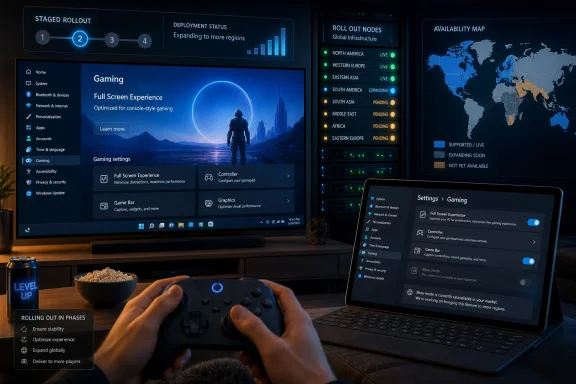
Microsoft began rolling out Xbox mode for Windows 11 PCs on April 30, 2026, but the feature remains unavailable to many users after the May 2026 update because Microsoft is limiting access by market and enabling it through a staged server-side rollout. That is the simple answer, and it is also the revealing one. The missing toggle is not a failed install so much as a preview of how Microsoft now ships Windows experiences: code first, availability later, certainty last.
The promise of Xbox mode is easy to understand. A Windows 11 PC, whether it is a desktop under a television, a gaming laptop on a couch, or a handheld PC with awkward touch targets, should be able to drop into a controller-first interface that feels closer to a console than a workstation. Microsoft has spent years insisting that Xbox is not merely a box under the TV but a platform spanning console, PC, cloud, subscription, and store.
Xbox mode is the user-interface version of that strategy. It turns the Xbox app into a full-screen, controller-optimized gaming surface and gives Windows a better answer to Steam Big Picture, SteamOS, and the handheld gaming PC boom. It is not a new operating system, and it is not a magic performance layer that turns Windows into an Xbox console. It is a front door.
That distinction matters because the reaction to its absence is shaped by expectations Microsoft helped create. When a company says a feature has begun rolling out, many users hear “install the update and get the feature.” In modern Windows, that translation is often wrong. The update may deliver the files, while Microsoft decides later whether your device, account, region, or rollout cohort is allowed to see the feature.
For Windows veterans, this is familiar. For gamers waiting for a console-style Windows experience, it feels worse because gaming interfaces are judged less by policy nuance than by immediacy. If the toggle is missing, the experience is missing.
There is a defensible engineering argument here. Windows 11 runs across a chaotic hardware base: desktops with multiple monitors, laptops with hybrid GPUs, tablets, handhelds, docks, TVs, capture cards, overlays, third-party launchers, anti-cheat systems, accessibility tools, and years of OEM utilities. A full-screen gaming shell that changes how users navigate Windows is exactly the kind of feature that can go sideways in unpredictable ways.
A staged rollout gives Microsoft room to watch telemetry, pause expansion, and avoid turning a niche issue into a global support incident. That is especially true for gaming, where a feature can be “working” in the narrow sense while still failing the experience test. A controller interface that opens the wrong window, mishandles display focus, or strands a game behind another app is not merely a bug; it breaks the whole promise.
But there is a trust cost. Controlled rollout turns Windows updates into Schrödinger’s changelogs. The release notes may describe a feature, the update may be installed, the screenshots may be circulating, and yet the user may have no way to tell whether the feature is unavailable because of region, cohort, device compatibility, Microsoft’s switch, or an actual problem.
That ambiguity is no longer incidental. It is part of the Windows experience.
SteamOS exposed that weakness. Valve’s advantage on the Steam Deck is not just Linux, Proton, or a curated hardware target. It is the feeling that the device wakes into the thing you bought it for. You pick it up, press buttons, and play. Windows handhelds, by contrast, often ask users to negotiate launchers, pop-ups, desktop scaling, update prompts, overlay conflicts, and tiny controls before the fun begins.
Xbox mode is Microsoft’s attempt to put a console-shaped layer over that reality. It does not need to replace Windows to be useful. If it can make Windows feel less like a general-purpose PC at the moment of play, it can improve the perceived quality of the whole device.
The problem is that a front end cannot fully hide the operating system beneath it. Windows still has to deal with foreground focus, multi-monitor behavior, app permissions, background services, storefront fragmentation, driver updates, and the long tail of PC gaming weirdness. Xbox mode can smooth the entry point, but it cannot erase the PC.
That is why the slow rollout is both understandable and revealing. Microsoft is not simply deploying a menu. It is testing whether Windows can convincingly pretend to be a console without giving up the compatibility that makes Windows valuable in the first place.
Microsoft appears to understand this, which is why Xbox mode is being framed as another way to play rather than as a replacement shell. That framing is politically necessary. PC gamers are quick to reject anything that smells like forced simplification, store steering, or a walled garden.
The feature’s real desktop use case is the living-room PC. If a Windows machine is connected to a TV and used from a couch, the normal desktop is a liability. The Start menu, taskbar, window chrome, notification area, and mouse-first assumptions all feel like leftovers from another room. A full-screen Xbox interface gives that machine a clearer identity.
Still, Microsoft has to be careful. Steam Big Picture already exists, and it benefits from the gravity of users’ Steam libraries. Xbox mode can compete if it becomes an excellent system-wide gaming surface, not merely a prettier way to open Game Pass titles. The more it feels like the Xbox app in theatrical lighting, the less persuasive it becomes.
That is the uncomfortable bar Microsoft has set for itself. It must make Windows better for gaming without making PC gamers feel managed.
Regional feature availability is not new for Microsoft. Services, licensing, language support, regulatory requirements, commerce infrastructure, and content partnerships can all shape where a feature appears first. But Xbox mode is an interface, not a streaming catalog or a subscription tier, so users are less likely to assume geography is the blocker.
That gap between internal rationale and user perception is where frustration grows. If Microsoft wants region-limited rollouts to be accepted, it needs blunt messaging inside Windows itself. A Settings page that says “Xbox mode is not yet available in your market” would be better than making users discover the answer through reporting and forum posts.
The same is true for Controlled Feature Rollout. Windows Update should not leave users guessing whether they have a feature, are waiting for a feature, or are excluded from a feature. The company has the telemetry and account context to know the difference. It should expose more of that truth to the person at the keyboard.
Transparency would not make the wait shorter. It would make the wait less insulting.
For Microsoft, this is rational. It reduces the blast radius of bugs, lets the company compare behavior across cohorts, and gives product teams flexibility after release. For administrators, it creates a more complicated estate. A fleet of PCs can be on the same build, with the same cumulative update installed, while presenting different user-facing capabilities.
That complicates documentation, training, support scripts, and help desk triage. “Are you fully updated?” is no longer a sufficient diagnostic question. The better question is “Has Microsoft enabled the feature for this device, account, region, and channel?” That is a much less satisfying sentence to say to an end user.
For consumers, the effect is subtler but still corrosive. Update announcements start to feel aspirational. A feature can be “released” in the industry-news sense while remaining absent in the everyday sense. The gap between those meanings is where Windows 11 has repeatedly generated confusion.
Xbox mode happens to be a gaming feature, but the pattern applies across the operating system. The future of Windows is not just builds and KB numbers. It is flags.
Gaming is unusually sensitive to first impressions. A productivity feature can be rough and still survive because users need it for work. A gaming mode that feels flaky becomes a punchline immediately. If Xbox mode is supposed to make Windows feel more console-like, reliability is not an enhancement; it is the product.
So yes, Microsoft deserves some credit for not treating every Windows 11 PC as a safe target on day one. The company has been criticized often enough for shipping rough edges into production. A more conservative rollout is not inherently bad.
But caution is only persuasive when paired with communication. The current situation asks users to be patient without giving them a useful status model. That is where Microsoft’s Windows culture still lags behind its service ambitions. It wants the control of a cloud rollout and the credibility of a local update, but the user sees only a missing checkbox.
At some point, “rolling out” becomes less an explanation than a shield.
But users do not grade platforms on fairness. They grade them on how the device feels. SteamOS feels built around play. Windows often feels like it is allowing play after it has finished being Windows.
That is the hill Xbox mode must climb. A full-screen interface is necessary but insufficient. Microsoft needs fast resume-like behavior where possible, reliable controller navigation, predictable game launching across storefronts, sane handling of overlays, clean display switching, and fewer interruptions from the general-purpose operating system underneath.
It also needs cadence. Valve has trained Steam Deck users to expect regular refinements that improve the experience after purchase. Microsoft’s history with Windows gaming features is more uneven. Some initiatives become foundational; others arrive loudly and then drift.
Xbox mode will be judged not by the April 30 announcement or the May update, but by what it looks like six months from now. Does Microsoft iterate? Does it fix the living-room annoyances? Does it support third-party libraries gracefully? Does it make handheld Windows feel less like a workaround?
Those are harder questions than whether the toggle appears this week.
But the Xbox app also carries baggage. On PC, it has not historically enjoyed the same affection or trust as Steam. Users have complained over the years about downloads, library management, store behavior, mod access, installation paths, and general reliability. Microsoft has improved much of this, but reputation lags behind reality.
If Xbox mode feels like the Xbox app enlarged, it will struggle. If it feels like a system-level gaming dashboard that happens to integrate the Xbox app well, it has a better chance. The distinction is subtle in architecture and enormous in perception.
Microsoft’s strongest possible version of Xbox mode would be generous. It would make it easy to launch games from multiple storefronts, return to the dashboard cleanly, manage performance-relevant settings, and navigate the PC without grabbing a mouse. The more it behaves like a Microsoft storefront wrapper, the more it narrows its audience.
PC gamers will tolerate Microsoft as a platform steward. They are less patient when it acts like a mall operator.
The combination of cumulative updates, feature flags, cloud controls, regional availability, and staggered activation makes endpoint predictability harder. IT departments care less about Xbox mode than about the principle: identical patch levels no longer guarantee identical capabilities. That affects testing, compliance documentation, user support, and change management.
This is especially relevant in mixed fleets where some devices are personal, some are corporate-owned, and some sit in gray areas like creator workstations or developer laptops. Gaming features can appear on machines that are not “gaming PCs” in an organizational sense. The mere presence of a new mode in Settings can trigger questions.
Microsoft has tools for enterprise control, but the consumer rollout still sets expectations. If users read that a feature is in the May update and cannot find it, help desks may get the ticket before Microsoft gets the blame. The more Windows becomes service-configured, the more Microsoft needs to make that configuration legible.
For IT, the lesson is not that Xbox mode is dangerous. It is that Windows feature availability is becoming a moving target even after Patch Tuesday.
That future requires Windows to behave better as a gaming appliance. Not all the time, and not for everyone, but reliably when the user asks it to. Xbox mode is the first visible layer of that appliance strategy on ordinary Windows 11 PCs.
The difficulty is that the PC’s mess is also its advantage. Windows wins because it runs almost everything, supports almost every peripheral, and allows users to shape their machines in ways consoles do not. The same openness that makes Windows indispensable makes it hard to simplify.
Microsoft cannot solve that tension with branding. Calling the experience Xbox mode raises the stakes because Xbox implies a degree of polish, predictability, and controller-native confidence that Windows does not automatically provide. If the company wants the name, it has to earn the behavior.
The slow rollout suggests Microsoft knows this. The scattered user experience suggests it has not yet solved how to explain it.
That is useful, but it is not satisfying. The more important point is that Xbox mode’s success will not be measured by who gets the toggle first. It will be measured by whether the mode becomes a dependable habit.
A good gaming shell disappears into muscle memory. The user presses a controller button, reaches the game library, launches the game, switches titles, adjusts basic settings, and leaves without thinking about the operating system. If Xbox mode can do that across enough Windows hardware, it will be more than a cosmetic concession to handhelds.
If it cannot, it will become another Windows feature that technically shipped but never quite changed behavior.
The practical read is narrower and calmer than the forum frustration suggests:
Source: TechRadar https://www.techradar.com/computing...lling-the-latest-windows-11-update-heres-why/
 Microsoft Ships the Button Before It Ships the Moment
The promise of Xbox mode is easy to understand. A Windows 11 PC, whether it is a desktop under a television, a gaming laptop on a couch, or a handheld PC with awkward touch targets, should be able to drop into a controller-first interface that feels closer to a console than a workstation. Microsoft has spent years insisting that Xbox is not merely a box under the TV but a platform spanning console, PC, cloud, subscription, and store.Xbox mode is the user-interface version of that strategy. It turns the Xbox app into a full-screen, controller-optimized gaming surface and gives Windows a better answer to Steam Big Picture, SteamOS, and the handheld gaming PC boom. It is not a new operating system, and it is not a magic performance layer that turns Windows into an Xbox console. It is a front door.
That distinction matters because the reaction to its absence is shaped by expectations Microsoft helped create. When a company says a feature has begun rolling out, many users hear “install the update and get the feature.” In modern Windows, that translation is often wrong. The update may deliver the files, while Microsoft decides later whether your device, account, region, or rollout cohort is allowed to see the feature.
For Windows veterans, this is familiar. For gamers waiting for a console-style Windows experience, it feels worse because gaming interfaces are judged less by policy nuance than by immediacy. If the toggle is missing, the experience is missing.
The Controlled Rollout Is the Product Now
Microsoft’s explanation rests on two mechanisms: supported markets and Controlled Feature Rollout, the company’s increasingly common method of shipping features gradually even after the relevant update is installed. In practice, that means the May update can place the Xbox mode components on a PC without lighting up the feature. The machine may be technically ready while the service side says no.There is a defensible engineering argument here. Windows 11 runs across a chaotic hardware base: desktops with multiple monitors, laptops with hybrid GPUs, tablets, handhelds, docks, TVs, capture cards, overlays, third-party launchers, anti-cheat systems, accessibility tools, and years of OEM utilities. A full-screen gaming shell that changes how users navigate Windows is exactly the kind of feature that can go sideways in unpredictable ways.
A staged rollout gives Microsoft room to watch telemetry, pause expansion, and avoid turning a niche issue into a global support incident. That is especially true for gaming, where a feature can be “working” in the narrow sense while still failing the experience test. A controller interface that opens the wrong window, mishandles display focus, or strands a game behind another app is not merely a bug; it breaks the whole promise.
But there is a trust cost. Controlled rollout turns Windows updates into Schrödinger’s changelogs. The release notes may describe a feature, the update may be installed, the screenshots may be circulating, and yet the user may have no way to tell whether the feature is unavailable because of region, cohort, device compatibility, Microsoft’s switch, or an actual problem.
That ambiguity is no longer incidental. It is part of the Windows experience.
Xbox Mode Is Really a Handheld Strategy Wearing a Desktop Jacket
The feature makes the most sense when viewed through handheld PCs rather than tower desktops. Devices like the ROG Ally made plain what Windows has long struggled to admit: the operating system is powerful, compatible, and maddeningly mouse-centric. Windows can run the games, the drivers, the mods, the stores, and the anti-cheat stack, but it does not naturally feel like an appliance.SteamOS exposed that weakness. Valve’s advantage on the Steam Deck is not just Linux, Proton, or a curated hardware target. It is the feeling that the device wakes into the thing you bought it for. You pick it up, press buttons, and play. Windows handhelds, by contrast, often ask users to negotiate launchers, pop-ups, desktop scaling, update prompts, overlay conflicts, and tiny controls before the fun begins.
Xbox mode is Microsoft’s attempt to put a console-shaped layer over that reality. It does not need to replace Windows to be useful. If it can make Windows feel less like a general-purpose PC at the moment of play, it can improve the perceived quality of the whole device.
The problem is that a front end cannot fully hide the operating system beneath it. Windows still has to deal with foreground focus, multi-monitor behavior, app permissions, background services, storefront fragmentation, driver updates, and the long tail of PC gaming weirdness. Xbox mode can smooth the entry point, but it cannot erase the PC.
That is why the slow rollout is both understandable and revealing. Microsoft is not simply deploying a menu. It is testing whether Windows can convincingly pretend to be a console without giving up the compatibility that makes Windows valuable in the first place.
The Desktop Crowd Was Never the Easiest Audience
On a desktop PC, Xbox mode faces a more skeptical audience. Many desktop gamers already have launchers, overlays, scripts, monitor arrangements, Discord setups, capture tools, and preferred storefronts. They may not want Windows to become more console-like, especially if that means the Xbox app becomes the privileged gateway to games they bought elsewhere.Microsoft appears to understand this, which is why Xbox mode is being framed as another way to play rather than as a replacement shell. That framing is politically necessary. PC gamers are quick to reject anything that smells like forced simplification, store steering, or a walled garden.
The feature’s real desktop use case is the living-room PC. If a Windows machine is connected to a TV and used from a couch, the normal desktop is a liability. The Start menu, taskbar, window chrome, notification area, and mouse-first assumptions all feel like leftovers from another room. A full-screen Xbox interface gives that machine a clearer identity.
Still, Microsoft has to be careful. Steam Big Picture already exists, and it benefits from the gravity of users’ Steam libraries. Xbox mode can compete if it becomes an excellent system-wide gaming surface, not merely a prettier way to open Game Pass titles. The more it feels like the Xbox app in theatrical lighting, the less persuasive it becomes.
That is the uncomfortable bar Microsoft has set for itself. It must make Windows better for gaming without making PC gamers feel managed.
The Market Lock Is More Than a Footnote
The select-market limitation is easy to treat as a rollout detail, but it has practical consequences. Users outside supported regions may install the latest update, follow the instructions, search Settings, update the Xbox app, reboot, and still never see the option. Nothing about that journey feels like a market strategy. It feels broken.Regional feature availability is not new for Microsoft. Services, licensing, language support, regulatory requirements, commerce infrastructure, and content partnerships can all shape where a feature appears first. But Xbox mode is an interface, not a streaming catalog or a subscription tier, so users are less likely to assume geography is the blocker.
That gap between internal rationale and user perception is where frustration grows. If Microsoft wants region-limited rollouts to be accepted, it needs blunt messaging inside Windows itself. A Settings page that says “Xbox mode is not yet available in your market” would be better than making users discover the answer through reporting and forum posts.
The same is true for Controlled Feature Rollout. Windows Update should not leave users guessing whether they have a feature, are waiting for a feature, or are excluded from a feature. The company has the telemetry and account context to know the difference. It should expose more of that truth to the person at the keyboard.
Transparency would not make the wait shorter. It would make the wait less insulting.
Windows Update Has Become a Delivery Truck With a Locked Cargo Bay
The Xbox mode rollout is a small case study in a larger shift. Windows Update no longer merely installs fixes and features in a straightforward package. It increasingly delivers dormant capability that can be activated later through configuration, experimentation, eligibility checks, and service-side gates.For Microsoft, this is rational. It reduces the blast radius of bugs, lets the company compare behavior across cohorts, and gives product teams flexibility after release. For administrators, it creates a more complicated estate. A fleet of PCs can be on the same build, with the same cumulative update installed, while presenting different user-facing capabilities.
That complicates documentation, training, support scripts, and help desk triage. “Are you fully updated?” is no longer a sufficient diagnostic question. The better question is “Has Microsoft enabled the feature for this device, account, region, and channel?” That is a much less satisfying sentence to say to an end user.
For consumers, the effect is subtler but still corrosive. Update announcements start to feel aspirational. A feature can be “released” in the industry-news sense while remaining absent in the everyday sense. The gap between those meanings is where Windows 11 has repeatedly generated confusion.
Xbox mode happens to be a gaming feature, but the pattern applies across the operating system. The future of Windows is not just builds and KB numbers. It is flags.
Microsoft Is Right to Move Slowly, But It Cannot Hide Behind Caution Forever
There is a tempting argument that Microsoft should simply flip the switch for everyone. That would satisfy impatient users and produce cleaner headlines. It would also be reckless if the company is seeing crashes, display bugs, input failures, or bad early telemetry.Gaming is unusually sensitive to first impressions. A productivity feature can be rough and still survive because users need it for work. A gaming mode that feels flaky becomes a punchline immediately. If Xbox mode is supposed to make Windows feel more console-like, reliability is not an enhancement; it is the product.
So yes, Microsoft deserves some credit for not treating every Windows 11 PC as a safe target on day one. The company has been criticized often enough for shipping rough edges into production. A more conservative rollout is not inherently bad.
But caution is only persuasive when paired with communication. The current situation asks users to be patient without giving them a useful status model. That is where Microsoft’s Windows culture still lags behind its service ambitions. It wants the control of a cloud rollout and the credibility of a local update, but the user sees only a missing checkbox.
At some point, “rolling out” becomes less an explanation than a shield.
The SteamOS Comparison Is Unavoidable and Unforgiving
Every discussion of Xbox mode eventually runs into SteamOS. That comparison can be unfair in technical terms because SteamOS benefits from a narrower hardware target on Steam Deck and a more vertically controlled experience. Windows has a broader mission, and broad compatibility is messy by nature.But users do not grade platforms on fairness. They grade them on how the device feels. SteamOS feels built around play. Windows often feels like it is allowing play after it has finished being Windows.
That is the hill Xbox mode must climb. A full-screen interface is necessary but insufficient. Microsoft needs fast resume-like behavior where possible, reliable controller navigation, predictable game launching across storefronts, sane handling of overlays, clean display switching, and fewer interruptions from the general-purpose operating system underneath.
It also needs cadence. Valve has trained Steam Deck users to expect regular refinements that improve the experience after purchase. Microsoft’s history with Windows gaming features is more uneven. Some initiatives become foundational; others arrive loudly and then drift.
Xbox mode will be judged not by the April 30 announcement or the May update, but by what it looks like six months from now. Does Microsoft iterate? Does it fix the living-room annoyances? Does it support third-party libraries gracefully? Does it make handheld Windows feel less like a workaround?
Those are harder questions than whether the toggle appears this week.
The Xbox App Is Both the Bridge and the Bottleneck
Using the Xbox app as the center of the experience is logical. It connects Game Pass, Microsoft Store purchases, cloud gaming, social features, and the broader Xbox identity. It gives Microsoft a familiar surface to expand rather than asking Windows to grow an entirely separate gaming shell overnight.But the Xbox app also carries baggage. On PC, it has not historically enjoyed the same affection or trust as Steam. Users have complained over the years about downloads, library management, store behavior, mod access, installation paths, and general reliability. Microsoft has improved much of this, but reputation lags behind reality.
If Xbox mode feels like the Xbox app enlarged, it will struggle. If it feels like a system-level gaming dashboard that happens to integrate the Xbox app well, it has a better chance. The distinction is subtle in architecture and enormous in perception.
Microsoft’s strongest possible version of Xbox mode would be generous. It would make it easy to launch games from multiple storefronts, return to the dashboard cleanly, manage performance-relevant settings, and navigate the PC without grabbing a mouse. The more it behaves like a Microsoft storefront wrapper, the more it narrows its audience.
PC gamers will tolerate Microsoft as a platform steward. They are less patient when it acts like a mall operator.
The Missing Toggle Tells IT Pros Something Too
For sysadmins, Xbox mode may sound like consumer fluff. In many environments, it will be disabled, irrelevant, or blocked by policy. But the rollout pattern matters because it reflects how Windows features increasingly arrive in business-adjacent channels as well.The combination of cumulative updates, feature flags, cloud controls, regional availability, and staggered activation makes endpoint predictability harder. IT departments care less about Xbox mode than about the principle: identical patch levels no longer guarantee identical capabilities. That affects testing, compliance documentation, user support, and change management.
This is especially relevant in mixed fleets where some devices are personal, some are corporate-owned, and some sit in gray areas like creator workstations or developer laptops. Gaming features can appear on machines that are not “gaming PCs” in an organizational sense. The mere presence of a new mode in Settings can trigger questions.
Microsoft has tools for enterprise control, but the consumer rollout still sets expectations. If users read that a feature is in the May update and cannot find it, help desks may get the ticket before Microsoft gets the blame. The more Windows becomes service-configured, the more Microsoft needs to make that configuration legible.
For IT, the lesson is not that Xbox mode is dangerous. It is that Windows feature availability is becoming a moving target even after Patch Tuesday.
Microsoft’s Console Dream Still Runs Through the PC’s Mess
The larger strategy behind Xbox mode is obvious. Microsoft wants Xbox to survive and grow in a world where the dedicated console is no longer the only center of gravity. The company has Game Pass on PC, cloud streaming on many screens, first-party games increasingly crossing platform lines, and a public commitment to a future where Xbox and Windows gaming are more tightly aligned.That future requires Windows to behave better as a gaming appliance. Not all the time, and not for everyone, but reliably when the user asks it to. Xbox mode is the first visible layer of that appliance strategy on ordinary Windows 11 PCs.
The difficulty is that the PC’s mess is also its advantage. Windows wins because it runs almost everything, supports almost every peripheral, and allows users to shape their machines in ways consoles do not. The same openness that makes Windows indispensable makes it hard to simplify.
Microsoft cannot solve that tension with branding. Calling the experience Xbox mode raises the stakes because Xbox implies a degree of polish, predictability, and controller-native confidence that Windows does not automatically provide. If the company wants the name, it has to earn the behavior.
The slow rollout suggests Microsoft knows this. The scattered user experience suggests it has not yet solved how to explain it.
The Real Test Begins After the Checkbox Appears
For users waiting today, the immediate advice is simple: install the latest Windows 11 updates, make sure the Xbox app and related gaming components are current, and check Settings under Gaming for Xbox mode or the Full Screen Experience label. If the option is absent, the likely causes are regional availability or Microsoft’s staged activation, not necessarily a failed update.That is useful, but it is not satisfying. The more important point is that Xbox mode’s success will not be measured by who gets the toggle first. It will be measured by whether the mode becomes a dependable habit.
A good gaming shell disappears into muscle memory. The user presses a controller button, reaches the game library, launches the game, switches titles, adjusts basic settings, and leaves without thinking about the operating system. If Xbox mode can do that across enough Windows hardware, it will be more than a cosmetic concession to handhelds.
If it cannot, it will become another Windows feature that technically shipped but never quite changed behavior.
The Wait Is Annoying Because the Idea Is Right
The current rollout leaves Windows 11 users in an awkward place. Microsoft has announced a feature many gamers genuinely want, delivered the underlying update to many machines, and then left some of those machines waiting for a switch they cannot see and cannot request. That is poor theater, even if the engineering caution behind it is reasonable.The practical read is narrower and calmer than the forum frustration suggests:
- Xbox mode began rolling out on April 30, 2026, but it is not universally available to every Windows 11 user yet.
- The May 2026 Windows 11 update may include the relevant components without activating the feature on a given PC.
- Availability depends partly on supported markets and partly on Microsoft’s Controlled Feature Rollout system.
- The setting may appear under Gaming as Xbox mode or as the older Full Screen Experience label.
- Users who do not see the option should not assume their installation is broken, though Microsoft could do much more to make that clear.
- The feature’s long-term value depends less on the rollout date than on whether Microsoft keeps improving it into a credible controller-first Windows gaming layer.
Source: TechRadar https://www.techradar.com/computing...lling-the-latest-windows-11-update-heres-why/
