

Microsoft has pushed back the Exchange Online PowerShell retirement of the
The updated timing was reported by Neowin, citing Microsoft 365 Message Center advisory MC1248389. Microsoft’s Exchange Team first announced the change on February 12, 2026, saying that newly released Exchange Online PowerShell module versions would stop supporting
For Windows administrators, the practical message is straightforward: do not treat December as a safe long-term support date. Microsoft is removing a legacy sign-in path from future client modules first, while a later server-side change is expected to disable the approach regardless of the module version pinned in a script.
The immediate retirement is a client-side module change. In practical terms, Exchange Online PowerShell module builds released before the December 2026 cutoff can continue exposing the
That distinction means an organization that has pinned a known working module version is not likely to see all of its existing jobs fail on the same day merely because Microsoft publishes a new release. But that apparent stability comes with an obvious operational cost: pinning an older administration module is a delaying tactic, not a migration plan. It can also leave administrators unable to take advantage of future fixes, cmdlets, and support improvements without revisiting authentication.
Microsoft has also indicated that a server-side retirement will follow at an unspecified later date. Once that arrives, using an old Exchange Online Management module will no longer preserve compatibility. The service itself will reject the legacy authentication route.
That makes the new date less of an extension than a six-month migration window for environments that were not ready in July.
Why
The parameter is tied to the Resource Owner Password Credentials, or ROPC, flow. ROPC is designed around supplying a username and password directly to an application or script, which is exactly why it became common in older automation: a scheduled task could collect a
It is also incompatible with the security controls Microsoft is increasingly treating as baseline requirements. ROPC cannot satisfy multifactor authentication and does not work cleanly with Conditional Access policies that expect modern token-based sign-in. Microsoft’s February announcement also noted that the Microsoft Authentication Library, or MSAL, deprecated ROPC beginning with version 4.74.0.
The withdrawal affects both
Microsoft’s security rationale is sound. Hard-coded passwords, even where they are stored in an encrypted vault or protected credential store, remain reusable secrets associated with a user account. A service principal with a certificate or a managed identity can be scoped, audited, rotated, and governed differently from an administrator password embedded in a job.
The friction is in the replacement paths.
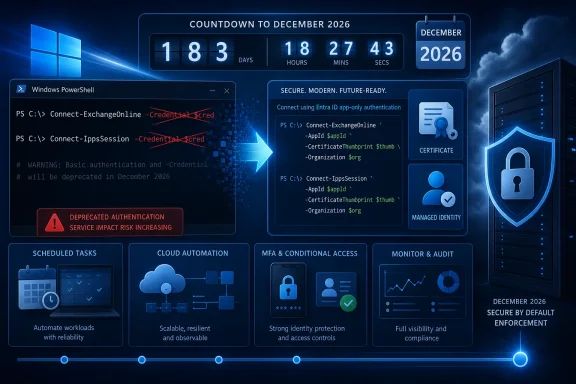
For automation outside Azure, Microsoft recommends app-only authentication using an Entra ID app registration and certificate-based authentication. For automation hosted in Azure, it recommends managed identities, which eliminate the need to store a certificate or password in the automation environment.
Neither route is a simple search-and-replace for
An app-only deployment requires an organization to create or approve an Entra application, grant the appropriate Exchange permissions, obtain and protect a certificate, deploy the public certificate to the app registration, and ensure that the private key is available to the execution context. Windows Task Scheduler jobs in particular can run under service accounts whose access to the certificate store differs from that of the administrator who originally tested the script.
Managed identities avoid private-key distribution, but only for workloads that can actually run in supported Azure services. An on-premises Windows Server host, a third-party RMM platform, or a local scheduled task cannot simply turn itself into an Azure managed identity. Those environments will generally need an app registration and certificate lifecycle management.
The migration may also expose functional gaps. Comments on Microsoft’s original Exchange Team post highlighted that some cmdlets or administrative scenarios did not work under certificate-based authentication at the time of the announcement. Microsoft invited customers to report unsupported cases, but administrators should verify their own scripts rather than assume every delegated command has a direct app-only equivalent.
That means module inventory should be part of the response. Administrators should identify which machines, runbooks, build agents, and scheduled tasks import ExchangeOnlineManagement, then determine whether they install a fixed module version, allow the PowerShell Gallery to choose a version, or share a common module path from a management host.
A sensible near-term review should include:
The updated plan acknowledges that real-world automation is messier than an authentication-method table suggests. Yet it leaves the destination unchanged: password-based ROPC authentication is being removed from the Exchange Online PowerShell workflow.
The December 2026 client-side date should therefore be treated as the deadline to finish testing and cut over production workloads, not the date to begin planning. The more consequential date—the future server-side shutdown—has not been announced. When Microsoft publishes it, organizations still relying on
-Credential parameter by six months, moving the client-side cutoff from July 2026 to December 2026. The reprieve matters for organizations whose scheduled PowerShell jobs still pass stored credentials to Connect-ExchangeOnline or Connect-IppsSession—but it is not a reversal, and it does not remove the eventual risk to unattended automation.The updated timing was reported by Neowin, citing Microsoft 365 Message Center advisory MC1248389. Microsoft’s Exchange Team first announced the change on February 12, 2026, saying that newly released Exchange Online PowerShell module versions would stop supporting
-Credential beginning in July. That deadline is now December, according to the updated advisory.For Windows administrators, the practical message is straightforward: do not treat December as a safe long-term support date. Microsoft is removing a legacy sign-in path from future client modules first, while a later server-side change is expected to disable the approach regardless of the module version pinned in a script.
 Existing Scripts Get a Temporary Stay of Execution
The immediate retirement is a client-side module change. In practical terms, Exchange Online PowerShell module builds released before the December 2026 cutoff can continue exposing the -Credential parameter, even after newer builds remove it.That distinction means an organization that has pinned a known working module version is not likely to see all of its existing jobs fail on the same day merely because Microsoft publishes a new release. But that apparent stability comes with an obvious operational cost: pinning an older administration module is a delaying tactic, not a migration plan. It can also leave administrators unable to take advantage of future fixes, cmdlets, and support improvements without revisiting authentication.
Microsoft has also indicated that a server-side retirement will follow at an unspecified later date. Once that arrives, using an old Exchange Online Management module will no longer preserve compatibility. The service itself will reject the legacy authentication route.
That makes the new date less of an extension than a six-month migration window for environments that were not ready in July.
Why -Credential Is Being Removed
The parameter is tied to the Resource Owner Password Credentials, or ROPC, flow. ROPC is designed around supplying a username and password directly to an application or script, which is exactly why it became common in older automation: a scheduled task could collect a PSCredential object and connect without a browser prompt.It is also incompatible with the security controls Microsoft is increasingly treating as baseline requirements. ROPC cannot satisfy multifactor authentication and does not work cleanly with Conditional Access policies that expect modern token-based sign-in. Microsoft’s February announcement also noted that the Microsoft Authentication Library, or MSAL, deprecated ROPC beginning with version 4.74.0.
The withdrawal affects both
Connect-ExchangeOnline, used for Exchange Online administration, and Connect-IppsSession, used for Security & Compliance PowerShell connections. That second cmdlet is important: the impact is not limited to mailbox provisioning or transport-management scripts. Compliance reporting, retention-policy administration, eDiscovery-related workflows, and other tenant maintenance routines may be caught in the same authentication transition.Microsoft’s security rationale is sound. Hard-coded passwords, even where they are stored in an encrypted vault or protected credential store, remain reusable secrets associated with a user account. A service principal with a certificate or a managed identity can be scoped, audited, rotated, and governed differently from an administrator password embedded in a job.
The friction is in the replacement paths.
App-Only Authentication Is Not a Drop-In Switch
Microsoft directs interactive administrators to modern interactive sign-in with MFA, which is a relatively uncomplicated move for a person running a command from a Windows workstation. The harder work begins with headless scripts running as Task Scheduler jobs, Windows services, on-premises management servers, Azure Automation accounts, or CI/CD runners.For automation outside Azure, Microsoft recommends app-only authentication using an Entra ID app registration and certificate-based authentication. For automation hosted in Azure, it recommends managed identities, which eliminate the need to store a certificate or password in the automation environment.
Neither route is a simple search-and-replace for
-Credential $Credential.An app-only deployment requires an organization to create or approve an Entra application, grant the appropriate Exchange permissions, obtain and protect a certificate, deploy the public certificate to the app registration, and ensure that the private key is available to the execution context. Windows Task Scheduler jobs in particular can run under service accounts whose access to the certificate store differs from that of the administrator who originally tested the script.
Managed identities avoid private-key distribution, but only for workloads that can actually run in supported Azure services. An on-premises Windows Server host, a third-party RMM platform, or a local scheduled task cannot simply turn itself into an Azure managed identity. Those environments will generally need an app registration and certificate lifecycle management.
The migration may also expose functional gaps. Comments on Microsoft’s original Exchange Team post highlighted that some cmdlets or administrative scenarios did not work under certificate-based authentication at the time of the announcement. Microsoft invited customers to report unsupported cases, but administrators should verify their own scripts rather than assume every delegated command has a direct app-only equivalent.
The Deadline Is Also a Module-Management Problem
The delay creates a second issue for IT teams: how their PowerShell environment receives updates. Many Windows administrators useInstall-Module or Update-Module as part of image preparation, server maintenance, or automation bootstrap logic. If that process automatically takes the newest ExchangeOnlineManagement module after December 2026, scripts that depend on -Credential could stop at the connection step.That means module inventory should be part of the response. Administrators should identify which machines, runbooks, build agents, and scheduled tasks import ExchangeOnlineManagement, then determine whether they install a fixed module version, allow the PowerShell Gallery to choose a version, or share a common module path from a management host.
A sensible near-term review should include:
- Search script repositories and Windows scheduled-task actions for
Connect-ExchangeOnline,Connect-IppsSession, and-Credential. - Record the ExchangeOnlineManagement module versions installed on automation hosts and how those versions are updated.
- Classify each script as interactive administration, external unattended automation, or Azure-hosted automation.
- Test the intended replacement authentication method against every cmdlet and tenant configuration the script relies on.
- Build certificate renewal, private-key protection, and application-permission review into the operational runbook before replacing production credentials.
.ps1 files. Old Exchange management routines frequently live inside monitoring integrations, help-desk tooling, server provisioning scripts, scheduled reports, and vendor-supported extensions. A credential object may be passed through several functions before it reaches the Exchange connection command, so a simple text search is necessary but not sufficient.Microsoft Bought Time, Not Compatibility
Microsoft has not publicly detailed why MC1248389 moved the date, though the reaction to the February announcement helps explain the pressure. Administrators argued that the original July schedule was too aggressive for organizations with large script estates and incomplete certificate-based command coverage.The updated plan acknowledges that real-world automation is messier than an authentication-method table suggests. Yet it leaves the destination unchanged: password-based ROPC authentication is being removed from the Exchange Online PowerShell workflow.
The December 2026 client-side date should therefore be treated as the deadline to finish testing and cut over production workloads, not the date to begin planning. The more consequential date—the future server-side shutdown—has not been announced. When Microsoft publishes it, organizations still relying on
-Credential will have no old-module escape hatch left.References
- Primary source: Neowin
Published: 2026-07-16T16:30:01+00:00
Microsoft delays Exchange Online PowerShell feature retirement after feedback from IT admins - Neowin
A major PowerShell change that worried many IT admins has been postponed, but Microsoft's long-term plans remain unchanged. www.neowin.net
- Official source: techcommunity.microsoft.com
- Official source: learn.microsoft.com
Deprecation of Basic authentication in Exchange Online | Microsoft Learn
Learn about deprecation of Basic authentication in Exchange Onlinelearn.microsoft.com
