

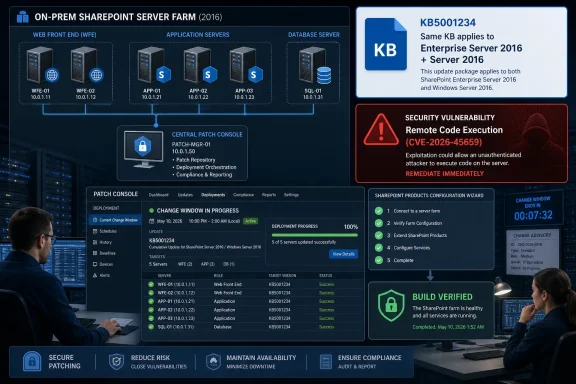
Microsoft’s May 2026 guidance for CVE-2026-45659 says the security update identified for SharePoint Enterprise Server 2016 also applies to SharePoint Server 2016, meaning administrators running either 2016-branded deployment should install the same KB to close the remote code execution flaw. The naming looks like a product split, but in this case it is mostly a packaging and servicing artifact. The operational answer is simple: if your farm is SharePoint Server 2016, treat the Enterprise Server 2016 update as yours. The larger story is that SharePoint’s oldest still-supported on-premises generation remains trapped between legacy naming, high-value attack surface, and patch workflows that punish hesitation.
The confusion is understandable because “SharePoint Server 2016” and “SharePoint Enterprise Server 2016” sound like two different server products. In everyday administrator speech, many shops say “SharePoint 2016” and mean the farm they installed years ago, licensed either through Standard or Enterprise client access rights. Microsoft’s security-update catalog, however, often uses the Enterprise Server label even when the payload is the relevant security update for supported SharePoint Server 2016 deployments.
That is what matters for CVE-2026-45659. Microsoft’s own update guidance states that the same KB number applies to both SharePoint Server 2016 and SharePoint Enterprise Server 2016. Put bluntly, a SharePoint Server 2016 admin should not skip the update because the package title says Enterprise.
This is not just a documentation quirk. SharePoint updates are farm-level events, not ordinary desktop patches. A mismatched reading of the product name can translate into an unpatched web front end, a delayed configuration wizard run, or a change-control ticket that stalls while security teams and platform owners argue about terminology. For a remote code execution vulnerability, that is the wrong kind of ambiguity.
The best reading is the conservative one: if Microsoft lists your SharePoint generation as affected and points to a KB, you install that KB across the farm after normal validation. If your farm is SharePoint Server 2016, the Enterprise Server 2016 wording does not give you an exemption.
CVE-2026-45659 has been described as a SharePoint remote code execution vulnerability with low attack complexity. Public reporting has characterized the issue as tied to unsafe handling of data, the class of bug that administrators have learned to treat seriously in server-side Microsoft collaboration products. The exact exploitability conditions still matter, but the headline is enough to guide triage: this is a server vulnerability in an application that many organizations cannot simply isolate without disrupting work.
SharePoint’s risk profile is also cumulative. A farm that has missed one SharePoint security update may have missed several. Unlike Windows client cumulative updates, SharePoint patching requires awareness of build levels, language packs, farm topology, and post-install configuration steps. That friction creates a patch-lag ecosystem, and attackers have repeatedly shown that on-premises collaboration servers are worth scanning for.
The lesson from recent SharePoint incidents is that the blast radius is rarely limited to “the SharePoint box.” A successful compromise may expose documents, authentication material, scripts, service account privileges, or lateral movement pathways. That is why the correct answer to the Server-versus-Enterprise naming question should be operational, not semantic.
That distinction matters. Organizations running SharePoint 2016 are often doing so because of customizations, old workflows, third-party integrations, regulatory retention requirements, or budget gravity. Those are real constraints, but they do not soften the security model. An old SharePoint farm remains a live enterprise application, and attackers do not discount it because the migration project is inconvenient.
The naming around Enterprise Server 2016 is a symptom of that long tail. As products age, the servicing vocabulary often becomes more important than the marketing vocabulary. Administrators stop thinking about product editions and start thinking about KB numbers, build numbers, farm patch baselines, and whether the configuration database agrees that every server in the farm is at the right level.
For SharePoint 2016, that means the relevant question is not “Do I own Enterprise?” It is “Does this update apply to my farm’s installed SharePoint generation and build?” For CVE-2026-45659, Microsoft’s answer is yes for both SharePoint Server 2016 and SharePoint Enterprise Server 2016.
The display name is still useful, but it is not definitive on its own. Microsoft’s update ecosystem has long contained naming inconsistencies across Microsoft Update, the Download Center, support articles, security guidance, and admin tools. That is especially true for products with multiple editions, language packs, and long servicing histories.
A prudent SharePoint patch workflow should therefore cross-check three things before deployment. First, confirm that the CVE lists your SharePoint version as affected. Second, confirm the KB Microsoft assigns to that version. Third, confirm the installed build and patch state of every SharePoint server in the farm after installation and configuration.
That final step is where many SharePoint patching plans fail. Installing binaries is not the same as completing a SharePoint update. The SharePoint Products Configuration Wizard, or its PowerShell equivalent, remains part of the process in many environments. A farm that has received files but has not completed configuration may still be in a bad operational state, and the security team may not get the clean remediation signal it expects.
That does not change the answer to the original question. The update applies. It does change the amount of preparation required to apply it safely.
Admins should begin with an inventory of farm servers and installed SharePoint components. They should verify backups, including SQL Server databases and farm configuration, before touching production. They should check whether language pack updates are required, because SharePoint farms with language packs often need matching patch attention. They should also stage the update in a test farm if one exists, especially in environments with custom code.
The uncomfortable truth is that many SharePoint 2016 deployments no longer have pristine test environments. The platform is old enough that documentation may be stale, original implementers may be gone, and third-party solutions may be out of maintenance. That is not a reason to avoid the patch. It is a reason to treat patching as a controlled recovery exercise rather than a casual maintenance task.
Security teams often work from scanner output and Microsoft vulnerability metadata. Platform owners work from product names, farm realities, and the scars of past SharePoint updates that broke search, workflows, or custom pages. When the wording does not line up, the ticket bounces. The vulnerability remains.
This is where Microsoft’s clarification should be treated as a decision point. If your inventory says SharePoint Server 2016, and the relevant CVE guidance points to a SharePoint Enterprise Server 2016 KB, do not wait for a second, differently named package to appear. Microsoft says the same KB covers both.
That does not mean skipping due diligence. It means moving from “does this apply?” to “how fast can we safely deploy?” The former has been answered. The latter is the job of the SharePoint owner, Windows Server team, database administrator, identity team, and change board.
Those two realities behave very differently. SharePoint Online customers generally do not install server KBs. SharePoint Server customers do. A CVE that affects on-premises SharePoint Server creates work for local administrators, even if the broader organization thinks it has “moved to the cloud.”
That split is one of the reasons old farms survive unnoticed. A department migrates most content to Microsoft 365 but leaves a specialized SharePoint 2016 site in place. The server is no longer strategic, but it still authenticates users, stores documents, and accepts HTTP requests. From an attacker’s perspective, that is enough.
CVE-2026-45659 should push organizations to revisit their SharePoint inventory, not just their patch list. If a 2016 farm is still needed, it should be patched and monitored like a crown-jewel application. If it is not needed, the safest patch is retirement.
Event logs, SharePoint health analyzer rules, service status, search crawl behavior, and user-facing functionality should all get a post-patch look. For high-risk CVEs, security teams may also want proof from vulnerability scanners or authenticated checks that the exposed farm no longer matches the vulnerable build. A screenshot of an installed update is useful, but it is not the same as farm-level assurance.
This is especially important where SharePoint servers are load-balanced. One unpatched web front end can preserve exposure even if the rest of the farm looks remediated. Similarly, a disaster recovery farm or staging environment can remain vulnerable if it is reachable and excluded from the main change window.
The old admin rule applies: patch what exists, not what the architecture diagram claims exists. If the diagram has not been updated since 2019, the patch plan should start with discovery.
The lifecycle question is murkier. SharePoint 2016 remains a supported product for security fixes, but every new SharePoint RCE is a reminder that support is not the same as resilience. The product can receive patches and still be expensive to secure. It can be operationally stable and still represent an unattractive concentration of legacy risk.
For many organizations, the best argument for migration is no longer a new feature in SharePoint Subscription Edition or Microsoft 365. It is the cost of emergency patching an aging collaboration platform under vulnerability pressure. Every urgent SharePoint update consumes scarce time from administrators who could be hardening identity, modernizing applications, or reducing exposed surface area.
Still, migration is not a patch plan. If the farm exists today, it must be protected today. Strategic modernization can begin after the immediate CVE is handled, not instead of it.
 Microsoft’s Product Name Is Doing More Work Than It Should
The confusion is understandable because “SharePoint Server 2016” and “SharePoint Enterprise Server 2016” sound like two different server products. In everyday administrator speech, many shops say “SharePoint 2016” and mean the farm they installed years ago, licensed either through Standard or Enterprise client access rights. Microsoft’s security-update catalog, however, often uses the Enterprise Server label even when the payload is the relevant security update for supported SharePoint Server 2016 deployments.That is what matters for CVE-2026-45659. Microsoft’s own update guidance states that the same KB number applies to both SharePoint Server 2016 and SharePoint Enterprise Server 2016. Put bluntly, a SharePoint Server 2016 admin should not skip the update because the package title says Enterprise.
This is not just a documentation quirk. SharePoint updates are farm-level events, not ordinary desktop patches. A mismatched reading of the product name can translate into an unpatched web front end, a delayed configuration wizard run, or a change-control ticket that stalls while security teams and platform owners argue about terminology. For a remote code execution vulnerability, that is the wrong kind of ambiguity.
The best reading is the conservative one: if Microsoft lists your SharePoint generation as affected and points to a KB, you install that KB across the farm after normal validation. If your farm is SharePoint Server 2016, the Enterprise Server 2016 wording does not give you an exemption.
A SharePoint RCE Is Not Just Another Patch Tuesday Chore
Remote code execution in SharePoint has a particular gravity because SharePoint sits in the awkward middle of enterprise identity, document management, workflow, search, and web publishing. Even when a farm is “internal,” it often touches sensitive files, privileged service accounts, custom web parts, legacy workflows, and authentication plumbing that was designed before today’s threat model hardened around internet-exposed collaboration software.CVE-2026-45659 has been described as a SharePoint remote code execution vulnerability with low attack complexity. Public reporting has characterized the issue as tied to unsafe handling of data, the class of bug that administrators have learned to treat seriously in server-side Microsoft collaboration products. The exact exploitability conditions still matter, but the headline is enough to guide triage: this is a server vulnerability in an application that many organizations cannot simply isolate without disrupting work.
SharePoint’s risk profile is also cumulative. A farm that has missed one SharePoint security update may have missed several. Unlike Windows client cumulative updates, SharePoint patching requires awareness of build levels, language packs, farm topology, and post-install configuration steps. That friction creates a patch-lag ecosystem, and attackers have repeatedly shown that on-premises collaboration servers are worth scanning for.
The lesson from recent SharePoint incidents is that the blast radius is rarely limited to “the SharePoint box.” A successful compromise may expose documents, authentication material, scripts, service account privileges, or lateral movement pathways. That is why the correct answer to the Server-versus-Enterprise naming question should be operational, not semantic.
The 2016 Generation Is Still Alive, But It Is Living on Borrowed Time
SharePoint Server 2016 remains in extended support, which is why administrators are still seeing security updates for it in 2026. That does not mean it is a comfortable platform to operate. Extended support is not a promise that the product will keep pace with modern expectations; it is a promise that Microsoft will continue to ship security fixes within the boundaries of the support lifecycle.That distinction matters. Organizations running SharePoint 2016 are often doing so because of customizations, old workflows, third-party integrations, regulatory retention requirements, or budget gravity. Those are real constraints, but they do not soften the security model. An old SharePoint farm remains a live enterprise application, and attackers do not discount it because the migration project is inconvenient.
The naming around Enterprise Server 2016 is a symptom of that long tail. As products age, the servicing vocabulary often becomes more important than the marketing vocabulary. Administrators stop thinking about product editions and start thinking about KB numbers, build numbers, farm patch baselines, and whether the configuration database agrees that every server in the farm is at the right level.
For SharePoint 2016, that means the relevant question is not “Do I own Enterprise?” It is “Does this update apply to my farm’s installed SharePoint generation and build?” For CVE-2026-45659, Microsoft’s answer is yes for both SharePoint Server 2016 and SharePoint Enterprise Server 2016.
The KB Number Is the Anchor, Not the Display Name
Microsoft’s clarification that the same KB applies to both names should change how administrators read the patch. The KB number is the operational anchor. It is what should appear in change records, deployment runbooks, vulnerability remediation notes, and audit evidence.The display name is still useful, but it is not definitive on its own. Microsoft’s update ecosystem has long contained naming inconsistencies across Microsoft Update, the Download Center, support articles, security guidance, and admin tools. That is especially true for products with multiple editions, language packs, and long servicing histories.
A prudent SharePoint patch workflow should therefore cross-check three things before deployment. First, confirm that the CVE lists your SharePoint version as affected. Second, confirm the KB Microsoft assigns to that version. Third, confirm the installed build and patch state of every SharePoint server in the farm after installation and configuration.
That final step is where many SharePoint patching plans fail. Installing binaries is not the same as completing a SharePoint update. The SharePoint Products Configuration Wizard, or its PowerShell equivalent, remains part of the process in many environments. A farm that has received files but has not completed configuration may still be in a bad operational state, and the security team may not get the clean remediation signal it expects.
Farm Patching Turns a Simple Answer Into a Change Window
For a single-server application, “install the KB” sounds like a tidy instruction. SharePoint farms make it more complicated. Web front ends, application servers, search components, distributed cache, Office Online integrations, and custom solutions all turn patching into a choreography.That does not change the answer to the original question. The update applies. It does change the amount of preparation required to apply it safely.
Admins should begin with an inventory of farm servers and installed SharePoint components. They should verify backups, including SQL Server databases and farm configuration, before touching production. They should check whether language pack updates are required, because SharePoint farms with language packs often need matching patch attention. They should also stage the update in a test farm if one exists, especially in environments with custom code.
The uncomfortable truth is that many SharePoint 2016 deployments no longer have pristine test environments. The platform is old enough that documentation may be stale, original implementers may be gone, and third-party solutions may be out of maintenance. That is not a reason to avoid the patch. It is a reason to treat patching as a controlled recovery exercise rather than a casual maintenance task.
Attackers Love the Gap Between “Affected” and “Patched”
The real risk in this case is not that administrators will never hear about CVE-2026-45659. The risk is that a farm will be marked for review, then sit in limbo because the update title appears to reference a different edition. That is exactly the kind of delay attackers exploit.Security teams often work from scanner output and Microsoft vulnerability metadata. Platform owners work from product names, farm realities, and the scars of past SharePoint updates that broke search, workflows, or custom pages. When the wording does not line up, the ticket bounces. The vulnerability remains.
This is where Microsoft’s clarification should be treated as a decision point. If your inventory says SharePoint Server 2016, and the relevant CVE guidance points to a SharePoint Enterprise Server 2016 KB, do not wait for a second, differently named package to appear. Microsoft says the same KB covers both.
That does not mean skipping due diligence. It means moving from “does this apply?” to “how fast can we safely deploy?” The former has been answered. The latter is the job of the SharePoint owner, Windows Server team, database administrator, identity team, and change board.
SharePoint Online’s Shadow Makes On-Premises Risk Easier to Miss
One reason these questions keep surfacing is that SharePoint now lives in two mental models. For many users, SharePoint means Microsoft 365, Teams files, OneDrive-backed libraries, and a cloud service Microsoft patches invisibly. For many IT departments, it also means a Windows Server farm in a data center that still hosts intranet portals, legal archives, plant-floor documents, or business-critical workflows.Those two realities behave very differently. SharePoint Online customers generally do not install server KBs. SharePoint Server customers do. A CVE that affects on-premises SharePoint Server creates work for local administrators, even if the broader organization thinks it has “moved to the cloud.”
That split is one of the reasons old farms survive unnoticed. A department migrates most content to Microsoft 365 but leaves a specialized SharePoint 2016 site in place. The server is no longer strategic, but it still authenticates users, stores documents, and accepts HTTP requests. From an attacker’s perspective, that is enough.
CVE-2026-45659 should push organizations to revisit their SharePoint inventory, not just their patch list. If a 2016 farm is still needed, it should be patched and monitored like a crown-jewel application. If it is not needed, the safest patch is retirement.
The Hardest Part Is Proving You Are Actually Fixed
After deployment, administrators should not rely solely on the absence of errors. SharePoint patch validation is its own discipline. The farm build should reflect the expected level, all servers should report consistent patch status, and configuration should complete successfully.Event logs, SharePoint health analyzer rules, service status, search crawl behavior, and user-facing functionality should all get a post-patch look. For high-risk CVEs, security teams may also want proof from vulnerability scanners or authenticated checks that the exposed farm no longer matches the vulnerable build. A screenshot of an installed update is useful, but it is not the same as farm-level assurance.
This is especially important where SharePoint servers are load-balanced. One unpatched web front end can preserve exposure even if the rest of the farm looks remediated. Similarly, a disaster recovery farm or staging environment can remain vulnerable if it is reachable and excluded from the main change window.
The old admin rule applies: patch what exists, not what the architecture diagram claims exists. If the diagram has not been updated since 2019, the patch plan should start with discovery.
Microsoft’s Answer Settles the Edition Debate but Not the Lifecycle Debate
The immediate edition question has a clean answer. SharePoint Server 2016 admins should install the SharePoint Enterprise Server 2016 KB associated with CVE-2026-45659 because Microsoft says the same update applies to both. There is no separate safety in waiting for wording that exactly matches the label in your environment.The lifecycle question is murkier. SharePoint 2016 remains a supported product for security fixes, but every new SharePoint RCE is a reminder that support is not the same as resilience. The product can receive patches and still be expensive to secure. It can be operationally stable and still represent an unattractive concentration of legacy risk.
For many organizations, the best argument for migration is no longer a new feature in SharePoint Subscription Edition or Microsoft 365. It is the cost of emergency patching an aging collaboration platform under vulnerability pressure. Every urgent SharePoint update consumes scarce time from administrators who could be hardening identity, modernizing applications, or reducing exposed surface area.
Still, migration is not a patch plan. If the farm exists today, it must be protected today. Strategic modernization can begin after the immediate CVE is handled, not instead of it.
The 2016 Patch Decision Comes Down to a Few Concrete Moves
The practical path is narrower than the product naming makes it look. Treat Microsoft’s KB mapping as authoritative, patch every server in the farm, complete SharePoint configuration, and verify the resulting build. Anything less leaves too much room for a vulnerability-management ticket to say “closed” while the farm remains exposed.- The SharePoint Enterprise Server 2016 security update for CVE-2026-45659 also applies to SharePoint Server 2016.
- Administrators should use the KB number and Microsoft’s affected-product guidance as the deployment anchor, not the display name alone.
- The update should be installed consistently across all SharePoint servers in the farm, including web front ends, application servers, and any reachable recovery or staging farms.
- SharePoint patching is not complete until post-install configuration has succeeded and the farm build level has been verified.
- Organizations should use this patch cycle to confirm whether their SharePoint 2016 farms are still required, still monitored, and still included in security-response playbooks.
References
- Primary source: MSRC
Published: 2026-05-26T07:00:00-07:00
Security Update Guide - Microsoft Security Response Center
 msrc.microsoft.com
- Related coverage: helpnetsecurity.com
High-severity SharePoint RCE bug patched by Microsoft (CVE-2026-45659) - Help Net Security
A high-severity remote code execution vulnerability (CVE-2026-45659) in SharePoint may be exploited in low-complexity attacks.www.helpnetsecurity.com - Official source: support.microsoft.com
- Related coverage: neuracybintel.com
NeuraCyb - Cybersecurity Intelligence & Investigation
Cybersecurity Intelligence and Investigation Platform www.neuracybintel.com
- Official source: microsoft.com
Download Security Update for Microsoft SharePoint Enterprise Server 2016 (KB4475590) from Official Microsoft Download Center
A security vulnerability exists in Microsoft SharePoint Enterprise Server 2016 that could allow arbitrary code to run when a maliciously modified file is opened. This update resolves that vulnerability.www.microsoft.com - Related coverage: threats.kaspersky.com
Kaspersky Threats — KLA91068
threats.kaspersky.com

- Official source: learn.microsoft.com
SharePoint updates - Office release notes | Microsoft Learn
Find and manage updates for SharePoint Server Subscription Edition, SharePoint Server 2019, SharePoint Server 2016, and SharePoint 2013 in one place. Use the links on this page to get more information about updates, and then download the updates.learn.microsoft.com - Related coverage: sqmagazine.co.uk
Microsoft Patches SharePoint Remote Code Execution Bug
Microsoft patched SharePoint vulnerability CVE-2026-45659 that could allow authenticated attackers to execute remote code on servers.sqmagazine.co.uk - Related coverage: techradar.com
Microsoft releases urgent SharePoint security flaw patches - here's what you need to know, and how to update
Patches for a critical severity SharePoint bug are now availablewww.techradar.com
- Related coverage: windowscentral.com
Microsoft issues emergency SharePoint patches for ToolShell | Windows Central
Microsoft has issued emergency patches for two zero-day vulnerabilities.www.windowscentral.com - Related coverage: tomsguide.com
Microsoft releases emergency security updates to fix SharePoint zero-day flaws — everything you need to know | Tom's Guide
Two zero-day flaws have been patched to fix actively exploited vulnerabilities in SharePoint.www.tomsguide.com - Related coverage: pcgamer.com
Microsoft confirms SharePoint vulnerabilities have been exploited by suspected Chinese hackers, as reports indicate the US Nuclear Security Administration may have been among those compromised | PC Gamer
'Investigations into other actors also using these exploits are still ongoing.'www.pcgamer.com - Related coverage: sra.io
</rdf:Alt> </dc:title> <dc:description> <rdf:Alt> <rdf:li xml:lang="x-default"/> </rdf:Alt> </dc:description> <dc:creator> <rdf:Seq> <rdf:li>Zoey Se
</rdf:Alt> </dc:description> <dc:creator> <rdf:Seq> <rdf:li>Zoey Selmansra.io
