

If Microsoft Entra Domain Services authentication fails where RC4 is no longer available, treat the failure as a dependency-identification incident—not as a reason to broadly restore legacy encryption. The practical goal is to identify the client or workload, service principal, account, keytab, or appliance involved in the RC4 request, assign an owner, repair the AES capability, and verify the result with fresh Kerberos evidence.
WindowsForum members have consistently made the same operational point: one incompatible legacy workload should not hold an entire managed domain on RC4. The useful response is to inventory each dependency, upgrade, reconfigure, replace, or retire it, and keep the exception discussion tied to a named workload and owner rather than a vague “Kerberos problem.”
Microsoft’s guidance supports using Entra Domain Services security auditing, monitoring Kerberos events 4768 and 4769, and using Microsoft’s Sample query 7 to investigate RC4 ticket issuance. Use the Microsoft-provided query from the current documentation rather than copying an unverified variation into an incident runbook.
Do not begin by changing account encryption settings, resetting passwords, or rebuilding an appliance. Those actions can obscure the original failure without identifying what requested RC4.
Before investigation, collect:
WindowsForum’s discussion of richer Kerberos auditing is especially relevant here: account settings alone often do not identify the real dependency. The event trail is what connects a broad encryption finding to a specific workload that must be repaired.
This matrix is intentionally conservative. It does not claim that a particular appliance, account type, or keytab is always at fault. It tells the incident team where to look first and what evidence should close the work.
Check:
Investigate:
Ask the workload owner to confirm:
Ask the product owner or vendor:
Use this sequence:
If Microsoft’s current procedure explicitly confirms a recovery option for your applicable deployment state, prerequisites, and support boundaries, use it only as a narrow, time-limited service-continuity measure. Document:
The operational outcome is not simply an alert disappearing. It is a documented, AES-capable authentication path with a known client owner, service owner, repair record, and audit evidence that the original RC4 dependency has been removed.
WindowsForum members have consistently made the same operational point: one incompatible legacy workload should not hold an entire managed domain on RC4. The useful response is to inventory each dependency, upgrade, reconfigure, replace, or retire it, and keep the exception discussion tied to a named workload and owner rather than a vague “Kerberos problem.”
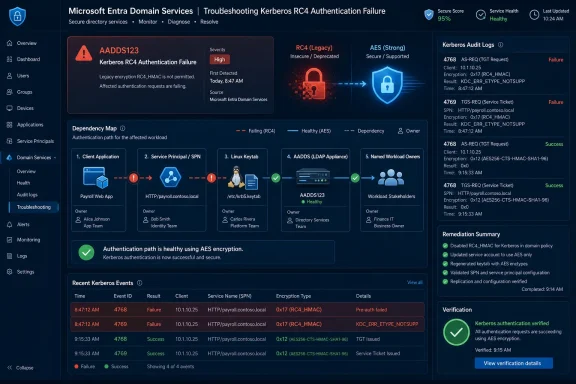 Start with evidence, not account settings
Microsoft’s guidance supports using Entra Domain Services security auditing, monitoring Kerberos events 4768 and 4769, and using Microsoft’s Sample query 7 to investigate RC4 ticket issuance. Use the Microsoft-provided query from the current documentation rather than copying an unverified variation into an incident runbook.Do not begin by changing account encryption settings, resetting passwords, or rebuilding an appliance. Those actions can obscure the original failure without identifying what requested RC4.
Before investigation, collect:
- The affected application, service, scheduled task, Linux host, appliance, or LDAP client.
- The time window of the failure, including the timezone.
- The user or service account involved, if known.
- The target service, hostname, or service principal name (SPN), if known.
- The business transaction that reliably reproduces the issue.
- The owner of the workload and the owner of the service being accessed.
- Enable the applicable Entra Domain Services security auditing according to Microsoft’s current documentation.
- Reproduce the failed business transaction once, if doing so is safe.
- Review new Kerberos audit activity for events 4768 and 4769.
- Run Microsoft’s current Sample query 7 to identify RC4-related ticket activity.
- Record the requesting identity, service name or SPN, event type, timestamp, and affected workload.
- Assign investigation ownership before making a configuration change.
WindowsForum’s discussion of richer Kerberos auditing is especially relevant here: account settings alone often do not identify the real dependency. The event trail is what connects a broad encryption finding to a specific workload that must be repaired.
Build a dependency record from each RC4 signal
For every RC4-related finding from 4768, 4769, or the managed-domain health alert, create a small incident record. Avoid assuming that the account named in an event is automatically the broken component. It is evidence to investigate.| Signal | Client/workload owner | Service/SPN owner | Likely dependency to check | Repair evidence |
|---|---|---|---|---|
| 4768 during the failed transaction | Owner of the requesting host, application, or scheduled task | Identity or directory owner, if applicable | Client Kerberos configuration, stored credentials, supported encryption types | Transaction succeeds and new audit activity no longer indicates RC4 |
| 4769 for a service ticket | Owner of the workload requesting the service | Owner of the service account and SPN | Service principal configuration, application settings, keytab, middleware support | Retest succeeds; the same client-to-service path produces no new RC4 finding |
| AADDS123 health alert | Workload owner identified through correlated audit evidence | Service or identity owner identified through the event trail | An outstanding RC4-dependent authentication path | Fresh audit data and managed-domain health state are reviewed after remediation |
| LDAP-related failure correlated with Kerberos activity | Application or appliance owner | LDAP service or identity owner | SASL/GSSAPI or other Kerberos-backed LDAP path | The exact bind test succeeds without a corresponding RC4 ticket finding |
Investigate the account, service principal, keytab, client, and appliance
1. Confirm the client and workload
Start with the source of the transaction. Identify the host, container, scheduled task, application pool, appliance, or middleware component that initiated the request.Check:
- Which account the workload runs as.
- Which service it is trying to reach.
- Whether the failure happens only for one operation or across the workload.
- Whether the workload was recently upgraded, moved, rebuilt, or configured with new credentials.
- Whether a different client can complete the same service transaction.
2. Check the service account and SPN as investigation evidence
If the event trail points to an expected service account and SPN, verify that the service ownership is clear and that the SPN corresponds to the intended application.Investigate:
- Whether the application is using the intended account.
- Whether the target SPN matches the service actually being accessed.
- Whether duplicate, stale, or unexpected service identities could be redirecting the investigation.
- Whether the service owner can confirm the application’s supported Kerberos encryption types.
3. Treat keytabs as an investigation branch
For Linux services, Java workloads, UNIX systems, and products that use keytabs, verify which keytab is deployed and which principal it represents. A keytab can be relevant even when the directory-side account configuration appears correct, but that is a check to perform—not a conclusion to assume.Ask the workload owner to confirm:
- The principal used by the running service.
- The account used to generate or manage the keytab.
- The location and deployment process for the active keytab.
- The vendor- or platform-supported method for generating an AES-capable keytab.
- Whether the application must reload credentials or restart after replacement.
4. Treat appliances and embedded clients as an investigation branch
Network appliances, older middleware, embedded LDAP clients, and packaged applications may have their own Kerberos stacks. Do not assume that they support AES simply because the surrounding Windows environment does.Ask the product owner or vendor:
- Does this exact release support Kerberos AES for the required connection?
- Does it support both ticket acquisition and access to the target service?
- Does it use a keytab, stored service credentials, or another credential method?
- Does its LDAP integration use Kerberos-backed SASL/GSSAPI or a different bind mechanism?
- Is an upgrade, patch, configuration change, or replacement required?
Troubleshoot LDAP failures without chasing the wrong layer
LDAP failures can be misleading because the visible error is an unsuccessful bind or directory operation, while the underlying dependency may be Kerberos.Use this sequence:
- Record the bind account, target hostname, authentication method, and failure time.
- Reproduce the bind once while auditing is available.
- Review 4768 and 4769 activity from the same window.
- Determine whether the client requested a ticket associated with the LDAP operation or another service dependency.
- If RC4-related activity is present, investigate the client, application configuration, keytab, or appliance path identified by the evidence.
- Retest the exact bind after the AES-capable repair.
Handle recovery carefully
Microsoft documentation describes advance testing and remediation tooling for RC4 changes. Do not assume that restoring RC4 is generally available after an enforcement state, or that it is appropriate for every managed-domain deployment.If Microsoft’s current procedure explicitly confirms a recovery option for your applicable deployment state, prerequisites, and support boundaries, use it only as a narrow, time-limited service-continuity measure. Document:
- The affected workload and business impact.
- The exact RC4-dependent client-to-service path.
- The responsible workload owner.
- The approved temporary scope and expiration date.
- The remediation plan required before the workaround is removed.
Verify the AES-capable repair
Close the incident only after verification, not when an account setting has changed or an application process starts.- Repeat the original business transaction with the repaired client, application, keytab, or appliance configuration.
- Confirm that the transaction succeeds.
- Review fresh 4768 and 4769 activity for the same client, account, and service path.
- Confirm that the RC4-related finding no longer appears for that tested path.
- Record the application version, configuration change, credential update, or replacement action that resolved the dependency.
- Record the named owner responsible for maintaining the repaired workload.
- Review AADDS123 and related managed-domain health information after remediation, but do not rely on alert state alone as proof of a fix.
Frequently Asked Questions
Does an AES setting on a service account prove the application is fixed?
No. The account is only one part of the path. The client, application runtime, service principal, credential artifact, keytab, or appliance may still need investigation. Verify the real transaction and review fresh Kerberos evidence.What does AADDS123 mean?
AADDS123 is a managed-domain health signal related to RC4 use during service-ticket issuance. Treat it as a remediation lead: correlate it with 4768 and 4769 evidence, identify the workload and service path, and assign owners.Should one legacy workload delay RC4 retirement for the whole organization?
No. WindowsForum user reports consistently favor isolating the named dependency and giving it an upgrade, reconfiguration, replacement, or retirement path. Broad exceptions hide ownership and leave unrelated workloads exposed to the same legacy dependency.Why monitor both 4768 and 4769?
They provide evidence from different points in the Kerberos flow. Looking at both helps distinguish an initial authentication event from a later request for access to a specific service, which is often where a legacy dependency becomes visible.The operational outcome is not simply an alert disappearing. It is a documented, AES-capable authentication path with a known client owner, service owner, repair record, and audit evidence that the original RC4 dependency has been removed.
References
- Primary source: learn.microsoft.com
RC4 deprecation advance dependency test in Microsoft Entra Domain Services - Microsoft Entra ID | Microsoft Learn
Learn what the RC4 deprecation advance dependency test is, when it runs, and how to prepare for and recover from it in Microsoft Entra Domain Services.learn.microsoft.com - Independent coverage: support.microsoft.com
How to manage Kerberos KDC usage of RC4 for service account ticket issuance changes related to CVE-2026-20833 | Microsoft Support
How to manage Kerberos KDC usage of RC4 for service account ticket issuance changes related to CVE-2026-20833support.microsoft.com - Independent coverage: azure.github.io
Azure.EntraDS.RC4 - PSRule for Azure
Disable RC4 encryption for Microsoft Entra Domain Services. azure.github.io
- Independent coverage: techcommunity.microsoft.com
- Primary source: WindowsForum
Remove RC4 in Windows Kerberos with New Audit Fields and Remediation Tools | Windows Forum
Microsoft is moving Windows authentication firmly away from the legacy RC4 cipher and adding concrete detection and remediation tooling so administrators...windowsforum.com
