

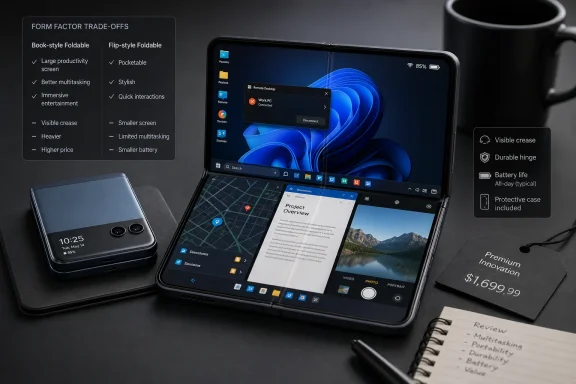
Foldable phones have finally reached the stage where owners can describe them in terms of everyday usefulness rather than technological novelty. The best models genuinely combine two devices, improve multitasking, fit into smaller pockets, and unlock camera tricks that conventional smartphones cannot reproduce. Yet the same owners who praise those advantages continue to warn about creases, delicate displays, awkward software, battery compromises, and premium prices—making the foldable decision less about buying the “best” phone and more about choosing which trade-offs match the way you work and live.
Samsung’s original Galaxy Fold entered the market in 2019 under difficult circumstances. Early review units exposed weaknesses around the display protector, hinge openings, and flexible panel, forcing Samsung to delay the launch and reinforce the design before releasing it commercially.
That troubled debut established a reputation foldables have spent years trying to overcome. Even as manufacturers improved hinges, added water resistance, strengthened frames, reduced gaps, and refined flexible glass, shoppers continued to associate the category with fragile prototypes costing considerably more than ordinary flagship phones.
Samsung remains the most recognizable foldable manufacturer, but it no longer operates alone. Google, Motorola, Honor, Oppo, OnePlus, and other brands have pushed the market toward thinner bodies, wider cover displays, better cameras, larger batteries, and less conspicuous creases.
Apple is also widely reported to be preparing its first foldable iPhone, potentially for later in 2026, although the company had not formally announced the product as of July 21. Apple’s arrival would not validate every foldable design decision, but it could encourage more developers to optimize software for displays that change size and shape.
Their collective verdict is neither an endorsement nor a rejection. Foldables can be transformative for the right buyer, but they still demand more care and compromise than the best conventional smartphones.
This distinction matters because large conventional phones have reached a practical limit. Making a slab phone wider or taller eventually damages one-handed usability, whereas a folding display creates more surface area without permanently increasing the device’s footprint.
The advantage becomes especially noticeable during commuting and travel. A foldable can replace a small tablet on a train or flight while remaining connected to the same cellular service, applications, authentication tools, and locally stored files as the user’s primary phone.
That continuity is more important than raw screen size. There is no need to create a hotspot, synchronize work between devices, retrieve a tablet from another bag, or decide in advance whether a larger screen will be required.
Prospective owners should therefore examine their current habits. People who already carry tablets, enlarge documents, work from mobile devices, or frequently switch between applications are more likely to benefit than those who primarily make calls, send short messages, and scroll through vertically oriented social feeds.
A book-style foldable changes that equation. Its internal display can show two usable applications side by side, and some software implementations allow a third app or a floating window to join them.
Practical pairings include:
It does not replace a Windows laptop for sustained typing or complex management. It can, however, make emergency troubleshooting, document approval, server monitoring, and remote access significantly less painful than they would be on a narrow phone screen.
The remaining limitation is software consistency. Multitasking feels excellent when applications resize correctly and frustrating when one app restarts, refuses a particular orientation, or displays a stretched phone interface.
Text columns become wider, diagrams become legible, and PDF pages require less zooming. Comics and manga particularly benefit because the larger panel preserves more artwork and lettering than a conventional phone.
The replacement is not universal. Dedicated e-readers remain easier on the eyes in bright sunlight, can run for much longer between charges, and avoid the distractions associated with a connected smartphone.
Still, the foldable’s versatility is difficult to dismiss. The same panel that displays a novel during a commute can open a technical manual at work, a recipe in the kitchen, or a boarding pass and airport map while traveling.
This is not necessarily more efficient than a flat tablet, but it gives the hardware a sense of purpose. The fold stops being merely a storage mechanism and becomes part of the interaction model.
This addresses a genuine ergonomic problem. Modern slab phones have become tall enough to protrude from shallow pockets, and their large rectangular shape can be inconvenient even when the device itself is relatively thin.
That distinction is crucial. Someone seeking the thinnest possible handset may be disappointed, while a buyer concerned about height and portability may find the shape ideal.
Clamshells also introduce an additional action before the full screen becomes accessible. Some users enjoy the deliberate act of opening the phone; others eventually regard it as unnecessary friction.
For some owners, this makes the flip form factor feel calmer than a permanently exposed smartphone. For others, the exterior display simply becomes another surface demanding attention.
The difference depends heavily on cover-screen design and notification settings. A well-configured flip phone can reduce unnecessary interaction, but a cluttered outer display can reproduce the same distractions in miniature.
The result is not merely a smaller copy of the main screen. At its best, the cover display functions as a glanceable control panel optimized for brief interactions.
Manufacturers differ over how much freedom the outer screen should provide. Motorola has generally favored broader application access, while Samsung has combined supported widgets and applications with optional customization tools that can expand compatibility.
A completely unrestricted approach sounds superior, but ordinary Android applications are not always designed for tiny, irregular displays. Menus can become difficult to tap, text may be truncated, and authentication prompts may appear outside the usable area.
Owners should evaluate more than the screen’s diagonal measurement. Shape, resolution, brightness, refresh rate, bezel design, supported apps, keyboard usability, and continuity between displays determine whether the outer panel becomes essential or ornamental.
The form factor nevertheless creates photographic capabilities a slab phone cannot easily match. The exterior display can act as a preview monitor, allowing subjects to frame themselves while the main rear cameras take the picture.
That can improve detail, dynamic range, low-light performance, and color consistency. Group photos also become easier because participants can see whether everyone fits inside the frame before the shutter fires.
The benefit is especially relevant to video creators. Rear cameras may provide better stabilization, autofocus, frame-rate options, and lens selection than an internal selfie camera.
The process works best on a level surface and within a limited range of angles. It cannot replace a proper tripod for precise positioning, but owners often value it because it is always available.
This is one of the clearest examples of foldable hardware creating a new behavior rather than enlarging an existing feature. The hinge becomes a photographic tool, not simply a mechanical necessity.
Owners typically divide into two groups. One group stops noticing the crease after several days, particularly when viewing the display directly; the other remains distracted by reflections or by the sensation of a finger crossing the depression.
The crease also has a tactile dimension. Users who frequently swipe across the center of the panel, draw with a stylus, or read content spanning the fold may notice it more than those who interact primarily with either side.
Manufacturers are continuing to refine support plates, hinge radiuses, flexible layers, and material stacks. Samsung’s newly announced Flex Titanium display technology, for example, is intended to improve durability while reducing crease visibility in its next generation of foldables.
A useful test follows four steps:
The fundamental engineering challenge remains. A flexible screen cannot use the same thick, rigid cover glass as a conventional smartphone, and a hinge introduces moving components that do not exist in a slab.
Cases offer partial protection but cannot eliminate every risk. Hinge coverage adds bulk, and the large inner panel must remain exposed whenever the device is open.
Water resistance has become increasingly common, but dust protection varies considerably. An IP48-rated device, for example, offers meaningful water protection and resistance against larger solid objects, yet it does not match the fine-particle sealing associated with an IP68 conventional flagship.
Businesses should incorporate repair turnaround into deployment planning. A damaged foldable may require specialized parts or service procedures, and employees who depend on one device for phone and tablet duties lose both functions during repair.
Durability anxiety can itself become a disadvantage even if the phone never fails. A product that makes its owner nervous at a beach, workshop, construction site, or crowded event may not suit that owner’s environment.
Physics still matters. A book-style foldable needs two body sections, a hinge, an internal display, an external display, and enough structural reinforcement to hold everything together.
Closed thickness also affects typing. A narrow, tall cover screen mounted on a thick body can feel less natural than a conventional phone even when it is technically usable with one hand.
When open, the situation reverses. The weight spreads across a broader area, and two-handed reading may become more comfortable than holding a heavy slab phone by its lower edge.
Buyers should evaluate the device in the protective configuration they intend to use. Admiring a remarkably thin bare foldable is of limited value if the final case turns it into an awkward object.
Android now provides extensive guidance and development tools for adaptive layouts, window-size classes, continuity, multitasking, and fold-aware behavior. Adoption, however, depends on individual developers updating and testing their applications.
Poorly optimized software may do one of several things:
The internal screen still offers benefits for subtitles, playback controls, and multitasking beside the video. Buyers expecting the entire panel to become a miniature widescreen television may nevertheless be disappointed.
The strongest use cases are those that adapt to available space: documents, websites, photographs, maps, games, comics, and multi-pane applications. Fixed-ratio video often uses the screen less efficiently.
Clamshells face especially severe packaging constraints because the hinge divides the chassis and the compact shape leaves little room for large cells. Book-style devices have more total area, but camera systems, multiple displays, and thinness targets compete for the same volume.
Silicon-carbon battery technology offers an important opportunity because it can increase energy density without proportionally increasing physical size. Some manufacturers have already used the technology to improve capacity in thin or compact designs.
Charging speeds also vary widely. A premium foldable may cost more than a conventional flagship while charging more slowly, making short top-ups less effective during a busy day.
Organizations should test representative workloads rather than relying on general battery benchmarks. Cellular signal conditions, VPN use, Teams calls, camera uploads, location services, and mobile-device-management software can all produce results that differ from light web browsing.
A foldable that replaces both a phone and a tablet must also replace the combined availability of those devices. That raises the standard for battery reliability rather than lowering it.
The price becomes harder to justify when cameras, battery capacity, charging speed, or durability trail a less expensive conventional flagship. Buyers are not simply paying for better specifications; they are paying for the transforming form factor.
A discounted older model may be an excellent introduction, but buyers should investigate remaining software support, battery condition, hinge wear, display-protector status, and warranty coverage. A cheap used foldable with an uncertain history can become expensive after one major repair.
Total cost should include:
That logic fails if the buyer continues carrying a tablet because the foldable is too small, delicate, or power-hungry for the intended work. The device must actually replace something—not merely add another expensive screen to the collection.
Neither category is automatically superior. They solve different problems and introduce different compromises.
A clamshell makes sense for someone who dislikes the height of modern phones, wants rear-camera selfies, or prefers handling notifications without opening the main display. A book-style model suits someone who frequently wishes a phone screen were wider, uses split-screen tools, or carries a separate tablet.
Consumers should also test one-handed typing, camera performance, case thickness, crease visibility, speaker placement, and the number of actions required to move between displays.
IT departments should validate:
Samsung’s response will matter just as much. Having spent years normalizing the category, it must now demonstrate that manufacturing experience can produce thinner, stronger, less creased, and more affordable devices—not simply another annual specification update.
Foldable phones are no longer gimmicks, but they are not yet effortless replacements for conventional handsets. Owners love them most when the changing shape solves a recurring problem: a book-style device replaces a tablet, a clamshell fits where a large phone cannot, or a flexible posture enables work and photography that would otherwise require extra equipment. Buyers who can identify that concrete benefit may find it difficult to return to a slab phone; everyone else should wait until durability, software consistency, battery life, and price catch up with the undeniable appeal of the fold.
 Background
Samsung’s original Galaxy Fold entered the market in 2019 under difficult circumstances. Early review units exposed weaknesses around the display protector, hinge openings, and flexible panel, forcing Samsung to delay the launch and reinforce the design before releasing it commercially.That troubled debut established a reputation foldables have spent years trying to overcome. Even as manufacturers improved hinges, added water resistance, strengthened frames, reduced gaps, and refined flexible glass, shoppers continued to associate the category with fragile prototypes costing considerably more than ordinary flagship phones.
From experiment to established category
The modern market has split into two broad designs. Book-style foldables resemble conventional smartphones when closed and open into compact tablets, while clamshell foldables turn a full-sized handset into a smaller square that fits more easily into a pocket or bag.Samsung remains the most recognizable foldable manufacturer, but it no longer operates alone. Google, Motorola, Honor, Oppo, OnePlus, and other brands have pushed the market toward thinner bodies, wider cover displays, better cameras, larger batteries, and less conspicuous creases.
Apple is also widely reported to be preparing its first foldable iPhone, potentially for later in 2026, although the company had not formally announced the product as of July 21. Apple’s arrival would not validate every foldable design decision, but it could encourage more developers to optimize software for displays that change size and shape.
Owners now provide the most useful evidence
Laboratory hinge tests and specification sheets reveal only part of the experience. Long-term owners discover whether opening the device becomes natural, whether the inner screen is used frequently enough to justify the price, and whether anxiety about damage fades or remains throughout ownership.Their collective verdict is neither an endorsement nor a rejection. Foldables can be transformative for the right buyer, but they still demand more care and compromise than the best conventional smartphones.
1. A Pocketable Mini-Tablet Is the Defining Advantage
The most persuasive argument for a book-style foldable remains simple: it gives the owner a normal phone and a small tablet without requiring two separate devices. The cover screen handles quick interactions, while the inner display becomes available whenever additional space would materially improve the task.This distinction matters because large conventional phones have reached a practical limit. Making a slab phone wider or taller eventually damages one-handed usability, whereas a folding display creates more surface area without permanently increasing the device’s footprint.
The value appears in ordinary moments
Owners frequently describe using the outer screen for notifications, calls, payments, messaging, and navigation. They then unfold the phone for reading, editing documents, viewing photographs, studying maps, browsing desktop-style websites, or watching video.The advantage becomes especially noticeable during commuting and travel. A foldable can replace a small tablet on a train or flight while remaining connected to the same cellular service, applications, authentication tools, and locally stored files as the user’s primary phone.
That continuity is more important than raw screen size. There is no need to create a hotspot, synchronize work between devices, retrieve a tablet from another bag, or decide in advance whether a larger screen will be required.
A larger screen is not automatically a better screen
The inner display only earns its place when owners regularly unfold it. Buyers who perform nearly every task on the cover screen may discover that they have purchased an expensive, mechanically complicated phone while rarely using its defining feature.Prospective owners should therefore examine their current habits. People who already carry tablets, enlarge documents, work from mobile devices, or frequently switch between applications are more likely to benefit than those who primarily make calls, send short messages, and scroll through vertically oriented social feeds.
2. Multitasking Becomes Genuinely Practical
Android has supported split-screen applications for years, but the feature is cramped on an ordinary phone. Two applications may technically fit, yet keyboards, navigation bars, menus, and narrow content columns quickly consume the available space.A book-style foldable changes that equation. Its internal display can show two usable applications side by side, and some software implementations allow a third app or a floating window to join them.
App pairs reduce repetitive setup
The strongest foldable software allows owners to save combinations of applications and reopen them together. A traveler might pair a mapping application with messages, while a researcher could combine a browser with a note-taking tool.Practical pairings include:
- A calendar can remain visible while the user answers an email about scheduling.
- A banking application can sit beside a calculator or budgeting spreadsheet.
- A video meeting can continue while the user reviews a document or takes notes.
- A shopping site can be compared with reviews, specifications, or another retailer.
- A remote desktop session can share the display with authentication or support tools.
Windows users gain a capable companion
For WindowsForum readers, the appeal extends beyond running two Android apps. A foldable can serve as a larger surface for Microsoft 365, Teams, Outlook, OneDrive, Remote Desktop, Windows App, browser-based administration portals, and Phone Link workflows.It does not replace a Windows laptop for sustained typing or complex management. It can, however, make emergency troubleshooting, document approval, server monitoring, and remote access significantly less painful than they would be on a narrow phone screen.
The remaining limitation is software consistency. Multitasking feels excellent when applications resize correctly and frustrating when one app restarts, refuses a particular orientation, or displays a stretched phone interface.
3. Reading Benefits More Than Video
Owners often expect video to be the killer application for a foldable, but reading may be the more convincing use. Books, comics, long articles, PDFs, magazines, and technical documentation can make productive use of the internal display without depending on a cinematic aspect ratio.Text columns become wider, diagrams become legible, and PDF pages require less zooming. Comics and manga particularly benefit because the larger panel preserves more artwork and lettering than a conventional phone.
Foldables can replace some secondary devices
A book-style model may reduce the need to carry a basic tablet or dedicated comic reader. It also keeps reading applications, downloads, annotations, passwords, and notifications on a device the owner already carries.The replacement is not universal. Dedicated e-readers remain easier on the eyes in bright sunlight, can run for much longer between charges, and avoid the distractions associated with a connected smartphone.
Still, the foldable’s versatility is difficult to dismiss. The same panel that displays a novel during a commute can open a technical manual at work, a recipe in the kitchen, or a boarding pass and airport map while traveling.
The hinge can imitate a physical book
Some reading applications support two-page layouts when the phone is opened like a book. Even when they do not, a partially folded posture can provide a subtle physical division between pages or content areas.This is not necessarily more efficient than a flat tablet, but it gives the hardware a sense of purpose. The fold stops being merely a storage mechanism and becomes part of the interaction model.
4. Clamshell Designs Solve the Pocketability Problem
Book-style devices sell the promise of expansion; clamshells sell compression. They provide a large conventional display when open but fold into a shorter object that fits more comfortably into small pockets, compact purses, and crowded bags.This addresses a genuine ergonomic problem. Modern slab phones have become tall enough to protrude from shallow pockets, and their large rectangular shape can be inconvenient even when the device itself is relatively thin.
Shorter does not always mean thinner
A closed flip phone is compact in height but usually becomes thicker because its two halves stack together. The result may fit more securely into a pocket while creating a more noticeable bulge.That distinction is crucial. Someone seeking the thinnest possible handset may be disappointed, while a buyer concerned about height and portability may find the shape ideal.
Clamshells also introduce an additional action before the full screen becomes accessible. Some users enjoy the deliberate act of opening the phone; others eventually regard it as unnecessary friction.
Folding can discourage compulsive checking
The need to open the device may create a useful boundary between the owner and the main display. Notifications can be screened on the cover panel, allowing unimportant alerts to be dismissed without entering an application and becoming distracted.For some owners, this makes the flip form factor feel calmer than a permanently exposed smartphone. For others, the exterior display simply becomes another surface demanding attention.
The difference depends heavily on cover-screen design and notification settings. A well-configured flip phone can reduce unnecessary interaction, but a cluttered outer display can reproduce the same distractions in miniature.
5. Cover Screens Are Becoming Independent Interfaces
Early clamshell cover screens displayed little more than the time, battery level, and incoming caller. Modern versions can manage notifications, widgets, media controls, navigation, messages, cameras, voice assistants, and selected applications.The result is not merely a smaller copy of the main screen. At its best, the cover display functions as a glanceable control panel optimized for brief interactions.
Quick tasks prevent unnecessary unfolding
The most useful cover-screen activities are those that take seconds rather than minutes. Checking a one-time password, changing a song, starting a timer, viewing the next navigation instruction, or replying with a short message does not require the full internal display.Manufacturers differ over how much freedom the outer screen should provide. Motorola has generally favored broader application access, while Samsung has combined supported widgets and applications with optional customization tools that can expand compatibility.
A completely unrestricted approach sounds superior, but ordinary Android applications are not always designed for tiny, irregular displays. Menus can become difficult to tap, text may be truncated, and authentication prompts may appear outside the usable area.
The best cover screens impose sensible limits
A strong cover interface balances access with readability. It should expose frequent actions while directing complex work to the main display rather than pretending every application can function equally well in a few square inches.Owners should evaluate more than the screen’s diagonal measurement. Shape, resolution, brightness, refresh rate, bezel design, supported apps, keyboard usability, and continuity between displays determine whether the outer panel becomes essential or ornamental.
6. The Cameras Gain New Possibilities
Foldable phones do not always contain the strongest camera hardware available at their price. Thin halves, hinge components, and battery placement compete for internal space that a conventional flagship can devote to larger sensors and advanced telephoto assemblies.The form factor nevertheless creates photographic capabilities a slab phone cannot easily match. The exterior display can act as a preview monitor, allowing subjects to frame themselves while the main rear cameras take the picture.
Rear-camera selfies improve image quality
Front-facing cameras usually receive smaller sensors and simpler optics than rear camera systems. A foldable lets the owner use the primary camera for selfies while monitoring the composition on the cover display.That can improve detail, dynamic range, low-light performance, and color consistency. Group photos also become easier because participants can see whether everyone fits inside the frame before the shutter fires.
The benefit is especially relevant to video creators. Rear cameras may provide better stabilization, autofocus, frame-rate options, and lens selection than an internal selfie camera.
Flex mode becomes a built-in tripod
Partially folding the phone lets one half rest on a table while the other holds the camera at an angle. This posture supports timed photographs, hands-free video calls, time-lapse recording, and stable low-light shots without a separate stand.The process works best on a level surface and within a limited range of angles. It cannot replace a proper tripod for precise positioning, but owners often value it because it is always available.
This is one of the clearest examples of foldable hardware creating a new behavior rather than enlarging an existing feature. The hinge becomes a photographic tool, not simply a mechanical necessity.
7. The Crease Remains the Most Visible Compromise
Every mainstream foldable must manage the point where its flexible display bends. Improved hinge geometry and panel materials have made creases shallower and less conspicuous, but they have not made the issue irrelevant.Owners typically divide into two groups. One group stops noticing the crease after several days, particularly when viewing the display directly; the other remains distracted by reflections or by the sensation of a finger crossing the depression.
Lighting changes the experience
A crease may be difficult to see against bright, colorful content and obvious on a dark screen beneath overhead lights. Retail demonstrations can therefore mislead in either direction depending on the store’s lighting and the image being displayed.The crease also has a tactile dimension. Users who frequently swipe across the center of the panel, draw with a stylus, or read content spanning the fold may notice it more than those who interact primarily with either side.
Manufacturers are continuing to refine support plates, hinge radiuses, flexible layers, and material stacks. Samsung’s newly announced Flex Titanium display technology, for example, is intended to improve durability while reducing crease visibility in its next generation of foldables.
Buyers should test rather than speculate
Crease tolerance is subjective, so reviews cannot settle the question for everyone. The sensible approach is to spend time with a demonstration unit and perform realistic actions rather than looking at a static home screen.A useful test follows four steps:
- View bright and dark content under direct overhead lighting.
- Scroll text and images across the fold in both orientations.
- Run a finger slowly over the center of the panel.
- Hold the phone at the angles normally used for reading and video.
8. Durability Has Improved, but Anxiety Persists
Current foldables are substantially more mature than the first Galaxy Fold. Manufacturers have redesigned hinges, added stronger frames, reduced debris entry points, improved display layers, and introduced certified water and limited dust resistance on selected devices.The fundamental engineering challenge remains. A flexible screen cannot use the same thick, rigid cover glass as a conventional smartphone, and a hinge introduces moving components that do not exist in a slab.
The inner display requires different habits
Foldable screens generally feel softer than traditional smartphone glass and can be more vulnerable to pressure from fingernails, grit, hard objects, or debris trapped during closing. Owners must also resist removing factory-installed display layers unless the manufacturer explicitly permits it.Cases offer partial protection but cannot eliminate every risk. Hinge coverage adds bulk, and the large inner panel must remain exposed whenever the device is open.
Water resistance has become increasingly common, but dust protection varies considerably. An IP48-rated device, for example, offers meaningful water protection and resistance against larger solid objects, yet it does not match the fine-particle sealing associated with an IP68 conventional flagship.
Repairability affects the ownership calculation
Damage to an internal foldable display can be expensive because the panel, supporting structure, protective layers, and hinge-related components form an integrated assembly. Insurance or an extended protection plan may therefore be more valuable than it is for a cheaper slab phone.Businesses should incorporate repair turnaround into deployment planning. A damaged foldable may require specialized parts or service procedures, and employees who depend on one device for phone and tablet duties lose both functions during repair.
Durability anxiety can itself become a disadvantage even if the phone never fails. A product that makes its owner nervous at a beach, workshop, construction site, or crowded event may not suit that owner’s environment.
9. Thickness and Weight Still Shape Daily Use
The industry has made striking progress in reducing foldable dimensions. Some recent book-style models approach the thickness and weight of large conventional flagships closely enough that the old “two phones taped together” description is no longer universally fair.Physics still matters. A book-style foldable needs two body sections, a hinge, an internal display, an external display, and enough structural reinforcement to hold everything together.
Specifications do not reveal weight distribution
Two devices with similar listed weights can feel very different. A narrow cover display, sharp edge, uneven camera bump, or concentrated hinge mass may make one model more tiring to hold than another.Closed thickness also affects typing. A narrow, tall cover screen mounted on a thick body can feel less natural than a conventional phone even when it is technically usable with one hand.
When open, the situation reverses. The weight spreads across a broader area, and two-handed reading may become more comfortable than holding a heavy slab phone by its lower edge.
Cases can erase engineering gains
Foldable cases require separate pieces and adhesives or frame clips to remain attached. Models with hinge protectors become significantly thicker, while minimalist cases may leave the most mechanically complex component exposed.Buyers should evaluate the device in the protective configuration they intend to use. Admiring a remarkably thin bare foldable is of limited value if the final case turns it into an awkward object.
10. App Optimization Is Still Inconsistent
A foldable’s internal screen sits between established phone and tablet conventions. Its near-square dimensions can expose applications built around fixed portrait layouts, assumptions about screen width, or interfaces that fail to respond gracefully to resizing.Android now provides extensive guidance and development tools for adaptive layouts, window-size classes, continuity, multitasking, and fold-aware behavior. Adoption, however, depends on individual developers updating and testing their applications.
Great software transforms the hardware
An optimized application can use a two-pane interface, keeping navigation or a list on one side and detailed content on the other. Email, file management, messaging, calendar, gallery, and productivity software are particularly well suited to this approach.Poorly optimized software may do one of several things:
- It may stretch phone controls across an unnecessarily wide canvas.
- It may place excessive empty space around a narrow content column.
- It may restart when the device is folded or unfolded.
- It may lock itself to an inconvenient orientation.
- It may display controls beneath the camera cutout, taskbar, or hinge region.
- It may refuse split-screen mode or behave unpredictably when resized.
Video reveals the aspect-ratio problem
A larger diagonal measurement does not guarantee a dramatically larger video image. Most movies and television programs use wide aspect ratios, so a nearly square foldable display can produce substantial black bars.The internal screen still offers benefits for subtitles, playback controls, and multitasking beside the video. Buyers expecting the entire panel to become a miniature widescreen television may nevertheless be disappointed.
The strongest use cases are those that adapt to available space: documents, websites, photographs, maps, games, comics, and multi-pane applications. Fixed-ratio video often uses the screen less efficiently.
11. Battery Life and Charging Remain Uneven
Foldables create a difficult power equation. They may contain more than one display and encourage longer sessions on a large internal panel, yet their segmented construction limits where manufacturers can place battery cells.Clamshells face especially severe packaging constraints because the hinge divides the chassis and the compact shape leaves little room for large cells. Book-style devices have more total area, but camera systems, multiple displays, and thinness targets compete for the same volume.
Capacity alone does not determine endurance
Display efficiency, chipset behavior, modem quality, software scheduling, refresh-rate control, and the owner’s screen usage all affect battery life. Someone who relies mainly on the cover screen may see very different results from an owner who unfolds the phone for hours of gaming, navigation, or remote work.Silicon-carbon battery technology offers an important opportunity because it can increase energy density without proportionally increasing physical size. Some manufacturers have already used the technology to improve capacity in thin or compact designs.
Charging speeds also vary widely. A premium foldable may cost more than a conventional flagship while charging more slowly, making short top-ups less effective during a busy day.
Enterprise users need predictable endurance
For a consumer, weak battery life is an inconvenience. For a field technician, salesperson, healthcare worker, or administrator using authentication and remote-management tools, it can become an operational problem.Organizations should test representative workloads rather than relying on general battery benchmarks. Cellular signal conditions, VPN use, Teams calls, camera uploads, location services, and mobile-device-management software can all produce results that differ from light web browsing.
A foldable that replaces both a phone and a tablet must also replace the combined availability of those devices. That raises the standard for battery reliability rather than lowering it.
12. Price Is Still the Largest Barrier
Foldables remain premium products because they contain expensive flexible displays, intricate hinges, additional structural parts, and relatively complex assembly processes. Book-style flagships often occupy the highest tier of a manufacturer’s mobile lineup.The price becomes harder to justify when cameras, battery capacity, charging speed, or durability trail a less expensive conventional flagship. Buyers are not simply paying for better specifications; they are paying for the transforming form factor.
Discounts change the equation
Trade-in promotions, carrier financing, refurbished stock, and previous-generation models can reduce the effective cost substantially. Foldables also tend to receive aggressive discounts after launch as manufacturers attempt to expand adoption.A discounted older model may be an excellent introduction, but buyers should investigate remaining software support, battery condition, hinge wear, display-protector status, and warranty coverage. A cheap used foldable with an uncertain history can become expensive after one major repair.
Total cost should include:
- The device price remains only the first expense.
- A suitable case may cost more than a conventional phone case.
- Insurance or extended coverage can be financially sensible.
- Repairs may involve expensive integrated assemblies.
- Resale value can be affected by visible hinge or screen wear.
- Accessory compatibility may be narrower than with mainstream phones.
Value depends on device consolidation
A book-style foldable becomes easier to justify when it prevents the purchase of a separate compact tablet. It may also reduce the number of devices, chargers, data plans, and synchronization steps in an owner’s routine.That logic fails if the buyer continues carrying a tablet because the foldable is too small, delicate, or power-hungry for the intended work. The device must actually replace something—not merely add another expensive screen to the collection.
Consumer and Enterprise Impact
Foldables serve consumers most effectively when the physical design matches a recurring need. A clamshell can improve portability and camera flexibility, while a book-style model can support reading, gaming, travel, productivity, and media consumption.Neither category is automatically superior. They solve different problems and introduce different compromises.
Consumer buyers should start with behavior
Shoppers should avoid choosing a model solely because its unfolding mechanism looks impressive. A more reliable decision comes from identifying which daily frustration the product will remove.A clamshell makes sense for someone who dislikes the height of modern phones, wants rear-camera selfies, or prefers handling notifications without opening the main display. A book-style model suits someone who frequently wishes a phone screen were wider, uses split-screen tools, or carries a separate tablet.
Consumers should also test one-handed typing, camera performance, case thickness, crease visibility, speaker placement, and the number of actions required to move between displays.
Enterprises need policies for a new device class
Business deployments must consider supportability as well as productivity. Foldables may benefit executives, mobile professionals, sales teams, and technicians who need more workspace without carrying another device.IT departments should validate:
- Whether required applications resize and multitask correctly.
- Whether mobile-device-management controls recognize both display states.
- Whether cases and mounts work with the chosen form factor.
- Whether repair providers can meet required turnaround times.
- Whether battery endurance remains adequate under managed workloads.
- Whether remote-access, authentication, and collaboration tools remain usable across posture changes.
Strengths and Opportunities
Foldable phones now deliver benefits that conventional devices cannot reproduce through software alone. Their strongest opportunities arise where physical transformation removes the need for another accessory or device.The clearest advantages
- Book-style models provide substantially more workspace without permanently requiring a tablet-sized body.
- Split-screen multitasking becomes practical enough for communication, research, scheduling, and remote administration.
- Clamshell models fit more easily into shallow pockets and small bags despite remaining relatively thick.
- Cover displays can reduce unnecessary interactions with the main screen and accelerate brief tasks.
- Rear-camera previews and partially folded postures create useful photography and video options.
- Reading, comics, maps, PDFs, and adaptive applications make effective use of near-square internal displays.
- Better batteries, stronger hinges, and improved materials are steadily narrowing the gap with conventional flagships.
- Apple’s expected market entry could encourage broader developer support for adaptive interfaces.
Risks and Concerns
The drawbacks are not merely remnants of first-generation hardware. Several result directly from folding a display and dividing a phone into mechanically connected sections.The most important cautions
- Flexible inner screens remain softer and more vulnerable to pressure than conventional cover glass.
- Creases can remain visible or tactile, particularly under reflective lighting.
- Dust resistance may not equal the protection offered by an IP68 slab flagship.
- Cases can add substantial bulk while providing incomplete protection for the hinge or inner display.
- Applications do not always resize, rotate, continue, or multitask correctly.
- Large internal screens can increase power consumption without leaving enough room for dramatically larger batteries.
- Repair costs and downtime may be higher because specialized components form integrated assemblies.
- Premium pricing can exceed the value of the cameras, charging system, or performance hardware alone.
- A buyer who rarely unfolds the device may receive little benefit from its most expensive component.
What to Watch Next
The next phase of foldable development will be defined less by proving that flexible screens work and more by eliminating the penalties attached to them. Buyers should watch for progress in materials, batteries, software, pricing, and repair programs rather than focusing solely on another reduction in chassis thickness.Five developments could change the market
- Crease reduction must become durable, not merely impressive on a new demonstration unit. New support materials and hinge geometries need to maintain their appearance after prolonged folding.
- Dust protection must approach conventional flagship standards. Better sealing would make foldables more credible for outdoor, industrial, and field use.
- Adaptive applications must become normal across Android and iOS. Users should not have to investigate whether each important app supports large screens, split views, or display continuity.
- Higher-density batteries must improve endurance without adding thickness. Silicon-carbon cells and more efficient processors could remove one of the most persistent owner complaints.
- Prices and repair costs must decline. Wider production, stronger competition, refurbished programs, and standardized service procedures could move foldables beyond the enthusiast market.
Samsung’s response will matter just as much. Having spent years normalizing the category, it must now demonstrate that manufacturing experience can produce thinner, stronger, less creased, and more affordable devices—not simply another annual specification update.
Foldable phones are no longer gimmicks, but they are not yet effortless replacements for conventional handsets. Owners love them most when the changing shape solves a recurring problem: a book-style device replaces a tablet, a clamshell fits where a large phone cannot, or a flexible posture enables work and photography that would otherwise require extra equipment. Buyers who can identify that concrete benefit may find it difficult to return to a slab phone; everyone else should wait until durability, software consistency, battery life, and price catch up with the undeniable appeal of the fold.
References
- Primary source: bgr.com
Published: 2026-07-21T14:02:00+00:00
Loading…
www.bgr.com - Related coverage: techradar.com
Loading…
www.techradar.com - Related coverage: digitalcameraworld.com
Samsung turns to titanium to help banish the crease on its next foldable phone screens | Digital Camera World
It should also help improve strength and durabilitywww.digitalcameraworld.com
