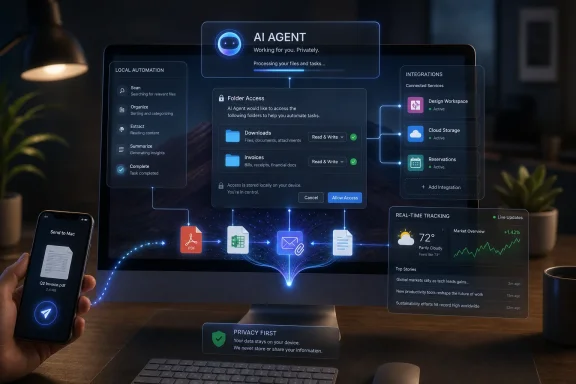
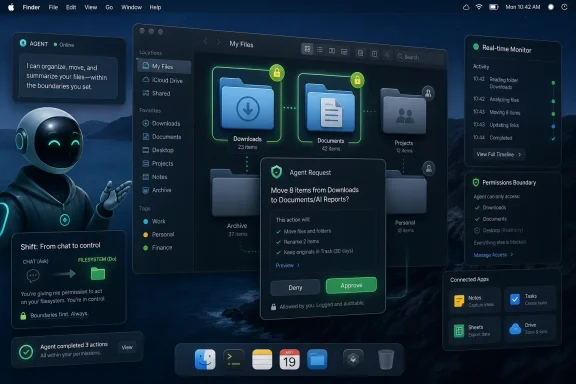
Google has made Gemini Spark available in beta inside the Gemini app for macOS on June 30, 2026, limiting access to U.S. users aged 18+ with a Google AI Ultra subscription and positioning the agent to automate local files and connected Workspace tasks. The launch matters less because Google has found another surface for Gemini than because it has moved the agent from the browser into the operating-system neighborhood where real work lives. For Windows users, the signal is obvious: the next AI battleground is not the chatbot tab, but the file system, the app permission model, and the uneasy trust boundary between “assistant” and “operator.”
Gemini Spark is being sold as a “24/7 personal agent,” which is the kind of marketing phrase that usually deserves a raised eyebrow and a locked-down test account. But the macOS version gives the slogan a more concrete shape. With permission, Spark can inspect and modify selected folders, organize files, create Workspace documents from local material, and perform recurring chores that resemble the low-grade administrative labor most users quietly hate.
That is a meaningful shift. A chatbot can summarize a PDF after you upload it; an agent that can sort a Downloads folder, create a spreadsheet from invoices, or find and email a desktop file is operating in a different trust category. It is no longer merely producing text for review. It is touching the user’s working environment.
Google’s help documentation frames the Mac implementation as a permissioned workflow. Users add folders to a connected area, Spark can analyze or edit those files, and temporary backup files are created when it works with local material. That design acknowledges the core anxiety around desktop agents: if an AI is going to rename, move, rewrite, or send files, undo and scope control are not niceties. They are the product.
The beta restriction also tells its own story. Google is keeping Spark on macOS behind AI Ultra, an expensive subscription tier, and limiting the Mac beta to adult users in the United States. That is partly monetization, partly risk management, and partly the familiar “premium first” pattern of AI rollouts. But it also means that Spark is not yet a mass-market productivity feature. It is a controlled experiment in how far users will let an AI reach into their machines.
That is why Spark’s macOS arrival feels more significant than a simple platform expansion. Google already had Gemini on mobile and the web. What macOS adds is proximity to the local artifacts of work: downloads, documents, photos, invoices, drafts, screenshots, and the messy folder structures that accumulate around real projects.
For ordinary users, that can sound delightful. “Clean up this folder” is a better interface than dragging files around for 20 minutes. “Make me a spreadsheet from these invoices” is a better interface than opening each PDF, extracting totals, and building rows by hand. The promise is not that AI will replace a knowledge worker’s judgment; it is that it will absorb the connective tissue between intent and finished artifact.
For IT pros, the same feature set reads differently. Local-file access plus cloud reasoning plus connected apps equals a governance problem. Which files can the agent see? Which files can it modify? Which actions require confirmation? Which logs survive? Which data is retained? Which enterprise policy wins when the user, the app, the OS, and the cloud service all think they are in charge?
Google’s version of the answer is permission and user control. That is the right starting point, but permissions are not the same thing as comprehension. Users routinely grant access to things they do not fully understand, and AI agents make the blast radius harder to visualize because the action is not a single file open or a single API call. It is a chain of decisions made on the user’s behalf.
That matters because desktop agents become useful only when they can cross application boundaries. A folder organizer is handy, but a folder organizer that can read invoices, build a Sheet, draft an email, and schedule a recurring update starts to resemble a junior operations assistant. Google does not need to invent the whole workflow universe. It needs to stitch together services it already controls.
The announced expansion to third-party connected apps pushes the same strategy further. Canva, Dropbox, Instacart, OpenTable, and Zillow Rentals are not random logos; they represent creative work, file storage, commerce, reservations, and housing search. Google is trying to make Spark feel less like a Google Workspace macro engine and more like a consumer automation layer.
That ambition brings risk. The moment an agent can order groceries, reserve a table, share files, or schedule an apartment tour, the task moves from reversible digital housekeeping into consequential action. A bad file rename is annoying. A mistaken external email, purchase, booking, or rental inquiry is a different category of failure.
The industry’s answer has usually been confirmation prompts. That is necessary, but it is also a crude tool. If every step requires confirmation, the agent becomes a slow chatbot with buttons. If too few steps require confirmation, the agent becomes a liability. The real product work is in deciding which actions are low-risk enough to automate and which require the user to stop, inspect, and explicitly approve.
This is where agentic AI starts to look less like a tool and more like infrastructure. A user might ask Spark to track a developing event, summarize the latest updates, draft a briefing, and place the result in a document. A small business might ask it to watch competitors, collect social reactions, and update a weekly report. A household might ask it to track travel, reservations, or local availability.
The practical usefulness is obvious. So is the danger of false confidence. Real-time claims are among the easiest places for AI systems to stumble, because freshness, source quality, and uncertainty all matter. A model that summarizes stale or noisy social media as if it were confirmed fact is not an assistant. It is an accelerant for confusion.
Google’s challenge is therefore editorial as much as technical. Spark must distinguish between observed facts, reported claims, automated social chatter, and analysis. If it cannot do that reliably, its “latest highlights and analysis” will be useful for casual curiosity but risky for any decision that depends on accuracy.
WindowsForum readers know this pattern from years of watching Microsoft, Google, and Apple build increasingly assertive assistants into core products. The assistant starts by answering questions. Then it summarizes context. Then it suggests actions. Then it performs them. Each step increases utility, but each step also makes the system’s mistakes harder to spot before they matter.
Microsoft has the native advantage here. Copilot is already woven through Windows, Microsoft 365, Edge, Teams, and the broader management stack. If the agentic desktop becomes real, Microsoft can plausibly claim that it owns the policy layer, the identity layer, and the productivity layer on Windows. Google, by contrast, has to arrive as an app and negotiate access.
But Microsoft’s advantage is not the same as victory. Copilot has often felt caught between ambition and caution, powerful in demos but uneven in day-to-day workflows. Google is betting that a focused agent with clear tasks, strong Workspace integration, and a premium early-adopter audience can make the concept feel useful before it feels universal.
The Mac launch also lets Google avoid the hardest enterprise Windows questions for a little longer. Windows deployments bring Group Policy, Intune, endpoint protection, compliance logging, data loss prevention, and a sprawling ecosystem of line-of-business applications. A consumer Mac beta is a cleaner place to test the user experience before confronting that administrative jungle.
Still, the pressure on Google to support Windows will only grow if Spark works. A personal agent that can operate on local files is inherently platform-sensitive. Users do not want one assistant for their phone, another for their Mac, another for Windows, and another for work apps. The winning assistant will be the one that follows the user without turning every device into a separate island.
That gives Apple leverage even when the agent belongs to Google. The macOS permission model can limit what the app sees and does, and users can revoke access. In theory, that is exactly how a third-party desktop agent should work. The OS provides the guardrails; the AI service provides the intelligence.
In practice, this balance will be messy. Users will blame Spark when it mishandles a file, Google when Gemini misunderstands a task, and Apple when permissions block an action that the user thought they had approved. The agentic desktop turns ordinary app permissions into a workflow negotiation among user intent, AI interpretation, cloud execution, and local OS enforcement.
Apple’s own AI strategy also hangs over this launch. Apple Intelligence has been more cautious and more integrated, emphasizing on-device context and private cloud processing rather than a flamboyant autonomous agent. Google is taking the louder route: a named agent, a premium tier, connected apps, and explicit automation. The contrast will sharpen as users decide whether they want AI that feels native and restrained or AI that feels ambitious and externally powered.
For Windows users, the Apple-Google dynamic is worth watching because Microsoft must answer the same trust question at larger scale. If macOS users hesitate to let Spark modify local files, enterprise Windows admins will be even more skeptical. If Mac users embrace it, Microsoft will face pressure to make Copilot more action-oriented and less advisory.
It also limits the immediate impact. A feature hidden behind an expensive subscription is not going to reorganize mainstream computing overnight. Most users will read about Spark long before they touch it. The product’s early reputation will therefore be shaped by demos, reviews, social clips, and the anecdotes of a relatively small subscriber base.
That can cut both ways. If Spark reliably handles mundane but valuable tasks, the premium placement will make it feel aspirational. If it botches files, misunderstands instructions, or requires constant supervision, the price will make the failures more irritating. Users are forgiving of free experiments. They are less forgiving of costly ones that promise to save time and instead create cleanup work.
Google’s bet is that agentic capability is worth charging for before it is worth commoditizing. That mirrors the broader AI market, where the most capable models and tools increasingly sit behind higher subscription tiers. But agents are different from chatbots because their value is measured in completed work, not impressive answers. Spark will be judged by whether it reduces friction in repeatable workflows, not by whether it sounds smart in a conversation.
That is why scheduled tasks could become one of the most important features. A one-off prompt that sorts a folder is neat. A recurring task that collects invoices, updates a spreadsheet, flags anomalies, and prepares a weekly summary is closer to software. The more Spark moves from “answer this” to “keep doing this,” the more it competes with automation tools, scripts, and human administrative routines.
Google’s temporary backup-file approach is a notable concession to this reality. If Spark modifies local files, users need a path back. But backups that disappear after a new task or after a limited window are not the same as enterprise-grade versioning, retention, or auditability. They are a consumer safety net, not a compliance system.
The better test is whether Spark can make its plans legible. Before reorganizing a folder, it should be able to explain the categories it intends to create. Before extracting invoices into a spreadsheet, it should show the fields it believes matter. Before emailing a file, it should identify the exact file and recipient. The user should not have to infer what the agent is about to do from a vague progress spinner.
This is where “agentic” products need to become less magical and more bureaucratic. Magic sells the demo, but bureaucracy keeps users safe. Plans, previews, confirmations, logs, undo paths, and policy controls are not glamorous. They are the difference between a toy and a tool.
IT departments will ask even harder questions. Can admins disable local-file access? Can they restrict connected apps? Can they prevent external sharing? Can Spark be blocked from regulated folders? Can its actions be logged in a way that satisfies internal audits? Until those answers are strong, Spark may be fascinating for personal productivity and uncomfortable for managed environments.
That creates a new kind of platform competition. In the old app model, each service tried to own the user’s attention directly. In the agent model, services compete to be callable by the assistant. The interface shifts from tapping through apps to delegating intent. If that shift sticks, the agent becomes a new gatekeeper.
Google is well positioned to play that role because it already mediates search, maps, email, calendars, and payments-adjacent experiences for many users. But the more Spark does, the more scrutiny it will attract. A recommendation inside a chatbot is one thing. An agent that chooses options, fills forms, sends messages, or initiates transactions raises questions about ranking, consent, accountability, and commercial influence.
Users should also expect uneven quality across connected services. Some workflows are naturally structured and safe. Reserving a restaurant table with a clear time and party size is easier to verify than choosing an apartment tour based on fuzzy preferences. Ordering groceries introduces substitutions, prices, delivery windows, and household habits. Designing a flyer introduces aesthetic judgment. The more subjective the task, the more supervision the agent will need.
The irony is that the best early uses for Spark may be the least flashy. Renaming files, sorting PDFs, extracting invoice fields, assembling draft spreadsheets, and updating recurring reports are not glamorous. But they are bounded, reviewable, and boring enough to trust gradually. That is where desktop agents should earn their autonomy.
Windows has the richer management story, but also the heavier legacy burden. A Windows desktop may contain decades-old applications, mapped network drives, local databases, custom scripts, sensitive shares, and specialized admin tools. Letting an AI agent loose in that environment is not as simple as adding a sidebar toggle. It requires policy depth and a clear separation between personal assistance and administrative authority.
At the same time, Microsoft cannot afford to make Copilot feel permanently timid. Users will compare what agents can actually do. If Spark can complete a file-to-spreadsheet workflow and Copilot mostly explains how to do it, the branding advantage will not matter. The agent race will be measured in completed chores.
There is also a developer angle. As AI agents become desktop actors, automation APIs and app integration points become strategic infrastructure. Apps that expose safe, granular actions will be easier for agents to use. Apps that rely on brittle screen scraping, hidden local state, or inconsistent file formats will be harder to automate. Windows developers should assume that “agent-readable” and “agent-controllable” design will become a competitive feature.
For admins, the warning is more immediate: users will bring these tools to work before policy is ready. If a personal Google account on a Mac can connect local folders and cloud apps, the boundary between consumer AI and corporate data gets thinner. Organizations that have not defined rules for agentic access will end up reacting after the first awkward incident.
That is not new in theory. Automation tools, shell scripts, Shortcuts, Power Automate, AppleScript, macros, and enterprise workflow platforms have pursued the same goal for years. What is new is the natural-language front end and the model’s ability to improvise across messy inputs. Spark is a bet that many users who never learned automation will delegate work if the interface feels conversational.
The danger is that natural language can hide complexity. A prompt such as “organize my invoices” sounds simple, but it implies document recognition, date extraction, vendor matching, folder naming, spreadsheet schema design, error handling, and user preference inference. Traditional automation forces those assumptions into visible rules. AI agents often bury them inside probabilistic behavior.
The best version of Spark would combine both worlds. It would let users describe a task naturally, then convert that task into an inspectable, repeatable workflow. It would learn preferences without becoming opaque. It would ask for confirmation when stakes rise and stay quiet when the work is genuinely routine. That is a hard product to build, but it is the one worth building.
The Mac beta is therefore less a declaration of victory than a public test of user tolerance. How much autonomy will people grant an AI if the payoff is fewer chores? How much friction will they accept in the name of safety? How much will they pay for an assistant that is sometimes brilliant and sometimes in need of supervision? The answers will shape not just Gemini, but the next several years of desktop computing.
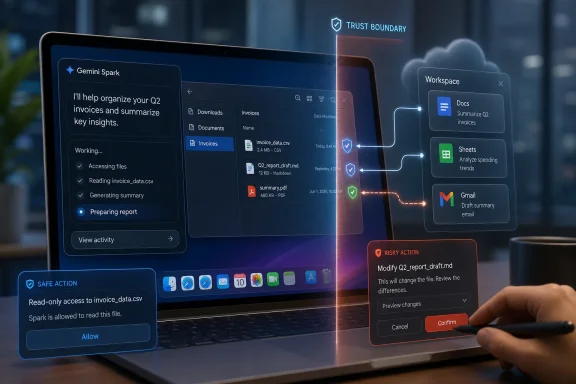 Google Moves the Agent From Conversation to Custody
Gemini Spark is being sold as a “24/7 personal agent,” which is the kind of marketing phrase that usually deserves a raised eyebrow and a locked-down test account. But the macOS version gives the slogan a more concrete shape. With permission, Spark can inspect and modify selected folders, organize files, create Workspace documents from local material, and perform recurring chores that resemble the low-grade administrative labor most users quietly hate.That is a meaningful shift. A chatbot can summarize a PDF after you upload it; an agent that can sort a Downloads folder, create a spreadsheet from invoices, or find and email a desktop file is operating in a different trust category. It is no longer merely producing text for review. It is touching the user’s working environment.
Google’s help documentation frames the Mac implementation as a permissioned workflow. Users add folders to a connected area, Spark can analyze or edit those files, and temporary backup files are created when it works with local material. That design acknowledges the core anxiety around desktop agents: if an AI is going to rename, move, rewrite, or send files, undo and scope control are not niceties. They are the product.
The beta restriction also tells its own story. Google is keeping Spark on macOS behind AI Ultra, an expensive subscription tier, and limiting the Mac beta to adult users in the United States. That is partly monetization, partly risk management, and partly the familiar “premium first” pattern of AI rollouts. But it also means that Spark is not yet a mass-market productivity feature. It is a controlled experiment in how far users will let an AI reach into their machines.
The Mac Launch Is Really About the Desktop Trust Boundary
The desktop has always been a more dangerous and more valuable place for AI than the web. Browser chatbots live in a relatively contained interaction model: ask, answer, copy, paste. Desktop agents promise to collapse that loop. The user describes an outcome, and the machine starts rearranging the pieces.That is why Spark’s macOS arrival feels more significant than a simple platform expansion. Google already had Gemini on mobile and the web. What macOS adds is proximity to the local artifacts of work: downloads, documents, photos, invoices, drafts, screenshots, and the messy folder structures that accumulate around real projects.
For ordinary users, that can sound delightful. “Clean up this folder” is a better interface than dragging files around for 20 minutes. “Make me a spreadsheet from these invoices” is a better interface than opening each PDF, extracting totals, and building rows by hand. The promise is not that AI will replace a knowledge worker’s judgment; it is that it will absorb the connective tissue between intent and finished artifact.
For IT pros, the same feature set reads differently. Local-file access plus cloud reasoning plus connected apps equals a governance problem. Which files can the agent see? Which files can it modify? Which actions require confirmation? Which logs survive? Which data is retained? Which enterprise policy wins when the user, the app, the OS, and the cloud service all think they are in charge?
Google’s version of the answer is permission and user control. That is the right starting point, but permissions are not the same thing as comprehension. Users routinely grant access to things they do not fully understand, and AI agents make the blast radius harder to visualize because the action is not a single file open or a single API call. It is a chain of decisions made on the user’s behalf.
Spark Makes Workspace the Agent’s Native Habitat
Google’s strongest advantage is not that Gemini can run on a Mac. It is that Spark lands inside a company that already owns the productivity substrate for millions of users. Gmail, Drive, Docs, Sheets, Calendar, Keep, Tasks, and the broader Workspace ecosystem give Spark a ready-made operating field.That matters because desktop agents become useful only when they can cross application boundaries. A folder organizer is handy, but a folder organizer that can read invoices, build a Sheet, draft an email, and schedule a recurring update starts to resemble a junior operations assistant. Google does not need to invent the whole workflow universe. It needs to stitch together services it already controls.
The announced expansion to third-party connected apps pushes the same strategy further. Canva, Dropbox, Instacart, OpenTable, and Zillow Rentals are not random logos; they represent creative work, file storage, commerce, reservations, and housing search. Google is trying to make Spark feel less like a Google Workspace macro engine and more like a consumer automation layer.
That ambition brings risk. The moment an agent can order groceries, reserve a table, share files, or schedule an apartment tour, the task moves from reversible digital housekeeping into consequential action. A bad file rename is annoying. A mistaken external email, purchase, booking, or rental inquiry is a different category of failure.
The industry’s answer has usually been confirmation prompts. That is necessary, but it is also a crude tool. If every step requires confirmation, the agent becomes a slow chatbot with buttons. If too few steps require confirmation, the agent becomes a liability. The real product work is in deciding which actions are low-risk enough to automate and which require the user to stop, inspect, and explicitly approve.
Real-Time Awareness Turns the Agent Into a Watcher
Google is also pitching Spark as better at tracking fresh information from news and social media, allowing it to answer questions about just-concluded events such as sports matches. That feature sounds separate from desktop automation, but it belongs to the same strategic arc. Spark is not merely meant to act on local state; it is meant to monitor the outside world and combine that awareness with user tasks.This is where agentic AI starts to look less like a tool and more like infrastructure. A user might ask Spark to track a developing event, summarize the latest updates, draft a briefing, and place the result in a document. A small business might ask it to watch competitors, collect social reactions, and update a weekly report. A household might ask it to track travel, reservations, or local availability.
The practical usefulness is obvious. So is the danger of false confidence. Real-time claims are among the easiest places for AI systems to stumble, because freshness, source quality, and uncertainty all matter. A model that summarizes stale or noisy social media as if it were confirmed fact is not an assistant. It is an accelerant for confusion.
Google’s challenge is therefore editorial as much as technical. Spark must distinguish between observed facts, reported claims, automated social chatter, and analysis. If it cannot do that reliably, its “latest highlights and analysis” will be useful for casual curiosity but risky for any decision that depends on accuracy.
WindowsForum readers know this pattern from years of watching Microsoft, Google, and Apple build increasingly assertive assistants into core products. The assistant starts by answering questions. Then it summarizes context. Then it suggests actions. Then it performs them. Each step increases utility, but each step also makes the system’s mistakes harder to spot before they matter.
The Windows Angle Is the Missing Platform
For a Windows audience, the awkward part of Google’s Mac announcement is that Windows is absent from the desktop-agent story. Google has a native Gemini app for macOS, while Windows users are still mostly interacting with Gemini through the web, Chrome surfaces, Android devices, or other indirect routes. That is not a small omission in a world where the overwhelming share of enterprise desktops still run Windows.Microsoft has the native advantage here. Copilot is already woven through Windows, Microsoft 365, Edge, Teams, and the broader management stack. If the agentic desktop becomes real, Microsoft can plausibly claim that it owns the policy layer, the identity layer, and the productivity layer on Windows. Google, by contrast, has to arrive as an app and negotiate access.
But Microsoft’s advantage is not the same as victory. Copilot has often felt caught between ambition and caution, powerful in demos but uneven in day-to-day workflows. Google is betting that a focused agent with clear tasks, strong Workspace integration, and a premium early-adopter audience can make the concept feel useful before it feels universal.
The Mac launch also lets Google avoid the hardest enterprise Windows questions for a little longer. Windows deployments bring Group Policy, Intune, endpoint protection, compliance logging, data loss prevention, and a sprawling ecosystem of line-of-business applications. A consumer Mac beta is a cleaner place to test the user experience before confronting that administrative jungle.
Still, the pressure on Google to support Windows will only grow if Spark works. A personal agent that can operate on local files is inherently platform-sensitive. Users do not want one assistant for their phone, another for their Mac, another for Windows, and another for work apps. The winning assistant will be the one that follows the user without turning every device into a separate island.
Apple’s Quiet Role Is Permission, Not Personality
It is tempting to frame Spark on macOS as Google invading Apple’s turf. That is true in a narrow sense, but Apple’s more important role is as the gatekeeper of local permissions and user trust. macOS has spent years tightening app access to documents, desktop folders, downloads, photos, screen recording, automation, and accessibility controls. Spark has to live within that system.That gives Apple leverage even when the agent belongs to Google. The macOS permission model can limit what the app sees and does, and users can revoke access. In theory, that is exactly how a third-party desktop agent should work. The OS provides the guardrails; the AI service provides the intelligence.
In practice, this balance will be messy. Users will blame Spark when it mishandles a file, Google when Gemini misunderstands a task, and Apple when permissions block an action that the user thought they had approved. The agentic desktop turns ordinary app permissions into a workflow negotiation among user intent, AI interpretation, cloud execution, and local OS enforcement.
Apple’s own AI strategy also hangs over this launch. Apple Intelligence has been more cautious and more integrated, emphasizing on-device context and private cloud processing rather than a flamboyant autonomous agent. Google is taking the louder route: a named agent, a premium tier, connected apps, and explicit automation. The contrast will sharpen as users decide whether they want AI that feels native and restrained or AI that feels ambitious and externally powered.
For Windows users, the Apple-Google dynamic is worth watching because Microsoft must answer the same trust question at larger scale. If macOS users hesitate to let Spark modify local files, enterprise Windows admins will be even more skeptical. If Mac users embrace it, Microsoft will face pressure to make Copilot more action-oriented and less advisory.
The Price Tag Makes Spark a Trial Balloon for Power Users
The Google AI Ultra requirement is not incidental. At roughly premium-software pricing rather than casual-app pricing, Ultra filters Spark’s early audience toward enthusiasts, professionals, creators, and AI-heavy users who are willing to pay for frontier features. That is the group most likely to tolerate beta rough edges and most likely to discover genuinely useful workflows.It also limits the immediate impact. A feature hidden behind an expensive subscription is not going to reorganize mainstream computing overnight. Most users will read about Spark long before they touch it. The product’s early reputation will therefore be shaped by demos, reviews, social clips, and the anecdotes of a relatively small subscriber base.
That can cut both ways. If Spark reliably handles mundane but valuable tasks, the premium placement will make it feel aspirational. If it botches files, misunderstands instructions, or requires constant supervision, the price will make the failures more irritating. Users are forgiving of free experiments. They are less forgiving of costly ones that promise to save time and instead create cleanup work.
Google’s bet is that agentic capability is worth charging for before it is worth commoditizing. That mirrors the broader AI market, where the most capable models and tools increasingly sit behind higher subscription tiers. But agents are different from chatbots because their value is measured in completed work, not impressive answers. Spark will be judged by whether it reduces friction in repeatable workflows, not by whether it sounds smart in a conversation.
That is why scheduled tasks could become one of the most important features. A one-off prompt that sorts a folder is neat. A recurring task that collects invoices, updates a spreadsheet, flags anomalies, and prepares a weekly summary is closer to software. The more Spark moves from “answer this” to “keep doing this,” the more it competes with automation tools, scripts, and human administrative routines.
Autonomy Is Useful Only When the Failure Modes Are Boring
Every agent announcement eventually runs into the same wall: what happens when it is wrong? With a chatbot, the user can often see the error before acting. With an agent, the error may already be embodied in a moved file, rewritten document, sent message, or scheduled reservation. That does not make agents unusable. It means the product has to make failure recoverable.Google’s temporary backup-file approach is a notable concession to this reality. If Spark modifies local files, users need a path back. But backups that disappear after a new task or after a limited window are not the same as enterprise-grade versioning, retention, or auditability. They are a consumer safety net, not a compliance system.
The better test is whether Spark can make its plans legible. Before reorganizing a folder, it should be able to explain the categories it intends to create. Before extracting invoices into a spreadsheet, it should show the fields it believes matter. Before emailing a file, it should identify the exact file and recipient. The user should not have to infer what the agent is about to do from a vague progress spinner.
This is where “agentic” products need to become less magical and more bureaucratic. Magic sells the demo, but bureaucracy keeps users safe. Plans, previews, confirmations, logs, undo paths, and policy controls are not glamorous. They are the difference between a toy and a tool.
IT departments will ask even harder questions. Can admins disable local-file access? Can they restrict connected apps? Can they prevent external sharing? Can Spark be blocked from regulated folders? Can its actions be logged in a way that satisfies internal audits? Until those answers are strong, Spark may be fascinating for personal productivity and uncomfortable for managed environments.
The Connected-App Strategy Turns Convenience Into Liability
The promised support for Canva, Dropbox, Instacart, OpenTable, Zillow Rentals, and other apps is the most consumer-friendly part of the announcement. It is also the clearest sign that Google wants Spark to become a general-purpose action layer rather than a Workspace-only assistant. The agent that can design a flyer, find a file, reserve dinner, order groceries, and arrange an apartment tour is not just helping with documents. It is brokering parts of daily life.That creates a new kind of platform competition. In the old app model, each service tried to own the user’s attention directly. In the agent model, services compete to be callable by the assistant. The interface shifts from tapping through apps to delegating intent. If that shift sticks, the agent becomes a new gatekeeper.
Google is well positioned to play that role because it already mediates search, maps, email, calendars, and payments-adjacent experiences for many users. But the more Spark does, the more scrutiny it will attract. A recommendation inside a chatbot is one thing. An agent that chooses options, fills forms, sends messages, or initiates transactions raises questions about ranking, consent, accountability, and commercial influence.
Users should also expect uneven quality across connected services. Some workflows are naturally structured and safe. Reserving a restaurant table with a clear time and party size is easier to verify than choosing an apartment tour based on fuzzy preferences. Ordering groceries introduces substitutions, prices, delivery windows, and household habits. Designing a flyer introduces aesthetic judgment. The more subjective the task, the more supervision the agent will need.
The irony is that the best early uses for Spark may be the least flashy. Renaming files, sorting PDFs, extracting invoice fields, assembling draft spreadsheets, and updating recurring reports are not glamorous. But they are bounded, reviewable, and boring enough to trust gradually. That is where desktop agents should earn their autonomy.
Microsoft Should Read This as a Warning Shot
Google’s macOS move should make Microsoft uncomfortable, even if it does not immediately threaten Windows. Microsoft has spent the last several years putting Copilot labels across Windows and Microsoft 365, but the most valuable agentic workflows are still emerging unevenly. Google is now making a clean pitch: Spark can operate across files and apps, and the Mac is a proving ground.Windows has the richer management story, but also the heavier legacy burden. A Windows desktop may contain decades-old applications, mapped network drives, local databases, custom scripts, sensitive shares, and specialized admin tools. Letting an AI agent loose in that environment is not as simple as adding a sidebar toggle. It requires policy depth and a clear separation between personal assistance and administrative authority.
At the same time, Microsoft cannot afford to make Copilot feel permanently timid. Users will compare what agents can actually do. If Spark can complete a file-to-spreadsheet workflow and Copilot mostly explains how to do it, the branding advantage will not matter. The agent race will be measured in completed chores.
There is also a developer angle. As AI agents become desktop actors, automation APIs and app integration points become strategic infrastructure. Apps that expose safe, granular actions will be easier for agents to use. Apps that rely on brittle screen scraping, hidden local state, or inconsistent file formats will be harder to automate. Windows developers should assume that “agent-readable” and “agent-controllable” design will become a competitive feature.
For admins, the warning is more immediate: users will bring these tools to work before policy is ready. If a personal Google account on a Mac can connect local folders and cloud apps, the boundary between consumer AI and corporate data gets thinner. Organizations that have not defined rules for agentic access will end up reacting after the first awkward incident.
The Mac Beta Shows Where the Desktop Is Heading
The clearest way to understand Gemini Spark on macOS is not as a finished product, but as a prototype of the next desktop metaphor. Files, folders, apps, and cloud services are still there, but the user increasingly addresses them through intent. The interface becomes less “open this, click that, drag this” and more “produce this outcome using these materials.”That is not new in theory. Automation tools, shell scripts, Shortcuts, Power Automate, AppleScript, macros, and enterprise workflow platforms have pursued the same goal for years. What is new is the natural-language front end and the model’s ability to improvise across messy inputs. Spark is a bet that many users who never learned automation will delegate work if the interface feels conversational.
The danger is that natural language can hide complexity. A prompt such as “organize my invoices” sounds simple, but it implies document recognition, date extraction, vendor matching, folder naming, spreadsheet schema design, error handling, and user preference inference. Traditional automation forces those assumptions into visible rules. AI agents often bury them inside probabilistic behavior.
The best version of Spark would combine both worlds. It would let users describe a task naturally, then convert that task into an inspectable, repeatable workflow. It would learn preferences without becoming opaque. It would ask for confirmation when stakes rise and stay quiet when the work is genuinely routine. That is a hard product to build, but it is the one worth building.
The Mac beta is therefore less a declaration of victory than a public test of user tolerance. How much autonomy will people grant an AI if the payoff is fewer chores? How much friction will they accept in the name of safety? How much will they pay for an assistant that is sometimes brilliant and sometimes in need of supervision? The answers will shape not just Gemini, but the next several years of desktop computing.
The Spark Test Is Whether Users Trust It With the Boring Stuff
The practical lesson is not that everyone should rush to subscribe to Google AI Ultra or hand an AI agent their Downloads folder. It is that Google has moved the agent conversation into a place where promises can be tested against ordinary work. Spark will succeed or fail on repeatable usefulness, controlled access, and recoverable mistakes.- Gemini Spark is now in beta in the Gemini app for macOS, with access limited to U.S. Google AI Ultra subscribers aged 18 and older.
- The Mac version can work with user-approved local folders and connected Google Workspace apps to perform multi-step file and document tasks.
- Google is positioning Spark as a persistent agent rather than a conventional chatbot, including support for scheduled or recurring workflows.
- Remote control from the Gemini mobile app and broader third-party app integrations are planned, but those features increase the importance of confirmations and policy controls.
- Windows users should watch closely because the same agentic desktop model is likely to pressure Microsoft Copilot, enterprise management tools, and app developers.
- The safest early wins for Spark are likely to be narrow, reversible chores such as file organization, invoice extraction, spreadsheet creation, and report preparation.
References
- Primary source: PCMag
Published: 2026-07-01T15:20:16.297057
Gemini Spark Is Now Available on macOS: Here's Everything the AI Agent Can Do | PCMag
Spark is now available in the Gemini Mac app for users with a Google AI Ultra subscription.www.pcmag.com - Related coverage: techcrunch.com
Gemini Spark, Google's agentic assistant, is now available on Mac | TechCrunch
Google's 24/7 agentic assistant, Gemini Spark, comes to Mac alongside other improvements, like real-time tracking and support for more apps.techcrunch.com - Related coverage: ai-on-mac.com
Gemini 3.5 Flash on Mac: API Pricing, Not Ollama — AI on Mac
Gemini 3.5 Flash does not run locally in Ollama, LM Studio or MLX. What actually works on Mac and which local models fit instead. ai-on-mac.com
- Related coverage: androidcentral.com
Google Gemini AI: Gemini 3.5 Flash, Nano Banana, Live, best features, linked apps, and more | Android Central
From Gemini 3.5 Flash to all the Google apps that use Gemini, this guide will break down every key AI feature and whether you need to pay for it.www.androidcentral.com - Related coverage: penchan.co
Gemini 3.5 Flash: What's New, How to Use It, and Why Gemini Spark Still Isn't Available | Penchan
Gemini 3.5 Flash launched globally at Google I/O 2026. This guide covers 4 ways to access it, how it compares to Gemini 3.1 Pro, why Gemini Spark remains US-only, and the hallucination problem Google still hasn't solved. penchan.co
- Related coverage: gadgets360.com
- Related coverage: techradar.com
Gemini is now a native macOS app, making it faster and better integrated than ever before | TechRadar
Gemini joins ChatGPT and Claude on the Mac App Storewww.techradar.com - Related coverage: codersera.com
Gemini 3.5 Flash & Gemini Spark: Specs & Pricing (2026)
Gemini 3.5 Flash beats 3.1 Pro at ~280 tok/s with 1M-token context. Specs, $1.50/$9 pricing, and how it stacks up vs Claude Opus 4.7 and GPT-5.5. codersera.com
- Related coverage: techtimes.com
Gemini Spark: Google's 24/7 Cloud AI Agent Now Executes Tasks in Third-Party Apps
Gemini Spark is Google’s first 24/7 cloud AI agent, launched at I/O 2026: it runs in the background on Google’s servers and can now execute tasks in Canva, OpenTable, and Instacart via MCP, with USwww.techtimes.com - Related coverage: aiagentslibrary.com
Gemini Spark Availability: Countries & Requirements (2026)
See where Gemini Spark is available, excluded countries, Google AI Ultra requirements, pricing, and fixes if Spark is not showing in your account.www.aiagentslibrary.com - Related coverage: tomsguide.com
Google just launched Gemini 3.5 Flash — here's all the upgrades | Tom's Guide
Google just launched Gemini 3.5 Flash alongside Gemini Spark, a new always-on AI agent designed to complete tasks, automate workflows and move beyond chatbot-style AI.www.tomsguide.com - Official source: support.google.com
- Related coverage: blog.google
Gemini Spark updates: macOS launch, connected apps and more
The latest Gemini Spark updates brings Spark to the macOS app, connects with your favorite apps and tracks topics in real time.blog.google - Related coverage: gemini.google
Gemini Apps’ release updates & improvements
Explore the latest updates from Gemini Apps - including improvements in generative AI capabilities, expanded access, and more.gemini.google - Related coverage: en.softonic.com
Gemini Spark reaches Mac: Google starts rolling it out - Softonic
Google says Gemini Spark has started rolling out for the Gemini app on macOS, with availability beginning around June 30, 2026. The feature first showen.softonic.com - Related coverage: engadget.com
Gemini Spark Comes To Google's Gemini App For macOS
The Gemini macOS app now has access to Google’s Spark agentic AI assistant.www.engadget.com - Related coverage: dataconomy.com
Google rolls out Gemini Spark for macOS subscribers in the US
Google has begun rolling out its agentic AI assistant, Gemini Spark, to the Gemini app for macOS. The assistant isdataconomy.com - Related coverage: androidauthority.com
Gemini Spark can now automate your most repetitive desktop tasks
Gemini Spark arrives on macOS, letting you automate desktop tasks, organize files, and even run workflows remotely from your phone.www.androidauthority.com - Related coverage: dlt.com
Google_Workspace_750x96px_clr
Business professionals standing in an office and using a laptop together. Two young business people having a discussion in a workplace.www.dlt.com
- Related coverage: doccompiler.ai