

GitHub made the GitHub Copilot app generally available on June 17, 2026, for Windows, macOS, and Linux as a standalone desktop workspace for launching, supervising, validating, and shipping AI-agent coding sessions tied directly to GitHub issues, pull requests, branches, and repositories. That makes this more than another Copilot surface. It is GitHub’s clearest admission yet that the center of software development is moving from the editor to the orchestration layer. The important question is no longer whether AI can autocomplete a line of code, but who controls the loop when AI starts changing many files, across many branches, while developers are doing something else.
For most of its public life, Copilot has lived where developers already worked: inside Visual Studio Code, JetBrains IDEs, Visual Studio, terminals, pull requests, and GitHub.com. That made strategic sense. The first wave of AI coding assistance needed to feel lightweight, contextual, and non-threatening, a smarter autocomplete rather than a substitute workflow.
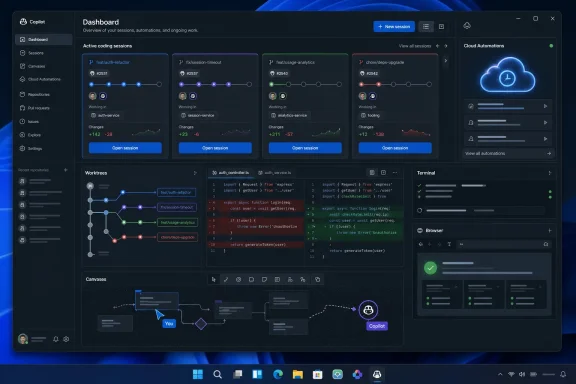
The new Copilot app changes that posture. A dedicated desktop application says GitHub no longer sees AI coding as a feature tucked into the editor. It sees agent-directed work as a workspace of its own, with enough state, concurrency, review surface, and policy friction to justify a separate home.
That shift matters for Windows users in particular because the desktop is again becoming contested terrain. Microsoft has spent years trying to make Windows the ambient front door for Copilot, but GitHub’s developer audience is less interested in wallpaper-deep AI branding than in whether an agent can pick up an issue, make a branch, run tests, show the diff, and produce a reviewable pull request. The Copilot app is a bet that developer trust is earned through workflow gravity, not assistant personality.
It also reflects a more sober view of what AI-generated code needs. Code completion is instant and disposable; agentic coding is slower, stateful, and risky. The app’s design is built around that difference: sessions, branches, worktrees, terminals, browsers, diffs, and pull requests. These are not decorative additions. They are GitHub’s attempt to wrap the inherently messy business of automated code changes inside familiar software-delivery controls.
A developer can start a session from an issue, a pull request, or a custom prompt. Each session runs on its own branch and worktree, allowing multiple streams of AI-generated changes to proceed without trampling the developer’s current working directory. That sounds mundane until you remember how often AI coding tools still collapse into a single chat window, a single workspace, and a single increasingly confused context.
Parallel sessions are the key architectural tell. GitHub is not optimizing only for the individual prompt-and-response moment; it is optimizing for a queue of software work. One agent might be handling a test failure, another might be updating documentation, and a third might be exploring a refactor. The developer’s role becomes less like typing every line and more like supervising a set of proposed changes moving through GitHub’s normal delivery machinery.
That is a profound product shift, but it is also a cultural one. Developers have long used branches to isolate human experiments. GitHub is now asking teams to apply the same mental model to machine-generated work: isolate it, inspect it, test it, and merge it only when it earns its place.
The app’s integrated terminal and browser support reinforce that framing. The agent is not merely producing text; it is expected to validate work in an environment closer to how a developer would validate it. That does not magically make the output correct, secure, or maintainable. But it signals that GitHub understands the trust gap: generated code without inspection is a liability, while generated code inside a reviewable workflow is at least a candidate for serious use.
That is a bigger design statement than it first appears. Chat is a terrible long-term interface for complex work. It is linear, lossy, and prone to hiding the important part three scrolls above the current prompt. For coding agents, that problem becomes acute because the useful artifact is rarely the chat itself. It is the plan, the diff, the test output, the failed command, the unresolved assumption, or the branch that now needs review.
Canvases are GitHub’s attempt to turn AI collaboration from a message stream into a shared operational surface. If GitHub gets this right, a developer should not have to interrogate the agent to discover what it did. The work should be inspectable as work: visible files, visible plans, visible command output, visible pull request state.
That aligns with how professional software teams already behave. Serious engineering organizations do not run on vibes; they run on artifacts. Tickets, branches, pull requests, CI results, review comments, release notes, and incident reports are all ways of making invisible thinking concrete enough for others to challenge. A useful AI development tool has to join that artifact economy rather than ask teams to abandon it for an endless chat log.
The risk is that Canvases become another branded surface layered on top of already complicated tooling. Developers are justifiably allergic to “new home base” rhetoric when it means another place to check, configure, and babysit. The app’s success will depend on whether Canvases reduce cognitive load or merely rename it.
That moves Copilot closer to the territory traditionally occupied by CI jobs, bots, dependency automation, and scheduled maintenance scripts. The difference is that a coding agent is not just running a predetermined command. It can interpret a goal, examine a repository, make changes, and potentially open or update pull requests.
There are obvious use cases. Teams can imagine agents that periodically refresh dependencies, update generated files, improve test coverage in neglected areas, triage low-priority issues, or keep documentation synchronized with recent changes. None of that requires a science-fiction view of AI. It requires enough reliability to produce reviewable work that saves humans time more often than it creates cleanup.
But scheduled agents also make governance unavoidable. A one-off AI suggestion inside an editor is easy to dismiss. A recurring cloud task that can propose changes across repositories is an operational actor. It needs permissions, auditability, rate limits, cost controls, repository boundaries, and a clear answer to who owns the output when the agent does something wrong.
For enterprises, that is where the excitement and anxiety meet. The dream is a fleet of low-friction coding helpers chewing through backlog dust. The nightmare is a swarm of semi-authorized bots generating noisy pull requests, burning compute, triggering CI, and creating review fatigue under the banner of productivity.
That is strategically necessary. Developers and organizations increasingly want different models for different jobs. A small, fast model may be good enough for boilerplate. A stronger reasoning model may be worth the cost for cross-repository refactors or security-sensitive changes. A company may also have contractual, regulatory, or data-residency reasons to prefer one model provider over another.
Model choice also helps GitHub avoid being boxed in by the rapid churn of the AI market. If the app is primarily a workflow layer, GitHub can compete on integration with repositories, pull requests, permissions, review checks, and developer identity rather than claiming that one model will always be best at every programming task.
The same logic applies to MCP servers and external tools. The Model Context Protocol has become one of the more important pieces of connective tissue in the AI tooling ecosystem because it gives agents a standardized way to reach tools, services, and context. For developers, that could mean connecting Copilot sessions to internal documentation, build systems, issue trackers, cloud environments, test harnesses, or domain-specific utilities.
The upside is enormous. The downside is that every connected tool expands the blast radius. A coding agent with repository access is one thing; a coding agent with repository access, deployment hooks, internal docs, database tools, and cloud controls is another. GitHub’s challenge is to make extensibility feel powerful without making security teams feel cornered.
The cross-platform launch is equally important. GitHub is not treating Windows as the sole or even privileged host for AI development. The app is available across Windows, macOS, and Linux because modern software teams are heterogeneous, and because AI coding workflows cannot afford to be locked to one desktop operating system.
That is good for Windows users. The best way for Windows to remain relevant to developers is not to demand exclusivity; it is to participate cleanly in the same workflows developers use elsewhere. If the Copilot app behaves consistently across platforms while still integrating well with Windows terminals, browsers, file systems, and local tooling, it gives Windows another credible place in the professional development stack.
There is also a subtler Windows story around local and cloud boundaries. Many Windows developers work in mixed environments: local repositories, WSL distros, remote containers, GitHub-hosted workflows, cloud dev boxes, and enterprise-managed endpoints. A desktop agent coordinator has to respect that reality. If Copilot can make those boundaries feel coherent, it becomes useful. If it obscures them, it becomes dangerous.
The worst version of this product would be a glossy shell that cannot handle real-world Windows development complexity: path differences, shell choices, corporate proxies, endpoint security tools, credential managers, WSL integration, and local build dependencies. The best version would make Windows a comfortable command center for agentic work that may run locally, remotely, or in GitHub’s cloud.
An issue can become the starting point. A failing pull request can become the starting point. A scheduled maintenance rule can become the starting point. A security warning, flaky test, or backlog ticket can become the starting point. In those cases, the editor is not necessarily where the work begins; it is where a human may later inspect, refine, or take over.
GitHub has a natural advantage in that world because it already owns much of the coordination layer around software work. Issues describe intent. Pull requests package change. Actions validate it. Code owners and branch protections govern it. Discussions and review comments explain it. The Copilot app sits on top of those primitives and tries to make AI agents behave like participants in that system.
That does not mean IDEs become irrelevant. Far from it. The editor remains where developers understand code at the highest resolution. But the launch suggests that GitHub believes the most valuable AI interface may not be the one closest to the cursor. It may be the one closest to the queue of work.
This is where the app’s “home base” language earns some credibility. If Copilot can show what agents are doing across repositories, which sessions need human input, which diffs are ready for review, which tasks failed validation, and which pull requests are waiting on checks, then it is not merely another coding assistant. It is a dashboard for delegated development.
Enterprises need more than a download button. They need to know which repositories agents can access, which models can be used, which data may leave the organization, whether prompts and outputs are logged, how MCP servers are approved, how cloud automations are governed, and how costs are attributed. The more capable the agent becomes, the less acceptable vague answers become.
There is a familiar pattern here. Consumer-grade AI tools often arrive with compelling demos and ambiguous operational models. Enterprise adoption then forces boring but essential questions into the foreground: identity, audit, compliance, retention, policy inheritance, network controls, and incident response. GitHub starts from a stronger position than many AI coding startups because it already sits inside enterprise software delivery. But the app still has to prove that its agent layer respects the controls teams already depend on.
The cost dimension also deserves attention. Agentic coding can trigger more model usage, more CI runs, more code review cycles, and more cloud execution. Even when each individual action is defensible, the aggregate can surprise organizations that are used to predictable seat-based software pricing. A team that embraces scheduled automations and parallel sessions will need a sharper view of consumption than a team that merely uses autocomplete.
Security teams will focus on the supply chain implications. An AI agent that changes code is part of the software supply chain, whether vendors call it that or not. Its output should be reviewed, tested, scanned, and attributed with the same seriousness as human output, and perhaps more. The agent may accelerate work, but it should not become a shortcut around the controls that make software trustworthy.
That is not a theoretical problem. Many teams already struggle with pull request queues, flaky CI, stale branches, and shallow reviews under time pressure. If agents create more pull requests, faster, the review system can become the choke point. Productivity gains evaporate if senior engineers spend their days cleaning up plausible but misdirected machine work.
GitHub’s workflow-oriented design appears to anticipate that risk. By isolating sessions on branches and worktrees, surfacing diffs, enabling validation, and pushing changes through existing pull request checks, the app channels AI output into the normal review pipeline. That is the right instinct.
But the review burden still changes. Reviewing human code includes reading intent through a colleague’s habits, past work, and accountability. Reviewing agent-generated code requires a different skepticism. The reviewer must ask whether the agent solved the stated problem, whether it introduced hidden complexity, whether it papered over failing tests, whether it followed project conventions, and whether the change will be maintainable when the agent is no longer in the loop.
The teams that benefit most will be those that give agents narrow, verifiable tasks and maintain strong engineering hygiene. The teams that suffer will be those that treat AI as a way to bypass unclear requirements, weak tests, or absent ownership. Copilot can amplify a good workflow. It can also amplify a bad one.
What GitHub has that most competitors lack is the canonical software collaboration graph for millions of teams. It knows repositories, issues, pull requests, checks, permissions, code owners, and review history. A coding agent that operates natively inside that graph can be more useful than a general-purpose assistant bolted onto a folder.
The danger for GitHub is complacency. Developers are unusually willing to switch tools when a new product feels materially faster or more capable. If another agent writes better code, handles context more reliably, or integrates more naturally with a team’s stack, GitHub’s incumbency will not guarantee loyalty. The Copilot app has to be good enough not merely by Microsoft ecosystem standards, but by the rapidly rising standards of AI-native developer tools.
The bring-your-own-model and MCP moves suggest GitHub understands this. Rather than betting the entire product on one assistant experience, it is building a place where models, tools, and GitHub-native workflows converge. That makes the app less like a chatbot and more like an operating environment for agentic software work.
That operating-environment ambition is why the launch feels larger than a normal desktop release. GitHub is not simply shipping a client. It is trying to define the interface between developers, agents, repositories, and delivery pipelines before someone else does.
Good delegation has always mattered in engineering management. Now it is moving down into everyday development. A developer using the Copilot app effectively will need to decide which tasks are agent-suitable, how many sessions to run at once, when to intervene, when to discard output, and when to promote a branch into a pull request.
That favors experienced developers more than the hype sometimes admits. Junior developers may get help producing code, but senior developers are better positioned to judge whether an agent is solving the right problem in the right way. The app may make strong engineers faster because they can supervise more work. It may also expose weak specifications and brittle projects faster because agents will stumble where humans have been relying on undocumented tribal knowledge.
This is why GitHub’s agent strategy should not be read as a simple replacement narrative. The near-term effect is likely redistribution rather than elimination: less time typing routine changes, more time framing work, validating outputs, managing reviews, and maintaining the systems that let automated work be safe.
For Windows-heavy shops, that redistribution may be particularly visible in internal tooling, line-of-business apps, PowerShell-heavy automation, .NET services, and hybrid cloud projects. These are exactly the kinds of environments where backlog maintenance accumulates and where an agent that can operate within policy could be valuable. They are also environments where a careless automated change can have very real operational consequences.
Trust comes from visibility. Developers need to see what the agent did, not merely read a confident summary. Trust comes from reversibility. Branches, worktrees, diffs, and pull requests matter because they make changes inspectable and discardable. Trust comes from policy. Organizations need to govern access, models, tools, and automations. Trust comes from accountability. Someone still has to own the merge.
The Copilot app appears designed around those realities. It does not pretend the agent can float above the development process. It embeds the agent in the process, then gives the human a supervisory interface. That is the right direction.
Still, trust is earned in daily use, not announced in a changelog. Developers will judge the app by whether it handles messy repositories, ambiguous tasks, failing tests, monorepos, enterprise authentication, and half-documented build systems. Administrators will judge it by whether controls are clear and enforceable. Reviewers will judge it by whether the pull requests are worth their time.
If the answer is yes often enough, Copilot becomes harder to categorize as a coding assistant. It becomes infrastructure.
The app is generally available on Windows, macOS, and Linux for eligible paid Copilot users. It is designed to start sessions from issues, pull requests, or prompts, then isolate those sessions on their own branches and worktrees. It supports parallel agent work, diff review, validation through integrated terminal and browser tooling, and pull request creation through existing team workflows. Since preview, GitHub has added Canvases, Cloud Automations, model choice, and MCP-based tool connections.
For teams considering rollout, the useful takeaways are concrete rather than mystical:
 GitHub Moves Copilot Out of the Margins
For most of its public life, Copilot has lived where developers already worked: inside Visual Studio Code, JetBrains IDEs, Visual Studio, terminals, pull requests, and GitHub.com. That made strategic sense. The first wave of AI coding assistance needed to feel lightweight, contextual, and non-threatening, a smarter autocomplete rather than a substitute workflow.The new Copilot app changes that posture. A dedicated desktop application says GitHub no longer sees AI coding as a feature tucked into the editor. It sees agent-directed work as a workspace of its own, with enough state, concurrency, review surface, and policy friction to justify a separate home.
That shift matters for Windows users in particular because the desktop is again becoming contested terrain. Microsoft has spent years trying to make Windows the ambient front door for Copilot, but GitHub’s developer audience is less interested in wallpaper-deep AI branding than in whether an agent can pick up an issue, make a branch, run tests, show the diff, and produce a reviewable pull request. The Copilot app is a bet that developer trust is earned through workflow gravity, not assistant personality.
It also reflects a more sober view of what AI-generated code needs. Code completion is instant and disposable; agentic coding is slower, stateful, and risky. The app’s design is built around that difference: sessions, branches, worktrees, terminals, browsers, diffs, and pull requests. These are not decorative additions. They are GitHub’s attempt to wrap the inherently messy business of automated code changes inside familiar software-delivery controls.
The Desktop App Is Really a Control Plane
The headline feature is not that Copilot now has a Windows app. Developers already have more apps than patience. The real story is that GitHub is packaging Copilot as a control plane for multiple autonomous or semi-autonomous coding efforts.A developer can start a session from an issue, a pull request, or a custom prompt. Each session runs on its own branch and worktree, allowing multiple streams of AI-generated changes to proceed without trampling the developer’s current working directory. That sounds mundane until you remember how often AI coding tools still collapse into a single chat window, a single workspace, and a single increasingly confused context.
Parallel sessions are the key architectural tell. GitHub is not optimizing only for the individual prompt-and-response moment; it is optimizing for a queue of software work. One agent might be handling a test failure, another might be updating documentation, and a third might be exploring a refactor. The developer’s role becomes less like typing every line and more like supervising a set of proposed changes moving through GitHub’s normal delivery machinery.
That is a profound product shift, but it is also a cultural one. Developers have long used branches to isolate human experiments. GitHub is now asking teams to apply the same mental model to machine-generated work: isolate it, inspect it, test it, and merge it only when it earns its place.
The app’s integrated terminal and browser support reinforce that framing. The agent is not merely producing text; it is expected to validate work in an environment closer to how a developer would validate it. That does not magically make the output correct, secure, or maintainable. But it signals that GitHub understands the trust gap: generated code without inspection is a liability, while generated code inside a reviewable workflow is at least a candidate for serious use.
Canvases Try to Fix the Chat Window’s Worst Habit
The most interesting addition since the technical preview is Canvases, GitHub’s shared workspace for humans and agents. The idea is simple enough: plans, pull requests, terminal sessions, and browser tasks should be visible and steerable rather than buried in a conversational transcript.That is a bigger design statement than it first appears. Chat is a terrible long-term interface for complex work. It is linear, lossy, and prone to hiding the important part three scrolls above the current prompt. For coding agents, that problem becomes acute because the useful artifact is rarely the chat itself. It is the plan, the diff, the test output, the failed command, the unresolved assumption, or the branch that now needs review.
Canvases are GitHub’s attempt to turn AI collaboration from a message stream into a shared operational surface. If GitHub gets this right, a developer should not have to interrogate the agent to discover what it did. The work should be inspectable as work: visible files, visible plans, visible command output, visible pull request state.
That aligns with how professional software teams already behave. Serious engineering organizations do not run on vibes; they run on artifacts. Tickets, branches, pull requests, CI results, review comments, release notes, and incident reports are all ways of making invisible thinking concrete enough for others to challenge. A useful AI development tool has to join that artifact economy rather than ask teams to abandon it for an endless chat log.
The risk is that Canvases become another branded surface layered on top of already complicated tooling. Developers are justifiably allergic to “new home base” rhetoric when it means another place to check, configure, and babysit. The app’s success will depend on whether Canvases reduce cognitive load or merely rename it.
Cloud Automations Turn Copilot Into a Scheduled Worker
Cloud Automations may prove more disruptive than the desktop app itself. Scheduling recurring agent work in the cloud means Copilot sessions are no longer bound to whether a developer’s machine is awake, connected, or actively supervised at that moment.That moves Copilot closer to the territory traditionally occupied by CI jobs, bots, dependency automation, and scheduled maintenance scripts. The difference is that a coding agent is not just running a predetermined command. It can interpret a goal, examine a repository, make changes, and potentially open or update pull requests.
There are obvious use cases. Teams can imagine agents that periodically refresh dependencies, update generated files, improve test coverage in neglected areas, triage low-priority issues, or keep documentation synchronized with recent changes. None of that requires a science-fiction view of AI. It requires enough reliability to produce reviewable work that saves humans time more often than it creates cleanup.
But scheduled agents also make governance unavoidable. A one-off AI suggestion inside an editor is easy to dismiss. A recurring cloud task that can propose changes across repositories is an operational actor. It needs permissions, auditability, rate limits, cost controls, repository boundaries, and a clear answer to who owns the output when the agent does something wrong.
For enterprises, that is where the excitement and anxiety meet. The dream is a fleet of low-friction coding helpers chewing through backlog dust. The nightmare is a swarm of semi-authorized bots generating noisy pull requests, burning compute, triggering CI, and creating review fatigue under the banner of productivity.
Bring-Your-Own Models Makes Copilot a Broker, Not Just a Brain
GitHub’s support for choosing the model behind each session is another important signal. Copilot began as a product closely associated with a particular AI capability. The agent era pushes it toward becoming a broker of models, tools, and policies.That is strategically necessary. Developers and organizations increasingly want different models for different jobs. A small, fast model may be good enough for boilerplate. A stronger reasoning model may be worth the cost for cross-repository refactors or security-sensitive changes. A company may also have contractual, regulatory, or data-residency reasons to prefer one model provider over another.
Model choice also helps GitHub avoid being boxed in by the rapid churn of the AI market. If the app is primarily a workflow layer, GitHub can compete on integration with repositories, pull requests, permissions, review checks, and developer identity rather than claiming that one model will always be best at every programming task.
The same logic applies to MCP servers and external tools. The Model Context Protocol has become one of the more important pieces of connective tissue in the AI tooling ecosystem because it gives agents a standardized way to reach tools, services, and context. For developers, that could mean connecting Copilot sessions to internal documentation, build systems, issue trackers, cloud environments, test harnesses, or domain-specific utilities.
The upside is enormous. The downside is that every connected tool expands the blast radius. A coding agent with repository access is one thing; a coding agent with repository access, deployment hooks, internal docs, database tools, and cloud controls is another. GitHub’s challenge is to make extensibility feel powerful without making security teams feel cornered.
The Windows Angle Is Practical, Not Cosmetic
For WindowsForum readers, the app’s Windows availability is notable less because it exists and more because of where it fits into Microsoft’s broader developer story. Windows has spent the last decade trying to re-earn developer credibility through WSL, Windows Terminal, PowerShell modernization, Dev Home, winget, Visual Studio Code, and better support for cross-platform workflows. A serious Copilot desktop app for Windows continues that pattern: meet developers where they actually build, not where Windows marketing wishes they did.The cross-platform launch is equally important. GitHub is not treating Windows as the sole or even privileged host for AI development. The app is available across Windows, macOS, and Linux because modern software teams are heterogeneous, and because AI coding workflows cannot afford to be locked to one desktop operating system.
That is good for Windows users. The best way for Windows to remain relevant to developers is not to demand exclusivity; it is to participate cleanly in the same workflows developers use elsewhere. If the Copilot app behaves consistently across platforms while still integrating well with Windows terminals, browsers, file systems, and local tooling, it gives Windows another credible place in the professional development stack.
There is also a subtler Windows story around local and cloud boundaries. Many Windows developers work in mixed environments: local repositories, WSL distros, remote containers, GitHub-hosted workflows, cloud dev boxes, and enterprise-managed endpoints. A desktop agent coordinator has to respect that reality. If Copilot can make those boundaries feel coherent, it becomes useful. If it obscures them, it becomes dangerous.
The worst version of this product would be a glossy shell that cannot handle real-world Windows development complexity: path differences, shell choices, corporate proxies, endpoint security tools, credential managers, WSL integration, and local build dependencies. The best version would make Windows a comfortable command center for agentic work that may run locally, remotely, or in GitHub’s cloud.
The App Is a Vote Against the IDE as the Only Center of Gravity
Developers have been trained to think of the IDE as the cockpit. That is still true for many tasks, especially exploratory programming, debugging, and deep code comprehension. But agentic development weakens the IDE’s monopoly because not all AI-generated work begins with an open file.An issue can become the starting point. A failing pull request can become the starting point. A scheduled maintenance rule can become the starting point. A security warning, flaky test, or backlog ticket can become the starting point. In those cases, the editor is not necessarily where the work begins; it is where a human may later inspect, refine, or take over.
GitHub has a natural advantage in that world because it already owns much of the coordination layer around software work. Issues describe intent. Pull requests package change. Actions validate it. Code owners and branch protections govern it. Discussions and review comments explain it. The Copilot app sits on top of those primitives and tries to make AI agents behave like participants in that system.
That does not mean IDEs become irrelevant. Far from it. The editor remains where developers understand code at the highest resolution. But the launch suggests that GitHub believes the most valuable AI interface may not be the one closest to the cursor. It may be the one closest to the queue of work.
This is where the app’s “home base” language earns some credibility. If Copilot can show what agents are doing across repositories, which sessions need human input, which diffs are ready for review, which tasks failed validation, and which pull requests are waiting on checks, then it is not merely another coding assistant. It is a dashboard for delegated development.
Enterprise IT Will Judge the Policy Surface, Not the Demo
For individual developers, the Copilot app will live or die by usefulness. For businesses, it will live or die by manageability. GitHub’s note that Business and Enterprise access may require administrators to enable the relevant Copilot policy is not a footnote; it is a preview of the deployment debate.Enterprises need more than a download button. They need to know which repositories agents can access, which models can be used, which data may leave the organization, whether prompts and outputs are logged, how MCP servers are approved, how cloud automations are governed, and how costs are attributed. The more capable the agent becomes, the less acceptable vague answers become.
There is a familiar pattern here. Consumer-grade AI tools often arrive with compelling demos and ambiguous operational models. Enterprise adoption then forces boring but essential questions into the foreground: identity, audit, compliance, retention, policy inheritance, network controls, and incident response. GitHub starts from a stronger position than many AI coding startups because it already sits inside enterprise software delivery. But the app still has to prove that its agent layer respects the controls teams already depend on.
The cost dimension also deserves attention. Agentic coding can trigger more model usage, more CI runs, more code review cycles, and more cloud execution. Even when each individual action is defensible, the aggregate can surprise organizations that are used to predictable seat-based software pricing. A team that embraces scheduled automations and parallel sessions will need a sharper view of consumption than a team that merely uses autocomplete.
Security teams will focus on the supply chain implications. An AI agent that changes code is part of the software supply chain, whether vendors call it that or not. Its output should be reviewed, tested, scanned, and attributed with the same seriousness as human output, and perhaps more. The agent may accelerate work, but it should not become a shortcut around the controls that make software trustworthy.
The Productivity Claim Now Has to Survive Review Fatigue
The promise of AI coding tools has always been speed. The complication is that software development is not just producing code; it is deciding which code should exist. As Copilot becomes more agentic, the bottleneck may shift from writing changes to reviewing them.That is not a theoretical problem. Many teams already struggle with pull request queues, flaky CI, stale branches, and shallow reviews under time pressure. If agents create more pull requests, faster, the review system can become the choke point. Productivity gains evaporate if senior engineers spend their days cleaning up plausible but misdirected machine work.
GitHub’s workflow-oriented design appears to anticipate that risk. By isolating sessions on branches and worktrees, surfacing diffs, enabling validation, and pushing changes through existing pull request checks, the app channels AI output into the normal review pipeline. That is the right instinct.
But the review burden still changes. Reviewing human code includes reading intent through a colleague’s habits, past work, and accountability. Reviewing agent-generated code requires a different skepticism. The reviewer must ask whether the agent solved the stated problem, whether it introduced hidden complexity, whether it papered over failing tests, whether it followed project conventions, and whether the change will be maintainable when the agent is no longer in the loop.
The teams that benefit most will be those that give agents narrow, verifiable tasks and maintain strong engineering hygiene. The teams that suffer will be those that treat AI as a way to bypass unclear requirements, weak tests, or absent ownership. Copilot can amplify a good workflow. It can also amplify a bad one.
GitHub Is Chasing the Agent Market Without Abandoning GitHub
The Copilot app also lands in a fiercely competitive market. AI coding has moved rapidly from autocomplete to chat to agents to CLI tools to desktop apps. Startups and incumbents alike are trying to become the place where developers delegate work. GitHub’s advantage is distribution, but distribution alone will not be enough.What GitHub has that most competitors lack is the canonical software collaboration graph for millions of teams. It knows repositories, issues, pull requests, checks, permissions, code owners, and review history. A coding agent that operates natively inside that graph can be more useful than a general-purpose assistant bolted onto a folder.
The danger for GitHub is complacency. Developers are unusually willing to switch tools when a new product feels materially faster or more capable. If another agent writes better code, handles context more reliably, or integrates more naturally with a team’s stack, GitHub’s incumbency will not guarantee loyalty. The Copilot app has to be good enough not merely by Microsoft ecosystem standards, but by the rapidly rising standards of AI-native developer tools.
The bring-your-own-model and MCP moves suggest GitHub understands this. Rather than betting the entire product on one assistant experience, it is building a place where models, tools, and GitHub-native workflows converge. That makes the app less like a chatbot and more like an operating environment for agentic software work.
That operating-environment ambition is why the launch feels larger than a normal desktop release. GitHub is not simply shipping a client. It is trying to define the interface between developers, agents, repositories, and delivery pipelines before someone else does.
The Copilot App Makes Delegation the New Developer Skill
The uncomfortable truth beneath this launch is that many developers will have to learn a new skill: delegation to machines. That is not the same as prompting. Prompting is asking. Delegation is defining scope, constraints, acceptance criteria, context, and review standards so another actor can do useful work without constant correction.Good delegation has always mattered in engineering management. Now it is moving down into everyday development. A developer using the Copilot app effectively will need to decide which tasks are agent-suitable, how many sessions to run at once, when to intervene, when to discard output, and when to promote a branch into a pull request.
That favors experienced developers more than the hype sometimes admits. Junior developers may get help producing code, but senior developers are better positioned to judge whether an agent is solving the right problem in the right way. The app may make strong engineers faster because they can supervise more work. It may also expose weak specifications and brittle projects faster because agents will stumble where humans have been relying on undocumented tribal knowledge.
This is why GitHub’s agent strategy should not be read as a simple replacement narrative. The near-term effect is likely redistribution rather than elimination: less time typing routine changes, more time framing work, validating outputs, managing reviews, and maintaining the systems that let automated work be safe.
For Windows-heavy shops, that redistribution may be particularly visible in internal tooling, line-of-business apps, PowerShell-heavy automation, .NET services, and hybrid cloud projects. These are exactly the kinds of environments where backlog maintenance accumulates and where an agent that can operate within policy could be valuable. They are also environments where a careless automated change can have very real operational consequences.
The Real Product Is Trust
GitHub’s challenge is not convincing developers that AI can produce code. That argument is over. The challenge is convincing teams that AI can participate in software delivery without degrading trust.Trust comes from visibility. Developers need to see what the agent did, not merely read a confident summary. Trust comes from reversibility. Branches, worktrees, diffs, and pull requests matter because they make changes inspectable and discardable. Trust comes from policy. Organizations need to govern access, models, tools, and automations. Trust comes from accountability. Someone still has to own the merge.
The Copilot app appears designed around those realities. It does not pretend the agent can float above the development process. It embeds the agent in the process, then gives the human a supervisory interface. That is the right direction.
Still, trust is earned in daily use, not announced in a changelog. Developers will judge the app by whether it handles messy repositories, ambiguous tasks, failing tests, monorepos, enterprise authentication, and half-documented build systems. Administrators will judge it by whether controls are clear and enforceable. Reviewers will judge it by whether the pull requests are worth their time.
If the answer is yes often enough, Copilot becomes harder to categorize as a coding assistant. It becomes infrastructure.
The Details That Decide Whether This Becomes Daily Muscle Memory
GitHub’s launch gives developers a clear picture of where Copilot is headed, but the practical decision is still grounded in near-term mechanics.The app is generally available on Windows, macOS, and Linux for eligible paid Copilot users. It is designed to start sessions from issues, pull requests, or prompts, then isolate those sessions on their own branches and worktrees. It supports parallel agent work, diff review, validation through integrated terminal and browser tooling, and pull request creation through existing team workflows. Since preview, GitHub has added Canvases, Cloud Automations, model choice, and MCP-based tool connections.
For teams considering rollout, the useful takeaways are concrete rather than mystical:
- The Copilot app is best understood as an agent supervision workspace, not as a replacement for Visual Studio Code, Visual Studio, JetBrains IDEs, or the terminal.
- Parallel sessions will be most valuable when tasks are narrow, testable, and isolated enough to review independently.
- Cloud Automations should be treated like scheduled engineering actors that require permissions, ownership, and cost visibility.
- MCP integrations can make Copilot much more useful, but they also expand the security and governance surface.
- Business and Enterprise deployments should begin with policy review before developers are encouraged to build workflows around the app.
- The productivity win will depend less on how much code agents generate and more on how reliably teams can review, validate, and merge the right changes.
References
- Primary source: thewincentral.com
Published: 2026-06-17T16:20:12.356765
GitHub Copilot App Brings AI Agents to Desktop - WinCentral
GitHub Copilot App is now available with AI agents, parallel workflows, and pull request tools. - Read in AI News on WinCentral thewincentral.com
- Related coverage: github.blog
GitHub Copilot app generally available - GitHub Changelog
The GitHub Copilot app is now generally available for macOS, Windows, and Linux. It’s the desktop home for agent-driven development, built natively on GitHub. Download the GitHub Copilot app to…github.blog
- Official source: github.com
GitHub Copilot app · GitHub
The GitHub Copilot app is the only desktop experience for agent-driven development built natively on GitHub for macOS, Windows, and Linux. github.com
- Official source: docs.github.com
About the GitHub Copilot app - GitHub Docs
The GitHub Copilot app is a desktop application for agent-driven development that brings parallel workstreams, GitHub integration, and PR lifecycle management into one place. docs.github.com
- Related coverage: winbuzzer.com
GitHub Copilot App Launches Agentic Desktop Preview
Microsoft has launched the GitHub Copilot app in technical preview as a standalone agentic desktop client for macOS, Windows, and Linux on paid Copilot plans.winbuzzer.com - Related coverage: chatforest.com
GitHub Copilot App: The Standalone Agent Desktop Is Now in Technical Preview — ChatForest
GitHub's standalone Copilot app — a desktop client separate from any IDE — expanded its technical preview at Build 2026 on June 2. Sessions run in isolated git worktrees, canvases give agents and humans a shared work surface, and Agent Merge handles the PR-through-merge pipeline. Here's...chatforest.com
- Related coverage: thurrott.com
Build 2026: Microsoft Announces GitHub Copilot App - Thurrott.com
The GitHub Copilot desktop app is like a central dashboard for managing AI agents and interacting with GitHub.www.thurrott.com - Related coverage: abapeur.fr
- Related coverage: cloudcontraptions.com
GitHub Copilot in 2026: Chat, Edits, Agents, Spaces, and CLI
For more information on this course contact Cloud Contraptions LLC - https://cloudcontraptions.comwww.cloudcontraptions.com
