

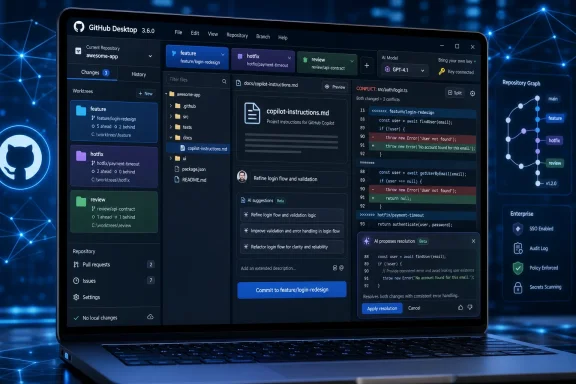
GitHub Desktop 3.6.0, released June 26, 2026 for Windows and macOS, adds Git worktree support and expands GitHub Copilot into commit writing, merge-conflict assistance, model selection, and bring-your-own-key AI configuration. The headline is not that GitHub has sprinkled more AI on a graphical Git client. The more important shift is that Desktop is being repositioned as the place where human developers, coding agents, and repository policy meet before code becomes history. For Windows developers who have long treated GitHub Desktop as the friendly on-ramp and the command line as the serious workspace, version 3.6 is GitHub’s argument that the boundary is no longer so obvious.
GitHub Desktop began life as a way to make Git less punishing. That mission has not gone away, but the shape of the problem has changed. In 2026, the pain point is not merely that Git is hard; it is that the surrounding development workflow is now crowded with AI assistants, automated coding agents, repository rules, multiple concurrent branches, and human reviewers trying to decide which machine-written changes deserve trust.
Version 3.6 attacks that problem at three pressure points. It brings worktrees into the interface, it gives Copilot more responsibility over the text and mechanics around commits, and it adds AI help at the moment many casual Git users fear most: merge conflicts. None of those features is revolutionary in isolation. Together, they make Desktop a more serious participant in the modern development loop.
That matters because GitHub Desktop sits in an unusually sensitive place. It is not the editor, where code is drafted. It is not the pull request, where teams debate and enforce policy. It is the layer where local intent becomes version-control fact. When AI starts influencing that layer, the product is no longer just helping you type faster; it is helping shape the record of what happened.
For Windows users, the timing is especially notable. Windows has become a mainstream development platform not by pretending everyone loves terminals, but by supporting a messy mix of GUI tools, WSL, VS Code, containers, and corporate-managed laptops. GitHub Desktop 3.6 is aimed squarely at that reality: developers may still use Git directly, but GitHub wants the everyday choreography to happen somewhere more guided.
This is not a new Git capability. The command-line
That change is bigger than it sounds. Worktrees are powerful precisely because they model the way real development happens: not as one clean linear task, but as interruptions, reviews, fixes, experiments, and half-finished changes competing for attention. A GUI that cannot understand that model nudges users back toward stashes, duplicated clones, or fragile rituals. A GUI that can understand it reduces the penalty for doing the right thing.
The AI angle makes this more urgent. Coding agents often benefit from isolated spaces where they can generate, test, and revise changes without trampling over a developer’s current branch. Worktrees offer a native Git answer to that need. By adding worktree support, GitHub Desktop is acknowledging that parallel local development is not a niche concern anymore; it is becoming part of the normal AI-assisted workflow.
There are still caveats. Worktrees share repository data, and they introduce their own housekeeping concerns. Teams need conventions for naming, cleanup, branch ownership, and where generated work is allowed to live. But bringing worktrees into Desktop lowers the barrier enough that these conventions can become team practice instead of arcane lore passed around in Slack messages.
That is a meaningful evolution. A bad AI-generated commit message is not just cosmetic noise. It damages the usefulness of project history, makes
GitHub’s move is to pull some of that guidance earlier into the authoring moment. Instead of generating a generic “update files” summary and letting automation reject it later, Desktop can attempt to produce a message that already fits the repository’s expectations. That is the right direction. The best policy enforcement is not a red light at the end of the road; it is a lane marker while the driver is still steering.
But this also exposes the limits of AI in developer tooling. A commit message is a small act of interpretation. It says what changed, why it changed, and sometimes what risk the change carries. Copilot can summarize diffs, but it cannot always know the intent behind a tradeoff, the customer incident that prompted a patch, or the architectural decision hidden behind a small deletion. The feature is strongest when treated as a draft generator, not an author of record.
The support for instruction files is therefore both useful and dangerous. Useful, because teams can give Copilot durable context about tone, format, and repository norms. Dangerous, because it may create a false sense that repository policy has been fully encoded. Instructions are guidance, not governance. If a commit message carries compliance, security, or audit significance, humans and automated checks still need to verify the output.
This is an obvious place for AI assistance. Merge conflict markers are visually hostile, and the underlying problem is often semantic rather than textual. Two branches may edit the same function for different reasons, rename a variable while another change updates its call sites, or adjust configuration defaults in ways that only make sense with domain knowledge. A tool that can narrate the conflict and propose a path through it has real value.
The key word, however, is propose. Merge conflict resolution is not merely a formatting task. A clean merge can still be wrong. It can compile but silently discard behavior, preserve both edits while duplicating logic, or choose a version that passes local tests but violates product intent. AI can reduce fear and speed up first-pass reasoning, but it cannot be allowed to turn conflict resolution into a one-click act of faith.
This is where Desktop’s positioning matters. By keeping the suggested resolution in a reviewable flow, GitHub is at least presenting Copilot as an assistant rather than an autonomous merger. That distinction matters for trust. The best version of this feature is not “Copilot fixes conflicts”; it is “Copilot explains the conflict well enough that more developers can fix it safely.”
For WindowsForum’s sysadmin and IT pro audience, the organizational angle is clear. Teams adopting this feature should think about training and policy before they think about productivity metrics. Developers need to know when AI conflict help is appropriate, when to pull in a maintainer, and when to run a broader test suite before pushing. A resolved conflict is not done because the markers disappeared; it is done when the merged behavior is understood.
Model choice is becoming a product surface in its own right. Developers and organizations increasingly want different models for different tasks: faster models for small summaries, stronger models for complex refactors, local models for sensitive code, and enterprise-approved providers for regulated environments. If Desktop is going to place AI in commit and merge workflows, it cannot treat the model as an invisible backend detail forever.
Bring-your-own-key support is particularly interesting on Windows. Corporate developers often work on managed endpoints where network paths, credentials, proxies, and data-handling policies are tightly controlled. The ability to point Copilot-powered features at a permitted provider or local model could make the difference between “blocked by policy” and “approved under conditions.” It also makes Desktop part of the broader enterprise AI configuration story rather than a simple consumer app.
The risk is fragmentation. If every developer chooses a different model, teams may see inconsistent commit messages, uneven conflict suggestions, and varying levels of instruction-following. One person’s model may be excellent at concise conventional commits; another may over-explain or miss repository-specific metadata. AI flexibility helps individuals, but organizations will want defaults, restrictions, and observability.
This is where GitHub’s enterprise-management story will matter more than the release note itself. A model picker is liberating on a personal machine and potentially chaotic at scale. The next question is not whether Desktop can choose models, but whether administrators can shape that choice in ways that align with security, cost, and engineering standards.
Version 3.6 does not eliminate Git’s complexity. Worktrees still require a mental model of branches and directories. Merge conflicts still require judgment. Commit metadata still requires team conventions. What Desktop does is bring more of those workflows into a place where the tool can slow the user down at the right moments and supply context without forcing a documentation hunt.
That is the optimistic reading. The skeptical reading is that GitHub is making developers more dependent on Copilot precisely at the moments where precision matters. Commit messages and merge resolutions are small compared with code generation, but they are disproportionately important to collaboration. They shape what reviewers see, what future maintainers understand, and what the repository records as truth.
Both readings can be true. The value of GitHub Desktop 3.6 depends heavily on how teams use it. In a disciplined environment, it can reduce friction, standardize routine work, and make advanced Git practices more accessible. In a careless environment, it can encourage developers to accept plausible AI output without understanding the underlying state of the repository.
The product’s challenge is therefore cultural as much as technical. GitHub is not just shipping features; it is nudging a generation of developers toward a workflow in which AI participates in the mechanics of version control. That demands better habits, not fewer of them.
The enterprise questions are less comfortable. If Copilot-powered features require Copilot access, organizations need to decide who gets that access, under what plan, and with which model providers. If BYOK is permitted, administrators need to know where keys live, how they are rotated, whether local models are allowed, and what data leaves the endpoint. If repository instruction files influence AI output, teams need ownership rules for those files.
There is also a security-review angle. Merge conflict assistance and commit generation operate on repository content and diffs. Even when the feature is behaving as designed, it touches material that may include proprietary code, configuration details, and issue references. Organizations that have already evaluated Copilot for code completion should not assume that evaluation automatically covers every new Desktop workflow.
The operational burden is not necessarily a reason to avoid the release. It is a reason to treat it as part of the software-development lifecycle rather than a harmless desktop update. GitHub Desktop may be free to download, but the workflows it enables can intersect with paid Copilot entitlements, data governance, and internal engineering standards.
For many teams, the right answer will be a staged rollout. Let experienced developers test worktrees and AI conflict assistance on non-critical repositories. Define commit-message expectations in repository instructions. Decide whether model choice is user-controlled or centrally guided. Then expand adoption once the team has seen how the feature behaves under real conflicts, not just demo scenarios.
Worktrees are a perfect example. They make parallel work easier, but they also make it easier to accumulate forgotten directories and stale branches. AI-assisted commits can improve consistency, but only if the repository gives Copilot clear rules and developers review the result. Merge assistance can reduce panic, but only if users understand that the absence of conflict markers is not proof of correctness.
That is why this release should be read less as a convenience update and more as infrastructure for the agentic development era. GitHub is preparing Desktop for a world where humans and agents may work side by side across multiple branches, and where the Git client must help coordinate the handoff. The mundane moments between coding and pull request review are becoming more important, not less.
There is a subtle competitive dynamic here as well. Editors such as VS Code are where much AI-assisted coding happens, but GitHub controls the collaboration layer where code becomes shared work. By extending Copilot deeper into Desktop, GitHub is reinforcing its position at the seam between local development and hosted review. The company does not need Desktop to replace the terminal; it needs Desktop to be the trusted checkpoint before changes enter the social life of a repository.
That is a powerful position, and one that deserves scrutiny. If GitHub Desktop becomes the place where AI summarizes intent, proposes conflict resolutions, and helps organize parallel branches, then the client is influencing not just productivity but engineering memory. The commit history is where projects remember themselves. Tools that write or reshape that memory need to be held to a higher standard than tools that merely autocomplete a line.
 GitHub Desktop Moves From Git Wrapper to Workflow Broker
GitHub Desktop began life as a way to make Git less punishing. That mission has not gone away, but the shape of the problem has changed. In 2026, the pain point is not merely that Git is hard; it is that the surrounding development workflow is now crowded with AI assistants, automated coding agents, repository rules, multiple concurrent branches, and human reviewers trying to decide which machine-written changes deserve trust.Version 3.6 attacks that problem at three pressure points. It brings worktrees into the interface, it gives Copilot more responsibility over the text and mechanics around commits, and it adds AI help at the moment many casual Git users fear most: merge conflicts. None of those features is revolutionary in isolation. Together, they make Desktop a more serious participant in the modern development loop.
That matters because GitHub Desktop sits in an unusually sensitive place. It is not the editor, where code is drafted. It is not the pull request, where teams debate and enforce policy. It is the layer where local intent becomes version-control fact. When AI starts influencing that layer, the product is no longer just helping you type faster; it is helping shape the record of what happened.
For Windows users, the timing is especially notable. Windows has become a mainstream development platform not by pretending everyone loves terminals, but by supporting a messy mix of GUI tools, WSL, VS Code, containers, and corporate-managed laptops. GitHub Desktop 3.6 is aimed squarely at that reality: developers may still use Git directly, but GitHub wants the everyday choreography to happen somewhere more guided.
Worktrees Finally Get a Seat at the Desktop Table
The most practically important addition may be the least glamorous one. Git worktrees let a single repository have multiple working directories checked out at once, each typically tied to a different branch. Instead of stashing unfinished work, switching branches, rebuilding state, and hoping nothing leaks across contexts, a developer can keep separate directories for a hotfix, a feature branch, a review task, or an agent-generated experiment.This is not a new Git capability. The command-line
git worktree machinery has existed for years, and experienced developers have used it to avoid the churn of branch switching. What is new is that GitHub Desktop now treats worktrees as a first-class workflow rather than an advanced command-line trick hiding outside the GUI.That change is bigger than it sounds. Worktrees are powerful precisely because they model the way real development happens: not as one clean linear task, but as interruptions, reviews, fixes, experiments, and half-finished changes competing for attention. A GUI that cannot understand that model nudges users back toward stashes, duplicated clones, or fragile rituals. A GUI that can understand it reduces the penalty for doing the right thing.
The AI angle makes this more urgent. Coding agents often benefit from isolated spaces where they can generate, test, and revise changes without trampling over a developer’s current branch. Worktrees offer a native Git answer to that need. By adding worktree support, GitHub Desktop is acknowledging that parallel local development is not a niche concern anymore; it is becoming part of the normal AI-assisted workflow.
There are still caveats. Worktrees share repository data, and they introduce their own housekeeping concerns. Teams need conventions for naming, cleanup, branch ownership, and where generated work is allowed to live. But bringing worktrees into Desktop lowers the barrier enough that these conventions can become team practice instead of arcane lore passed around in Slack messages.
The Commit Box Becomes an AI Policy Surface
GitHub Desktop already had Copilot-powered commit message generation, but version 3.6 gives that feature a more deliberate role. Commit generation now reads repository-level instructions such as.github/copilot-instructions.md and AGENTS.md, and GitHub says it can honor commit metadata rules defined for a repository. In plain English, the commit box is learning to respect house style.That is a meaningful evolution. A bad AI-generated commit message is not just cosmetic noise. It damages the usefulness of project history, makes
git blame less informative, and forces reviewers to infer intent from code alone. Teams that care about conventional commits, ticket IDs, release-note tags, signed-off-by lines, or other metadata have traditionally had to enforce those expectations through hooks, CI checks, or reviewer discipline.GitHub’s move is to pull some of that guidance earlier into the authoring moment. Instead of generating a generic “update files” summary and letting automation reject it later, Desktop can attempt to produce a message that already fits the repository’s expectations. That is the right direction. The best policy enforcement is not a red light at the end of the road; it is a lane marker while the driver is still steering.
But this also exposes the limits of AI in developer tooling. A commit message is a small act of interpretation. It says what changed, why it changed, and sometimes what risk the change carries. Copilot can summarize diffs, but it cannot always know the intent behind a tradeoff, the customer incident that prompted a patch, or the architectural decision hidden behind a small deletion. The feature is strongest when treated as a draft generator, not an author of record.
The support for instruction files is therefore both useful and dangerous. Useful, because teams can give Copilot durable context about tone, format, and repository norms. Dangerous, because it may create a false sense that repository policy has been fully encoded. Instructions are guidance, not governance. If a commit message carries compliance, security, or audit significance, humans and automated checks still need to verify the output.
Merge Conflicts Are No Longer Left as a Rite of Passage
Merge conflicts occupy a strange place in developer culture. They are common enough that every working developer eventually faces them, but intimidating enough that many newer developers treat them as a sign that something has gone badly wrong. GitHub Desktop 3.6 brings Copilot into that moment by explaining conflicting changes and suggesting a resolution that users can review, accept, or edit.This is an obvious place for AI assistance. Merge conflict markers are visually hostile, and the underlying problem is often semantic rather than textual. Two branches may edit the same function for different reasons, rename a variable while another change updates its call sites, or adjust configuration defaults in ways that only make sense with domain knowledge. A tool that can narrate the conflict and propose a path through it has real value.
The key word, however, is propose. Merge conflict resolution is not merely a formatting task. A clean merge can still be wrong. It can compile but silently discard behavior, preserve both edits while duplicating logic, or choose a version that passes local tests but violates product intent. AI can reduce fear and speed up first-pass reasoning, but it cannot be allowed to turn conflict resolution into a one-click act of faith.
This is where Desktop’s positioning matters. By keeping the suggested resolution in a reviewable flow, GitHub is at least presenting Copilot as an assistant rather than an autonomous merger. That distinction matters for trust. The best version of this feature is not “Copilot fixes conflicts”; it is “Copilot explains the conflict well enough that more developers can fix it safely.”
For WindowsForum’s sysadmin and IT pro audience, the organizational angle is clear. Teams adopting this feature should think about training and policy before they think about productivity metrics. Developers need to know when AI conflict help is appropriate, when to pull in a maintainer, and when to run a broader test suite before pushing. A resolved conflict is not done because the markers disappeared; it is done when the merged behavior is understood.
Model Choice Turns Desktop Into a Local AI Control Point
GitHub says every Copilot feature in Desktop now includes a model picker, allowing users to select among models available through GitHub. It also says users can bring their own key to connect a third-party provider or a model running locally on the machine. This is one of the more strategically revealing pieces of the release.Model choice is becoming a product surface in its own right. Developers and organizations increasingly want different models for different tasks: faster models for small summaries, stronger models for complex refactors, local models for sensitive code, and enterprise-approved providers for regulated environments. If Desktop is going to place AI in commit and merge workflows, it cannot treat the model as an invisible backend detail forever.
Bring-your-own-key support is particularly interesting on Windows. Corporate developers often work on managed endpoints where network paths, credentials, proxies, and data-handling policies are tightly controlled. The ability to point Copilot-powered features at a permitted provider or local model could make the difference between “blocked by policy” and “approved under conditions.” It also makes Desktop part of the broader enterprise AI configuration story rather than a simple consumer app.
The risk is fragmentation. If every developer chooses a different model, teams may see inconsistent commit messages, uneven conflict suggestions, and varying levels of instruction-following. One person’s model may be excellent at concise conventional commits; another may over-explain or miss repository-specific metadata. AI flexibility helps individuals, but organizations will want defaults, restrictions, and observability.
This is where GitHub’s enterprise-management story will matter more than the release note itself. A model picker is liberating on a personal machine and potentially chaotic at scale. The next question is not whether Desktop can choose models, but whether administrators can shape that choice in ways that align with security, cost, and engineering standards.
The Real Audience Is the Developer Who Does Not Want to Become a Git Specialist
Git has always suffered from a mismatch between its power and its ergonomics. It gives developers a robust model for distributed history, but it exposes that model through commands and concepts that can feel unforgiving. GitHub Desktop exists because many people need Git’s benefits without wanting Git to become their second job.Version 3.6 does not eliminate Git’s complexity. Worktrees still require a mental model of branches and directories. Merge conflicts still require judgment. Commit metadata still requires team conventions. What Desktop does is bring more of those workflows into a place where the tool can slow the user down at the right moments and supply context without forcing a documentation hunt.
That is the optimistic reading. The skeptical reading is that GitHub is making developers more dependent on Copilot precisely at the moments where precision matters. Commit messages and merge resolutions are small compared with code generation, but they are disproportionately important to collaboration. They shape what reviewers see, what future maintainers understand, and what the repository records as truth.
Both readings can be true. The value of GitHub Desktop 3.6 depends heavily on how teams use it. In a disciplined environment, it can reduce friction, standardize routine work, and make advanced Git practices more accessible. In a careless environment, it can encourage developers to accept plausible AI output without understanding the underlying state of the repository.
The product’s challenge is therefore cultural as much as technical. GitHub is not just shipping features; it is nudging a generation of developers toward a workflow in which AI participates in the mechanics of version control. That demands better habits, not fewer of them.
Windows Developers Gain Convenience, but Admins Gain New Questions
For Windows developers, the immediate upside is straightforward. GitHub Desktop 3.6 gives them a more capable GUI for parallel branch work and a more integrated Copilot experience without requiring a jump into command-line Git for every advanced task. That is especially useful in mixed-skill teams where some developers are comfortable withgit worktree and others are not.The enterprise questions are less comfortable. If Copilot-powered features require Copilot access, organizations need to decide who gets that access, under what plan, and with which model providers. If BYOK is permitted, administrators need to know where keys live, how they are rotated, whether local models are allowed, and what data leaves the endpoint. If repository instruction files influence AI output, teams need ownership rules for those files.
There is also a security-review angle. Merge conflict assistance and commit generation operate on repository content and diffs. Even when the feature is behaving as designed, it touches material that may include proprietary code, configuration details, and issue references. Organizations that have already evaluated Copilot for code completion should not assume that evaluation automatically covers every new Desktop workflow.
The operational burden is not necessarily a reason to avoid the release. It is a reason to treat it as part of the software-development lifecycle rather than a harmless desktop update. GitHub Desktop may be free to download, but the workflows it enables can intersect with paid Copilot entitlements, data governance, and internal engineering standards.
For many teams, the right answer will be a staged rollout. Let experienced developers test worktrees and AI conflict assistance on non-critical repositories. Define commit-message expectations in repository instructions. Decide whether model choice is user-controlled or centrally guided. Then expand adoption once the team has seen how the feature behaves under real conflicts, not just demo scenarios.
The Old Git Habits Still Decide Whether the New AI Helps
The most important thing about GitHub Desktop 3.6 is that it does not replace good version-control discipline. It rewards it. Teams with clean branches, useful tests, clear commit standards, and maintained instruction files will get more from these features than teams already drowning in vague history and oversized pull requests.Worktrees are a perfect example. They make parallel work easier, but they also make it easier to accumulate forgotten directories and stale branches. AI-assisted commits can improve consistency, but only if the repository gives Copilot clear rules and developers review the result. Merge assistance can reduce panic, but only if users understand that the absence of conflict markers is not proof of correctness.
That is why this release should be read less as a convenience update and more as infrastructure for the agentic development era. GitHub is preparing Desktop for a world where humans and agents may work side by side across multiple branches, and where the Git client must help coordinate the handoff. The mundane moments between coding and pull request review are becoming more important, not less.
There is a subtle competitive dynamic here as well. Editors such as VS Code are where much AI-assisted coding happens, but GitHub controls the collaboration layer where code becomes shared work. By extending Copilot deeper into Desktop, GitHub is reinforcing its position at the seam between local development and hosted review. The company does not need Desktop to replace the terminal; it needs Desktop to be the trusted checkpoint before changes enter the social life of a repository.
That is a powerful position, and one that deserves scrutiny. If GitHub Desktop becomes the place where AI summarizes intent, proposes conflict resolutions, and helps organize parallel branches, then the client is influencing not just productivity but engineering memory. The commit history is where projects remember themselves. Tools that write or reshape that memory need to be held to a higher standard than tools that merely autocomplete a line.
The Practical Read for Desktop 3.6
GitHub Desktop 3.6 is worth taking seriously because it connects three previously separate concerns: parallel branch work, AI-assisted repository mechanics, and configurable model behavior. The update is not just a set of features for people who dislike terminals. It is a signal that GitHub sees local Git workflows as the next surface where AI needs to become more context-aware, more governed, and more visible.- GitHub Desktop 3.6.0 is available for Windows and macOS, with automatic updates rolling out progressively and manual downloads available from GitHub’s Desktop app page.
- Worktree support is the most concrete workflow improvement, especially for developers juggling hotfixes, feature branches, reviews, and agent-generated experiments.
- Copilot-generated commit messages now have a better chance of matching repository expectations because Desktop can use project instruction files and commit metadata rules.
- AI-assisted merge conflict resolution should be treated as guided review, not automatic correctness, because a syntactically resolved merge can still be semantically wrong.
- The model picker and bring-your-own-key support make Desktop more flexible, but they also create governance questions for teams that need consistency, security review, and cost control.
- The release will be most valuable in teams that already maintain good Git hygiene, because AI assistance amplifies repository conventions more effectively than it invents them.
References
- Primary source: The GitHub Blog
Published: Fri, 26 Jun 2026 10:32:58 GMT
GitHub Desktop 3.6: Worktrees and deeper Copilot integration - GitHub Changelog
GitHub Desktop 3.6 brings more of your day-to-day Git flow into one place with GitHub Copilot now powering commit authoring and merge conflict resolution, plus new Git worktree support. The…github.blog
- Official source: docs.github.com
About customizing GitHub Copilot responses - GitHub Docs
Learn about customizing the behavior of GitHub Copilot to fit with your preferences and requirements. docs.github.com
- Official source: github.com
awesome-copilot/instructions/agents.instructions.md at main · github/awesome-copilot · GitHub
Community-contributed instructions, agents, skills, and configurations to help you make the most of GitHub Copilot. - awesome-copilot/instructions/agents.instructions.md at main · github/awesome-copilot github.com
- Official source: desktop.github.com

Release Notes for GitHub Desktop | GitHub Desktop
Simple collaboration from your desktop
desktop.github.com
- Related coverage: copilot-academy.github.io
GitHub Copilot Customization Handbook | GitHub Copilot
Instructions, Prompts, Agents, and Skills — a comprehensive guide to tailoring GitHub Copilot to your team's workflowscopilot-academy.github.io
