

SoliderSound released Go-Splitter on May 21, 2026, as a free standalone stem-separation application for Windows 10/11 and macOS 12.3 or later, giving musicians a local tool for splitting songs into vocals, drums, bass, and other stems. The headline is not that another AI audio utility exists; the headline is that another developer has decided the browser is no longer the natural home for this job. Stem separation has become one of the most visible consumer-facing uses of neural audio processing, but Go-Splitter arrives with a pointedly old-fashioned promise: download the app, keep the files on your own machine, and get usable WAV stems without opening a cloud account.
That positioning matters because the stem-separation market has been moving in two directions at once. At the high end, DAWs and paid services are folding separation into broader production workflows. At the low end, free web tools promise instant results but ask users to upload the very thing they may be least comfortable handing over: unreleased tracks, client mixes, samples, rehearsal recordings, or copyright-sensitive material. Go-Splitter does not solve every problem in the category, but it lands squarely on the pressure point that makes local processing attractive.
For years, stem separation has been sold as a miracle trick: take a finished stereo mix and peel it apart into the components that should, by all rights, be inseparable. The technology still feels magical when it works. A vocal emerges from a dense chorus, a bass line becomes clearer under a wall of guitars, a drummer’s pattern can be studied without the rest of the band fighting for space.
But the practical workflow has often been less magical. Many tools run in the browser, meter usage by time or file count, and treat the user’s audio as a payload to be shipped somewhere else. That is tolerable for hobbyists dissecting commercial songs; it is less comfortable for producers, educators, DJs, remixers, or engineers working with material they do not own outright or cannot casually upload.
Go-Splitter’s strongest pitch is therefore not its stem count. It separates into four conventional categories: vocals, drums, bass, and other. The stronger pitch is locality. A neural-network-based separator that runs on a desktop computer is boring in the best possible way, because boring is exactly what many audio workflows need.
That “other” bucket will inevitably do a lot of work. Guitars, piano, synth pads, strings, horns, noise beds, reverbs, and miscellaneous artifacts all have to live somewhere if the free version only exposes four stems. Still, for many common use cases, those four outputs are the basic kit: remove a vocal, practice a bass part, sample a drum groove, or make a quick rehearsal backing track.
That is why cloud-based stem splitting creates a sharper trust question than, say, cloud-based photo cleanup. An unreleased vocal take, a client’s demo, or a sync pitch cue may be small enough to upload in seconds, but the decision to upload it is still a decision to let someone else’s infrastructure touch it. Even when a service has reasonable policies, the user has to read them, believe them, and accept that the processing chain is outside their control.
Local separation reduces that concern. It does not eliminate every privacy issue — installers, telemetry, update systems, and licensing all deserve scrutiny — but it changes the default posture. The audio does not need to leave the workstation simply to become stems. For WindowsForum readers who think about endpoint control, data governance, or just plain operational hygiene, that distinction is not cosmetic.
It also changes the reliability equation. A local tool does not care whether the broadband is having a bad day, whether a service is rate-limiting free users, or whether a startup quietly changed its pricing. If the app is installed and the machine can run it, the workflow continues. That is exactly the kind of small independence that tends to matter more after a deadline has already begun to burn.
The trade-off is easy to understand. More stems sound better on a feature table, but more categories also create more opportunities for a model to guess wrong. A guitar may smear into the vocal stem, a piano transient may resemble percussion, a synth bass may confuse the bass and other channels, and heavy reverb can turn the “other” stem into a fog machine. Stem separation is not extraction in the forensic sense; it is informed reconstruction.
That is why quality varies so dramatically by source material. Sparse arrangements with centered vocals and conventional drums often separate more cleanly than loud, compressed, reverb-heavy mixes. Dense rock, layered EDM, shoegaze, live recordings, distorted vocals, and older masters can produce results that are useful but obviously artificial. The better tools make fewer ugly mistakes, but none of them abolish the problem.
For a free app, four stems may be the correct floor. It gives users the most common separations without pretending that every instrument in a finished master can be recovered like a multitrack session. The paid Pro version’s existence complicates the story, but it also clarifies the segmentation: free users get the basic utility; paid users get improved separation and production-oriented extras.
That split between free and paid is familiar, but in audio it has a particular tension. If the free version’s separation quality is too limited, it becomes a demo with a nicer name. If it is too capable, it may undermine the paid product. SoliderSound has to walk the same line as every developer offering a free AI utility in a crowded category: useful enough to earn trust, limited enough to sustain a business.
The danger is not that users object to paid software. Musicians and engineers have always paid for tools that save time or improve results. The danger is that the free tier can create a sour first impression if the artifacts are too obvious or if the best examples are locked behind the Pro label. In stem separation, first impressions are brutal because users judge the tool with their own tracks, not with the developer’s demos.
Key detection and tempo functions also hint at the larger destination. Stem separation by itself is becoming a commodity feature. The money is likely to be in workflow: analysis, pitch and time manipulation, DAW-ready exports, rehearsal tools, remix preparation, sample cleanup, and eventually plugin or batch-processing integration. Go-Splitter Pro is less interesting as a paid upgrade than as a sign that SoliderSound sees separation as one piece of a broader production stack.
A free Windows 10/11 app gives Go-Splitter a potentially broader audience than a Mac-only utility would. It also makes the performance question more varied. Windows machines span everything from modest laptops to desktop workstations with powerful GPUs, while Apple Silicon Macs offer a more controlled hardware target. Local neural processing can be sensitive to those differences.
That means Windows users should expect the familiar bargain: more hardware freedom, more configuration variability. A stem split that feels quick on a modern desktop may be sluggish on an older laptop. Driver issues, graphics acceleration, memory pressure, and storage speed can all become part of the experience even if the app itself is simple.
Still, the mere availability on Windows matters. Too many creative AI tools arrive first as web apps, then as Mac apps, and only later as Windows builds if demand appears. Go-Splitter entering with Windows support reinforces the point that local AI audio processing is not a boutique Mac-only niche. It is becoming a normal desktop workload.
That is where Go-Splitter will earn or lose credibility. A clean vocal from a simple mix is nice, but the real test is whether the output remains useful when the model is wrong in small ways. Does the vocal stem have watery cymbal ghosts? Does the drum stem lose punch? Does the bass stem become thin? Does the “other” stem sound like the music was played through a bad noise gate?
The early description suggests mixed results, which is not an indictment so much as a realistic baseline for the category. Clean-ish vocals can be usable for remix sketches, karaoke beds, transcription, or reference work. Drum and bass stems that sound slightly tinny may still be enough for practice, sampling, or arrangement analysis. Perfection is rarely necessary; predictability is.
The trouble is that users often conflate “AI” with “studio multitrack recovery.” That expectation is wrong. Stem separation is closer to a smart approximation than a time machine. The app can infer likely components from a finished mix, but it cannot know every production decision that created that mix. The best users will treat the results as working material, not recovered masters.
That shift changes how apps should be judged. A tool that produces spectacular results once but requires uploads, queues, subscriptions, or manual file juggling may be less useful than a slightly less impressive desktop app that can be run repeatedly during a session. Musicians value speed not because they are impatient, but because creative decisions decay when the workflow breaks.
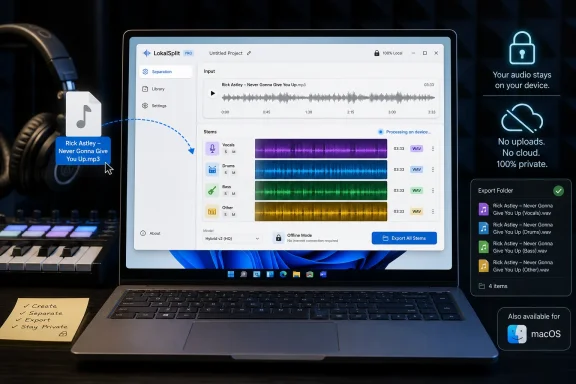
Go-Splitter’s drag-and-drop design is therefore not trivial. The user drops in an audio file, lets the app analyze the song, previews the separated stems, and exports them. Supported formats reportedly include common production and consumer formats such as WAV, MP3, FLAC, M4A/AAC, AIFF, and OGG. That is the right level of ceremony for a utility.
The lack of plugin status may disappoint some users, but standalone apps have advantages. They avoid DAW compatibility headaches, plugin format fragmentation, and real-time performance expectations. For a process that can run offline and export WAV files, standalone may be the saner first product. The DAW can remain the place where the real arrangement work happens.
Go-Splitter’s local-processing pitch gives it an advantage, but the trust conversation does not end there. A desktop app can still collect analytics. It can still require update checks. It can still have unclear licensing terms. It can still have bugs that matter more on a studio machine than on a disposable test laptop.
That is not an accusation against SoliderSound. It is the normal standard for software that wants to live on a workstation. The more AI tools move from websites into native apps, the more users will need to distinguish between local processing as a technical claim and local processing as part of a broader privacy posture.
For sysadmins and lab managers, the questions become even more concrete. Is the installer deployable? Does it need admin rights? Where are temporary files stored? Can output locations be controlled? Does it behave without internet access? Those details rarely make the launch blog post, but they decide whether a tool becomes part of a repeatable environment.
A local app does not change that legal landscape. If anything, it makes enforcement harder because the processing is not happening on a service that might impose limits or terms. That is good for privacy and autonomy, but it also shifts responsibility more completely onto the user. The tool can be lawful; the use may not be.
This is not unique to Go-Splitter. Every stem separator lives with the same tension. The technology is now accessible enough that the old friction has disappeared. A task that once required studio access, phase tricks, multitrack leaks, or painstaking EQ can now be attempted by anyone with a laptop.
The sensible position is not panic. It is clarity. Producers should use tools like this on material they own, are licensed to manipulate, or are using within a defensible educational or personal context. The fact that an app is free and local does not grant rights to the underlying recording.
That does not make Go-Splitter irrelevant. Standalone tools often thrive precisely because they are narrower, cheaper, faster to launch, or available outside a particular DAW ecosystem. A Windows user who does not own a premium DAW still needs options. A teacher preparing materials may not want to open a full production session just to split a track. A DJ may want quick stems without subscribing to a larger platform.
But it does mean the category will get squeezed. Web tools compete on convenience. DAWs compete on integration. Specialist apps compete on quality, privacy, pricing, and workflow speed. Go-Splitter’s free tier gives it a low-friction entry point, but its long-term position will depend on whether SoliderSound can make the Pro version feel meaningfully better than both web freebies and bundled DAW features.
That is the pattern we have seen across creative AI software. The standalone novelty appears first, then the platform vendors absorb the most popular functions, and the specialists survive only if they are meaningfully deeper or more trusted. Stem separation is already somewhere in the middle of that cycle.
That shift has special significance for Windows. The PC has always been the platform of heterogeneous performance: cheap machines, monster machines, odd machines, old machines that refuse to die. Local AI tools will expose that spread. Some users will discover that their hardware is more capable than they expected; others will discover that “runs locally” is not the same as “runs quickly.”
For developers, this creates a product-design challenge. The app must feel simple while the underlying workload is not. It must hide model complexity, hardware differences, file-format issues, and export management behind a workflow that does not interrupt the creative task. Go-Splitter’s apparent simplicity is a good sign, but simplicity has to survive contact with real machines and real libraries of audio files.
For users, the advice is equally plain: test with your own material before building a workflow around any separator. The only meaningful benchmark is the one that resembles your actual use. A jazz trio, a modern pop master, a death-metal mix, a bedroom demo, and a lecture recording will all tell different stories about the same model.
That positioning matters because the stem-separation market has been moving in two directions at once. At the high end, DAWs and paid services are folding separation into broader production workflows. At the low end, free web tools promise instant results but ask users to upload the very thing they may be least comfortable handing over: unreleased tracks, client mixes, samples, rehearsal recordings, or copyright-sensitive material. Go-Splitter does not solve every problem in the category, but it lands squarely on the pressure point that makes local processing attractive.
 SoliderSound Bets That Offline Is the Feature
For years, stem separation has been sold as a miracle trick: take a finished stereo mix and peel it apart into the components that should, by all rights, be inseparable. The technology still feels magical when it works. A vocal emerges from a dense chorus, a bass line becomes clearer under a wall of guitars, a drummer’s pattern can be studied without the rest of the band fighting for space.But the practical workflow has often been less magical. Many tools run in the browser, meter usage by time or file count, and treat the user’s audio as a payload to be shipped somewhere else. That is tolerable for hobbyists dissecting commercial songs; it is less comfortable for producers, educators, DJs, remixers, or engineers working with material they do not own outright or cannot casually upload.
Go-Splitter’s strongest pitch is therefore not its stem count. It separates into four conventional categories: vocals, drums, bass, and other. The stronger pitch is locality. A neural-network-based separator that runs on a desktop computer is boring in the best possible way, because boring is exactly what many audio workflows need.
That “other” bucket will inevitably do a lot of work. Guitars, piano, synth pads, strings, horns, noise beds, reverbs, and miscellaneous artifacts all have to live somewhere if the free version only exposes four stems. Still, for many common use cases, those four outputs are the basic kit: remove a vocal, practice a bass part, sample a drum groove, or make a quick rehearsal backing track.
The Cloud Was Always the Hidden Cost
The music software world has a strange relationship with the cloud. Producers may happily download sample packs, authorize plugins online, collaborate through shared folders, and publish to streaming platforms, but the actual session file remains sacred territory. A song in progress is not just data; it is leverage, reputation, and sometimes a contractually restricted asset.That is why cloud-based stem splitting creates a sharper trust question than, say, cloud-based photo cleanup. An unreleased vocal take, a client’s demo, or a sync pitch cue may be small enough to upload in seconds, but the decision to upload it is still a decision to let someone else’s infrastructure touch it. Even when a service has reasonable policies, the user has to read them, believe them, and accept that the processing chain is outside their control.
Local separation reduces that concern. It does not eliminate every privacy issue — installers, telemetry, update systems, and licensing all deserve scrutiny — but it changes the default posture. The audio does not need to leave the workstation simply to become stems. For WindowsForum readers who think about endpoint control, data governance, or just plain operational hygiene, that distinction is not cosmetic.
It also changes the reliability equation. A local tool does not care whether the broadband is having a bad day, whether a service is rate-limiting free users, or whether a startup quietly changed its pricing. If the app is installed and the machine can run it, the workflow continues. That is exactly the kind of small independence that tends to matter more after a deadline has already begun to burn.
Four Stems Is a Compromise, Not a Failure
The free Go-Splitter app splits into vocals, drums, bass, and other. That puts it behind some alternatives on raw granularity, including tools that advertise guitar, piano, or additional instrument classes. It also puts it in line with the long-standing shape of many open and commercial separation models, where four-stem output remains the practical baseline.The trade-off is easy to understand. More stems sound better on a feature table, but more categories also create more opportunities for a model to guess wrong. A guitar may smear into the vocal stem, a piano transient may resemble percussion, a synth bass may confuse the bass and other channels, and heavy reverb can turn the “other” stem into a fog machine. Stem separation is not extraction in the forensic sense; it is informed reconstruction.
That is why quality varies so dramatically by source material. Sparse arrangements with centered vocals and conventional drums often separate more cleanly than loud, compressed, reverb-heavy mixes. Dense rock, layered EDM, shoegaze, live recordings, distorted vocals, and older masters can produce results that are useful but obviously artificial. The better tools make fewer ugly mistakes, but none of them abolish the problem.
For a free app, four stems may be the correct floor. It gives users the most common separations without pretending that every instrument in a finished master can be recovered like a multitrack session. The paid Pro version’s existence complicates the story, but it also clarifies the segmentation: free users get the basic utility; paid users get improved separation and production-oriented extras.
The Pro Version Shows Where the Business Really Is
SoliderSound is not releasing Go-Splitter as an act of pure software charity. The free app sits beside Go-Splitter Pro, which is positioned as the more serious production tool and is currently being offered at a discounted price. The Pro version reportedly improves separation quality and adds features such as key detection and more advanced tempo-changing functions.That split between free and paid is familiar, but in audio it has a particular tension. If the free version’s separation quality is too limited, it becomes a demo with a nicer name. If it is too capable, it may undermine the paid product. SoliderSound has to walk the same line as every developer offering a free AI utility in a crowded category: useful enough to earn trust, limited enough to sustain a business.
The danger is not that users object to paid software. Musicians and engineers have always paid for tools that save time or improve results. The danger is that the free tier can create a sour first impression if the artifacts are too obvious or if the best examples are locked behind the Pro label. In stem separation, first impressions are brutal because users judge the tool with their own tracks, not with the developer’s demos.
Key detection and tempo functions also hint at the larger destination. Stem separation by itself is becoming a commodity feature. The money is likely to be in workflow: analysis, pitch and time manipulation, DAW-ready exports, rehearsal tools, remix preparation, sample cleanup, and eventually plugin or batch-processing integration. Go-Splitter Pro is less interesting as a paid upgrade than as a sign that SoliderSound sees separation as one piece of a broader production stack.
Windows Support Makes This More Than a Mac Music Toy
The Windows angle is important. A large share of music-technology coverage still treats macOS as the default creative platform, especially when discussing slick desktop utilities. But Windows remains everywhere in home studios, live rigs, gaming-adjacent creator setups, education labs, DJ workflows, and budget production environments.A free Windows 10/11 app gives Go-Splitter a potentially broader audience than a Mac-only utility would. It also makes the performance question more varied. Windows machines span everything from modest laptops to desktop workstations with powerful GPUs, while Apple Silicon Macs offer a more controlled hardware target. Local neural processing can be sensitive to those differences.
That means Windows users should expect the familiar bargain: more hardware freedom, more configuration variability. A stem split that feels quick on a modern desktop may be sluggish on an older laptop. Driver issues, graphics acceleration, memory pressure, and storage speed can all become part of the experience even if the app itself is simple.
Still, the mere availability on Windows matters. Too many creative AI tools arrive first as web apps, then as Mac apps, and only later as Windows builds if demand appears. Go-Splitter entering with Windows support reinforces the point that local AI audio processing is not a boutique Mac-only niche. It is becoming a normal desktop workload.
The Demos Are Less Important Than the Messy Files Users Will Throw at It
Product demos for stem separation are always a little suspicious, even when they are made in good faith. Developers naturally choose material that makes the tool look competent. Reviewers and users, by contrast, test the app on the cursed files: brickwalled MP3s, old rehearsal recordings, YouTube rips, dense metal mixes, phasey live tracks, and pop songs where every element has been side-chained, saturated, widened, compressed, and drowned in reverb.That is where Go-Splitter will earn or lose credibility. A clean vocal from a simple mix is nice, but the real test is whether the output remains useful when the model is wrong in small ways. Does the vocal stem have watery cymbal ghosts? Does the drum stem lose punch? Does the bass stem become thin? Does the “other” stem sound like the music was played through a bad noise gate?
The early description suggests mixed results, which is not an indictment so much as a realistic baseline for the category. Clean-ish vocals can be usable for remix sketches, karaoke beds, transcription, or reference work. Drum and bass stems that sound slightly tinny may still be enough for practice, sampling, or arrangement analysis. Perfection is rarely necessary; predictability is.
The trouble is that users often conflate “AI” with “studio multitrack recovery.” That expectation is wrong. Stem separation is closer to a smart approximation than a time machine. The app can infer likely components from a finished mix, but it cannot know every production decision that created that mix. The best users will treat the results as working material, not recovered masters.
Stem Separation Has Become a Workflow Feature, Not a Party Trick
The first wave of consumer stem separation had a novelty quality. Remove a vocal, isolate a drum part, laugh at the artifacts, move on. The current wave is different because the output increasingly flows into real work: remixes, DJ edits, practice tools, education, sampling, transcription, podcast cleanup, and content creation.That shift changes how apps should be judged. A tool that produces spectacular results once but requires uploads, queues, subscriptions, or manual file juggling may be less useful than a slightly less impressive desktop app that can be run repeatedly during a session. Musicians value speed not because they are impatient, but because creative decisions decay when the workflow breaks.
Go-Splitter’s drag-and-drop design is therefore not trivial. The user drops in an audio file, lets the app analyze the song, previews the separated stems, and exports them. Supported formats reportedly include common production and consumer formats such as WAV, MP3, FLAC, M4A/AAC, AIFF, and OGG. That is the right level of ceremony for a utility.
The lack of plugin status may disappoint some users, but standalone apps have advantages. They avoid DAW compatibility headaches, plugin format fragmentation, and real-time performance expectations. For a process that can run offline and export WAV files, standalone may be the saner first product. The DAW can remain the place where the real arrangement work happens.
Free Software Still Has to Earn Trust
“Free” is persuasive, but it is not a complete argument. Windows users in particular have learned to ask what a free desktop app is doing, where it installs, how it updates, what it phones home, and whether it bundles anything unpleasant. Audio users add another layer: whether the installer plays nicely with their production machine and whether it leaves system components in a clean state.Go-Splitter’s local-processing pitch gives it an advantage, but the trust conversation does not end there. A desktop app can still collect analytics. It can still require update checks. It can still have unclear licensing terms. It can still have bugs that matter more on a studio machine than on a disposable test laptop.
That is not an accusation against SoliderSound. It is the normal standard for software that wants to live on a workstation. The more AI tools move from websites into native apps, the more users will need to distinguish between local processing as a technical claim and local processing as part of a broader privacy posture.
For sysadmins and lab managers, the questions become even more concrete. Is the installer deployable? Does it need admin rights? Where are temporary files stored? Can output locations be controlled? Does it behave without internet access? Those details rarely make the launch blog post, but they decide whether a tool becomes part of a repeatable environment.
The Copyright Shadow Is Not Going Away
Stem separation sits in legally and ethically complicated territory. The technology has legitimate uses: learning parts, creating practice tracks, remixing licensed material, restoring archival audio, preparing educational examples, and working with one’s own recordings. It also makes it easier to misuse commercial recordings by extracting vocals, sampling instrumental parts, or creating derivative works without permission.A local app does not change that legal landscape. If anything, it makes enforcement harder because the processing is not happening on a service that might impose limits or terms. That is good for privacy and autonomy, but it also shifts responsibility more completely onto the user. The tool can be lawful; the use may not be.
This is not unique to Go-Splitter. Every stem separator lives with the same tension. The technology is now accessible enough that the old friction has disappeared. A task that once required studio access, phase tricks, multitrack leaks, or painstaking EQ can now be attempted by anyone with a laptop.
The sensible position is not panic. It is clarity. Producers should use tools like this on material they own, are licensed to manipulate, or are using within a defensible educational or personal context. The fact that an app is free and local does not grant rights to the underlying recording.
The Real Competition Is Already Inside the DAW
Go-Splitter is not only competing with web services. It is competing with a future in which stem separation is a standard DAW feature. Apple has already pushed separation-style workflows into Logic Pro, and other major production platforms have strong incentives to treat source separation as part of editing, remixing, and arrangement. Once a capability becomes native, standalone utilities have to justify their place.That does not make Go-Splitter irrelevant. Standalone tools often thrive precisely because they are narrower, cheaper, faster to launch, or available outside a particular DAW ecosystem. A Windows user who does not own a premium DAW still needs options. A teacher preparing materials may not want to open a full production session just to split a track. A DJ may want quick stems without subscribing to a larger platform.
But it does mean the category will get squeezed. Web tools compete on convenience. DAWs compete on integration. Specialist apps compete on quality, privacy, pricing, and workflow speed. Go-Splitter’s free tier gives it a low-friction entry point, but its long-term position will depend on whether SoliderSound can make the Pro version feel meaningfully better than both web freebies and bundled DAW features.
That is the pattern we have seen across creative AI software. The standalone novelty appears first, then the platform vendors absorb the most popular functions, and the specialists survive only if they are meaningfully deeper or more trusted. Stem separation is already somewhere in the middle of that cycle.
Local AI Audio Is Becoming Ordinary Desktop Software
The larger story is that neural audio processing is leaving the demo stage and becoming normal software infrastructure. Noise suppression, room cleanup, transcription, mastering assistants, pitch tools, source separation, and generative composition all now sit on the same continuum. Some run in the cloud; more are moving onto local hardware as machines become capable enough and users become more privacy-conscious.That shift has special significance for Windows. The PC has always been the platform of heterogeneous performance: cheap machines, monster machines, odd machines, old machines that refuse to die. Local AI tools will expose that spread. Some users will discover that their hardware is more capable than they expected; others will discover that “runs locally” is not the same as “runs quickly.”
For developers, this creates a product-design challenge. The app must feel simple while the underlying workload is not. It must hide model complexity, hardware differences, file-format issues, and export management behind a workflow that does not interrupt the creative task. Go-Splitter’s apparent simplicity is a good sign, but simplicity has to survive contact with real machines and real libraries of audio files.
For users, the advice is equally plain: test with your own material before building a workflow around any separator. The only meaningful benchmark is the one that resembles your actual use. A jazz trio, a modern pop master, a death-metal mix, a bedroom demo, and a lecture recording will all tell different stories about the same model.
The Stem-Splitting Moment Is Now About Control
Go-Splitter’s launch is not revolutionary by itself, but it captures the direction of travel: users want AI audio tools that are cheap, fast, local, and good enough to be useful. The app’s free tier makes it easy to try, while the Pro tier shows where SoliderSound hopes to turn utility into a business. The most important takeaways are practical rather than mystical.- Go-Splitter is a free standalone app for Windows 10/11 and macOS 12.3 or later that separates songs into vocals, drums, bass, and other stems.
- The app’s strongest advantage over many web-based tools is that processing runs locally, which helps users who care about privacy, unreliable connections, or keeping unfinished work off third-party servers.
- The four-stem output is useful for common workflows but less granular than tools that separate additional parts such as guitar or piano.
- Separation quality will vary heavily by source material, and users should expect artifacts on dense, compressed, reverberant, or heavily processed mixes.
- The paid Go-Splitter Pro version is positioned as the higher-quality option with extra production features, including key detection and more advanced tempo tools.
- Windows support makes the release more relevant to mainstream producers, educators, DJs, and hobbyists who are not working inside Apple’s hardware and software ecosystem.
References
- Primary source: Bedroom Producers Blog
Published: 2026-05-21T16:20:08.795808
SoliderSound releases Go-Splitter, a FREE stem separation app for macOS and Windows - Bedroom Producers Blog
From developer SoliderSound comes Go-Splitter, a free stem separation app for macOS and Windows. We’ve had a few stem separation tools come along over the last handful of years, especially since terms like neural networks have become a regular feature of conversations about audio software...bedroomproducersblog.com - Related coverage: solidersound.com
SoliderSound Go-Splitter: AI Stem Separation App
Go-Splitter is a high-performance desktop stem separation app for macOS and Windows. Split a full mix into Vocals, Drums, Bass, and Other — fully on-device for offline workflows.solidersound.com - Related coverage: rekkerd.org
SoliderSound releases Go-Splitter Pro stem separation for Mac and Windows
Built for producers, engineers, remixers, and post-production pros, Pro runs a higher-precision on-device separation engine that delivers cleaner stems with noticeably fewer artefacts than the free version.rekkerd.org - Related coverage: audio.com
Stem Splitter | Free AI Music Stem Separator | AUDIO.COM
Split any song into stems with our free AI-powered stem splitter. Extract vocals, drums, bass, and more – online and with high quality.audio.com - Related coverage: dtmer.info
【無料】Solider Sound「Go-Splitter」無償配布!ボーカル・ドラム・ベース・その他に分離するスタンドアロンアプリ(現在Macのみ) | DTMer.info
ボーカル・ドラム・ベース・その他に分離するスタンドアロンアプリ(現在Macのみ)Solider Sound「Go-Splitter」の無料配布情報をお届けします。dtmer.info - Related coverage: static.solidersound.com
- Related coverage: songsurgeon.com
