

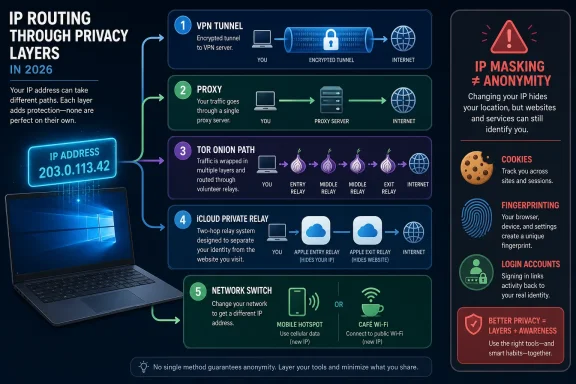
Hiding your IP address in 2026 usually means routing traffic through an intermediary such as a proxy, VPN, Tor, Apple’s iCloud Private Relay, a different network, or browser-level tracker masking, each of which changes who sees your address and how much of your traffic is protected. The trick is that these tools solve different problems, and the marketing around them often blurs that distinction. An IP address is not your identity, but it is a useful identifier: it can reveal your approximate location, your ISP, and enough network context to help advertisers, fraud systems, and websites connect dots. The central lesson is blunt: hiding an IP address is easy; knowing from whom you are hiding it is the part most users skip.
The public IP address is one of the internet’s oldest compromises. It is necessary for routing packets, but it also gives every site, app, tracker, and service a rough idea of where a connection is coming from. That roughness matters: an IP address generally does not reveal your street address, but city, region, ISP, mobile carrier, corporate network, and data-center hints are often enough to build behavioral profiles.
That is why IP masking has become a consumer privacy shorthand. If a website sees a VPN server in Chicago instead of your home broadband address in Ohio, something meaningful has changed. But the same website may still recognize your browser through cookies, login state, device characteristics, screen size, fonts, extensions, and behavioral signals.
This is where the consumer privacy market gets slippery. A tool can honestly say it “hides your IP” while doing little about tracking scripts, account logins, browser fingerprints, or malware. In other words, IP masking is a privacy layer, not a privacy religion.
The right question is not “Which method hides my IP?” It is “Which observer am I trying to blind?” Your ISP, a website, a public Wi-Fi operator, an ad-tech tracker, a corporate firewall, and a hostile exit node are different adversaries. A method that helps against one may do almost nothing against another.
That makes proxies useful when the narrow goal is changing the IP address seen by one app or one workflow. Developers use them for testing location-sensitive content. Researchers use them to observe how sites behave from different regions. Ordinary users use them because they are simple, fast, and often cheaper than a full privacy suite.
But a proxy is not a VPN with a different label. Most proxies are configured per app, not system-wide, which means the browser may use the proxy while your email client, game launcher, cloud sync agent, and background telemetry do not. If you forget that distinction, you can easily believe your device is “covered” when only one lane of traffic has moved.
Encryption is the second trap. A proxy does not automatically encrypt traffic just because it changes the visible IP address. HTTPS still protects the content of HTTPS sites, and an HTTPS proxy can encrypt the connection to the proxy itself, but a plain proxy is not a general-purpose privacy tunnel. Your ISP may not see the final site content if HTTPS is in use, but it can still see that you are connecting to the proxy.
SOCKS5 proxies complicate the picture because they are flexible and can carry more than basic web traffic. They are often used for applications that need rawer network forwarding and can be faster than VPNs for simple location shifting. That speed, however, comes with the same caveat: unless the application and transport are configured correctly, the proxy is merely a forwarding point, not a security boundary.
For Windows users, the operational issue is also familiar. Windows can define system proxy settings, and browsers or apps may either honor them or override them. In enterprise environments, proxy behavior is often governed by policy, authentication, certificates, and inspection appliances, which means “just use a proxy” can quickly become a help-desk ticket rather than a privacy upgrade.
That makes a VPN the broadest mainstream answer for users who want device-wide IP masking. It protects more than a browser. It covers apps that never heard of proxy settings. It is also far easier to explain to family members, remote workers, and traveling employees than a patchwork of per-application proxy rules.
The VPN’s strength is also its central weakness: it moves trust. Your ISP loses direct visibility into much of your browsing, but the VPN provider becomes a privileged intermediary. If the provider logs aggressively, injects ads, mishandles DNS, or runs weak infrastructure, the privacy story collapses into branding.
Free VPNs deserve special skepticism. Some are legitimate limited trials or subsidized products, but others monetize attention, bandwidth, analytics, or data. A free VPN with unlimited usage, no obvious business model, and sweeping privacy promises should make a security-minded reader more nervous, not less.
Performance is the other everyday trade-off. A VPN adds distance, encryption overhead, and routing complexity. Good paid providers can be fast enough that most users barely notice, but latency-sensitive work, gaming, large downloads, and corporate SaaS access can still suffer. In some cases the VPN improves routing; in others it turns a clean path into a scenic tour of someone else’s network.
For IT administrators, VPNs are also a policy problem. Consumer VPNs can bypass regional controls, content filters, and network monitoring. Corporate VPNs, by contrast, are usually designed to extend enterprise security policy to remote users. The two share a name, but their incentives are often opposite.
That architecture is why Tor remains important. It is not just a location changer; it is an anonymity system designed around separation of knowledge. The entry relay knows the user’s IP but not the destination. The exit relay can see the destination connection but not the original user. The middle relay helps break the link.
The cost is speed and compatibility. Tor is slower than ordinary browsing and much slower than a good VPN for many everyday tasks. Sites may challenge Tor users with CAPTCHAs, block known exit relays, degrade functionality, or treat the traffic as suspicious because Tor is also used for abuse.
Tor Browser also protects Tor Browser traffic. That sounds obvious, but it is another common point of failure. If you open Chrome beside Tor Browser, Chrome is not magically inside Tor. If you log into a personal account through Tor, the site may not know your home IP, but it may still know exactly who you are because you told it.
The better way to think about Tor is as a disciplined compartment. It is strongest when used for a specific privacy-sensitive browsing session, with default settings preserved and personal identifiers kept out. It is weaker when treated as a magic cloak over normal web habits.
For WindowsForum readers, Tor also raises a practical security distinction. Tor hides network origin from sites; it does not make downloaded files safe, repair compromised machines, or prevent users from voluntarily identifying themselves. If a threat model includes malware, phishing, or hostile documents, Tor is only one small part of the answer.
This is useful in the most literal sense. If a site rate-limits one address, another network may appear different. If a home IP is associated with a rough location, a mobile carrier address may point somewhere else. If troubleshooting depends on whether a problem follows the device or the network, switching connections is a quick diagnostic move.
But it is not a privacy method. The new network operator now occupies the position the old one held. A mobile carrier, hotel Wi-Fi provider, airport network, school, employer, or café access point can still observe metadata and control the local network path. On unencrypted traffic, local observers may see far more than users expect.
Public Wi-Fi is the obvious example. HTTPS has made the web much safer than it was in the packet-sniffing free-for-all of the early 2000s, but not every protocol, app, or background service deserves blind trust. Captive portals, rogue hotspots, DNS manipulation, and device discovery risks still exist.
Changing networks is therefore best seen as address rotation, not privacy protection. Pairing that new network with a trustworthy VPN is a different story, because the local operator then sees an encrypted tunnel rather than a scatter of individual destinations. Without that tunnel, the user has merely traded one observer for another.
This is elegant, especially for mainstream users who will never configure SOCKS5 or compare VPN logging policies. It is also tightly scoped. Private Relay is tied to iCloud+, Apple platforms, Safari browsing, and some system traffic. It is not a universal tunnel for every app on a Windows PC or every browser on a Mac.
That scope is not an accident. Apple’s privacy strategy often works by embedding protections into defaults and first-party surfaces rather than giving users a general-purpose networking Swiss Army knife. The experience is smoother because the boundaries are managed. The cost is that users may overestimate those boundaries.
Private Relay also preserves approximate location behavior in ways that make sense for weather, language, fraud prevention, and regional services. That means it is not meant to be a simple “pretend I am in another country” tool. Anyone looking for location shifting across apps will still reach for a VPN or proxy.
The more interesting implication is competitive. Apple has effectively said that IP address exposure is now a platform privacy issue, not merely a third-party app market. That puts pressure on browsers and operating systems to do more by default, but it also increases the number of partially overlapping privacy features users must understand.
The key distinction is that browser tracker masking is not the same as hiding your IP from the site you intentionally visit. If you browse a news site, the news site may still see your address. The protection is aimed at embedded trackers, advertising systems, and third-party contexts that follow users from page to page.
That makes browser-level masking a supplement, not a replacement. It can reduce passive cross-site correlation without the speed penalty or trust shift of a full VPN. It can also work quietly for users who would never install a privacy tool. But it does not protect non-browser apps, and it does not necessarily stop first-party sites from seeing where connections originate.
Chrome’s model is especially revealing because it is constrained and gradual. Applying IP protection in Incognito mode and focusing on known tracker domains is not the same as routing the entire web through Google infrastructure. The technical and antitrust sensitivities are obvious: a browser vendor that masks IP addresses too aggressively can become an internet gatekeeper by accident or design.
Brave takes a more activist route, offering Tor integration in private windows and a paid Firewall + VPN product. That gives users more knobs, but also more confusion. A private window with Tor, a normal private window, a browser VPN, and a system VPN are different beasts. The label “private” does far too much work in modern browser UI.
For Windows users in particular, browser-level IP masking should be welcomed as a quiet reduction in tracking surface, not mistaken for whole-device anonymity. Edge, Chrome, Firefox, Brave, and Safari each sit inside broader operating-system behavior. The apps that update in the background, sync files, fetch notifications, or authenticate to cloud services may ignore the browser’s privacy posture entirely.
A proxy scores well on speed and specificity but poorly on whole-device simplicity. A VPN scores well on broad coverage and encryption but requires trust in the provider. Tor scores well on anonymity design but poorly on speed and site compatibility. Private Relay scores well on usability inside Apple’s world but is not a universal VPN. Network switching changes the address but does not solve trust. Browser tracker masking reduces one tracking vector but leaves the first-party site and other apps mostly untouched.
This comparison also exposes why “hide my IP” articles often frustrate technical readers. The phrase bundles together at least three different goals: hiding from websites, hiding from the local network or ISP, and reducing cross-site tracking. A single tool can address one, two, or all three, but rarely without trade-offs.
There is also a legal and administrative layer. Some workplaces, schools, streaming services, banks, and government sites restrict or flag traffic from VPNs, proxies, Tor exits, or relay services. That does not make privacy tools illegitimate, but it does mean users should expect friction. An IP address is not just a privacy signal; it is also a risk signal in fraud and abuse systems.
The most privacy-preserving setup for one person may be operationally unusable for another. A journalist contacting a source, a gamer trying to reduce DDoS exposure, a sysadmin testing geo-specific content, and a traveler securing hotel Wi-Fi are not solving the same problem. The correct method follows the threat model.
This is why Tor Browser standardizes so many settings. It tries to make users look more alike, because anonymity is partly a crowd problem. If your browser setup is unique, hiding your IP may simply attach a different network address to the same recognizable fingerprint.
VPN users often miss this point. They connect to a server in another city, open the same browser profile, stay logged into Google, Microsoft, Amazon, or social media accounts, and then wonder why personalization continues. The answer is that the site did not need the old IP address to know who was back.
Private Relay and browser tracker masking are more honest about this problem because they target specific tracking pathways rather than promising total invisibility. Still, their effectiveness depends on the broader browser privacy stack: cookie controls, anti-fingerprinting defenses, tracker blocking, partitioned storage, and user behavior.
The Windows ecosystem adds another layer because users often live across multiple browsers and account systems. A person may use Edge for Microsoft 365, Chrome for personal browsing, Steam for gaming, Discord for communities, OneDrive for sync, and a dozen auto-updaters in the background. A VPN may cover the network path, but identity still leaks through accounts and application behavior.
That is a meaningful privacy improvement, especially in jurisdictions where ISPs can monetize browsing metadata or where users do not trust local networks. But it is not invisibility. The ISP still knows the customer, the connection time, the volume of data, and the VPN endpoint. If the user is trying to conceal the mere use of a privacy tool, a standard VPN may not accomplish that.
Tor has a similar nuance. An ISP may see that a user is connecting to the Tor network unless bridges or pluggable transports are used. The content and final destinations are protected by Tor’s design, but the fact of Tor usage can be visible and may itself attract attention in restrictive environments.
Proxies are weaker in this respect unless wrapped in encryption. A plain proxy may hide the final destination from casual website observers but offer little comfort against the network operator. HTTPS protects website content, but DNS, metadata, and proxy connection details can still matter.
The broader point is that every method creates a new observable pattern. VPN traffic looks like VPN traffic. Tor traffic can look like Tor traffic. Private Relay traffic can be identified as relay traffic by some services. Proxies often advertise themselves through IP reputation. Privacy is not the absence of signals; it is the management of which signals are exposed to whom.
A system proxy may not capture every application. A browser extension VPN may not protect desktop apps. A commercial VPN may leak identity through logged-in accounts. A privacy browser may be undermined by extensions. A mobile hotspot may change IP address while leaving traffic exposed to the carrier.
Administrators should also distinguish personal privacy from organizational security. A corporate VPN is usually a way to bring the user into managed infrastructure, not to anonymize them. Split tunneling, DNS policy, endpoint detection, conditional access, and certificate inspection can all change what “covered by VPN” means in practice.
For enthusiasts, the better habit is verification. Check the visible IP in the browser you intend to use. Test DNS behavior. Confirm whether apps outside the browser are routed as expected. Understand whether the tool starts before network traffic begins, reconnects after sleep, and blocks traffic if the tunnel drops.
That last point is where many consumer setups fail. If the VPN disconnects and traffic silently returns to the normal ISP path, IP hiding becomes intermittent. A kill switch, firewall rule, or trusted network policy can matter more than a glamorous server map.
For general home privacy, a reputable paid VPN is still the most complete consumer option because it covers the whole device and encrypts traffic to the provider. For one browser session where anonymity matters more than speed, Tor Browser is the more principled choice. For Apple users who mainly browse in Safari and want quiet anti-tracking protection, iCloud Private Relay is a useful built-in layer.
For developers, testers, and location-specific tasks, proxies remain efficient tools. For casual address rotation, changing networks works, but it should not be mistaken for security. For reducing ad-tech correlation, browser IP masking is welcome, but it operates inside a narrow frame.
The uncomfortable conclusion is that convenience and privacy are often pulling in opposite directions. The tools that are easiest to leave on tend to be narrower or require trust in a vendor. The tools designed for stronger anonymity require more discipline and tolerate less normal browsing behavior.
A user trying to hide from an account-based service has a harder problem. If you sign in, the site knows you regardless of your IP address. If your browser fingerprint is unusually stable, the site may recognize you even without a login. If you reuse email addresses, phone numbers, payment cards, or device identifiers, the network layer is only one piece of a much larger puzzle.
This is not a counsel of despair. It is a call for precision. Privacy tools work best when users stop expecting one switch to defeat every observer and start layering protections around specific risks.
The most misleading version of IP privacy is the cinematic one, where the address is treated like a glowing dot on a hacker’s map. The more accurate version is bureaucratic: IP addresses are fields in logs, inputs to risk systems, features in ad auctions, and clues in authentication models. Masking them changes those systems’ inputs, but it does not erase the rest of the file.
 The IP Address Became a Privacy Symbol Because It Is Visible, Not Because It Is Everything
The public IP address is one of the internet’s oldest compromises. It is necessary for routing packets, but it also gives every site, app, tracker, and service a rough idea of where a connection is coming from. That roughness matters: an IP address generally does not reveal your street address, but city, region, ISP, mobile carrier, corporate network, and data-center hints are often enough to build behavioral profiles.That is why IP masking has become a consumer privacy shorthand. If a website sees a VPN server in Chicago instead of your home broadband address in Ohio, something meaningful has changed. But the same website may still recognize your browser through cookies, login state, device characteristics, screen size, fonts, extensions, and behavioral signals.
This is where the consumer privacy market gets slippery. A tool can honestly say it “hides your IP” while doing little about tracking scripts, account logins, browser fingerprints, or malware. In other words, IP masking is a privacy layer, not a privacy religion.
The right question is not “Which method hides my IP?” It is “Which observer am I trying to blind?” Your ISP, a website, a public Wi-Fi operator, an ad-tech tracker, a corporate firewall, and a hostile exit node are different adversaries. A method that helps against one may do almost nothing against another.
The Proxy Is the Oldest Trick, and Still the Most Misunderstood
A proxy server sits between an application and the destination it is trying to reach. In the classic consumer setup, the browser is told to send web requests to a proxy, and the proxy forwards them onward. To the destination website, the request appears to come from the proxy’s IP address rather than yours.That makes proxies useful when the narrow goal is changing the IP address seen by one app or one workflow. Developers use them for testing location-sensitive content. Researchers use them to observe how sites behave from different regions. Ordinary users use them because they are simple, fast, and often cheaper than a full privacy suite.
But a proxy is not a VPN with a different label. Most proxies are configured per app, not system-wide, which means the browser may use the proxy while your email client, game launcher, cloud sync agent, and background telemetry do not. If you forget that distinction, you can easily believe your device is “covered” when only one lane of traffic has moved.
Encryption is the second trap. A proxy does not automatically encrypt traffic just because it changes the visible IP address. HTTPS still protects the content of HTTPS sites, and an HTTPS proxy can encrypt the connection to the proxy itself, but a plain proxy is not a general-purpose privacy tunnel. Your ISP may not see the final site content if HTTPS is in use, but it can still see that you are connecting to the proxy.
SOCKS5 proxies complicate the picture because they are flexible and can carry more than basic web traffic. They are often used for applications that need rawer network forwarding and can be faster than VPNs for simple location shifting. That speed, however, comes with the same caveat: unless the application and transport are configured correctly, the proxy is merely a forwarding point, not a security boundary.
For Windows users, the operational issue is also familiar. Windows can define system proxy settings, and browsers or apps may either honor them or override them. In enterprise environments, proxy behavior is often governed by policy, authentication, certificates, and inspection appliances, which means “just use a proxy” can quickly become a help-desk ticket rather than a privacy upgrade.
The VPN Won Because It Sells One Big Switch
The consumer VPN became popular because it reduced a complicated networking choice to a single toggle. Turn it on, pick a server, and most device traffic routes through an encrypted tunnel. Websites see the VPN server’s address; the ISP sees an encrypted connection to the VPN provider.That makes a VPN the broadest mainstream answer for users who want device-wide IP masking. It protects more than a browser. It covers apps that never heard of proxy settings. It is also far easier to explain to family members, remote workers, and traveling employees than a patchwork of per-application proxy rules.
The VPN’s strength is also its central weakness: it moves trust. Your ISP loses direct visibility into much of your browsing, but the VPN provider becomes a privileged intermediary. If the provider logs aggressively, injects ads, mishandles DNS, or runs weak infrastructure, the privacy story collapses into branding.
Free VPNs deserve special skepticism. Some are legitimate limited trials or subsidized products, but others monetize attention, bandwidth, analytics, or data. A free VPN with unlimited usage, no obvious business model, and sweeping privacy promises should make a security-minded reader more nervous, not less.
Performance is the other everyday trade-off. A VPN adds distance, encryption overhead, and routing complexity. Good paid providers can be fast enough that most users barely notice, but latency-sensitive work, gaming, large downloads, and corporate SaaS access can still suffer. In some cases the VPN improves routing; in others it turns a clean path into a scenic tour of someone else’s network.
For IT administrators, VPNs are also a policy problem. Consumer VPNs can bypass regional controls, content filters, and network monitoring. Corporate VPNs, by contrast, are usually designed to extend enterprise security policy to remote users. The two share a name, but their incentives are often opposite.
Tor Is Not a Faster VPN, and That Is the Point
Tor Browser is built around a different model. Rather than trusting one commercial VPN provider, Tor routes browser traffic through a sequence of volunteer-run relays. The destination site sees the exit relay’s IP address, not the user’s home IP address, and no single relay in the chain is supposed to know both who the user is and where they are going.That architecture is why Tor remains important. It is not just a location changer; it is an anonymity system designed around separation of knowledge. The entry relay knows the user’s IP but not the destination. The exit relay can see the destination connection but not the original user. The middle relay helps break the link.
The cost is speed and compatibility. Tor is slower than ordinary browsing and much slower than a good VPN for many everyday tasks. Sites may challenge Tor users with CAPTCHAs, block known exit relays, degrade functionality, or treat the traffic as suspicious because Tor is also used for abuse.
Tor Browser also protects Tor Browser traffic. That sounds obvious, but it is another common point of failure. If you open Chrome beside Tor Browser, Chrome is not magically inside Tor. If you log into a personal account through Tor, the site may not know your home IP, but it may still know exactly who you are because you told it.
The better way to think about Tor is as a disciplined compartment. It is strongest when used for a specific privacy-sensitive browsing session, with default settings preserved and personal identifiers kept out. It is weaker when treated as a magic cloak over normal web habits.
For WindowsForum readers, Tor also raises a practical security distinction. Tor hides network origin from sites; it does not make downloaded files safe, repair compromised machines, or prevent users from voluntarily identifying themselves. If a threat model includes malware, phishing, or hostile documents, Tor is only one small part of the answer.
Changing Networks Changes the Address, Not the Privacy Equation
There is a crude method of changing your IP address that requires no privacy product at all: use another network. Switch from home broadband to mobile data, move from office Wi-Fi to a coffee shop, or reboot a modem that receives dynamic addressing, and the visible IP may change.This is useful in the most literal sense. If a site rate-limits one address, another network may appear different. If a home IP is associated with a rough location, a mobile carrier address may point somewhere else. If troubleshooting depends on whether a problem follows the device or the network, switching connections is a quick diagnostic move.
But it is not a privacy method. The new network operator now occupies the position the old one held. A mobile carrier, hotel Wi-Fi provider, airport network, school, employer, or café access point can still observe metadata and control the local network path. On unencrypted traffic, local observers may see far more than users expect.
Public Wi-Fi is the obvious example. HTTPS has made the web much safer than it was in the packet-sniffing free-for-all of the early 2000s, but not every protocol, app, or background service deserves blind trust. Captive portals, rogue hotspots, DNS manipulation, and device discovery risks still exist.
Changing networks is therefore best seen as address rotation, not privacy protection. Pairing that new network with a trustworthy VPN is a different story, because the local operator then sees an encrypted tunnel rather than a scatter of individual destinations. Without that tunnel, the user has merely traded one observer for another.
Apple’s Private Relay Is a Clever Middle Ground With Apple-Shaped Walls
iCloud Private Relay is one of the more interesting consumer privacy designs because it refuses to become a normal VPN. Apple routes supported traffic through a two-hop system: one relay knows who the user is but not where they are going, while another relay knows the destination but not the user’s original IP. The point is to prevent a single party from holding both sides of the browsing record.This is elegant, especially for mainstream users who will never configure SOCKS5 or compare VPN logging policies. It is also tightly scoped. Private Relay is tied to iCloud+, Apple platforms, Safari browsing, and some system traffic. It is not a universal tunnel for every app on a Windows PC or every browser on a Mac.
That scope is not an accident. Apple’s privacy strategy often works by embedding protections into defaults and first-party surfaces rather than giving users a general-purpose networking Swiss Army knife. The experience is smoother because the boundaries are managed. The cost is that users may overestimate those boundaries.
Private Relay also preserves approximate location behavior in ways that make sense for weather, language, fraud prevention, and regional services. That means it is not meant to be a simple “pretend I am in another country” tool. Anyone looking for location shifting across apps will still reach for a VPN or proxy.
The more interesting implication is competitive. Apple has effectively said that IP address exposure is now a platform privacy issue, not merely a third-party app market. That puts pressure on browsers and operating systems to do more by default, but it also increases the number of partially overlapping privacy features users must understand.
Browser-Level IP Masking Is the New Privacy Theater and Also Useful
Modern browsers increasingly treat IP-based tracking as something to limit, not merely something users can outsource to VPN vendors. Safari’s tracker-focused IP hiding and Chrome’s IP Protection efforts reflect the same reality: third-party tracking domains do not need full network visibility to make an IP address useful. They only need enough repeated exposure across sites.The key distinction is that browser tracker masking is not the same as hiding your IP from the site you intentionally visit. If you browse a news site, the news site may still see your address. The protection is aimed at embedded trackers, advertising systems, and third-party contexts that follow users from page to page.
That makes browser-level masking a supplement, not a replacement. It can reduce passive cross-site correlation without the speed penalty or trust shift of a full VPN. It can also work quietly for users who would never install a privacy tool. But it does not protect non-browser apps, and it does not necessarily stop first-party sites from seeing where connections originate.
Chrome’s model is especially revealing because it is constrained and gradual. Applying IP protection in Incognito mode and focusing on known tracker domains is not the same as routing the entire web through Google infrastructure. The technical and antitrust sensitivities are obvious: a browser vendor that masks IP addresses too aggressively can become an internet gatekeeper by accident or design.
Brave takes a more activist route, offering Tor integration in private windows and a paid Firewall + VPN product. That gives users more knobs, but also more confusion. A private window with Tor, a normal private window, a browser VPN, and a system VPN are different beasts. The label “private” does far too much work in modern browser UI.
For Windows users in particular, browser-level IP masking should be welcomed as a quiet reduction in tracking surface, not mistaken for whole-device anonymity. Edge, Chrome, Firefox, Brave, and Safari each sit inside broader operating-system behavior. The apps that update in the background, sync files, fetch notifications, or authenticate to cloud services may ignore the browser’s privacy posture entirely.
The Real Comparison Is Coverage, Encryption, Trust, and Friction
The six methods differ less by marketing category than by four practical dimensions. Coverage determines whether the protection applies to one site, one browser, one app, or the whole device. Encryption determines whether observers between you and the intermediary can read or infer traffic details. Trust determines who becomes the new point of visibility. Friction determines whether ordinary users will actually keep using the tool.A proxy scores well on speed and specificity but poorly on whole-device simplicity. A VPN scores well on broad coverage and encryption but requires trust in the provider. Tor scores well on anonymity design but poorly on speed and site compatibility. Private Relay scores well on usability inside Apple’s world but is not a universal VPN. Network switching changes the address but does not solve trust. Browser tracker masking reduces one tracking vector but leaves the first-party site and other apps mostly untouched.
This comparison also exposes why “hide my IP” articles often frustrate technical readers. The phrase bundles together at least three different goals: hiding from websites, hiding from the local network or ISP, and reducing cross-site tracking. A single tool can address one, two, or all three, but rarely without trade-offs.
There is also a legal and administrative layer. Some workplaces, schools, streaming services, banks, and government sites restrict or flag traffic from VPNs, proxies, Tor exits, or relay services. That does not make privacy tools illegitimate, but it does mean users should expect friction. An IP address is not just a privacy signal; it is also a risk signal in fraud and abuse systems.
The most privacy-preserving setup for one person may be operationally unusable for another. A journalist contacting a source, a gamer trying to reduce DDoS exposure, a sysadmin testing geo-specific content, and a traveler securing hotel Wi-Fi are not solving the same problem. The correct method follows the threat model.
Fingerprinting Is Why Hiding the IP Never Feels Like Enough
Even when IP masking works perfectly, websites can still recognize users through other means. Cookies remain the obvious mechanism, especially when users sign into accounts. Browser fingerprinting is the subtler one, combining information such as user agent, graphics behavior, installed fonts, screen characteristics, language settings, time zone, extensions, and device quirks.This is why Tor Browser standardizes so many settings. It tries to make users look more alike, because anonymity is partly a crowd problem. If your browser setup is unique, hiding your IP may simply attach a different network address to the same recognizable fingerprint.
VPN users often miss this point. They connect to a server in another city, open the same browser profile, stay logged into Google, Microsoft, Amazon, or social media accounts, and then wonder why personalization continues. The answer is that the site did not need the old IP address to know who was back.
Private Relay and browser tracker masking are more honest about this problem because they target specific tracking pathways rather than promising total invisibility. Still, their effectiveness depends on the broader browser privacy stack: cookie controls, anti-fingerprinting defenses, tracker blocking, partitioned storage, and user behavior.
The Windows ecosystem adds another layer because users often live across multiple browsers and account systems. A person may use Edge for Microsoft 365, Chrome for personal browsing, Steam for gaming, Discord for communities, OneDrive for sync, and a dozen auto-updaters in the background. A VPN may cover the network path, but identity still leaks through accounts and application behavior.
The ISP Does Not Disappear; Its View Changes
One of the most common VPN claims is that it hides browsing from the ISP. This is broadly true in the sense that the ISP no longer sees a normal list of destination sites for tunneled traffic. Instead, it sees that the user is connecting to a VPN endpoint and moving encrypted data.That is a meaningful privacy improvement, especially in jurisdictions where ISPs can monetize browsing metadata or where users do not trust local networks. But it is not invisibility. The ISP still knows the customer, the connection time, the volume of data, and the VPN endpoint. If the user is trying to conceal the mere use of a privacy tool, a standard VPN may not accomplish that.
Tor has a similar nuance. An ISP may see that a user is connecting to the Tor network unless bridges or pluggable transports are used. The content and final destinations are protected by Tor’s design, but the fact of Tor usage can be visible and may itself attract attention in restrictive environments.
Proxies are weaker in this respect unless wrapped in encryption. A plain proxy may hide the final destination from casual website observers but offer little comfort against the network operator. HTTPS protects website content, but DNS, metadata, and proxy connection details can still matter.
The broader point is that every method creates a new observable pattern. VPN traffic looks like VPN traffic. Tor traffic can look like Tor traffic. Private Relay traffic can be identified as relay traffic by some services. Proxies often advertise themselves through IP reputation. Privacy is not the absence of signals; it is the management of which signals are exposed to whom.
Windows Users Need Fewer Myths and Better Defaults
For the Windows audience, the practical challenge is not finding tools. It is avoiding a half-configured mess. Windows supports proxy settings, VPN profiles, browser privacy controls, DNS configuration, firewall rules, and enterprise policies. That flexibility is useful, but it also creates gaps where users assume one layer covers another.A system proxy may not capture every application. A browser extension VPN may not protect desktop apps. A commercial VPN may leak identity through logged-in accounts. A privacy browser may be undermined by extensions. A mobile hotspot may change IP address while leaving traffic exposed to the carrier.
Administrators should also distinguish personal privacy from organizational security. A corporate VPN is usually a way to bring the user into managed infrastructure, not to anonymize them. Split tunneling, DNS policy, endpoint detection, conditional access, and certificate inspection can all change what “covered by VPN” means in practice.
For enthusiasts, the better habit is verification. Check the visible IP in the browser you intend to use. Test DNS behavior. Confirm whether apps outside the browser are routed as expected. Understand whether the tool starts before network traffic begins, reconnects after sleep, and blocks traffic if the tunnel drops.
That last point is where many consumer setups fail. If the VPN disconnects and traffic silently returns to the normal ISP path, IP hiding becomes intermittent. A kill switch, firewall rule, or trusted network policy can matter more than a glamorous server map.
The Six Choices Collapse Into a Few Sensible Patterns
There is no universal winner because the methods answer different needs. But there are sensible defaults for common scenarios, and they are less dramatic than the ads suggest.For general home privacy, a reputable paid VPN is still the most complete consumer option because it covers the whole device and encrypts traffic to the provider. For one browser session where anonymity matters more than speed, Tor Browser is the more principled choice. For Apple users who mainly browse in Safari and want quiet anti-tracking protection, iCloud Private Relay is a useful built-in layer.
For developers, testers, and location-specific tasks, proxies remain efficient tools. For casual address rotation, changing networks works, but it should not be mistaken for security. For reducing ad-tech correlation, browser IP masking is welcome, but it operates inside a narrow frame.
The uncomfortable conclusion is that convenience and privacy are often pulling in opposite directions. The tools that are easiest to leave on tend to be narrower or require trust in a vendor. The tools designed for stronger anonymity require more discipline and tolerate less normal browsing behavior.
The Practical Answer Is to Match the Tool to the Observer
A user trying to keep a hotel Wi-Fi network from seeing browsing destinations should prioritize an encrypted VPN. A user trying to prevent a website from seeing a home IP address can use a VPN, proxy, Tor, or Private Relay depending on context. A user trying to reduce cross-site tracking should combine browser protections with cookie controls and tracker blocking.A user trying to hide from an account-based service has a harder problem. If you sign in, the site knows you regardless of your IP address. If your browser fingerprint is unusually stable, the site may recognize you even without a login. If you reuse email addresses, phone numbers, payment cards, or device identifiers, the network layer is only one piece of a much larger puzzle.
This is not a counsel of despair. It is a call for precision. Privacy tools work best when users stop expecting one switch to defeat every observer and start layering protections around specific risks.
The most misleading version of IP privacy is the cinematic one, where the address is treated like a glowing dot on a hacker’s map. The more accurate version is bureaucratic: IP addresses are fields in logs, inputs to risk systems, features in ad auctions, and clues in authentication models. Masking them changes those systems’ inputs, but it does not erase the rest of the file.
The Privacy Menu Has Six Items, but Only Three Real Decisions
The comparison becomes clearer once the slogans are stripped away. Most users are choosing between whole-device tunneling, browser-contained anonymity, and limited tracker reduction. The other methods are useful, but they are either narrower or more situational.- A VPN is the best default for whole-device IP masking, provided the provider is trustworthy and the user understands that trust has shifted rather than vanished.
- Tor Browser is the strongest mainstream option for browser anonymity, but it is slower, more fragile, and safest when kept separate from ordinary logged-in browsing.
- A proxy is useful for changing the IP address of a specific app or browser, but it should not be assumed to encrypt traffic or cover the whole device.
- iCloud Private Relay is a polished privacy layer for Safari and supported Apple traffic, not a general VPN and not a Windows solution.
- Switching networks changes the visible IP address but does not provide meaningful privacy unless paired with encryption such as a VPN.
- Browser tracker-IP masking reduces some third-party tracking, but it does not hide your IP from every site you visit or protect non-browser apps.
References
- Primary source: AIMultiple
Published: 2026-06-05T10:10:31.487704
How to Hide Your IP Address: 6 Methods Compared
Hide your IP address with a VPN, proxy, Tor, a different network, or built-in browser and OS privacy features. Compare what each method hides and its limits.aimultiple.com
- Official source: developer.apple.com
Prepare your network or web server for iCloud Private Relay - iCloud - Apple Developer
iCloud Private Relay is a new internet privacy service built into iCloud that allows users to connect to and browse the web more privately and securely.developer.apple.com
