Windows 10 How can I check my installed OpenVPN version?

ontodva

Extraordinary Member
Joined
Nov 17, 2014
Messages
5
I have Windows 10 and a VPN which uses OpenVPN, and that is installed. I want to check which version of OpenVPN is installed as I would ungrade to version 2.4 if the current version is older. How can I check?
 

Solution
Open VPN doesn't have a GUI so you can't just look in "Help -About" as you normally would. There's the "Open VPN GUI" but that's separate software app on top of OpenVPN.

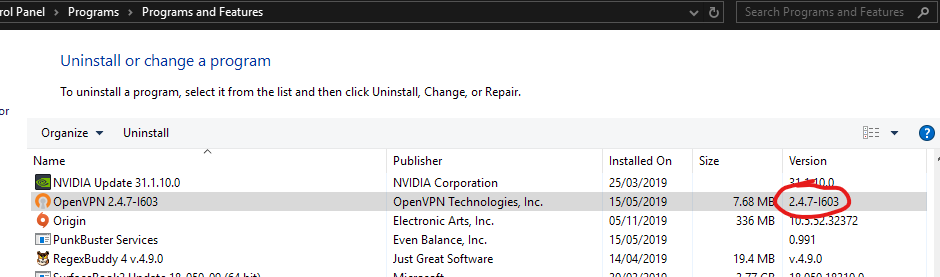
To get the currently installed version go to Control Panel - Programs, Uninstall and check the version number in the column. Here's a screenshot

mKnNrmf.png

BIGBEARJEDI

Excellent Member
Premium Supporter
Joined
Jan 28, 2013
Messages
2,419
Try opening your program and find a File Menu; or a Help Menu. Click on either and look for an ABOUT item on the subsequent Task Menu dropdown. Most programs in Windows, or Linux have this. It's been a convention in all windows programs for 25 years or so.

<<<BIGBEARJEDI>>>
 

alexj

New Member
Joined
Nov 6, 2019
Messages
1
Open VPN doesn't have a GUI so you can't just look in "Help -About" as you normally would. There's the "Open VPN GUI" but that's separate software app on top of OpenVPN.

To get the currently installed version go to Control Panel - Programs, Uninstall and check the version number in the column. Here's a screenshot

mKnNrmf.png
 

Solution

Josephur

Windows Forum Admin
Staff member
Premium Supporter
Microsoft Certified Professional
Joined
Aug 3, 2010
Messages
1,289
I think the OP means he uses a VPN service such as NordVPN, PureVPN, etc that uses OpenVPN as it's connection software.

In this case it depends on the program but for PureVPN for instance you can find the OpenVPN binaries here:
C:\Program Files (x86)\PureVPN\ovpn

However if you manually update the binaries the program may lose its ability to work with OpenVPN, so I recommend backing up the files before you replace them to do your manual update. If your having trouble locating where it's placed OpenVPN try doing a search for openvpn.exe or openssl.exe and that may lead you to the right path.
 

Josephur

Windows Forum Admin
Staff member
Premium Supporter
Microsoft Certified Professional
Joined
Aug 3, 2010
Messages
1,289
Also to manually update the binaries you will have to find the latest OpenVPN binaries (2.4.8 as of time of this post), then copy them manually to overwrite your VPN software's version. Hopefully that is pretty straightforward. You can right click, properties your openvpn.exe file to see which version it is.
 

Back
Top