

Microsoft announced at Ignite in Orlando on September 25, 2017, that Microsoft Teams would become the core communications client for Office 365, eventually replacing Skype for Business for cloud-connected customers. The decision was not just a product shuffle; it was Microsoft admitting that workplace communication had moved from scheduled calls to persistent collaboration. Skype for Business had the enterprise voice pedigree, but Teams had the strategic gravity. The future of Microsoft’s productivity stack would not be a better phone client — it would be a workspace that swallowed the phone.
The safest way to read Microsoft’s Ignite announcement is as a controlled demolition. Skype for Business was not declared dead on the spot, and Microsoft was careful to talk about coexistence, roadmaps, and transition paths. But the direction was unmistakable: Teams would become the “hero” experience, and Skype for Business would be phased into history.
That mattered because Skype for Business was not some fringe app. It was the successor to Lync, itself the enterprise communications system many large organizations had spent years integrating into meeting rooms, headsets, conferencing bridges, federation policies, compliance workflows, and phone systems. For many admins, Skype for Business was less an app than a plumbing layer.
Teams arrived from a different direction. It was not built first as a telephony product, but as a chat-based workspace in Office 365, aimed squarely at the Slack-shaped hole in Microsoft’s portfolio. Its power was not that it could make a call; its power was that calls, chat, files, meetings, and apps could live in one shared context.
That is why the replacement was more consequential than a rebrand. Microsoft was collapsing two philosophies of work into one product: the real-time communications world of Skype for Business and the persistent collaboration world of Teams. In doing so, it made a bet that the center of enterprise communication was no longer the contact list, but the channel.
That workflow was rational in a world where most collaboration still orbited email, Office documents, and recurring meetings. Skype for Business improved on desk phones and legacy conferencing systems by making communications software-driven, manageable, and integrated with Office. It gave IT departments policy controls, security hooks, and a familiar Microsoft support model.
But the app still carried the logic of an earlier era. Conversations were often transient, meetings were discrete events, and shared files usually lived somewhere else. The client was a communications endpoint, not the place where work accumulated.
Teams changed the default assumption. A chat thread could become a meeting, the meeting could produce a recording, the recording could live with the channel, and the channel could sit beside files, tabs, bots, connectors, and later a growing universe of Microsoft 365 services. In Microsoft’s telling, this was intelligent communications. In plainer English, it was the conversion of communication from an event into a searchable work artifact.
Skype for Business was not the right weapon for that fight. It had enterprise credibility, but it did not feel like the social operating system of a team. Its strongest features — voice, meetings, federation, presence — were necessary, but they were not enough to compete with a new generation of collaboration software built around persistent rooms and integrations.
Teams gave Microsoft a more plausible answer. It could tell customers that they did not need to choose between enterprise compliance and modern collaboration. They could get Slack-like team chat, Office document coauthoring, SharePoint-backed file storage, Exchange calendar integration, and eventually Skype-grade meetings and calling under one subscription umbrella.
That last point is easy to understate. Microsoft’s advantage was not simply that Teams was popular; it was that Teams could be bundled into a suite customers were already paying for. Once Teams had enough communications capability, the economics became brutally simple for many organizations. Why pay for a separate collaboration platform if the Microsoft 365 tenant already included one?
The gap between strategy and readiness was the story admins had to live through. Meeting features, calling plans, device support, federation, compliance controls, administrative tooling, and migration modes all mattered. Microsoft could declare the destination at Ignite, but IT departments had to map the route through real users, real hardware, and real support tickets.
For cloud-first organizations with relatively simple needs, the migration case was strong early. For heavily customized voice environments, regulated industries, or businesses with on-premises Skype for Business Server deployments, the calculus was more complicated. “Replace the client” sounds clean from a keynote stage; in production, it touches identity, network quality, user training, endpoint management, retention policies, and help desk scripts.
Microsoft’s roadmap therefore became as important as the announcement itself. The company had to convince customers that Teams would not remain a chat app with partial calling bolted on. It had to become the place where enterprise communications could actually land.
That was the technical story. The business story was even clearer: Microsoft wanted one cloud communications surface, not a divided estate of Skype clients, Teams channels, overlapping meeting experiences, and uncertain product loyalties. The more work moved into Teams, the more valuable Microsoft 365 became as a platform.
This is the pattern Microsoft has repeated across its modern productivity strategy. It does not merely sell standalone apps; it builds gravitational centers. Outlook became more than mail, SharePoint became more than document libraries, and Teams became more than chat. Each successful hub makes the surrounding ecosystem stickier.
Skype for Business, by contrast, was too specialized to carry that burden. It could be excellent at communications and still lose the strategic argument. Microsoft did not need a better Skype for Business as much as it needed a single place where collaboration, meetings, apps, and corporate knowledge converged.
The second job was cultural migration. Teams changed how Microsoft expected people to work. Users who treated Skype for Business as a quick-message-and-meeting tool were now being pushed into channels, threaded conversations, file tabs, and persistent group spaces. That required governance, not just deployment.
Without governance, Teams could become a sprawl engine. Every project, department, and side conversation could turn into another team. Files could scatter across SharePoint sites users did not know they were creating. Notifications could become a productivity tax instead of a productivity aid.
That was the bargain IT inherited. Teams offered a more capable collaboration model, but it also demanded more intentional administration. The old question was whether the conferencing client worked. The new question was whether the organization understood its own information architecture.
That chronology matters because it shows Microsoft’s patience and its persistence. The company did not flip one switch overnight. It moved business customers first, hardened Teams as the communications hub, and then finally closed the consumer Skype chapter years later.
Still, inevitability should not be confused with elegance. Many users found Teams heavy, noisy, and sometimes confusing compared with simpler chat or calling tools. Many admins had to support overlapping modes and explain why one contact opened in Teams while another still seemed to belong to Skype-era workflows. The transition was less a clean migration than a long period of product sediment.
Yet Microsoft’s direction proved durable. Teams became the default collaboration layer for countless Microsoft 365 organizations, especially as remote and hybrid work made video meetings and persistent chat unavoidable. The pandemic did not create Microsoft’s Teams strategy, but it accelerated the world into the use case Microsoft had already chosen.
The problem was that Skype’s meaning became muddled. There was Skype, Skype for Business, Skype Meeting Broadcast, Skype infrastructure, Lync history, and various degrees of integration with Office. To consumers, Skype increasingly felt like a legacy video-calling app. To enterprises, Skype for Business felt like a different lineage wearing the same familiar name.
Teams gave Microsoft a clean break. It was not burdened by consumer nostalgia or by Lync-era expectations. It could be positioned as the modern collaboration hub, with voice and meetings as features rather than as the entire product identity.
That branding shift was not superficial. In enterprise software, names carry deployment assumptions. “Skype” suggested calls. “Teams” suggested groups, projects, and work. Microsoft wanted the latter frame because it aligned with the broader Microsoft 365 story.
In the Teams model, a meeting is not just a time slot. It is connected to chat before and after the call, attached files, shared notes, recordings, transcripts, and channel context. The meeting becomes less of an isolated event and more of a node in a project’s memory.
That is the idealized version, of course. In real workplaces, Teams meetings can still multiply pointlessly, chats can become chaotic, and recordings can pile up unwatched. But the product architecture nudges organizations toward a different pattern: fewer orphaned conversations and more searchable continuity.
For Windows users, that shift also meant Teams becoming one of the most visible Microsoft apps on the desktop. It moved from being another Office 365 service to something closer to an operating layer for work. When a collaboration app is always open, always notifying, always integrated with identity and calendar, it becomes part of the daily computing environment in a way Skype for Business rarely did.
Microsoft’s Teams strategy had to absorb that complexity. The company could not simply tell organizations to chat in channels and call it done. If Teams was to replace Skype for Business as the core communications client, it needed to mature into a credible platform for calling and meetings at enterprise scale.
That maturation changed the competitive map. Teams was no longer just fighting Slack; it was also pressing into territory associated with Zoom, Cisco, RingCentral, and traditional unified communications vendors. Microsoft’s pitch became broader: consolidate collaboration and communications inside Microsoft 365, then manage the rest through policy, licensing, and partner ecosystems.
For IT buyers, that consolidation is attractive but not free. It can simplify procurement and user experience, but it can also deepen dependency on Microsoft’s stack. The more Teams becomes chat, meetings, voice, webinars, apps, and workflow, the harder it becomes to treat it as replaceable software.
That has practical consequences. Teams performance affects perceived PC performance. Camera, microphone, Bluetooth, GPU, and network behavior all become part of the collaboration experience. Windows admins suddenly care about meeting-room peripherals, background effects, notification policies, and update channels as much as they care about traditional Office deployment.
It also changes support patterns. A user complaining that “Teams is broken” may be reporting an identity issue, a network QoS problem, an Exchange calendar sync failure, a SharePoint permissions tangle, an audio driver bug, or a policy mismatch. The app is the front door to a distributed system.
Skype for Business had its own operational complexity, but Teams widened the blast radius because it does more. That is both the strength and the weakness of Microsoft’s strategy. A single hub reduces context switching until the hub itself becomes the context everyone must troubleshoot.
That does not mean organizations had no agency. Many evaluated Zoom, Slack, Cisco Webex, or specialized voice providers. Some retained on-premises systems longer. Others adopted Teams for meetings but kept separate tools for contact centers or external collaboration. Enterprise reality is always messier than vendor diagrams.
But Microsoft’s suite advantage is formidable. When a capability is “good enough” and already included in a subscription, it changes procurement behavior. Competitors must be not merely better, but better enough to justify extra cost, integration work, and governance overhead.
That is why the Skype for Business replacement was a platform story disguised as a communications story. Microsoft did not simply move users from one client to another. It used Teams to make Microsoft 365 feel more complete — and harder to leave.
There is a certain irony in that outcome. Skype’s consumer fame helped give Microsoft credibility in internet calling, yet the product that ultimately won inside Microsoft was not branded around calling at all. The “Skype” name survived for years, but the strategic center had moved elsewhere.
This is not simply a story of one app dying. It is a story of Microsoft deciding that communication is no longer a standalone category. Chat, calls, files, meetings, calendars, identity, compliance, and increasingly AI-driven summaries and search all belong in the same productivity fabric.
Whether users love that fabric is another matter. Teams can feel indispensable and overbearing in the same workday. It can reduce tool sprawl while creating notification sprawl. It can make collaboration easier while making the Microsoft 365 estate harder to reason about.
The same pattern is likely to repeat across Microsoft’s portfolio. A product may remain supported while another becomes the real investment center. The trick for IT pros is to notice when Microsoft’s language changes from “also available” to “primary experience.” That is usually when the clock starts, even if the retirement date has not yet been printed.
Near the close, the concrete lessons are plain:
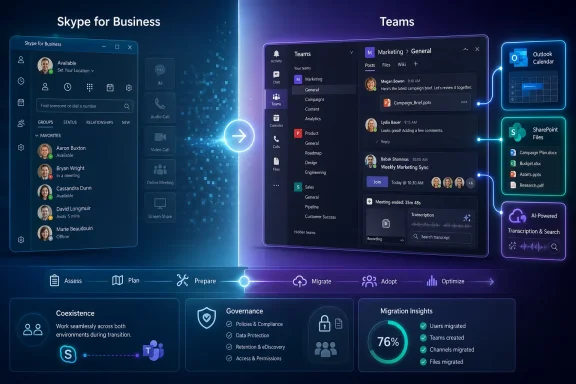 Microsoft Turns a Migration Into a Strategy
The safest way to read Microsoft’s Ignite announcement is as a controlled demolition. Skype for Business was not declared dead on the spot, and Microsoft was careful to talk about coexistence, roadmaps, and transition paths. But the direction was unmistakable: Teams would become the “hero” experience, and Skype for Business would be phased into history.That mattered because Skype for Business was not some fringe app. It was the successor to Lync, itself the enterprise communications system many large organizations had spent years integrating into meeting rooms, headsets, conferencing bridges, federation policies, compliance workflows, and phone systems. For many admins, Skype for Business was less an app than a plumbing layer.
Teams arrived from a different direction. It was not built first as a telephony product, but as a chat-based workspace in Office 365, aimed squarely at the Slack-shaped hole in Microsoft’s portfolio. Its power was not that it could make a call; its power was that calls, chat, files, meetings, and apps could live in one shared context.
That is why the replacement was more consequential than a rebrand. Microsoft was collapsing two philosophies of work into one product: the real-time communications world of Skype for Business and the persistent collaboration world of Teams. In doing so, it made a bet that the center of enterprise communication was no longer the contact list, but the channel.
Skype for Business Was Built for a Different Office
Skype for Business made sense in the office it was designed to serve. The classic enterprise communications model revolved around presence, instant messaging, scheduled meetings, and voice. You checked whether someone was available, sent a message, escalated to a call, and joined a conference from a calendar invite.That workflow was rational in a world where most collaboration still orbited email, Office documents, and recurring meetings. Skype for Business improved on desk phones and legacy conferencing systems by making communications software-driven, manageable, and integrated with Office. It gave IT departments policy controls, security hooks, and a familiar Microsoft support model.
But the app still carried the logic of an earlier era. Conversations were often transient, meetings were discrete events, and shared files usually lived somewhere else. The client was a communications endpoint, not the place where work accumulated.
Teams changed the default assumption. A chat thread could become a meeting, the meeting could produce a recording, the recording could live with the channel, and the channel could sit beside files, tabs, bots, connectors, and later a growing universe of Microsoft 365 services. In Microsoft’s telling, this was intelligent communications. In plainer English, it was the conversion of communication from an event into a searchable work artifact.
The Slack Problem Forced Microsoft’s Hand
Teams did not emerge in a vacuum. Slack had exposed a weakness in Microsoft’s productivity empire: Office was dominant, Exchange was entrenched, SharePoint was everywhere, but the day-to-day energy of modern work was moving into lighter, faster, chat-first tools. Microsoft could not defend Office 365 merely by making Word, Excel, and Outlook better.Skype for Business was not the right weapon for that fight. It had enterprise credibility, but it did not feel like the social operating system of a team. Its strongest features — voice, meetings, federation, presence — were necessary, but they were not enough to compete with a new generation of collaboration software built around persistent rooms and integrations.
Teams gave Microsoft a more plausible answer. It could tell customers that they did not need to choose between enterprise compliance and modern collaboration. They could get Slack-like team chat, Office document coauthoring, SharePoint-backed file storage, Exchange calendar integration, and eventually Skype-grade meetings and calling under one subscription umbrella.
That last point is easy to understate. Microsoft’s advantage was not simply that Teams was popular; it was that Teams could be bundled into a suite customers were already paying for. Once Teams had enough communications capability, the economics became brutally simple for many organizations. Why pay for a separate collaboration platform if the Microsoft 365 tenant already included one?
“Eventually” Was the Word That Mattered
Microsoft’s early messaging left room for caution. Teams would replace Skype for Business “over time,” and customers could run the two clients side by side while evaluating their path. That was sensible, because in 2017 Teams was still young, and Skype for Business had years of enterprise deployment reality behind it.The gap between strategy and readiness was the story admins had to live through. Meeting features, calling plans, device support, federation, compliance controls, administrative tooling, and migration modes all mattered. Microsoft could declare the destination at Ignite, but IT departments had to map the route through real users, real hardware, and real support tickets.
For cloud-first organizations with relatively simple needs, the migration case was strong early. For heavily customized voice environments, regulated industries, or businesses with on-premises Skype for Business Server deployments, the calculus was more complicated. “Replace the client” sounds clean from a keynote stage; in production, it touches identity, network quality, user training, endpoint management, retention policies, and help desk scripts.
Microsoft’s roadmap therefore became as important as the announcement itself. The company had to convince customers that Teams would not remain a chat app with partial calling bolted on. It had to become the place where enterprise communications could actually land.
The Cloud Won the Argument Before the Client Did
The most revealing part of Microsoft’s rationale was its emphasis on newer infrastructure. Teams was built for the cloud era in a way Skype for Business was not. That gave Microsoft more room to ship features quickly, integrate AI-adjacent services such as transcription and search, and tie communication data more deeply into Microsoft 365.That was the technical story. The business story was even clearer: Microsoft wanted one cloud communications surface, not a divided estate of Skype clients, Teams channels, overlapping meeting experiences, and uncertain product loyalties. The more work moved into Teams, the more valuable Microsoft 365 became as a platform.
This is the pattern Microsoft has repeated across its modern productivity strategy. It does not merely sell standalone apps; it builds gravitational centers. Outlook became more than mail, SharePoint became more than document libraries, and Teams became more than chat. Each successful hub makes the surrounding ecosystem stickier.
Skype for Business, by contrast, was too specialized to carry that burden. It could be excellent at communications and still lose the strategic argument. Microsoft did not need a better Skype for Business as much as it needed a single place where collaboration, meetings, apps, and corporate knowledge converged.
For IT Departments, the Announcement Created Two Jobs
The first job was technical migration. Administrators had to understand coexistence modes, user upgrade paths, meeting migration, device compatibility, and network readiness. Voice workloads were especially sensitive because users tolerate a clumsy chat transition better than they tolerate broken calling.The second job was cultural migration. Teams changed how Microsoft expected people to work. Users who treated Skype for Business as a quick-message-and-meeting tool were now being pushed into channels, threaded conversations, file tabs, and persistent group spaces. That required governance, not just deployment.
Without governance, Teams could become a sprawl engine. Every project, department, and side conversation could turn into another team. Files could scatter across SharePoint sites users did not know they were creating. Notifications could become a productivity tax instead of a productivity aid.
That was the bargain IT inherited. Teams offered a more capable collaboration model, but it also demanded more intentional administration. The old question was whether the conferencing client worked. The new question was whether the organization understood its own information architecture.
Microsoft’s Bet Paid Off, But Not Painlessly
With hindsight, the 2017 announcement looks less like a risky pivot and more like the start of an inevitable consolidation. Skype for Business Online was later retired on July 31, 2021, after Microsoft gave customers a two-year runway. The consumer Skype service lasted longer, but Microsoft ultimately retired Skype itself on May 5, 2025, directing users toward Microsoft Teams Free.That chronology matters because it shows Microsoft’s patience and its persistence. The company did not flip one switch overnight. It moved business customers first, hardened Teams as the communications hub, and then finally closed the consumer Skype chapter years later.
Still, inevitability should not be confused with elegance. Many users found Teams heavy, noisy, and sometimes confusing compared with simpler chat or calling tools. Many admins had to support overlapping modes and explain why one contact opened in Teams while another still seemed to belong to Skype-era workflows. The transition was less a clean migration than a long period of product sediment.
Yet Microsoft’s direction proved durable. Teams became the default collaboration layer for countless Microsoft 365 organizations, especially as remote and hybrid work made video meetings and persistent chat unavoidable. The pandemic did not create Microsoft’s Teams strategy, but it accelerated the world into the use case Microsoft had already chosen.
The Name “Skype” Became a Liability
Skype once meant internet calling to mainstream users in the way Google meant search. That kind of brand recognition is rare. Microsoft paid heavily for it in 2011, then spent years trying to stretch it across consumer chat, enterprise meetings, and business telephony.The problem was that Skype’s meaning became muddled. There was Skype, Skype for Business, Skype Meeting Broadcast, Skype infrastructure, Lync history, and various degrees of integration with Office. To consumers, Skype increasingly felt like a legacy video-calling app. To enterprises, Skype for Business felt like a different lineage wearing the same familiar name.
Teams gave Microsoft a clean break. It was not burdened by consumer nostalgia or by Lync-era expectations. It could be positioned as the modern collaboration hub, with voice and meetings as features rather than as the entire product identity.
That branding shift was not superficial. In enterprise software, names carry deployment assumptions. “Skype” suggested calls. “Teams” suggested groups, projects, and work. Microsoft wanted the latter frame because it aligned with the broader Microsoft 365 story.
The Real Replacement Was Outlook’s Meeting Culture
The obvious victim of Teams was Skype for Business, but the subtler target was the meeting culture that surrounded it. Skype for Business made meetings easier to join, but it did not fundamentally challenge the dominance of scheduled calls and email follow-ups. Teams offered Microsoft a way to make meetings part of a broader collaboration loop.In the Teams model, a meeting is not just a time slot. It is connected to chat before and after the call, attached files, shared notes, recordings, transcripts, and channel context. The meeting becomes less of an isolated event and more of a node in a project’s memory.
That is the idealized version, of course. In real workplaces, Teams meetings can still multiply pointlessly, chats can become chaotic, and recordings can pile up unwatched. But the product architecture nudges organizations toward a different pattern: fewer orphaned conversations and more searchable continuity.
For Windows users, that shift also meant Teams becoming one of the most visible Microsoft apps on the desktop. It moved from being another Office 365 service to something closer to an operating layer for work. When a collaboration app is always open, always notifying, always integrated with identity and calendar, it becomes part of the daily computing environment in a way Skype for Business rarely did.
The Enterprise Voice Problem Never Disappears
Replacing chat is one thing. Replacing enterprise voice is another. Phone systems have long tails: reception desks, call queues, emergency calling, compliance recording, analog devices, contact centers, executive assistants, and meeting-room systems all complicate the migration story.Microsoft’s Teams strategy had to absorb that complexity. The company could not simply tell organizations to chat in channels and call it done. If Teams was to replace Skype for Business as the core communications client, it needed to mature into a credible platform for calling and meetings at enterprise scale.
That maturation changed the competitive map. Teams was no longer just fighting Slack; it was also pressing into territory associated with Zoom, Cisco, RingCentral, and traditional unified communications vendors. Microsoft’s pitch became broader: consolidate collaboration and communications inside Microsoft 365, then manage the rest through policy, licensing, and partner ecosystems.
For IT buyers, that consolidation is attractive but not free. It can simplify procurement and user experience, but it can also deepen dependency on Microsoft’s stack. The more Teams becomes chat, meetings, voice, webinars, apps, and workflow, the harder it becomes to treat it as replaceable software.
The Windows Angle Is Bigger Than an App Icon
For the Windows ecosystem, Teams’ rise has always carried a second meaning. It is not just a Microsoft 365 service; it is a signal of how Microsoft wants work to happen on Windows PCs. The desktop is no longer merely a launcher for Office files and browser tabs. It is a managed endpoint for continuous cloud collaboration.That has practical consequences. Teams performance affects perceived PC performance. Camera, microphone, Bluetooth, GPU, and network behavior all become part of the collaboration experience. Windows admins suddenly care about meeting-room peripherals, background effects, notification policies, and update channels as much as they care about traditional Office deployment.
It also changes support patterns. A user complaining that “Teams is broken” may be reporting an identity issue, a network QoS problem, an Exchange calendar sync failure, a SharePoint permissions tangle, an audio driver bug, or a policy mismatch. The app is the front door to a distributed system.
Skype for Business had its own operational complexity, but Teams widened the blast radius because it does more. That is both the strength and the weakness of Microsoft’s strategy. A single hub reduces context switching until the hub itself becomes the context everyone must troubleshoot.
The Migration Was Also a Lesson in Microsoft’s Power
The Teams-for-Skype transition shows how Microsoft can move an installed base when product strategy, licensing, and cloud operations align. Customers were not merely persuaded by features. They were carried along by the direction of Microsoft 365 itself.That does not mean organizations had no agency. Many evaluated Zoom, Slack, Cisco Webex, or specialized voice providers. Some retained on-premises systems longer. Others adopted Teams for meetings but kept separate tools for contact centers or external collaboration. Enterprise reality is always messier than vendor diagrams.
But Microsoft’s suite advantage is formidable. When a capability is “good enough” and already included in a subscription, it changes procurement behavior. Competitors must be not merely better, but better enough to justify extra cost, integration work, and governance overhead.
That is why the Skype for Business replacement was a platform story disguised as a communications story. Microsoft did not simply move users from one client to another. It used Teams to make Microsoft 365 feel more complete — and harder to leave.
The Skype Era Ends Where the Teams Era Began
The later retirement of consumer Skype gives the 2017 Ignite announcement a sharper historical edge. At the time, Microsoft was careful to distinguish Skype for Business from consumer Skype. Years later, even that distinction faded as Microsoft pushed the remaining Skype audience toward Teams Free.There is a certain irony in that outcome. Skype’s consumer fame helped give Microsoft credibility in internet calling, yet the product that ultimately won inside Microsoft was not branded around calling at all. The “Skype” name survived for years, but the strategic center had moved elsewhere.
This is not simply a story of one app dying. It is a story of Microsoft deciding that communication is no longer a standalone category. Chat, calls, files, meetings, calendars, identity, compliance, and increasingly AI-driven summaries and search all belong in the same productivity fabric.
Whether users love that fabric is another matter. Teams can feel indispensable and overbearing in the same workday. It can reduce tool sprawl while creating notification sprawl. It can make collaboration easier while making the Microsoft 365 estate harder to reason about.
The Lesson From the Skype-to-Teams Switch Is Written in Admin Consoles
The practical reading for WindowsForum’s audience is that Microsoft’s communication roadmap rewards early planning and punishes passive waiting. Skype for Business did not vanish the morning after Ignite, but the direction of travel was visible years before the final retirement dates arrived. Organizations that treated the announcement as a strategy signal had more time to test, govern, and train.The same pattern is likely to repeat across Microsoft’s portfolio. A product may remain supported while another becomes the real investment center. The trick for IT pros is to notice when Microsoft’s language changes from “also available” to “primary experience.” That is usually when the clock starts, even if the retirement date has not yet been printed.
Near the close, the concrete lessons are plain:
- Microsoft’s 2017 Ignite announcement made Teams the strategic communications client for Office 365, not merely another collaboration app.
- Skype for Business Online was later retired on July 31, 2021, confirming that the “over time” language had a real endpoint.
- The migration was as much about governance, user behavior, devices, and voice infrastructure as it was about installing a new client.
- Teams succeeded because it combined adequate communications features with Microsoft 365’s licensing, identity, compliance, and file ecosystem.
- The retirement of consumer Skype in May 2025 completed the broader shift from Skype-branded calling to Teams-branded collaboration.
References
- Primary source: Digital Journal
Published: 2026-06-05T08:42:11.529183
Microsoft Teams to completely replace Skype for Business
During its Ignite conference today, Microsoft said Teams will be getting a set of new communication features for voice and video calls. Previously, thiswww.digitaljournal.com - Official source: support.microsoft.com
What's the difference between Skype, Microsoft Teams, and Skype for Business? | Microsoft Support
What's the difference between Skype, Microsoft Teams, and Skype for Business?support.microsoft.com - Official source: learn.microsoft.com
Plan your upgrade from Skype for Business to Microsoft Teams - Microsoft Teams | Microsoft Learn
Microsoft Teams is designed to help people stay connected, collaborate seamlessly, and simplify work in a secure and compliant way - all in one place. Here you’ll find guidance, training, and resources to implement a successful upgrade from Skype for Business to Teams.learn.microsoft.com - Related coverage: geekwire.com
Microsoft Teams to replace Skype for Business as main meeting tool for Office 365 customers – GeekWire
Microsoft is going all in on its chat and productivity tool, Teams. As its annual customer event Ignite kicks off in Orlando, Microsoft announced thiswww.geekwire.com - Official source: microsoft.com
A new vision for intelligent communications in Office 365 | Microsoft 365 Blog
Microsoft introduces a new vision for intelligent communications, transforming calling and meeting experiences for people and organizations worldwide.www.microsoft.com - Related coverage: techradar.com
Microsoft kills Skype for Business, rolling the service into Microsoft Teams | TechRadar
We’ll all be Team players soon…www.techradar.com
- Official source: techcommunity.microsoft.com
Roadmap for Skype for Business capabilities coming to Microsoft Teams now available | Microsoft Community Hub
Last month at Microsoft Ignite we introduced a new vision for intelligent communications, which includes Microsoft Teams becoming the primary client for... techcommunity.microsoft.com
- Related coverage: windowscentral.com
Microsoft begins moving Skype for Business users to Microsoft Teams [Updated] | Windows Central
Microsoft Teams and Skype for Business are currently distinctly separate services, but that's about to change.www.windowscentral.com - Related coverage: nwn.ai
625686298
Shot of an attractive young designer working late at the office with her colleagues in the backgroundnwn.ai
- Related coverage: cdn2.hubspot.net
- Related coverage: office365.delaware.gov
- Related coverage: choc.org
- Official source: directionsonmicrosoft.com
Skype for Business Online Will Retire in 2021 - Directions on Microsoft
Skype for Business Online will shut down on July 31, 2021. The service will operate normally until then but will be unsupported and unavailable afterwards. All new Office 365 customers will be onboarded directly to Teams beginning Sept. 1, 2019. Support for on-premises Skype for Business Server...www.directionsonmicrosoft.com - Related coverage: businesscloudintegration.co.uk
- Related coverage: axios.com
Microsoft is killing Skype: Why the app couldn't keep up
Skype, a big hit during the early 2000s, failed to keep up with competitors.www.axios.com
- Related coverage: loopup.com
- Related coverage: cloudchampion.at
