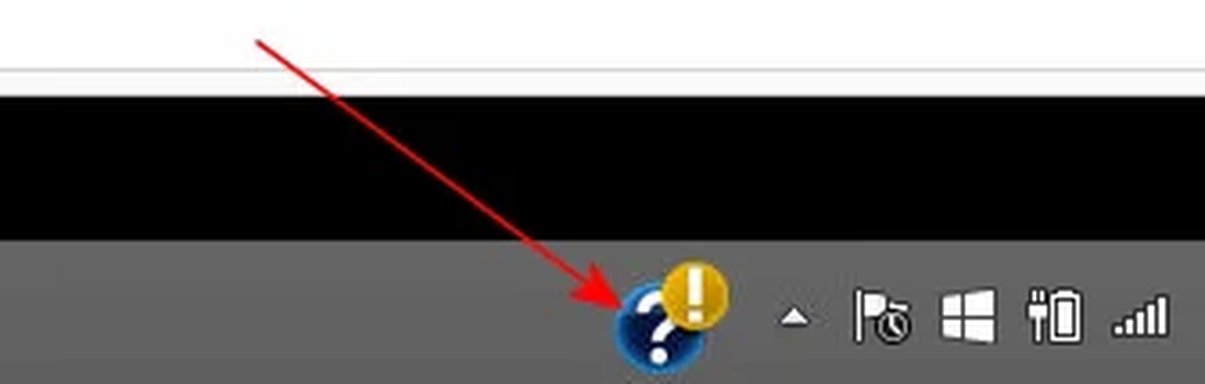
P pstein Extraordinary Member Joined Mar 20, 2010 Messages 454 Mar 4, 2016 Thread Author #1 Have a look at the attached snapshot. As you can see there is a question mark icon in Systray. How do I remove it? Peter Attachments question mark TaskBar.webp 2.1 KB · Views: 347
Have a look at the attached snapshot. As you can see there is a question mark icon in Systray. How do I remove it? Peter
Solution Neemobeer Mar 4, 2016 This looks like the HP help assistant. Go into Control Panel > Programs and Features and uninstall it.
This looks like the HP help assistant. Go into Control Panel > Programs and Features and uninstall it.
kemical Essential Member Joined Aug 28, 2007 Messages 36,176 Mar 4, 2016 #2 Hi Peter, try clicking it and see what pops up, if nothing, try right clicking it. Usually these kind of things belong to an app of sorts which may need some attention, hence the prompt. Upvote 0 Downvote
Hi Peter, try clicking it and see what pops up, if nothing, try right clicking it. Usually these kind of things belong to an app of sorts which may need some attention, hence the prompt.
Neemobeer Windows Forum Team Staff member Joined Jul 4, 2015 Messages 8,998 Mar 4, 2016 #3 This looks like the HP help assistant. Go into Control Panel > Programs and Features and uninstall it. Upvote 1 Downvote Solution
This looks like the HP help assistant. Go into Control Panel > Programs and Features and uninstall it.