

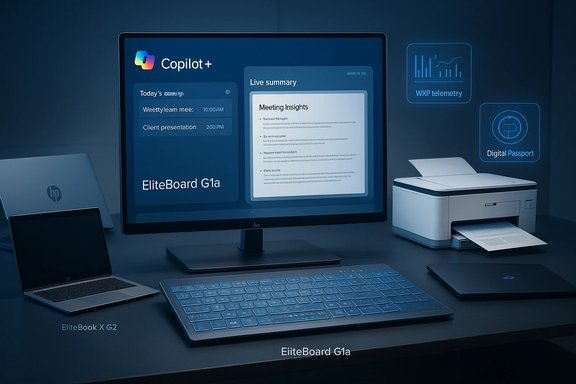
HP used CES 2026 to announce a broad, tightly coordinated push: make the endpoint the primary execution layer for Microsoft Copilot-era workflows, extend local AI into unexpected form factors, and wrap those endpoints with fleet-grade management, security, and lifecycle transparency. The headline devices — most notably the EliteBoard G1a (a full Windows Copilot+ PC built into a keyboard), new EliteBook and OmniBook lines tuned for high on-device NPU throughput, integrated Copilot capabilities for HP Office Print devices, and the unification of OMEN and HyperX under a single HyperX gaming brand — together sketch a strategy that treats the PC not as a passive client but as an active, AI-enabled node in enterprise and consumer workflows.
HP’s CES message was methodical: push meaningful AI into the places people work, make endpoints manageable at scale, and reduce friction in information-heavy workflows. That combination produced several distinct announcements:
Conclusion: HP’s CES 2026 program is a coherent, ambitious push toward turning the PC — and even the printer — into a first‑class, AI‑capable node in enterprise workflows. The EliteBoard G1a and HyperX OMEN MAX 16 headline a broader portfolio optimized around Copilot+ PCs, workplace manageability, printer intelligence, and lifecycle transparency. For IT buyers and prosumers, the next 60–120 days of pilots and independent reviews will determine whether the promises of on‑device AI and novel form factors translate into operational gains or remain compelling demos.
Source: Bleeding Cool News HP Unveils Several New Items & Innovations During CES 2026
 Background / Overview
HP’s CES message was methodical: push meaningful AI into the places people work, make endpoints manageable at scale, and reduce friction in information-heavy workflows. That combination produced several distinct announcements:- The HP EliteBoard G1a, described by HP as the world’s first full AI PC built into a keyboard, positioned as a Copilot+ device for hybrid and hot-desk scenarios.
- New laptop families — EliteBook X G2 Series for business and OmniBook consumer updates including the OmniBook Ultra 14 — that offer multiple silicon choices and high-NPU SKUs (HP cites peak NPU figures as high as 85 TOPS for selected Snapdragon X2 Elite configurations).
- HP for Microsoft 365 Copilot: a Workpath app that brings Copilot features (summarization, translation, smart storage) to HP multifunction printers.
- Platform and service updates such as enhancements to the Workforce Experience Platform (WXP) — including firmware-level remote recovery and extended telemetry — and HP Digital Passport, a QR-linked device hub for setup, sustainability, and support.
- Gaming consolidation under HyperX, and the debut of the HyperX OMEN MAX 16, billed as a class-leading gaming laptop with fully internal cooling and very high Total Platform Power (TPP) figures.
EliteBoard G1a — the “Keyputer”: what it is and why it matters
A radical form factor for a specific problem
The EliteBoard G1a reframes the desktop: a full Windows Copilot+ PC built into a full‑size keyboard. That includes CPU, RAM, NVMe storage, Wi‑Fi, microphones, speakers, active cooling, and an on‑device NPU suitable for many Copilot experiences — all packaged under keycaps and a slim chassis. HP positions it for hot‑desking, kiosks, branch offices, and other environments where IT wants a single-cable deployment model and simple asset redeployment.Key specs HP is promoting
- AMD Ryzen AI 300-series processors (select SKUs).
- NPU performance advertised at over 50 TOPS in headline SKUs (a claim that puts the EliteBoard above commonly stated Copilot+ baselines).
- Up to 64 GB DDR5 memory and 2 TB PCIe 4.0 NVMe storage options.
- Extremely slim profile (HP lists ~12 mm) and light weight (around 0.75 kg / ~726–750 g in many announcements).
- Two SKU strategies: a permanently cabled USB4 model (65 W PD + DisplayPort passthrough) for fixed desks, and a detachable-cable version with a replaceable ~32–35 Wh battery for short untethered use. Battery-equipped models are promoted with roughly 3–3.5 hours active use in HP’s early claims.
Why IT should take notice
- Deployment simplicity: one cable to a display transforms a monitor+keyboard into a managed Copilot+ endpoint. That simplifies provisioning and recovery for distributed desks.
- Local AI & data locality: on-device NPUs reduce cloud dependency for latency-sensitive tasks (live transcription, summarization), which matters for regulated industries and bandwidth-constrained offices.
- Serviceability: HP emphasizes modularity (SODIMM RAM, removable NVMe, accessible Wi‑Fi module and battery) to lower TCO and extend device lifecycles.
Immediate caveats and practical questions
- Thermals and sustained performance: compressing a full x86 stack into a 12 mm keyboard raises inevitable questions about sustained CPU/NPU thermal throttling and surface temperatures under load. HP provides an internal fan and venting strategy, but independent validation will be essential.
- Ergonomics: membrane-style key action keeps thickness low, but heavy typists who prefer mechanical switches might find the feel and travel wanting.
- Battery reality: battery numbers (3–3.5 hours of active use) are modest compared to laptops and must be treated as mobility for hot-desk moves, not laptop-class endurance. HP frames the EliteBoard as a movable desktop, not a laptop replacement.
EliteBook X G2 Series, OmniBook family, and the race for TOPS
Multi-architecture business PCs
HP’s EliteBook X G2 series is explicitly multi-architecture: Intel Core Ultra, AMD Ryzen AI, and Qualcomm Snapdragon X2 Elite options are offered so organizations can choose a platform that matches performance, battery life, and NPU needs. HP positions some Snapdragon X2 Elite SKUs as delivering up to 85 TOPS NPU performance, enabling concurrent on-device AI workloads such as live transcription, summarization, and image processing. That number appears in HP materials and was independently reported by outlets following CES.OmniBook: consumer AI notebooks
The OmniBook family refresh — notably the OmniBook Ultra 14 and the OmniBook 3 16 — is HP’s play for consumer and prosumer AI experiences. Several OmniBook configurations include Qualcomm Snapdragon X2 Elite variants that HP and partners claim can hit 85 TOPS in the right SKUs, while Intel-based OmniBooks show strong battery claims in select lab tests (HP cited extreme runtime numbers for narrowly defined video-playback tests). These devices bring OLED screens, Wi‑Fi 7, and thin builds to the consumer Copilot+ market.How to read TOPS and marketing numbers
- TOPS is a throughput metric, not an application-level guarantee. It measures raw NPU operations per second; software optimization, driver maturity, thermal headroom, and model quantization determine actual speed and perceived responsiveness. HP’s 50 TOPS (EliteBoard) and 85 TOPS (selected OmniBook/EliteBook Snapdragon SKUs) are credible given the silicon platform claims, but real-world application-level gains require independent verification.
- SKU-level transparency is essential. Not all configurations will match the highest TOPS figure; procurement and pilot plans must demand SKU-specific NPU numbers, test methodology, and expected power envelopes.
HP for Microsoft 365 Copilot — putting Copilot on the printer
What HP announced
HP introduced HP for Microsoft 365 Copilot, a new HP Workpath app that brings Copilot functionality to eligible HP multifunction printers (MFPs). From the printer’s touchscreen users will be able to:- Summarize scanned documents and files in OneDrive/SharePoint.
- Perform on-device translations of scanned content.
- Receive smart file naming and storage suggestions, and securely store scans to the right tenant locations.
Why it matters
Printers are the least-hotspot for AI innovation — until now. Embedding Copilot at the printed-paper touchpoint shortens workflows for document-heavy functions: legal intake, HR paperwork, contract triage, and education scanning workflows all benefit when summarization, translation, and secure archiving happen at the point of capture. For large offices with heavy scanning volume, this could save measurable time and reduce human error.Privacy, licensing, and security considerations
- The Workpath Copilot app requires Microsoft 365 Copilot tenant licensing; organizations must budget for entitlements and confirm enterprise DLP boundaries before wide rollouts.
- Red-team privacy reviews and secure-default configurations are recommended before connecting printers to tenant document stores: scanned documents often contain highly sensitive data. Implement guided redaction and supervised release workflows where available.
Workforce Experience Platform (WXP) — remote repair and fleet survivability
HP highlighted enhancements to Workforce Experience Platform (WXP) that target the operational side of hybrid work:- Firmware/BIOS-level remote recovery for devices that won’t boot, intended to reduce mean time to repair (MTTR) and keep distributed workforces productive.
- Expanded telemetry, unified device analytics, and integrated print management to make single-pane-of-glass administration simpler for IT teams.
Gaming: HyperX consolidation and the HyperX OMEN MAX 16
Brand consolidation
HP formally united OMEN and HyperX under the single HyperX gaming brand, a branding move intended to simplify product positioning and offer an end-to-end gaming portfolio spanning systems, monitors, and peripherals. The company framed the consolidation as a way to accelerate product interoperability and deliver a consistent ecosystem for players and creators.HyperX OMEN MAX 16 — headline gaming hardware
The HyperX OMEN MAX 16 is presented as HP’s most powerful internal‑cooling gaming laptop to date. Key points announced:- Fully internal cooling with HP’s OMEN Tempest Cooling Pro and Fan Cleaner tech; no external liquid-cooling required to reach the stated power levels.
- Very high Total Platform Power (TPP) claims — HP cites up to 300 W TPP in select configurations, permitting top-tier GPU and CPU combinations such as NVIDIA RTX 50‑series laptop parts and top-end Intel Core Ultra / AMD Ryzen AI processors.
- 16‑inch OLED 240Hz panel options, OMEN AI optimizations, and high‑polling keyboards for competitive play.
Practical context and buyer questions
A 300 W internal power budget is aggressive for a laptop chassis and demands excellent thermal headroom and acoustic management. HP’s messaging is that it achieves this without external cooling, but buyers should:- Demand independent thermals and sustained-power benchmarks (frame time stability under long play sessions).
- Check charger ecosystem requirements (HP references high‑wattage GaN chargers for delivery).
- Evaluate the weight and travel tradeoffs — high TPP usually correlates with thicker chassis and heavier units.
HP Digital Passport — lifecycle transparency as procurement feature
HP’s Digital Passport wraps product onboarding, sustainability details, repair guides, and support routes into a serial-numbered QR experience tied to each device. It’s a practical, incremental move but one with potentially outsized procurement impact: serialized QR access helps IT asset tracking and makes sustainability claims auditable at the unit level. HP announced Digital Passport as a CES Innovation Award honoree and indicated rollout across new PCs starting with late‑2025/2026 products.Peripherals, accessories and sustainability notes
HP filled out the portfolio with ergonomic and sustainability-oriented peripherals and accessories:- New mice (HP Tilt Ergonomic Mouse 720M in a new pink finish), GaN fast chargers (HP 65W GaN Wall Charger), and lightweight protective sleeves.
- A sustainability thread runs through many announcements — recycled plastics, EPEAT registrations, and Digital Passport’s role in reducing printed manuals — all positioned as procurement differentiators in enterprise RFPs.
Verifying HP’s claims — what to test in pilots
HP’s CES slate is coherent, but numbers matter. For IT teams and sophisticated buyers the immediate next step is to pilot and validate SKU-level claims. The most load‑bearing claims that require verification:- NPU performance and Copilot features: confirm application‑level speedups (e.g., live meeting transcription latency, local summarization speed) rather than relying on TOPS alone. Compare HP’s Copilot‑enabled experience against cloud‑based and other on‑device options.
- EliteBoard thermals and ergonomics: measure sustained surface temperature, fan noise in open-office environments, and real-world reliability of the serviceable components.
- Battery endurance under mixed workloads (productivity + local inference) for detachable EliteBoard SKUs and Snapdragon X2-equipped OmniBooks — treat vendor battery numbers as laboratory maxima and define realistic test profiles.
- HyperX laptop sustained performance: 300 W TPP claims must be validated with long-run gaming sessions, thermals, and acoustics to ensure the chassis and cooling maintain performance without undue throttling or noise.
- Select representative SKUs and run usage-pattern benchmarks (meetings, document summarization, and mixed productivity tasks).
- Instrument thermals, fan RPM, and chassis surface temps across all modes.
- Validate Copilot feature locality and telemetry flows against enterprise security and DLP policy.
- Confirm warranty and serviceability commitments for EliteBoard modular components.
- Examine Digital Passport entries for serialized accuracy and repair/parts availability.
Strengths, risks, and procurement guidance
Strengths
- Coherent strategy: HP’s portfolio ties hardware, software, printing, and management in a procurement story that many enterprises will find attractive.
- Product innovation at the endpoint: The EliteBoard is a strong, pragmatic example of form‑factor thinking with enterprise serviceability.
- Expanded Copilot footprint: Bringing Copilot to printers and offering strong NPU configurations across laptop lines accelerates the practical adoption of local AI workflows.
Risks and unanswered questions
- Performance vs. marketing numbers: TOPS, battery hours, and TPP figures are useful but not definitive; they must be validated in-context.
- Thermal, acoustic, and ergonomic tradeoffs: The EliteBoard’s thin profile is a radical compromise that requires hands-on evaluation.
- Licensing/entitlement complexity: Printer-side Copilot features require tenant Copilot licensing; organizations must assess cost and governance implications.
- Supply-chain and repairability details: Digital Passport and stated serviceability are valuable, but buyers should confirm parts availability timelines and regional service support in procurement contracts.
Final assessment and practical recommendation
HP’s CES 2026 slate is a strategic bet: make where the AI runs as important as how much raw compute a device has. The EliteBoard G1a is the most visually and conceptually novel product — a keyputer designed for IT-first deployments — while EliteBook, OmniBook, printer Copilot, WXP, Digital Passport and HyperX moves round out a full‑stack narrative aimed at enterprise, prosumer, and gaming buyers alike. The announcements are backed by credible silicon partners and clear ship windows (EliteBoard in March, many laptops in February–Spring 2026), but the broad claims around TOPS, battery life, and TPP require SKU‑level scrutiny and independent verification before fleet or bulk purchasing. For IT leaders planning pilots this quarter, the recommended approach is pragmatic and defensive:- Run a focused pilot with SKU transparency, instrumenting for AI-latency, thermal stability, and battery endurance.
- Include security & DLP checks for any Copilot-enabled workflow, especially where printers and shared devices access tenant storage.
- Evaluate serviceability claims (Digital Passport, modular parts) in procurement terms — include SLAs for replacement modules and spare‑part commitments.
- For gaming or creative teams, require sustained performance tests for the HyperX OMEN MAX 16 under expected workloads before approving replacements for existing hardware pools.
Conclusion: HP’s CES 2026 program is a coherent, ambitious push toward turning the PC — and even the printer — into a first‑class, AI‑capable node in enterprise workflows. The EliteBoard G1a and HyperX OMEN MAX 16 headline a broader portfolio optimized around Copilot+ PCs, workplace manageability, printer intelligence, and lifecycle transparency. For IT buyers and prosumers, the next 60–120 days of pilots and independent reviews will determine whether the promises of on‑device AI and novel form factors translate into operational gains or remain compelling demos.
Source: Bleeding Cool News HP Unveils Several New Items & Innovations During CES 2026
