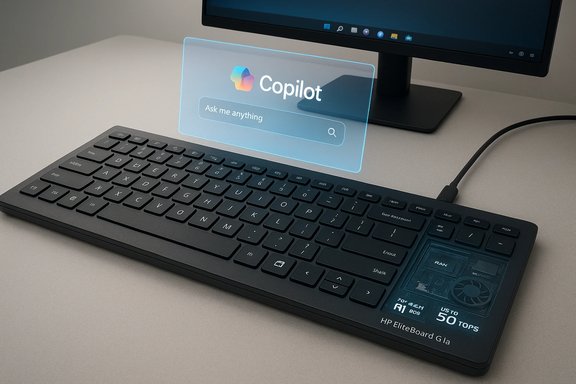
HP’s CES 2026 reveal of the EliteBoard G1a collapses an entire Copilot+ AI PC into a standard office keyboard, promising to turn a desk accessory into a portable, IT-manageable workstation that “moves” where the user works while delivering local AI acceleration that would normally require a tower or laptop.
HP introduced the EliteBoard G1a at CES 2026 as part of a broader push to rethink desktop setups for hybrid work. The company bills the EliteBoard as the “world’s first full AI PC built into a keyboard,” a Copilot+ capable device powered by AMD’s Ryzen AI 300 Series and engineered for enterprise deployment with serviceable internals and hardware-enforced security. HP showcased the product as a CES Innovation Awards honoree and said it will ship in March 2026 in multiple configurations. HP’s headline claims include an ultra-thin 12 mm profile, a lightweight 0.75 kg chassis, up to 50 TOPS of NPU performance, configurable 64 GB DDR5 memory, up to 2 TB PCIe 4.0 NVMe storage, and two SKU styles — one with a permanently attached USB4 cable (including 65 W PD and DisplayPort 2.1) and another with a detachable cable plus a replaceable ~32 Wh battery for hybrid mobility. Independent outlets and HP materials broadly echo these specs in early coverage.
Source: Technobezz HP Launches EliteBoard G1a Keyboard with Full AI PC Inside at CES 2026
 Background / Overview
HP introduced the EliteBoard G1a at CES 2026 as part of a broader push to rethink desktop setups for hybrid work. The company bills the EliteBoard as the “world’s first full AI PC built into a keyboard,” a Copilot+ capable device powered by AMD’s Ryzen AI 300 Series and engineered for enterprise deployment with serviceable internals and hardware-enforced security. HP showcased the product as a CES Innovation Awards honoree and said it will ship in March 2026 in multiple configurations. HP’s headline claims include an ultra-thin 12 mm profile, a lightweight 0.75 kg chassis, up to 50 TOPS of NPU performance, configurable 64 GB DDR5 memory, up to 2 TB PCIe 4.0 NVMe storage, and two SKU styles — one with a permanently attached USB4 cable (including 65 W PD and DisplayPort 2.1) and another with a detachable cable plus a replaceable ~32 Wh battery for hybrid mobility. Independent outlets and HP materials broadly echo these specs in early coverage. What the EliteBoard G1a actually is
A “keyputer,” not a dock or dongle
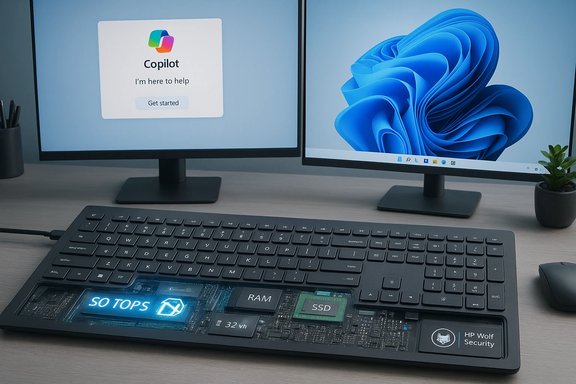
At first glance the EliteBoard G1a looks like a premium full‑size keyboard: scissor-switch keys, backlighting, full numpad, optional fingerprint sensor, and an included pre-paired wireless mouse. Under the deck, HP places the full PC stack — SoC, NPU, RAM, storage, Wi‑Fi, speakers, microphones, cooling, and ports. The device connects to displays via a single cable and can be used as a standalone keyboard while providing local compute and Windows 11 Copilot+ features.Two practical SKUs for different workflows
HP will ship two main hardware variants:- A permanently-attached USB4 cable model that provides 65 W power delivery and DisplayPort 2.1 — useful for static desk setups where a second USB4 passthrough port is available.
- A detachable-cable model aimed at hybrid workers that includes a replaceable ~32 Wh battery enabling several hours of untethered use (HP’s claims center around ~3.5 hours of active use in battery mode in early coverage). This version trades the permanently-attached passthrough port for mobility.
Design, build, and ergonomics
Size and weight
HP emphasizes portability: the EliteBoard measures roughly 12 mm thick and weighs ~0.75 kg, making it lighter than many ultraportable notebooks and a fraction of a tower. The low profile is deliberate — HP positions it as a clutter‑free way to carry a complete desktop environment between home and office. Independent press coverage confirms these dimensions as the headline hardware differentiator.Durability and workplace readiness
The keyboard features spill resistance and claims military-grade durability (U.S. MIL‑STD‑810 series tests), plus a lattice-free design and a full numpad to match enterprise keyboard ergonomics. HP also integrated dual microphones and stereo speakers into the chassis, aiming to make the device viable for conferencing without a laptop. Those enterprise-orientated touches — ruggedness, replaceable parts, and optional fingerprint reader — underline an IT-first use case rather than a hobbyist toy.Hardware and performance: what to expect
Processor, NPU, memory and storage
The EliteBoard G1a uses AMD Ryzen AI 300 Series processors and delivers over 50 TOPS of neural throughput in HP’s top configurations, a figure intended to place it within Microsoft’s Copilot+ hardware guidance for robust on‑device inference. Memory options scale up to 64 GB DDR5, and storage supports up to 2 TB PCIe 4.0 NVMe SSDs — desktop‑class components in a keyboard form factor. These are HP’s published figures and are corroborated by multiple press outlets reporting from CES. Why TOPS matters. TOPS (tera operations per second) measures raw NPU throughput and is a vendor metric used to approximate the capacity for local model inference. Microsoft’s Copilot+ guidance and several OEMs have used a 40+ TOPS floor as a practical baseline for richer local AI features; HP’s 50‑TOPS claim gives headroom for more demanding local tasks. That said, TOPS alone does not guarantee app-level performance — software support, driver maturity and thermal/power constraints shape real outcomes.Integrated graphics and daily workloads
Graphics are handled by AMD integrated GPU silicon paired with the Ryzen AI platform (HP’s materials and press reporting indicate Radeon-class integrated graphics appropriate for 2D productivity, video, and light GPU-accelerated tasks). The EliteBoard is positioned as a desktop replacement for office and Copilot+ workloads, not as a gaming rig or heavy GPU compute node. Expect smooth performance for multiple 4K display setups, media playback and standard creative tasks that can leverage the iGPU and NPU together.Thermals and noise
Squeezing PC hardware into a low-profile keyboard requires careful thermal engineering. HP says the EliteBoard uses an active cooling system engineered to pull air from the bottom and exhaust toward the rear, keeping the top surface comfortable for long typing sessions. The company also lists TÜV noise certification in early materials to assure quiet operation — an important detail for shared offices and call-heavy environments. Real-world thermals will be a function of configuration, workload, and firmware limits, so independent testing will be needed to validate sustained performance claims.Connectivity and displays
The EliteBoard is designed to simplify the desk: a single USB‑C/USB4 cable carries power, video (DisplayPort alt mode up to DP 2.1 on the attached-cable SKU), and data. HP advertises support for dual daisy‑chained 4K displays under appropriate conditions and cable topologies, turning the keyboard into a one-cable docking replacement for many setups. The attached-cable SKU provides an extra USB4 port to compensate for the fixed connection; the detachable-battery SKU sacrifices that passthrough for mobility. Wireless options include Wi‑Fi (modern standards) and Bluetooth for peripherals; HP’s enterprise software and manageability stack also aim to integrate the device into existing fleet deployment tools. The modular internals make it easy for IT to swap the Wi‑Fi module if upgrades are needed over a product lifecycle.Enterprise features, security, and manageability
Hardware-enforced HP Wolf Security for Business
HP is stressing security for commercial customers: the EliteBoard ships with HP Wolf Security for Business functionality, a hardware-enforced stack designed to protect firmware and provide defenses against emerging threats (HP also references protections designed for post‑quantum and firmware attack surfaces). This positions the EliteBoard not only as a convenience device but as a deployable endpoint for regulated environments where secure boot, attestation and device-level protections matter.Serviceability and lifecycle economics
One of HP’s strongest arguments is cost of ownership: the EliteBoard’s bottom panel can be opened by IT teams to swap RAM, SSDs, batteries, speakers and other components. This reduces e‑waste and supports longer service cycles than typical sealed laptops. For enterprises that replace large fleets on regular schedules, such modularity can reduce downtime and keep warranty costs more predictable. HP positions the EliteBoard as an IT-friendly endpoint that blends the manageability of a thin client with the compute and privacy benefits of on‑device AI.Use cases and target buyers
- Hybrid professionals who want a consistent workstation between home and office without carrying a laptop. The detachable-battery SKU targets commuters who need temporary untethered operation.
- Shared workspaces, kiosks and classrooms where a single-cable setup and secure, serviceable endpoint reduce administrative overhead. The EliteBoard is explicitly pitched at these environments.
- Enterprises that prioritize on‑device AI for privacy and latency-sensitive tasks — Copilot+ features, real‑time transcription, summary, and local model inference without always-on cloud calls.
How the EliteBoard fits the market: comparisons and context
Similar ideas already exist — but HP aims to industrialize it
The concept of packing a PC into a keyboard is not entirely new. Low‑power single-board devices and hobbyist projects (and even some commercial mini‑PC keyboards) have explored the format before; the Raspberry Pi 500, for example, packs a single‑board computer inside a keyboard shell. What distinguishes the EliteBoard is HP’s emphasis on enterprise-grade silicon, Copilot+ class NPU performance, serviceability, and security certifications — effectively industrializing the format for corporate fleets rather than hobbyist users. Reviewers noted the Pi‑class predecessors but emphasize that HP’s approach targets IT-managed, secure, and repairable deployments. HP’s “world’s first” phrasing is a marketing claim and should be read in that light; it’s more accurate to say HP is the first major OEM to commercialize a Copilot+ AI PC in a keyboard at scale.Where it wins
- Desk real estate and simplicity. A single-cable workstation with built-in keyboard and pointing device reduces clutter and makes moving between workspaces straightforward.
- On-device AI for privacy and latency. With 50 TOPS of NPU capability, the EliteBoard enables richer local Copilot+ workflows and can reduce reliance on cloud inference where privacy or latency matters.
- IT serviceability. The ability to replace RAM, SSD and batteries without replacing the whole unit gives HP a lifecycle and total-cost-of-ownership pitch that enterprises will evaluate.
Where it will be tested
- Sustained thermals and performance. A keyboard’s thin volume challenges cooling; sustained heavy AI workloads may force firmware to throttle, reducing the real-world performance below headline TOPS figures. Independent reviews and lab tests will be decisive.
- Battery runtime and mobility. HP’s ~3.5‑hour active runtime claim for the battery SKU is useful but modest compared with laptops; hybrid workers who rely on long untethered sessions may still prefer a thin laptop. Real-world mixed‑use measurements typically fall short of lab playback numbers, and buyers should expect variance.
- Software support for NPUs. TOPS is a hardware ceiling; performance for real applications depends on OS runtimes, drivers, and app developers integrating NPU paths. Early generation Copilot+ features may lean on cloud fallback for more advanced tasks.
Risks, unknowns, and caveats
- Vendor marketing vs. lab reality. HP’s claim of being the “world’s first full AI PC in a keyboard” is marketing-forward and should be treated as a positioning statement rather than an uncontestable technical fact. Other keyboard-computer combos exist in hobbyist and niche commercial spaces.
- TOPS ≠ application speed. TOPS is a useful comparator for NPU capability, but it’s not a substitute for measured application-level throughput. Model format, runtime optimization, memory bandwidth, and thermal/power delivery determine real inference speed. Prospective buyers should await independent benchmarks for Copilot+ workloads.
- Real-world battery life concerns. HP’s claimed ~3.5 hours of active use on a ~32 Wh battery is plausible, but mixed productivity workloads, brighter displays and sustained AI inference will reduce runtime. For users expecting all-day untethered use, a laptop still offers stronger battery endurance.
- Pricing and provisioning. HP has announced availability in March 2026 but withheld MSRP until closer to shipping. Cost — especially for high‑RAM, high‑NPU configurations — will determine whether the EliteBoard is a mainstream replacement or a niche premium device for specific enterprise use cases.
- Driver and software maturity. Early Copilot+ and NPU-enabled Windows experiences depend on Microsoft, OEMs and ISVs delivering optimized stacks. Enterprises should validate critical business applications against the EliteBoard hardware early in pilot tests.
Practical buying checklist (for IT managers and enthusiasts)
- Confirm the SKU: attached‑cable (65 W PD + DP 2.1 passthrough) vs. battery SKU (replaceable 32 Wh cell). Decide whether mobility or a passthrough port matters more.
- Verify the RAM and storage configuration needed for your Copilot+ workflows — up to 64 GB RAM and 2 TB NVMe are supported in HP’s top SKUs.
- Ask for independent thermal and NPU runtime tests for the specific workloads you plan to run (transcription, summarization, live captioning, agent tasks). TOPS alone is insufficient.
- Plan for manageability: ensure your deployment and endpoint management tools can inventory and update the EliteBoard and that HP Wolf Security capabilities integrate with your security stack.
- Pilot before fleet purchase: run a small pilot to validate user experience (typing feel, noise, thermals), software compatibility, and real battery/runtime behavior in day‑to‑day scenarios.
Conclusion
The EliteBoard G1a is the clearest OEM attempt yet to mainstream the “PC-in-a-keyboard” idea for enterprise customers rather than hobbyists. HP’s combination of a Copilot+ capable Ryzen AI platform, modular serviceability, and enterprise-grade security creates a compelling value proposition for IT teams chasing simplified desks, secure endpoints, and on‑device AI capabilities. Those strengths are tempered by reasonable questions about sustained thermal performance, real-world battery endurance, and software maturity — all of which will be answered only after independent reviews and fleet pilots appear in the coming months. For organizations that place a premium on privacy‑sensitive local AI, simplified single-cable desk setups, and long-term serviceability, the EliteBoard G1a could reshape how a modern hybrid desk is provisioned. Early adopters should plan pilots; mainstream buyers should watch for pricing and independent benchmarks when HP’s March availability window arrives.Source: Technobezz HP Launches EliteBoard G1a Keyboard with Full AI PC Inside at CES 2026